logo elektroda
logo elektroda
X
logo elektroda

[OpenBK] Publishing Command-Alias-Script via autoexec.bat to HomeAssistant

andreasR 375 9
ADVERTISEMENT
  • #1 21787054
    andreasR
    Level 3  
    Dear all,

    I would like to publish a command/alias/script to Home Assistant.
    Goal is to not manually add this in HA.
    Can this be done using OpenBeken autoexec.bat?

    My alias is "OpenShutter"
    Device name: "shutter03"

    I tried this:
    publish cmnd/shutter03/OpenShutter 1 "Open Shutter"

    Unfortunately, my Home Assistant does not see anything.

    What am I missing?

    Thanks a lot for your help!
    AI: Could you please confirm if you have set up the MQTT integration in Home Assistant and which MQTT broker (including server address and port) both OpenBeken and Home Assistant are using?
    Yes.
    AI: Is Home Assistant subscribed to the topic "cmnd/shutter03/OpenShutter", or have you checked the MQTT logs to see if the message is being received at all?
    I have checked the logs: Yes.
  • ADVERTISEMENT
  • #2 21787171
    p.kaczmarek2
    Moderator Smart Home
    I need some more details, what are you exactly trying to do?

    Do you want to expand alias before publishing it? We don't have this feature, but I may figure something out.

    Why do you want to use alias, why not run command directly? Maybe I can suggest a better approach or solution.

    Are you trying to control one OBK device from second OBK device via MQTT?
    Helpful post? Buy me a coffee.
  • #3 21787365
    andreasR
    Level 3  
    Some background:
    I have several BK devices with relays that control a window shutter.
    But I have scripts that control the relays' duration and make sure that two states cannot occur at the same time. Also, it integrates with event handlers that are activated once an RF433 remote triggers a function.
    I have used "setChannelVisible" to disable publishing them to HA. So nobody can trigger multiple relays in an uncontrolled manner.

    Now, I would like to make the scripts available to HA, kind of "publishing" them, so HA knows they exist.
    The scripts themselves do not have a state; they should just be triggered as action elements.
  • ADVERTISEMENT
  • #4 21791594
    andreasR
    Level 3  
    Dear @p.kaczmarek2
    Do you have an idea if it can even be possible to do what I like?

    Thanks for your reply!
  • ADVERTISEMENT
  • #5 21791754
    p.kaczmarek2
    Moderator Smart Home
    Well, I am still not sure what exactly you're trying to do, but do you know that we have now a dedicated shutter driver? If you are using shutters, then maybe this driver can help? You can try it here:
    https://github.com/openshwprojects/OpenBK7231T_App/pull/1912
    This has HA integration already via HA discovery.

    
    publish cmnd/shutter03/OpenShutter 1 "Open Shutter"
    

    Device shuter03 should see command OpenShutter1 with arguments, but alias do not pass them. I think it's a known limitation.
    Helpful post? Buy me a coffee.
  • ADVERTISEMENT
  • #6 21793344
    andreasR
    Level 3  
    OK, I try to explain what I intend ;-)

    This is my autoexec.bat:
    
    // Set up Aliases
    alias Set_StopAll backlog setChannel 1 0; setChannel 3 0
    alias Set_OpenStop backlog setChannel 1 0
    alias Set_CloseStop backlog setChannel 3 0
    alias Set_Open backlog setChannel 1 1;
    alias Set_Close backlog setChannel 3 1;
    
    alias OpenShutter if $CH1==0 then OpenNow else StopNow
    alias CloseShutter if $CH3==0 then CloseNow else StopNow
    alias StopShutter backlog stopAllScripts; startScript autoexec.bat stopShutterTSK
    alias AdjustShutter backlog stopAllScripts; startScript autoexec.bat adjustShutterTSK
    
    alias OpenNow backlog stopAllScripts; startScript autoexec.bat openShutterTSK
    alias StopNow backlog stopAllScripts; startScript autoexec.bat stopShutterTSK
    alias CloseNow backlog stopAllScripts; startScript autoexec.bat closeShutterTSK
    
    // setup Delays 50=open (s); 51=close (s); 52=wait (ms); 53=adjust (ms)
    setChannel 50 36
    setChannel 51 36
    setChannel 52 100
    setChannel 53 250
    
    // create GUI buttons for HTTP panel
    startDriver httpButtons
    
    setButtonEnabled 1 1
    setButtonLabel 1 "Open Shutter"
    setButtonCommand 1 OpenShutter
    setButtonEnabled 3 1
    setButtonLabel 3 "Close Shutter"
    setButtonCommand 3 CloseShutter
    setButtonEnabled 2 1
    setButtonLabel 2 "Stop Shutter"
    setButtonCommand 2 StopShutter
    setButtonEnabled 4 1
    setButtonLabel 4 "Adjust Shutter"
    setButtonCommand 4 AdjustShutter
    SetChannelLabel 1 "Open"
    SetChannelLabel 3 "Close"
    SetChannelLabel 4 "LED"
    
    // Hide the default GUI buttons
    setChannelVisible 1 0
    setChannelVisible 3 0
    setChannelVisible 4 0
    setChannelPrivate 1 1
    setChannelPrivate 3 1
    setChannelPrivate 4 1
    
    // Loading Event Handlers
    addEventHandler OnClick 24 OpenShutter
    addEventHandler OnClick 26 CloseShutter
    addEventHandler OnClick 23 AdjustShutter
    
    // Stop Operation on power up
    goto stopShutterTSK
    
    // do not proceed
    return
    
    openShutterTSK:
    Set_CloseStop
    delay_ms $CH52
    Set_Open
    delay_s $CH50
    Set_StopAll
    return
    
    closeShutterTSK:
    Set_OpenStop
    delay_ms $CH52
    Set_Close
    delay_s $CH50
    Set_StopAll
    return
    
    adjustShutterTSK:
    Set_StopAll
    Set_Open
    delay_ms $CH53
    Set_StopAll
    return
    
    stopShutterTSK:
    Set_StopAll
    return 


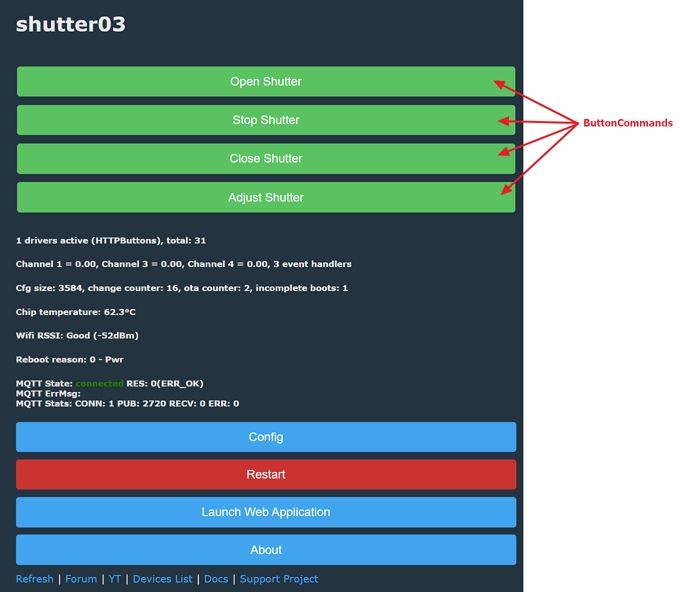
    So I have buttons on the web UI that I can click to execute functions:
    Control panel shutter03 with green and blue buttons for operating a shutter system.

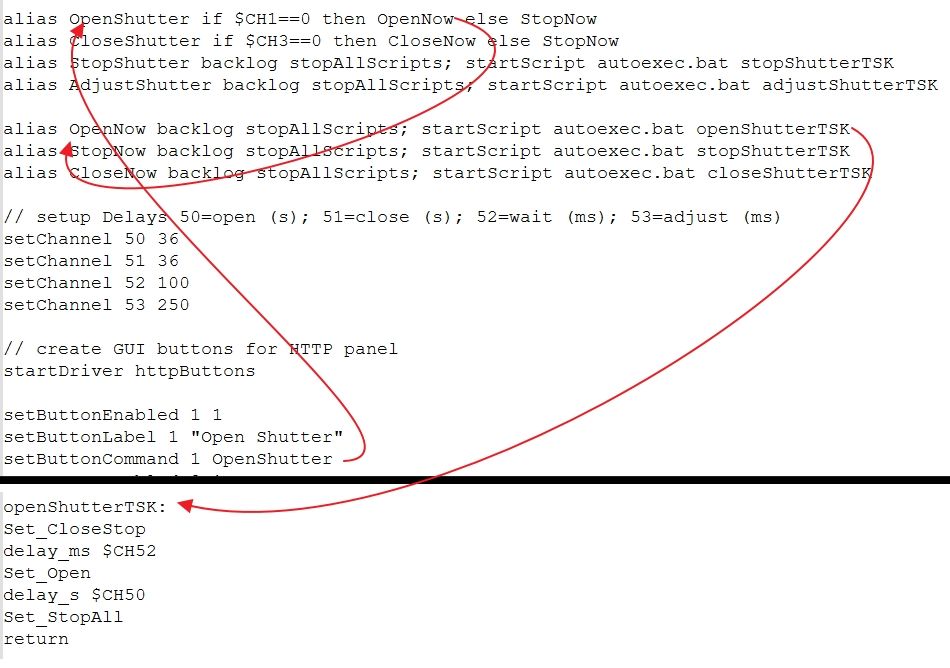
    This is the workflow of the functions:
    Script code fragment for shutter control with comments and red arrows.

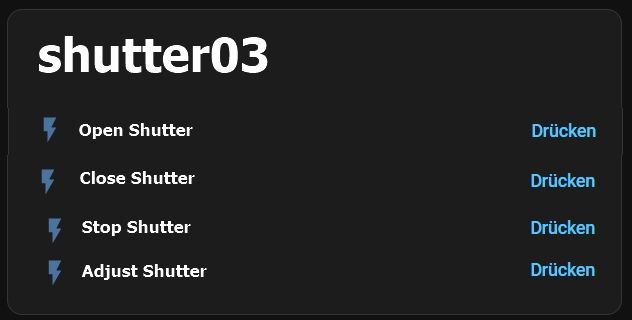
    My inension is to have the same functionality in HomeAssistant: (this is a mockup picture)
    Control panel for shutter03 with options to open, close, stop, and adjust the shutter

    Goal is to have something in autoexec.bat that tells HomeAssistant about the functions that I want to publish.
    So it is there automatically.
  • #7 21793402
    deeekos
    Level 3  
    >>21793344 I think there are two things that you may need to do here:

    1. Setup the OpenBeken device to respond to specific MQTT command messages that you can send from Home Assistant.
    2. Configure Home Assistant to generate those MQTT command messages

    I am no expert in item (1) - but it looks like you are already most of the way there.
    I would imagine that someone on this forum can readily advise on what is needed to may an incoming MQTT message topic to your existing channel settings. That way you can activate the required channels using either the existing Web GUI buttons or by sending an MQTT message.

    You can test all of this by manually generating the MQTT messages using a tool such as Mqttcli or MQTT Explorer.
    If you have not setup an MQTT Broker, its fairly easy to do this as a Home Assistant add-on.

    For item (2), I would suggest you probably need to delve into the murky world of Home Assistant Templates.

    I have done this in the past myself for roller blinds - but with my own dedicated software to handle the MQTT rather than tasmota or similar.

    Essentially you create a template object (typically a cover) and mapp the actions you can perform on the cover (e.g. open, close, set position etc.) as a series to MQTT messages. Then when the respective Cover entity is manipulated in Home Assistant ot will send or respond to the MQTT messages as needed.

    Here is a snippet of template YAML from my setup which may help give you an idea:

    
    cover:
      - name: "Kitchen Blind 1"
        unique_id: "kitchen_blind_1"
        state_topic: "kitchen/blind/state/get"
        command_topic: "kitchen/blind/state/set"
        position_topic: "kitchen/blind/position/get"
        set_position_topic: "kitchen/blind/position/set"
        availability:
          - topic: "kitchen/blind/availability/get"
        qos: 0
        payload_open: "OPEN"
        payload_close: "CLOSE"
        payload_stop: "STOP"
        position_open: 0
        position_closed: 100
        payload_available: "online"
        payload_not_available: "offline"


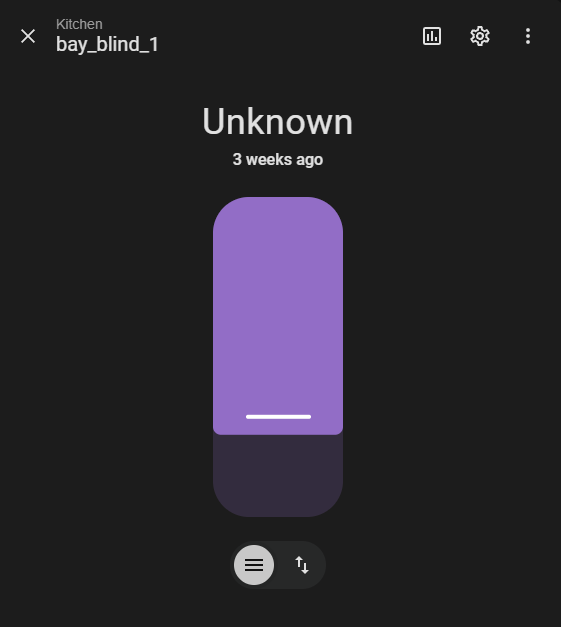
    You then get a suitable control in Home Assistant that represents the blind in a number of ways.

    You get a pull up/down representation of the cover you can set to a position between 0 and 100%.
    This updates in "near" real-time (depending on how often you send MQTT updates from your firmware).

    Control interface for kitchen blind with unknown state

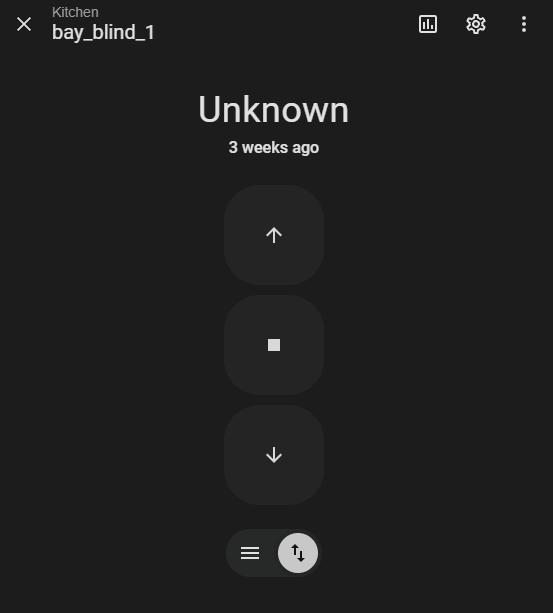
    You also get a set of buttons for up/down/stop etc.

    Control screen for bay_blind_1 with three large buttons in a dark interface

    Hope this makes sense.

    (note that the images and Yaml posted are not exactly the same entity details as I sub-edited the yaml to make it easier to understand when posted).
  • #8 21793419
    p.kaczmarek2
    Moderator Smart Home
    Guys? But... do you both know that there is a shutter driver for obk?
    https://github.com/openshwprojects/OpenBK7231T_App/pull/1912
    I will look into what you asked in the morning, but it seems like you're reinventing the wheel.

    And yes, my new shutter drives does publish of similar yaml internally.
    Helpful post? Buy me a coffee.
  • #9 21794176
    deeekos
    Level 3  
    >>21793419 I have not used the shutter driver, but I can envisage how it would work.

    As per my message above, my first attempt at controlling covers was a few years ago. I wrote my own controller software in C++ that managed 28BJY-48 stepper motors and could be managed using MQTT. I then modelled it as a template entity in Home Assistant. It was a lot of work - but I learned a lot about how MQTT and Home Assistant templates worked :-)

    My more recent cover projects have been ESP8266 or ESP32 based and I used ESPHome. This was much simpler as it provided many of the primitives and the Home Assistant entities were all auto generated. I assume that obk shutter driver works in a similar manner?

    Up to now I have built my own electronics and 3D printed the required mechanisms etc. For anything ESP32 or ESP8266 its easier for me to stick with ESPHome - but I am interested enough that I may get hold of one of the off-the-shelf cover motors that use Beken CPU or similar and give the driver a shot.
  • #10 21801317
    andreasR
    Level 3  
    @>>21793419
    Thank you for the suggestion to use the shutter driver. I will need some time to test this in February during my vacation.

    Still, I would like to raise the question whether it is possible to have the BK device somehow publish manually defined data, commands, entities, etc.
    Independent of the shutter driver, it is possible to implement a lot of functionality directly on the device using all the scripting possibilities.
    In my opinion, it then makes sense to publish individually, since it is not necessary to do two configurations, such as in the example of @deeekos
    deeekos wrote:
    >>21793344
    1. Setup the OpenBeken device to respond to specific MQTT command messages that you can send from Home Assistant.
    2. Configure Home Assistant to generate those MQTT command messages


    Thanks for considering!

Topic summary

The discussion addresses the challenge of publishing a command alias or script from an OpenBeken device to Home Assistant via MQTT without manual configuration in Home Assistant. The user attempts to use the OpenBeken autoexec.bat file to publish the command "OpenShutter" for the device "shutter03" on the topic "cmnd/shutter03/OpenShutter" with the payload "1" but finds that Home Assistant does not recognize the message. The MQTT integration is confirmed to be set up correctly on both OpenBeken and Home Assistant, and MQTT logs verify that the message is received. The issue likely involves the correct topic subscription or message format expected by Home Assistant for command execution, suggesting that publishing a command alias via autoexec.bat requires adherence to Home Assistant's MQTT discovery or command topic conventions.
Summary generated by the language model.
ADVERTISEMENT