logo elektroda
logo elektroda
X
logo elektroda

TUYAMCU curtain WiFi module: no HEARTBEAT, BK RX/TX unused, PAD14/PAD25

rt400yuval 324 17
ADVERTISEMENT
  • #1 21878123
    rt400yuval
    Level 4  
    Hi.
    I have two WIFI modules for curtain, the modules come with TUYAMCU and CB3S BK chip.
    One of the modules does not work at all (it arrived defective) and I managed to burn it in the second one.
    I can't get the TUYA driver to work. No matter what I tried, I don't get a HEARTBEAT in log.
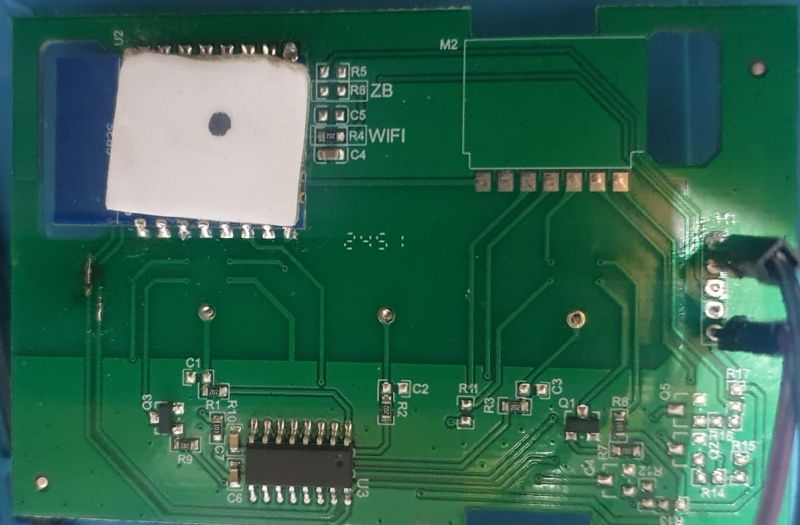
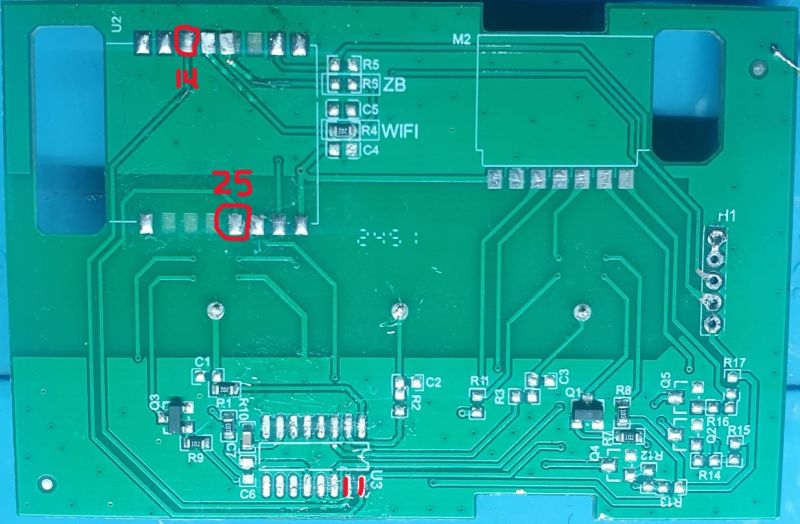
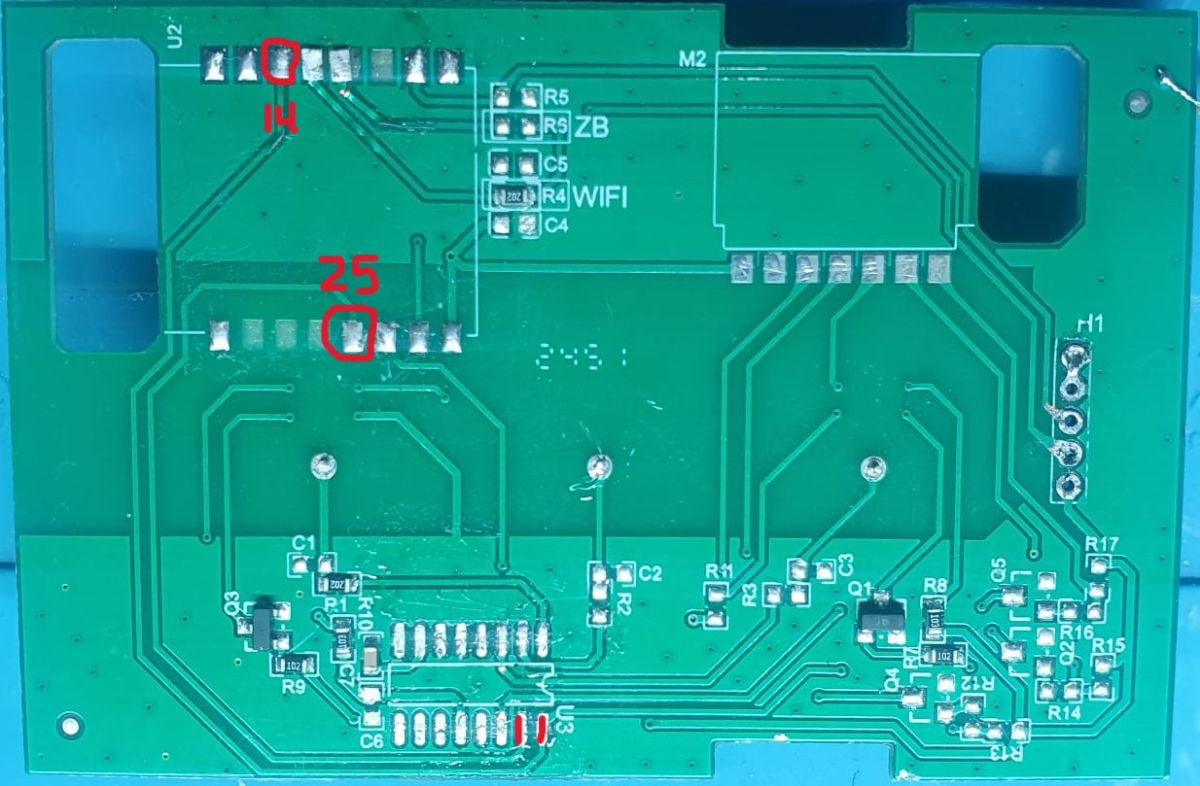
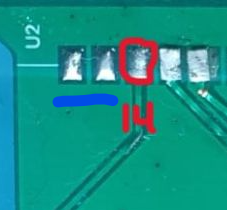
    I disassembled the defective module to understand where all the GPIOS go and I see that RX and TX in the BK chip are not connected to anything, while PAD 14 and PAD25 go to TUYAMCU.
    And in CONFIG I didn't find anywhere how to configure the RX and TX of the TUYAMCU.
    I suspect that I don't have any communication with the TUYA chip because of this.
    I would appreciate help on how to use this module.
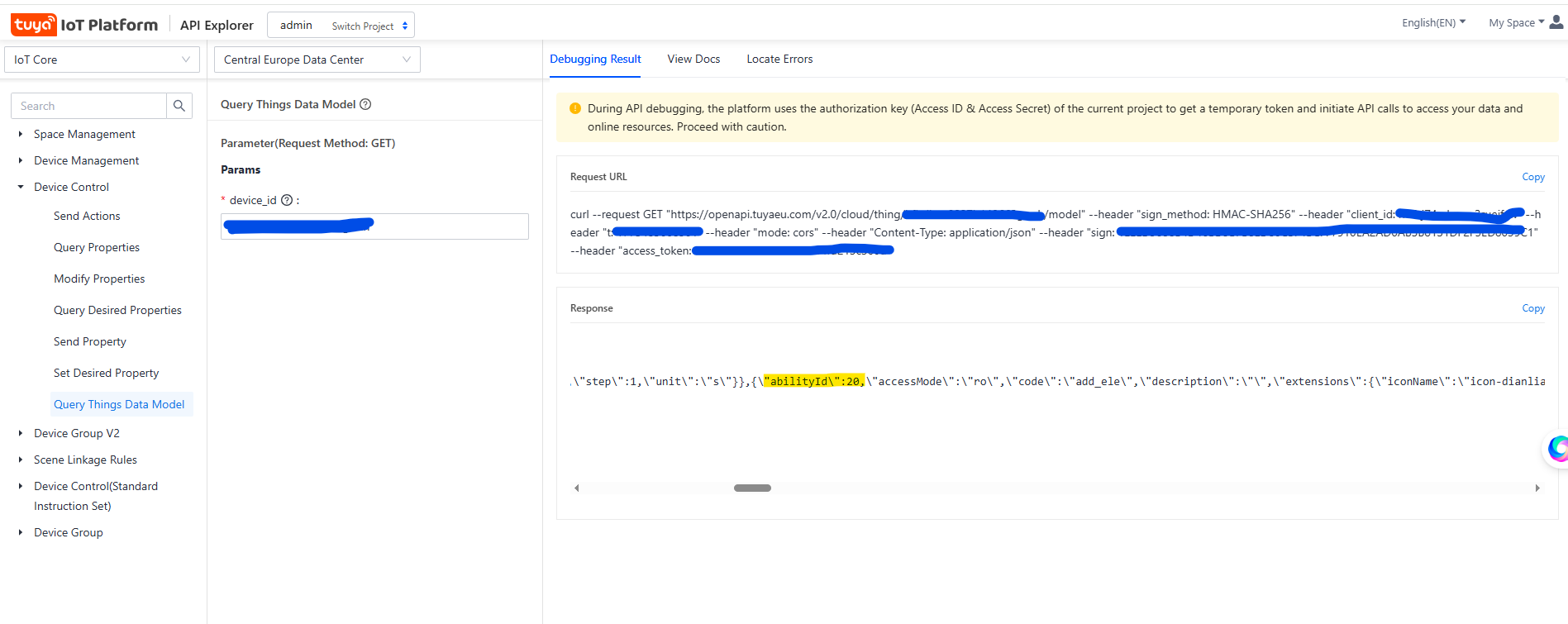
    By the way, before I burned I backed up the firmware and connected the module to the TUYA app at first, where I saw that the module was indeed working. I also managed to export the DP IDS from the TUYA cloud.
    {
    
      "result": {
    
        "model": {
    
          "modelId": "eu2emk",
    
          "services": [
    
            {
    
              "name": "Default Service",
    
              "description": "",
    
              "code": "",
    
              "actions": [],
    
              "events": [],
    
              "properties": [
    
                {
    
                  "abilityId": 1,
    
                  "accessMode": "rw",
    
                  "code": "control",
    
                  "name": "Curtain Switch (Channel 1)",
    
                  "description": "",
    
                  "extensions": {
    
                    "iconName": "icon-a_power",
    
                    "attribute": "1280"
    
                  },
    
                  "typeSpec": {
    
                    "type": "enum",
    
                    "range": ["open", "stop", "close"]
    
                  }
    
                },
    
                {
    
                  "abilityId": 8,
    
                  "accessMode": "rw",
    
                  "code": "control_back",
    
                  "name": "Motor Direction",
    
                  "description": "",
    
                  "extensions": {
    
                    "iconName": "icon-dp_loop",
    
                    "attribute": "1024"
    
                  },
    
                  "typeSpec": {
    
                    "type": "enum",
    
                    "range": ["forward", "back"]
    
                  }
    
                },
    
                {
    
                  "abilityId": 10,
    
                  "accessMode": "rw",
    
                  "code": "tr_timecon",
    
                  "name": "Travel Time Setting",
    
                  "description": "",
    
                  "extensions": {
    
                    "iconName": "icon-dp_time2",
    
                    "attribute": "1024"
    
                  },
    
                  "typeSpec": {
    
                    "type": "value",
    
                    "min": 1,
    
                    "max": 120,
    
                    "step": 1,
    
                    "scale": 0,
    
                    "unit": "seconds"
    
                  }
    
                }
    
              ]
    
            }
    
          ]
    
        }
    
      },
    
      "success": true,
    
      "t": 1775333992021,
    
      "tid": "a2fb1313306311f1b9c19e6068def229"
    
    }
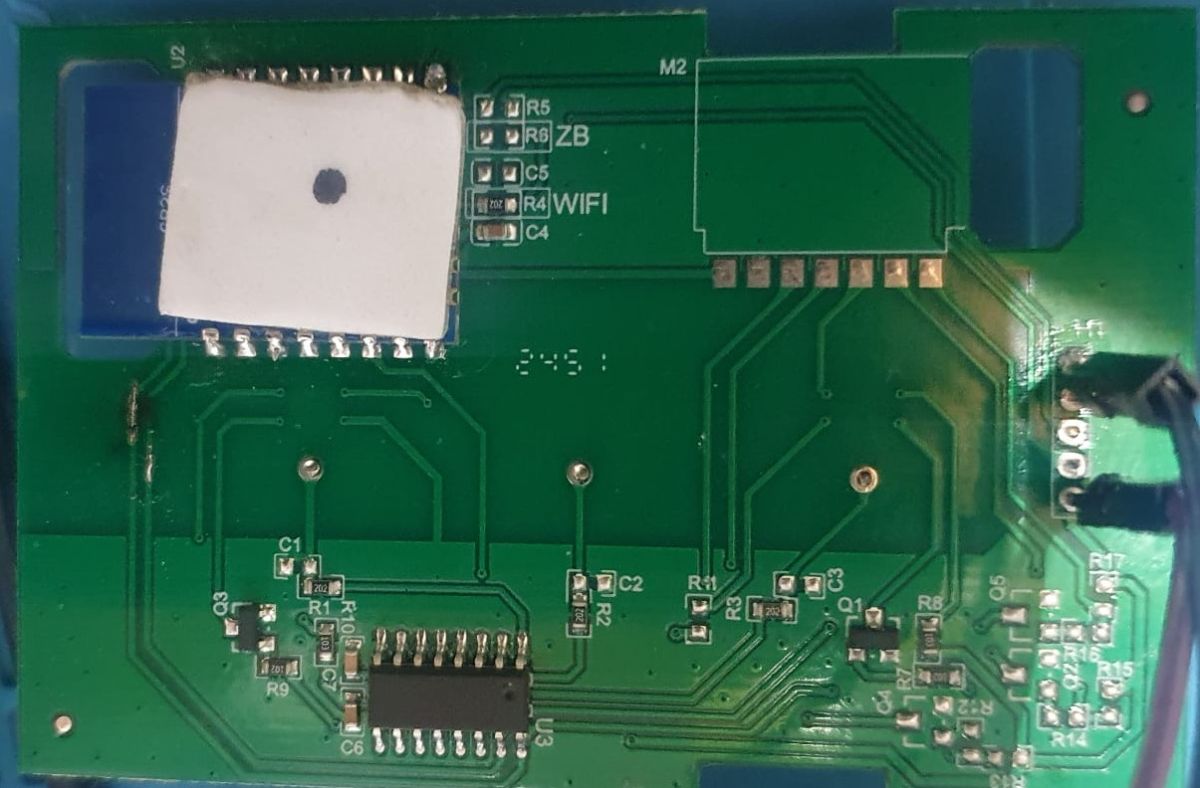

    Green PCB with traces, solder pads, and red markings highlighting points labeled “14” and “25”.
    Green PCB with a labeled “WIFI” module and an IC, showing traces and SMD components
    AI: What firmware/build are you running on the CB3S now (for example OpenBeken version), and can you post your current config/template plus the exact TUYA/UART commands or settings you already tried?
    Built on Mar 31 2026 18:02:39 version 1.18.282

    startDriver TuyaMCU
    tuyaMcu_defWiFiState 4
    linkTuyaMCUOutputToChannel 1 4 1
    linkTuyaMCUOutputToChannel 8 4 2
    linkTuyaMCUOutputToChannel 10 2 3
    

    AI: Can you share the exact module/device model or clear PCB photos/log output from boot, especially showing PAD14/PAD25 connections and the log where no HEARTBEAT appears?
    Info:MAIN:Time 25, idle 351869/s, free 67976, MQTT 0(1), bWifi 1, secondsWithNoPing -1, socks 2/38 
    Info:MAIN:Time 26, idle 190128/s, free 56280, MQTT 0(1), bWifi 1, secondsWithNoPing -1, socks 3/38 
    Info:MAIN:Time 27, idle 367936/s, free 55360, MQTT 0(1), bWifi 1, secondsWithNoPing -1, socks 3/38 
    Info:MAIN:Time 28, idle 172097/s, free 67760, MQTT 0(1), bWifi 1, secondsWithNoPing -1, socks 3/38 
    Info:MAIN:Time 29, idle 185260/s, free 67976, MQTT 0(1), bWifi 1, secondsWithNoPing -1, socks 2/38 
    Info:MQTT:mqtt_host empty, not starting mqtt
    Info:MAIN:Time 30, idle 175285/s, free 67760, MQTT 0(2), bWifi 1, secondsWithNoPing -1, socks 3/38 
    Info:GEN:dhcp=0 ip=192.168.1.137 gate=192.168.0.1 mask=255.255.254.0 mac=80:64:7c:9a:4e:fe
    Info:GEN:sta: 1, softap: 0, b/g/n
    Info:GEN:sta:rssi=-49,ssid=AAA-IoT,bssid=da:b3:70:19:8f:9f,channel=11,cipher_type:CCMP
    Info:CMD:[WebApp Cmd 'loglevel 3' Result] OK
    Info:MAIN:Time 31, idle 174586/s, free 67976, MQTT 0(2), bWifi 1, secondsWithNoPing -1, socks 2/38 
    Info:MAIN:Time 32, idle 173932/s, free 67976, MQTT 0(2), bWifi 1, secondsWithNoPing -1, socks 2/38 
    Info:MAIN:Time 33, idle 177512/s, free 67976, MQTT 0(2), bWifi 1, secondsWithNoPing -1, socks 2/38 
    Debug:CMD:loglevel set 6
    Info:CMD:[WebApp Cmd 'loglevel 6' Result] OK
    ExtraDebug:TuyaMCU:TuyaMCU heartbeat_valid = 0, product_information_valid=0, self_processing_mode = 1, wifi_state_valid = 0, wifi_state_timer=0
    Info:MAIN:Time 34, idle 176658/s, free 67976, MQTT 0(2), bWifi 1, secondsWithNoPing -1, socks 2/38 
    ExtraDebug:TuyaMCU:TuyaMCU heartbeat_valid = 0, product_information_valid=0, self_processing_mode = 1, wifi_state_valid = 0, wifi_state_timer=0
    Info:MAIN:Time 35, idle 192679/s, free 67976, MQTT 0(2), bWifi 1, secondsWithNoPing -1, socks 2/38 
    ExtraDebug:TuyaMCU:TuyaMCU heartbeat_valid = 0, product_information_valid=0, self_processing_mode = 1, wifi_state_valid = 0, wifi_state_timer=0
    Info:MAIN:Time 36, idle 178191/s, free 67976, MQTT 0(2), bWifi 1, secondsWithNoPing -1, socks 2/38 
    ExtraDebug:TuyaMCU:TuyaMCU heartbeat_valid = 0, product_information_valid=0, self_processing_mode = 1, wifi_state_valid = 0, wifi_state_timer=0
    Info:MAIN:Time 37, idle 175838/s, free 67976, MQTT 0(2), bWifi 1, secondsWithNoPing -1, socks 2/38 
    ExtraDebug:TuyaMCU:TuyaMCU heartbeat_valid = 0, product_information_valid=0, self_processing_mode = 1, wifi_state_valid = 0, wifi_state_timer=0
    Info:MAIN:Time 38, idle 176425/s, free 67976, MQTT 0(2), bWifi 1, secondsWithNoPing -1, socks 2/38 
    ExtraDebug:TuyaMCU:TuyaMCU heartbeat_valid = 0, product_information_valid=0, self_processing_mode = 1, wifi_state_valid = 0, wifi_state_timer=0
    Info:MAIN:Time 39, idle 173870/s, free 67976, MQTT 0(2), bWifi 1, secondsWithNoPing -1, socks 2/38 
    ExtraDebug:TuyaMCU:TuyaMCU heartbeat_valid = 0, product_information_valid=0, self_processing_mode = 1, wifi_state_valid = 0, wifi_state_timer=0
    Info:MAIN:Time 40, idle 176143/s, free 67976, MQTT 0(2), bWifi 1, secondsWithNoPing -1, socks 2/38 
    Info:GEN:dhcp=0 ip=192.168.1.137 gate=192.168.0.1 mask=255.255.254.0 mac=80:64:7c:9a:4e:fe
    Info:GEN:sta: 1, softap: 0, b/g/n
    Info:GEN:sta:rssi=-51,ssid=AAA-IoT,bssid=da:b3:70:19:8f:9f,channel=11,cipher_type:CCMP
    ExtraDebug:TuyaMCU:TuyaMCU heartbeat_valid = 0, product_information_valid=0, self_processing_mode = 1, wifi_state_valid = 0, wifi_state_timer=0
    Info:MAIN:Time 41, idle 169436/s, free 67976, MQTT 0(2), bWifi 1, secondsWithNoPing -1, socks 2/38 
    ExtraDebug:TuyaMCU:TuyaMCU heartbeat_valid = 0, product_information_valid=0, self_processing_mode = 1, wifi_state_valid = 0, wifi_state_timer=0
    Info:MAIN:Time 42, idle 176835/s, free 67976, MQTT 0(2), bWifi 1, secondsWithNoPing -1, socks 2/38 
    ExtraDebug:TuyaMCU:TuyaMCU heartbeat_valid = 0, product_information_valid=0, self_processing_mode = 1, wifi_state_valid = 0, wifi_state_timer=0
    Info:MAIN:Time 43, idle 174642/s, free 67976, MQTT 0(2), bWifi 1, secondsWithNoPing -1, socks 2/38 
    ExtraDebug:TuyaMCU:TuyaMCU heartbeat_valid = 0, product_information_valid=0, self_processing_mode = 1, wifi_state_valid = 0, wifi_state_timer=0
    Info:MAIN:Time 44, idle 173656/s, free 67976, MQTT 0(2), bWifi 1, secondsWithNoPing -1, socks 2/38 
    Debug:API:POST to api/cmnd
    Debug:CMD:cmd [loglevel 4]
    Debug:CMD:loglevel set 4
    Info:CMD:[WebApp Cmd 'loglevel 4' Result] OK
    Info:MAIN:Time 45, idle 186635/s, free 67976, MQTT 0(2), bWifi 1, secondsWithNoPing -1, socks 2/38 
    Info:MQTT:mqtt_host empty, not starting mqtt
    Info:MAIN:Time 46, idle 175234/s, free 67760, MQTT 0(3), bWifi 1, secondsWithNoPing -1, socks 3/38 
    Info:MAIN:Time 47, idle 178428/s, free 67976, MQTT 0(3), bWifi 1, secondsWithNoPing -1, socks 2/38 
    Info:MAIN:Time 48, idle 190155/s, free 67976, MQTT 0(3), bWifi 1, secondsWithNoPing -1, socks 2/38 
    Info:MAIN:Time 49, idle 174938/s, free 67976, MQTT 0(3), bWifi 1, secondsWithNoPing -1, socks 2/38 
    Info:MAIN:Time 50, idle 176564/s, free 59368, MQTT 0(3), bWifi 1, secondsWithNoPing -1, socks 3/38 
    Info:GEN:dhcp=0 ip=192.168.1.137 gate=192.168.0.1 mask=255.255.254.0 mac=80:64:7c:9a:4e:fe
    Info:GEN:sta: 1, softap: 0, b/g/n
    Info:GEN:sta:rssi=-49,ssid=AAA-IoT,bssid=da:b3:70:19:8f:9f,channel=11,cipher_type:CCMP
    Info:MAIN:Time 51, idle 173811/s, free 67976, MQTT 0(3), bWifi 1, secondsWithNoPing -1, socks 2/38 
    Info:MAIN:Time 52, idle 177397/s, free 67976, MQTT 0(3), bWifi 1, secondsWithNoPing -1, socks 2/38 
    Info:MAIN:Time 53, idle 178913/s, free 67976, MQTT 0(3), bWifi 1, secondsWithNoPing -1, socks 2/38 
    Info:MAIN:Time 54, idle 178207/s, free 59376, MQTT 0(3), bWifi 1, secondsWithNoPing -1, socks 3/38 
    Debug:API:POST to api/cmnd
    Debug:CMD:cmd [logfeature 23 0]
    Debug:CMD:logfeature set 0x037FFDFF
    Info:CMD:[WebApp Cmd 'logfeature 23 0' Result] OK
    Info:MAIN:Time 55, idle 174877/s, free 67976, MQTT 0(3), bWifi 1, secondsWithNoPing -1, socks 2/38 
    Info:MAIN:Time 56, idle 177293/s, free 67976, MQTT 0(3), bWifi 1, secondsWithNoPing -1, socks 2/38 
    Info:MAIN:Time 57, idle 179694/s, free 67976, MQTT 0(3), bWifi 1, secondsWithNoPing -1, socks 2/38 
    Info:MAIN:Time 58, idle 185230/s, free 67976, MQTT 0(3), bWifi 1, secondsWithNoPing -1, socks 2/38 
    Debug:API:POST to api/cmnd
    Debug:CMD:cmd [logfeature 8 0]
    Debug:CMD:logfeature set 0x037FFCFF
    Info:CMD:[WebApp Cmd 'logfeature 8 0' Result] OK
    Debug:CMD:cmd [logfeature 2 0]
    Debug:CMD:logfeature set 0x037FFCFB
    Info:CMD:[WebApp Cmd 'logfeature 2 0' Result] OK
    Debug:CMD:cmd [logfeature 10 0]
    Info:MAIN:Time 59, idle 170241/s, free 67672, MQTT 0(3), bWifi 1, secondsWithNoPing -1, socks 2/38
  • ADVERTISEMENT
  • #2 21878331
    p.kaczmarek2
    Moderator Smart Home
    Have you tried 115200 baud?

    Can you do Tuya config extraction?
    https://www.youtube.com/watch?v=WunlqIMAdgw&ab_channel=Elektrodacom
    Helpful post? Buy me a coffee.
  • #3 21878491
    rt400yuval
    Level 4  
    >>21878331
    Yes. I try both 115200 and 9600 baud also change the start TuyaMcu 1 and 2. Didn't work
    the tuya config I add it to post. It looks like is not connect to the correct mcu
  • #4 21878494
    divadiow
    Level 38  
    are you sure it's TuyaMCU? Is it a touch-button device? It could just be some touch chip.

    No traces anywhere from RX1/TX1 ?

    Close-up of PCB showing five solder pads near “U2”, one circled in red, with “14” marked below.
  • #5 21878497
    p.kaczmarek2
    Moderator Smart Home
    Fair point, I didn't notice he said it's not connected. Then it's probably not TuyaMCU
    Helpful post? Buy me a coffee.
  • ADVERTISEMENT
  • #6 21878505
    rt400yuval
    Level 4  
    >>21878497
    But in Tuya cloud I extract the IDs and you can see that it is Tuya IDs, otherwise how can you explain that?

    Added after 55 [seconds]:

    >>21878494 No trace at all, only from other GPIOs
  • ADVERTISEMENT
  • #8 21878513
    p.kaczmarek2
    Moderator Smart Home
    We need more information. What is U3? How are buttons connected? How are relays connected? Would toggling P14 and P25 in GPIO Doctor toggle relays?
    Helpful post? Buy me a coffee.
  • #9 21878517
    rt400yuval
    Level 4  
    >>21878510 But I see ID with enum (open, close, stop) also timer and motor direction with values that define by tuyamcu.

    Added after 2 [minutes]:

    >>21878513 there nothing wrote on U3. I have 2 relays and the 3 touch button connect to the U3. that so strange, if I set the 14 and 25 as relay they work
  • #10 21878522
    p.kaczmarek2
    Moderator Smart Home
    As @divadiow said, enums are also created for non-tuyamcu devices.

    Wait... they work? You mean toggling P14 / P25 toggles relays
    Helpful post? Buy me a coffee.
  • #11 21878525
    rt400yuval
    Level 4  
    >>21878522 yes... that so strange. maybe you are right and the u3 isn't tuya mcu.
    so how can i config the stop (middle) button to stop? if i have 2 relays.
    let me try to set it and check and update you
  • ADVERTISEMENT
  • #12 21878534
    p.kaczmarek2
    Moderator Smart Home
    Well, do you know that OBK has a new Shutters driver? You can check it out ,however, I'm not sure if it has a stop function yet, so maybe we need to script the stop call.
    Helpful post? Buy me a coffee.
  • #13 21878538
    rt400yuval
    Level 4  
    >>21878534
    First, I set all the recognized GPIO as relay and btn and it works. It’s not a TuyaMCU... Sorry, my mistake..
    About the shutter driver, I would like to get a link to learn about that.
  • #14 21878543
    p.kaczmarek2
    Moderator Smart Home
    We don't have a tutorial yet, but you basically set Shutter* pin roles, set single channel, do "startDriver shutters" in console or autoexec.bat, and calibrate on main UI.
    Helpful post? Buy me a coffee.
  • #15 21878555
    rt400yuval
    Level 4  
    >>21878543 sorry didn't understand...
    i set the relay to what ? i see only SHUTTER A and B and BTN_Shutter_UP and Down..
  • #16 21878570
    p.kaczmarek2
    Moderator Smart Home
    Ahhh, okay, sorry. So then, ShutterA and ShutterB are relay roles.
    Helpful post? Buy me a coffee.
  • #17 21878710
    rt400yuval
    Level 4  
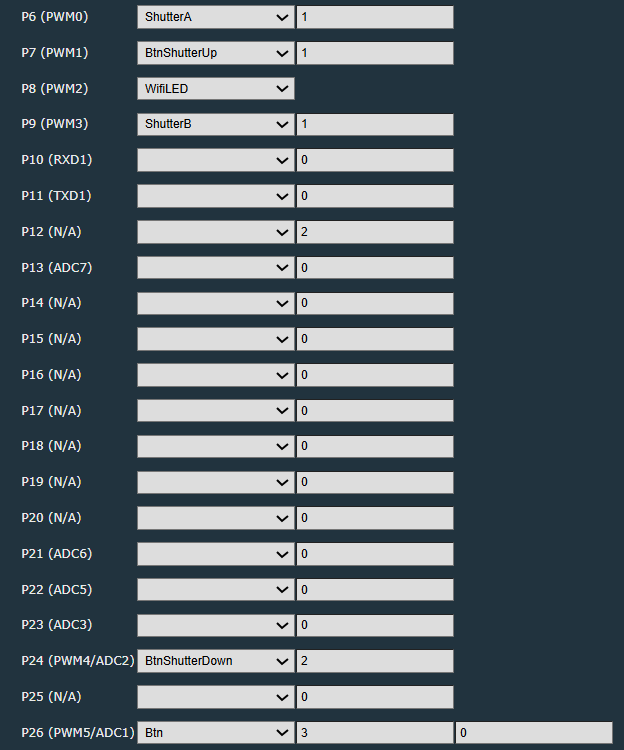
    OK, here is my gpio config

    Screenshot of P6–P26 pin configuration with dropdowns and numeric values, including ShutterA and WiFiLED

    Now I try to make that the BTN3 (STOP SHUTTER) will stop the shutter.
    Can you help me with that?
  • #18 21878824
    p.kaczmarek2
    Moderator Smart Home
    You can use command:
    
    ShutterMove 1 stop
    

    Change btn to Btn_ScriptOnly and then in autoexec.bat add click handler to run it on click.
    https://github.com/openshwprojects/OpenBK7231T_App/blob/main/docs/autoexecExamples.md
    Helpful post? Buy me a coffee.

Topic summary

✨ The discussion concerns troubleshooting a TUYAMCU WiFi curtain module featuring a CB3S BK chip. One module was defective, and its firmware was backed up before attempting to flash the second module. The main issue is the absence of a HEARTBEAT signal in the logs, indicating no communication with the TUYA chip. Inspection revealed that the BK chip's RX and TX pins are unconnected, while PAD14 and PAD25 are wired to the TUYAMCU chip. The user could not find configuration options for TUYAMCU RX/TX in the firmware settings, suspecting this as the cause of communication failure. Initial connection to the TUYA app was successful before reflashing, and DP IDs were exported from the TUYA cloud. The problem centers on configuring UART communication between the BK chip and TUYAMCU module, specifically addressing the unused BK RX/TX pins and the role of PAD14/PAD25 signals.
Generated by the language model.

FAQ

TL;DR: With 2 relays and 3 touch buttons, the key finding was: “it’s not a TuyaMCU.” This FAQ helps OpenBeken users fix a CB3S curtain module that shows no HEARTBEAT by switching from failed UART assumptions to direct GPIO shutter control with PAD14 and PAD25. [#21878538]

Why it matters: Misidentifying a direct-GPIO curtain board as TuyaMCU wastes time on baud-rate and UART settings that can never work.

Check TuyaMCU-based board Direct-GPIO BK7231 board
BK RX/TX wiring Must be used for MCU communication May be unused
HEARTBEAT in OpenBeken Expected Not expected
Relay control Usually via external MCU Direct on BK pins, here PAD14/PAD25
Best OpenBeken path startDriver TuyaMCU Shutters driver + GPIO roles

Key insight: Tuya Cloud datapoints do not prove a separate TuyaMCU exists. In this case, working relays on PAD14 and PAD25 proved the curtain module was controlled directly by the CB3S, not over RX/TX. [#21878525]

Quick Facts

  • The tested OpenBeken build was 1.18.282, built on Mar 31 2026 18:02:39. The user enabled startDriver TuyaMCU but still saw no valid heartbeat. [#21878123]
  • The user tried 2 UART baud rates: 9600 and 115200. Neither produced communication, and changing start TuyaMcu 1 and 2 also failed. [#21878491]
  • Tuya Cloud exposed curtain datapoints including open / stop / close, motor direction, and a travel-time range of 1–120 seconds. Those datapoints still did not prove a separate TuyaMCU chip existed. [#21878123]
  • Hardware discovery showed BK RX/TX had no traces, while PAD14 and PAD25 could switch the 2 relays directly. That finding redirected the setup from TuyaMCU to direct GPIO control. [#21878517]
  • OpenBeken’s shutter workflow for this board used ShutterA, ShutterB, Btn_Shutter_Up, Btn_Shutter_Down, and a scripted stop action with ShutterMove 1 stop. [#21878824]

1. Why does OpenBeken TuyaMCU show no HEARTBEAT on a CB3S curtain module even after trying 9600 and 115200 baud?

Because this board was not using TuyaMCU over UART. The user tried both 9600 and 115200 baud, but BK RX/TX had no traces and the log stayed at heartbeat_valid = 0. That means OpenBeken had no serial partner to talk to, so HEARTBEAT could never appear. The working control path was direct GPIO on PAD14 and PAD25, not RX/TX. [#21878491]

2. How can I tell whether a TUYAMCU-labeled board is actually using TuyaMCU or just direct GPIO control on a BK7231 CB3S module?

Check the traces first, then test the pins. If BK RX/TX are physically disconnected and relay outputs work when you assign BK pins directly, the board is using direct GPIO control. In this case, PAD14 and PAD25 toggled the relays, while RX/TX were unused. A label on the PCB is weaker evidence than actual wiring and pin tests. [#21878517]

3. What is TuyaMCU in the context of Tuya curtain switches and OpenBeken?

"TuyaMCU" is a serial-control architecture that lets a Wi-Fi chip exchange commands and status with a separate MCU, using UART signals such as RX and TX. In OpenBeken, that setup should produce traffic like HEARTBEAT and product information. If UART is absent, TuyaMCU mode is the wrong driver for the board. [#21878123]

4. What is a Tuya DP ID, and why do non-TuyaMCU devices still show datapoints like open, close, stop, and motor direction in Tuya Cloud?

"Tuya DP ID" is a cloud-side datapoint definition that represents a device function, such as an enum, value, or Boolean, and it does not require a separate TuyaMCU chip. That is why a device can show open, close, stop, motor direction, and a 1–120 second timer in Tuya Cloud even when RX/TX are unused on the PCB. [#21878510]

5. How do I troubleshoot a curtain WiFi module when BK RX/TX are not connected but PAD14 and PAD25 drive the relays?

Treat it as a direct-GPIO board, not a TuyaMCU board. First verify that RX/TX truly have no traces. Then assign PAD14 and PAD25 as relay outputs and test the buttons. If the relays switch, move to the Shutters driver instead of chasing baud settings or HEARTBEAT logs. [#21878517]

6. What’s the difference between a TuyaMCU-based curtain controller and a direct-relay BK7231/OpenBeken curtain controller?

A TuyaMCU curtain controller uses a separate MCU and communicates over UART. A direct-relay BK7231 controller drives the relays itself from GPIO pins. In this thread, the direct-relay design had 2 relays and 3 touch buttons connected through board logic, while RX/TX were unused. That difference decides whether you use startDriver TuyaMCU or the Shutters driver. [#21878538]

7. How do I use GPIO Doctor or manual GPIO testing to find relay and button pins on a CB3S curtain switch?

Use a simple 3-step test. 1. Assign suspected pins one by one and see which ones toggle the relays. 2. Press each touch button and watch which input changes. 3. Keep only the pins that produce repeatable relay or button behavior. In this case, PAD14 and PAD25 switched the relays, and the board had 3 touch buttons tied through another chip. [#21878513]

8. Why would PAD14 and PAD25 work as relays on a TUYAMCU board while RX and TX appear completely unused?

Because the board marking did not reflect the actual control method. The user confirmed PAD14 and PAD25 worked as relay outputs, which means the CB3S could drive the curtain motor path directly. If RX and TX have no traces, they cannot carry TuyaMCU traffic. This is a direct-control board with a misleading assumption, not a broken UART setup. [#21878525]

9. How do I configure OpenBeken’s new Shutters driver for a two-relay curtain module with up, down, and stop buttons?

Assign the two relay outputs as ShutterA and ShutterB, assign the movement buttons as shutter button roles, then start the driver. The guidance given was to use single-channel mode, run startDriver shutters in the console or autoexec.bat, and calibrate from the main UI. For this board, that replaces the failed TuyaMCU setup cleanly. [#21878543]

10. What roles should I assign in OpenBeken for a curtain switch: ShutterA, ShutterB, Btn_Shutter_Up, Btn_Shutter_Down, or Btn_ScriptOnly?

Use ShutterA and ShutterB for the 2 relay outputs. Use Btn_Shutter_Up and Btn_Shutter_Down for the movement buttons. Use Btn_ScriptOnly for the middle stop button if you want it to run a command instead of acting like a normal mapped button. That split matches the thread’s working direction. [#21878824]

11. How can I make the middle touch button stop the curtain in OpenBeken using ShutterMove 1 stop and autoexec.bat?

Map the middle button as Btn_ScriptOnly and make its click action run ShutterMove 1 stop. The thread gave that exact stop command for shutter channel 1. This method is useful when the board has up, down, and a separate center stop key, but only 2 relay outputs. [#21878824]

12. Where can I find documentation or examples for scripting button actions in OpenBeken autoexec.bat for shutter control?

Use the OpenBeken autoexec.bat examples linked in the thread. The recommended path was to change the stop button to Btn_ScriptOnly, then add a click handler in autoexec.bat that runs ShutterMove 1 stop. That gives you a reusable pattern for scripted shutter actions without extra hardware changes. [#21878824]

13. Why doesn’t extracting Tuya Cloud config prove that a device has a separate TuyaMCU chip?

Because Tuya Cloud datapoints describe product functions, not the physical wiring. The thread showed datapoints like open, stop, close, motor direction, and travel time, yet the board still turned out not to use TuyaMCU. Cloud metadata can exist on both MCU-based and non-MCU devices, so PCB traces and pin behavior are stronger evidence. [#21878510]

14. What should I check about the unknown U3 chip when the touch buttons connect to it on a curtain switch PCB?

Check what U3 is connected to and what role it plays in the button path. In this board, nothing was written on U3, all 3 touch buttons connected to it, and the relays still worked directly from PAD14 and PAD25. That pattern suggests U3 handled local touch sensing or logic, not TuyaMCU serial communication over RX/TX. [#21878517]

15. How do I migrate from a failed TuyaMCU setup to a working direct-GPIO OpenBeken shutter configuration on a CB3S module?

Follow this 3-step migration. 1. Remove the TuyaMCU assumption and verify which BK pins actually switch the relays. 2. Assign those outputs to ShutterA and ShutterB, then map the up and down buttons. 3. Start shutters, calibrate in the main UI, and script the center stop button with ShutterMove 1 stop if needed. This exact path solved the thread’s no-HEARTBEAT dead end. [#21878824]
Generated by the language model.
ADVERTISEMENT