






Hi,
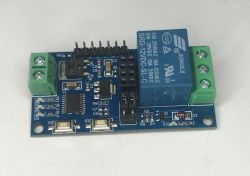
I have just got OpenBeken running on this Moes module. It's a bit weird since the box says model is WM-104B-M-LT-MS but then the module itself says WM4LT2.
It's quite cheap and it uses a CB2S board (BK7231N).
Here is the config:
Flashing is not the easiest: I had to desolder the CB2S module, which in turn required desoldering the terminal strip. I think this is due to the TX line being used for the button.
Hope it helps, let me know if you need anything more!
 0dfcdd79-f...11c5~1.jpg (718.09 kB)You must be logged in to download this attachment.
 856ca40d-2...ecb6~1.jpg (915.04 kB)You must be logged in to download this attachment.
I have just got OpenBeken running on this Moes module. It's a bit weird since the box says model is WM-104B-M-LT-MS but then the module itself says WM4LT2.
It's quite cheap and it uses a CB2S board (BK7231N).
Here is the config:
{
  "vendor": "Moeas",
  "bDetailed": "0",
  "name": "MiNi Smart Switch Module",
  "model": "WM-104B-M-LT-MS",
  "chip": "BK7231N",
  "board": "TODO",
  "flags": "1024",
  "keywords": [
    "TODO",
    "TODO",
    "TODO"
  ],
  "pins": {
    "6": "Rel;2",
    "7": "LED;1",
    "8": "Rel;1",
    "11": "Btn;10",
    "24": "dInput_n;2",
    "26": "dInput_n;1"
  },
  "command": "",
  "image": "https://obrazki.elektroda.pl/YOUR_IMAGE.jpg",
  "wiki": "https://www.elektroda.com/rtvforum/topic_YOUR_TOPIC.html"
}
Flashing is not the easiest: I had to desolder the CB2S module, which in turn required desoldering the terminal strip. I think this is due to the TX line being used for the button.
Hope it helps, let me know if you need anything more!
 0dfcdd79-f...11c5~1.jpg (718.09 kB)You must be logged in to download this attachment.
 856ca40d-2...ecb6~1.jpg (915.04 kB)You must be logged in to download this attachment.

