

logo elektroda
logo elektroda
X
logo elektroda

[BK7231N/CB3S] Schneider Wiser smart socket - teardown, CB3S, BL0942

snusken 2289 1

TL;DR

  • A Schneider Wiser smart socket 550B6000 for Danish mains plugs was opened and traced to its CB3S Wi-Fi module and BL0942 power-meter chip.
  • Wire tracking identified RX, TX, CF1, button, LED, and relay pins on the CB3S, making the board easier to reflash and automate.
  • The CB3S pin config was P11 RX, P10 TX, P9 button active low, P7 BL0942 CF1, P24 LED active high, and P26 relay active high.
  • OpenBK7231N_QIO_1.17.437.bin flashed successfully over a USB-3.3V_UART converter, and the flasher recovered Tuya parameters from the original firmware.
  • The device worked through the OpenBK web interface, and MQTT to Home Assistant was demonstrated in a linked YouTube video.
Generated by the language model.
ADVERTISEMENT
📢 Listen (AI):
  • Bought a Schneider smart plug 550B6000 for Danish mains plugs:
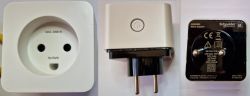
    Schneider 550B6000 smart plug with three views.

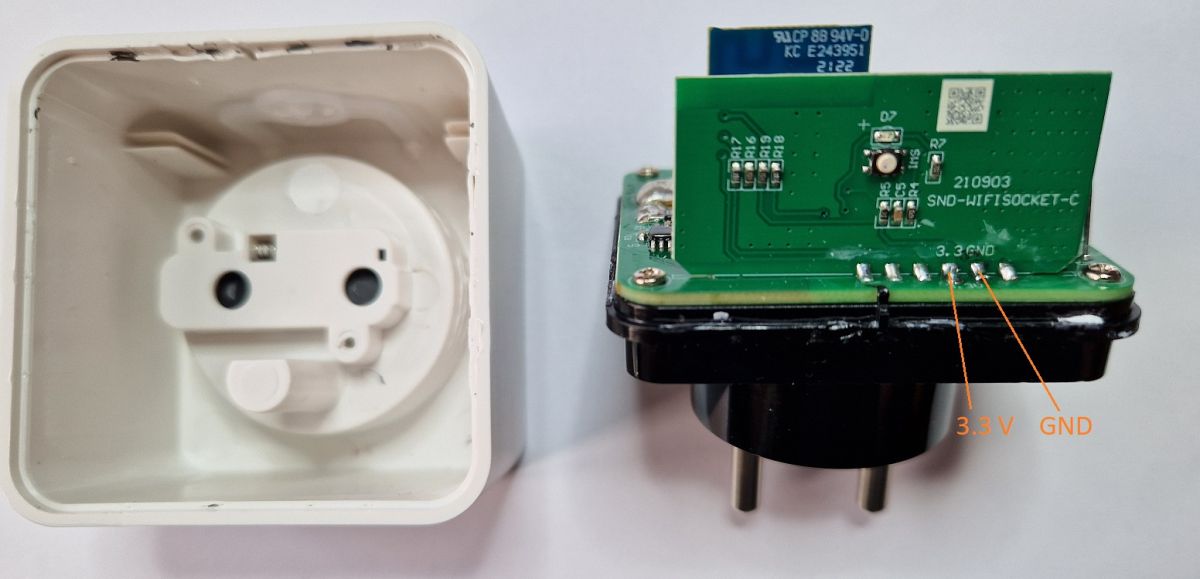
    With a hobby knife and a small flat screwdriver, it is possible to open and separate the bottom and top parts. GND and 3.3V are easily recognized:
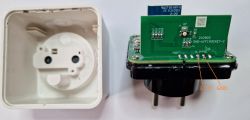
    Disassembled Schneider 550B6000 smart plug with visible PCB.

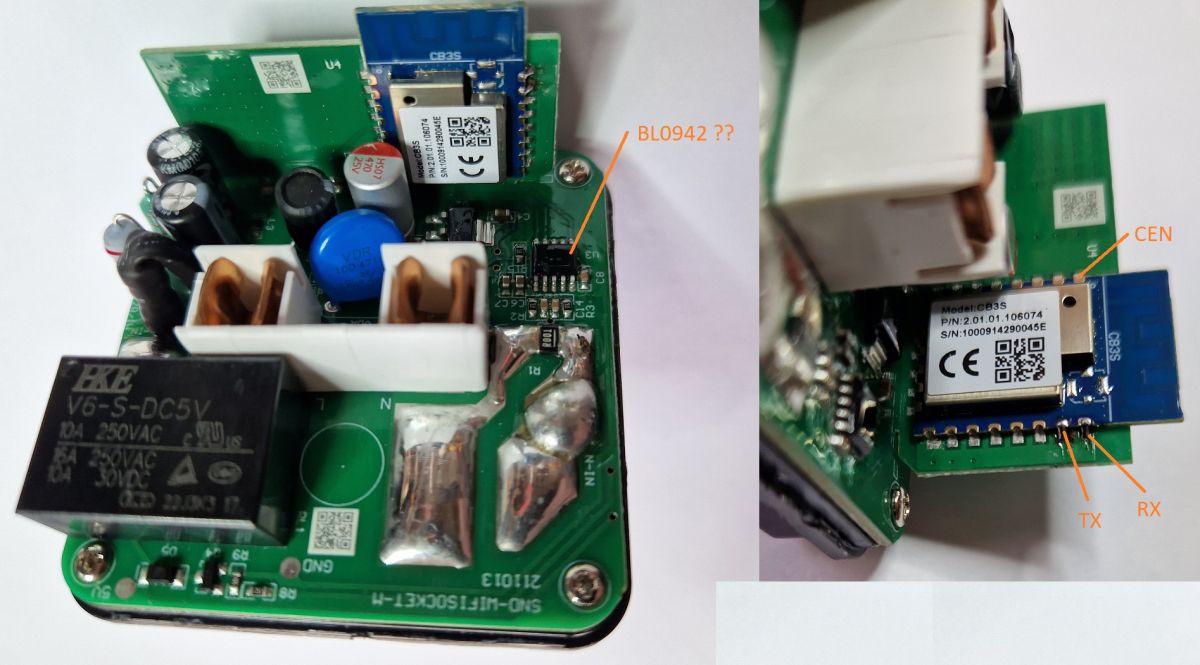
    On the PCB, there is a 10-pin power meter chip. It seemed to be a BL0942. On the CB3S module, RX and TX pins are found:
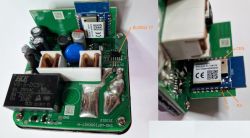
    Opened Schneider 550B6000 plug showing electronic components on the PCB.

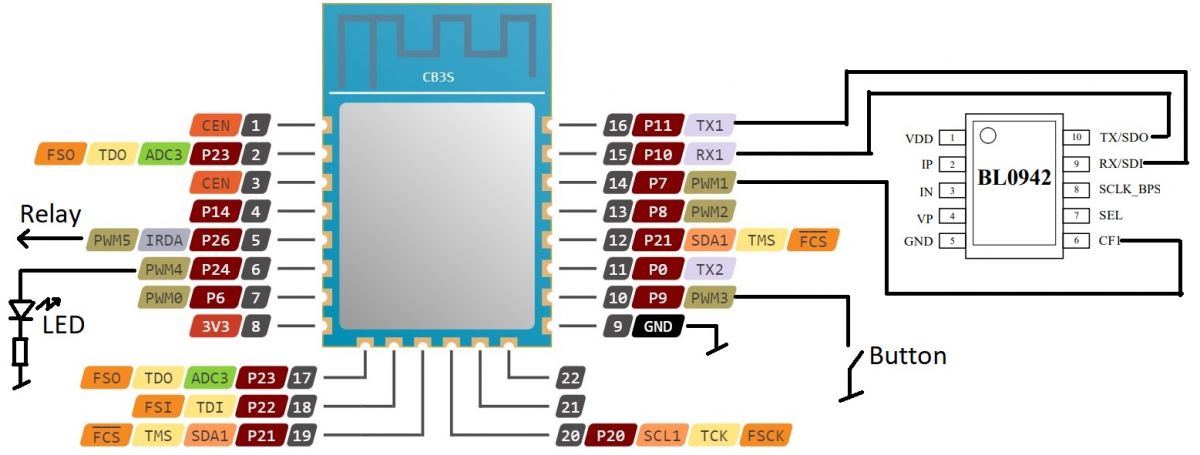
    A bit more wire tracking reveals the pins for the BL0942 RX, TX, and CF1:
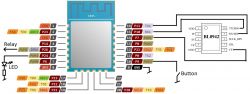
    Wiring diagram of CB3S module connected to BL0942 chip.

    CB3S pin config.:
    P11 - RX
    P10 - TX
    P9 - Button active low
    P7 - BL0942 CF1
    P24 - LED active high
    P26 - Relay active high

    Using a USB-3.3V_UART converter, I flashed the OpenBK7231N_QIO_1.17.437.bin firmware.
    In this case, the flash program could retrieve the Tuya parameters from the original firmware.
    With the OpenBK firmware, it worked nicely when browsing to the IP address and setting up the parameters.
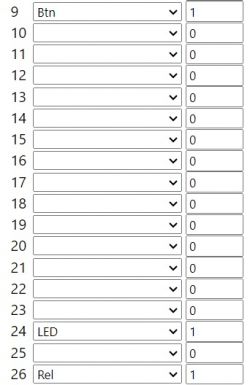
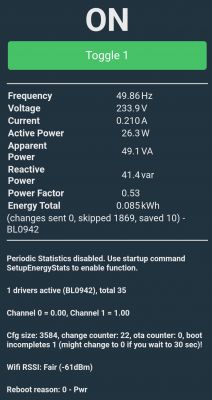
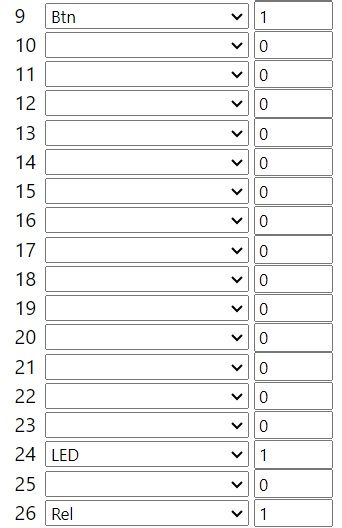
    Table of pin configuration for Schneider 550B6000.

    Code: JSON
    Log in, to see the code


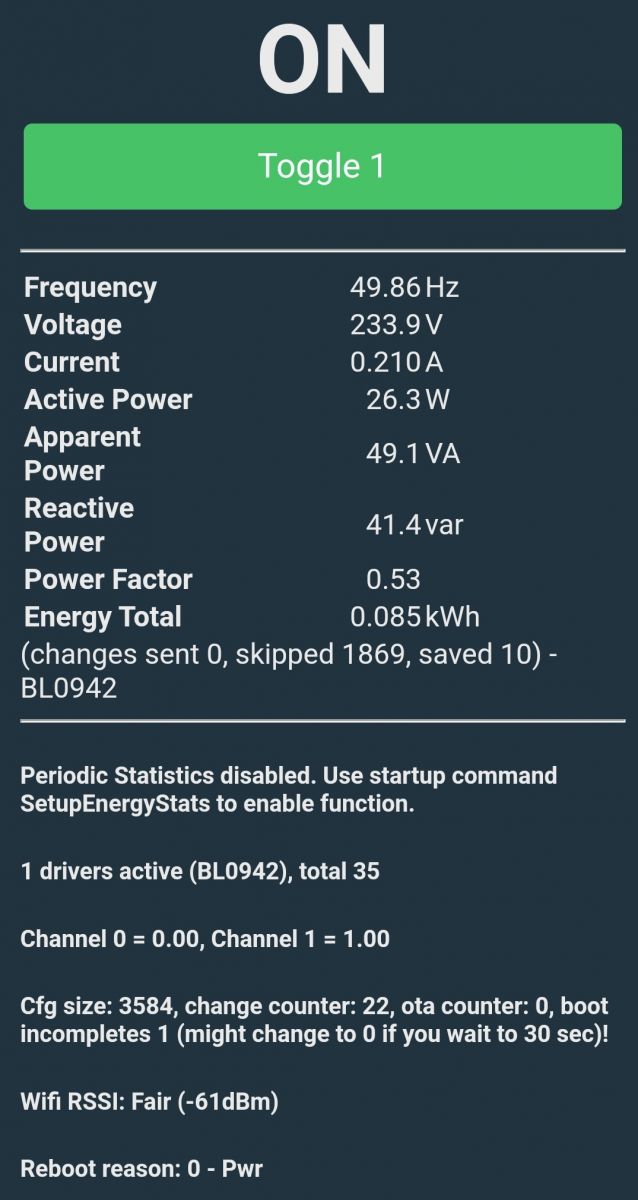
    Screenshot displaying measurement data from the Schneider 550B6000 smart plug.

    The YT video at: https://www.youtube.com/watch?v=pkcspey25V4 shows how to connect to HA via MQTT. ! ;)

    Cool? Ranking DIY
    About Author
    snusken
    Level 3  
    Offline 
    snusken wrote 3 posts with rating 5. Been with us since 2024 year.
  • ADVERTISEMENT
  • #2 20937858
    p.kaczmarek2
    Moderator Smart Home
    Posts: 14444
    Help: 650
    Rate: 12414
    Thanks, but can you also include JSON template from the Web App, so I can copy-paste it to our devices list?
    https://openbekeniot.github.io/webapp/devicesList.html

    Added after 4 [hours] 22 [minutes]:

    EDIT: Thank you for attaching template, I will add JSON tag to first post to make it more readable.
    Helpful post? Buy me a coffee.
📢 Listen (AI):

FAQ

TL;DR: For users flashing a Schneider Wiser 550B6000, this teardown identifies a 10-pin BL0942 meter and states, "worked nicely," after flashing OpenBK7231N_QIO_1.17.437.bin over 3.3V UART. It solves the core jobs: opening the case, finding CB3S serial pins, mapping GPIOs, and enabling local setup or MQTT-based Home Assistant use. [#20937705]

Why it matters: This gives a repeatable path from a stock Tuya-based smart plug to a locally configurable OpenBK device with relay, LED, button, and power-meter support.

Method What the thread confirms Best use
OpenBK local web interface Browse to the device IP and set parameters Fast local configuration
Home Assistant via MQTT A linked YouTube video shows MQTT connection to HA Ongoing integration in HA

Key insight: The most valuable finding is the confirmed CB3S pin map: P11 RX, P10 TX, P9 button, P24 LED, P26 relay, plus P7 for BL0942 CF1. That turns a generic teardown into a directly usable OpenBK profile.

Quick Facts

  • Model 550B6000 uses a CB3S board with a BK7231N chip, and the shared JSON template names BL0942 as the metering IC. [#20937705]
  • The board exposes clearly recognizable GND and 3.3V points, which enabled flashing with a USB-to-3.3V UART converter. [#20937705]
  • The meter IC is described as a 10-pin chip, and wire tracing identified BL0942 RX, TX, and CF1 connections on the PCB. [#20937705]
  • Confirmed GPIO assignments are P11 RX, P10 TX, P9 button active low, P24 LED active high, and P26 relay active high. [#20937705]
  • The follow-up request for the Web App JSON template was resolved after 4 hours 22 minutes, and the first post was updated to include a readable JSON block for device-list reuse. [#20937858]

How do you open the Schneider Wiser smart socket 550B6000 without damaging the case or PCB?

Open it by working the seam with a hobby knife and a small flat screwdriver until the bottom and top parts separate. The thread confirms that this method was enough to access the PCB on the Schneider Wiser 550B6000. Once open, stop prying near the board and immediately identify the visible GND and 3.3V pads before doing any wiring. [#20937705]

What are the GND, 3.3V, RX, and TX pin locations on the CB3S module inside the Schneider Wiser 550B6000 smart plug?

GND and 3.3V are easy to recognize on the opened board, and the CB3S serial pins are mapped as P11 = RX and P10 = TX. The teardown photos show these points directly on the module and PCB. That gives you the four essential connections for UART work: power, ground, receive, and transmit. [#20937705]

How do you flash OpenBK7231N_QIO_1.17.437.bin onto a BK7231N-based CB3S module using a USB-to-3.3V UART converter?

Use a USB-to-3.3V UART adapter connected to the CB3S serial pads, then flash OpenBK7231N_QIO_1.17.437.bin. 1. Open the plug and locate GND, 3.3V, P11 RX, and P10 TX. 2. Wire the UART converter to those points. 3. Run the flash program, then browse to the device IP and set parameters in the OpenBK web interface. The thread states the flash tool could also retrieve Tuya parameters from the original firmware. [#20937705]

What pin configuration works for the Schneider Wiser 550B6000 with CB3S and BL0942, including button, LED, relay, and metering pins?

The working map is P11 RX, P10 TX, P9 button active low, P7 BL0942 CF1, P24 LED active high, and P26 relay active high. The JSON template also maps 9 to Btn;1, 24 to LED;1, and 26 to Rel;1. This is the confirmed configuration for the Schneider Wiser 550B6000 on a CB3S board. [#20937705]

How do you configure the BL0942 power metering chip in OpenBK for the Schneider smart plug 550B6000?

Configure it by starting the BL0942 driver in OpenBK and using the traced metering connection. The posted JSON template sets the command to startDriver BL0942, and the teardown identifies P7 as BL0942 CF1. That is the exact OpenBK-side configuration shown for the Schneider Wiser 550B6000. [#20937705]

What is the BL0942 chip, and what does it measure in a smart plug?

"BL0942 is a power-metering chip that handles electrical measurement in the smart plug, with traced serial and CF1 connections on the PCB." In this teardown, it is the 10-pin metering IC identified on the board, and OpenBK uses it for the device’s power-metering function. The thread does not list individual measured quantities beyond confirming metering support. [#20937705]

What is the CB3S module, and how is it related to the BK7231N chip in Tuya-based devices?

"CB3S is a Tuya Wi-Fi module that carries the BK7231N chip and exposes GPIO and UART pins used for flashing and device control." In the posted JSON, the device is identified as chip: BK7231N and board: CB3S. That means the Schneider plug uses a CB3S module built around the BK7231N platform. [#20937705]

How does OpenBK retrieve Tuya parameters from the original firmware during flashing, and what can you do with those parameters afterward?

The flash program can read Tuya parameters from the original firmware during the OpenBK flashing process. After that, you can browse to the plug’s IP address and apply or verify settings in the local OpenBK interface. The author reports that this workflow "worked nicely" on the 550B6000. [#20937705]

What JSON template from the OpenBeken Web App should be used to add the Schneider Wiser 550B6000 to the devices list?

Use the JSON template posted in the thread for Schneider smart plug with power metering, model 550B6000. It specifies vendor: Tuya, chip: BK7231N, board: CB3S, keyword BL0942, pins 9 Btn;1, 24 LED;1, 26 Rel;1, and command startDriver BL0942. A follow-up post explicitly asked for this Web App template so it could be copy-pasted into the devices list. [#20937705]

How do you identify the BL0942 RX, TX, and CF1 connections on a smart plug PCB by tracing wires?

Identify them by tracing the PCB runs from the 10-pin metering IC to the module pins and nearby test points. The teardown says that "a bit more wire tracking" revealed the BL0942 RX, TX, and CF1 pins. In this plug, that tracing produced a confirmed CF1 assignment on P7. [#20937705]

Why is the button configured as active low and the LED and relay as active high in this CB3S setup?

They are configured that way because that is how the board wiring behaves on this device. The confirmed map labels P9 as Button active low, while P24 and P26 are LED active high and Relay active high. In practice, that means the button asserts on a low state, while the LED and relay respond to a high state. [#20937705]

What does the CF1 pin do on the BL0942, and how is it used by OpenBK for power monitoring?

In this device, CF1 is the traced BL0942 metering connection that OpenBK uses together with the BL0942 driver. The teardown explicitly finds BL0942 RX, TX, and CF1, then assigns P7 to BL0942 CF1 and starts the driver with startDriver BL0942. That is the complete metering hookup shown in the thread. [#20937705]

What is the best way to connect an OpenBK-flashed Schneider Wiser smart plug to Home Assistant over MQTT?

The thread’s recommended path is to use the linked YouTube guide that shows MQTT connection to Home Assistant. The post says the video demonstrates how to connect the OpenBK-flashed plug to HA via MQTT. Use the local web interface first for basic setup, then follow that MQTT workflow for Home Assistant integration. [#20937705]

What troubleshooting steps help when a BK7231N or CB3S device does not respond after flashing OpenBK over UART?

Start by re-checking the four essential UART points: GND, 3.3V, P11 RX, and P10 TX. Then confirm you flashed OpenBK7231N_QIO_1.17.437.bin and try reaching the device by its IP address to set parameters. If the flash tool did not retrieve the Tuya parameters, or the local settings were not completed, the plug may not behave as expected after flashing. [#20937705]

How does configuring the Schneider Wiser smart plug through its local OpenBK web interface compare with integrating it through MQTT in Home Assistant?

The local OpenBK web interface is the faster setup path, while MQTT is the integration path for Home Assistant. The thread says configuration worked by browsing to the device IP and setting parameters locally. It separately points to a YouTube video for HA over MQTT, so the two methods complement each other rather than replace each other. [#20937705]
Generated by the language model.
ADVERTISEMENT