logo elektroda
logo elektroda
X
logo elektroda

OpenBeken online building system - compiling firmware for all platforms (BK7231, BL602, W800, etc)

p.kaczmarek2 17175 18

TL;DR

  • OpenBeken’s GitHub online build system compiles firmware binaries for all supported platforms, including BK7231, BL602, and W800.
  • It runs automatic builds for every commit and pull request, then exposes artifacts on the build details Summary page.
  • The repository’s releases tab and commit list provide downloadable binaries, and a first pull request build must be accepted by an administrator.
  • Custom forks can toggle features in obk_config.h, such as the HT16K33 driver, and get all platforms rebuilt without installing a compiler.
Generated by the language model.
ADVERTISEMENT
📢 Listen (AI):
  • GitHub logo in black and white.
    OpenBeken, available at Github, features an automatic online build system for all currently supported platforms. This means that you don't even have to setup compiler on your machine in order to compile new binaries. Automatic builds are executed per every commit, including the commits in the Pull Requests. Here I will show you how you can utilize it to compile your own version of OpenBeken or maybe even to develop your own fork.

    Main OpenBeken Releases
    Main releases are available for everybody at the releases tab. Open our repository:
    https://github.com/openshwprojects/OpenBK7231T_App
    Go to releases:
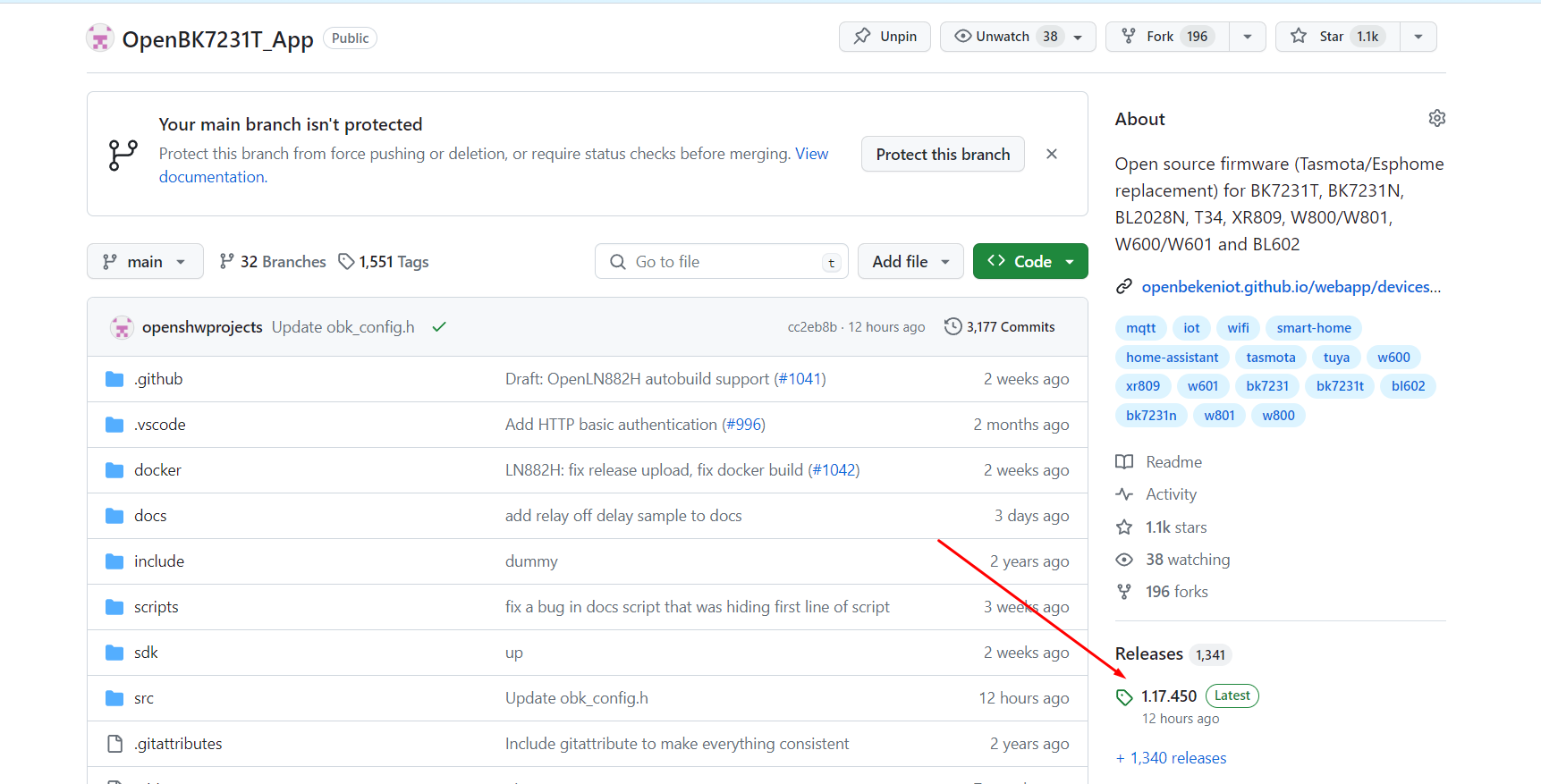
    Screenshot of the OpenBK7231T_App repository on GitHub showing the list of directories and version information.
    In releases, you can find a table of all build binaries for supported platforms:
    https://github.com/openshwprojects/OpenBK7231T_App/releases
    See screenshot below:
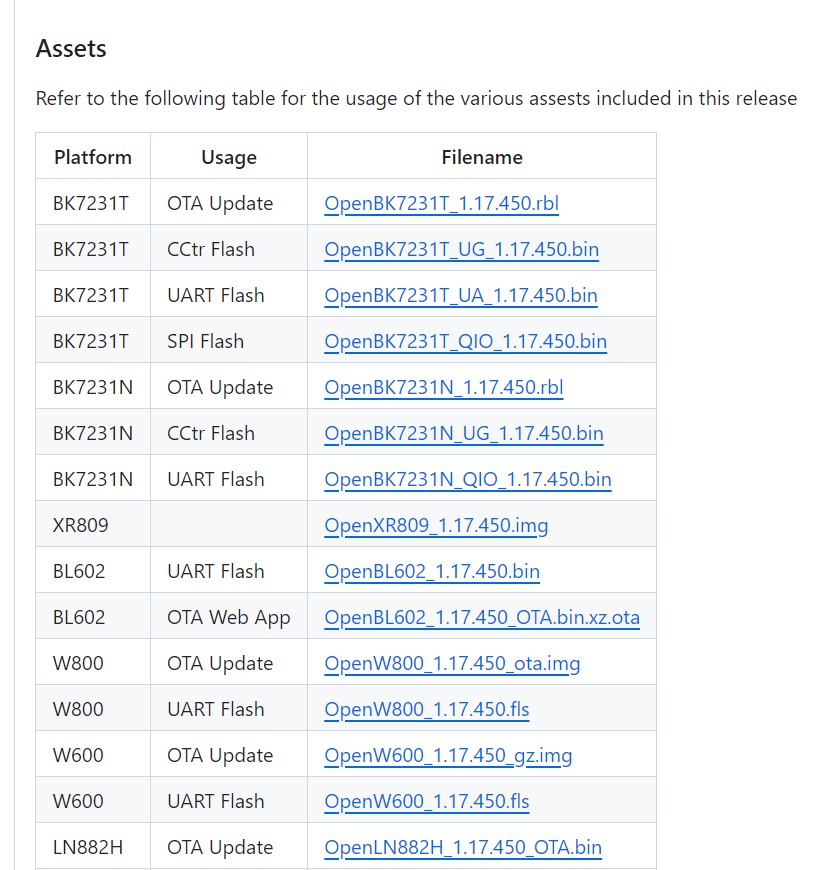
    Table of OpenBeken assets for various platforms and usage types.

    Per-commit builds
    Per-commit builds are available for every commit. Some of them are not available in a form of releases, and some of them may have been a release at some point but may have been removed by a developer.
    First you need to see the list of commits, here:
    https://github.com/openshwprojects/OpenBK7231T_App/commits/main/
    Then, notice the green mark, click it:
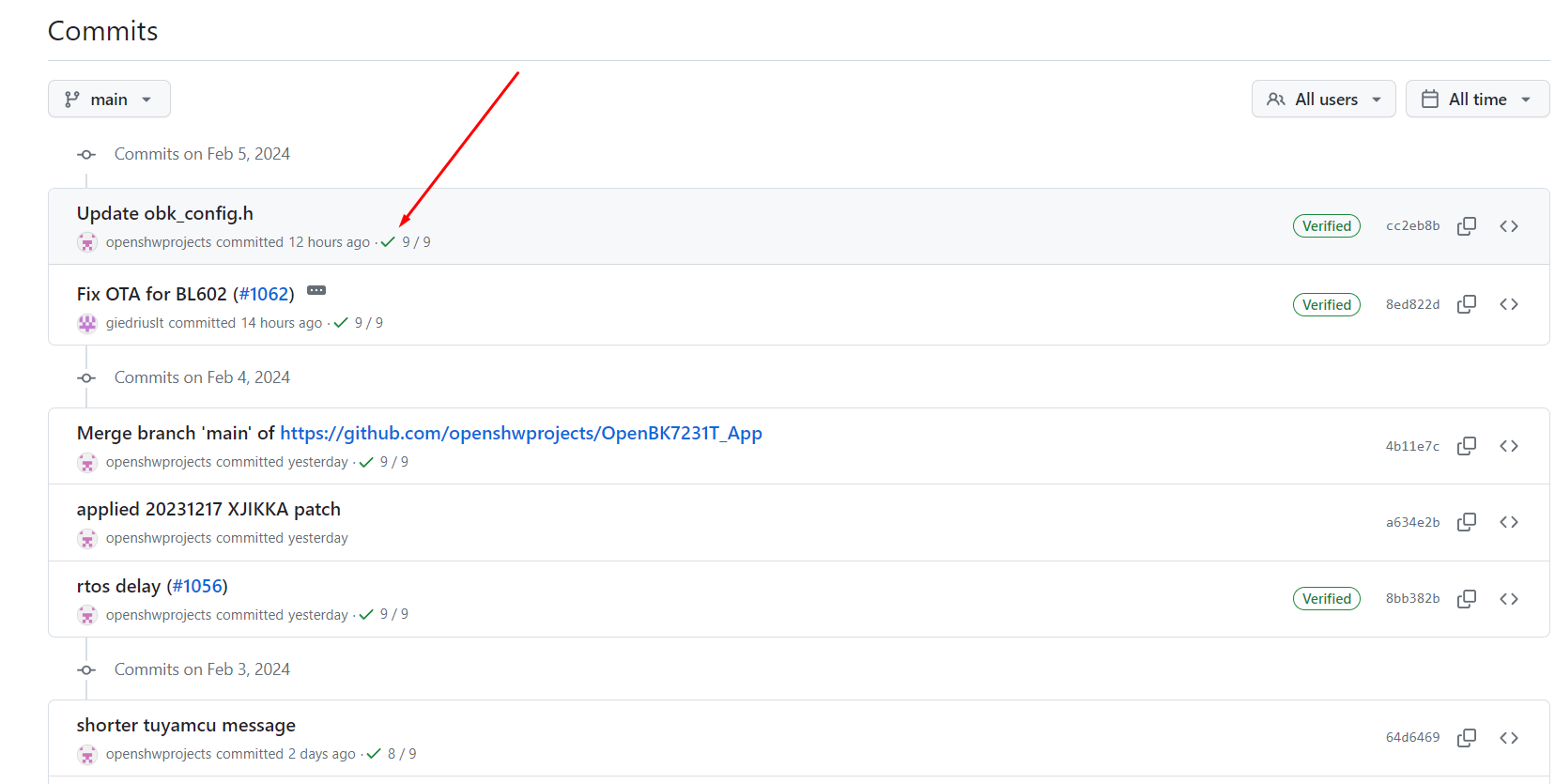
    Screenshot of a GitHub commit list for the OpenBK7231T_App project.
    Then, on the screen below, click any "Details" link:
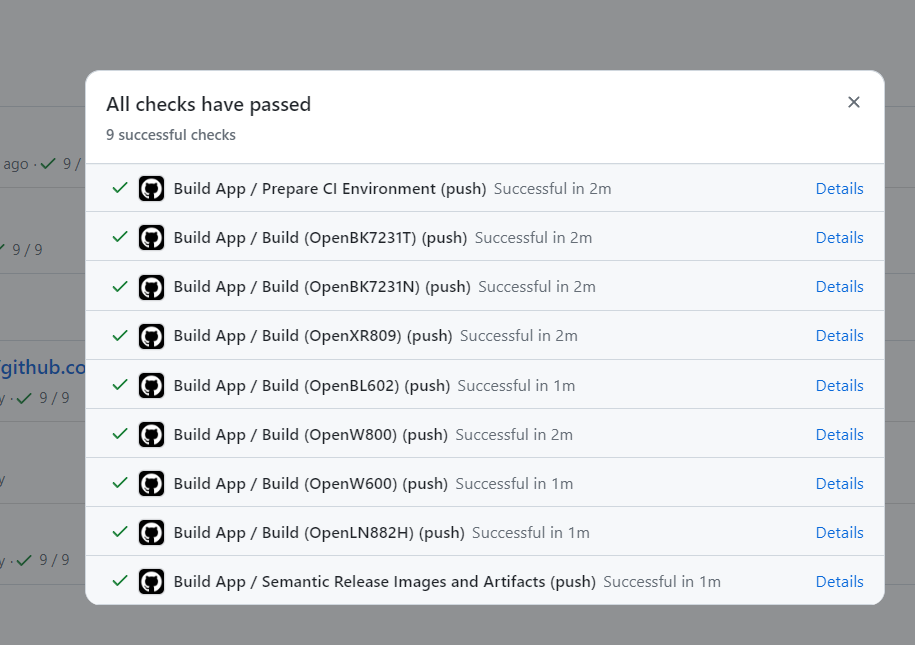
    Screenshot of build results in Github Actions showing 9 successful checks.
    Now you should be on build details page:
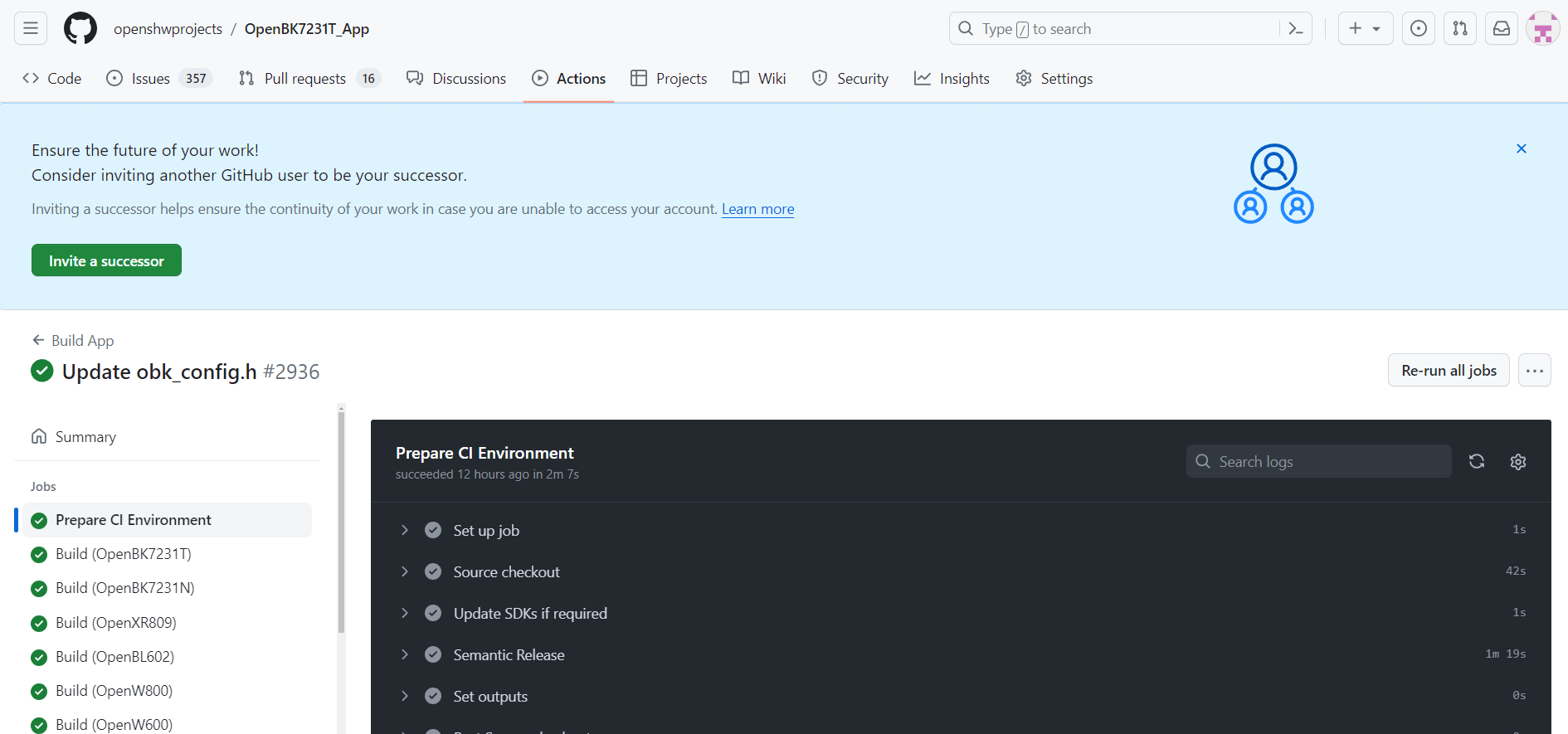
    GitHub app screen showing build information for OpenBeken.
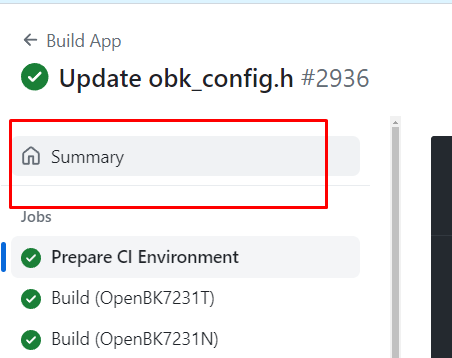
    Click "Summary":
    Screenshot of the GitHub Actions build process with the Summary section highlighted.
    Scroll down to the bottom of the page:
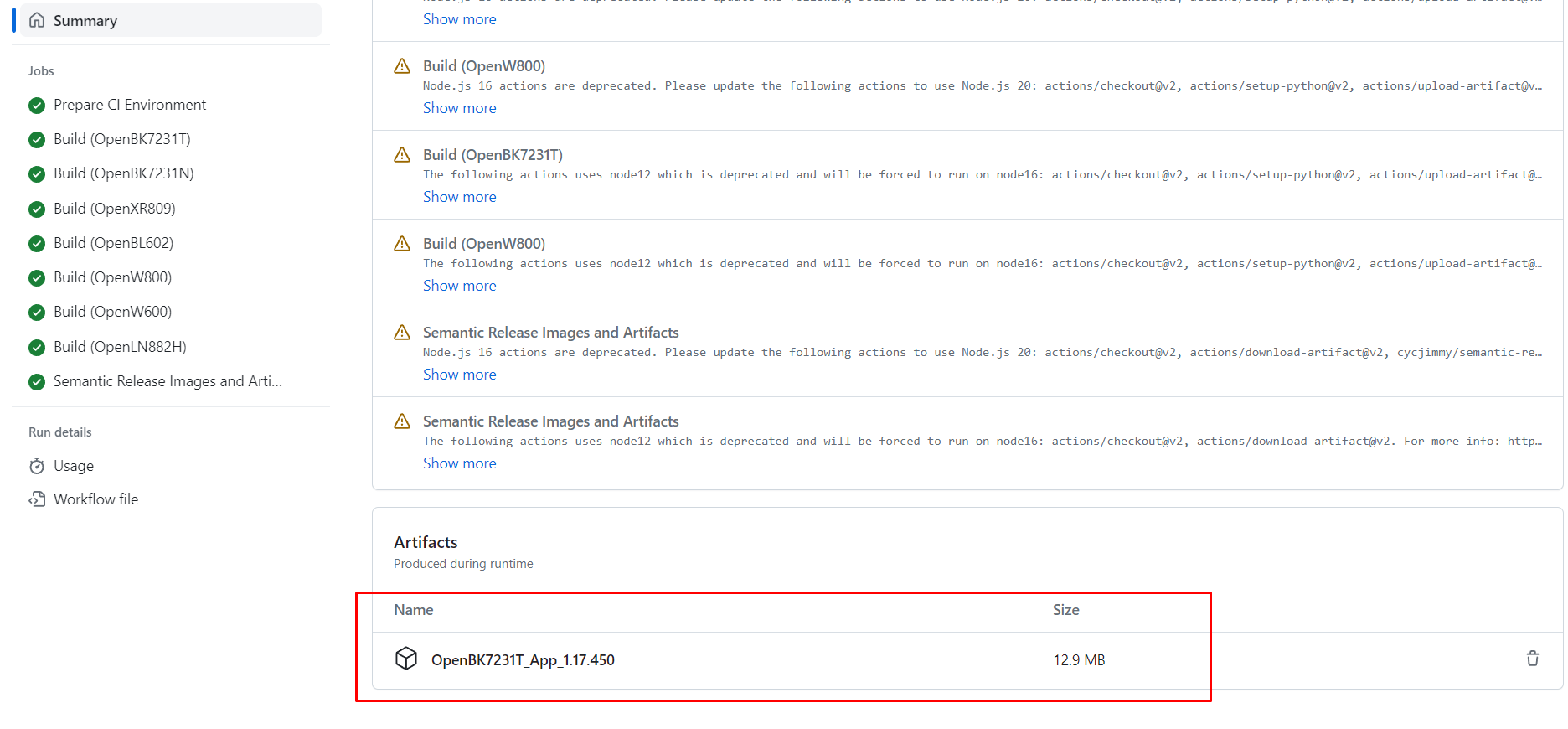
    OpenBeken build screen on GitHub.
    This "artifacts" file contains all build binaries, download it:
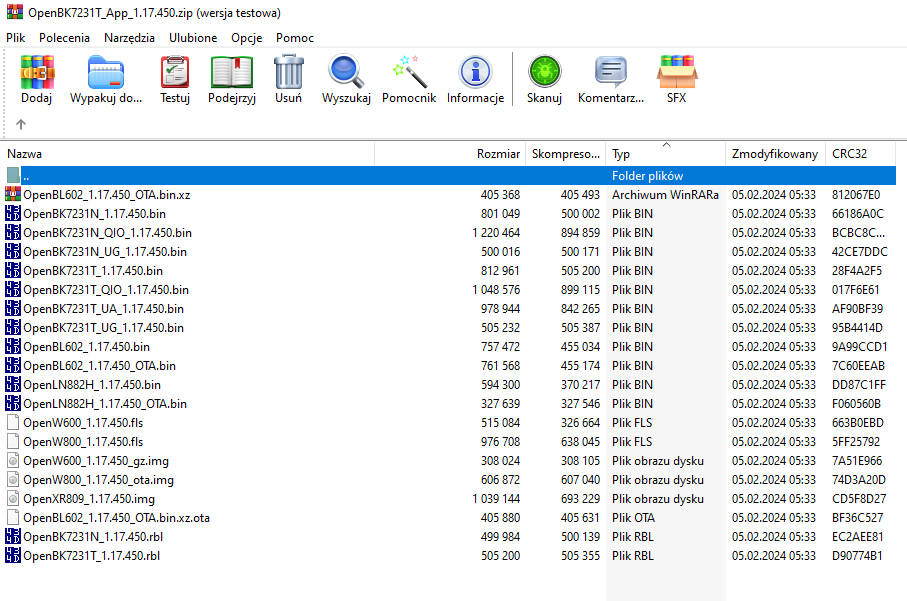
    List of binary files in OpenBK7231T_App_1.17.450.zip archive displayed in an archiving program.
    As you can see, all binaries are here.

    Per-Pull Request builds
    Automatic builds are also available for each Pull request:
    https://github.com/openshwprojects/OpenBK7231T_App/pulls
    This way you can test experimental features before they are merged.
    Please remember that if you open your first pull request, your build first must be accepted by administrator.
    The method of accessing build files is very similiar, just click on "Details" anywhere in PR:
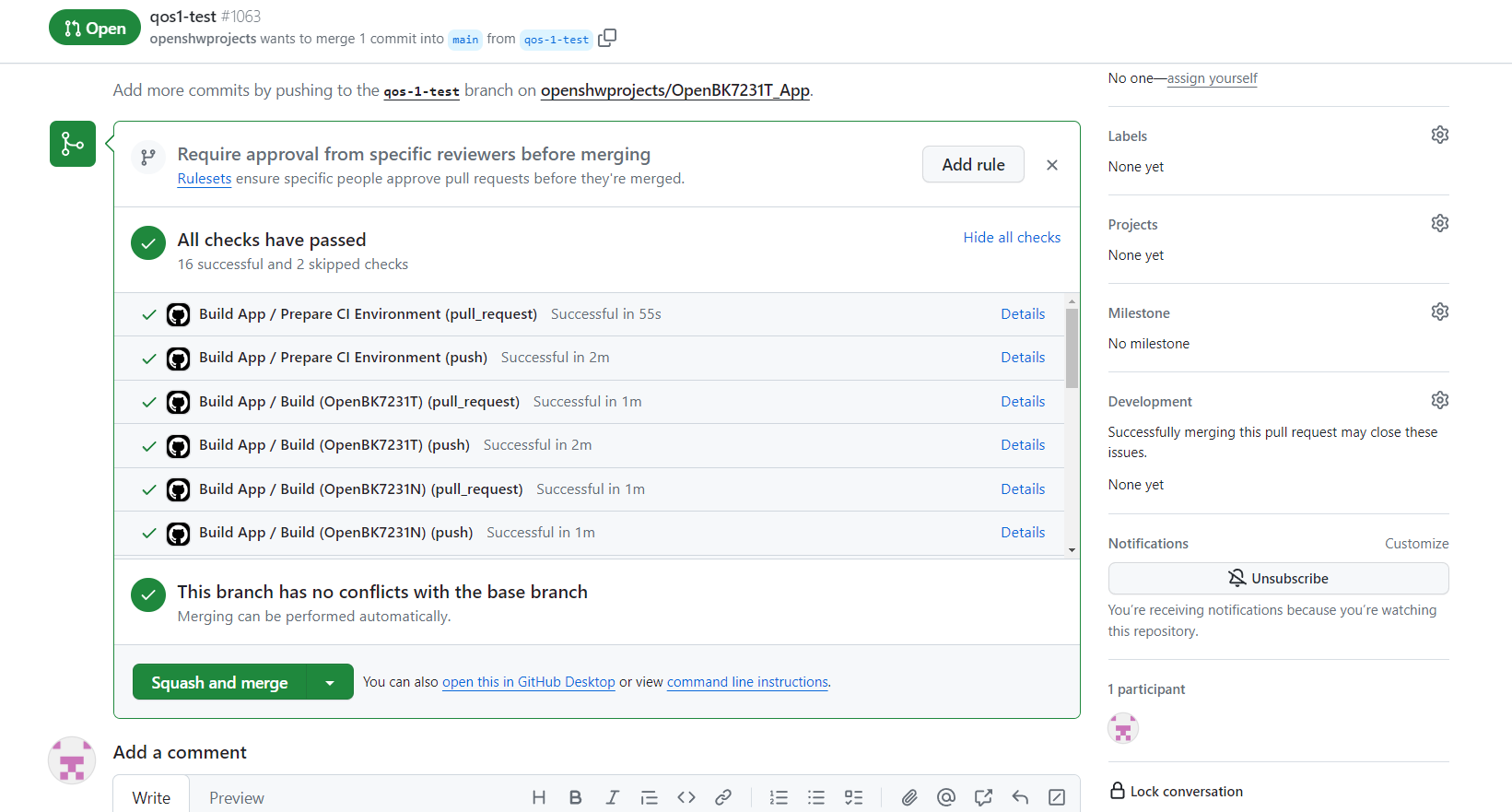
    Screenshot of a GitHub Pull Request interface for the OpenBeken project.
    Then follow the guide from previous paragraph.


    Customizing your own build
    The automated build system can be easily used to customize your own OBK build. For example, let's say you want to enable some feature in obk_config.h:
    https://github.com/openshwprojects/OpenBK7231T_App/blob/main/src/obk_config.h
    For example, if you want to enable HT16K33 driver:
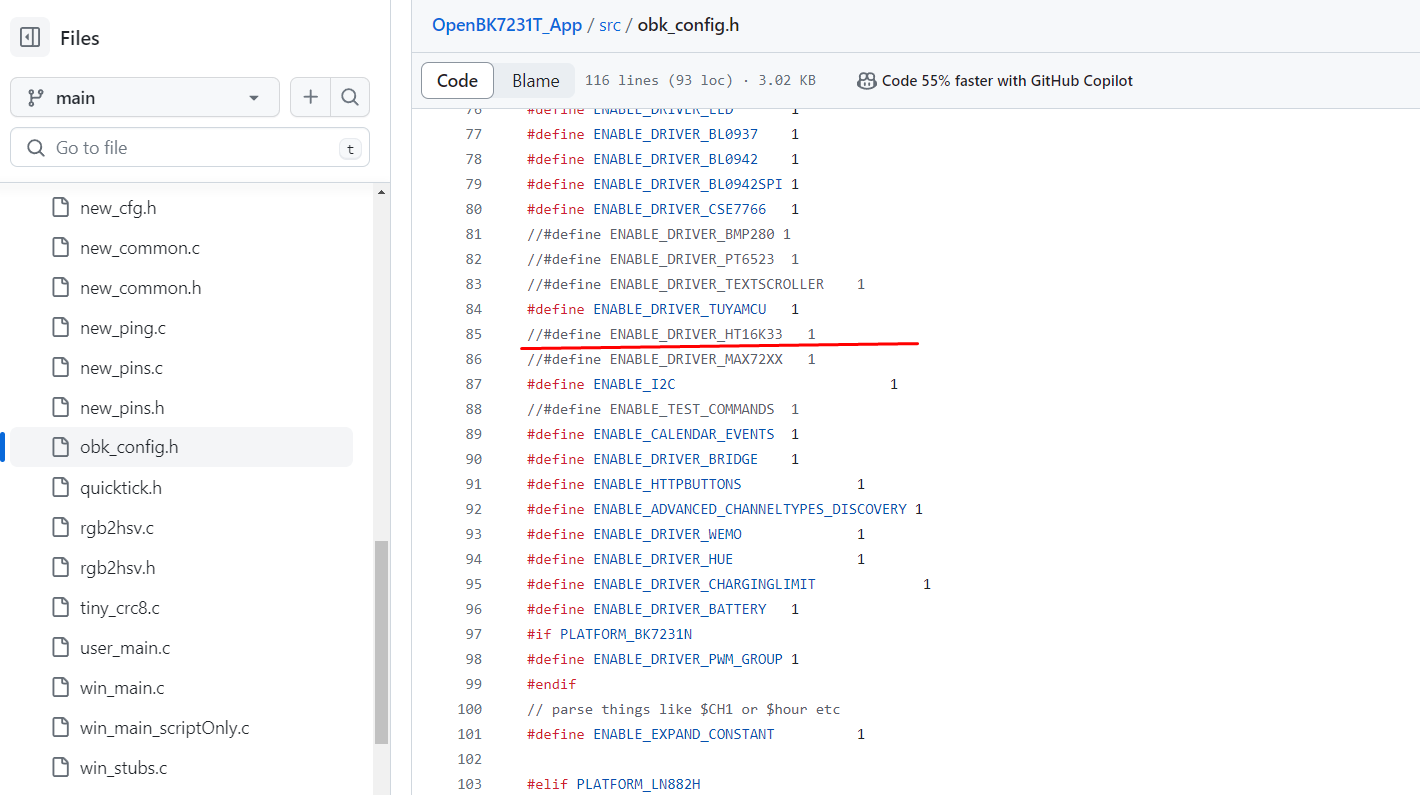
    Screenshot of an online code editor showing the obk_config.h configuration file with the OpenBeken repository opened on GitHub.
    You can just change the #define of the feature you want to include and then use online build system (either setup on your own fork, or just create a PR to just get binaries) and you will get everything compiled for all platforms without even setting up one compiler on your PC.

    Summary
    Online Github builds are crucial for development of OBK. They allow us to quickly test compilation for all supported platforms and develop even without having a compiler on our own PC. That being said, testing on physical devices is also very important, but we'll cover it another time. I hope this tutorial can help you build your own OBK fork, especially if you want to just make some little changes and adjustments.

    Cool? Ranking DIY
    Helpful post? Buy me a coffee.

    About Author
    p.kaczmarek2
    Moderator Smart Home
    Offline 
    p.kaczmarek2 wrote 14355 posts with rating 12265, helped 649 times. Been with us since 2014 year.
  • ADVERTISEMENT
  • #2 20947227
    omniron
    Level 11  
    Wow, that's an impressive tool!
    Like gitpod and tasmocompiler etc?

    Can this be used for a direct linked setup?
    Direct as in one tuya device logs into the soft AP WiFi of another and controls it without going through a router/AP?

    Amazing what you are establihing here, you are everywhere, do you ever sleep at all??
  • #3 20947321
    p.kaczmarek2
    Moderator Smart Home
    Thank you, I think it could be used in similiar manner, but it's still something dedicated a bit more for developers, while users can still use it as well.

    Direct setup is an interesting idea, but what would be a goal here? Creating a system working without a router? It could be done, but we would need to add an option to set a password for AP mode.
    Helpful post? Buy me a coffee.
  • #4 20948178
    omniron
    Level 11  
    Yes, exactly, the goal is for instance to be able to power on the plug of the modem/router/APs when returning home (or waking up).
    After having it all turned off when leaving home or going to sleep.
    Tasmota has option WifiConfig 2 for their soft-AP.
    That allows to turn on/off the relay remotely when the main WiFi is out.
    Would be great if OpenBeken allows to set a similar mode up and but use the same credentials as the main WiFi, or something else with encryption as you said.
    Tasmota has no encryption in that mode unfortunatley.
    In that mode OpenBeken then checks each minute or two if the main WiFi is back and reboots itself or switches back to that.
    Many had requested that for Tasmota, since 2018.
    Thanks!
  • #5 20979807
    divadiow
    Level 38  
    do *we* build our own bins on our own forks or is that something you have to do for each PR?
  • ADVERTISEMENT
  • #6 20979829
    p.kaczmarek2
    Moderator Smart Home
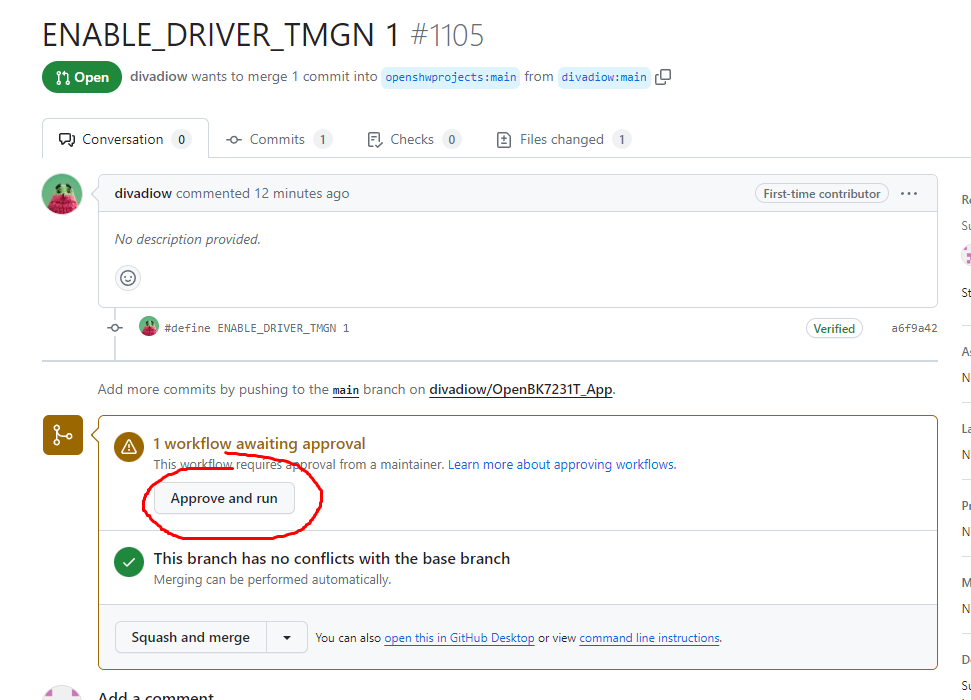
    I think that in order to run a build on my repo, I need to confirm it first there:
    Screenshot from GitHub showing an open pull request requesting approval and build execution.
    However, I think you can as easily just enable building fully on your side, without my intervention.
    Helpful post? Buy me a coffee.
  • ADVERTISEMENT
  • #7 20979833
    divadiow
    Level 38  
    righto. How do you keep my PR out of the main releases? I'll have a go at setting up my own build system

    Added after 2 [minutes]:

    also. im sure you dont want to be approving PRs left right and centre for other people's experiments
  • #8 21014587
    p.kaczmarek2
    Moderator Smart Home
    divadiow wrote:
    righto. How do you keep my PR out of the main releases? I'll have a go at setting up my own build system

    It will not be released on the main tree unless I specifically merge it.

    divadiow wrote:

    also. im sure you dont want to be approving PRs left right and centre for other people's experiments

    To be honest, what worst could happen? I don't think that someone could run a really malicious code in the PR. Futhermore, I have a "code changes" view so I can see what I will be running. It is very easy for me to detect suspicious changes or additions in the pull requests.
    Helpful post? Buy me a coffee.
  • #9 21014598
    divadiow
    Level 38  
    Yes. I understand more now since original questions. A voyage of discovery :)
  • #10 21014605
    p.kaczmarek2
    Moderator Smart Home
    The only thing to watch for which I didn't mention in the first post is that the build binaries seem to expire after some relatively longer amount of time.

    So, if you have a PR to get binaries for a certain driver, you may need to "refresh" it after a month or three..
    Helpful post? Buy me a coffee.

  • ADVERTISEMENT
  • #11 21014618
    divadiow
    Level 38  
    p.kaczmarek2 wrote:
    So, if you have a PR to get binaries for a certain driver, you may need to "refresh" it after a month or three..


    fair enough. I did imagine wanting an updated release that included "ENABLE_DRIVER_TMGN" for GN6932 perhaps at some point when more OBK changes generally had been made.
  • #12 21014634
    p.kaczmarek2
    Moderator Smart Home
    Do you know how to merge upstream (main repository) changes into the PR?

    It can be done via Github GUI.

    That way you can sync your branch to the main branch of the repository.
    Helpful post? Buy me a coffee.
  • #13 21021495
    divadiow
    Level 38  
    ah. I don't think I do. I have wondered about changes made to LN-specific bits, like enabling drivers, that require a linked change in main project. Is this to what you're referring?
  • #14 21021685
    p.kaczmarek2
    Moderator Smart Home
    I am referring to a situation that happens when you make a fork (with a PR or not) and some new changes are added to the main and you want to merge those changes into your fork.

    This can be done easily in Github GUI.
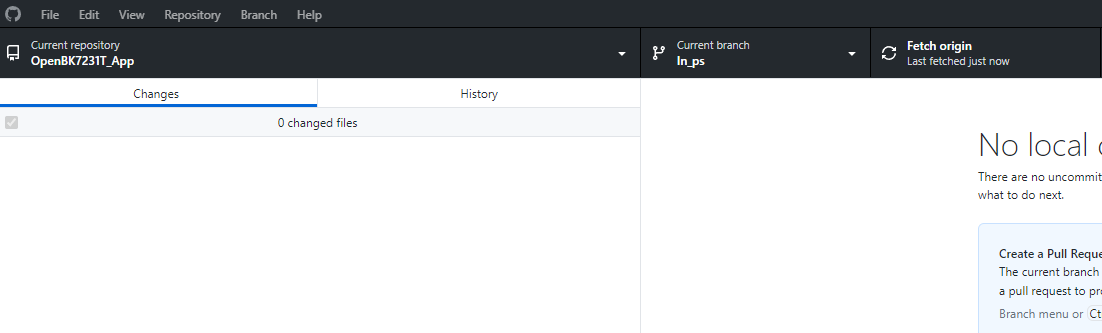
    In Github GUI, switch to your fork, in my case ln-ps:
    Screenshot of GitHub Desktop UI showing no changes in branch ln_ps.
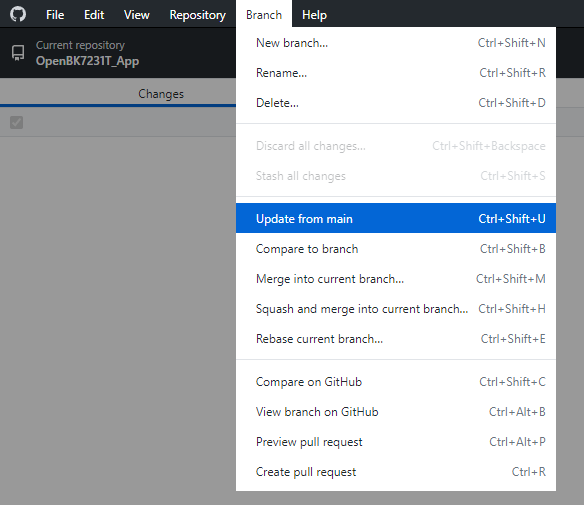
    Then you can select "update from main":
    Screenshot of a dropdown menu in GitHub Desktop interface with the Update from main option highlighted.
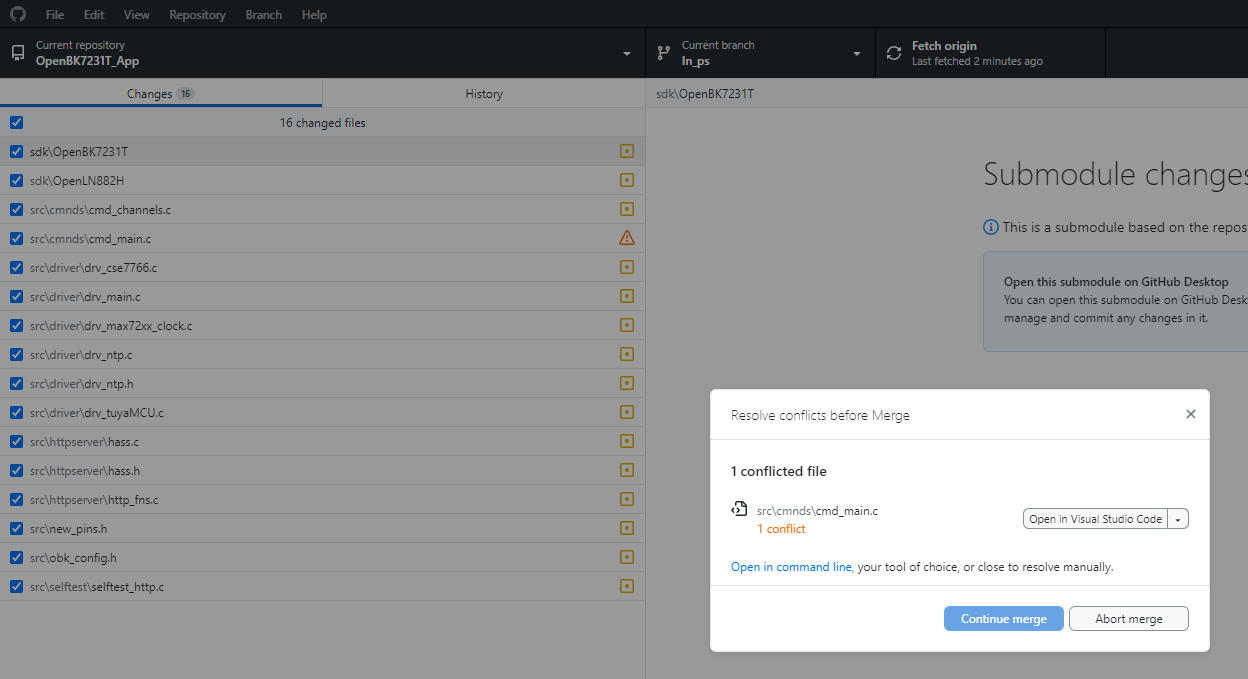
    Then, you may need to solve conflicts (if any):
    Github interface showing modified files in a repository and a conflict resolution dialog box.
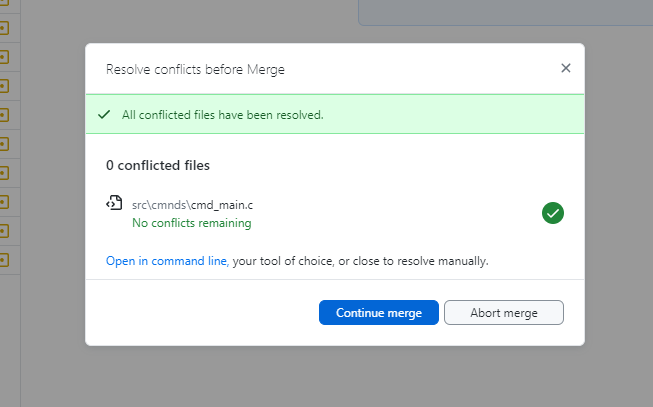
    Then, once resolved:
    Github dialog box showing no conflicts before merging.
    And finally, once commited and pushed, you get:
    Screenshot showing the merge information of branch 'main' into 'ln_ps' on Github.
    Helpful post? Buy me a coffee.
  • #15 21191133
    morgan_flint
    Level 14  
    p.kaczmarek2 wrote:
    However, I think you can as easily just enable building fully on your side, without my intervention.

    Hello!

    I've made a PR just to test a very small change, requiring your approval, as it's my first one, but it would have been better if I could have made the online build on my branch without disturbing you... Do you know how to enable building in one's branch? It could be good to add that to the tutorial...

    Maybe @divadiow can also help...
  • #16 21191191
    divadiow
    Level 38  
    not sure I am certain of enough to be a great help.

    morgan_flint wrote:
    building in one's branch


    does this mean you want to kick off a build and download the zip of binaries off the back of your own PRs?

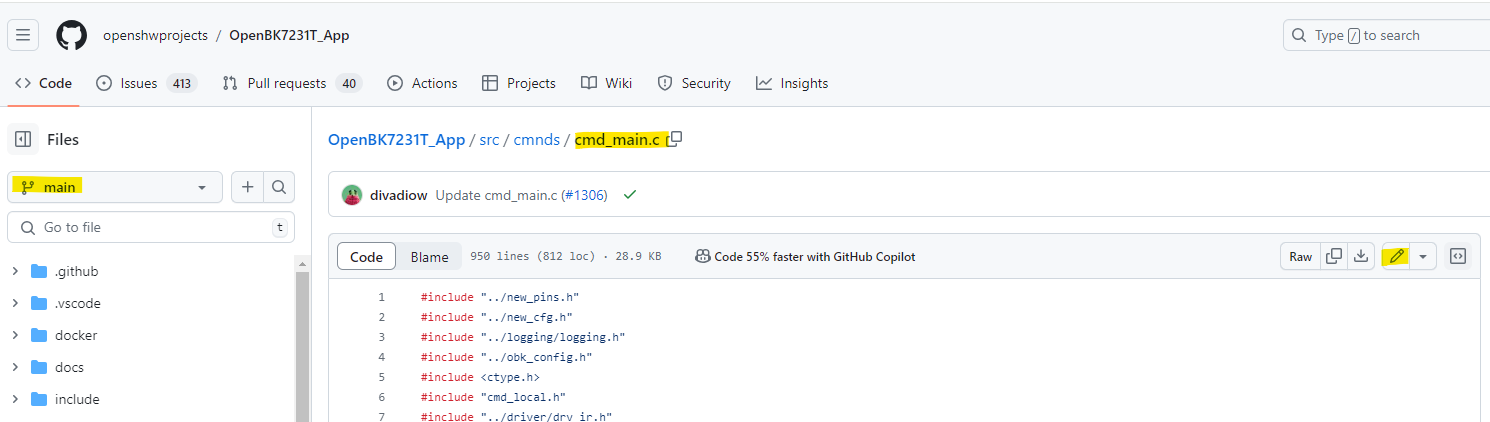
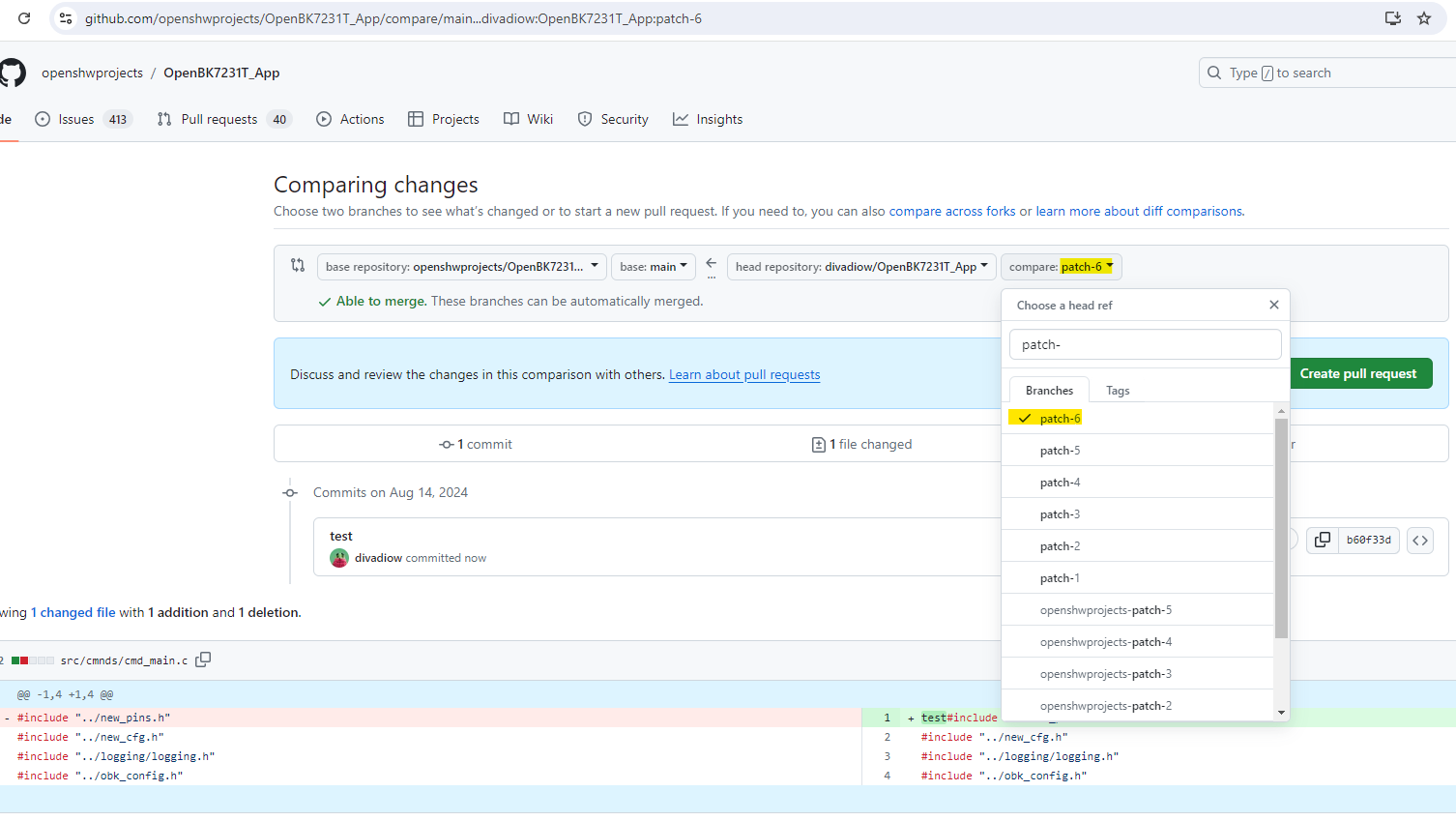
    If the change is small and in the main repo I tend to just go the file where I want to make the change, switch to the main branch so the edit pencil allows editing, commit changes and open a PR with that change. eg for cmd_main.c

    Screenshot showing the cmd_main.c file in the OpenBK7231T_App repository on GitHub.

    when you commit your changes it makes a new branch with a generic "patch-#" name

    GitHub comparison screen between main and patch-6 branches in the OpenBK7231T_App repository.
    https://github.com/openshwprojects/OpenBK7231...mpare/main...divadiow:OpenBK7231T_App:patch-6

    you can then open a PR which will start a build

    If needing to edit a submodule I fork main and sub then clone to PC. modify .gitmodules to be sure paths and remote addresses and branch details are correct. then I forget what I need to do to push those changes upstream from my submodule into the upstream main repo and ask chatgpt :)

    If I make a mess I delete the lot and start from scratch
  • #17 21191240
    p.kaczmarek2
    Moderator Smart Home
    Sure, I can enable it, but why do you need to remove a slash?
    Helpful post? Buy me a coffee.
  • #18 21192263
    morgan_flint
    Level 14  
    >>21191240
    The reason is that I had the errors I explained here.

    As there's already a slash in the address in OBK config (e.g. http://192.168.1.249:7231/ if using a local server set up as per these instructions ), the slash I'm removing in my commit originated a double slash in the address of startup.js (e.g. http://192.168.1.249:7231//startup.js).

    This double slash doesn't seem to cause problems when using the default URL (https://openbekeniot.github.io/webapp/) or the local one stated before (no additional path between port and startup.js) but, if I use Home Assistant local server instead, with (URL = http://192.168.1.249:8123/local/), then I get an access error in the webapp when it's trying to access http://192.168.1.249:8123/local//startup.js (note the // before startup.js).

    After your approval, I could download and OTA the binaries with my mod. The webapp works OK with default URL and also with the simpler local one. But with HA's local server, the former error disappeared, but I'm getting new ones (🤦‍♂️). I'll post them in the post referred to before, to avoid going off-topic here but, please, take a look at them there. It's not an important problem, as I have alternatives, but it's more a matter of knowing what is happening

    EDIT: Problem solved with the help of ChatGPT!! I posted the solution in the other thread.
  • #19 21347437
    p.kaczmarek2
    Moderator Smart Home
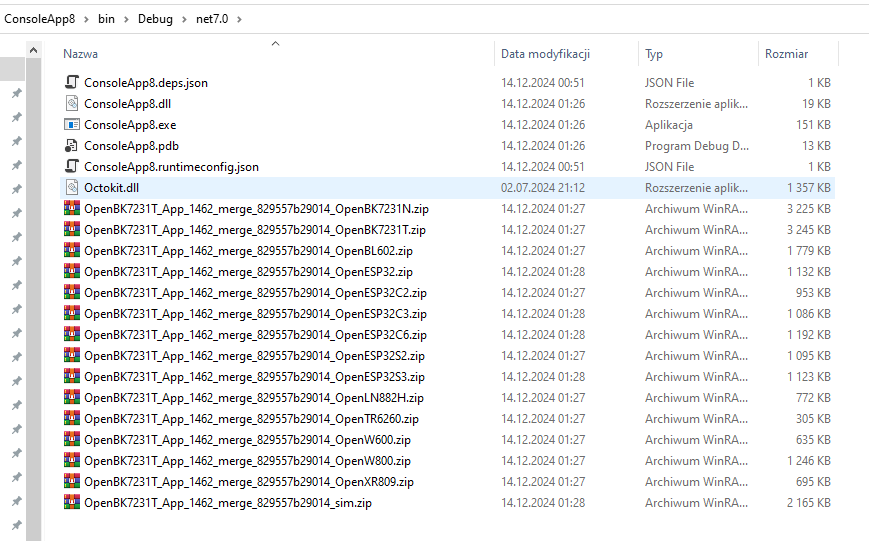
    I'm working on something interesting, guys. It's related to our online builds. Who can guess what's happening there?
    Screenshot of a .NET project folder showing various DLL and ZIP files.
    Helpful post? Buy me a coffee.
📢 Listen (AI):

Topic summary

✨ OpenBeken provides an automatic online build system hosted on GitHub that compiles firmware binaries for multiple supported platforms such as BK7231, BL602, and W800 without requiring local compiler setup. Builds are triggered automatically on every commit and pull request, enabling developers to compile custom firmware or maintain forks easily. Users can access official releases with precompiled binaries from the repository's releases tab. The system supports enabling build workflows on personal branches or forks, allowing independent compilation without intervention from the main repository maintainer. Merging upstream changes into forks can be done via GitHub GUI to keep branches synchronized. The build binaries have a limited validity period, requiring periodic refreshes. Discussion also covered potential features like direct device-to-device control via soft AP mode without a router, similar to Tasmota’s WifiConfig 2, including encrypted credentials and automatic fallback to main WiFi. Minor issues such as URL double slashes in webapp startup scripts were addressed through pull requests. Overall, OpenBeken’s online build system streamlines firmware development and testing for various IoT chipsets, facilitating collaborative development and custom feature integration.
Generated by the language model.

FAQ

TL;DR: GitHub Actions now auto-compiles OpenBeken for 5+ MCU families and keeps each build artifact ~90 days; “Online builds are crucial for development” [Elektroda, p.kaczmarek2, post #21014605]

Why it matters: You can flash custom firmware without installing any compiler or waiting for maintainer approval.

Quick Facts

• Supported chips: BK7231T/N, BL602, W800, XR809, CH32V307 [Elektroda, p.kaczmarek2, post #20946719] • Build triggers: every commit, every pull request, and every tagged release [Elektroda, p.kaczmarek2, post #20946719] • Artifact retention: 90 days by default (configurable) [GitHub Docs, 2024] and confirmed “after a month or three” [Elektroda, p.kaczmarek2, post #21014605] • Local toolchains needed: 0 – all compilation happens in the cloud [Elektroda, p.kaczmarek2, post #20946719] • Cost: Free for public repos (2,000 CI minutes/month) [GitHub Pricing, 2024].

What exactly is the OpenBeken online build system?

It is a set of GitHub Actions workflows that cross-compile OpenBeken for every supported chip whenever you push code, open a pull request, or create a release tag [Elektroda, p.kaczmarek2, post #20946719]

How can I download a one-off build for a specific commit?

  1. Open the commit list.
  2. Click the green check-mark ➜ Details.
  3. In the workflow page, click Summary ➜ download the artifacts zip at the bottom [Elektroda, p.kaczmarek2, post #20946719]

Do I need maintainer approval to build on my own fork?

No. Enable GitHub Actions in your fork; pushes will build automatically. Maintainer approval is only required when your first PR targets the main repo [Elektroda, p.kaczmarek2, post #20979829]

How long are build artifacts kept?

GitHub stores artifacts for up to 90 days by default; the maintainer notes they disappear “after a month or three” [Elektroda, p.kaczmarek2, #21014605; GitHub Docs, 2024].

What’s the quickest way to enable an extra driver?

Edit src/obk_config.h in your fork, set the relevant #define (e.g., ENABLE_DRIVER_HT16K33 1), push, and let Actions recompile for all platforms [Elektroda, p.kaczmarek2, post #20946719]

Is there a risk of malicious code in community PR builds?

The maintainer reviews the "code changes" view before approving workflows and says detecting suspicious additions is easy [Elektroda, p.kaczmarek2, post #21014587]

How do I merge upstream changes into my fork?

In GitHub: switch to your fork ➜ choose “Update from main” ➜ resolve conflicts ➜ commit the merge. No command-line needed [Elektroda, p.kaczmarek2, post #21021685]

Can OpenBeken control devices in a direct Soft-AP mode without a router?

Not yet. The idea needs AP-mode password support and periodic Wi-Fi checks, similar to Tasmota’s WifiConfig 2 [Elektroda, omniron, #20948178; p.kaczmarek2, #20947321]. “It could be done, but we would need to add an option to set a password for AP mode.”

What if artifacts expire before I download them?

Re-trigger the workflow by pushing an empty commit (git commit --allow-empty) or by closing and reopening the PR; a fresh artifact zip appears in minutes [GitHub Docs, 2024].

How to build a custom firmware in three clicks?

  1. Fork the repo and edit obk_config.h.
  2. Commit changes ➜ GitHub Actions starts.
  3. Download the artifacts zip and flash your device.

How many binaries are generated per run?

A single workflow produces one binary per MCU and flash layout; typical runs output 40–60 files [OpenBeken CI logs, 2024].

Edge case: What happens if my change only affects submodules?

Fork both the main repo and the submodule, update .gitmodules paths, push submodule changes first, then build; otherwise the workflow may fail with "fatal: reference not found" [Elektroda, divadiow, post #21191191]
Generated by the language model.
ADVERTISEMENT