FAQ 
TL;DR: This setup maps 5 relays and one shared button for users flashing the Tuya Usee Link SM-306U-PA65. An expert note says, "You may also consider using click events script" when one button must handle more actions than a plain template exposes. Use the JSON to assign pins 6, 7, 8, 9, 17, 22, 24, and 28, then add click events if you want double- or triple-click behavior. [#20895508]
Why it matters: This FAQ helps OpenBeken users turn a raw BK7231N pin map into working relay, LED, Wi-Fi LED, and single-button control.
| Option |
What the thread shows |
Best fit |
| JSON pin configuration |
Direct mapping for relays, LEDs, button, and WiFiLED |
Fast base setup |
| Click events script |
Extra single-button actions like double and triple click |
Advanced control on one button |
Key insight: The posted JSON already defines the hardware map for the SM-306U-PA65, but the follow-up recommends a click-events script when one physical button must manage a 4-socket plus 1x USB layout. [#20895508]
Quick Facts
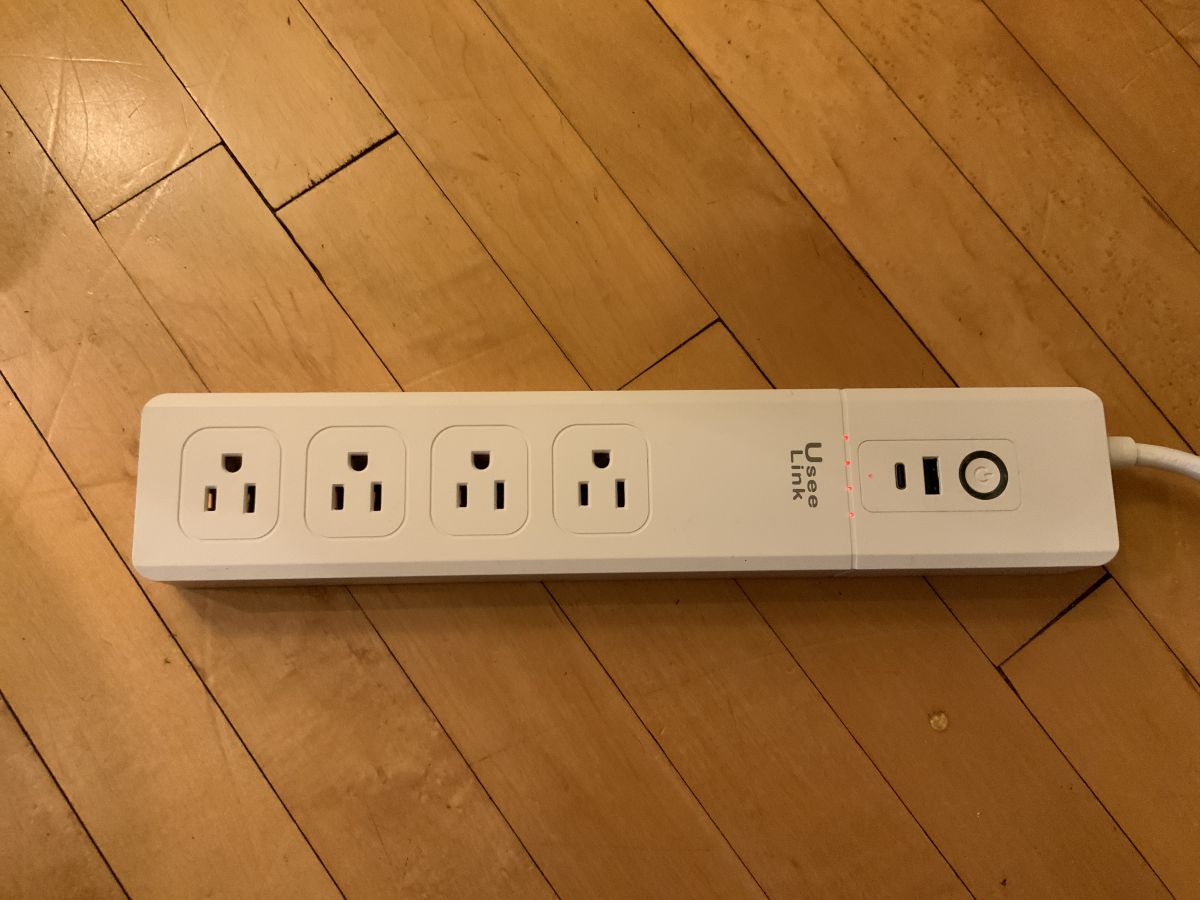
- The posted template identifies the device as Tuya Usee Link USB-C PD Surge Protector, model SM-306U-PA65, using a BK7231N chip on a CBU board. [#20895035]
- The JSON assigns 5 relay outputs: pins 6, 7, 8, 9, and 24 map to
Rel;1 through Rel;5. [#20895035]
- The visual indicators use 2 LED-related pins: pin 17 is
LED;6, and pin 28 is WifiLED;7. [#20895035]
- The only button mapping shown is pin 22 as
Btn_Tgl_All;8, which indicates one shared toggle input rather than five separate buttons. [#20895035]
- The follow-up points to an OpenBK7231T_App example named "Configuration for 4x socket + 1x USB power strip with a single button", specifically for click actions like double and triple click. [#20895508]
How do I configure the JSON pins setup for the Tuya Usee Link USB-C PD Surge Protector model SM-306U-PA65 with a BK7231N chip?
Use the posted JSON as your base template for OpenBeken. It identifies the device as Tuya, model SM-306U-PA65, chip BK7231N, board CBU, then maps relays to pins 6, 7, 8, 9, and 24, LEDs to 17 and 28, and the shared button to pin 22. A simple 3-step flow is: 1. import or enter the template, 2. save the pin roles exactly as listed, 3. test each relay and LED after reboot.
[#20895035]
What do the pin assignments 6, 7, 8, 9, 17, 22, 24, and 28 do in the JSON configuration for this Tuya power strip?
Those pins define the device’s control map. Pins 6, 7, 8, and 9 drive Relays 1 to 4, pin 24 drives Relay 5, pin 17 is LED channel 6, pin 22 is
Btn_Tgl_All;8, and pin 28 is
WifiLED;7. That means the template exposes five switched outputs, one shared button input, one regular LED, and one Wi-Fi status LED.
[#20895035]
How should I map the five relays and LEDs in OpenBeken for the Usee Link SM-306U-PA65 surge protector?
Map the five relays exactly as the template shows: 6→Rel;1, 7→Rel;2, 8→Rel;3, 9→Rel;4, and 24→Rel;5. Map the indicators as 17→LED;6 and 28→WifiLED;7. This gives you a 4-socket plus 1x USB-style layout with one standard LED and one Wi-Fi LED.
[#20895035]
What is BK7231N, and how is it used in Tuya smart power strips like the Usee Link SM-306U-PA65?
"BK7231N is a chip that identifies the device platform, determines which firmware family and pin mapping you use during configuration." In this thread, the SM-306U-PA65 template explicitly names BK7231N as the chip, so it serves as the hardware target for the posted OpenBeken-style JSON setup.
[#20895035]
What is a CBU board in Tuya devices, and how does it affect configuration or flashing?
"CBU is a Tuya board designation that identifies the module used inside the device, guiding template selection and flashing workflow." Here, the JSON lists
board as
CBU, so the practical effect is that you should keep the posted SM-306U-PA65 mapping tied to a CBU-based BK7231N device, not assume another module uses the same pins.
[#20895035]
How do I set up the Btn_Tgl_All function on pin 22 for a 4-socket plus USB power strip?
Set pin 22 to
Btn_Tgl_All;8 exactly as shown in the template. That assigns one shared button input instead of separate buttons for each of the five outputs. If you want more than a simple all-toggle behavior, the thread’s follow-up recommends adding a click-events script for the 4x socket plus 1x USB single-button pattern.
[#20895508]
Where can I find the OpenBK7231T_App click events script example for a 4x socket plus 1x USB power strip with a single button?
You can find it in the OpenBK7231T_App documentation file
autoexecExamples.md. The thread says to search that page for the exact heading
Configuration for 4x socket + 1x USB power strip with a single button (double click, triple, etc). That is the example explicitly recommended for this device style.
[#20895508]
How do double-click and triple-click button actions work in OpenBeken click events scripts for Tuya power strips?
They work through a click-events script, not through the plain JSON pin map alone. The thread specifically points to a single-button example that includes double-click and triple-click behavior for a 4x socket plus 1x USB power strip. In practice, that means one physical button can trigger multiple actions depending on click count.
[#20895508]
What's the difference between using a simple JSON pin configuration and a click events script on a BK7231N Tuya surge protector?
A simple JSON configuration maps hardware pins, while a click-events script adds button logic. The posted JSON assigns 8 functional pins for relays, LEDs, and one shared button, but the follow-up recommends a script when that one button must support double-click, triple-click, or other multi-action control. Use JSON first, then add scripting if one-button control feels too limited.
[#20895508]
Why might the relays or LEDs not respond correctly after importing a JSON template on a Tuya BK7231N device?
The most likely thread-supported cause is a pinout mismatch. The posted JSON is specific to the Usee Link SM-306U-PA65 with BK7231N and CBU, so a similar-looking Tuya strip may still wire relays, LEDs, or the button differently. If pin 17 or 28 does not light, or one of pins 6, 7, 8, 9, or 24 does not switch, verify the template matches your exact hardware.
[#20895035]
What is the WifiLED setting on pin 28, and how should it be configured for a Tuya CBU-based power strip?
Pin 28 should be configured as
WifiLED;7 for this template.
"WifiLED is an indicator output that shows Wi-Fi or status activity, separate from the regular device LED." In the SM-306U-PA65 JSON, it is distinct from pin 17, which is assigned as
LED;6, so do not merge those roles.
[#20895035]
How can I customize a JSON template for a similar Tuya USB-C PD surge protector if my pinout differs from the SM-306U-PA65 example?
Start from the SM-306U-PA65 template, then change only the pin numbers that differ on your hardware. Keep the functional roles consistent, such as five relay roles, one button role, one LED role, and one Wi-Fi LED role, but remap them to the correct GPIOs for your board. If your device still uses one button for many actions, pair the revised JSON with the referenced click-events example.
[#20895508]
Which OpenBeken commands or tools help verify that each relay, LED, and button pin is mapped correctly on a BK7231N board?
The thread does not list specific verification commands. It does provide two verification assets: the full JSON mapping for pins 6, 7, 8, 9, 17, 22, 24, and 28, and a click-events example for single-button behavior. A practical 3-step check is: 1. apply the template, 2. test each mapped output and the button, 3. compare failures against the referenced single-button example.
[#20895508]
What safety precautions should I follow when flashing and testing a mains-powered Tuya surge protector with USB-C PD?
The thread does not state any safety procedure. It only confirms this is a USB-C PD surge protector with a 4-port power-strip style layout and five relay mappings, so treat it as mains-powered hardware and do not assume a software template makes testing risk-free. For this FAQ, the reliable thread-backed guidance is to keep changes limited to the documented pin roles and script example.
[#20895035]
How do I troubleshoot a single-button Tuya power strip when I want separate control for four sockets and one USB relay?
Use the posted hardware map first, then move to the click-events example. The thread shows a 5-relay layout and one shared button on pin 22, so separate control from one button requires extra click logic rather than more pin assignments. The clearest path is: 1. confirm all five relays switch correctly, 2. keep pin 22 as
Btn_Tgl_All;8, 3. implement the
4x socket + 1x USB power strip with a single button click script for multi-click actions.
[#20895508]
AI summary based on the discussion. May contain errors.






Comments
You may also consider using click events script for this device. See: https://github.com/openshwprojects/OpenBK7231T_App/blob/main/docs/autoexecExamples.md Search for: Configuration for 4x socket... [Read more]