OpenBeken RC driver tutorial for a Tuya 4-channel 433 MHz relay switch module built around a CB3S BK7231 and SYN590R receiver.
It sets the RCRecv pin, starts the driver with `startDriver RC`, then maps remote codes in `autoexec.bat` using `addEventHandler2` to toggle relays or send HTTP GETs.
One example handler maps RF code 591946 to `http://192.168.0.58/cm?cmnd=Power0%20Toggle` for external device control.
The same RF remote can control the relay board itself or other LAN devices, turning cheap 433 MHz hardware into a local automation gateway.
Home Assistant support is still pending, but the published RF format is expected to match Tasmota’s standard.
AI summary based on the discussion. May contain errors.
How to flash and configure RF remote receiver with open source firmware? How to use it to control relays and external devices, with and without Home Assistant? How to add custom remotes? Here's a short guide to RC (Radio Control) driver in OpenBeken, all basics covered. With this tutorial you'll be able to transform your simple RF relays controller into all-in-one RF control hub for many other Wi-Fi appliances, such as smart bulbs, LED strip controllers, external relay modules and much more.
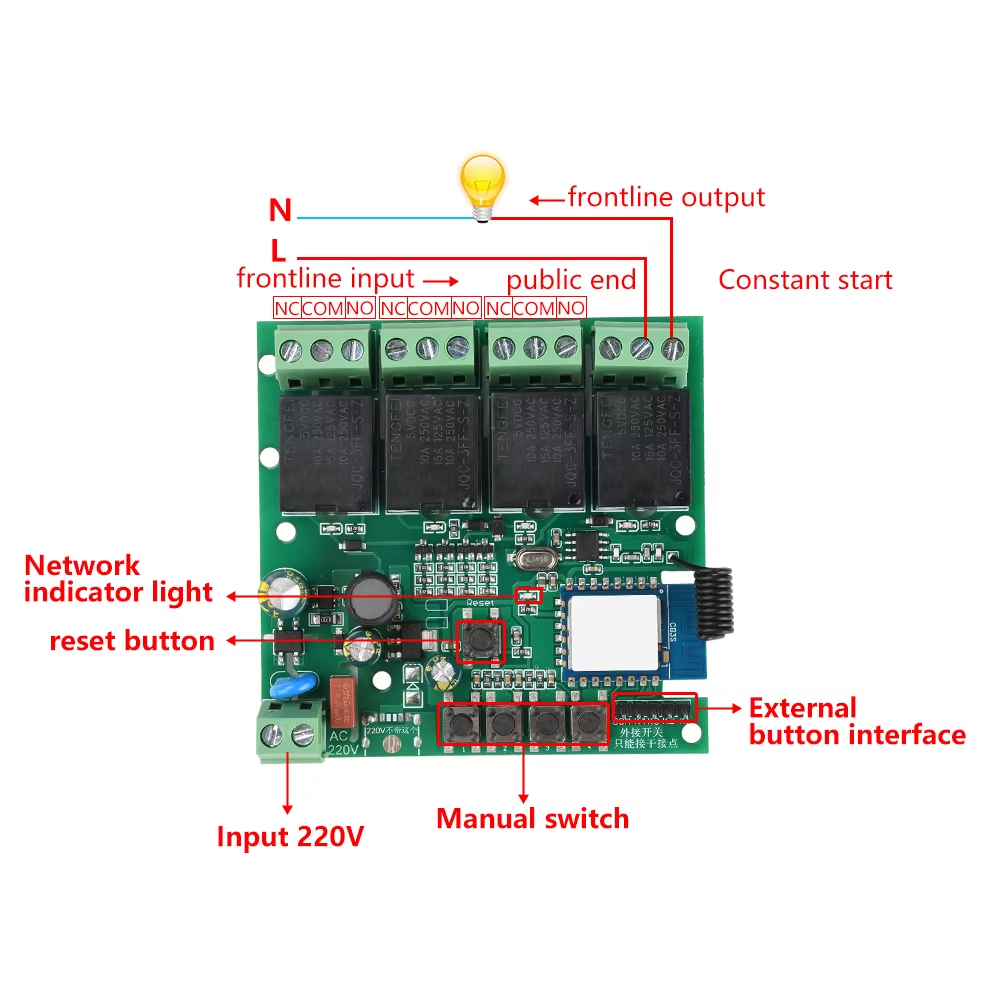
Device used for presentation The driver presented here can work with many devices and receivers, for presentation we used a popular Tuya 4-channel 220V AC Wi-Fi Remote Control Relay Switch Module 433 MHz RF from Aliexpress:
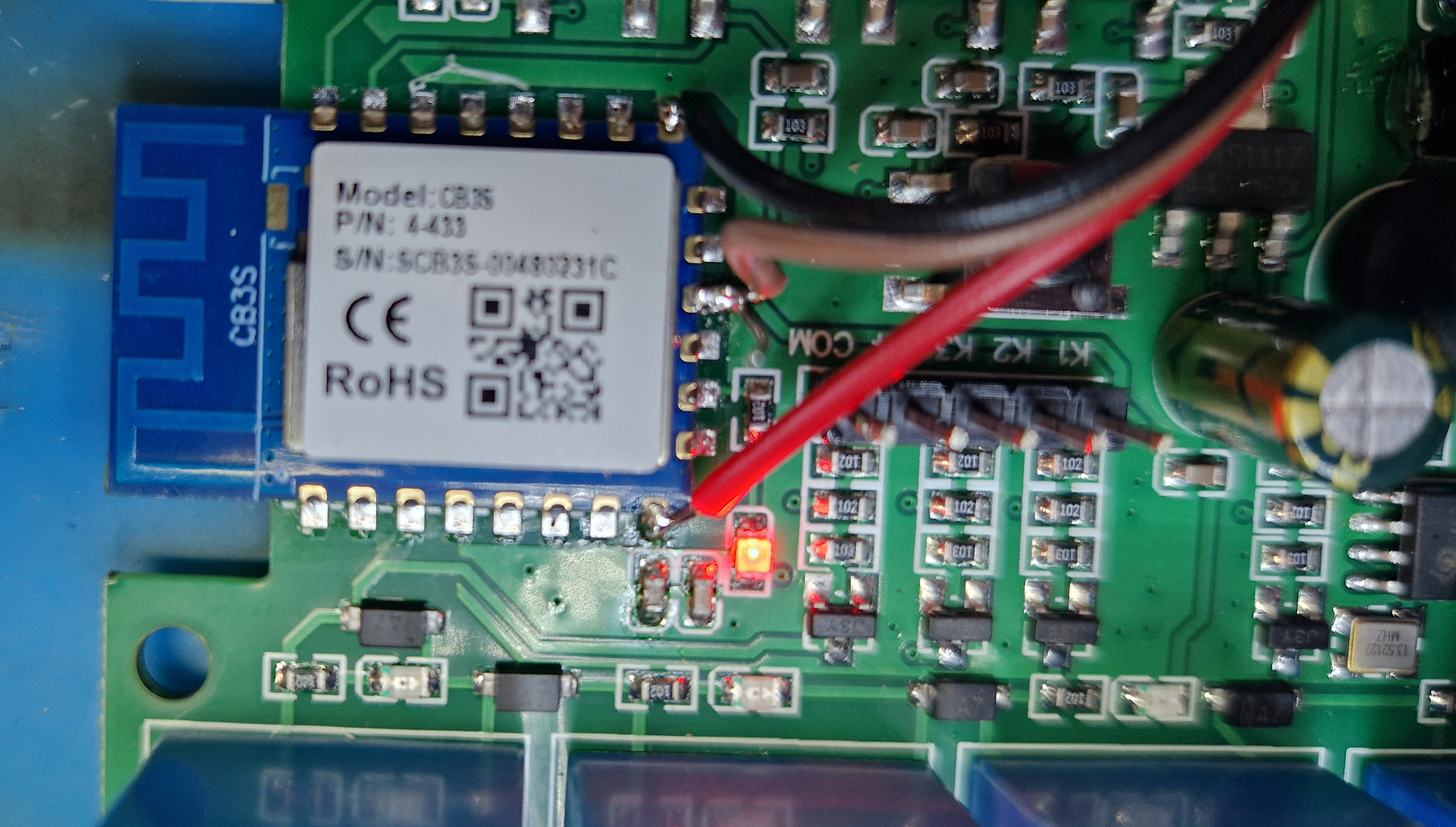
This board features CB3S (BK7231) Wi-Fi module, which can be flashed with OpenBeken.
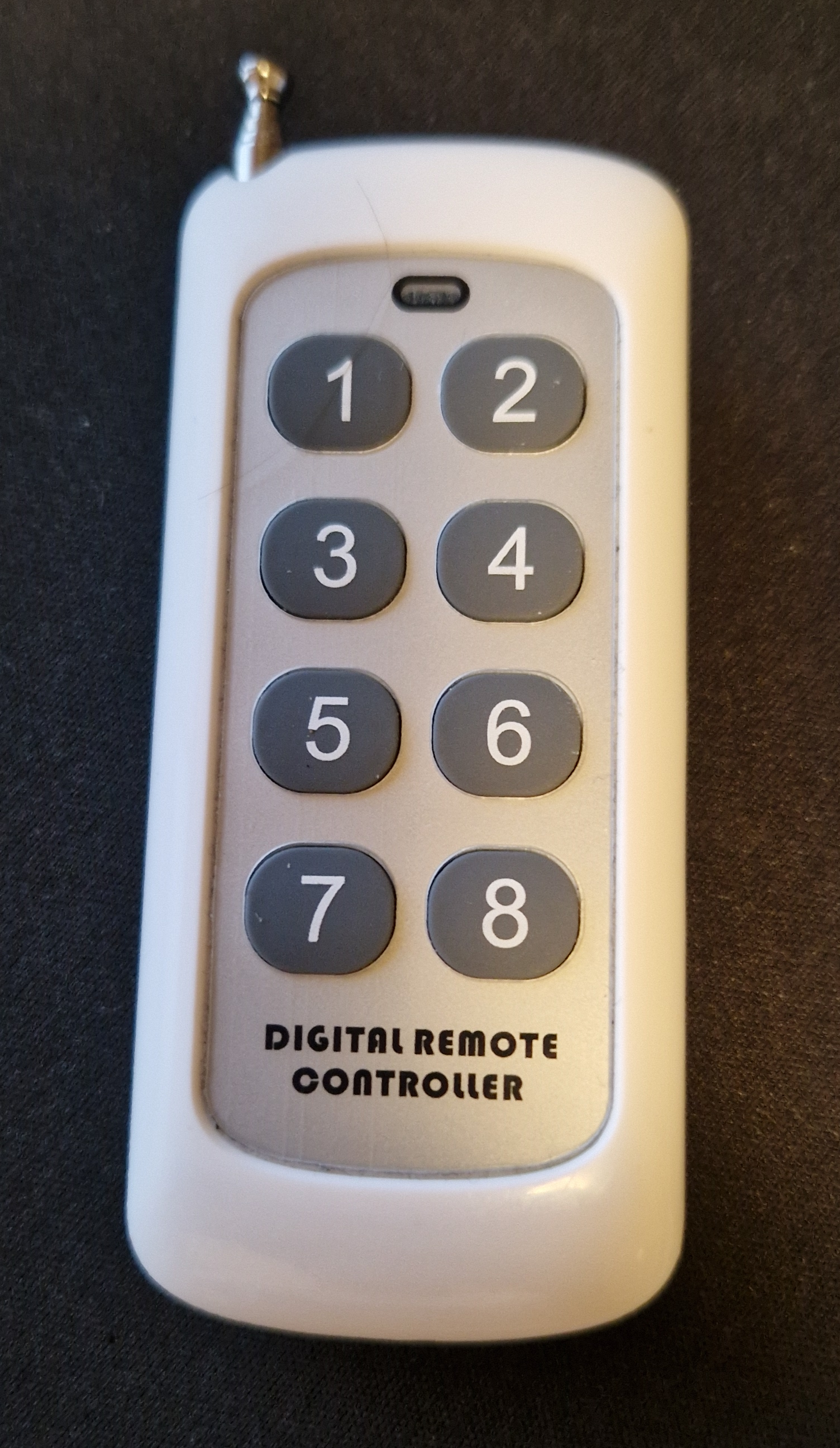
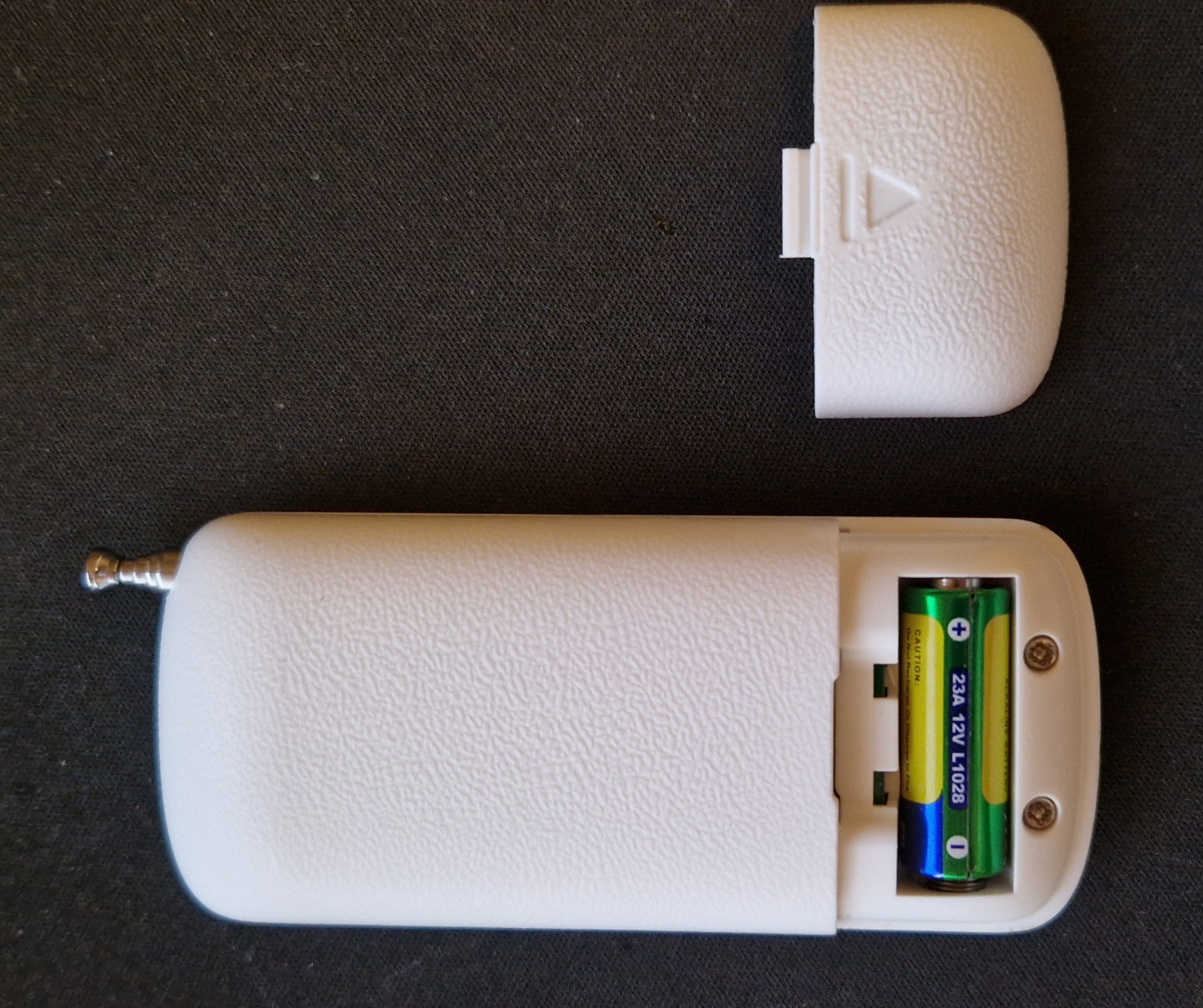
The device comes with a single remote, more remotes can be bought separately:
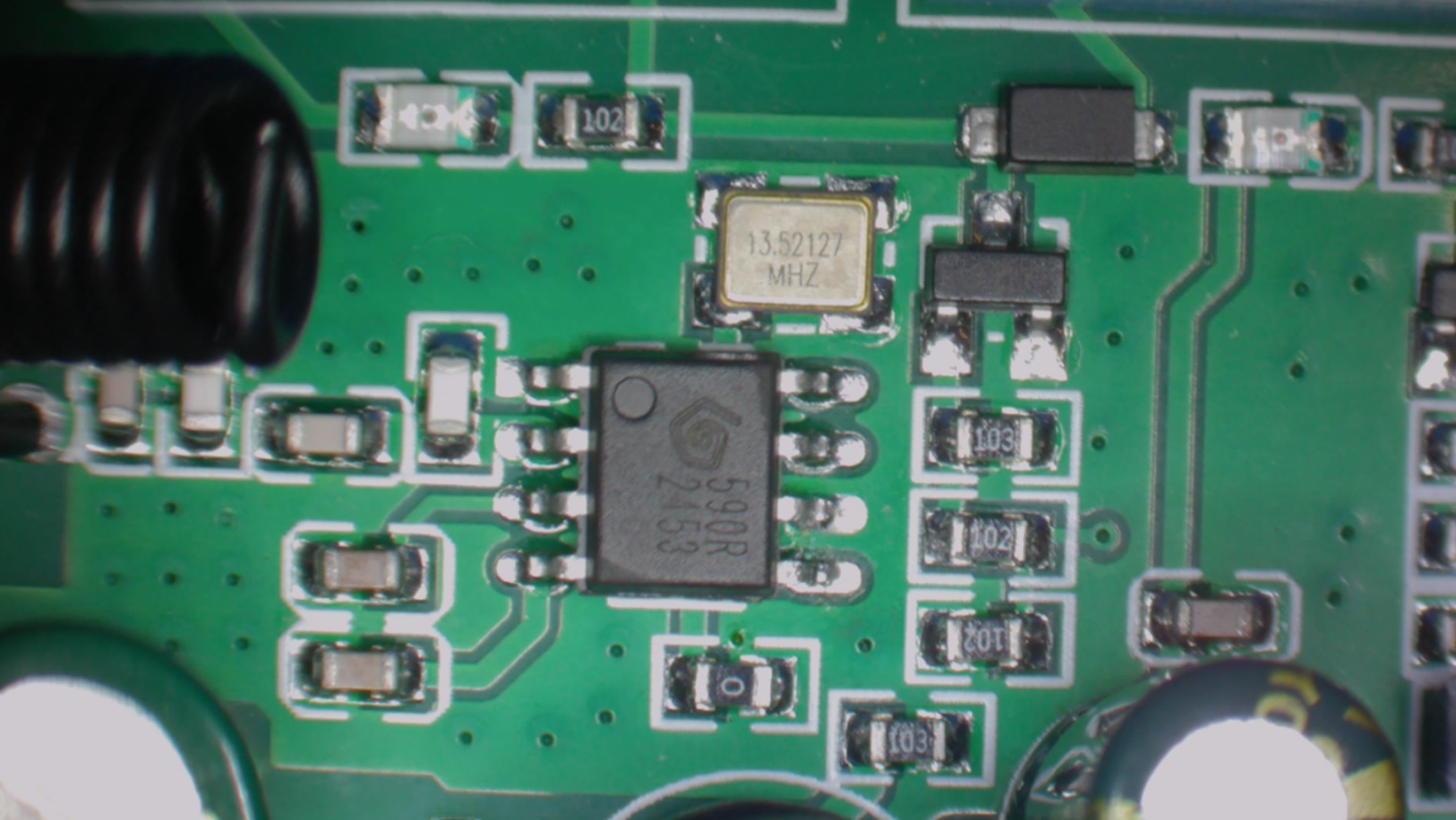
This device features SYN590R (590R), which is connected directly to one of Wi-Fi module pads. It's not connected via external MCU, like on some devices, so in order to utilize it, Wi-Fi chip firmware must have a special driver for it. Luckily, there is such a driver in OBK!
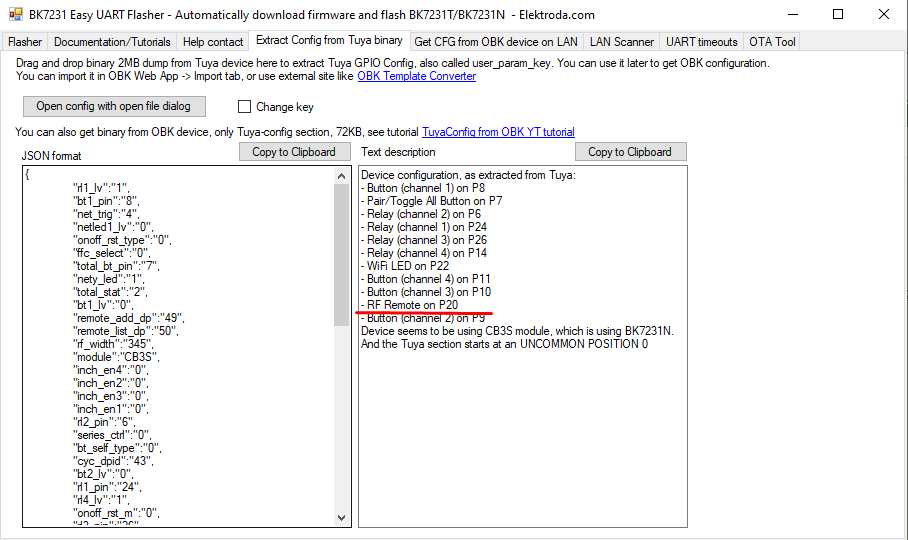
For the flashing part, see our BK7231 flasher page. Our flasher, which is a recommended solution for Beken and other OBK-supported chips, can also detect device configuration:
Import the template and proceed to RF setup:
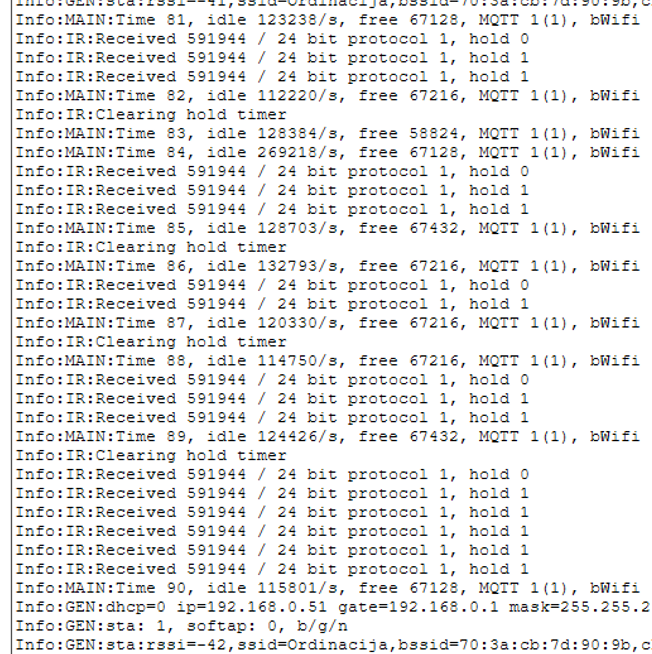
Basic guide for OBK RC driver So, in order to run RC (Radio Control) driver in OBK, you need to set the RCRecv pin (check PCB trace or extract Tuya config if possible) and start the driver with startDriver RC command. Then you will get events and codes in OBK console:
We may add more information or hex format for codes in the future, but the core functionality will remain the same.
Then, to handle events, use the event handler in autoexec.bat:
First argument is always RC, second is remote control code, third is held state - first press has 0 value, further repeats (when the button is held) have a value of 1 there.
If you don't know how to create autoexec.bat, see guide:
https://www.youtube.com/watch?v=kXi8S12tmC8
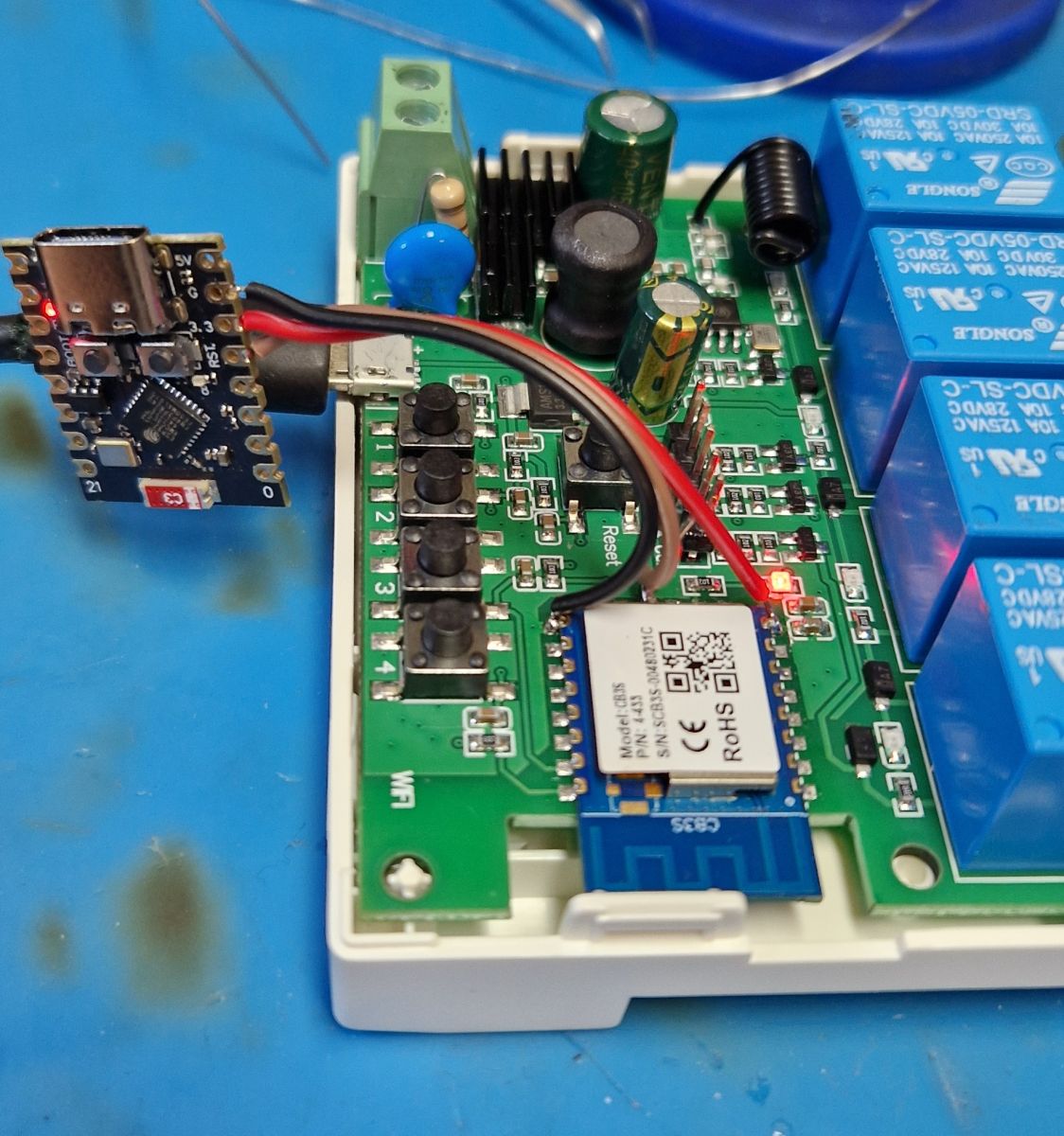
Comparison with Tasmota For the comparison purposes, we've hooked ESP32 flashed with Tasmota to the same receiver:
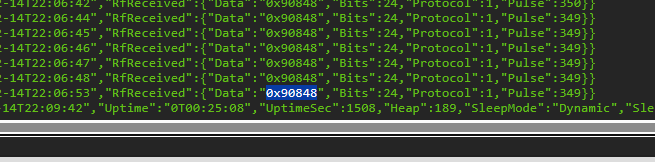
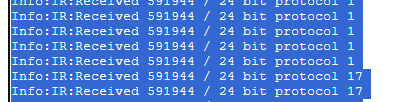
This way, both Tasmota and OBK can see the same signal:
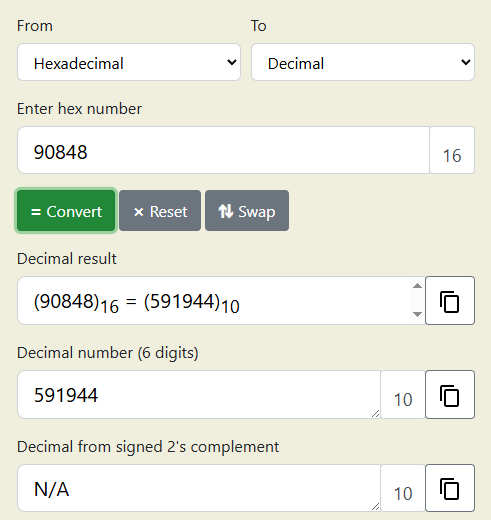
OBK currently uses decimal format for RF code, but a little conversion can clearly show us that the codes are matching, so both solutions are interchangeable.
Sample device config (autoexec.bat) Sample autoexec.bat was based on OBK documentation. It's designed to showcase control of both the same RF device (relays), and other devices directly via their IPs.
The procedure to create autoexec.bat is simple - we just test the remote with OBK console open to see what the code is, and then write the code down.
Autoexec.bat can be rerun without restarting OBK device in many cases, so it's easy to develop quickly.
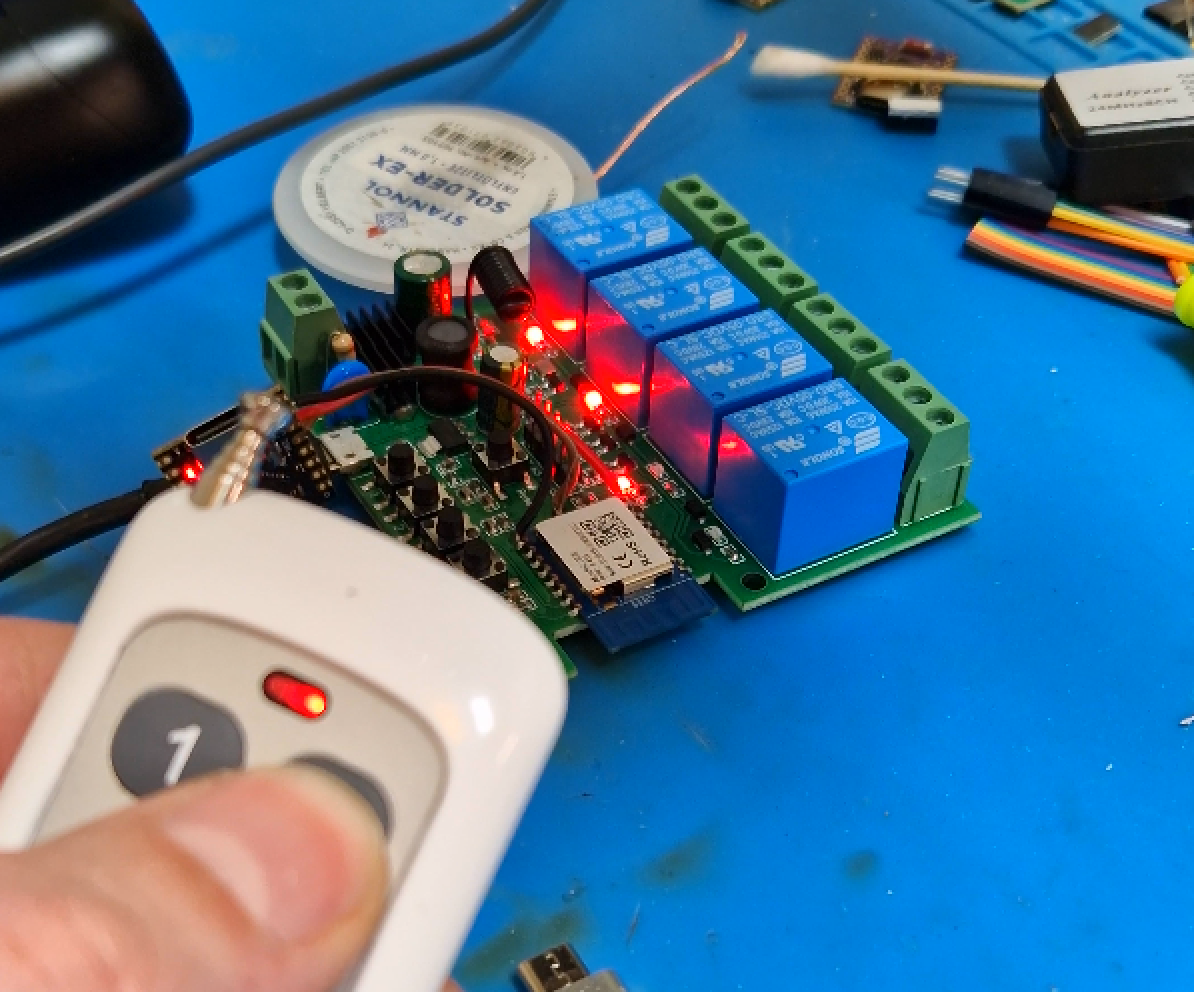
And here is short presentation - first control of the relays device itself:
Then usage of RF device as a gateway to control another device via HTTP GET - the LED strip controller is under the table, it's the device with 192.168.0.58 IP, as you can see in autoexec.bat:
Home Assistant support We're also working on Home Assistant support - it should be released within upcoming days. The published RF format will match Tasmota standard, as can be seen there: https://tasmota.github.io/docs/RF-Protocol/
Summary The following method should work with many RF receivers, including STX882 and so on. It allows you to reuse cheap 433 MHz RF hardware as a flexible automation input without relying on cloud services or vendor firmware. Thanks to event handlers and HTTP/MQTT integration, RF buttons can trigger virtually any action in your local network. The solution scales well, from simple relay toggling to complex multi-device scenes and automations. Combined with MQTT Home Assistant support, OpenBeken turns RF receivers into a powerful and fully open smart-home control layer.
Do you have any devices with RF inputs? Let us know!
About Author
p.kaczmarek2 wrote 14771 posts with
rating 12914 , helped 659 times.
Been with us since 2014 year.
One thing to note is that the remotes that come with these type of devices are Princeton protocol RF remotes. OBK driver recognizes Roger protocol as well and we didn't test beyond that right now but it... [Read more]
divadiow
15 Dec 2025 21:35
great work guys!
regarding this standard mini breaker/switch with RF on P8
https://obrazki.elektroda.pl/5081148700_1765829028_thumb.jpg https://obrazki.elektroda.pl/8964425900_1765829028_thumb.jpg... [Read more]
p.kaczmarek2
15 Dec 2025 21:40
By the way, do you remember those switches where 480RA RF receiver is connected to buttons controller MCU, and not to Wi-Fi module?
Like there: https://www.elektroda.com/rtvforum/topic4110013.html
I... [Read more]
divadiow
15 Dec 2025 23:04
well, yes, though it seems I do have one of those switch types but it does contain remote_io in the config - Bingoelec W601 T34 .
On the other hand, the two other devices I posted about here do... [Read more]
p.kaczmarek2
16 Dec 2025 00:04
Ah, I think the board on photos has USB port, so it's 5 V powered, it's just that I found the 230V-powered version and put the schematic of that.
Thanks for updating template!
RC driver should be... [Read more]
divadiow
16 Dec 2025 20:39
just confirming, is RCRecv an assignment that requires a channel or is the channel field just not auto-hiding like it does for some? [Read more]
p.kaczmarek2
17 Dec 2025 18:28
Channels are not used. This should be hidden. Please hide, if you can. The RF receiver has a single instance and works on only one pin, multiple pins are not supported yet. [Read more]
divadiow
17 Dec 2025 21:21
https://obrazki.elektroda.pl/5983467900_1766003086_bigthumb.jpg
also IOR_BL0937_SEL_n was missing and IOR_LED_WIFI_n was there twice
descriptions ok too?
https://github.com/openshwproje... [Read more]
p.kaczmarek2
17 Dec 2025 21:22
Yes, sure, merged. You may also run docs update now, or I'll run it later. [Read more]
divadiow
17 Dec 2025 21:57
just trying to work out why these are getting generated
https://obrazki.elektroda.pl/8815955100_1766005052_thumb.jpg [Read more]
p.kaczmarek2
17 Dec 2025 22:07
Probably the xml has name with prefix IOR_ and it doesn't like it and tries to create it without this prefix.
Solution: remove manually IOR_ prefix from xml before running getcommands.js [Read more]
divadiow
17 Dec 2025 22:34
found it https://github.com/openshwprojects/OpenBK7231T_App/pull/1905/files#diff-88e5c3500e4bdb2c9a6393afa90653737ecfcaab139d663370f3c95d6d18b5e3 [Read more]
max4elektroda
18 Dec 2025 06:46
Maybe again a point to advocate for a PR I made some time ago to put all "IOR", description, number of channels... in a separate file and generate the source code for new_pins.h and so on (first PR 1773... [Read more]
I currently think that's adding extra dependency for a little gain. Wouldn't it be better to just .... fix getcommands.js to handle missing/extra IOR_ prefix correctly?
I would like to avoid forcing... [Read more]
max4elektroda
23 Dec 2025 08:24
The "problem" I saw is, that you need to change code in different locations, and every change has the (small) chance you break of forget something.
Especially for the forgetting part a one-stop-change... [Read more]
insmod
05 Feb 2026 16:41
https://github.com/openshwprojects/OpenBK7231T_App/pull/1975
Oh, and on RTL8720D (B too, but IR is not enabled on it) minimum timer period is 61us (because 32khz timer), with some modifications IR receive... [Read more]
divadiow
06 Feb 2026 07:36
I didn't have any of this chat in mind, but I did fiddle with getcommands.js so the autogenerated docs like commands-extended.md are now accurate when the same command exists in more than one implementation.... [Read more]
insmod
06 Feb 2026 19:04
I updated RC and old IR drivers to use HAL.
In need of some testing of course.
IR is BK only (since it's still using BK PWM funcs), RC can be enabled on any platform that supports cpp.
Potential... [Read more]
FAQ
TL;DR: Flash a Tuya 4‑channel (433 MHz) relay with OpenBeken, map RCRecv, run startDriver RC, then bind button codes—“all basics covered.” [Elektroda, p.kaczmarek2, post #21781577]
Why it matters: This turns a cheap RF relay into a local, cloud‑free RF hub that can trigger Wi‑Fi devices, scenes, and Home Assistant automations.
OpenBeken is open firmware for BK7231 modules. It adds an RF driver so the SYN590R receiver connects directly to the Wi‑Fi chip. You read button codes, then trigger relays or other devices over HTTP/MQTT. It avoids vendor clouds and works as a flexible RF-to‑Wi‑Fi bridge. “RF buttons can trigger virtually any action.” [Elektroda, p.kaczmarek2, post #21781577]
How do I flash the BK7231 (CB3S) module and detect the device template?
Use the BK7231 GUI Flash Tool from the OpenBeken project. The tool flashes the CB3S module and can auto-detect configuration. Import the detected template into OBK, then proceed to RF setup. Keep the console open to capture RF codes during testing. [Elektroda, p.kaczmarek2, post #21781577]
How do I enable the RF receiver and start seeing codes?
Trace the PCB to find the RCRecv pin, assign it in OBK, then run startDriver RC. Press a remote button and watch OBK’s console to see the decimal RF code and the held-state flag. Use those values in event handlers. [Elektroda, p.kaczmarek2, post #21781577]
What’s the quickest way to bind a remote button to a relay?
Three steps: 1) Capture the button code in the console. 2) Add to autoexec.bat: addEventHandler2 RC <code> 0 ToggleChannel <n>. 3) Save and re-run autoexec to test without rebooting. Map channels 1–4 as needed. [Elektroda, p.kaczmarek2, post #21781577]
Can I control other devices (like smart bulbs or LED strips) from this RF hub?
Yes. Use event handlers to send HTTP commands directly to device IPs, or publish via MQTT. The example shows an RF button toggling a Wi‑Fi LED strip at 192.168.0.58 using SendGet. This provides local, low‑latency control with no cloud. [Elektroda, p.kaczmarek2, post #21781577]
How does held vs. single press work in OBK’s RC driver?
OBK exposes a held-state parameter in events. First press sets the third argument to 0. Holding the button generates repeats with the value 1. Use addEventHandler2 to branch behavior by that flag. This enables press-and-hold actions. [Elektroda, p.kaczmarek2, post #21781577]
Does this approach work if the RF receiver is behind an external MCU?
If the SYN590R output goes into a separate MCU, the Wi‑Fi chip will not see raw RF data. OBK’s RC driver needs the receiver wired to a BK7231 pad. In MCU‑mediated designs, use the MCU’s protocol or modify hardware. [Elektroda, p.kaczmarek2, post #21781577]
How does OpenBeken compare to Tasmota for 433 MHz remotes?
The demo feeds the same RF signal to OBK and a Tasmota ESP32. After converting OBK’s decimal code, both match. This means remotes and automations are interchangeable. Upcoming HA support will follow Tasmota’s RF format. [Elektroda, p.kaczmarek2, post #21781577]
What is the SYN590R and why was it chosen?
SYN590R is a 433 MHz RF receiver used on the Tuya 4‑channel board. It connects directly to a BK7231 pad, making it ideal for OBK’s RC driver. This eliminates a middle MCU and reduces latency and complexity. [Elektroda, p.kaczmarek2, post #21781577]
What is Tuya in this context?
Here, “Tuya” refers to the showcased 4‑channel 220 V AC Wi‑Fi relay module sourced from AliExpress. It ships with one RF remote, and you can add more. The board carries a CB3S (BK7231) module and a SYN590R receiver. [Elektroda, p.kaczmarek2, post #21781577]
How do I structure an autoexec.bat for multiple buttons and scenes?
Use one line per button code. Example shows mappings for channels 1–4, plus all‑on and all‑off. Add HTTP calls to control other IP devices. You can re-run autoexec without rebooting for fast iteration. Keep codes readable and documented. [Elektroda, p.kaczmarek2, post #21781577]
Is there a Home Assistant integration?
Yes, support is being finalized. The published RF format will match Tasmota’s documented standard. That ensures simple pairing with existing RF automation flows in HA once released. Watch for builds in the coming days. [Elektroda, p.kaczmarek2, post #21781577]
What failures should I expect, and how do I debug them?
If no codes appear, verify the RCRecv pin mapping and that startDriver RC ran. Check whether the RF path goes through an external MCU, which OBK cannot read. Use the console to confirm codes and the held-state flag. [Elektroda, p.kaczmarek2, post #21781577]
Can one RF hub trigger multiple Wi‑Fi devices at once?
Yes. Use multiple addEventHandler2 lines for the same code to call several actions. You can toggle relays locally and fire HTTP/MQTT commands to other devices for scenes. This scales from one relay to whole‑home actions. [Elektroda, p.kaczmarek2, post #21781577]
Do I need internet or cloud accounts for this to work?
No. All examples use local networking. OBK handles RF reception on‑device, and actions run via local HTTP or MQTT. This yields privacy, resilience, and fast response even if the internet drops. [Elektroda, p.kaczmarek2, post #21781577]
What concrete example stats should I copy from the guide?
The sample uses RF codes like 591944–591950, mapping to four channels, all‑on, and all‑off. First press=0, hold=1. Reuse this structure with your own captured codes for consistent behavior. [Elektroda, p.kaczmarek2, post #21781577]
AI summary based on the discussion. May contain errors.








Comments
One thing to note is that the remotes that come with these type of devices are Princeton protocol RF remotes. OBK driver recognizes Roger protocol as well and we didn't test beyond that right now but it... [Read more]
great work guys! regarding this standard mini breaker/switch with RF on P8 https://obrazki.elektroda.pl/5081148700_1765829028_thumb.jpg https://obrazki.elektroda.pl/8964425900_1765829028_thumb.jpg... [Read more]
By the way, do you remember those switches where 480RA RF receiver is connected to buttons controller MCU, and not to Wi-Fi module? Like there: https://www.elektroda.com/rtvforum/topic4110013.html I... [Read more]
well, yes, though it seems I do have one of those switch types but it does contain remote_io in the config - Bingoelec W601 T34 . On the other hand, the two other devices I posted about here do... [Read more]
Ah, I think the board on photos has USB port, so it's 5 V powered, it's just that I found the 230V-powered version and put the schematic of that. Thanks for updating template! RC driver should be... [Read more]
just confirming, is RCRecv an assignment that requires a channel or is the channel field just not auto-hiding like it does for some? [Read more]
Channels are not used. This should be hidden. Please hide, if you can. The RF receiver has a single instance and works on only one pin, multiple pins are not supported yet. [Read more]
https://obrazki.elektroda.pl/5983467900_1766003086_bigthumb.jpg also IOR_BL0937_SEL_n was missing and IOR_LED_WIFI_n was there twice descriptions ok too? https://github.com/openshwproje... [Read more]
Yes, sure, merged. You may also run docs update now, or I'll run it later. [Read more]
just trying to work out why these are getting generated https://obrazki.elektroda.pl/8815955100_1766005052_thumb.jpg [Read more]
Probably the xml has name with prefix IOR_ and it doesn't like it and tries to create it without this prefix. Solution: remove manually IOR_ prefix from xml before running getcommands.js [Read more]
found it https://github.com/openshwprojects/OpenBK7231T_App/pull/1905/files#diff-88e5c3500e4bdb2c9a6393afa90653737ecfcaab139d663370f3c95d6d18b5e3 [Read more]
Maybe again a point to advocate for a PR I made some time ago to put all "IOR", description, number of channels... in a separate file and generate the source code for new_pins.h and so on (first PR 1773... [Read more]
all sounds very good! [Read more]
I currently think that's adding extra dependency for a little gain. Wouldn't it be better to just .... fix getcommands.js to handle missing/extra IOR_ prefix correctly? I would like to avoid forcing... [Read more]
The "problem" I saw is, that you need to change code in different locations, and every change has the (small) chance you break of forget something. Especially for the forgetting part a one-stop-change... [Read more]
https://github.com/openshwprojects/OpenBK7231T_App/pull/1975 Oh, and on RTL8720D (B too, but IR is not enabled on it) minimum timer period is 61us (because 32khz timer), with some modifications IR receive... [Read more]
I didn't have any of this chat in mind, but I did fiddle with getcommands.js so the autogenerated docs like commands-extended.md are now accurate when the same command exists in more than one implementation.... [Read more]
I updated RC and old IR drivers to use HAL. In need of some testing of course. IR is BK only (since it's still using BK PWM funcs), RC can be enabled on any platform that supports cpp. Potential... [Read more]