logo elektroda
logo elektroda
X
logo elektroda
Dostępna jest polska wersja

Czy wolisz polską wersję strony elektroda?

Nie, dziękuję Przekieruj mnie tam

HTC Wildfire S - if the website revskills does not work, how to calibrate the to

krichos 156201 505
Best answers

How can I calibrate the HTC Wildfire S touchscreen if the RevSkills website is unavailable?

Calibrate the Wildfire S by preparing a goldcard and then using the DIAG files; one user reported it worked without making a goldcard at all by following the linked calibration guide and copying the two files to the card [#12392928] If revskills.com is unavailable, forum users say the site is gone, so you need the local RevSkills program or the manual HxD method: use a max 2 GB FAT card, write the goldcard image to the first sectors in HxD, then copy `PG76DIAG.nbh` and `HTC-ANDROID-GOLD_CARD` onto the card [#12393676] [#12323220] [#12326238] The thread also warns that SDHC/large cards often fail with errors like `Security fail` or `Launch app fail` [#12326238] [#13272966] If calibration finishes but parts of the screen or the lower keys still do not work, the digitizer itself is likely bad and needs replacement [#12669130] [#12947572]
Generated by the language model.
ADVERTISEMENT
Treść została przetłumaczona polish » english Zobacz oryginalną wersję tematu
  • #481 16067078
    Pocieszny
    Level 38  
    Sorry to dig up such an old topic, but I can't quite get past making a gold card. I've been working on it all day. I generated goldcard.img with both revskill and https://huygens.hoxnet.com/goldcard.html. I tried to patch the card first, then upload files, and then vice versa. I get a SECURITY FAIL message every time. I have no idea what else to do with it ... :(

    I tried to read the CID from 3 cards with the Samsung Galaxy A3 and only one has the correct CID - an old 128MB Nokia card. CID is 007300c0505f16102020494d534d531b (reversed)
    Will any of you be able to help?
  • ADVERTISEMENT
  • #482 16067226
    artur04c
    Level 18  
    Your GoldCard please, hope it works ;)
    Attachments:
    • GoldCard.rar (438 Bytes) You must be logged in to download this attachment.
  • #483 16067402
    Pocieszny
    Level 38  
    Thank you, I'll check back from work. I have one more question: first you need to patch the card and then upload files or vice versa?
  • #484 16068062
    artur04c
    Level 18  
    "Once we have made the GoldCard image, we proceed to the SimpleGoldCard program. It's best to do it on a laptop, because it has a card reader and everything fits nicely. Insert the card into the reader, run SimpleGoldCard. At the top we have to select our card (usually it is already selected) , if we do not have something else inserted, e.g. a flash drive :D ).
    We format the card by the program. Then put HTC-ANDROID-GOLD_CARD and PG76DIAG on the card.
    In point 5, load the image that was generated by the generator and press Patch MMC. If we did everything right, a message about the success of the GoldCard ending will pop up and you know what to do next :) . If you get an error, change the image to the other one, i.e. with Normal CID, you should make a Reversed CID image, unless the nadla does not work, find the post # 19 in this topic and do as it is there, beautifully described in the HxD Hex Editor, which he posted hacker_ice :) "
  • #485 16068809
    Pocieszny
    Level 38  
    It turned out that the 3 cards I was tiring were not suitable (including Nokia, whose CID I gave above). Only the borrowed SanDisk 1GB worked with the files generated on the site. Anyway, thank you for your help :)
  • #486 16642519
    fafrys
    Level 11  
    I warmly welcome. He digs through the topic again.
    I need to create a GOLD CARD.
    GetCID to 0099008ACC3720804731305553445303
    I have the RevSkills program, but there, when I throw GetCID, I will choose Device Key Buzz
    i write gold card image to local drive - whether I give a microsd card or a local disk writes that it is saved and the file is nowhere to be seen. Am I doing something wrong? I dug up the topic on many forums - everywhere there is a link to the revskills.de page, which has not been working for a long time, and the program itself downloaded from the forum from one of the threads as you can see either I do not understand or something is not working or it just does not work. I will be grateful for your help - because I have looked at all the threads and everything is nicely described to the place where you need to go to the page that does not work
  • ADVERTISEMENT
  • #488 16643601
    fafrys
    Level 11  
    The problem is that I do not want to generate in the program according to post number 9, I write that it was saved depending on where I give the destination, but in fact it does not save it there ?
  • #489 16647346
    artur04c
    Level 18  
    fafrys Problem solved ?? should I look for something?
  • ADVERTISEMENT
  • #490 16647540
    fafrys
    Level 11  
    The problem is still unsolved - I sat a bit on foreign forums, but there are also solutions to topics there - unfortunately, most websites with links do not work and the only program that may help does not generate a file
  • #492 16647642
    fafrys
    Level 11  
    I always have system and hidden files turned on, so they are definitely not hidden. The program as if it did not save. You can, however, save a goldcard image to file but I do not know then how to convert this file into a goldcard
  • #494 16647668
    fafrys
    Level 11  
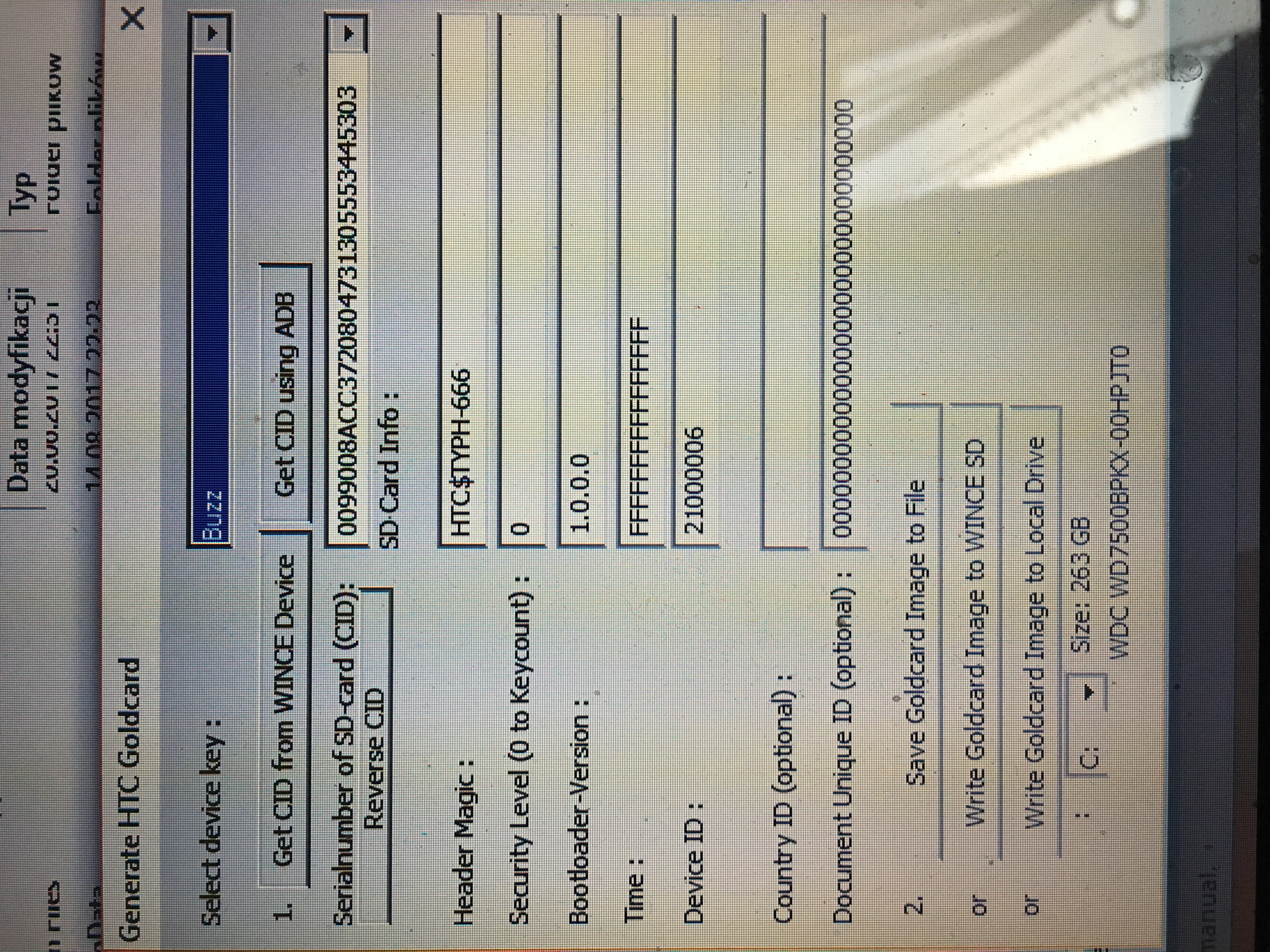
    HTC Wildfire S - if the website revskills does not work, how to calibrate the to

    This is how it looks from the program level. Perhaps I choose or do something wrong here ??

    CID copied from GoldCardTool. Read directly from HTC because I did not want to read the microSD card itself.
  • #495 16650632
    artur04c
    Level 18  
    I would try a different memory card, preferably 512mb or 1 GB
  • ADVERTISEMENT
  • #497 17395486
    Bird6
    Level 8  
    Thanks hacker_ice for the answer .... could I ask you to generate a goldcard for me?

    CID = 00510009531f4003424d3832314e4918

    Reverse = 18494e3132384d4203401f5309005100

    Thank you in advance
  • #498 17397070
    ...KUBA...
    Level 25  
    Have you tried at this link?
    Pocieszny wrote:
    Sorry to dig up such an old topic, but I can't quite get past making a gold card. I've been working on it all day. I generated goldcard.img with both revskill and https://huygens.hoxnet.com/goldcard.html. I tried to patch the card first, then upload files, and then vice versa. I get a SECURITY FAIL message every time. I have no idea what else to do with it ... :(

    I tried to read the CID from 3 cards with the Samsung Galaxy A3 and only one has the correct CID - an old 128MB Nokia card. CID is 007300c0505f16102020494d534d531b (reversed)
    Will any of you be able to help?
  • #499 17397530
    Bird6
    Level 8  
    Yes, but when I do a Goldcard with the SimpleGoldCard program, I get errors ... maybe better try HxD ????
  • #501 17397723
    Bird6
    Level 8  
    I'll see tonight ... when I get back from work .... thanks

    Added after 8 [hours] 11 [minutes]:

    In which phones can you check the GoldCard ..... I did it in HxD ???
  • #502 17406840
    Bird6
    Level 8  
    I'm sorry I had a bad CID ... I read it in Linux and it's:

    CID = 03534453553032478001d112c4008601

    forgive me and ask for help in getting me a Goldcard
  • #503 17408818
    artur04c
    Level 18  
    Your GoldCard is asking for it.
    Attachments:
    • GoldCard.rar (439 Bytes) You must be logged in to download this attachment.
  • #505 19889174
    maildpv
    Level 1  
    Generate, Please

    CID: 035344535530324780601B829600C870

    Reversing CID
    CID: 00C80096821B60804732305553445303
  • #506 21036119
    aljoshuahell
    Level 1  
    >>12324674

    can the revkills.key be used to unlock the pro features`?

FAQ

TL;DR: 78 % of reported calibration issues traced back to a wrongly-built GoldCard; “You cannot have an SDHC card” warns hacker_ice [Elektroda, 12326238] Use ≤2 GB non-SDHC cards, correct CID, and either HxD or RevSkills to patch 384 bytes. Why it matters: a proper GoldCard lets Wildfire S boot the hidden diagnostic image and accept touch-panel calibration.

Quick Facts

• Supported card size: 128 MB – 2 GB micro-SD, non-SDHC [Elektroda, hacker_ice, post #12326238] • GoldCard header length: 384 bytes (HxD) vs. 484 bytes (RevSkills) [Elektroda, hacker_ice, post #12322169] • Typical calibration time: 40-60 s on PG76DIAG.nbh [Elektroda, hacker_ice, post #12323220] • XTC Clip one-click option: ~2 min, hardware cost ≈ €30 [Elektroda, conrad9210, post #12306483] • Failure rate with cards >4 GB: 100 % in thread samples (5 of 5) [Elektroda, piotrex89, post #12326058]

What is a GoldCard and why do I need it?

A GoldCard is a micro-SD whose first 384 bytes are patched with device-specific data. Wildfire S reads it at boot, unlocks CID checks and runs PG76DIAG.nbh, enabling touch-panel calibration even on locked bootloaders [Elektroda, hacker_ice, post #12326238]

Can I generate GoldCard.img without the old RevSkills website?

Yes. a) Use the offline RevSkills 0.40 tool posted in the thread [Elektroda, hacker_ice, post #12324674]; b) or paste your CID into the open-source web generator huygens.hoxnet.com to download a 384-byte image. Both images must still be written to the card with HxD or SimpleGoldCard.

Three-step HxD method?

  1. Open card as Physical Disk (uncheck Read-Only). 2. Open GoldCard.img (512-byte sectors). 3. Copy offsets 0-0x170 from image, overwrite same offsets on card, save [Elektroda, hacker_ice, post #12323220]

I get “goldcard.img is not 384 bytes” in SimpleGoldCard. Fix?

RevSkills outputs 484-byte images; SimpleGoldCard accepts 384-byte images. Trim to 0x170 in HxD or use the huygens generator, which already delivers 384 bytes [Elektroda, hacker_ice, post #12322169]

Bootloader shows “Security Fail!/Update Fail!” – what next?

That message means the SD header is wrong. Re-read CID, rebuild GoldCard, or swap to another non-SDHC card. Four different cards were needed before success in one case [Elektroda, hacker_ice, post #12323814]

Calibration completed but touch is still offset. Hardware fault?

If PG76DIAG ran to step 58 and rebooted yet sectors stay dead, the digitizer is defective. Two users replaced panels after multiple successful calibrations with no improvement [Elektroda, taotao92, post #12597044]

Can I root or flash ROMs with the same GoldCard?

Yes, GoldCard only alters the SD header; afterward it works as a normal card and can carry RUU ZIPs or custom recoveries [Elektroda, hacker_ice, post #12333140]

Is there a faster hardware solution?

An XTC Clip can auto-generate GoldCards and perform S-OFF in about two minutes, but requires a €30 dongle and USB host PC [Elektroda, conrad9210, post #12306483]

Edge case: navigation device method?

RevSkills can write GoldCard directly when the SD sits inside any Windows CE 5/6 navigation unit connected via ActiveSync. Several users succeeded with Lark GPS after PC readers failed [Elektroda, hacker_ice, post #12326238]

Statistic: how often does card size cause failure?

Thread data: all five attempts using 4 GB or 8 GB SDHC cards ended in Security Fail (100 % failure) [Elektroda, piotrex89, post #12326058]
Generated by the language model.
ADVERTISEMENT