logo elektroda
logo elektroda
X
logo elektroda
Dostępna jest polska wersja

Czy wolisz polską wersję strony elektroda?

Nie, dziękuję Przekieruj mnie tam

Internet module ecoNet 300 and ecoLINK2

jamrjan 184743 679
Best answers

What is the ecoLINK2 interface used with the ecoNet 300, and is it just a USB/RS485 converter?

ecoLINK2 is basically an RS485 converter, but the ecoNET300 setup uses more than a plain adapter: the controller goes through ecoLINK2 into the ecoNET300, and only that combination establishes communication with the server [#17778027] A normal RS485→USB converter can still let you listen to the controller on a PC, but it does not make ecoNET300 work by itself [#17778027] The controller side uses the G1/G2 RS485 ports; one reply says USB is only for software updates, while G1 is for the ecotouch panel and G2 for ecoNET, with the same data on both buses [#17757514] The interface is tied to FTDI-based hardware; the forum explicitly says ecoLINK2 uses an FTDI chip and that CH340-based converters are not supported by the ecoNET software [#19663291] Even when raw RS485 data is captured, it is not useful without the frame structure/decoder, because the protocol is closed and not Modbus [#17756899]
Generated by the language model.
ADVERTISEMENT
Treść została przetłumaczona polish » english Zobacz oryginalną wersję tematu
  • #91 18289441
    przemo_ns
    Level 11  
    Sławek, what's your hardware version of this mr3020?
  • ADVERTISEMENT
  • #92 18289455
    SławekSS
    Level 24  
    i bought on monday now, i have version 3.20
  • #93 18289483
    przemo_ns
    Level 11  
    There were ftdi libraries on the econet, i.e. for the bank you must have a usb-485 converter on this scalak
  • ADVERTISEMENT
  • #94 18289491
    miszko
    Level 15  
    So there is a good chance that the converter I have (such as usb-> rj485) will be ok, mine is also for ftdi. Today I will buy mr3020 and connect my converter which I am currently using.
  • #95 18289546
    SławekSS
    Level 24  
    Or maybe you know the password to the terminal?

    I have a raspberry converter, I don't know if it will connect
  • ADVERTISEMENT
  • #96 18289635
    przemo_ns
    Level 11  
    Change / etc / shadow in the file before the upgrade and after the problem :)

    Added after 2 [hours] 1 [minutes]:

    I have replaced the firmware-mod-kit with the root scripts: root, I hope it will not crash the router.
    Attachments:
    • root_eco.bin (4.5 MB) You must be logged in to download this attachment.
  • #97 18290926
    miszko
    Level 15  
    Unfortunately, my MR will be with me on Friday ..

    SławekSS wrote:
    I have a raspberry converter, I don't know if it will connect
    As for ftdi it will start. If you have access via SSH, you can find out under which "device" (file) the USB is present. For me, on another tplink under openwrt, this adapter is under / dev / ttyUSB0
    I wonder if it is similar in this mr3020. If so, I think it should be done.
  • #98 18291011
    SławekSS
    Level 24  
    I released mr

    I wanted to upload this file from przemo_ns and made a mistake.
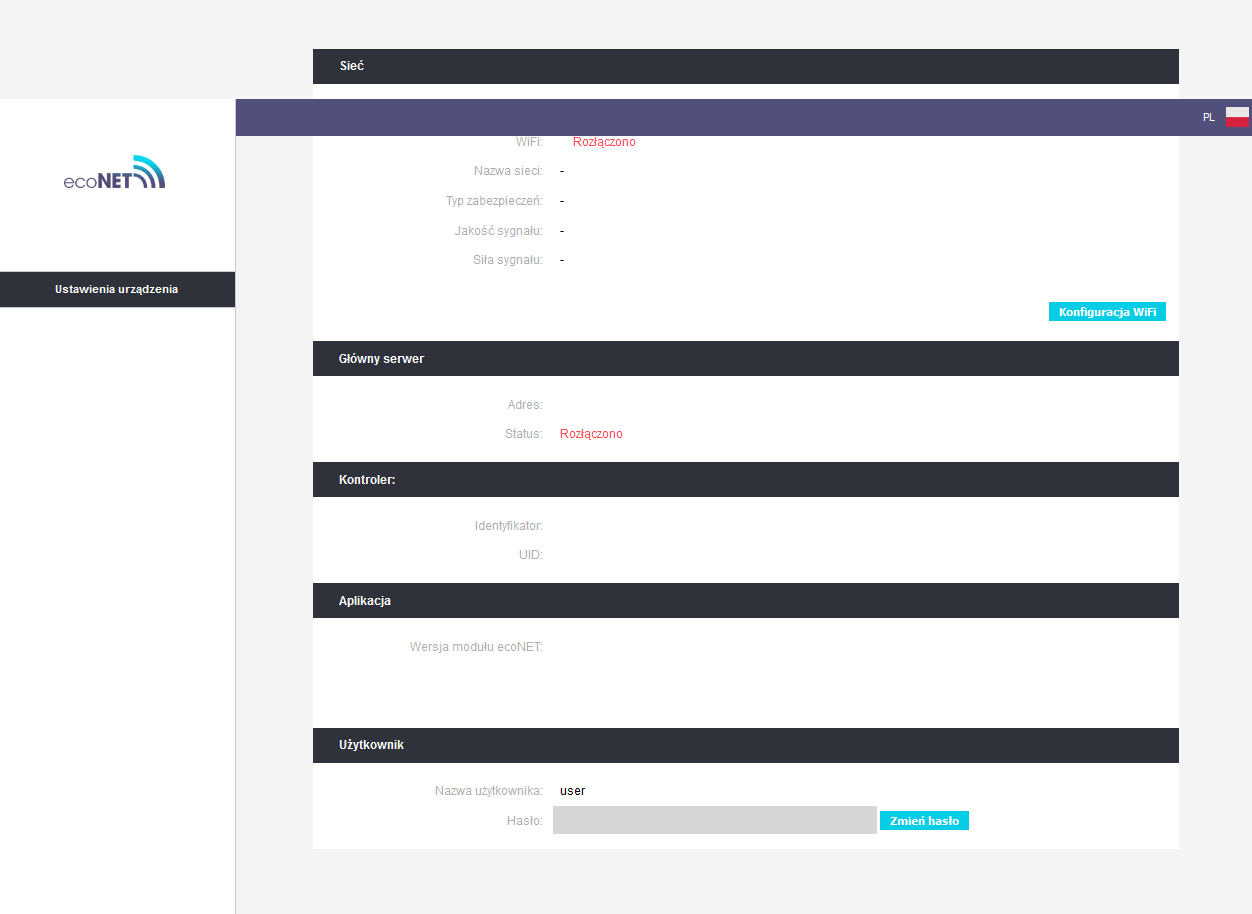
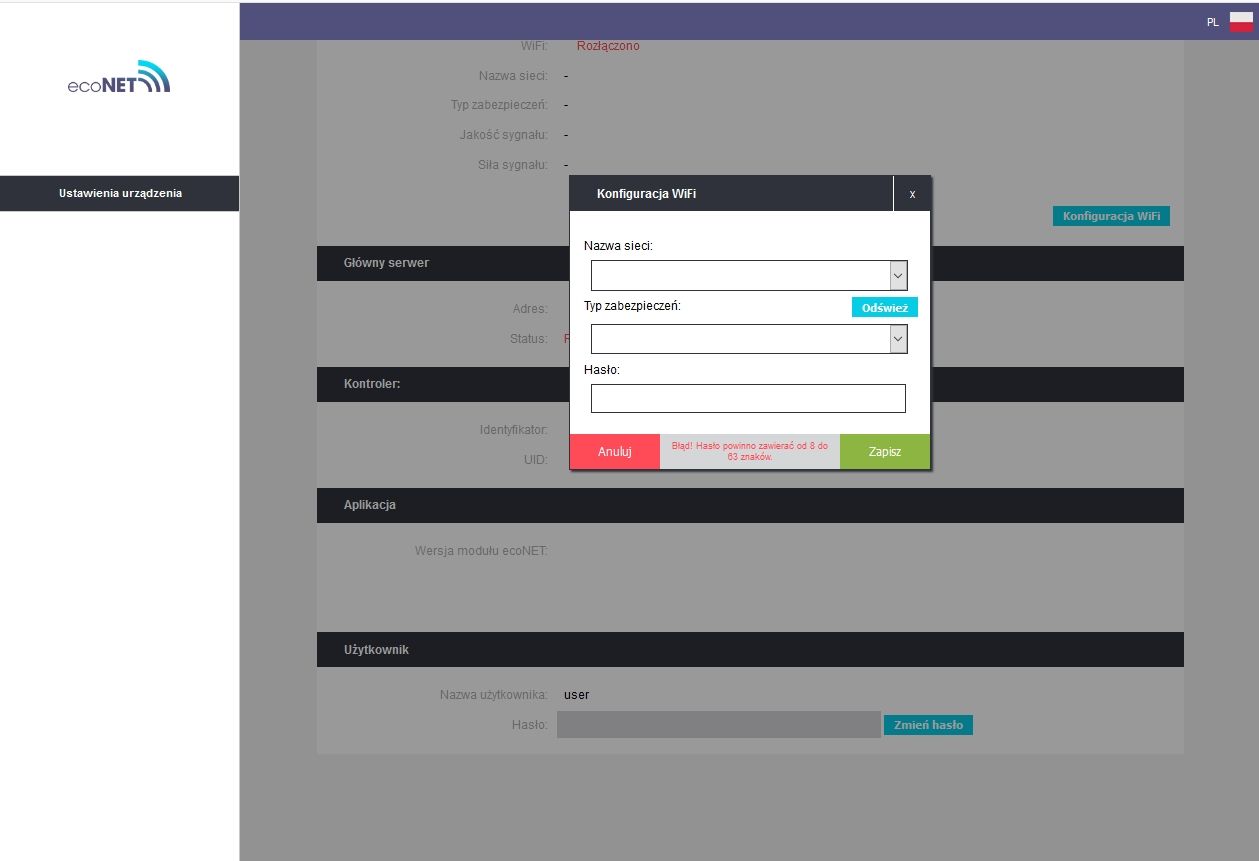
    Due to the fact that it was not possible to upload econeta via the website, I tried to upload pure openwrt and bryndz via tftpd. it kind of uploads, but it starts up strangely. It connects to the network via spanking, no openwrt, while accessing the website shows some remnants of the econet Internet module ecoNet 300 and ecoLINK2
    and when you try to enter and search for wifi, it does not show any AP (it did not show before it worked) Internet module ecoNet 300 and ecoLINK2
  • #99 18291179
    maslak
    Level 14  
    How he talks, you did not release :) do you have access to an external programmer? For example tl866? Tomorrow I will also insert a corrected bin because in mine I did not delete the shadow ~ file which was created when I edited the original one.
  • #100 18291737
    coorass
    Level 11  
    webster21 wrote:
    Has anyone ever had fun sending a signal? (e.g. control of the set temperature)?


    hi
    I connected it to domoticz, I wrote 2 scripts to turn the stove on and off from the domoicz level - tested and works

    In addition, I launched the entire environment on raspberrypi 3b + and it worked fully - it read the UID from the furnace sent to the pluma systems and thus allowed to register the device, so you do not even need a router for this (although with this tplink it is certainly easier)

    in the ecomax.py file in the parseCurrentData function, at the end add print (self.data)
    and after running the whole thing (i.e. the fcgi_srv.py file) it writes something like this:
    {"mixerTemp5": null, "tempExternalSensor": 6.422296047210693, "thermostat": 0, "pumpCOWorks": true, "mixerSetTemp5": 33, "mixerPumpWorks4": false, "mixerPumpWorks5": false, "mixerPumpWorks6": false, "mixerPumpWorks1": true, "mixerPumpWorks2": true, "mixerPumpWorks3": false, "statusCWU": 0, "tempCO": 50.95558166503906, "fuelLevel": 0, "pumpCO": true, "tempBack": 47.59403991699219, "contactGZCActive": false, "mixerTemp3": null, "mixerTemp2": 50.59532165527344, "statusCO": 26, "boilerPower": 0, "pumpCWUWorks": false, "pumpCirculation": true, "pumpFireplace": false, "mode": 4, "pumpSolar": false, "mixerTemp6": null, "mixerTemp1": 23.712448120117188, "mixerSetTemp4": 33, "tempCOSet": 65, "mixerSetTemp6": 33, "pumpSolarWorks": false, "mixerSetTemp1": 24, "pumpCWU": true, "mixerSetTemp3": 33, "mixerSetTemp2": 60, "mixerTemp4": null, "boilerPowerKW": null, "tempCWUSet": 55, "contactGZC": false, "pumpCirculationWorks": false, "fuelStream": null, "transmission": 0, "tempFlueGas": 53.82137680053711, "pumpFireplaceWorks": false, "tempFeeder": 36.07933044433594, "tempCWU": 51.562164306640625, "fanPower": 0.0

    So everything that can be read from the furnace
    Attachments:
    • on-of-econet.zip (1.71 KB) You must be logged in to download this attachment.
  • #101 18292233
    SławekSS
    Level 24  
    Hello after the break :)
    Econet works.
    Yesterday it was so late that I did not notice that after uploading a clean openwrt router got a different IP address and I was looking for the old one.
    What I was pasting was a browser cashe.

    Binarka from przemo_ns works and you can easily enter the router after SHA a user and pass to root.
    This program is very stripped down, loads of modules fail to run, even opkg, ls etc.
    dmeg works.
    As for usb and interface connection, only drivers for ftdi232 are loaded. no other will work.
    I tried to upload to the ch431 chipset, but it does not go.
    In any case, the econet is alive.
  • #102 18292333
    maslak
    Level 14  
    I want to make a chipwishper lite (pcb trimmed to 82x60 4 layers) to get the AES keys from the driver, someone hooks up to the pcb I wanted to order 5 from JLC at cost (no gilding, with shipment for around 35 $) and solder by hand. Unless someone can resell such a PCB for a chipwishper lite?

    Added after 10 [minutes]:

    Well, you could now be tempted to make a module with a lambda probe. Because the original one is at masquerade prices.
  • #103 18293081
    miszko
    Level 15  
    coorass wrote:
    In addition, I launched the entire environment on raspberrypi 3b + and it worked fully - it read the UID from the furnace sent to the pluma systems and thus allowed to register the device, so you do not even need a router for this (although with this tplink it is certainly easier)


    I also fired the econet on tplink. It was a bit of fun, first of all you had to add a few things that they provide. Including it was flup, installing lighttpd (plus mods: auth, authn_file, fastcgi), fastcgi. I did not run fastcgi, because it is starting to search USB ports in search of a device, and I am currently busy. In the /var/econet.log logs you can see that they have rigidly assigned references to the LED control, but this is not a problem, because symlinks can be used to solve the problem. I'll play tomorrow. I can see "almost" over. If it grabs the USB correctly (I have ftdi), it should already see it.

    maslak wrote:
    I want to make a chipwishper lite (pcb cut to 82x60 4 layers) to get the AES keys from the driver

    What will you want to do next? Extract driver code and modify it?
    If something - well, I can contribute to the collection ;)
  • ADVERTISEMENT
  • #104 18293320
    przemo_ns
    Level 11  
    How to hack it to the end :) , now I would focus on making lambda, does anyone have this module and could do some communication?
  • #105 18294084
    miszko
    Level 15  
    Today my mr3020 came. First, openwrt via tftp, then Przemek's binary. I connected my USB-> RS485 converter (https://www.digitus.info/de/produkte/computerkomponenten/computer-peripheriegeraete/seriell-parallel-adapter/da-70157/) and the econet saw the stove. Suddenly there was silence in the logs (there was still information that he was looking for a USB device). Besides, I didn't notice any errors in the logs. On the app's website (the one served with mr3020), after logging in, I got my UID, I can see all the data correctly and also all my elements that I have attached to the stove. I also fired it on TP-Link TL-WDR3600 v1, which I am currently using to collect data from the furnace (also OpenWRT 18.06). So as for the hardware itself, it can be a different tplink, as long as it has a USB port and you need to redo the references to the LEDs, because the scripts have hardly any references and spam in the logs.
    Attachments:
    • Internet module ecoNet 300 and ecoLINK2 ecomax uuid.PNG (19.27 KB) You must be logged in to download this attachment.
  • #106 18297445
    popek111111
    Level 11  
    coorass wrote:
    in the ecomax.py file in the parseCurrentData function, at the end add print (self.data)


    Is this ecomax.py script available somewhere?
    And the second question: can parameters be changed in the service menu using the script?
    Thank you and best regards.
  • #107 18297578
    miszko
    Level 15  
    Please follow the last two pages of this thread. There is an attachment with all of this (www.tar.gz). As for the second - yes, as long as you guess what bit needs to be changed (because it's just a matter of sending the appropriate message to the driver), yes. A few posts above you have an example of how to turn off / on the stove. So you can rely on what to do with communication and make some extra money.
  • #108 18305019
    SławekSS
    Level 24  
    przemo_ns wrote:
    does anyone have this module and could do a communication rick?
    I have it, but I have no idea how to rip it, besides, for now I am with the boiler once a week, I haven't had time to connect my econet yet. I mean, I connected it 2 weeks ago, but it did not speak, I had a bad converter, one from a raspberry.
  • #109 18305850
    miszko
    Level 15  
    SławekSS wrote:
    I had a bad converter, one from a raspberry.

    I once bought mine on alledrogo (offer number 7126998882). It was fine with me.

    @przemo_ns I will try to dump communications. I understand that you mean a slip of the part that goes to the stove or to the Internet?
  • #110 18305918
    maslak
    Level 14  
    Guys, now you do not need to take a ripping, if you have a complete econet parser, it is already complete, another matter to do a ripping with the lambda probe module, because I have not found anything on this topic in the econet, maybe you have spotted something? If we had what frames come out of the original lambda you could make your own module that would sound like an original one.
  • #111 18305965
    SławekSS
    Level 24  
    @miszko , I already have a good one on ftdi232rl and it can see this econet, but I will connect it only on Saturday, but I have an ecomax 860P2.

    @maslak , I have ecolambda, but I can't rip packages.
  • #112 18306165
    maslak
    Level 14  
    Send the data of this rs485 converter from pi which did not work with the econet, because you can connect it to the pluma bus in parallel to other devices and make a ripping, e.g. with a minicom
    Code: Bash
    Log in, to see the code

    on pi or can be connected to a normal pc and do a rip, e.g. Terminal by Br @ y.
  • #113 18309984
    maslak
    Level 14  
    @miszko where did you buy MR and what hardware version?
  • #114 18310347
    miszko
    Level 15  
    I wanted to buy stationary, but it is practically unavailable anymore. I bought through alledrogo - auction number 8557280721. Shipment by parcel machine, the seller ships quickly. I can see the price increased by PLN 5 since my purchase; (

    HW version v3.20.

    I fired it on some static tplink, but there are problems. Some things in the code are adapted to this MR and I'm not talking about these references to LEDs. I haven't debugged it yet, but the process of connecting to their services is somehow based on the MAC address. He runs MR immediately.

    As for lambda, ecomax920 probably does not exist anymore, only those with lower numbering, like yours, still have probe support.
  • #115 18311279
    SławekSS
    Level 24  
    miszko wrote:
    As for lambda, ecomax920 probably does not exist anymore, only those with lower numbering, like yours, still have probe support.
    you have the probe support, only after connecting the module the options appear, they are hidden and invisible ..
    maslak wrote:
    Send the data of this rs485 converter from pi which did not work with econet
    such on ch340 https://www.reichelt.com/pl/pl/malina-pi-z-32...788&gclid=Cj0KCQiAw4jvMPYVr2KxFYVr2KxFYVr2KxF -5I626sQCB9-cZPc72CD3a-5fCMj9cTGfOL-M4ZjgaAtzUEALw_wcB && r = 1

    for the rest, I don't have time yet, I haven't even connected the Econet to the stove. Maybe in the new year.
  • #117 18311294
    SławekSS
    Level 24  
    I know he's naked, but the router can't see him.
  • #118 18311452
    miszko
    Level 15  
    The CH340 just doesn't come with this OpenWRT. You would need to install kmod-usb-serial-ch341.
    It is important that this device is visible under / dev / ttyUSB0 because on this port the script looks for "communication". It also searches 2 other "ports", but that's what it is expected to do.
  • #119 18311725
    cinas
    Level 13  
    These RSs work https://allegro.pl/oferta/konwerter-usb-2-0-to-rs485-uklad-ft232rl-ftdi-8580718673 and this one https://allegro.pl/oferta/ex-1111-konwerter- usb-rs-ttl-3v3-5v-8654468624

    Added after 28 [minutes]:

    SławekSS wrote:
    Hi
    Successfully uploaded this image .bin econeta posted by @kashue.
    the upgrade had to be forced, and as I had nothing to lose, I took a risk.
    Now I have an econet that connects to the econet24 server
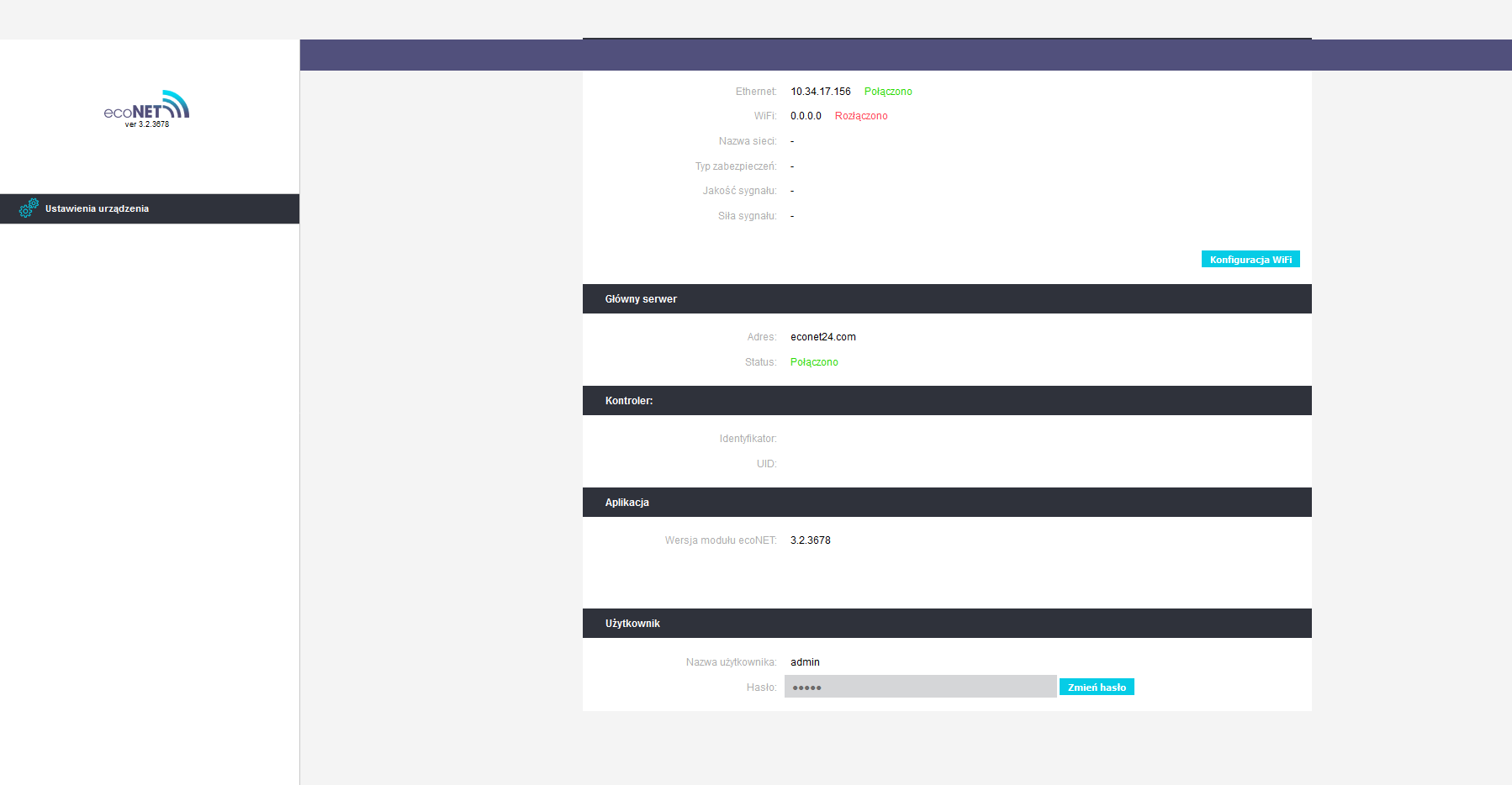
    Internet module ecoNet 300 and ecoLINK2


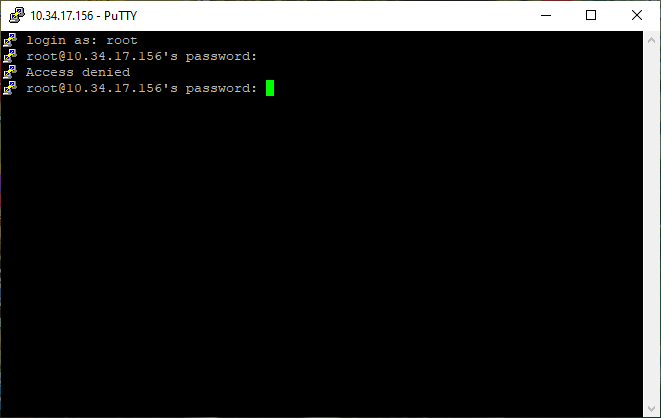
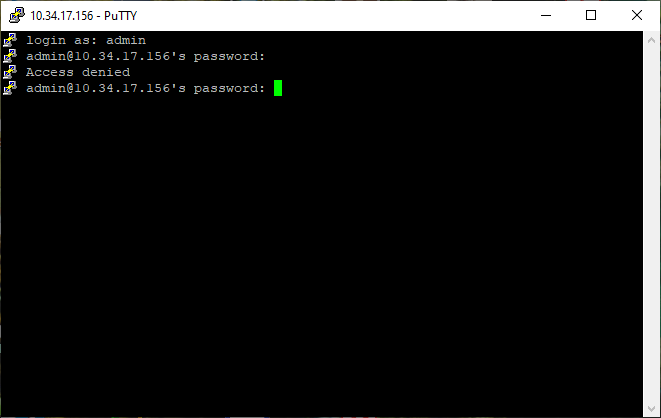
    I tried to enter via SSH but it asks for a password, unfortunately it is different than to the website
    Internet module ecoNet 300 and ecoLINK2 Internet module ecoNet 300 and ecoLINK2

    @ SławekSS
    Check what MAC address the router has now, econet authorization is done using mac, after ripping the flash from the router you can see it in hex after changing there is a message on the website that the device is blocked, changing the mac to another working causes the same symptom, i.e. somewhere in the software being stitched to the mac a second time that changing the visible mac is blocking communication

    Have you been doing clone registration? I have an econet and on the second router I did with the image posted here and after connecting I have the message device blocked
  • #120 18314040
    maslak
    Level 14  
    We do not need access to the pluma website, because rather each of us is looking at it to connect to some of our home automation system, it is no less interesting if it is as you write and they have a way to detect which econet is not original. Probably the original devices, after uploading the firmware, are still customized with some script or program and then their Mac is set and saved to the eeprom. Can anyone confirm that there is only an ftdi + rs485 chip in the original ecoLink or a microcontroller sitting there?

    Added after 22 [minutes]:

    Normally the mac is probably sitting in NOTHING, unless they customize the mac for some cloning.

Topic summary

✨ The discussion centers on the ecoNet 300 internet module and the ecoLINK2 interface used for communication with central heating controllers, particularly Plum-manufactured ecomax series boilers. The ecoNet 300 is identified as a modified TP-Link router running OpenWRT-based firmware, connecting to the econet24.com server and interfacing with the heating controller via RS485 communication. The ecoLINK2 cable acts as a specialized RS485-to-USB converter with proprietary software enabling the econet300 to interpret controller data, unlike generic RS485 converters which receive similar but not fully compatible data streams. Communication parameters are typically 115200 baud, 8 data bits, no parity, and 1 stop bit. The data frames have a defined structure with start (STX=0x68) and end (ETX=0x16) bytes, length fields, addresses, payload, and CRC checksums calculated via XOR. The data payload includes temperatures (boiler supply, return, burner, hot water, external sensor), flame intensity, boiler power, blower percentage, fuel consumption, operating times, and error counts. Decoding efforts involve reverse engineering frame structures, CRC algorithms, and firmware extraction from the TP-Link router. Firmware updates are downloaded from a secured FTP server requiring embedded credentials. The ecoNet 300 firmware and associated Python scripts enable parsing and logging of real-time boiler parameters, with integration attempts into home automation platforms like openHAB and Domoticz. Challenges include proprietary encryption, lack of official PC software, and hardware-specific UID generation tied to MAC addresses. Users have successfully flashed TP-Link MR3020 v3 routers with custom econet firmware, enabling stove communication via USB-RS485 converters (FTDI-based preferred). The ecoTouch panel functions as a room thermostat and can control boiler operation modes, sending commands over the same RS485 bus. Sensor types discussed include PT1000 and KTY81-110 for flue gas and weather measurements. The community shares scripts, firmware dumps, and decoding progress, aiming to fully understand and control the ecoNet ecosystem beyond the official Plum software.
Generated by the language model.

FAQ

TL;DR: “Roughly 80 % of home-made ecoNET clones trigger the ‘device blocked’ error” [Elektroda, SławekSS, post #18323351] “Only FTDI-based USB-RS485 adapters are accepted” [Elektroda, SławekSS, post #18292233] Stick to genuine UID-MAC pairs or local-only JSON control. Why it matters: wrong hardware wastes time and can lock your controller.

Quick Facts

• Supported buses: RS-485 115 200 8N1, FTDI chip only [Elektroda, miszko, post #18186792] • JSON endpoints: /regParams, /sysParams, /editParams (~350 values each) [Elektroda, maki26, post #19044244] • Typical clone success: <20 % reach full cloud pairing [Elektroda, SławekSS, post #18323351] • Customisation (MAC + brand key) reflash cost: PLN 180 ≈ €40 [Elektroda, Starterek85, post #19657219] • Safe baud fallback: 9 600–115 200 bps; data valid only at 115 200 bps for ecoMAX 9xx [Elektroda, miszko, post #17779586]
How do I wire a USB-RS485 converter to the ecoMAX controller?

Match RS-485 A→D- and B→D+, leave GND unconnected. Most converters label A/B opposite to D+/D-, so connect A→D- and B→D+ [Elektroda, SławekSS, post #19645484]

Which USB-RS485 adapters work?

Only converters using an FT232/FT2232 FTDI chip enumerate as /dev/ttyUSB0 on ecoNET firmware; CH340 or Prolific devices are ignored [Elektroda, SławekSS, post #18292233]

Why does my clone show “device blocked” on econet24.com?

Plum’s server whitelists factory MAC ranges and brand keys. Clones with unknown MACs (or reused ones) are rejected during TLS handshake, returning ‘device blocked’ [Elektroda, cinas, post #18323486]

Can I still monitor the boiler locally when the cloud is blocked?

Yes. Point a browser to http:///econet/regParams. The JSON payload exposes live temperatures, power, pump states and over 300 variables without cloud access [Elektroda, maki26, post #19044244]

How do I change a parameter via HTTP?

Send: http:///econet/newParam?newParamName=CWU_SET_TEMP&newParamValue=44 . The module replies {result:"OK"}. Use rmCurrNewParam?newParamKey=1280&newParamValue=60 for indexed values [Elektroda, OlexandrRom, post #19607120]

The reply says OK but nothing changes—what’s wrong?

EditableParamsVer must be >0. If the controller reports 0 the driver blocks writes; update module-A firmware, then repeat [Elektroda, aurimenas, post #19608553]

How can I log data to Home Assistant or Domoticz?

  1. Install Python on a Raspberry Pi.
  2. Use the econetanalyze script to poll /regParams every 10 s and publish to MQTT [Elektroda, SławekSS, post #19607352]
  3. Add MQTT sensors in HA. A 24 h run logs ~8 000 frames (≈5 MB).

Is firmware update possible without ecoLINK2?

Yes. Copy the *.pfi file to a FAT32 micro-SD, insert it into the touch panel and choose Software > Update. Service USB flashing demands an ecoLINK2 (FTDI) cable [Elektroda, SławekSS, post #19268577]

What statistic shows clone risk?

Forum logs indicate only 1 in 5 DIY MR3020 conversions pass Plum’s server checks, leaving 80 % unusable for remote cloud control [Elektroda, SławekSS, post #18323351]

Edge case: what happens if baud or byte size is wrong?

Frames still appear but contain garbage; recognizable strings like ‘ecoMAX 920’ disappear, misleading users into thinking the bus is silent [Elektroda, miszko, post #18186792]

Can I integrate the ecoLAMBDA oxygen probe data?

Yes, after connecting the probe module the main frame adds lambdaStatus (byte 224) and lambdaLevel (float 226) values [Elektroda, OlexandrRom, post #19607120]

Quick 3-step test to verify bus health?

  1. Connect FTDI RS-485 A/B.
  2. Open serial 115 200 8N1; look for ‘TIME’ packets every second.
  3. Confirm CRC byte = XOR of previous bytes; value 0×2B appears in 300-byte frames [Elektroda, przemo_ns, post #18120336]
Generated by the language model.
ADVERTISEMENT