logo elektroda
logo elektroda
X
logo elektroda

Hilti C4/36-350 Charger Issue: Green LED Flashing Every 2s, Battery Not Charging

rsv6 145089 239
Best answers

Why does the Hilti C4/36-350 charger flash green every 2 seconds and refuse to charge a battery?

Green flashing every ~2 s is not normal standby; in the thread it was identified as a charger power-supply/control fault, not a battery problem [#17267674] The most repeated fix path is to check the primary/standby section first: IC2/MIP2M2, Q5/Q7, the 1 Ω resistors R24/R30/R33, ZD16/ZD17, D9 and J3, and verify about 13 V on IC2 pin 4 and roughly 320–327 V on C3/pin 5 [#18686643] [#20596230] [#20760785] [#20873559] One repaired unit that had the same “green LED but no charging” symptom needed replacement of IC1, Q6, R28, J3, D9, ZD16, R31, R51, Q3, Q4, D16, D17 and F3, and then a bad PC3 optocoupler was found under the transformer; after that the charger worked normally [#18916140]
AI summary based on the discussion. May contain errors.
ADVERTISEMENT
Treść została przetłumaczona polish » english Zobacz oryginalną wersję tematu
  • Need cell impedance testing and BMS diagnostics

    #211 21480493
    krakarak
    Level 42  
    Posts: 8867
    Help: 681
    Rate: 1845
    And this is a decent, tester-based description of the condition of individual cells.... Measuring the battery with a dash and a second hand....

    Mate, take the pack out of the case, disconnect the electronics from the cells and with a tester that measures the impedance of the cells do their analysis.
    Do you have such a tester? If not then, unfortunately, you should put it in the hands of someone who owns one and has the knowledge of how to measure individual cells, how to interpret the result (good-bad), owns a meter and will take measurements on the electronics board, can familiarise themselves with the battery charge control system (BMS).
    In my opinion, here no one will be able to solve your problem remotely, just based on the number of glowing dashes. At least I am not aware of such a method to locate the problem in the package.
  • ADVERTISEMENT
  • #212 21494643
    Lucbbs
    Level 1  
    Posts: 1
    hello,
    would it be possible to know the voltage and functions of the different pins on the output connector?,

    thanks
  • ADVERTISEMENT
  • #213 21512301
    spicter
    Level 23  
    Posts: 601
    Help: 73
    Rate: 65
    Welcome.

    I have an identical patient on my table.
    I have taken some measurements around the MIP2M2.

    ZD17 shorted - I replaced with a 0.5W 15V Zener diode.

    1. 5.83V
    4. 15.03 V
    5. 309 V
    8. 0.89V

    Sometimes the charger will start with the LED active - then VCC is exactly 13.09V

    Does this behaviour disqualify the MIP2M2?
  • Suspect failed MIP2M2 startup switcher after drop damage

    #214 21513310
    manuelconso98
    Level 2  
    Posts: 2
    Hello,
    I have a faulty Hilti C4/36-350 that has fallen from a high place. Firstly, I noticed that the big capacitor was gone, then I replaced it but still no signal of life. No LED flash at all.
    I have checked the voltage on the transformers and I measure correctly the 300V from the bridge rectifier on the first big transformer, but on the small one I have no tension at all, only 0.5/0.6V.
    The diode D5 and the Zener ZD13 are fine, and before the ZD13 I have 300V, but after nothing.
    I noticed that when it's plugged to the AC, I measure between pin 5 and 7 of the MIP2M2 static 59kOHM, that from the datasheet found in this forum should be the Source and Drain of the MOSFET that should be swinging from close to open to drive the small transformer (am I correct?), maybe the MIP2M2 is gone? or is it normal?
    All around the low power board I have no voltage, so none of the chips are ON, neither the L6599AD.
  • #215 21516473
    marchakoleg911
    Level 3  
    Posts: 5
    Hello!
    What could be wrong with the charger? The LED lights up, no response to inserting the battery, the fan also does not switch on
  • ADVERTISEMENT
  • #216 21517207
    Marko121
    Level 17  
    Posts: 394
    Help: 10
    Rate: 120
    >>21516473 Disconnect the diode so it doesn't light up, it will be complete in unresponsive :)
    Forgive me the banter, but if you don't have any experience in measuring and servicing, you won't fix such a complicated inverter and don't bury it there, because you'll mess it up even worse.
  • #217 21517294
    krakarak
    Level 42  
    Posts: 8867
    Help: 681
    Rate: 1845
    >>21516473 and did you read the post above yours?.... Do...

    Also - all your posts are of the same content and in this topic. Are you stammering or are you mocking?
  • #218 21523710
    spicter
    Level 23  
    Posts: 601
    Help: 73
    Rate: 65
    My charger repaired. In addition to the faulty Zener diode, the 400V capacitor and components around the transformer had cold solders.

    Sometimes (as I wrote above) the green diode did not light up or was flickering.
    Following this lead it was possible to remove the fault.
  • #219 21527161
    vkudryakov
    Level 3  
    Posts: 3
    >>20872003 Hello! Can you measure the voltage on LED100? My LED is 12.6 V and it glows and smokes. Why can the voltage on C111 be 12.6 V? And type/nominal/datasheet/marking code Q127 and Q123
  • ADVERTISEMENT
  • Broken transformer primary wires after impact

    #220 21528235
    manuelconso98
    Level 2  
    Posts: 2
    Hi,
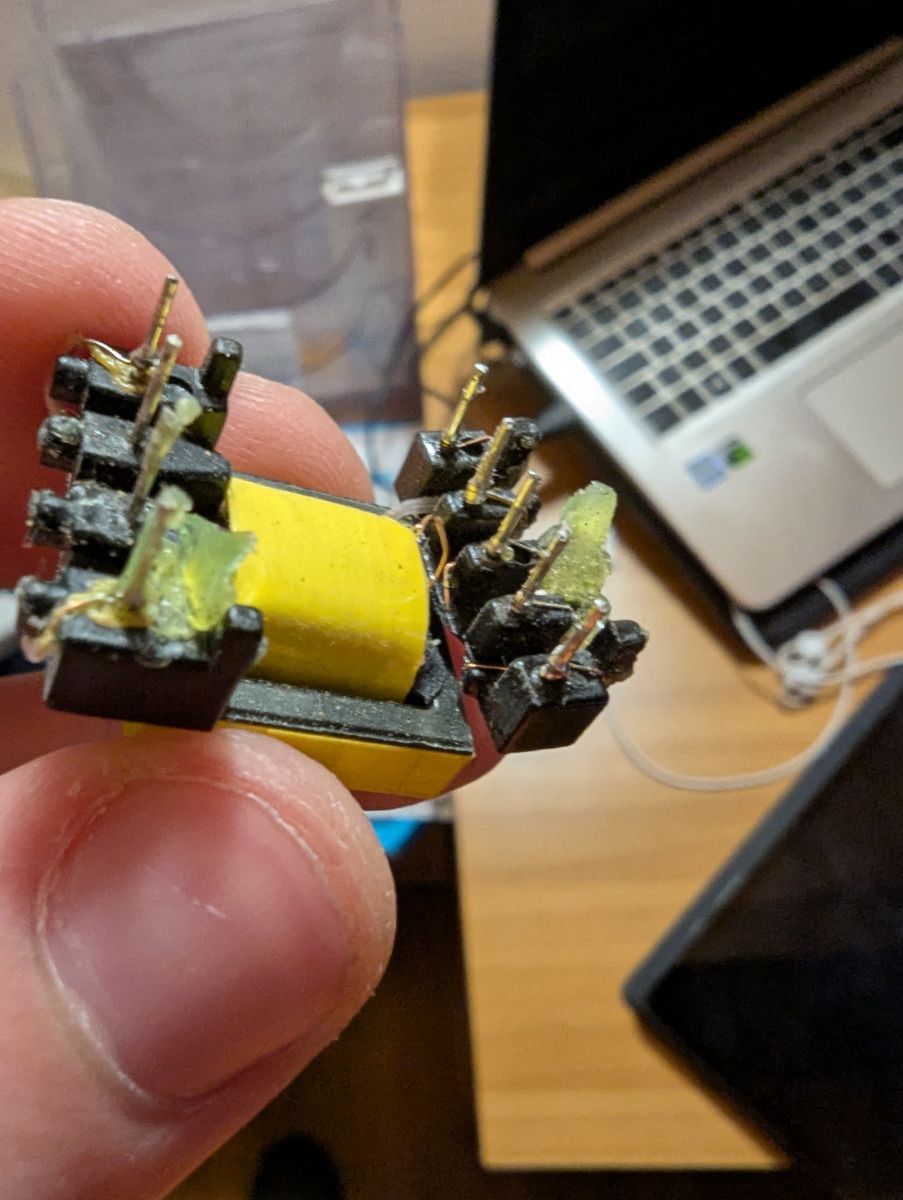
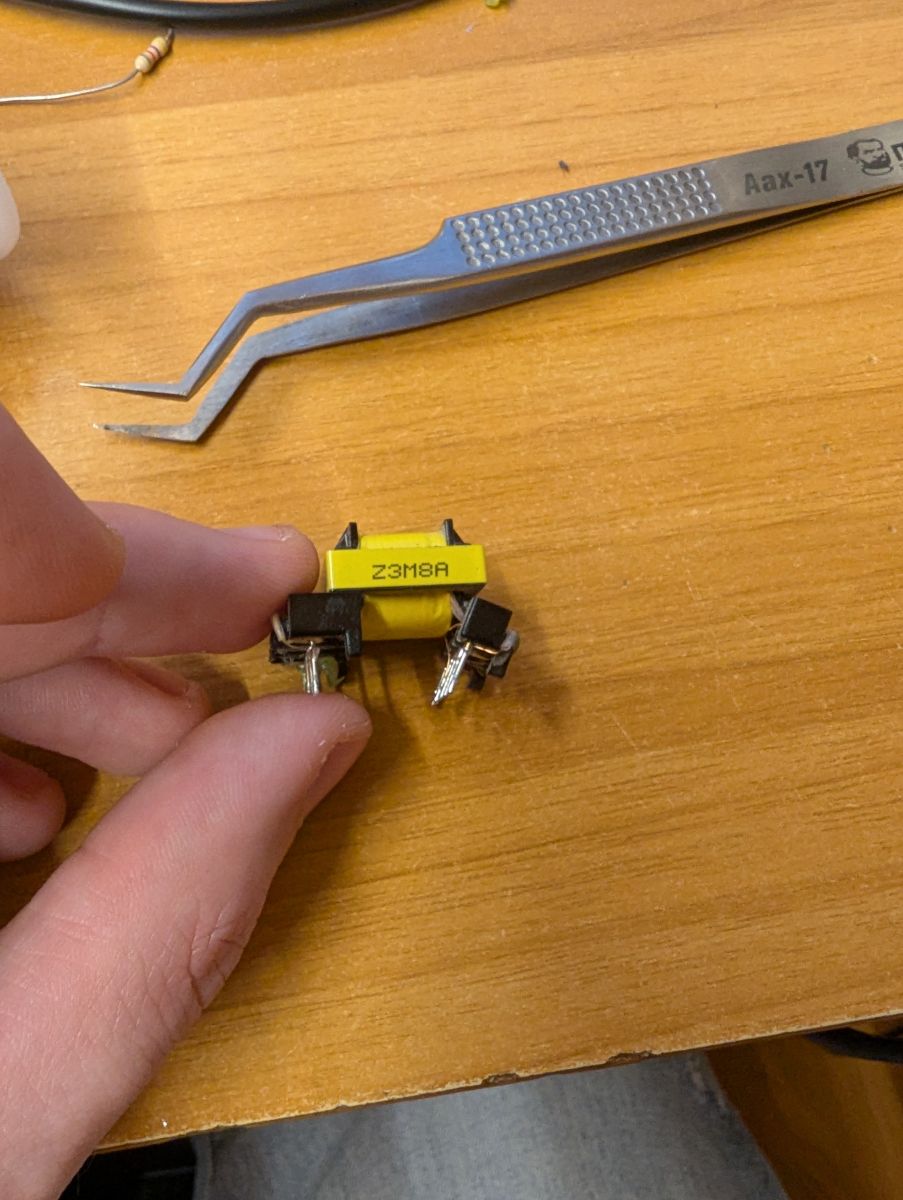
    I found the problem described in the previous post, after the fall the small transformer probably took a hit and broke the primary wires. The problem is that I can't find anything online by searching for the code reported on the side "Z3M8A", and I couldn't even find a transformer with the same pin number and positions.
    Do You have any information on this transformer?
    Thanks
    Electronic transformer held between fingers in front of a laptop on a desk.
    Switching transformer held between fingers on a wooden desk, tweezers nearby.
  • Faulty divider chain leaves optocoupler open

    #221 21551803
    vkudryakov
    Level 3  
    Posts: 3
    My diagnostics revealed a resistance of 30 Ohm between the Vcc and Vss pins of the MCU freescale mc9s08ac48 32pin. Can someone measure the resistance on your hilti c4/36-450? Is it possible to read the firmware from this MC?
    For those who may need help - with such a malfunction, the divider chain R111-R112 and ICU101 does not work. As a result, the optocoupler PC5 is completely open and instead of 8.4 V on the low side of t2 c111 there is 12.6 V
  • Bench supply proves main supply start fault

    #222 21555401
    stijepicmladen
    Level 2  
    Posts: 2
    Rate: 2
    Trying to repair, changed L6599 just to find out that command for starting comes from PC4. Everything seems ok, steady green LED, 8.4V present, 11.5V present but no start. After connecting my bench power supply to imitate output of main power supply, system starts, relay clicks, fan starts. battery charging. If I short BCP54 that starts L6599 there is no green LED. Any idea?
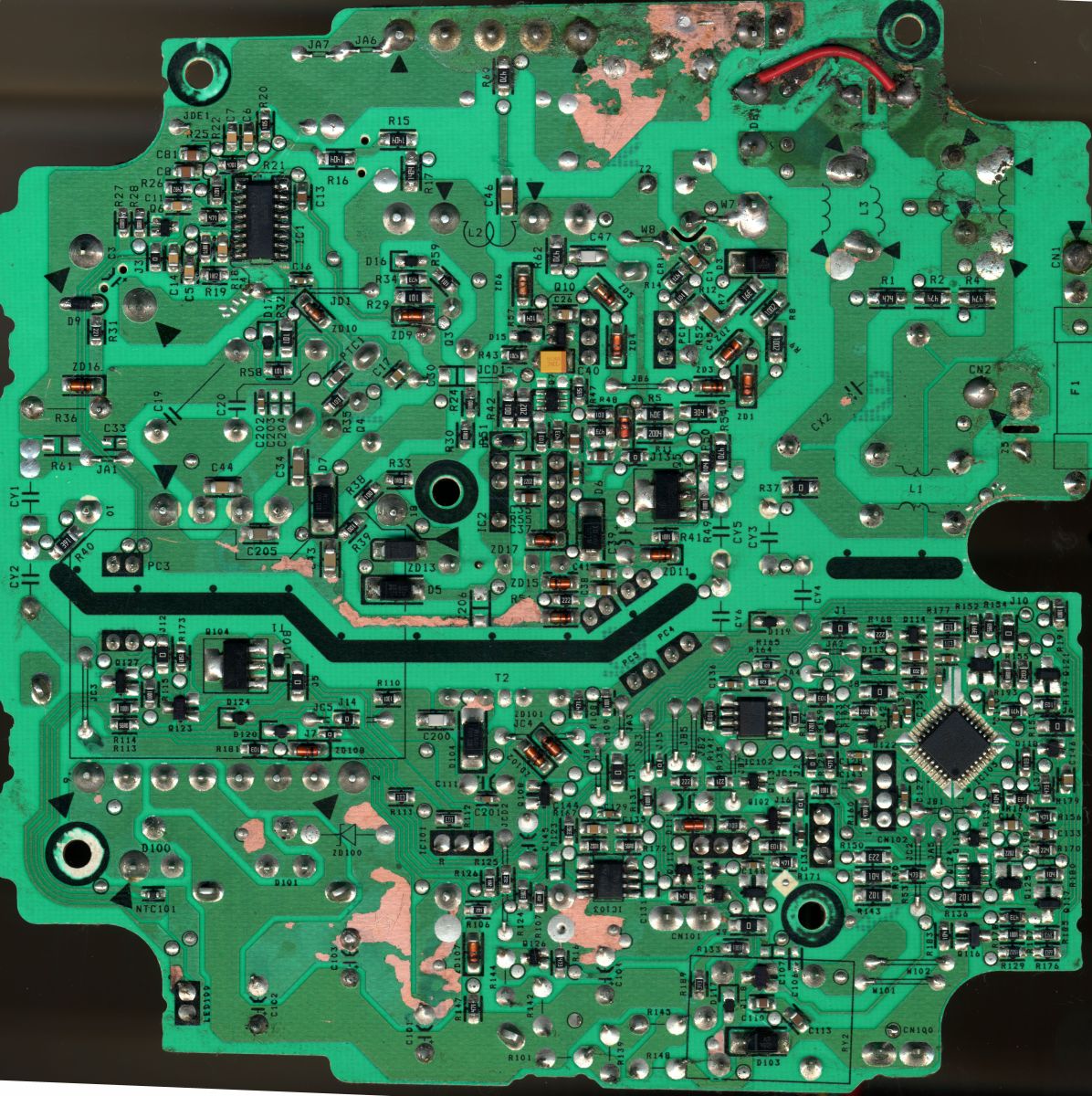
    Close-up of a green printed circuit board (PCB) with various electronic components and tracks.
    This is 2400dpi scanned PCB on EPSON 1680. It can be useful do download full resolution image.
  • #223 21558759
    stijepicmladen
    Level 2  
    Posts: 2
    Rate: 2
    Did a bench supply of l6599, 12.5v vcc, resistor divider to pin 7 for 2v, simulating line voltage present. Now scope shows triangle wave on pin 3, outputs working. Still thinkering.
  • #224 21567365
    dariusz_21
    Level 23  
    Posts: 482
    Help: 52
    Rate: 15
    If anyone is looking for MIP2M2 and 1R0 resistors, I have them, and in condition I am happy to share.
  • #225 21585185
    rademeness
    Level 12  
    Posts: 3
    Rate: 2
    @stijepicmladen you have a 39 kΩ R185 resistor eaten and a 47 kΩ resistor next to it, replace and it should start.
  • Measured charger supply voltages and asked battery-wire levels

    #226 21614328
    odzkpm2011
    Level 1  
    Posts: 1
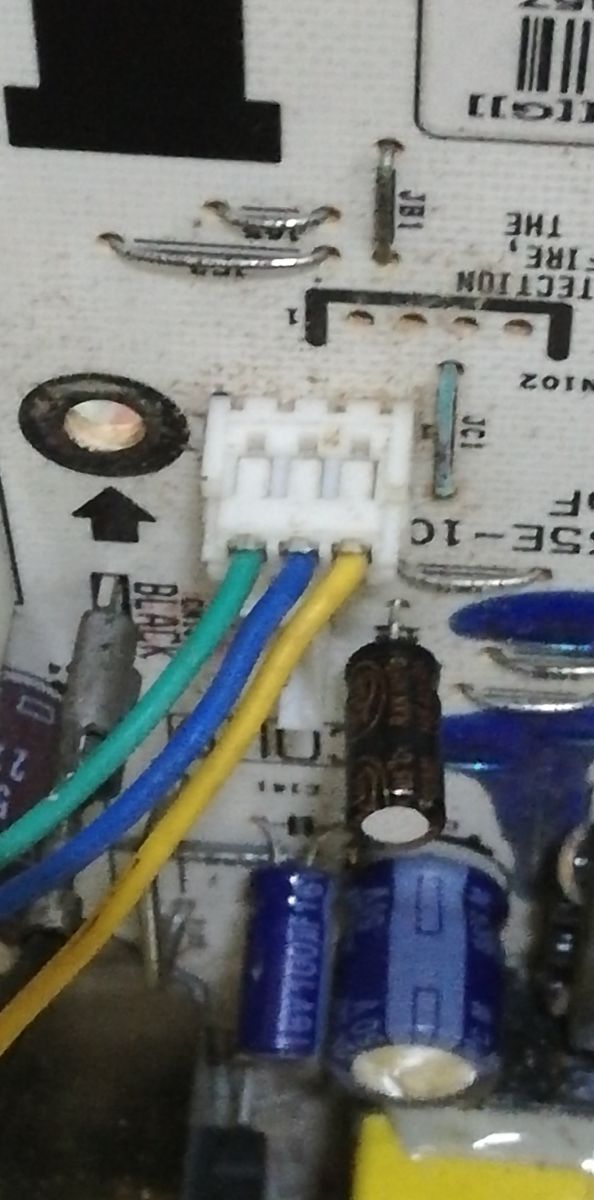
    Greetings to everyone at elektroda.com from Havana. I'm trying to repair a HILTI charger. The electrolytic capacitor C3 (390uF/400 Volts) has 325 Volts. Pin 5 of IC2 (MIP2M) has 325 Volts, and pin 4 has 16 Volts. Transistor Q5 is in perfect condition. The cathode of D104 has 12.5 Volts. What voltage should there be across the green, blue, and yellow wires that connect to the battery? I've measured all the Zener diodes, and they're fine. Thank you very much, and best regards from Cuba.
    Daniel
    Close-up of a connector with green, blue, and yellow wires on a circuit board
    [img-0]
  • #227 21637246
    mclareniak
    Level 11  
    Posts: 3
    Cześć.

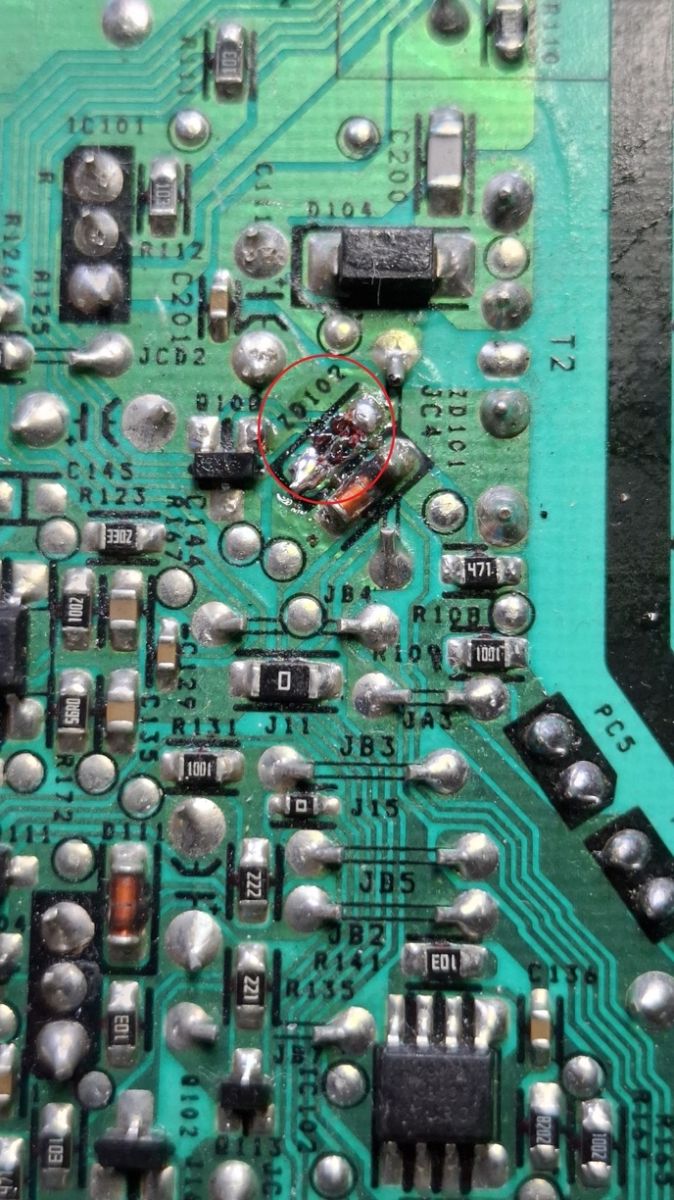
    Proszę, jakie napięcie ma dioda Zenera ZD102? Mam ją uszkodzoną i muszę ją wymienić.
    Dziękuję
    Close-up of damaged Zener diode ZD102 on green printed circuit board
  • #228 21735453
    ProStypek21
    Level 10  
    Posts: 59
    Help: 1
    Rate: 3
    Hello, I am reheating a chop.
    I fell into my hands with just such a loader. Fortunately I don't see the minor damage described in this topic. I think I have another problem. Well, I found a cold solder on C3. Also, C3 itself is not charging. 0v. The voltage comes out of the rectifier bridge and that's it. The PFC circuit is not working. Where can I start from?
  • #229 21812415
    audiovideo416
    Level 3  
    Posts: 7
    Rate: 2
    @h3c4 10 seconds after inserting the battery, the charger turns off. Even when it's on you can't hear any relay or fan. In standby, the light turns on for 10 seconds and then turns off. In the post you wrote "The problem is in the battery charge level measurement line". What should I check? Thanks, have you solved it?
  • Request for PTC1 value in Hilti C4/36-350 charger

    #231 21852165
    andre41
    Level 17  
    Posts: 229
    Help: 20
    Rate: 32
    Sorry to reheat the subject, burned out a section of the board from the plus of the 320V capacitor. I have replaced the circuit and some components but the main inverter does not start. I'm measuring the break on PTC1, I've substituted a 10k (usually I've encountered such) but no effect. Would anyone be able to give (measure its value)? I would appreciate your help. Regards. I'll preempt suggestions about powering IC1, 14V appears. The fan starts but does not charge.
  • #233 21854912
    andre41
    Level 17  
    Posts: 229
    Help: 20
    Rate: 32
    Thank you, there is no need to be indignant because
    i have read a lot of posts on the subject. Obviously I must not have read to the end.
  • #234 21855164
    Marko121
    Level 17  
    Posts: 394
    Help: 10
    Rate: 120
    I am not indignant, I am also annoyed by such remarks as I made to you , but here all you had to do was type PTC1 in the search engine in this topic.
    Best regards
  • #235 21855515
    andre41
    Level 17  
    Posts: 229
    Help: 20
    Rate: 32
    >>21855164 Fact, I didn't use this option, I don't know why myself, and there was a lot of reading. Thanks again and apologies. Even so, the inverter still doesn't start. I need to check again quietly everything within the burn-in and analyse the starting conditions of the L6599 chip. Regards.
  • #237 21884688
    griszka77
    Level 12  
    Posts: 125
    Help: 2
    Rate: 26
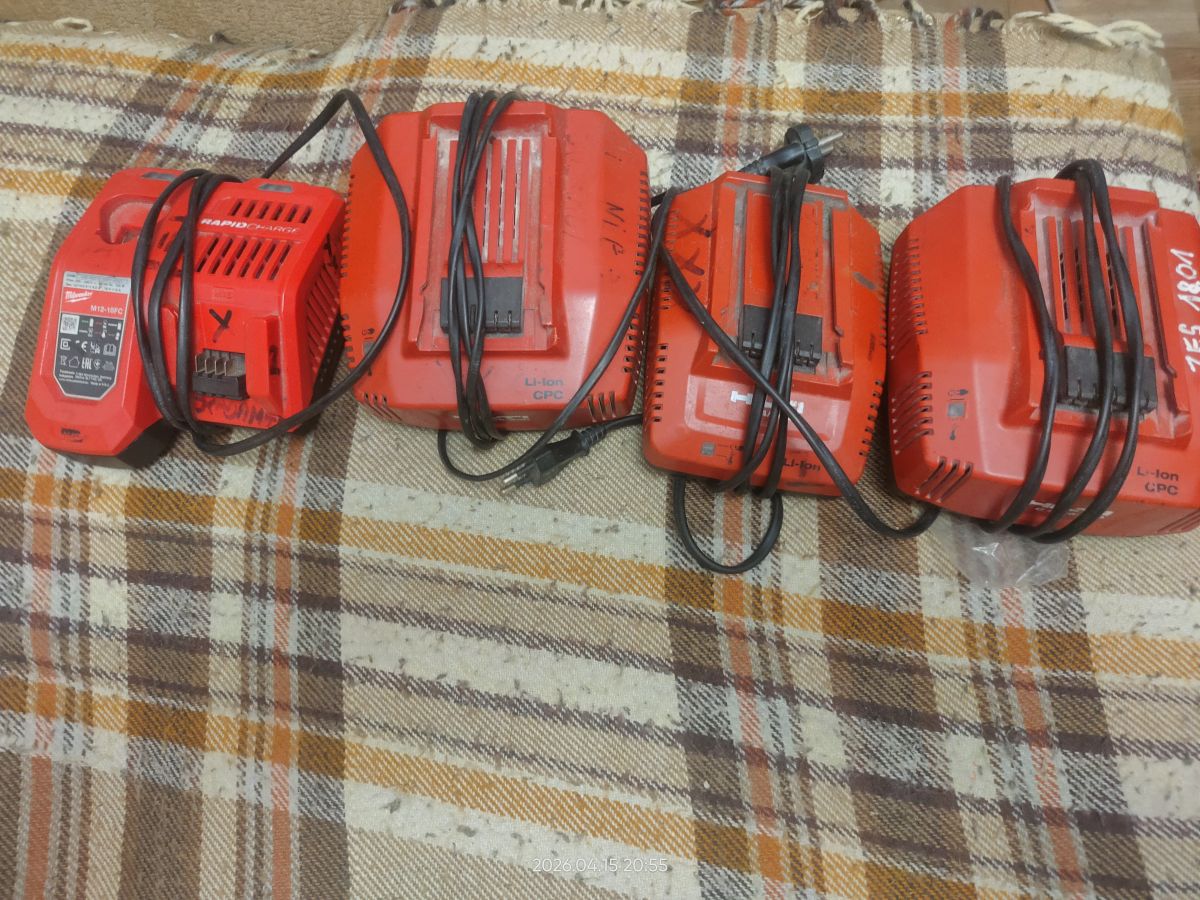
    Hello I have three Hilti and one Milwaukee loaders to repair someone will undertake the repair at a reasonable remuneration ?
    Hilti C4/36-350 Charger Issue: Green LED Flashing Every 2s, Battery Not Charging
  • #238 21918507
    DRAZEK87
    Level 15  
    Posts: 256
    Help: 4
    Rate: 144
    i can fix them all ...
  • Short charging cycle points to manufacturing fault

    #239 21921911
    DRAZEK87
    Level 15  
    Posts: 256
    Help: 4
    Rate: 144
    I’m trying to help everyone here, but it’s not possible to fix every charger remotely; some require specific measurements and expertise that I’m unable to convey on the forum. People often ask what to do with a charger that isn’t charging, even though the green LED is lit… The answer is simple: no current is being supplied to the battery.
    And the reason for this could be a fault with the charger or the battery itself.

    I’ve noted at least four instances where the battery simply wouldn’t charge.
    We’ll assume that all the chargers discussed here have a green LED that’s lit; if it isn’t lit, go back to the start of the post and read it carefully… there’s a problem with the MIP.

    The first scenario is inserting the battery for a few seconds and hearing nothing; the current reading is 0.
    The second scenario is when, after inserting the battery, the LEDs on the battery light up and the green LED goes out.
    The third scenario is when, after inserting the battery, the fan starts up and you can hear the relay switching; current reading: 0.
    The fourth scenario is: I insert the battery, the fan starts up, the relay engages, the current rises and then switches off after a moment.

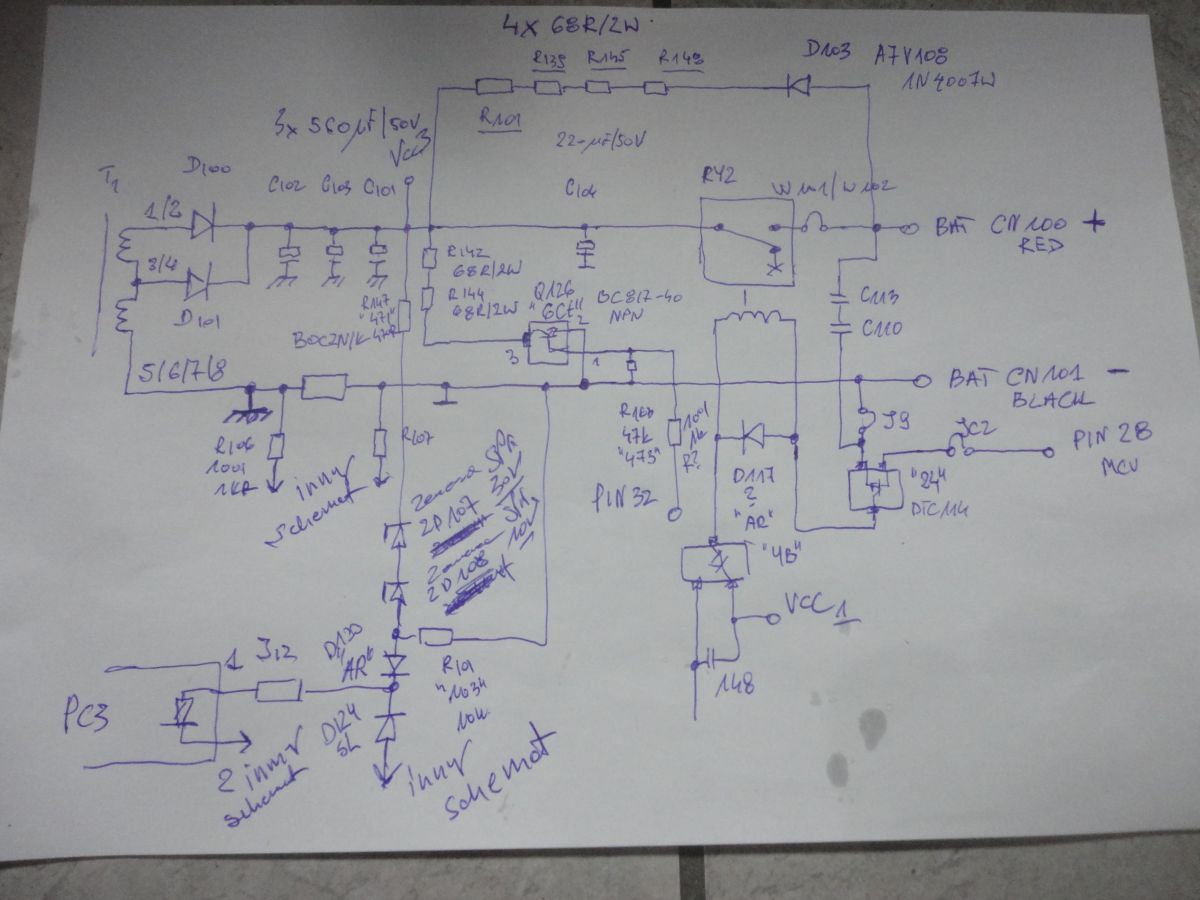
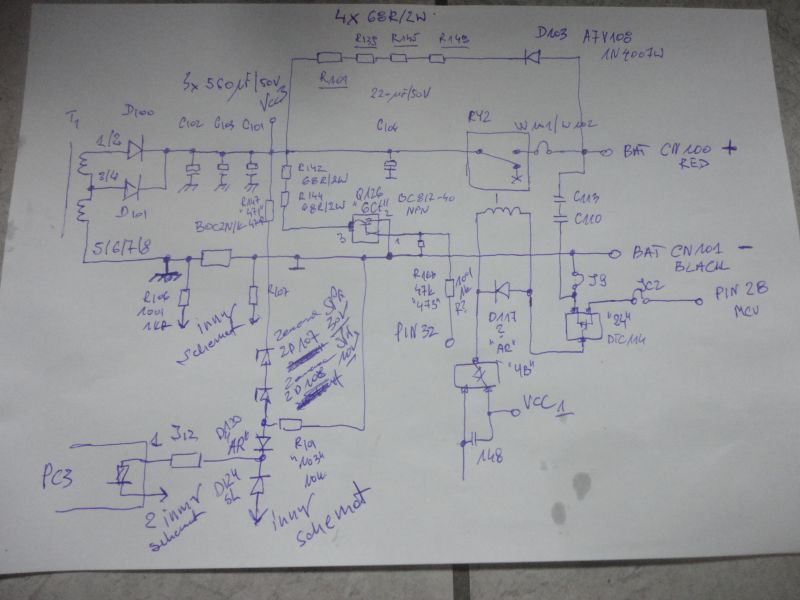
    I think I’ve done all my homework and finished drawing the schematic; I’ve drawn two more segments; today I’m presenting the final output of the battery charger – it looks like this: it could be improved, but this is the first sketch I’ve done and I don’t have time for any more… it’s about understanding the principle…
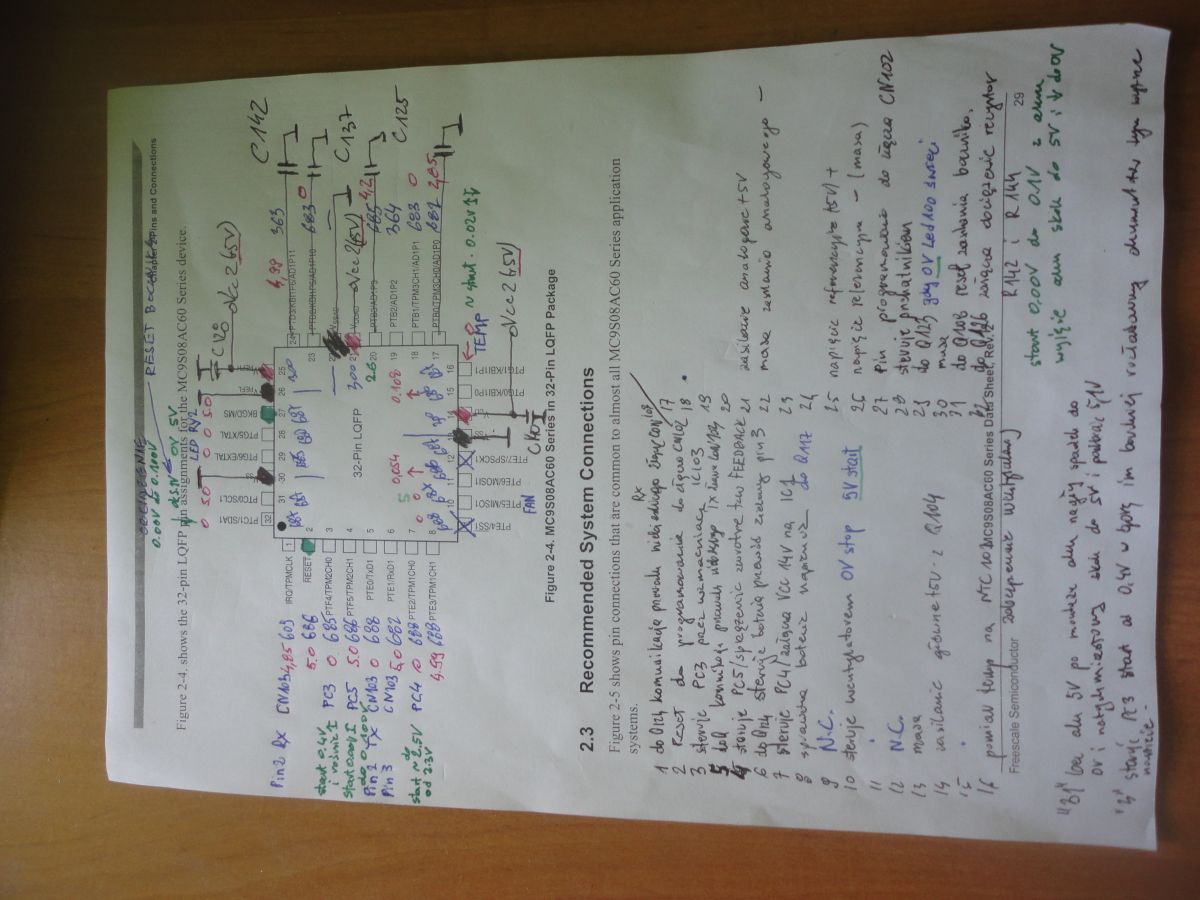
    The second sketch will focus on the processor and its pins; it’ll be an interesting topic, but you’ll have to wait…

    Hilti C4/36-350 Charger Issue: Green LED Flashing Every 2s, Battery Not Charging

    To summarise briefly, we have the main transformer T1, which generates the voltage for our battery, but before that happens, the current draw is measured by a shunt resistor and the circuit is ultimately switched on by relay RY2. The voltage measured across resistor R147 and Zener diode Zd107 is 30 V, and that across 108 is 10 V (checked with a multimeter) and R101 provide signals to the main converter circuit regarding its operation via the PC3 optocoupler (mounted beneath the main transformer; difficult to access – the transformer must be desoldered), which is often damaged when the IC1 L6599AD chip blows.

    The PC3 optocoupler, which controls IC1 on pin 1, has a voltage of between 4.7 V and 4.8 V when the battery is not connected; this is because there is a 0.3 V drop across diode D124, which is supplied with a constant 5 V voltage, whilst the voltage at pin 2 is between 3.6 V and 3.7 V. When the battery is fitted and the circuit is operating correctly, the voltage at pin 1 rises to 5.1 V because, via R147, ZD107 and ZD108; R101 causes the voltage to rise, whilst on pin 2 the voltage is around 3.9 V and this varies depending on the battery’s charge level (this is determined by the IC103 operational amplifier; I should point out that if this is faulty, inserting a working battery will cause the green LED to go out). The PC3 optocoupler on the high-voltage side, when operating correctly, has a constant voltage of 1.9 V at pin 4, whilst pin 3, which controls transistor Q6 (BC817-40) and determines the operation of the IC1 circuit, fluctuates within a range of 0.08 V. If the measurements confirm these values, we can be certain that the charger is in good working order.

    As soon as a working battery is fitted, the charger begins charging; you can hear the relay engage and the fan start, but after a few seconds it switches off; on pins 3 and 4 of the PC3 optocoupler, we will then read 0 V, which indicates that the main converter powered by IC1 is not operating correctly.

    Having examined many faulty chargers, I have observed that there is a certain rule: when a working battery is inserted, the charger must engage the relay and start the fan, even if the main power converter is faulty! I had a case where, that after fitting the battery, there was no response, and the reason was cold solder joints near the processor, as it is the processor that triggers the charging process. The processor communicates with the battery via three wires: yellow, blue and green; these determine what to do with the battery. From my observations, I’ve noticed that the yellow wire is responsible for charging: as the voltage on our battery pack rises, the voltage on this wire drops to around 3V; without the battery, there’s a constant 5V there, whilst the green and blue wires read 0V. When the battery is present, the voltage on the blue and green wires fluctuates between 4.2 and 4.5 V; these are presumably signal lines.

    At the heart of the charger is the MC9S08AC32 microcontroller, which has 32 pins, of which 2 are unused (pins 9 and 12).
    Ground is on pins 13, 22, 26 and 30.
    The +5V power supply is on pins 14, 21 and 25.
    There is also a pin for programming the chip – pin 27, known as BKGD/MS (which carries 5V) – and the required pin 2, i.e. RESET (which also carries 5V).

    Hilti C4/36-350 Charger Issue: Green LED Flashing Every 2s, Battery Not Charging

    I’ve tried my bloody best to sort this out… I’ll ask the admin to fix it, then I’ll describe these pins to you in detail because each one has its own function.

    Here’s the processor and some interesting findings that might help someone repair a charger;
    I’d like to point out that a problem with a battery that won’t charge, or the charger showing no response at all, is not related to the processor!!! Damage to the processor or its immediate vicinity is the least common fault; in these chargers, 90 per cent of faults are within the main L6599AD converter, and even replacing the chip with a new one will yield poor results, as the capacitors in its vicinity very often fail.

    I have observed two different behaviours in the charger despite the lack of charging: 1) it switches off immediately after the battery is charged, and 2) it switches off only after about 30 seconds of the battery being inserted. The first shutdown indicates that a safety mechanism has been triggered – i.e. shorted switches, a faulty PTC1 thermistor (470R) or its components; for example, I had a cracked capacitor C5, no power at pin 7; the resistors R15/16/17 must be desoldered to take a correct measurement. The second scenario is more interesting because the converter starts up but does not supply voltage to the battery pack… but I’ll discuss that later.

    The important thing is that at this stage we need to remove the transistors to find out more about how the converter works; their presence will quickly shut down the converter and you won’t learn anything about its operation. Even working switches won’t change anything here.

    I’ll post the rest in a few days...
  • Suspect unstable MIP supply causing 3-second LED flash

    #240 21941579
    Piotrek k.
    Level 12  
    Posts: 5
    Help: 1
    >>17267278 >>17267278
    Hello everyone.
    I’d like to join this thread; I’m having the same problem with the C4/36-350 charger – the green LED flashes every 3 seconds (with no battery inserted). I’ve replaced the MIP, tested the capacitors, diodes, transistors, optocouplers and quite a few resistors. I’ve also desoldered transistor Q5, but the charger still isn’t working; the LED flashes every 3 seconds, and the voltage at pin 4 of the MIP fluctuates between 8 V and 14 V. When it reaches 14 V, the LED lights up and then goes out. The voltage across C3 and the MIP (n5, n7) is 320 V. Please could you advise what else I can check, as I’m running out of ideas.

Topic summary

✨ Discussion of a Hilti C4/36-350 battery charger that shows a flashing green LED every 2 seconds and does not start charging. The thread focuses on diagnosing failures in the primary power supply and control section: burned tracks, blown jumpers/resistors, shorted zener diodes, damaged MOSFETs/transistors, and faults around the L6599AD resonant controller and MIP2M2 auxiliary supply IC. Several repair attempts are described, including replacing IC1, IC2, optocouplers, zeners, and power transistors, checking the 13 V supply on IC1/IC2 pins, measuring the high-voltage bus, and tracing the feedback loop. Later posts identify common damaged parts such as ZD16, ZD17, Q5/Q10, PC3/PC4, R24/R30/R33/R51, and the main switching transistors Q3/Q4, with some cases resolved by replacing the correct zener values and the L6599AD or MIP2M2 chips.
AI summary based on the discussion. May contain errors.

FAQ

TL;DR: 80 % of C4/36-350 shutdowns are “caused by the MIP2M2 plus three 1 Ω resistors” [Elektroda, DRAZEK87, post #20760785] “Replace the chip and the charger works” [Elektroda, teskot, post #18916140]

Why it matters: Fixing this €200 charger often costs < €5 in parts.

Quick Facts

• Stand-by LED blinks every 2 s = no HV supply, check MIP2M2 chain [Elektroda, rsv6, post #17267845] • Correct DC on C3 main cap: 320–330 VDC at 230 VAC input [Elektroda, DRAZEK87, post #20873167] • L6599AD VCC must stay 12–16 V (14 V typical) or the main inverter latches off [STMicro, 2019]. • Optocoupler PC4 turns on only with battery inserted; LED side gets 4–6 mA from MCU pin 7 [Elektroda, florian_1034, post #21313155]

Why does the green LED flash every 2 seconds with no battery?

The flash means the standby SMPS around MIP2M2 lacks a stable 13 V output. Check the three series 1 Ω resistors (R24 / R30 / R33). If any are open, pin 4 (VCC) of MIP2M2 collapses and the LED blinks [Elektroda, PiterSen151, post #20873381]

Which parts fail most often in Hilti C4/36-350 chargers?

Forum repairs show 80 % of dead units need only the MIP2M2 IC plus the three 1 Ω resistors replaced; 60 % of those also need the L6599AD driver IC [Elektroda, DRAZEK87, post #20760785]

How do I test if my MIP2M2 is shorted?

With power off, measure resistance between pins 5 and 7. Anything below 300 kΩ (often tens of ohms) means the internal MOSFET is shorted and the IC is dead [Elektroda, DRAZEK87, post #20873559]

The charger clicks on for 5 s then stops—what now?

That pattern means the MCU sees no charge current. Common reasons:
  1. L6599AD not powered (PC4 path open).
  2. High-side MOSFETs Q3/Q4 shorted or open.
  3. Current-sense network (R31 + ZD16 + D9) faulty [Elektroda, teskot, post #18916140]

What voltage should be on C3 main capacitor?

At 230 VAC the rectifier, triac and EMC filter should leave 320–330 VDC on C3. If it pulses or stays < 200 V, check Q10 (BSS138N), Q7 (BC817DPN) and ZD1-ZD6 75 V TVS ladder that drive triac CR1 [Elektroda, DRAZEK87, post #20872003]

Can I replace optocoupler VO615A-9 with PC817?

Yes. Multiple users confirmed PC817 works for PC3 and PC5 positions without altering feedback accuracy [Elektroda, krakarak, post #20418803]

Edge-case: why does my LED smoke at power-up?

If LED100 sees > 12 V it overheats. This happens when PC5 fails—R111/R112 divider opens and C111 rises to 12–13 V instead of 8.4 V. Replace PC5 and rebuild the divider [Elektroda, vkudryakov, post #21551803]

How to quickly verify the HV stage before buying parts?

  1. Un-solder MIP2M2 and MOSFET keys.
  2. Apply mains; measure 320 V on C3.
  3. Confirm pin 5 pad shows 320 V and pin 4 pad ~0.5 V. If ok, HV section is healthy [Elektroda, DRAZEK87, post #20873167]

What is the small SMPS transformer marked Z3M8A?

It is the 13 V/8.4 V auxiliary flyback for logic power. No commercial replacement exists; salvage from donors or rewind (primary 2×110 T, secondary 2×12 T 0.3 mm, measured on intact unit) [Elektroda, manuelconso98, post #21528235]

My charger works only with nearly full batteries—why?

The MCU disables charge if cell voltage < 24 V and current feedback missing. Faulty shunt resistor R105 or op-amp LM358 (IC103) causes premature cutoff at low pack voltage [Elektroda, marchakoleg911, post #21480299]

How do I reset latch-off after a fault?

Simply remove AC for 10 s. Both MIP2M2 and L6599AD use latched protections that clear only after VCC drops below 4 V [STMicro, 2019].

What’s the function of PTC1 beside Q4?

It is a 470 Ω PTC. When Q4 heat-sink exceeds ~125 °C its resistance rises, DIS pin sees > 1.8 V and L6599AD shuts down [Elektroda, DRAZEK87, post #20801282]

3-step quick fix for ‘dead-silent’ units

  1. Measure C3; if < 300 V replace triac CR1 or ZD1-ZD6 ladder.
  2. If 320 V present, check R24/R30/R33 for 1 Ω open.
  3. Still dead? Replace MIP2M2 and verify 13 V on pin 4.
AI summary based on the discussion. May contain errors.
ADVERTISEMENT