logo elektroda
logo elektroda
X
logo elektroda

Where can I find a description of the combination of Integra 128 Plus and Domoticz?

Daro1003 1974 12
ADVERTISEMENT
Treść została przetłumaczona polish » english Zobacz oryginalną wersję tematu
  • #1 19613215
    Daro1003
    Level 34  
    Posts: 2709
    Help: 295
    Rate: 603
    Board Language: polish
    Hello
    Have any colleagues on the web come across a manual / description of Integra integration with Domoticz so from scratch what and how to set up ?
    I have a working Domoticz at a UE site and will be installing Integra 128Plus with ETHM plus and would like to use the reed switch states from the detectors in Domoticz.
  • ADVERTISEMENT
  • Helpful post
    #2 19622441
    xury
    Automation specialist
    Posts: 7068
    Help: 876
    Rate: 1486
    Board Language: polish
    Banally simple. In domoticz, you specify the IP and port of the integration protocol and you can give a user password for control purposes. Domoticz, once connected, will search for all the inputs and outputs itself and add them together.
  • #3 19622602
    Daro1003
    Level 34  
    Posts: 2709
    Help: 295
    Rate: 603
    Board Language: polish
    That's pretty cool, I understand that in Domoticz you only add one device and that's it by giving the IP address the ETHM integration port and that's it.

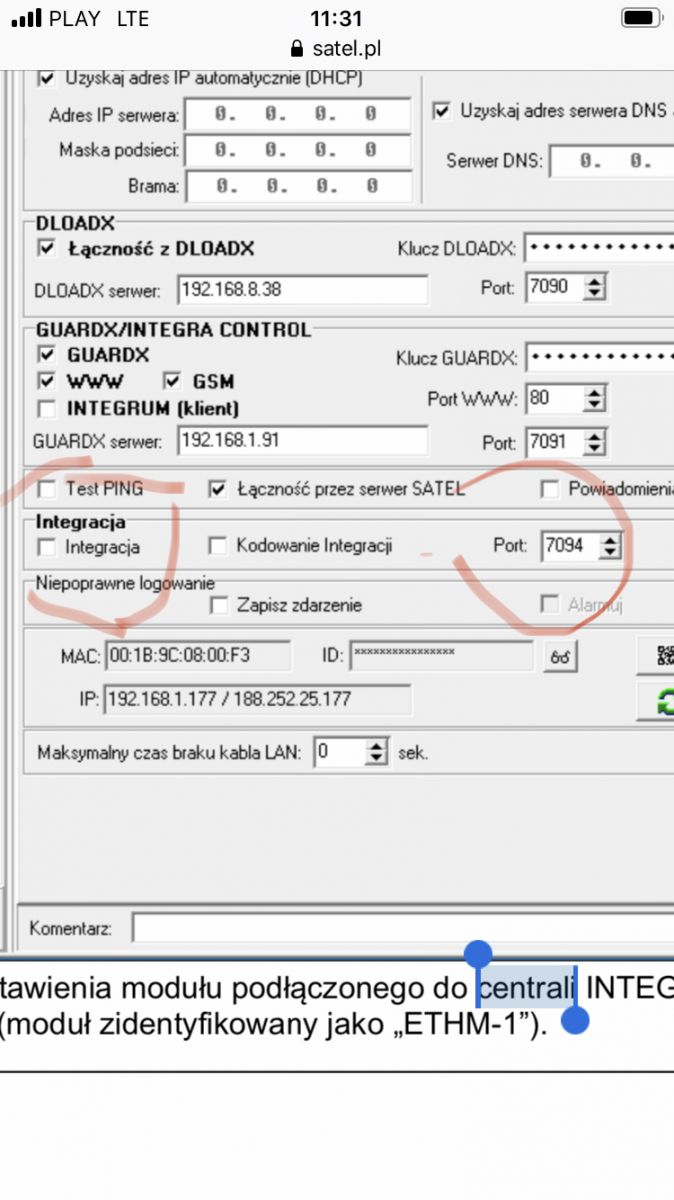
    So I use this:
    Where can I find a description of the combination of Integra 128 Plus and Domoticz? .

    Plus the IP address.
    Create a separate user plus password for this integration ?
  • ADVERTISEMENT
  • Helpful post
    #4 19622969
    xury
    Automation specialist
    Posts: 7068
    Help: 876
    Rate: 1486
    Board Language: polish
    Yes. Create a user and give them a password. Then wait for domoticz to scan all inputs and outputs.
  • #5 19622971
    Daro1003
    Level 34  
    Posts: 2709
    Help: 295
    Rate: 603
    Board Language: polish
    How often does Domoticz scan inputs and outputs? I will successively add inputs.
  • ADVERTISEMENT
  • Helpful post
    #6 19623134
    xury
    Automation specialist
    Posts: 7068
    Help: 876
    Rate: 1486
    Board Language: polish
    It only scans when you start the plugin. So if you change something in the control panel, you have to disable the plugin (but not delete it) and enable it.
    After it scans the status refresh is with a slight delay. Somewhere around a second. Sometimes less.
  • #7 19633083
    Daro1003
    Level 34  
    Posts: 2709
    Help: 295
    Rate: 603
    Board Language: polish
    And it all worked.
    I even managed to synchronise the reed switch which is plugged into the INT-SCR and see the status of the door in domoticz.
    I now wanted to do the opening of this door from domoticz and got hung up.
    I have opening from a macro command in apc and it works.
    In domoticz I can't see the output from this command described as Shed Button:
    Where can I find a description of the combination of Integra 128 Plus and Domoticz? .

    As if domoticz does not detect this output why ?
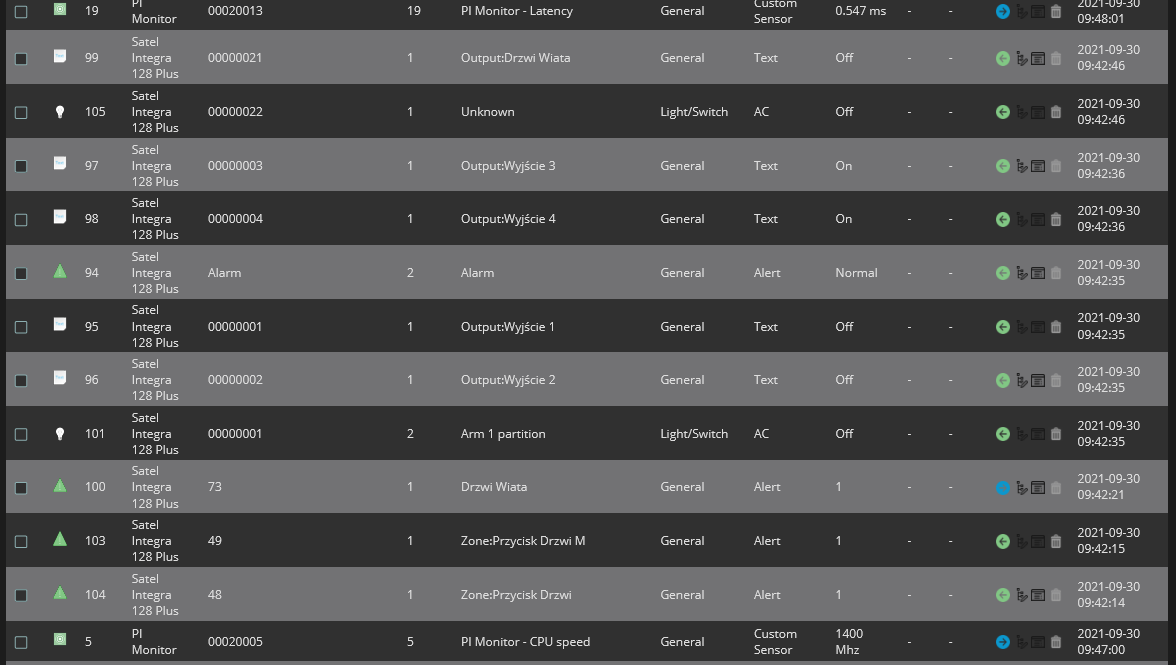
    This is all I have in domoticz from satel:

    Where can I find a description of the combination of Integra 128 Plus and Domoticz? .

    Added after 6 [hours] 39 [minutes]:

    Topic embraced item 105 Unkonown turned out to be what I was looking for. It did not download the name correctly from Satel. Why ?
  • ADVERTISEMENT
  • #8 19633893
    xury
    Automation specialist
    Posts: 7068
    Help: 876
    Rate: 1486
    Board Language: polish
    Because you probably have a Polish letter in your name.
  • #9 19633915
    Daro1003
    Level 34  
    Posts: 2709
    Help: 295
    Rate: 603
    Board Language: polish
    Well just not on the screenshot you can see the Shed Button I changed it to a shorter one and nothing.
  • #10 21063330
    szczukot
    Level 14  
    Posts: 820
    Help: 6
    Rate: 82
    Board Language: polish
    Daro1003 wrote:
    How often does Domoticz scan inputs and outputs ? I will successively add inputs.


    I've made it so that it only scans on startup of the plugin.
    It could be queried from time to time, but Satel doesn't give the option to query directly. Only when you query a specific input does the error just fly.
    That's why it's only on startup, so that errors don't fly over and over again.
  • #11 21063355
    Daro1003
    Level 34  
    Posts: 2709
    Help: 295
    Rate: 603
    Board Language: polish
    szczukot wrote:
    That's why it's just for starters, so the errors don't fly around.


    And ok don't bother you rarely add anything in Integra and if you do you can turn the plugin off and on.

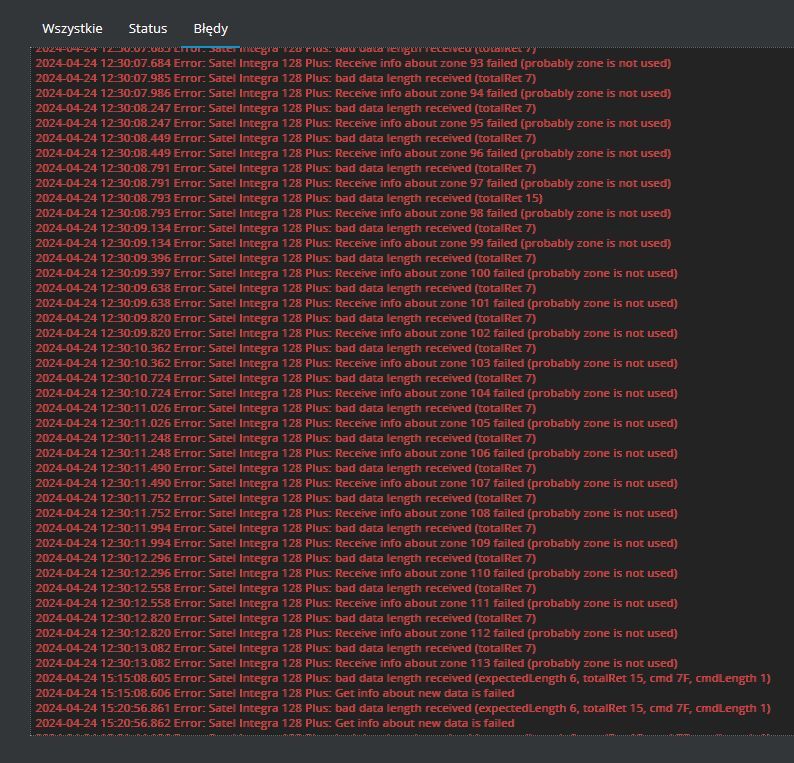
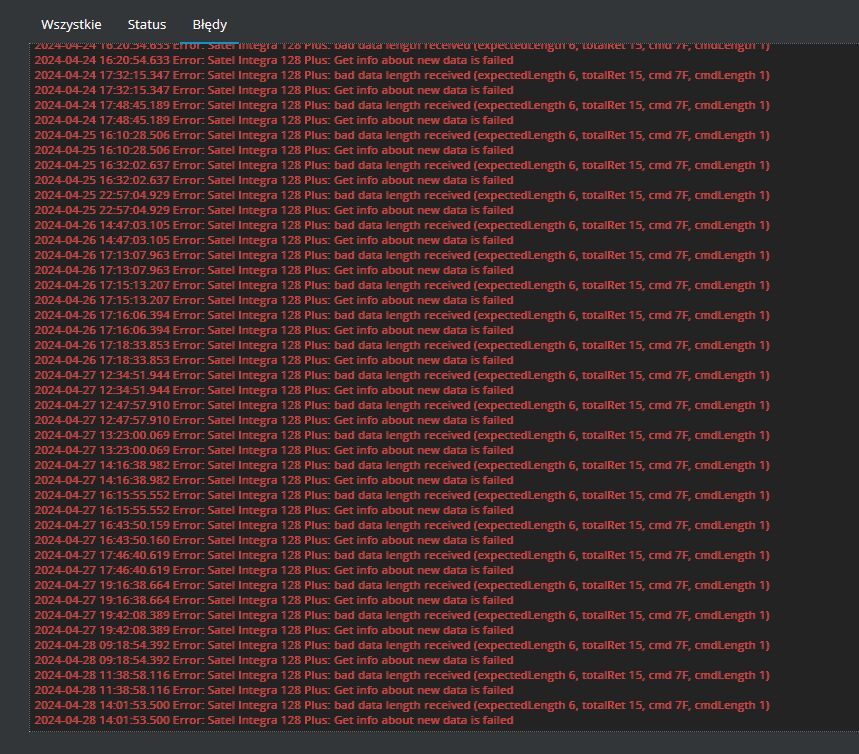
    Or maybe there is something wrong with me and that is what these errors are from:

    Screenshot showing a list of errors in the Satel Integra 128 Plus software with the date and time of each event. .

    Screenshot of system errors for Satel Integra 128 Plus.
  • Helpful post
    #12 21063383
    szczukot
    Level 14  
    Posts: 820
    Help: 6
    Rate: 82
    Board Language: polish
    Hmm, I used to add this info in the errors so you can see a bit of what is flying. This 7F command should with ETHM return 5 or 6 bytes. And here as many as 15 are flying in the response ! That is, with the beginning and end of the frame and with the CRC as many as 21.

    ps. I just downloaded the latest documentation, and there were some changes. They write that it can return 13 or 15 bytes (instead of 5 or 6) as I understand correctly.
    But I'm not sure if I understand :) I don't even understand if these are bytes sent or received.
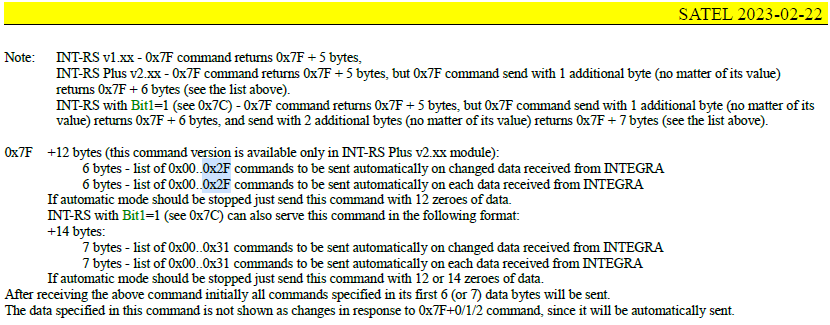
    Screenshot of SATEL documentation regarding command 0x7F for INT-RS and INT-RS Plus.
  • #13 21063472
    Daro1003
    Level 34  
    Posts: 2709
    Help: 295
    Rate: 603
    Board Language: polish
    I am completely unfamiliar with it. I can update the Integra and ETHM software because I'm sure they're new, but it probably won't change anything.

    It's a pity that it doesn't work nicely I don't want to go around integrating and connecting the detectors to Domoticz separately.

Topic summary

✨ The discussion revolves around integrating the Integra 128 Plus alarm system with Domoticz home automation software. Users share insights on setting up the integration, emphasizing the need to specify the IP address and integration port of the ETHM module in Domoticz. A user account with a password is recommended for control purposes. Domoticz scans for inputs and outputs upon plugin startup, and users can add inputs progressively. Issues arise with detecting outputs, particularly with the "Shed Button," which may not be recognized due to naming conventions or errors in the integration process. Users also discuss the response behavior of the ETHM module and potential updates to the Integra and ETHM software.
Generated by the language model.

FAQ

TL;DR: Setup is quick: Domoticz auto-discovers on startup, with ≈1 s status refresh; “It only scans when you start the plugin.” Connect via ETHM IP/port, add a user/password, then restart to rescan. [Elektroda, xury, post #19623134]

Why it matters: For installers and DIYers linking Satel Integra 128 Plus to Domoticz, this FAQ speeds setup, rescans, naming fixes, and error handling.

Quick Facts

How do I set up Domoticz with Satel Integra 128 Plus and ETHM?

Add the Satel integration in Domoticz and enter the ETHM IP and Integration port. Create a dedicated Integra user with a password for control. Start the plugin and wait for auto-discovery to add inputs and outputs. Expert tip: “Banally simple.” How-To: 1. Add hardware → Satel. 2. Set ETHM IP/port + user/password. 3. Enable and wait for discovery. [Elektroda, xury, post #19622441]

Do I need a separate Integra user account for Domoticz control?

Yes. Create a dedicated user on the Integra panel and assign a password. Use those credentials in Domoticz for control functions. This keeps permissions scoped and enables reliable communication. You can change these credentials later without deleting the plugin. [Elektroda, xury, post #19622969]

When does Domoticz scan my Integra inputs and outputs?

Discovery runs only when the Satel plugin starts. If you add or change zones or outputs later, it won’t appear automatically. “It only scans when you start the plugin.” Plan edits, then restart the plugin to refresh the device list. [Elektroda, xury, post #19623134]

How do I force a rescan after adding zones or outputs in Integra?

In Domoticz, open Hardware and locate the Satel entry. Disable the plugin but do not delete it. Enable it again to trigger a new discovery pass and pull updated inputs and outputs into Domoticz. [Elektroda, xury, post #19623134]

Why do some devices show as “Unknown” in Domoticz?

Names containing Polish letters or special characters may not import correctly. Domoticz can show such items as “Unknown” even though the device works. Rename those devices in Domoticz to clear the confusion and keep automation readable. [Elektroda, xury, post #19633893]

Domoticz can’t see my macro output (e.g., gate open). What should I try?

Look for a newly added device labeled “Unknown,” which often corresponds to your macro output. Rename it and test control. If it still doesn’t appear, disable and re-enable the Satel plugin to rescan the panel configuration. [Elektroda, Daro1003, post #19633083]

What update latency should I expect between Integra and Domoticz?

Expect a slight delay. Typical status updates arrive in about one second, sometimes faster. This is normal for the integration. Plan automations with that latency in mind. It does not indicate a fault if values trail by a fraction of a second. [Elektroda, xury, post #19623134]

Can the plugin scan periodically instead of only at startup?

No. The developer set discovery to run on startup only. Satel’s protocol doesn’t allow a safe full query, and repeatedly probing specific inputs causes errors. Restart the plugin when you change the panel configuration. [Elektroda, szczukot, post #21063330]

I see 0x7F command responses with 15 bytes in logs—normal?

Yes. Recent ETHM documentation indicates 13–15-byte responses for 0x7F. Logs that show 15-byte frames reflect that change. Ensure your plugin handles longer frames to avoid mis-parsing. This is a protocol detail, not necessarily a fault. [Elektroda, szczukot, post #21063383]

Will updating Integra/ETHM firmware fix those 0x7F-related errors?

Updating firmware aligns your panel with newer protocol docs, but the plugin must also handle 13–15-byte replies. If the plugin expects shorter frames, logs may still show errors. Verify plugin compatibility after firmware updates. [Elektroda, szczukot, post #21063383]

Can Domoticz control Integra outputs, or is it read-only?

You can control outputs when you provide a valid Integra user and password. Domoticz discovers outputs after connection and lets you actuate them. Use device permissions to limit access as needed. [Elektroda, xury, post #19622441]

Does Domoticz read zones from expanders like INT-SCR?

Yes. Zone states from expanders appear in Domoticz after discovery. For example, a reed switch on INT-SCR can show a door’s open/closed status. Rename the device if its label imports incorrectly. [Elektroda, Daro1003, post #19633083]

Which port should I enter for ETHM integration?

Use the ETHM Integration Protocol port configured on your Integra/ETHM. In Domoticz, enter that port with the ETHM’s IP address when adding the Satel hardware. [Elektroda, xury, post #19622441]

Why do I get frequent errors when trying to poll Integra devices?

Satel’s protocol lacks a universal, safe query for all inputs/outputs. Polling individual inputs repeatedly triggers errors. That’s why discovery runs only at startup. Rely on startup discovery and event updates for stability. [Elektroda, szczukot, post #21063330]
Generated by the language model.
ADVERTISEMENT