logo elektroda
logo elektroda
X
logo elektroda

Tuya SmartLife Universal IR+RF WIFI REMOTE Control Smatrul PCB CODE S11-SH4-CBU-V2.4

hakimmuhiddin 12909 32
ADVERTISEMENT
  • #31 21609204
    abeta
    Level 1  
    Posts: 1
    Hello,
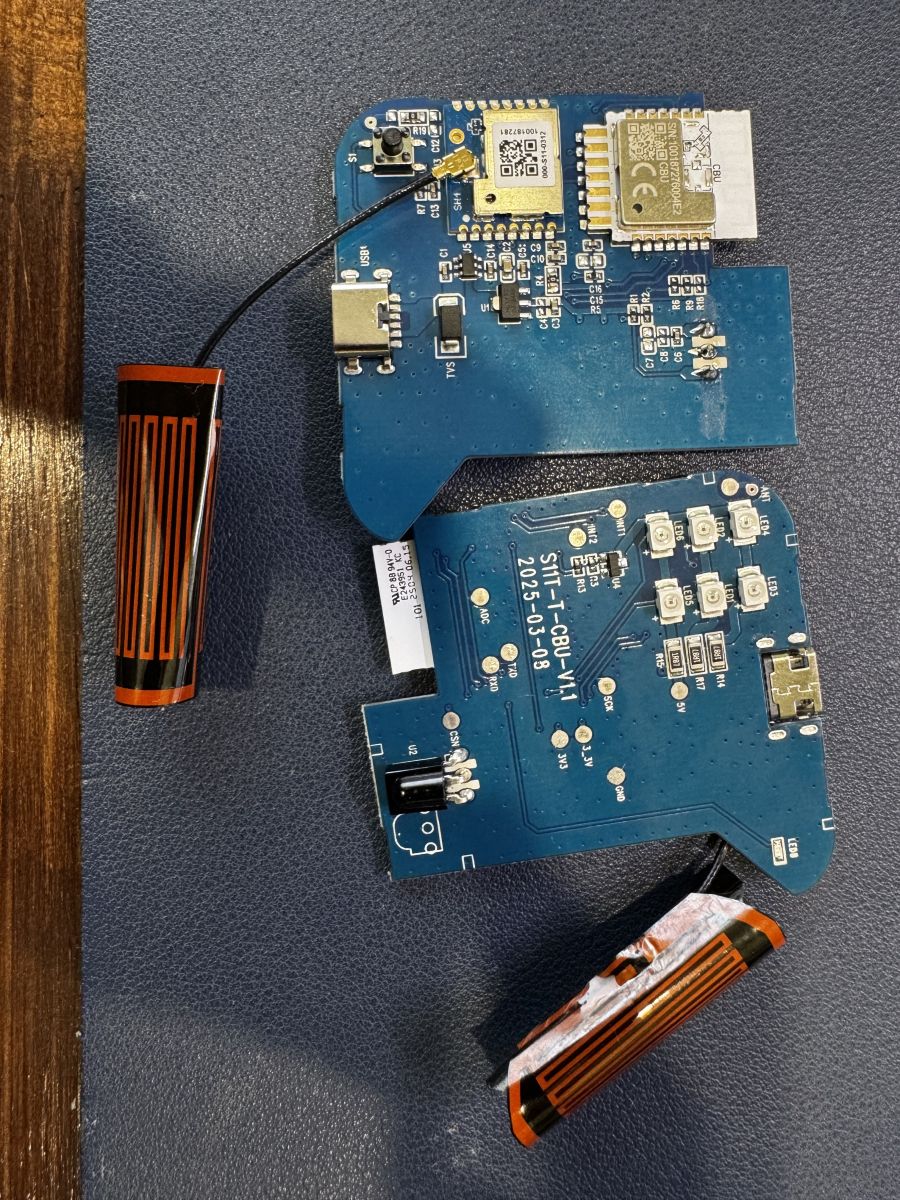
    here's another variant of the S11 bought on taobao.
    After some tinkering I can not seem to find a way to restore power from USB (still workin from UART); any help is appreciated.
    Cheers
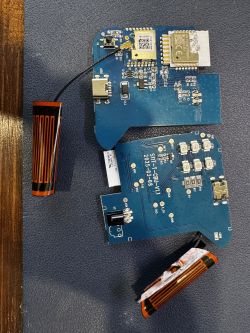
    Tuya SmartLife Universal IR+RF WIFI REMOTE Control Smatrul PCB CODE S11-SH4-CBU-V2.4

    PS: working on compiling an esphome file from previous posts :
    Quote:

    esphome:
    name: tuya_rf_blaster_s11

    external_components:
    - source:
    type: local
    path: components
    components: [ tuya_rf ]

    bk72xx:
    board: cbu
    framework:
    version: latest

    logger:

    web_server:
    version: 3

    captive_portal:

    mdns:

    api:
    encryption:
    key: !secret esphome_encryption_key

    ota:
    platform: esphome
    password: !secret ota_password

    wifi:
    ssid: !secret wifi_ssid
    password: !secret wifi_password

    #status led
    output:
    platform: gpio
    id: status
    pin: P9

    #reset button, it has an external pull-down in my board
    binary_sensor:
    - platform: gpio
    id: reset_button
    pin: P23

    #rf transmitter and receiver
    tuya_rf:
    id: rf
    receiver_disabled: true
    dump: raw

    #for the ir leds
    remote_transmitter:
    id: ir
    pin: P7
    carrier_duty_percent: 50%

    #for the ir receiver
    remote_receiver:
    pin:
    number: P8
    inverted: true
    dump: nec

    sensor:
    - platform: uptime
    name: Uptime

    button:
    - platform: restart
    name: "restart"
    - platform: template
    name: irtest
    web_server:
    sorting_weight: 1000
    on_press:
    - remote_transmitter.transmit_nec:
    transmitter_id: ir
    address: 0xFA05
    command: 0xEB14
    command_repeats: 1
    - platform: template
    name: turn off receiver
    web_server:
    sorting_weight: 1010
    on_press:
    - tuya_rf.turn_off_receiver:
    - platform: template
    name: turn on receiver
    web_server:
    sorting_weight: 1020
    on_press:
    - tuya_rf.turn_on_receiver:
    - platform: template
    name: play/pause
    web_server:
    sorting_weight: 10
    on_press:
    - output.turn_on: status
    - remote_transmitter.transmit_raw:
    transmitter_id: rf
    repeat:
    times: 7
    wait_time: 0s
    #code: [6042,-1106,391,-1106,391,-391,1106,-333,1106,-391,1106,-391,1106,-333,1106,-391,1106,-391,1106,-1106,391,-1106,391,-391,1106,-1106,391,-1106,391,-391,1106,-1106,391,-391,1106,-1106,391,-391,1106,-1106,391,-1106,391,-1106,391,-391,1106,-391,1106,-1106,391,-391,1106,-391,1106,-391,1106,-1106,333,-1106]
    code: [6027, -1093, 375, -1145, 355, -375, 1093, -406, 1094, -389, 1079, -406, 1094, -374, 1114, -386, 1094, -374, 1094, -1145, 354, -1096, 373, -406, 1094, -1145, 323, -1125, 375, -375, 1114, -1104, 375, -406, 1094, -1114, 354, -406, 1093, -1125,
    344, -1145, 386, -1093, 375, -375, 1114, -355, 1093, -1125, 406, -344, 1145, -355, 1124, -344, 1125, -1114, 386, -1093]
    - output.turn_off: status
    - platform: template
    name: 1
    web_server:
    sorting_weight: 20
    on_press:
    - output.turn_on: status
    - remote_transmitter.transmit_raw:
    transmitter_id: rf
    repeat:
    times: 7
    wait_time: 0s
    #code: [6750,-1106,391,-1106,391,-391,1106,-391,1106,-391,1106,-391,1106,-391,1106,-391,1106,-391,1106,-1106,332,-1106,391,-391,1106,-1106,391,-1106,391,-391,1106,-1106,391,-391,1106,-1106,332,-391,1106,-1106,391,-1106,391,-1106,391,-1106,391,-1106,391,-391,1106,-1106,391,-391,1106,-391,1106,-391,1106,-391]
    code: [6744, -1115, 386, -1095, 375, -375, 1125, -348, 1099, -398, 1126, -344, 1107, -424, 1094, -344, 1126, -375, 1146, -1107, 352, -1096, 394, -345, 1144, -1075, 406, -1095, 378, -379, 1118, -1095, 375, -409, 1112, -1073, 376, -375, 1125, -1115,
    354, -1094, 407, -1094, 375, -1115, 386, -1094, 375, -406, 1115, -1105, 388, -362, 1094, -376, 1115, -385, 1094, -376]
    - output.turn_off: status
    - platform: template
    name: 2
    web_server:
    sorting_weight: 30
    on_press:
    - output.turn_on: status
    - remote_transmitter.transmit_raw:
    transmitter_id: rf
    repeat:
    times: 7
    wait_time: 0s
    #code: [6013,-1093,387,-1093,341,-387,1093,-387,1093,-387,1128,-341,1128,-387,1093,-387,1093,-387,1128,-1093,387,-1093,387,-387,1093,-1093,387,-1093,387,-387,1128,-1093,387,-387,1128,-1093,387,-387,1093,-1128,387,-1093,387,-1093,387,-1093,387,-387,1093,-387,1128,-1093,387,-387,1093,-387,1093,-387,1093,-1093]
    code: [6061, -1095, 344, -1146, 354, -375, 1095, -406, 1129, -349, 1117, -375, 1126, -344, 1146, -354, 1126, -375, 1094, -1115, 386, -1097, 372, -375, 1129, -1100, 366, -1094, 407, -344, 1146, -1074, 409, -341, 1125, -1115, 386, -344, 1125, -1094,
    407, -1115, 354, -1126, 375, -1099, 391, -354, 1126, -375, 1094, -1146, 386, -344, 1126, -375, 1094, -378, 1100, -1117]
    - output.turn_off: status
    - platform: template
    name: 3
    web_server:
    sorting_weight: 40
    on_press:
    - output.turn_on: status
    - remote_transmitter.transmit_raw:
    transmitter_id: rf
    repeat:
    times: 7
    wait_time: 0s
    #code: [6803,-1105,379,-1105,379,-379,1105,-379,1105,-379,1105,-379,1105,-379,1105,-379,1105,-379,1105,-1105,379,-1105,379,-379,1105,-1105,379,-1105,379,-379,1105,-1105,379,-379,1105,-1105,379,-379,1105,-1105,379,-1105,379,-1105,379,-379,1105,-1105,379,-379,1105,-1105,379,-379,1105,-379,1105,-1105,379,-379]
    code: [6768, -1079, 406, -1094, 376, -396, 1073, -406, 1095, -375, 1146, -323, 1126, -375, 1126, -344, 1161, -370, 1095, -1094, 375, -1115, 386, -344, 1125, -1095, 427, -1073, 375, -375, 1126, -1115, 354, -375, 1126, -1094, 376, -375, 1140, -1080,
    375, -1094, 410, -1099, 367, -406, 1095, -1105, 364, -406, 1094, -1095, 375, -406, 1115, -355, 1125, -1095, 375, -390]
    - output.turn_off: status
    - platform: template
    name: 4
    web_server:
    sorting_weight: 50
    on_press:
    - output.turn_on: status
    - remote_transmitter.transmit_raw:
    transmitter_id: rf
    repeat:
    times: 7
    wait_time: 0s
    #code: [6005,-1105,379,-1105,379,-379,1105,-379,1105,-379,1105,-379,1105,-379,1105,-379,1105,-379,1105,-1105,379,-1105,379,-379,1105,-1105,379,-1105,379,-379,1105,-1105,379,-379,1105,-1105,379,-379,1105,-1105,379,-1105,379,-1105,379,-379,1105,-379,1105,-379,1105,-1105,379,-379,1105,-379,1105,-1105,379,-1105]
    code: [6034, -1115, 386, -1094, 375, -375, 1104, -400, 1091, -375, 1094, -407, 1115, -354, 1095, -406, 1094, -374, 1116, -1105, 375, -1094, 411, -385, 1080, -1095, 406, -1098, 380, -367, 1094, -1125, 376, -375, 1146, -1073, 379, -372, 1094, -1144,
    357, -1094, 406, -1095, 389, -361, 1125, -376, 1094, -406, 1115, -1075, 374, -406, 1094, -386, 1084, -1094, 406, -1126]
    - output.turn_off: status
    - platform: template
    name: 5
    web_server:
    sorting_weight: 60
    on_press:
    - output.turn_on: status
    - remote_transmitter.transmit_raw:
    transmitter_id: rf
    repeat:
    times: 7
    wait_time: 0s
    #code: [6816,-1105,379,-1105,379,-379,1105,-379,1105,-379,1105,-379,1105,-379,1105,-379,1105,-379,1105,-1105,379,-1105,379,-379,1105,-1105,379,-1105,379,-379,1105,-1105,379,-379,1105,-1105,379,-379,1105,-1105,379,-1105,379,-379,1105,-1105,379,-1105,379,-379,1105,-1105,379,-379,1105,-1105,379,-379,1105,-379]
    code: [6784, -1094, 375, -1115, 386, -344, 1126, -375, 1135, -334, 1094, -407, 1094, -407, 1115, -354, 1126, -344, 1125, -1115, 386, -1094, 375, -375, 1126, -1108, 361, -1094, 407, -344, 1146, -1073, 407, -344, 1125, -1115, 386, -344, 1125, -1094,
    422, -1100, 354, -406, 1095, -1094, 389, -1080, 407, -344, 1156, -1115, 355, -375, 1094, -1126, 375, -388, 1081, -407]
    - output.turn_off: status
    - platform: template
    name: 6
    web_server:
    sorting_weight: 70
    on_press:
    - output.turn_on: status
    - remote_transmitter.transmit_raw:
    transmitter_id: rf
    repeat:
    times: 7
    wait_time: 0s
    #code: [5933,-1104,379,-1104,379,-379,1104,-379,1104,-379,1104,-379,1104,-379,1104,-379,1104,-379,1104,-1104,379,-1104,379,-379,1104,-1104,379,-1104,379,-379,1104,-1104,379,-379,1104,-1104,379,-379,1104,-1104,379,-1104,379,-379,1104,-1104,379,-379,1104,-379,1104,-1104,379,-379,1104,-1104,379,-379,1104,-1104]
    code: [6034, -1115, 386, -1125, 344, -407, 1097, -386, 1080, -407, 1094, -375, 1115, -386, 1097, -372, 1094, -407, 1115, -1104, 344, -1126, 375, -396, 1074, -1094, 406, -1099, 391, -386, 1094, -1126, 344, -406, 1115, -1105, 344, -406, 1095, -1146,
    323, -1106, 395, -375, 1129, -1097, 369, -375, 1126, -375, 1146, -1073, 376, -406, 1094, -1115, 355, -375, 1125, -1095]
    - output.turn_off: status
    - platform: template
    name: random
    web_server:
    sorting_weight: 80
    on_press:
    - output.turn_on: status
    - remote_transmitter.transmit_raw:
    transmitter_id: rf
    repeat:
    times: 7
    wait_time: 0s
    code: [6046,-1103,380,-1103,380,-380,1103,-380,1103,-380,1103,-380,1103,-380,1103,-380,1103,-380,1103,-1103,380,-1103,380,-380,1103,-1103,380,-1103,380,-380,1103,-1103,380,-380,1103,-1103,380,-380,1103,-1103,380,-1103,380,-380,1103,-380,1103,-380,1103,-380,1103,-1103,380,-380,1103,-1103,380,-1103,380,-1103]
    - output.turn_off: status
    - platform: template
    name: invert
    web_server:
    sorting_weight: 90
    on_press:
    - output.turn_on: status
    - remote_transmitter.transmit_raw:
    transmitter_id: rf
    repeat:
    times: 7
    wait_time: 0s
    code: [6728,-1105,333,-1105,388,-388,1105,-388,1105,-388,1105,-388,1105,-388,1105,-388,1105,-388,1105,-1105,388,-1105,388,-388,1105,-1105,388,-1105,388,-388,1105,-1105,388,-388,1105,-1105,388,-388,1105,-1105,388,-1105,388,-388,1105,-388,1105,-1105,333,-388,1105,-1105,388,-388,1105,-1105,388,-1105,388,-333]
    - output.turn_off: status
    - platform: template
    name: 1h
    web_server:
    sorting_weight: 100
    on_press:
    - output.turn_on: status
    - remote_transmitter.transmit_raw:
    transmitter_id: rf
    repeat:
    times: 7
    wait_time: 0s
    code: [6068,-1106,390,-1106,390,-390,1106,-390,1106,-390,1106,-390,1106,-390,1106,-390,1106,-390,1106,-1106,390,-1106,332,-390,1106,-1106,332,-1106,390,-390,1106,-1106,390,-390,1106,-1106,332,-390,1106,-1106,390,-332,1106,-1106,390,-390,1106,-390,1106,-1106,390,-390,1106,-1106,332,-390,1106,-1106,390,-1106]
    - output.turn_off: status
    - platform: template
    name: 2h
    web_server:
    sorting_weight: 110
    on_press:
    - output.turn_on: status
    - remote_transmitter.transmit_raw:
    transmitter_id: rf
    repeat:
    times: 7
    wait_time: 0s
    code: [6698,-1108,392,-1108,392,-392,1108,-392,1108,-392,1108,-392,1108,-331,1108,-392,1108,-392,1108,-1108,392,-1108,331,-392,1108,-1108,392,-1108,392,-392,1108,-1108,392,-392,1108,-1108,392,-392,1108,-1108,392,-392,1108,-392,1108,-392,1108,-1108,392,-1108,392,-392,1108,-1108,392,-1108,392,-1108,392,-331]
    - output.turn_off: status
    - platform: template
    name: 4h
    web_server:
    sorting_weight: 120
    on_press:
    - output.turn_on: status
    - remote_transmitter.transmit_raw:
    transmitter_id: rf
    repeat:
    times: 7
    wait_time: 0s
    code: [6713,-1103,380,-1103,380,-380,1103,-380,1103,-380,1103,-380,1103,-380,1103,-380,1103,-380,1103,-1103,380,-1103,380,-380,1103,-1103,380,-1103,380,-380,1103,-1103,380,-380,1103,-1103,380,-380,1103,-1103,380,-380,1103,-380,1103,-1103,380,-1103,380,-1103,380,-380,1103,-1103,380,-1103,380,-380,1103,-380]
    - output.turn_off: status
    - platform: template
    name: 8h
    web_server:
    sorting_weight: 130
    on_press:
    - output.turn_on: status
    - remote_transmitter.transmit_raw:
    transmitter_id: rf
    repeat:
    times: 7
    wait_time: 0s
    code: [6041,-1104,379,-1104,379,-379,1104,-379,1104,-379,1104,-379,1104,-379,1104,-379,1104,-379,1104,-1104,379,-1104,379,-379,1104,-1104,379,-1104,379,-379,1104,-1104,379,-379,1104,-1104,379,-379,1104,-1104,379,-1104,379,-379,1104,-1104,379,-379,1104,-1104,379,-379,1104,-379,1104,-1104,379,-379,1104,-1104]
    - output.turn_off: status
    - platform: template
    name: luz
    web_server:
    sorting_weight: 140
    on_press:
    - output.turn_on: status
    - remote_transmitter.transmit_raw:
    transmitter_id: rf
    repeat:
    times: 7
    wait_time: 0s
    code: [6756,-1105,379,-1105,379,-379,1105,-379,1105,-379,1105,-379,1105,-379,1105,-379,1105,-379,1105,-1105,379,-1105,379,-379,1105,-1105,379,-1105,379,-379,1105,-1105,379,-379,1105,-1105,379,-379,1105,-1105,379,-379,1105,-1105,379,-379,1105,-1105,379,-1105,379,-379,1105,-1105,379,-379,1105,-1105,379,-379]
    - output.turn_off: status
  • ADVERTISEMENT
  • #32 21618884
    leandrosouzacarneiro
    Level 1  
    Posts: 1
    no need to clone, you can use your current ESPHome Builder interface, here a sample code:

    Code: YAML
    Log in, to see the code


    receiving RF works, I haven't emmiting, tho; IR works like a charm. Tested on a S11
  • #33 21777392
    kar200
    Level 4  
    Posts: 4
    Hi all,

    I spent a few days and more time than I would have liked to create a GitHub repo. I am quite a noob, so I used antigravity for the whole process, and thanks to Olivier and Tuya source code, I managed to come up with something.

    https://github.com/kar200/kar200-tuya_rf_remote

    You are welcome to try, and it seems to work better in my case.

    Initially, I wanted to get a clean signal just like my CC1101, but it was not possible. Most of the filtering options offered by the CMT2300A seem to be for the packet mode (not used with remote_receiver). The main one called DOUT_MUTE did not work in my case. This option does mute the receiver but is supposed to trigger if the RSSI is above a certain value, but it stayed muted all the time no matter what value I would assign to the RSSI. I used a logic analyzer to monitor both GPIOs' behavior throughout the whole process.

    Another filtering option is PJD but does not seem to work for OOK modulation. One last that did work was PKT_VLD, which essentially puts the second GPIO high if the RSSI is above a certain value. Using it was not working well, so I abandoned the use.

    For me, selecting dooya as dump or even all works. Selecting the actual remote works very well, as I can see the 5 different pulses sent (I only press once).

    This is the repo. If you want to use it, you can just create a Python venv and install esphome and compile the yaml. Just change the external component part with

    external_components:
     - source: github://kar200/tuya_rf_remote@main
       components: [ cmt2300a ] 

Topic summary

✨ The discussion centers on the Tuya SmartLife Universal IR+RF WiFi Remote Control with PCB code S11-SH4-CBU-V2.4, focusing on firmware configuration, IR and RF functionality, and integration with OpenBK and ESPHome platforms. Key technical details include pin assignments such as "wfst_pin" for WiFi status LED, "infrr" for infrared receive, and "infre" for infrared emit. Users share JSON configuration templates and explore programming IR remote functions using OpenBeken firmware. A significant topic is enabling RF transmission and reception, with suggestions to port Tasmota RF drivers (e.g., xdrv_17_rcswitch) due to compatible licenses. Several contributors express interest in developing RF support, noting partial IR functionality but limited RF support in current firmware. Alternative approaches involve flashing custom firmware using Tuya Cloud Cutter and ESPHome, enabling raw RF signal capture and replay, demonstrated with protocols like Dooya DC2702. Discussions include challenges in flashing firmware via USB-to-TTY adapters and successful OTA flashing methods. Users analyze RF signal encoding, including NEC IR codes and 433 MHz raw high/low pulse sequences, and confirm that most 433 MHz RF devices operate unencrypted and do not require pairing, allowing broad compatibility. Additional tools mentioned include CC1101 RF modules with ESP32 and esphome-cc1101 integration for signal decoding and visualization. The thread also touches on scripting examples for TV remote control and requests for assembly cable diagrams for programming related devices.
Generated by the language model.

FAQ

TL;DR: For S11-SH4-CBU-V2.4, 3 core pins matter: P7 IR emit, P8 IR receive, P9 WiFi status; "IR works like a charm" with ESPHome, while RF433 needs tuya_rf or further OpenBeken driver work. This FAQ helps Avatto/Smatrul users flash, map pins, and replay IR/RF codes. [#21618884] Why it matters: The S11 can become a local Home Assistant IR/RF bridge, but only if firmware, pins, and raw RF timing are handled correctly.

Alternative IR support RF433 support Typical use in thread
OpenBeken Works for IR scripting RF driver still requested Existing BK7231 firmware and web app
ESPHome + olivluca/tuya_rf Works on P7/P8 Learn/replay raw RF Home Assistant YAML workflow
ESPHome + CC1101 helper External decoder Cleaner protocol analysis Debugging Dooya-style RF

Key insight: Use P7/P8/P9 as the stable base mapping, then choose firmware by RF needs. ESPHome already shows working RF workflows, while OpenBeken still needs a dedicated RF driver port.

Quick Facts

  • PCB code discussed: S11-SH4-CBU-V2.4, sold as Tuya SmartLife Universal IR+RF WiFi Remote / Avatto S11. [#20618377]
  • Mini pin table:

    Function Pin
    WiFi status LED P9
    Infrared receive P8
    Infrared emit P7

    [#20636079]

  • Tuya model/API data included HMS11CBUSH4, category Universal Remote Control, protocol 2.2, baseline 40.00, and schema IDs 201 and 202. [#21040274]
  • ESPHome examples use bk72xx board: cbu, RF repeat values such as 2, 3, or 7, and IR carrier duty of 50%. [#21618884]
  • RF filtering notes include start pulses 6–10 ms, pause rejection over 6 ms, and an end pulse detected at at least 50 ms. [#21441995]

How do I configure the Avatto/Smatrul S11-SH4-CBU-V2.4 Tuya IR+RF remote pins for OpenBeken or ESPHome?

Configure P7 as IR transmit, P8 as IR receive, and P9 as WiFi status LED. Use CBU as the BK72xx board in ESPHome. A working YAML also uses P23 as reset button. Set remote_transmitter on P7 with 50% carrier duty. Set remote_receiver on P8 with inverted: true. For RF, add tuya_rf and use raw dumps or protocol dumps. [#21618884]

What do the Tuya config fields wfst_pin, infrr, and infre mean on the S11 IR+RF remote?

wfst_pin means WiFi status, infrr means infrared receive, and infre means infrared emit. The mapped values are P9, P8, and P7. "wfst_pin" is a Tuya configuration field that assigns the WiFi status indicator GPIO, letting firmware blink or hold the LED during connection state changes. One contributor used WiFiLED blinking during connection and steady on after connection. [#20636079]

How can I flash ESPHome onto an Avatto S11 with a BK7231N/CBU module after OpenBeken is already installed?

Flash the ESPHome OTA RBL through the OpenBeken OTA panel after renaming the file. 1. Compile ESPHome for bk72xx and board: cbu. 2. Find image_bk7231n_app.ota.rbl, without UG in the filename. 3. Rename it to OpenBK7231N_esphome.rbl and upload it in OpenBeken OTA. This solved a failed USB-to-TTL serial flash on an already OpenBeken-flashed Avatto S11. [#21429534]

What is Tuya CloudCutter and how is it used with the Avatto S11 IR+RF controller?

Tuya CloudCutter was used first to change the stock firmware before building ESPHome from the RF repository. "Tuya CloudCutter" is a flashing method that replaces compatible Tuya firmware without opening the device, commonly used before installing local firmware on supported BK7231 devices. In this thread, the user then built ESPHome inside a Python virtual environment from olivluca/tuya_rf. [#21407223]

What is the CBU module in the Tuya SmartLife Universal IR+RF WiFi remote?

CBU is the BK72xx module target used by the S11 ESPHome configurations. "CBU" is a Tuya/Beken WiFi module category that ESPHome targets with bk72xx board: cbu, enabling firmware builds for BK7231-based Tuya devices. The working YAML sets bk72xx, board: cbu, and framework version: latest. [#21412540]

How do I add RF433 support to OpenBeken for the S11 by porting a Tasmota RF driver?

Add a new OpenBeken driver entry, then create a separate RF driver source file. The proposed path was src/driver/drv_main.c for the driver table. Then create a file such as drv_rf.c. Use an existing driver, such as drv_httpButtons.c, as the structure example. The maintainer stated help was welcome because no RF device was available locally. [#20940597]

Which Tasmota RF driver or RFSend code should be migrated to OpenBeken for 433 MHz support?

Start with Tasmota RFSend and the xdrv_17_rcswitch.ino code path. The OpenBeken maintainer pointed to RFSend search results and line-level rcswitch code. For receive-only work, migrate the RF receiver path instead. The thread separates sending and receiving because each needs different driver behavior and command handling. [#21040232]

How can I use the olivluca/tuya_rf ESPHome component to learn and transmit RF commands on the S11?

Use the olivluca/tuya_rf ESPHome external component, enable raw dumping, then replay captured arrays. 1. Add external_components from the local repo or GitHub URL. 2. Configure tuya_rf with id: rf, receiver_disabled, and dump: raw. 3. Use remote_transmitter.transmit_raw with transmitter_id: rf, repeat count, and captured code. One example used repeat 3 for Dooya commands. [#21412540]

Why do some RF raw high/low codes from the S11 look inverted or start after the first pause?

The S11 capture can start after the first pause because the tuya_rf code filters noisy RF aggressively. It expects a start pulse longer than 6 ms and shorter than 10 ms. It rejects pauses over 6 ms and waits for an end pulse of at least 50 ms. In one working setup, both tx_pin P20 and rx_pin P22 were set inverted. [#21441995]

How can I capture and replay 433 MHz raw RF commands for Dooya, Yooda, Intertech, or Brennenstuhl devices?

Capture the 433 MHz signal as raw high/low timings, then replay the same timing array. Dooya DC2702 commands worked after learning every remote command. Intertech/Brennenstuhl analysis found a 24-bit pattern: 10 device bits, 10 channel bits, and 4 command bits. One measured bit time was 1200 µs, with 0 represented as 900, -300. Rolling-code devices are excluded. [#21432262]

What is the difference between using the S11 built-in RF hardware and a CC1101 module for decoding 433 MHz signals?

The S11 built-in RF hardware can replay raw codes, while CC1101 gives cleaner analysis for decoding. One user used a cheap CC1101 with ESP32 and an ESPHome oscilloscope tool. That setup identified the Dooya protocol and showed the S11 capture was inverted. The CC1101 workflow helped move from raw arrays to protocol-level commands. [#21441995]

OpenBeken vs ESPHome on BK7231 S11 IR+RF remotes — which is better for IR and RF control?

ESPHome is better documented in this thread for combined IR and RF control. OpenBeken already handled IR scripting examples, but RF still required driver work. ESPHome examples show tuya_rf, P7 IR transmit, P8 IR receive, and Home Assistant API support. OpenBeken remains useful when it is already installed, especially for OTA migration to ESPHome. [#21429534]

How do I set up IR transmit and receive on the Avatto S11 using ESPHome remote_transmitter and remote_receiver?

Set remote_transmitter to P7 and remote_receiver to P8 with inversion enabled. A working S11 YAML used carrier_duty_percent: 50% for the IR LEDs. Another example used dump: all and tested LG TV power with transmit_lg data 0x20DF10EF, 32 bits. The thread also shows NEC testing with address 0xFA05 and command 0xEB14. [#21618884]

Why might an S11 variant from Taobao stop powering from USB while still working from UART, and how can it be troubleshot?

The thread reports the failure but gives no confirmed repair. The Taobao S11 variant still worked from UART but no longer restored power from USB. Treat this as a hardware power-path fault first. Check USB 5 V input, connector continuity, regulator output, and any damaged protection components. Compare the board visually with the shared photos before flashing again. [#21609204]

Where can I find or make a programming cable diagram for DC270 Yooda roller shutters?

The thread asks for a DC270 Yooda programming cable diagram but does not provide one. The closest related data is a working Dooya DC2702 RF workflow, not a cable pinout. Do not infer a wiring diagram from RF codes. Use the roller shutter manufacturer documentation or continuity-test the original cable before connecting UART, power, or motor lines. [#21542974]
Generated by the language model.
ADVERTISEMENT