logo elektroda
logo elektroda
X
logo elektroda

Differences between SniffUART and TuyaMcu Analyzer: Improved USB Adapter Communication

mkmunichmk 1881 19
ADVERTISEMENT
  • #1 20672453
    mkmunichmk
    Level 7  

    There is a further Windows program available on GitHub named "SniffUART".
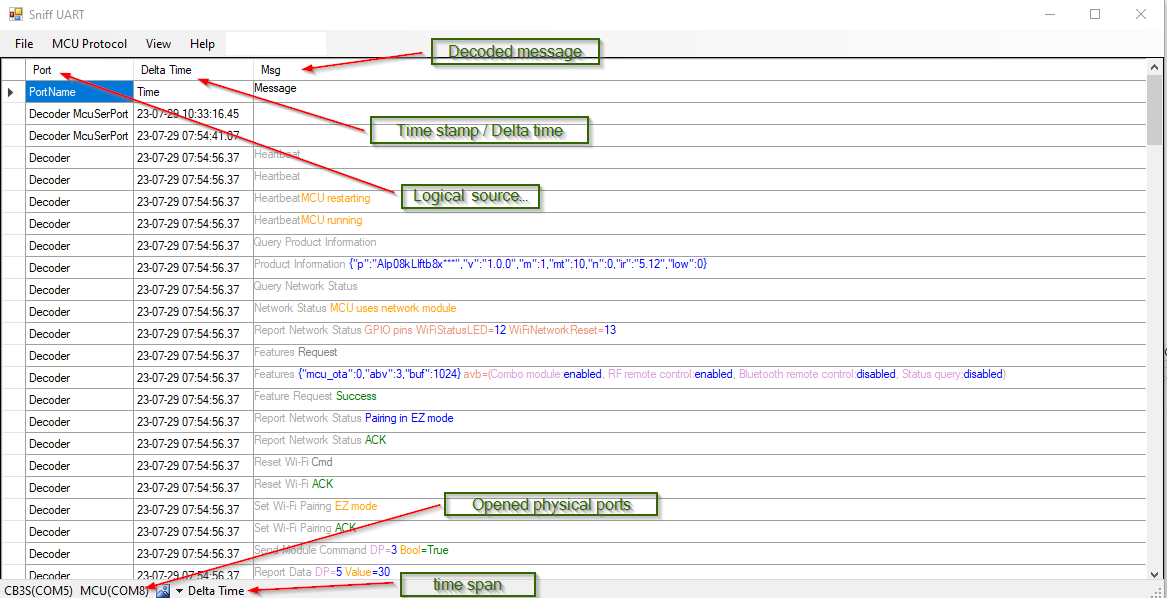
    Screenshot of the Sniff UART program showing a table of decoded messages from serial ports, annotated with arrows and labels.

    What is the difference to TuyaMcu Analyzer?
    - improve communication to serial USB adapters.
    - all Tuya messages specified by Tuya are decoded.
    - maintainable, means errors can easily be fixed & further decoding can be added.

    A lot of work - hopefully worth it to you.
    Please have a look at the Readme.md on GitHub.
    https://github.com/MkMunich/SniffUART

    I appreciate your feedback.
    Best Regards,
    MK_Munich
  • ADVERTISEMENT
  • #2 20672480
    p.kaczmarek2
    Moderator Smart Home
    Nice work! I will definitely try it out when I get next TuyaMCU device.

    Do you also decode date (calendar) packets?
    Helpful post? Buy me a coffee.
  • ADVERTISEMENT
  • #3 20672736
    mkmunichmk
    Level 7  

    p.kaczmarek2 wrote:
    Do you also decode date (calendar) packets?


    For sure. If these messages are specified in either McuSerialPort
    https://developer.tuya.com/en/docs/iot/tuya-c...ess-protocol?id=K9hhi0xxtn9cb#QueryServerTime
    or McuLowPower
    https://developer.tuya.com/en/docs/iot/tuyacl...niversalserialaccessprotocol?id=K95afs9h4tjjh

    then they are already included.

    I started with spec McuHomeKit
    https://developer.tuya.com/en/docs/iot/wifi-m...lopment-overview-for-homekit?id=Kaa8fvusmgapc
  • #4 20672826
    p.kaczmarek2
    Moderator Smart Home
    Is the HomeKit protocol different than standard TuyaMCU? In which devices is it used? I haven't looked into that protocol yet.
    Helpful post? Buy me a coffee.
  • #5 20673305
    mkmunichmk
    Level 7  
    At first glance, the messages are very similar. Most messages look identical, but I saw one response having a different meaning...

    From the 'header' of the Tuya spec:
    "This topic describes how to interface your MCU with Tuya’s Wi-Fi module that can be connected to both the Tuya IoT Platform and the Apple HomeKit platform. After implementing the serial protocol, your product can communicate with Tuya’s Wi-Fi module and interact with ‘Powered by Tuya’ products and HomeKit-compatible products."

    So far I've seen from examples, which were uploaded to TuyaMCU Analyzer, there were some devices using this protocol.

    Added after 29 [minutes]:

    In case the messages are identical, I'll delegate decoding from McuHomeKitMsg to McuSerPortMsg. This has the advantage that code is not duplicated and it can be seen (inside source code) that the message is the same.
  • #6 20673976
    DeDaMrAz
    Level 22  

    @mkmunichmk

    Nice job!!

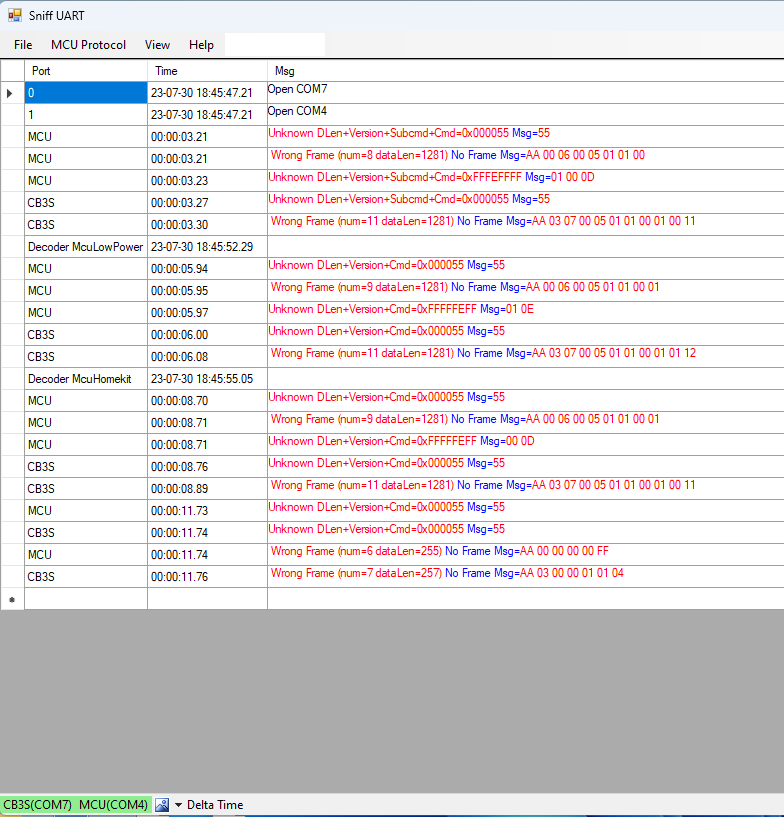
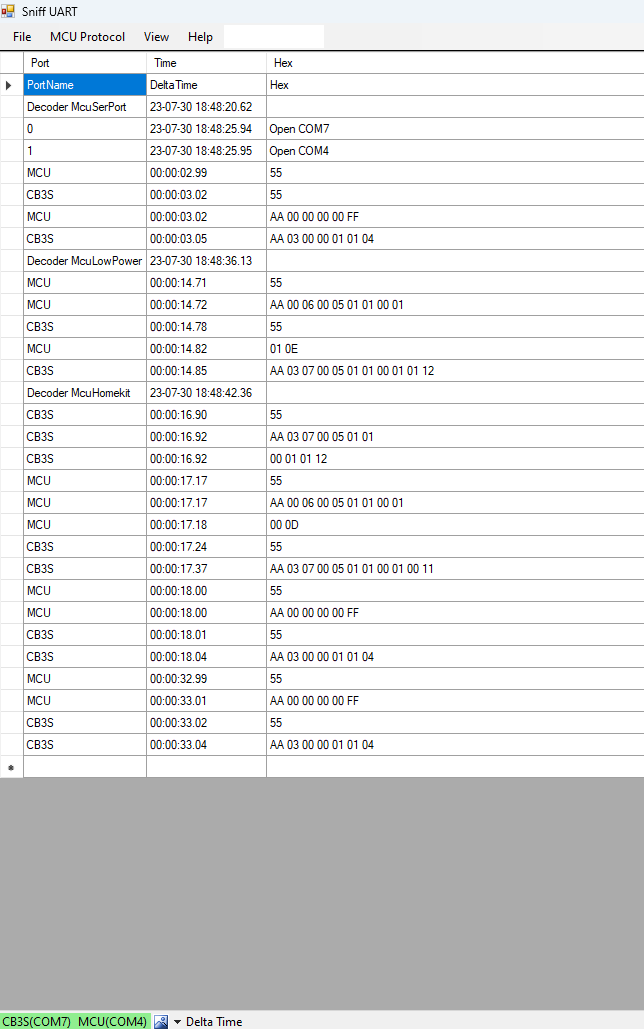
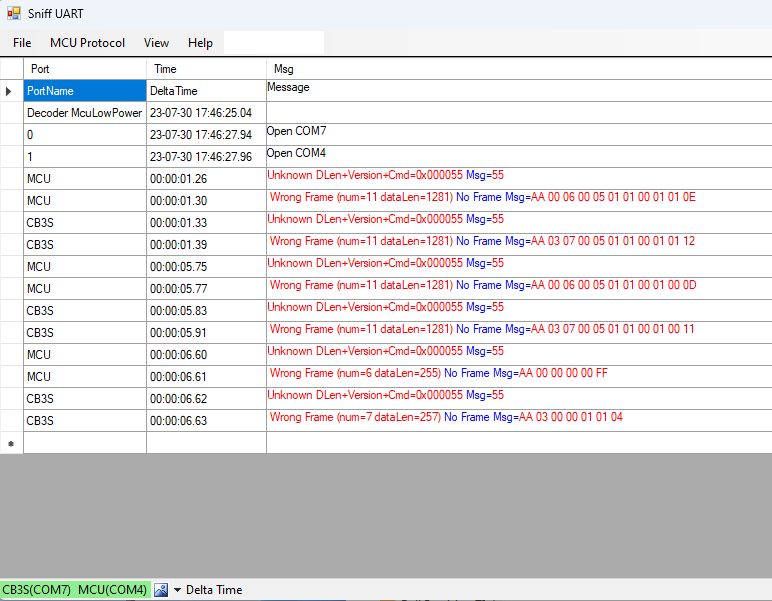
    Decided to give this a test as me and @p.kaczmarek2 are working on something TuyaMCU related but I am not having luck decoding the messages so far. Any idea?

    Sniff UART software window displaying error messages about frames and message decoding on COM4 and COM7 ports.

    Screenshot of the Sniff UART program showing serial communication analysis with multiple decoding errors for TuyaMCU frames.
  • ADVERTISEMENT
  • #9 20675424
    mkmunichmk
    Level 7  

    It looks like SniffUART has a problem finding the end of a message. You'll need to play around with the parameter "Read Timeout" in the port settings. This time in ms defines the gap time between messages. Normally, a serial port will send all bytes at once (using an internal 16-byte buffer if the chip). Of course, the Windows driver could 'divide' the byte stream, so the first byte could come immediately and the 'rest' with a second call to ReadBytes. For this, I'd configured a minimal message length of 2 bytes. Maybe I should increase this fixed value in the code.
    But first, you should try to increase the Read Timeout to e.g. 100 ms.

    One last-minute change has been to increase the thread priority. If you can compile the source code, you could comment this out
    in PortHandler.cs at line ~33
    _readThread.Priority = ThreadPriority.Highest;
    Maybe "AboveNormal" would help? Please let me know.
  • #10 20675433
    p.kaczmarek2
    Moderator Smart Home
    Hmm so you don't buffer them together? I have taken a different approach in my flasher, you can check my ring buffer code for more info.
    Helpful post? Buy me a coffee.
  • ADVERTISEMENT
  • #11 20675445
    mkmunichmk
    Level 7  

    p.kaczmarek2 wrote:
    you can check my ring buffer code

    I wanted to avoid this, as in general messages could have different (how to say) structures. In the past I had a protocol, where it was (nearly) impossible to find a start and the end of a message. I agree, Tuya messages are more structured e.g. having a 2 byte header.
    Unfortunately I do not have many different Tuya devices to test with. But I'm sure, we'll find a solution (e.g. your ring buffer).
  • #12 20676456
    mkmunichmk
    Level 7  

    My last comment seems to be lost :-( So again:
    I updated the SniffUART.exe on GitHub (as I do not know whether you are able to compile the sources).

    I took back the thread priority to normal and increased the ReceivedBytesThreshold=75; (Maybe it is still too low for messages having a length > 75 bytes).

    A hint to Read Timeout: This time should not be too short, as it defines the 'distance' to the next following message. I'm assuming this can't be quicker than 100 ms in a Tuya device.

    Please let me know whether this helped.
    Best Regards, MK_Munich
  • #13 20676468
    DeDaMrAz
    Level 22  

    I'll try that soon and will report back.

    One thing I noticed is that you only have 9600 bps, you do know there are 115200 bps devices out there??
  • #14 20676628
    p.kaczmarek2
    Moderator Smart Home
    Tasmota allows you to choose between 9600 and 115200 with a flag, in OpenBK, you can specify any reasonable baud.
    Helpful post? Buy me a coffee.
  • #15 20676837
    mkmunichmk
    Level 7  

    SniffUART supports all (typical) baud rates. Hint: you could also specify different settings for each port, but normally you'll set the flag File->Port Settings->One port.
  • #16 20677748
    mkmunichmk
    Level 7  

    I completed McuHomeKitMsg. So all known (to me) Tuya messages should decode.
    To get a feeling of how the decoded messages look, download SniffUART.exe from GitHub, start it, and open the menu File->Decode Messages dialog. Then paste the example test messages "Test Mcu*.txt" into the dialog and press 'Decode'. Enjoy!

    I did not have many messages from real Tuya devices. In case the spec gave examples, I took them over into "Test Mcu*.txt". If there was no example given, I invented my own.
    The quality of the Tuya specs is sometimes okay, sometimes I was only able to guess and decode as I understood it. I do not expect it to be error-free. The decoding has ~3,500 lines of code...
    Please use GitHub to report issues.

    A hint for @p.kaczmarek2 who asked about differences in the decoder classes: whenever possible, I redirected the decoding to McuSerPortMsg. You can see in the source code where the decoding takes place. One major difference is in the data unit, which is completely different in McuHomeKitMsg.
  • #18 20678142
    mkmunichmk
    Level 7  
    An actual build is found on GitHub.

    Good news: I improved the UART communication. The end of a messages is now detected by timing out after the last byte of a message had been received.
    I used my battery powered Tuya door contact (old version with reed contact and TuyaMCU) to test. I'm not sure,whether I found an issue...
    As my Tuya door contact is not a DS06 device and looks from hardware very similar to https://www.elektroda.com/rtvforum/topic3914412.html#20350672 I do not know, whether to open a new thread? @p.kaczmarek2 Please advice.
  • #19 20683640
    p.kaczmarek2
    Moderator Smart Home
    @mkmunichmk if you can do a detailed write-up of new device, you are welcome to do so. Add some photos, configuration info, packet captures... we can send you a free gift for contributing a good, detailed device description:
    https://www.elektroda.com/rtvforum/topic3950844.html#20500470

    Here's my Door sensor topic:
    https://www.elektroda.com/rtvforum/topic3914412.html
    if yours is different, please share the information.
    Helpful post? Buy me a coffee.

Topic summary

✨ The discussion centers around the differences between SniffUART and TuyaMcu Analyzer, focusing on their capabilities in decoding Tuya messages and improving communication with serial USB adapters. SniffUART, available on GitHub, is designed to decode all specified Tuya messages and is maintainable for future updates. Users inquire about specific functionalities, such as decoding date packets and the differences between the HomeKit protocol and standard TuyaMCU. Issues with message decoding and communication parameters, such as Read Timeout and baud rates, are addressed, with suggestions for adjustments to improve performance. The conversation also highlights the collaborative efforts of users to enhance the decoding process and share findings related to Tuya devices.
Generated by the language model.

FAQ

TL;DR: SniffUART adds robust Tuya MCU decoding and USB‑serial handling. It ships with ~3,500 lines of decoders; "all known messages should decode." [Elektroda, mkmunichmk, post #20677748] Why it matters: You’ll capture and decode Tuya traffic more reliably, even with finicky USB adapters—ideal for firmware tinkerers and integrators.

Quick Facts

What’s the main difference between SniffUART and TuyaMCU Analyzer?

SniffUART focuses on stronger USB‑serial communication, full Tuya-specified message decoding, and maintainable code for fast fixes and extensions. It’s a Windows tool with a GitHub README and active iteration. These priorities address real-world capture reliability and long-term decoder growth. [Elektroda, mkmunichmk, post #20672453]

Does SniffUART decode Tuya date/time (calendar) packets?

Yes. If Tuya defines the calendar or time messages in MCU Serial Port or MCU Low Power specs, SniffUART includes them. That covers items like server time queries documented in Tuya’s serial protocols. This ensures time sync frames parse correctly in typical devices. [Elektroda, mkmunichmk, post #20672736]

Is the Tuya HomeKit serial protocol different from standard TuyaMCU?

At first glance, they are very similar, with some responses differing in meaning. When identical, decoding routes to the MCU Serial Port handler to avoid duplication. "At first glance, the messages are very similar." This keeps behavior consistent across overlapping frames. [Elektroda, mkmunichmk, post #20673305]

How do I fix frames not decoded or garbled in SniffUART?

Try this:
  1. Update to the latest GitHub build.
  2. Set Read Timeout around 100 ms to separate frames.
  3. Raise ReceivedBytesThreshold from 75 if frames are long. The author restored normal thread priority and advises longer gaps between messages for Tuya devices. [Elektroda, mkmunichmk, post #20676456]

Why does SniffUART sometimes mis-detect message boundaries?

Windows drivers can split serial reads, and some chips use a 16‑byte buffer. SniffUART initially assumed a minimal 2‑byte message, which can fragment frames. Increase Read Timeout to about 100 ms so gaps terminate messages. This reduces boundary errors on busy systems. [Elektroda, mkmunichmk, post #20675424]

Does SniffUART support 115200 bps devices?

Yes. "SniffUART supports all (typical) baud rates." You can also set different parameters per port, or enable the One port option for uniform settings. This covers 9600 and 115200 bps TuyaMCU devices used by Tasmota or OpenBK setups. [Elektroda, mkmunichmk, post #20676837]

Which Tuya protocols are supported out of the box?

SniffUART targets Tuya MCU Serial Port, MCU Low Power, and HomeKit-related serial protocols. If Tuya’s spec defines a message for these, SniffUART includes the decoder. This ensures broad coverage for common Wi‑Fi and low-power modules. [Elektroda, mkmunichmk, post #20672736]

How can I test the decoder offline without hardware?

Open File → Decode Messages, paste one of the bundled “Test Mcu*.txt” samples, and click Decode. This lets you preview how frames parse before attaching any device. It’s useful for learning field names and verifying custom captures. [Elektroda, mkmunichmk, post #20677748]

Where do I download the latest SniffUART binary?

Grab the current build from the project’s GitHub. Recent updates improved UART reliability by detecting end-of-message via a timeout after the last byte arrives. Use that build before tuning port parameters. [Elektroda, mkmunichmk, post #20678142]

Does SniffUART use a ring buffer for serial data?

The author avoided a ring buffer due to varied protocol structures and boundary detection concerns. Tuya frames help by having a 2‑byte header, and a ring buffer could still be added if needed. The design favors clear, maintainable parsing. [Elektroda, mkmunichmk, post #20675445]

What decoder profile should I choose for Low Power TuyaMCU captures?

Select the MCU Low Power decoder when your device uses that protocol. This is crucial for proper field mapping and DP parsing. Mis-matched profiles will cause undecoded payloads or wrong values. [Elektroda, p.kaczmarek2, post #20674055]

How exactly does SniffUART improve USB adapter communication?

It now detects the end of a message by timing out after the last received byte. This approach reduces split or merged frames from driver buffering and makes captures cleaner on common USB‑serial adapters. [Elektroda, mkmunichmk, post #20678142]

What if my frames exceed 75 bytes?

Increase ReceivedBytesThreshold beyond 75 so longer messages don’t split mid-frame. The author raised the default but noted very long frames may still need higher thresholds. Combine this with an adequate Read Timeout. [Elektroda, mkmunichmk, post #20676456]

Can I contribute issues or suggest new decoders?

Yes. Report issues on GitHub. The codebase is designed for maintainability, and the author invites feedback using samples and the test files to refine decoders. Include captures and device details. [Elektroda, mkmunichmk, post #20677748]

Do I need to change thread priority for better captures?

No. The author reverted to normal thread priority in newer builds. Focus on Read Timeout and threshold tuning instead of thread tweaks for stability. Update first, then adjust serial settings. [Elektroda, mkmunichmk, post #20676456]
Generated by the language model.
ADVERTISEMENT