logo elektroda
logo elektroda
X
logo elektroda
Dostępna jest polska wersja

Czy wolisz polską wersję strony elektroda?

Nie, dziękuję Przekieruj mnie tam

[SM-02/BL602L20] Mini Smart Breaker RMW002 Flashing OpenBL602 on BL602L20 Flash Like Esphome

climberfather 17667 42

TL;DR

  • Mini Smart Breaker RMW002 uses a BL602L20 microcontroller on the SM-028 board.
  • It is flashed with OpenBL602_1.17.282 from the OpenBK7231T_App project.
  • A working profile exists for this configuration.
Generated by the language model.
ADVERTISEMENT
📢 Listen (AI):
  • #31 20871097
    max_mcu
    Level 3  
    Posts: 6
    Hello, I have a relay (Mini Smart Breaker RMW002) with OpenBL602,
    -->> SendGet <<-- doesn't work. What do i have to do ? Thanks for the help

    OpenBL602_xxxxx
    Command Tool
    This is a basic command line.
    Please consider using 'Web Application' console with more options and real time log view.
    Remember that some commands are added after a restart when a driver is activated...

    Error:CMD:cmd SendGet NOT found (args http://192.168.188.25:8181/cuxd.exe?ret=dom.GetObject(xxxxx......)
    Unknown command

    doesn't work. What do i have to do ? Thanks for the help
  • ADVERTISEMENT
  • #32 20871441
    p.kaczmarek2
    Moderator Smart Home
    Posts: 14667
    Help: 656
    Rate: 12683
    It looks like you're trying to use SendGET on BL602 platform. This is currently disabled, we haven't tested SendGET on this platform yet. Futhermore, BL602 is slightly more space-limited, as it has only 1MB of Flash instead of 2MB like Beken.

    In order to use SendGET on BL602, you'd have to switch define and makefile to include SendGET code:
    https://github.com/search?q=repo%3Aopenshwprojects%2FOpenBK7231T_App%20SendGet%20&type=code
    This theoretically should work after just those changes, so you don't really need coding skills to do that, but still, I am not 100% sure.

    I may look into it later, depending on my free time, but BL602 is not as popular as Beken and I don't have a BL602 dev board at hand, it was bricked when I started testing MAC change functionality... I'd need to get one first.
    Helpful post? Buy me a coffee.
  • ADVERTISEMENT
  • #33 20871748
    max_mcu
    Level 3  
    Posts: 6
    ok I see... I can test it, but I didn't understand how I can build an .ota firmware from the .Bin
  • ADVERTISEMENT
  • #34 20871867
    p.kaczmarek2
    Moderator Smart Home
    Posts: 14667
    Help: 656
    Rate: 12683
    Well, the simplest solution is to fork our app from Github and just commit to that. We have online build systems. When you submit a commit, it will build all binaries automatically. You will see a green OK sign or a red cross (error icon) next to the commit indicating whether build has failed or succeeded. If you click it, and search for "download artifacts" you will get zip file with binaries for all platforms.

    Keep in mind that BL602 OTA silently fails once you reach the flash limit. It will not update anymore, but it will NOT break your device. You will be able to update it as soon as you reduce the size of the next OTA binary.
    Helpful post? Buy me a coffee.
  • #35 20872519
    nikolajpug
    Level 1  
    Posts: 1
    При попытке считать программатором на скорости 128 (ch340) нет Handshake. Для перепрограммирования затирка обязательна?
  • #36 20986233
    jeffs555
    Level 1  
    Posts: 1
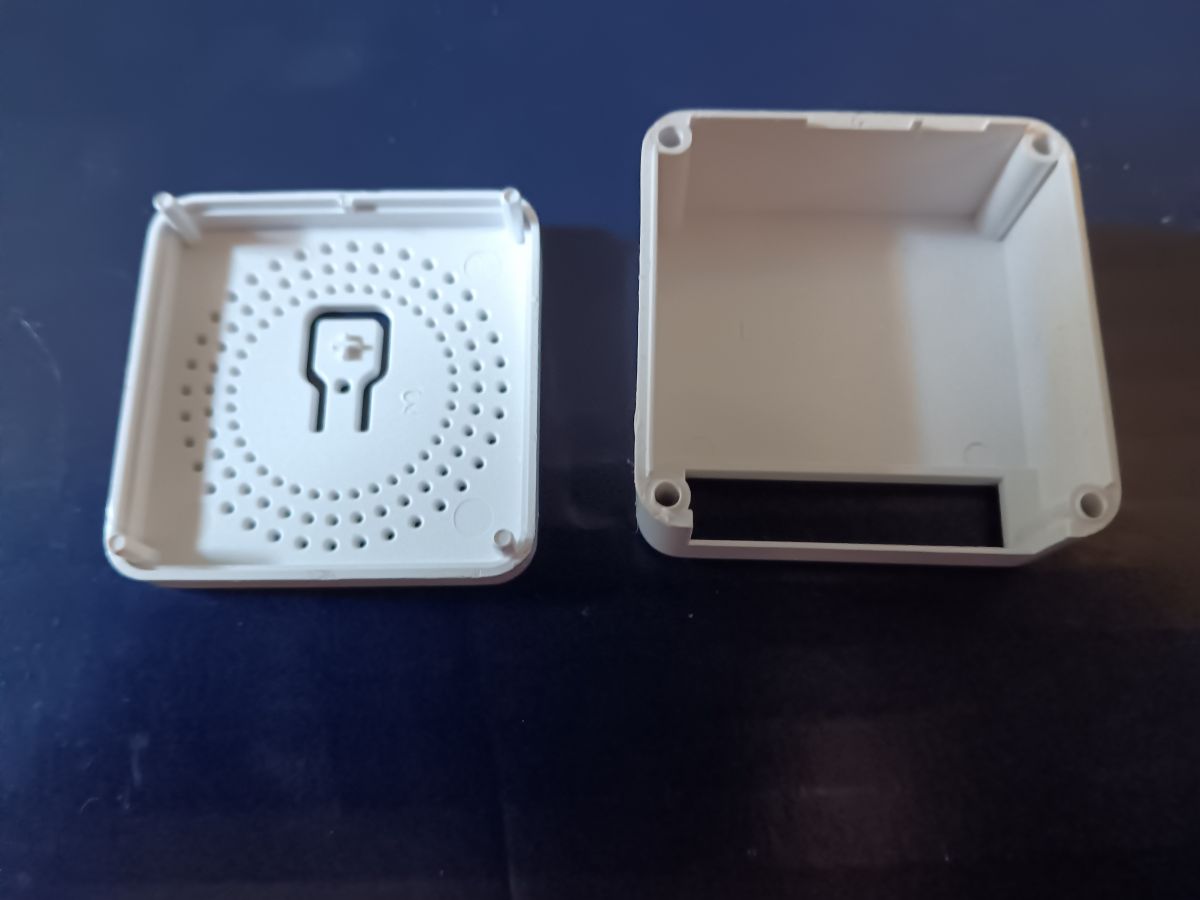
    Just received a RMW002 from AliExpress, and the only thing not exactly clear in this thread was how to open the plastic case. Thought I would post a case photo and suggestion on the easiest way to do it. On the one I received, the only thing holding the case together appears to be the friction fit of a molded plastic pin in each of the four corners. I just used a razor knife wedged into one corner to separate one corner slightly. Then go around to each corner separating more and more until all the pins are free.

    Photo of a plastic RMW002 case from AliExpress, showing its opening process.
  • #37 21003994
    aliexpress
    Level 4  
    Posts: 7
    Hi,

    many thanks for creating this environment to also support Beken and Bouffalo devices. I think the BL602 is quite interesting.
    I am also the owner of RMW002 which has a board with BL602. It came es eWeLink device and works fine as such.

    I tried to flash the desoldered board but I can't. Basically, I see in the logs that the board most of the time keeps rebooting. If not, it is unresponsive to the flashing tool (I used exactly the one recommended here).

    The standard answer I find is: Check you power supply. Oh boy, I did that! I used 3 different power supplies including a lab power supply with Voltage 0-35 V and 2 Amps. I tried with 3.3 Volts with this PSU but also went up a little further (up to 3.7 Volts). The behavior would not change.

    Soldered back the BL602 into the RMW002 - works again stable. I suspect the boot loops might depend on some missing external connectivity (pull-up or pull-down of some pins) when the board is desoldered.

    Question to the ones who flashed successfully: Did you take out the BL602 board or flashed it when it was still soldered to the RMW002?

    Thanks!
  • #38 21004659
    miegapele
    Level 16  
    Posts: 173
    Help: 15
    Rate: 29
    I do not have such switch, but I was running socket from the serial adapter using ams1117 for power without any issues
  • #39 21005274
    p.kaczmarek2
    Moderator Smart Home
    Posts: 14667
    Help: 656
    Rate: 12683
    @aliexpress maybe you can check out related BL602 tutorials, they are not for this specific device but still may help:


    You can also search our devices list for BL602-based ones:
    https://openbekeniot.github.io/webapp/devicesList.html
    Helpful post? Buy me a coffee.
  • ADVERTISEMENT
  • #40 21005326
    divadiow
    Level 38  
    Posts: 5109
    Help: 441
    Rate: 902
    aliexpress wrote:
    Question to the ones who flashed successfully: Did you take out the BL602 board or flashed it when it was still soldered to the RMW002?


    not specifically the RMW002, but the majority of BL602s I have removed and flashed externally. several SM-028s too. the exception was this where I used the DC5V barrel PSU and the BL602 was soldered to main PCB anyway https://www.elektroda.com/rtvforum/topic4024917.html
  • #41 21007489
    aliexpress
    Level 4  
    Posts: 7
    Many thanks for the highlighting again the videos.
    I have experience with flashing multiple ESP and Beken devices and I am sure my setup is generally working.

    Thanks for confirming the successful flashing of multiple de-soldered SM-028 boards!

    So this leaves me with the question what could be wrong on my end. I soldered connections to 3.3V, GND, RX, TX and BT (with 10k resistor to be connected to 3.3V for starting flashing with next power on).
    The issue here that persisted were the boot loops which I could monitor in the console (open UART) in the Bouffalo Flasher.
    The device kept rebooting with the frequently seen "reboot reason POWER_OFF" (or similar, comes from the top of my head).
    Therefore I tried 3 alternative power sources including high capacity lab power supply and I even experimented with higher voltage to get the board more stable. But it was unstable.

    Soldered back into the RMW002 mini switch board, it just worked as eWeLink device as before without any issues and apparently without reboots. So that is why I wondered about additional requirements to get the SM028 in a stable configuration. And this could only be through the other pins that are connected to RMW002.
    Or maybe my SM028 has a slight defect, causing any external connection to RX/TX to keep it in reset loop. But my CH340 serial interface works fine with all other boards.
    Too bad the CEN is not routed outside, would have been worth a try if it has any effect.

    Nevertheless, I am at this moment giving up with this particular board. Bought for less than 2€, it is not worth to spend too much time on it. Maybe I will try another one with BL602 sometime soon, with hopefully better results.

    All the best, and thanks for the great efforts spent in freeing these low-cost devices!
  • 100 nF capacitor fixes random relay activation

    #43 21687041
    visionesglobales
    Level 2  
    Posts: 2
    thanks to this forum and the people who post in it. I could advance with my bl602 thanks to you.

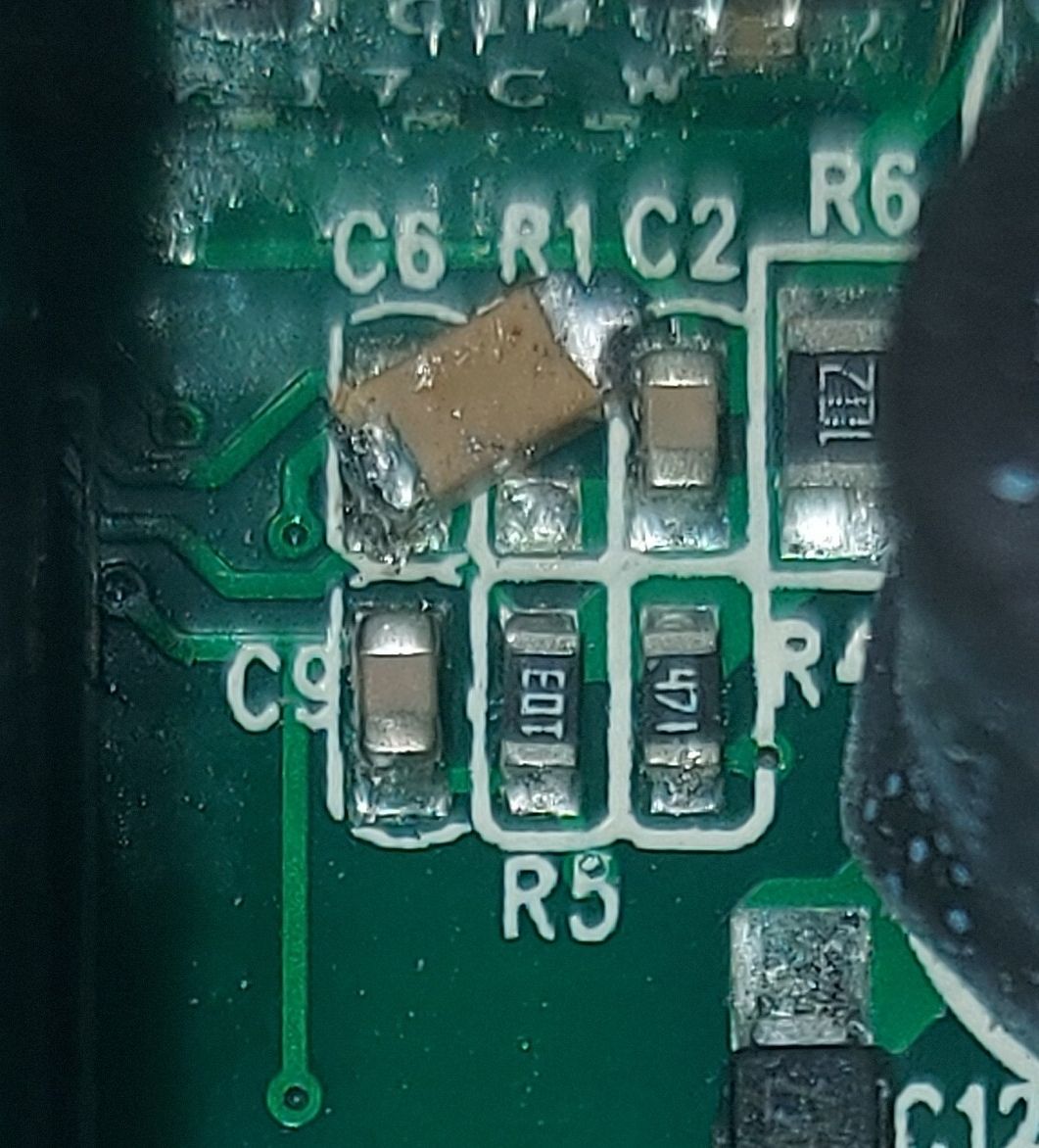
    i only needed one capacitor of 100nf soldered in the way i showed in the picture cos i didnt had the correct size but it works for solving the ramdom relay activation.

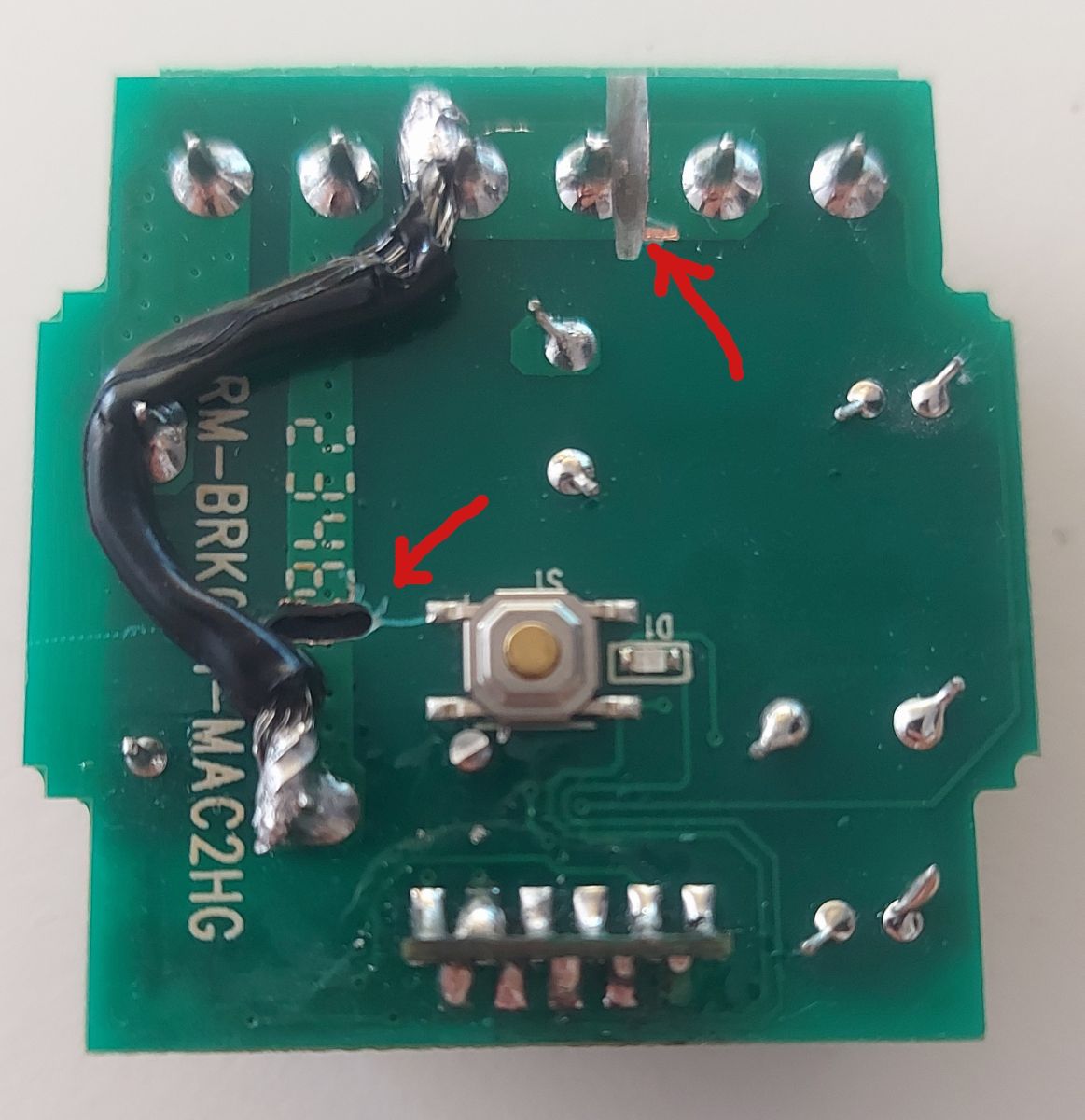
    I made some changes for converting the switch in a dry switch for garage door opening (no voltage, only close circuit).
    i had to make a hole where the bottom arrow cos there are conections in both sides of the board.
    and where the top arrow there are only a side of the board connecting the pins so it only need a superficial cut.

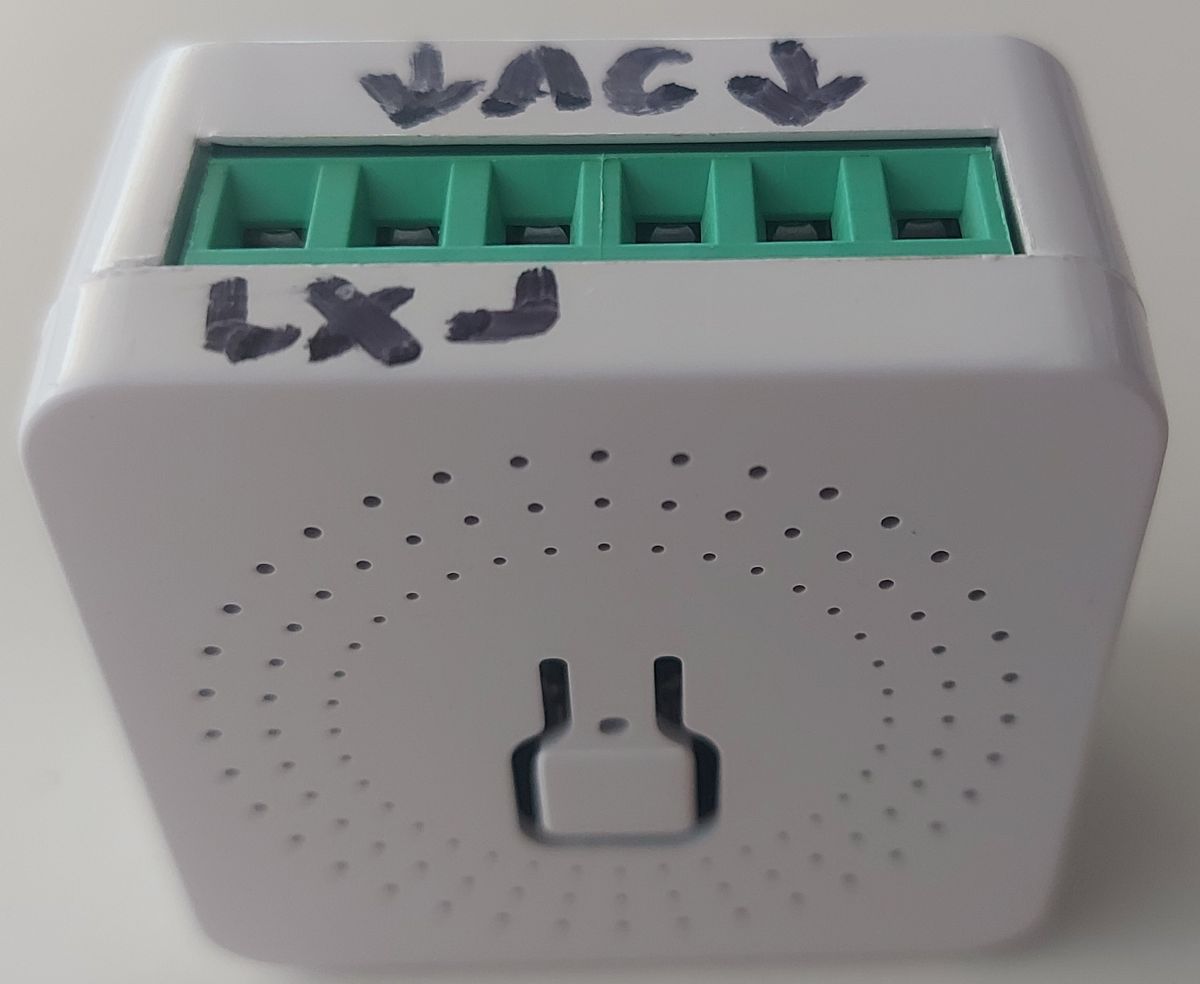
    I leave here some photos of my experience.

    PCB section with a manually soldered 100nF capacitor between labeled points C6 and C2
    PCB with soldered wire and red arrows highlighting modifications  Front view of a white device case with green terminals and hand-written AC and Lx labels.
📢 Listen (AI):

Topic summary

✨ The discussion revolves around the Mini Smart Breaker RMW002, which features a BL602L20 microcontroller and is flashed with OpenBL602 firmware. Users share their experiences with the device, including configuration details, GPIO pin assignments, and issues related to phantom switching and firmware flashing. Some users report successful flashing and integration with Home Assistant, while others encounter problems such as boot loops and external switch functionality. Solutions are proposed, including soldering specific components to mitigate issues. The community also discusses the ease of opening the device and the necessity of soldering skills for firmware updates.
Generated by the language model.

FAQ

TL;DR: For RMW002 owners, 2 missing parts often explain failures: “the rattle disappeared” after adding C6 = 100 nF and R1 = 100 kΩ. This FAQ shows how to open, flash, map GPIOs, and stabilize BL602L20/SM-028 versions, while warning that identical cases may hide unsupported LN882HK hardware. [#20807168]

Why it matters: The same RMW002 case ships with different chips and pinouts, so correct identification saves hours of failed flashing and unstable relay behavior.

Version Chip Open firmware status Notes
RMW002 SM-028 BL602L20 / BL602 Supported in thread OpenBL602 flashed successfully on multiple units
RMW002 variant BK7231 Often available Mentioned as an alternative to BL602
RMW002 lookalike LN882HK Not supported in thread Same outer case, different internals

Key insight: Do not trust the RMW002 label alone. Check the actual chip and board wiring before flashing, because both GPIO maps and firmware support changed between units.

Quick Facts

  • The working BL602 profile from the first report uses GPIO20 = Btn, GPIO21 = Rel, and GPIO22 = WifiLED_n on board SM-028 with chip BL602L20. [#20781275]
  • A second verified RMW002 variant uses GPIO3 = TglChanOnTgl, GPIO14 = LED_n, GPIO20 = Button, and GPIO21 = Rel, showing that at least 2 pinouts exist under the same product name. [#20795450]
  • Flashing requires a 3.3 V serial setup with labeled rear pads for 3.3V, GND, RX, TX, and Boot; users report the SM-028 often must be removed to reach them. [#20800216]
  • Several users fixed relay chatter or phantom switching by populating missing footprints C6 = 100 nF and R1 = 100 kΩ; one report says C6 alone reduced the issue, but a later fix used both parts. [#20859608]
  • Price and hardware quality vary sharply: one buyer paid about $2, and another warning notes that BL602 OTA can silently stop once the 1 MB flash limit is reached. [#20860356]

How do I flash OpenBL602 onto the Mini Smart Breaker RMW002 with the BL602L20/SM-028 board?

You flash it through the SM-028 module’s UART pads, not over mains power. 1. Open the clipped case and remove the SM-028 if needed. 2. Solder to the labeled rear pads: 3.3V, GND, RX, TX, and Boot. 3. Use a USB-to-UART adapter and flash OpenBL602, then apply the matching GPIO template. The first successful report used OpenBL602_1.17.282 on a BL602L20-based RMW002 board marked SM-028. [#20781275]

What is the correct GPIO template for the RMW002 smart breaker on BL602L20, including the relay, button, WiFi LED, and external switch pins?

There is no single correct template for every RMW002. One confirmed BL602L20 template is GPIO20 = Btn;1, GPIO21 = Rel;1, and GPIO22 = WifiLED_n;0. Another confirmed SM-028 variant adds the external switch on GPIO3 = TglChanOnTgl;1 and uses GPIO14 = LED_n;1, with GPIO20 = Btn;1 and GPIO21 = Rel;1. Use the template that matches your traced board, not the product label alone. [#20795450]

Why do some RMW002 units use a different pinout, such as GPIO3 for TglChanOnTgl and GPIO14 for LED_n, instead of the template from the first post?

They use different pinouts because the same RMW002 marking covers more than one board revision. One user reverse-engineered traces and found GPIO3 for the external switch and GPIO14 for LED_n, while the first post used GPIO22 for WifiLED_n and no external-switch pin. That means the enclosure name stayed the same, but the internal wiring changed. Trace verification is safer than copying the first template blindly. [#20795350]

What's the easiest way to open the RMW002 plastic case without damaging the clips or the enclosure?

The easiest method is to pry the corners gradually because the case is clipped, not welded or screwed. A later user described four molded plastic corner pins held by friction fit. He loosened one corner slightly with a razor knife, then worked around all four corners until the pins released. Earlier posts also confirm there are no screws and the shell is not glued. [#20986233]

Which USB-to-UART adapter and wiring do I need to connect to the SM-028 module for flashing, including 3.3V, GND, RX, TX, and Boot?

Use a USB-to-UART adapter such as an FTDI-class serial converter and wire 3.3V, GND, RX, TX, and Boot. The rear side of the SM-028 exposes labeled pads for those five signals, but you must solder to them directly. One user explicitly lists 3.3V, Gnd, RX, TX, and Boot as the required flashing points. Keep the supply at 3.3 V, not mains, during programming. [#20800216]

Why does the SM-028 BL602 board sometimes need to be desoldered from the main RMW002 PCB before flashing?

It often needs desoldering because the flashing pads are on the rear of the SM-028 module. The module sits against the main PCB, so you cannot reach the labeled 3.3V, GND, RX, TX, and Boot pads cleanly while it remains installed. One successful guide for beginners calls this the main difficulty and says removal is required to access the solder points on the back. [#20800216]

What is TglChanOnTgl in OpenBeken/OpenBL602, and how is it used to make the RMW002 external switch input S1/S2 work?

"TglChanOnTgl" is an OpenBeken input role that toggles a relay channel when the input changes state, acting as an external wall-switch handler rather than a plain logic input. On the traced RMW002 variant, assigning GPIO3 to TglChanOnTgl made the S1/S2 external switch work. Without that role, users reported the external switch function did not behave like a proper toggle control. [#20795350]

What is LED_n or WifiLED_n in an OpenBeken GPIO template, and why is the LED logic inverted on some RMW002 boards?

"LED_n" or "WifiLED_n" is an active-low LED assignment that drives a status LED with inverted logic, meaning the LED turns on when the GPIO outputs the opposite electrical level from a normal active-high LED. In this thread, one board used WifiLED_n on GPIO22 with value 0, while another used LED_n on GPIO14 with value 1. That difference reflects hardware wiring changes between revisions. [#20795450]

How can I stop relay rattling, random switching, or phantom activation on the RMW002 by adding the missing R1 and C6 components?

Populate the missing R1 and C6 footprints. A working fix reported in the thread uses C6 = 100 nF and R1 = 100 kΩ, after which contact rattle disappeared when GPIO3 was used in toggle mode. Another later post reports R1 = 10 kΩ with C6 = 0.1 mF, but both fixes agree that the missing RC parts around the external-switch input are the key cause. Use the actual empty pads on your board revision. [#20807168]

Why does GPIO3 configured as TglChanOnTgl cause random relay switching on some RMW002 devices, while dInput works more reliably?

GPIO3 toggles randomly because the external-switch input can float when the supporting RC network is missing. One user says dInput works, but TglChanOnTgl causes random on/off events; that matches other posts showing absent C6 and R1 footprints on some boards. dInput reads the pin, while TglChanOnTgl actively turns edge changes into relay actions, so noise becomes visible as switching. Adding the missing components reduced or removed the false triggers. [#20866048]

RMW002 with BL602 vs BK7231 vs LN882HK: which version is better for OpenBeken flashing and compatibility?

The safer choice in this thread is BL602 or BK7231, not LN882HK. BL602-based RMW002 units were flashed successfully with OpenBL602, and BK7231 is mentioned as another common OpenBeken-friendly alternative. A later warning says some identical-looking RMW002 units contain LN882HK, which was explicitly described as unsupported. If compatibility matters more than price, confirm the chip before buying or opening the case. [#20843957]

How can I configure the RMW002 relay to start closed instead of open at power-up using the Startup menu or autoexec.bat?

Set the startup state in the Startup menu, or script it in autoexec.bat. The thread states both options are supported, and autoexec.bat can also add delays if needed. That means you can force the relay closed at boot instead of using the default open state. This is a firmware setting, not a hardware mod. [#20853244]

Why does SendGet show 'CMD not found' on OpenBL602, and how can I build a BL602 firmware image with SendGet or SendPOST enabled?

SendGet shows “CMD not found” because it was disabled on the BL602 build discussed in the thread. The maintainer says BL602 has only 1 MB flash, versus 2 MB on Beken, so some features are trimmed. To enable SendGet or SendPOST, fork the app, switch the relevant define and makefile options, commit the change, and use the project’s online build system to generate artifacts. BL602 OTA may silently fail if the image grows too large. [#20871867]

What causes a desoldered SM-028 BL602 module to get stuck in reboot loops or show 'reboot reason POWER_OFF' during flashing, even with a stable 3.3V supply?

The thread points to missing external board conditions, not only bad power. One user tested 3 different power supplies, including a 0–35 V, 2 A lab supply, and still saw reboot loops and “reboot reason POWER_OFF” when the SM-028 was desoldered. The same module worked again after being soldered back into the RMW002. That suggests some removed pull-up, pull-down, or surrounding circuitry on the main board may stabilize the module during normal operation. [#21007489]

When reading or reflashing a BL602 with a CH340 adapter at 128 speed and there is no handshake, what erase or boot procedure is required?

The thread does not provide a confirmed erase requirement or a tested handshake recovery sequence. It only shows one user asking whether erase is mandatory when a CH340 at speed 128 gives no handshake, with no posted answer afterward. Use the documented Boot-pad flashing method described earlier in the same thread, but treat the handshake issue itself as unresolved here. That is the thread’s hard limit. [#20872519]
Generated by the language model.
ADVERTISEMENT