logo elektroda
logo elektroda
X
logo elektroda

Exploring the Features and Specifications of Tuya WiFi Energy Meter PJ-1103a [BK7231N][CB2S]

taktlos 13581 69
ADVERTISEMENT
  • #61 21712819
    p.kaczmarek2
    Moderator Smart Home
    This is a TuyaMCU device. It has both MCU and WiFi module. We only flash WiFI module and then use our implementation of TuyaMCU protocol to use the MCU.
    Helpful post? Buy me a coffee.
  • ADVERTISEMENT
  • #62 21715624
    marschr
    Level 3  
    p.kaczmarek2 wrote:
    This is a TuyaMCU device. It has both MCU and WiFi module. We only flash WiFi module and then use our implementation of TuyaMCU protocol to use the MCU.
    Ohhh I see it now. After two days of fiddling with it I got it working.
    The catch for me was to grasp the "TuyaMCU" vs. WiFi module concept, thanks for the insight!

    Mine is a PJ1103C, it has a T1-M WiFi module (BK7238 based) and a N32G430 MCU for the TuyaMCU which interfaces with the HLW8112.
    It seems to be working fine with the autoexec.bat from this topic (I've tested with a couple), the Openbeken page shows the readings fine. Only caveat is that I couldn't test the board when only connected to 3.3V, even the current sensors wouldn't report anything. (worth mentioning for other users: never try testing these devices on mains power with the case open)
  • #63 21715878
    p.kaczmarek2
    Moderator Smart Home
    Interesting, so they are really introducing now BK7238 series. It's good that we already have it supported.
    Helpful post? Buy me a coffee.
  • ADVERTISEMENT
  • #64 21720597
    marschr
    Level 3  
    Odd thing is that somehow the current direction detected on the B sensor of mine was inverted in one of my dual phase 220V lines. I double, triple and quadruple checked the arrow direction, the S1/S2 wirings and so on and the TuyaMCU always detected the direction of channel (dpID 6) B as reversed. Seems that the TuyaMCU calculates this automatically and you can't overwrite this boolean, any fixes for this aside from aliasing the channel and recalculating an absolute value? My current fix was to physically invert the clamp-sensor.

    Also my main doubt: Is there a way to reset the Total energy counters? They seem to be stored in the TuyaMCU, is that right? Is there a command for that? I've looked around on the .md guide files on GitHub and couldn't find a command related to that.
  • ADVERTISEMENT
  • #65 21720920
    feiltom
    Level 5  
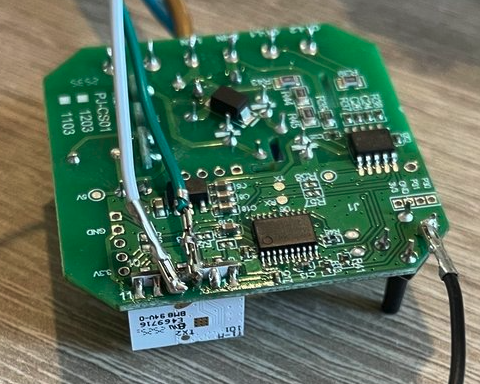
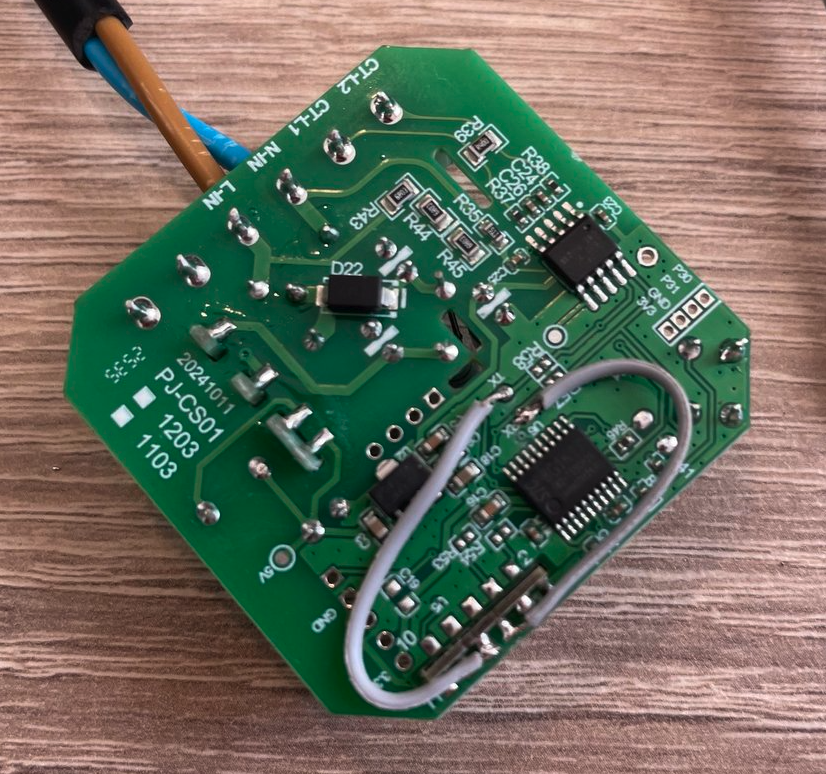
    small resume for PJ1103C, with a T1-M WiFi module (BK7238-based) and an N32G430 MCU for the TuyaMCU which interfaces with the HLW8112
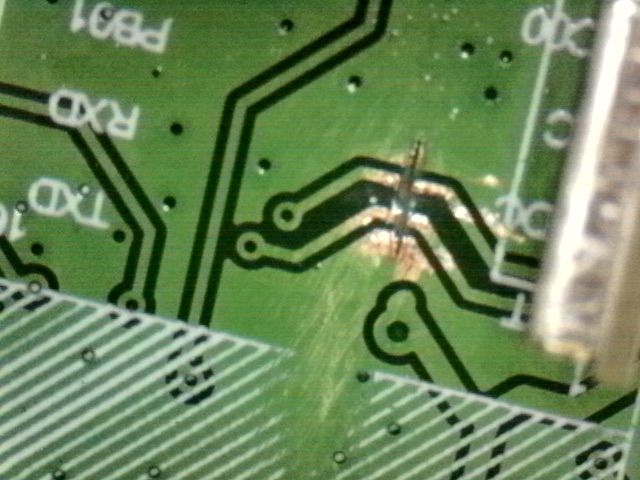
    Cut RX / TX trace
    Damaged trace on green printed circuit board with visible corrosion
    Flash with BK7238 firmware
    Close-up of a green PCB with colored wires and surface-mounted integrated circuits.
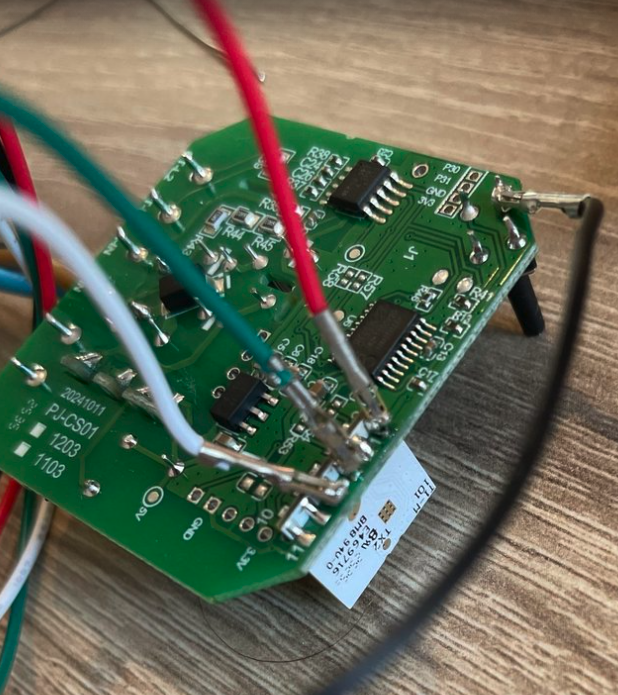
    Detail for RX / TX pin not good on previous photo
    Printed circuit board with integrated circuits and soldered wires
    Rebuild the trace
    Green PCB with wires, microchips, and printed technical markings

    autoexec.bat good for me
    startDriver TuyaMCU
    tuyaMCU_setBaudRate 115200
    tuyaMcu_defWiFiState 4
    // request full state from time to time (every 10 seconds, -1 repeats - forever)
    addRepeatingEvent 10 -1 uartSendHex 55AA0008000007
    // dpID 20 is voltage * 0.1
    setChannelType 1 Voltage_div10
    linkTuyaMCUOutputToChannel 20 val 1
    // dpID 18 is current * 0.001
    setChannelType 2 Current_Div1000
    linkTuyaMCUOutputToChannel 18 val 2
    // dpID 19 is power * 0.1
    setChannelType 3 Power_Div10
    linkTuyaMCUOutputToChannel 19 val 3

    Thanks all, for your post, it's helped me
  • #66 21721142
    marschr
    Level 3  
    marschr wrote:
    Also my main doubt: Is there a way to reset the Total energy counters? They seem to be stored in the TuyaMCU, is that right? Is there a command for that? I've looked around on the .md guide files on GitHub and couldn't find a command related to that.

    I've figured this out by "RTFM" lol. So answering myself: it was easy as pressing the button on the box 5 times quickly and then all the cumulative counters are reset.

    I wish that there was a way to erase the stored values from the tuyaMCU protocol but none of the "tuyaMcu_sendState" or "SetChannel" worked, the tuyaMCU internal logic rewrites the values on the openbeken a few moments later.
  • #67 21768527
    UnfortunatelyClumsy
    Level 2  
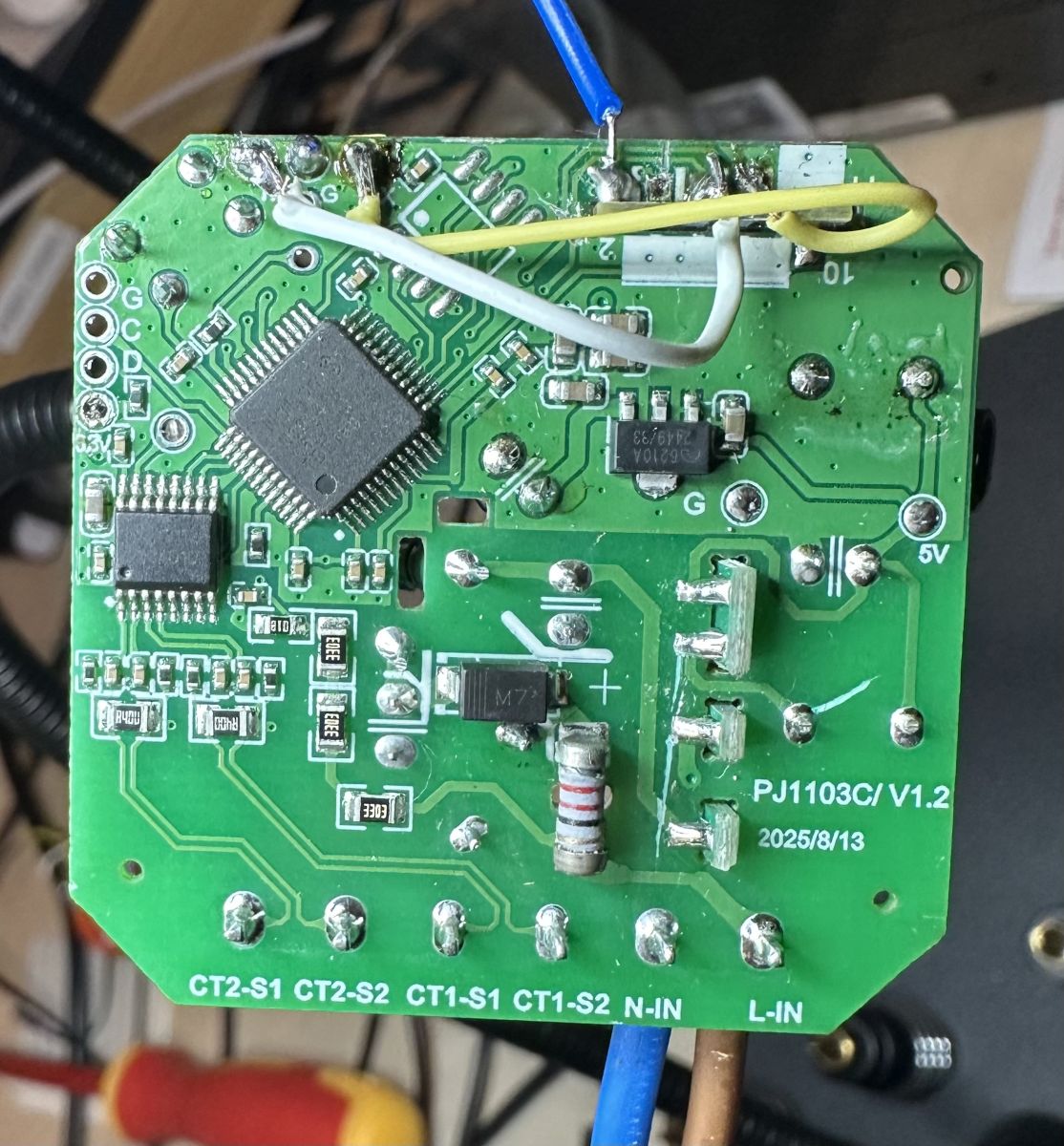
    I have a similar device marked PJ1103C/V1.2 with T1-M (BK7238) + N32G430 + HLW8112.

    Green PCB with SMD components and PJ1103C/V1.2 printed in the corner

    I followed feiltom's approach (cut traces to isolate T1-M, flashed OpenBeken, reconnected traces), but using his or alexan's autoexec.bat config just gives me all zeros in the web UI.

    Looking at the logs, I see the N32 is sending plain text debug output, not TuyaMCU protocol:

    Quote:

    Info:TuyaMCU:Consumed 150 unwanted non-header byte in Tuya MCU buffer
    Info:TuyaMCU:Skipped data (part) 5B 49 2F 68 6C 77 5D 20 2A 2A 2A 2A 2A 43 48 41 2A 2A 2A 2A 2A 0D 0A 5B 49 2F 68 6C 77 5D 20 56 2F 46 72 65 71 2F 50 46 3A 20 32 33 30 30 2C 20 34 39 30 34 2C 20 31 30 30 0D 0A 5B 49 2F 68 6C 77 5D 20 49 2F 50 2F 45 3A 20 30 2C 20 30 2C 20 30 0D 0A 5B 49


    Decoding this hex gives RT-Thread debug messages:

    Quote:

    [I/hlw] *****CHA*****
    [I/hlw] V/Freq/PF: 2300, 4904, 100
    [I/hlw] I/P/E: 0, 0, 0
    [I/hlw] *****CHB*****
    [I/hlw] I/P/E/PF: 0, 0, 0, 100


    The readings seem valid (230.0V, 49.04Hz, PF 100%) — the N32 is clearly reading the HLW8112 correctly. But it's outputting plain text instead of TuyaMCU binary protocol (which I understand starts with 55 AA ...).

    Is it normal that I see this debug output? Did anyone else encounter this with PJ1103C? If not normal, how do you get the N32 to switch to TuyaMCU protocol mode?

    I am very new/inexperienced at this. Any advice appreciated!
  • ADVERTISEMENT
  • #68 21768747
    p.kaczmarek2
    Moderator Smart Home
    On which pin do you see this plaintext?

    Well, I can add support for parsing that, if it's really sent by MCU...
    Helpful post? Buy me a coffee.
  • #69 21770525
    UnfortunatelyClumsy
    Level 2  
    >>21768747

    These messages appear in the OpenBeken logs from the TuyaMCU driver, which I understand reads from UART1. I see the same plaintext output when connecting directly to the board's TX/RX pads (the ones that bridge N32 ↔ T1-M). It seems I get plain text instead of TuyaMCU protocol?
  • #70 21781239
    frath
    Level 2  
    >>21770525
    Hi, new to the forum , hope we can help each other. from what i see you have the V1.2. With mine i didn't have to change the TX RX, juste flash with BK7238 and add this in the startup command line , you should see lots of things comming up:

    startDriver TuyaMCU
    tuyaMcu_setBaudRate 9600
    tuyaMcu_defWiFiState 4
    addRepeatingEvent 10 -1 uartSendHex 55AA0008000007
    setChannelType 1 Voltage_div10
    setChannelType 2 Frequency_div100
    setChannelType 3 Power_div10
    setChannelType 4 Current_div1000
    setChannelType 5 PowerFactor_div100
    setChannelType 6 EnergyTotal_kWh_div100
    setChannelType 7 Power_div10
    setChannelType 8 Current_div1000
    setChannelType 9 PowerFactor_div100
    setChannelType 10 EnergyTotal_kWh_div100
    setChannelType 11 ReadOnly
    setChannelType 12 ReadOnly
    setChannelType 13 Power_div10
    linkTuyaMCUOutputToChannel 112 val 1
    linkTuyaMCUOutputToChannel 111 val 2
    linkTuyaMCUOutputToChannel 101 val 3
    linkTuyaMCUOutputToChannel 113 val 4
    linkTuyaMCUOutputToChannel 110 val 5
    linkTuyaMCUOutputToChannel 106 val 6
    linkTuyaMCUOutputToChannel 105 val 7
    linkTuyaMCUOutputToChannel 114 val 8
    linkTuyaMCUOutputToChannel 121 val 9
    linkTuyaMCUOutputToChannel 107 val 10
    linkTuyaMCUOutputToChannel 102 raw 11
    linkTuyaMCUOutputToChannel 104 raw 12
    linkTuyaMCUOutputToChannel 115 val 13
    setChannelLabel 1 "Tension"
    setChannelLabel 2 "Frequence"
    setChannelLabel 3 "Puissance A"
    setChannelLabel 4 "Courant A"
    setChannelLabel 5 "PowerFactor A"
    setChannelLabel 6 "Energie A"
    setChannelLabel 7 "Puissance B"
    setChannelLabel 8 "Courant B"
    setChannelLabel 9 "PowerFactor B"
    setChannelLabel 10 "Energie B"
    setChannelLabel 11 "Direction A"
    setChannelLabel 12 "Direction B"
    setChannelLabel 13 "Puissance nette"

    More things to come up i'm sure, cause i didn't check for the buzzer yet or else, but can easily be found.i'll try to udpate this.
    Hope it 'll help

    Frath

Topic summary

The discussion centers on the Tuya WiFi Energy Meter PJ-1103a, featuring the BK7231N chip and CB2S clamp, with variants using HLW8112 or BL0942 energy metering ICs. Users share specifications, internal photos, and firmware details, highlighting challenges in firmware customization and driver support. The PJ-1103a supports 1CT or 2CT configurations, 0.2-80A current range, 110-240V input, and 2.4GHz WiFi. The device often uses a TuyaMCU interface at 9600 baud, but some units employ HLW8112 ICs connected via SPI, requiring dedicated drivers. Efforts to develop an HLW8112 driver for OpenBK7231T firmware are ongoing, with references to external repositories (e.g., BabyOS, MahdaSystem HLW811x driver). Users report difficulties in obtaining frequent data updates via TuyaMCU commands and in extracting calibration data from original firmware dumps. Flashing OpenBeken firmware is straightforward, but full functionality depends on proper driver implementation and correct dpID mapping. Some users note differences in PCB versions (PJ1103A, PJ1103AN, PJ1103C) affecting compatibility. The community exchanges configuration scripts, pinout diagrams, and firmware dumps to facilitate development. Restoration of original Tuya firmware without backups remains a concern. Overall, the thread documents collaborative troubleshooting, firmware development, and hardware analysis for the PJ-1103a energy meter and its HLW8112-based variants.
Summary generated by the language model.
ADVERTISEMENT