logo elektroda
logo elektroda
X
logo elektroda

How to Implement a Clock in OpenBeken Devices Without Using NTP Protocol

max4elektroda 6936 97
Best answers

How can I add a clock to OpenBeken devices that keeps time locally without relying on NTP, while staying compatible across platforms?

Implement it as a separate optional clock subsystem, not as NTP itself: split the generic time helpers out of the NTP driver, rename APIs to `Clock_*`, and gate the feature with a disabled-by-default `ENABLE_LOCAL_CLOCK` in `obk_config.h` so existing builds and devices are unaffected [#21031682][#21032115] Use a companion `ENABLE_LOCAL_CLOCK_ADVANCED` for DST/timezone handling if needed [#21032907] For timekeeping, base the clock on a more accurate uptime source from RTOS ticks rather than a simple `g_secondsElapsed++`, because the counter can drift and it should not be moved backward at runtime or driver logic may break [#21639787][#21639876] If you need an initial time source without NTP, the clock can be set from the browser or by an HTTP request from another device, then continue running locally [#21038303]
Generated by the language model.
ADVERTISEMENT
  • #91 21640158
    divadiow
    Level 38  
    Posts: 4854
    Help: 424
    Rate: 860
    ECR6600 1.18.156
    OpenECR6600 interface screen showing ON state and energy measurement data

    ECR6600 1768_merge_cf30e28012eb ✅

    OpenECR6600 control interface with voltage, current, and energy data
  • ADVERTISEMENT
  • #92 21640213
    p.kaczmarek2
    Moderator Smart Home
    Posts: 14413
    Help: 650
    Rate: 12363
    Regarding counter role - calling Channel_Add from ISR is not probably a good idea. I will need to fix it tomorrow. Probably store deltas and collect them in quick tick...
    Helpful post? Buy me a coffee.
  • ADVERTISEMENT
  • #93 21640278
    max4elektroda
    Level 24  
    Posts: 745
    Help: 47
    Rate: 183
    p.kaczmarek2 wrote:
    Probably store deltas and collect them in quick tick...

    Btw, anyone knows in which periods quickticks are called in real life?
    If I understood it right, it will get the real time in Beken and ESP and else assume 25ms?
    We might even here go for the "right time" with xticks and possibly even set g_secondsElapsed while at it?
    Just thinking out loud...

    Added after 1 [hours] 58 [minutes]:

    max4elektroda wrote:
    Using this for now - working on W800, will test with others soon ...

    Code: text Expand Select all Copy to clipboarddiff --git a/src/user_main.c b/src/user_main.c
    index a0ea6322..dbee5483 100644
    --- a/src/user_main.c
    +++ b/src/user_main.c
    @@ -583,6 +583,11 @@ float g_wifi_temperature = 0;
     static byte g_secondsSpentInLowMemoryWarning = 0;
     void Main_OnEverySecond()
     {
    +#if PLATFORM_W600 || PLATFORM_W800
    +#define TimeOut_t xTimeOutType 
    +#endif
    +       TimeOut_t myTimeout;    // to get uptime from xTicks 
    +
            int newMQTTState;
            const char* safe;
            int i;
    @@ -754,8 +759,9 @@ void Main_OnEverySecond()
                            }
                    }
            }
    -
    -       g_secondsElapsed++;
    +//     g_secondsElapsed++;
    +       vTaskSetTimeOutState( &myTimeout );
    +       g_secondsElapsed = (int)((((uint64_t) myTimeout.xOverflowCount << (sizeof(portTickType)*8) | myTimeout.xTimeOnEntering)*portTICK_RATE_MS ) / 1000 );
            if (bSafeMode) {
                    safe = "[SAFE] ";
            }
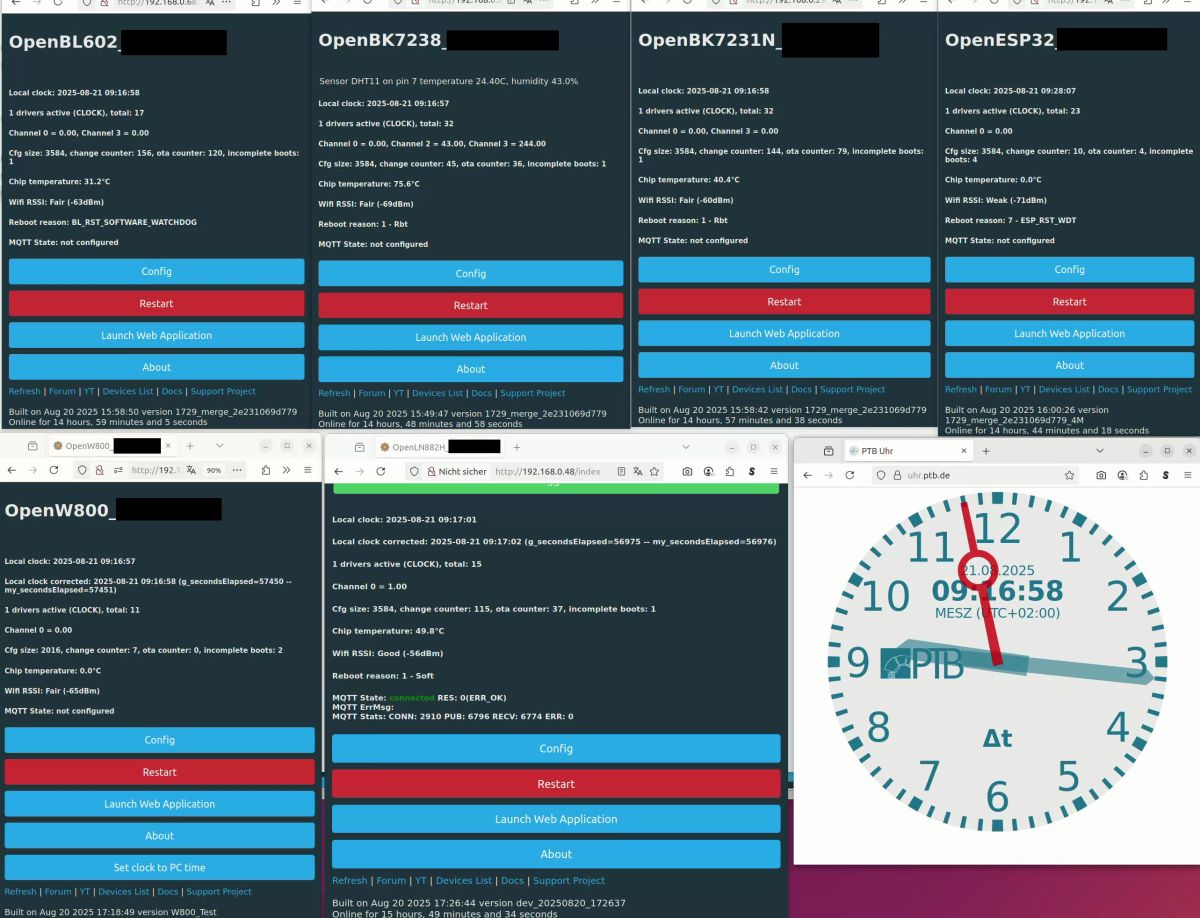

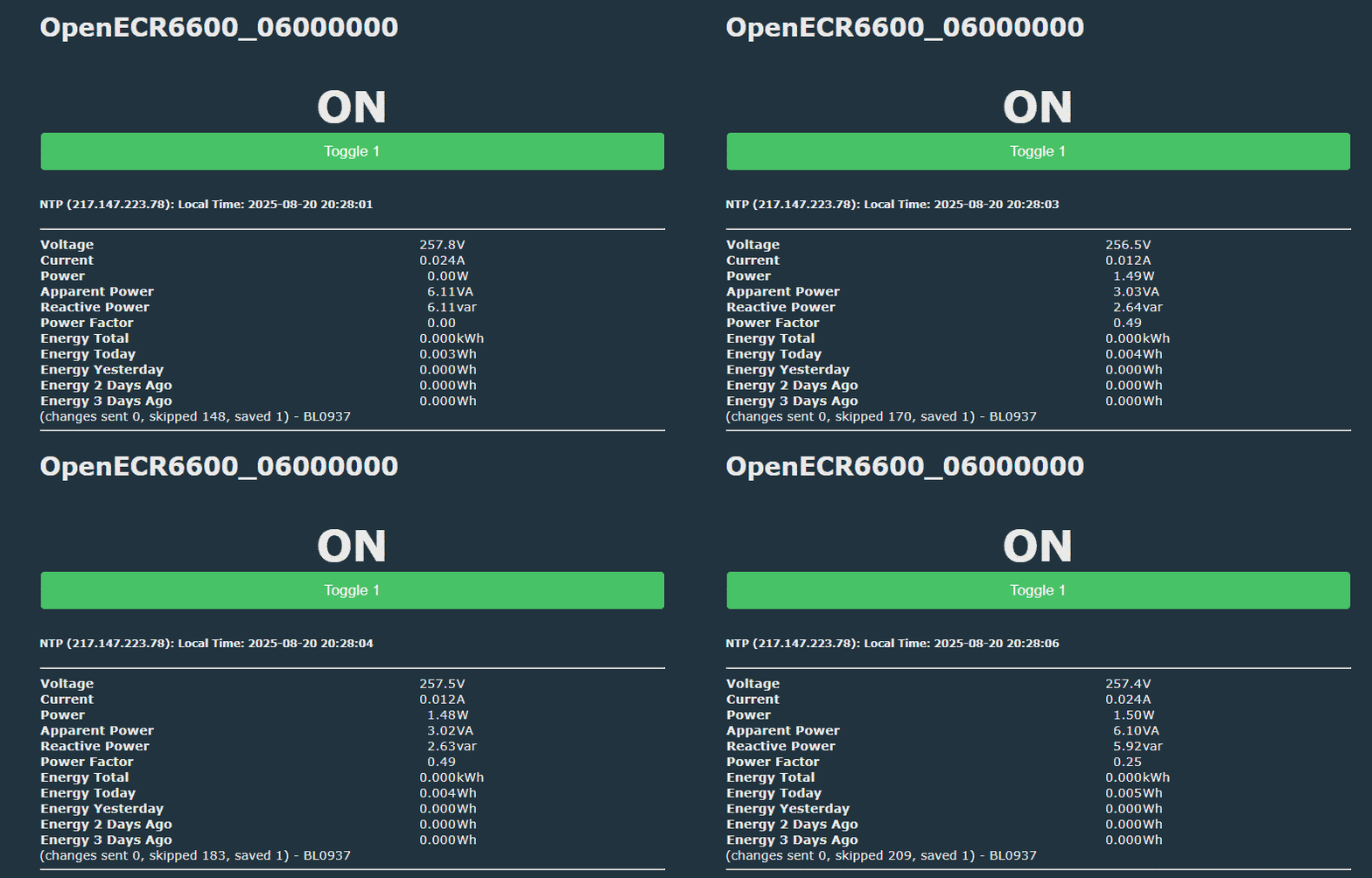
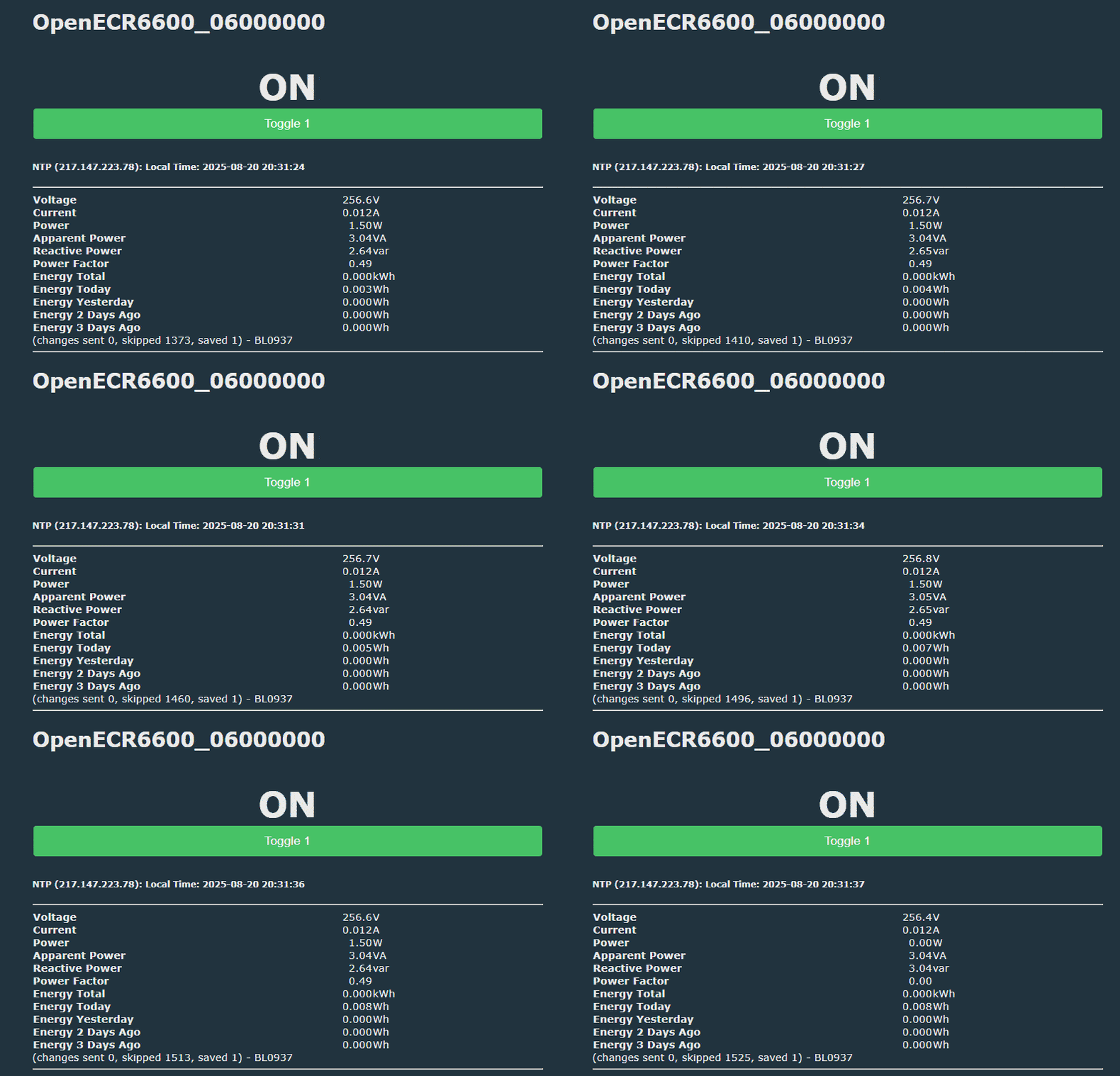
    Tested over night with BL602, BK7238, BK7231N, ESP32, W800, LN882H:

    Screenshots of OpenBK UIs on various IoT devices and a PTB time sync clock.


    For LN882H its 3 seconds off after 15 hours, rest ~ 1 second (plus there's a small gap in how exactly time was set).
    Only "big" difference on ESP32, which is 12 minutes(!) off.
    Maybe @insmod xTicks are "second choice" and I should try to use esp_timer_get_time() , like for quickticks?
  • #94 21640422
    p.kaczmarek2
    Moderator Smart Home
    Posts: 14413
    Help: 650
    Rate: 12363
    My only worry is that now Main_OnEverySecond may either:
    - be called twice with the same g_secondsElapsed value
    - skip g_secondsElapsed values
    still, if it's not breaking anything, then acceptable?

    Related: Counter_f works on BK7238 https://www.elektroda.com/rtvforum/topic4092465-210.html#21640407
    Probably need to check on other platforms. Seems to crash on ESP32 for me?
    Helpful post? Buy me a coffee.
  • #95 21640471
    max4elektroda
    Level 24  
    Posts: 745
    Help: 47
    Rate: 183
    p.kaczmarek2 wrote:
    - be called twice with the same g_secondsElapsed value
    - skip g_secondsElapsed values

    both is possible, I think, but at least we will never "go back in time".

    Did a quick check, I can't see a "big" breaking point:
    
    .../OpenBeken/main/OpenBK7231T_App$ find src/ -name "*.[ch]" | xargs grep g_secondsElapsed
    src/httpserver/new_http.c:   hprintf255(request, "<br>Online for <span id=\"onlineFor\" data-initial=\"%i\">-</span>", g_secondsElapsed);
    src/httpserver/json_interface.c:   format_time(g_secondsElapsed, buff, sizeof(buff));
    src/httpserver/json_interface.c:   JSON_PrintKeyValue_Int(request, printer, "UptimeSec", g_secondsElapsed, true);
    src/httpserver/json_interface.c:   JSON_PrintKeyValue_Int(request, printer, "Uptime", g_secondsElapsed, true);
    src/httpserver/json_interface.c:   if (NTP_GetCurrentTimeWithoutOffset() > g_secondsElapsed) {   // would be negative else, leading to unwanted results when converted to (unsigned) time_t 
    src/httpserver/json_interface.c:      ntpTime = (time_t)NTP_GetCurrentTimeWithoutOffset() - (time_t)g_secondsElapsed;
    src/httpserver/rest_interface.c:   hprintf255(request, "{\"uptime_s\":%d,", g_secondsElapsed);
    src/driver/drv_ds1820_full.c:   // if (dsread == 1 && g_secondsElapsed % 5 == 2) {
    src/driver/drv_ds1820_full.c:            float t_float = 20.0 + i/10.0 + (float)(g_secondsElapsed%100)/100.0;
    src/driver/drv_ds1820_full.c:               lastconv = g_secondsElapsed;
    src/driver/drv_ds1820_full.c:               lastconv = g_secondsElapsed;
    src/driver/drv_ds1820_full.c:         if(dsread == 0 && (g_secondsElapsed % ds18_conversionPeriod == 0 || lastconv == 0))
    src/driver/drv_dht_internal.c:   uint32_t currenttime = g_secondsElapsed;
    src/driver/drv_tm_gn_display_shared.c:      segments[i] = g_digits[(g_secondsElapsed + i) % 10];
    src/driver/drv_tm_gn_display_shared.c:      segments[i] = g_digits[(g_secondsElapsed + i) % 10];
    src/driver/drv_bl_shared.c:          cJSON_AddNumberToObject(root, "uptime", g_secondsElapsed);
    src/driver/drv_ntp.c:      if (g_secondsElapsed < 60) {
    src/driver/drv_ds1820_simple.c:   hprintf255(request, "<h5>DS1820 Temperature: %.2f C (read %i secs ago)</h5>", (float)t / 100, g_secondsElapsed - lastconv);
    src/driver/drv_ds1820_simple.c:   // if (dsread == 1 && g_secondsElapsed % 5 == 2) {
    src/driver/drv_ds1820_simple.c:      lastconv = g_secondsElapsed;
    src/driver/drv_ds1820_simple.c:   if(g_secondsElapsed % ds18_conversionPeriod == 0 || lastconv == 0) //dsread == 0
    src/mqtt/new_mqtt.c:      sprintf(dataStr, "%d", g_secondsElapsed);
    src/new_common.h:extern int g_secondsElapsed;
    src/cmnds/cmd_if.c:   return g_secondsElapsed;
    src/cmnds/cmd_test.c:      cJSON_AddNumberToObject(root, "uptime", g_secondsElapsed);
    src/user_main.c:int g_secondsElapsed = 0;
    src/user_main.c:      if(g_secondsElapsed < 30)
    src/user_main.c:      if (g_secondsElapsed < 30) {
    src/user_main.c:   if (g_timeSinceLastPingReply != -1 && g_secondsElapsed > 60)
    src/user_main.c:   g_secondsElapsed++;
    src/user_main.c:         safe, g_secondsElapsed, idleCount, xPortGetFreeHeapSize(), bMQTTconnected,
    src/user_main.c:         safe, g_secondsElapsed, idleCount, xPortGetFreeHeapSize(),g_bHasWiFiConnected, g_timeSinceLastPingReply, LWIP_GetActiveSockets(), LWIP_GetMaxSockets(),
    src/user_main.c:   if (!(g_secondsElapsed % 10))
    src/user_main.c:      if (g_secondsElapsed > bootCompleteSeconds)
    src/user_main.c:   if (g_secondsElapsed < 5)
    src/hal/w800/hal_main_w800.c:   //actually starts shifting g_secondsElapsed. To compensate, we are checking how much


    new_http.c only printing value
    json_interface.c only printing value

    drv_ds1820_full.c used for "fake windows temperatures (no problem)
    --> we might skip one read, if we skip a second dividable by our period

    drv_dht_internal.c used as currenttime in if (!force && ((currenttime - dht->_lastreadtime) < 3)) { return dht->_lastresult; ...
    --> we might be one second late for reading

    drv_tm_gn_display_shared.c display value only
    -> display might "jump" one second if we skipped one value

    drv_ds1820_simple.c
    --> we might skip one read, if we skip a second dividable by our period

    new_mqtt.c only printing value
    cmd_if.c only printing value
    cmd_test.c only printing value
    main.c only checking against limits
    hal_main_w800.c only in comment

    Added after 27 [minutes]:

    p.kaczmarek2 wrote:
    Seems to crash on ESP32 for me?

    Is this with "Add_Channel"? I crashed ESP32 in ISR, too by using addLogAdv in it (which worked fine on W800 with much more logging during debugging)
  • ADVERTISEMENT
  • #96 21640503
    p.kaczmarek2
    Moderator Smart Home
    Posts: 14413
    Help: 650
    Rate: 12363
    Well if there are no drawbacks then we can merge your changes really soon. I also saw @insmod has nothing against them... so I guess we'll have them in a release :D

    I am still thinking what else can I cover with self tests for clock stuff, but not sure for now.

    Hm, addLogAdv crashes ESP? This may be it! That is with Add_Channel channel in ISR routine. I am not sure if we can just "silently" add to channel, since we also want to do MQTT publish. Maybe I will just create some kind of int addToChannels[MAX_CHANNELS] table and add it in quick ticks...
    Helpful post? Buy me a coffee.
  • ADVERTISEMENT
  • #97 21864940
    omniron
    Level 11  
    Posts: 114
    Help: 1
    Rate: 6
    Very amazed about you guys' process and diversions, baffled this all fits in memory still.
    Is there a version I could try out?
    Just wanted to see if an update is available for my switches.
    Thanks!!
  • #98 21865147
    max4elektroda
    Level 24  
    Posts: 745
    Help: 47
    Rate: 183
    @omniron If you are talking about the RTC driver: The driver for DS3231 is available now since some time. But it's not enabled per default on any MCU, so you will need to compile one yourself with
    "#define ENABLE_DRIVER_DS3231 1"
    set for your platform.

Topic summary

✨ The discussion revolves around implementing a local clock in OpenBeken devices without relying on the NTP protocol. The initial approach involved using a variable to track the time since startup, allowing for time calculations based on elapsed seconds. While this method lacks the accuracy provided by NTP, it offers advantages such as independence from network connectivity and reduced resource requirements. Participants provided feedback on code structure, suggested improvements for compatibility, and discussed the potential for using real-time clocks (RTC) for enhanced accuracy. Testing across various platforms, including LN882H, BL602, and W600, was conducted to evaluate the clock's performance and reliability. The conversation also touched on daylight saving time adjustments and the possibility of remote clock synchronization.
Generated by the language model.

FAQ

TL;DR: With 1–2 seconds/day drift after switching to RTOS-tick-based uptime, the thread’s core advice is: "split clock from NTP" and keep a local OpenBeken clock from startup time plus corrected elapsed seconds. This helps OpenBeken users who need offline energy stats, local scheduling, or RTC integration without internet or NTP. [#21031093]

Why it matters: A separable device clock lets OpenBeken keep usable time in AP mode, offline LANs, and future RTC-based builds, while reducing dependence on always-on internet time.

Approach Internet required Reported accuracy in thread Best fit Main limitation
Local clock from startup + corrected uptime No about 1–2 s/day daily energy totals, basic schedules loses time after power loss
NTP-based clock Yes, at least for sync network-synced precise schedules, sunrise/sunset needs reachable time source
DS3231 RTC No about 1 minute/year remote installs, outages, offline switching needs extra hardware and space

Key insight: The breakthrough was not “manual time entry” alone. It was replacing naive g_secondsElapsed++ timing with RTOS-tick-derived uptime, then separating generic clock functions from the NTP protocol layer. [#21031093]

Quick Facts

  • The first local-clock method drifted by about 2 minutes per day, but RTOS-tick correction reduced that to about 1–2 seconds per day on the author’s device. [#21031093]
  • Tick-counter overflow was discussed as an edge case, but on a 32-bit counter it appears only about every 50 days; a local 16-bit test forced overflow after about 1 minute to verify logic. [#21063405]
  • Cross-platform testing reported good results on LN882H, BK7231T/N, W600, W800, BL602, BK7238, and ESP32, although BL602 also showed separate watchdog resets during long tests. [#21062117]
  • The DS3231 path became practical later: the driver was said to be available, but not enabled by default; users must compile with #define ENABLE_DRIVER_DS3231 1. [#21865147]

How can I implement a local clock in OpenBeken without using the NTP protocol?

Implement it by storing the device’s time at startup, then adding corrected elapsed uptime to that base. The first version used one startup-time variable plus g_secondsElapsed; the improved version recalculated elapsed time from RTOS ticks every 10 seconds. That lets the clock run in AP mode and without any network. It is accurate enough for daily energy totals, even when exact wall-clock precision is unnecessary. [#21031093]

Why does g_secondsElapsed drift on some OpenBeken platforms, and how can RTOS ticks make it more accurate?

g_secondsElapsed drifts because a simple one-second increment is not equally accurate on all SDKs and platforms. The fix is to derive uptime from RTOS ticks, including platform-specific tick-to-millisecond factors such as portTICK_RATE_MS or a ratio of 2 on some Beken and WinnerMicro targets. That change fixed slow clocks on BK7231N, BK7231T, W600, and W800, and brought reported drift down to about 1–2 seconds per day. [#21046836]

What is g_secondsElapsed in OpenBeken, and how is it used for uptime and offline timekeeping?

g_secondsElapsed is OpenBeken’s uptime counter, used for status displays, JSON output, driver timing, and offline clock math. "g_secondsElapsed is an uptime counter that tracks seconds since boot, a core timing value reused for status pages, sensor intervals, and local timekeeping when combined with a saved start time." The local-clock approach turns uptime into wall time by adding a stored startup epoch. [#21036229]

How do I split OpenBeken's NTP-dependent time functions into a separate generic clock driver?

Split the code by moving generic time access out of drv_ntp.c into a separate clock layer, then leave only protocol-specific sync logic in NTP. In the thread, this meant adding files such as drv_deviceclock.c and renaming event logic toward drv_clock_events.c, while keeping feature flags optional in obk_config.h. That design also makes sunrise, DST, manual clock setting, and future RTC sources usable without forcing the NTP driver to own all time functions. [#21031093]

What is an RTC module like the DS3231, and how does it help OpenBeken keep time without internet access?

A DS3231 RTC gives OpenBeken a hardware time source that survives network loss and improves long-term accuracy. "DS3231 is a real-time clock module that stores and serves calendar time, usually with battery backup, so the device can query accurate time without internet access." In the thread, it was described as accurate to about 1 minute per year and suitable for fully offline systems. [#21034483]

Local clock vs NTP vs DS3231 RTC in OpenBeken — which approach is best for energy stats and scheduled switching?

Use the local clock for energy stats, NTP for highest convenience and precision, and DS3231 for offline switching with outages. The thread concluded that a drift of about 1 minute after a month is acceptable for daily values and many switching tasks, while NTP remains better when exact synchronization matters. DS3231 is the strongest offline option because it avoids internet dependency and keeps good accuracy through power and network interruptions. [#21062117]

How do I enable and test ENABLE_LOCAL_CLOCK and ENABLE_LOCAL_CLOCK_ADVANCED in obk_config.h?

Enable them by turning the defines on, compiling, then verifying both GUI and status output. 1. Set ENABLE_LOCAL_CLOCK 1; optionally set ENABLE_LOCAL_CLOCK_ADVANCED 1 for DST support. 2. Rebuild and flash, because the feature was submitted disabled by default. 3. Confirm that the config page shows a browser-time clock option and that status output reports time. The thread used ENABLE_LOCAL_CLOCK for basic clocking and ENABLE_LOCAL_CLOCK_ADVANCED for DST, with the advanced flag requiring the basic one. [#21032907]

Why did the OpenBeken local clock run slow on BK7231N, BK7231T, and W600, and what fixed it?

It ran slow because the code initially missed the platform tick conversion factor. On BK7231N and BK7231T, the author later found a required ratio of 2; on W600 and W800, portTICK_RATE_MS also equaled 2. After changing the uptime calculation to multiply xTaskGetTickCount() by the correct tick period, the slow-clock behavior was reported fixed across those platforms. [#21039505]

How can I query the current device time programmatically in OpenBeken, for example with STATUS 8 or HTTP requests?

Query it with OpenBeken status endpoints, especially STATUS 8, or send HTTP requests to read or set time remotely. The thread showed a shell example using wget against /cm?cmnd=STATUS%208, returning JSON with "StatusSNS":{"Time":"2024-04-07T15:05:09"}. That makes drift testing easy: poll the device at intervals and compare its reported time with a known-good router or Linux host clock. [#21036320]

What is DCF77, and how could it be used as an alternative time source for OpenBeken devices?

DCF77 can act as an offline radio time source if OpenBeken decodes its pulse timings correctly. "DCF77 is a longwave time-signal system that transmits one timing bit per second, using pulse lengths to encode time data over a one-minute frame." In the thread, a first decoder worked on W800 and ESP32, and the practical requirement was only to distinguish roughly 100 ms pulses, 200 ms pulses, and a nearly 2-second gap. [#21638397]

How should daylight saving time be implemented in OpenBeken: compile-time tables, runtime calculation, or LittleFS-based zone files?

Use runtime-configurable DST if flexibility matters; use compile-time tables only for the smallest builds. The thread started with compile-time tables, then moved toward universal DST settings inspired by Tasmota so users were no longer bound to build-time timezone choices. A LittleFS file like DST.bin was also proposed as a scalable middle ground for per-zone data without hardcoding every rule into firmware. [#21036097]

What is LittleFS in OpenBeken, and how could it store DST or timezone configuration data?

LittleFS is the lightweight on-device file storage layer proposed for keeping timezone or DST rule data outside hardcoded firmware tables. In the thread, one idea was to store a file named DST.bin and read it as a float array or fetch values as needed. That would let users upload zone-specific DST data separately, instead of recompiling for each timezone. [#21036097]

How do I use a DS3231 driver in OpenBeken to set device time from an RTC or keep the RTC synced with epoch time?

Start the driver with pins, then choose whether the RTC sets the device clock once or continuously. 1. Run startdriver DS3231 <CLK-Pin> <DATA-Pin> <optional sync>. 2. Use sync 1 to set device time from RTC at startup or 2 to refresh device time regularly. 3. Set RTC time with DS3231_SetEpoch <epoch> or a Linux request such as wget "http://<ip>/cmd_tool?cmd=DS3231_SetEpoch $(date +%s)". The thread also listed DS3231_GetTime and DS3231_GetEpoch. [#21633562]

What is the safest way to add external time hardware like a DS3231, GPS, or DCF77 module to mains-powered smart plugs?

The safest method is to avoid direct access to live mains circuitry and use only properly isolated, space-appropriate hardware. The thread explicitly warned that plug pins are often at live potential, making GPS access unsafe without optical isolation. It also noted that RTC boards may fit only if there is enough room and if you accept enclosure, compliance, and safety trade-offs inside mains-powered devices. [#21633562]

How could one OpenBeken device act as a time source for other devices on the local network when there is no NTP server available?

It can act as a practical HTTP time source, even without a built-in NTP server. The thread said another device with a good clock can send an HTTP request to set time remotely on an OpenBeken unit by IP, and that source device does not have to run OpenBeken. That enables a local-only setup where one trusted node, router, or web server distributes time to multiple devices after startup or outages. [#21038303]
Generated by the language model.
ADVERTISEMENT