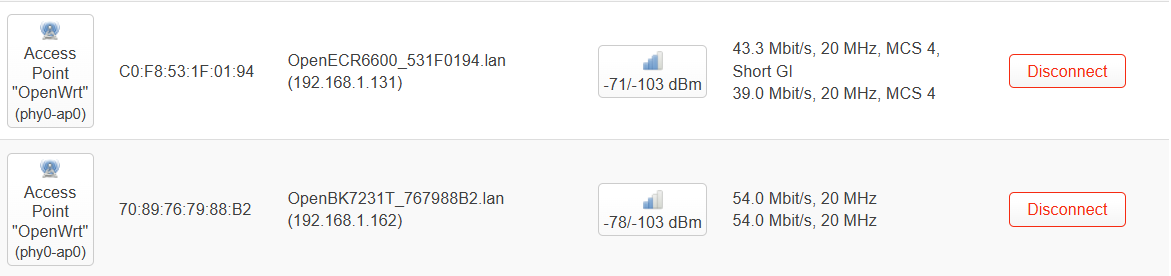
we think that's just limited to the experience on WG236A modules used in testing. There are several people with ECR6600/BL0937 EU plugs now using OpenECR6600 seemingly without issue.
>>21523865 Transmission power / dbm was more or less ok even on WG236.
It's the reception that is the problem. I had once seen -75dbm on router, but -90 on device (in log, because http stopped working already)
ECR6600 with v2.1.23.16 firmware size increased from 850kb to 920kb. (When i tried v2.1.24.11, it was 1222kb. Perhaps some optimization flags were missing?)
Added ECR6600 and BL602 deepsleep (ECR6600 - unknown if it works with new sdk, it didn't in the old one).
BL602 pindeepsleep (GPIO7/8 only)
ESP-IDF sdk from v5.5-beta1 to v5.5
Powersave for ECR6600
ESP deepsleep argument from ms to s
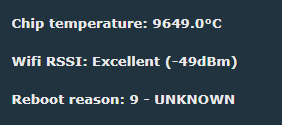
ECR6600 reset reason
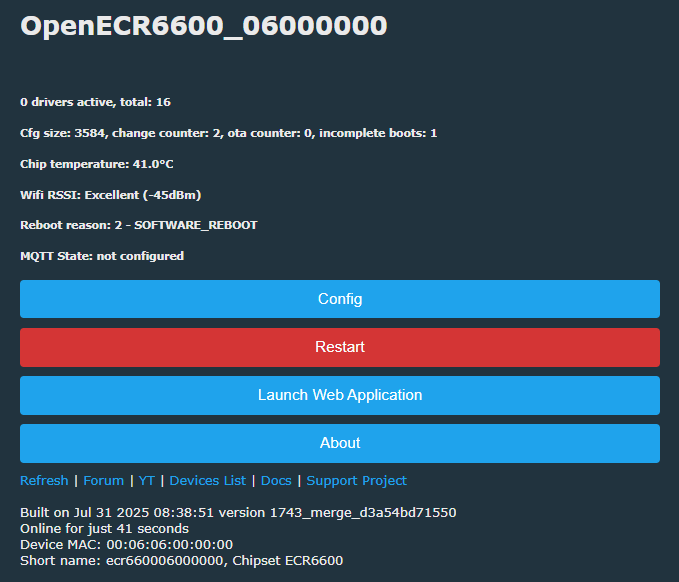
reboot reason ✅
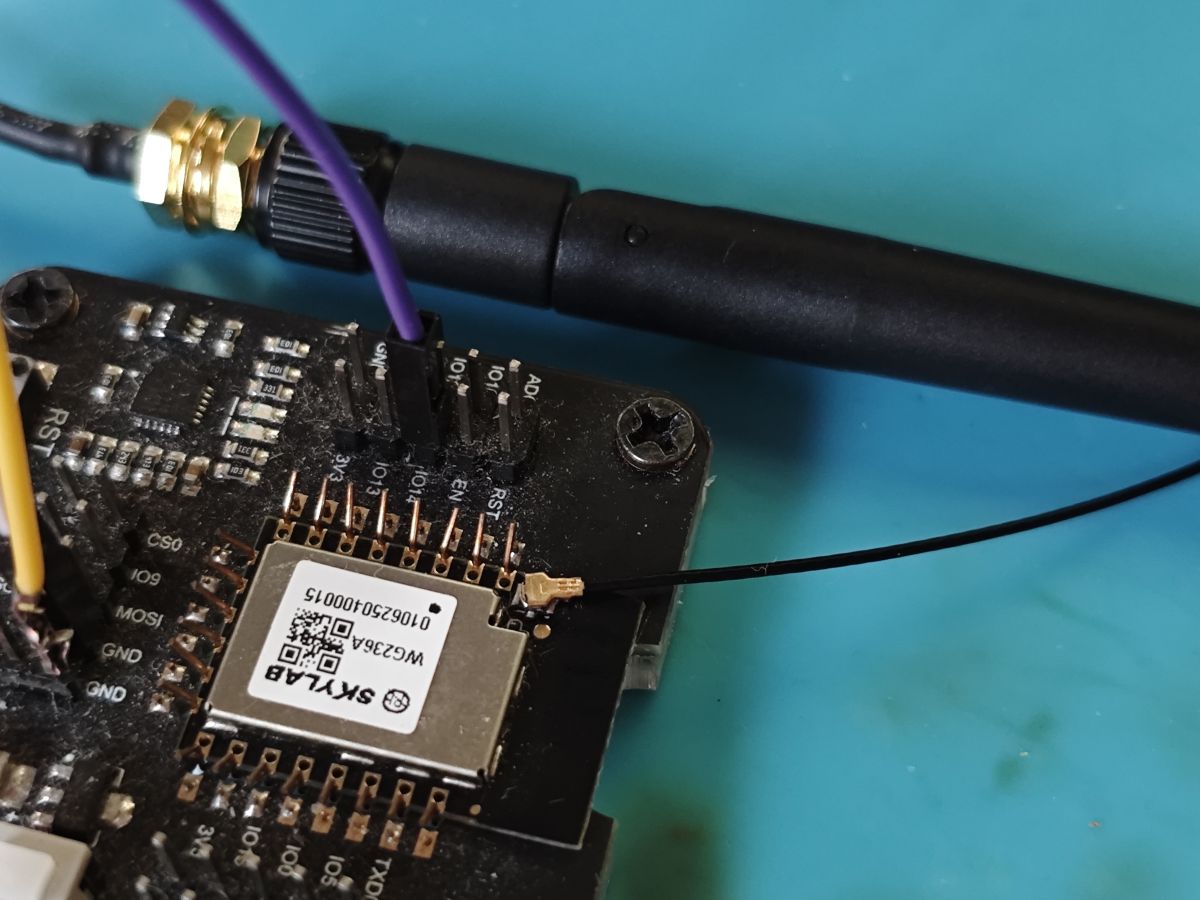
Excellent RSSI only because I have MHF4 + aerial now ✅
powersave 1 doesn't crash but don't know if it's effective
Code: Text
Log in, to see the code
deepsleep 30
Code: Text
Log in, to see the code
wakes at 30s but is weird. won't join wifi again until hard power off/on
Code: Text
Log in, to see the code
Added after 7 [minutes]:
yes weird. I get Windows device disconnect sound when it wakes too and no wifi join. but then a minute later it'll device-disconnect sound again, reboot and join wifi, then:
I'll try non-PC USB port
Added after 4 [minutes]:
on mains-powered USB 2A port it did join wifi 9s after wake and:
Added after 12 [minutes]:
divadiow wrote:
powersave 1 doesn't crash but don't know if it's effective
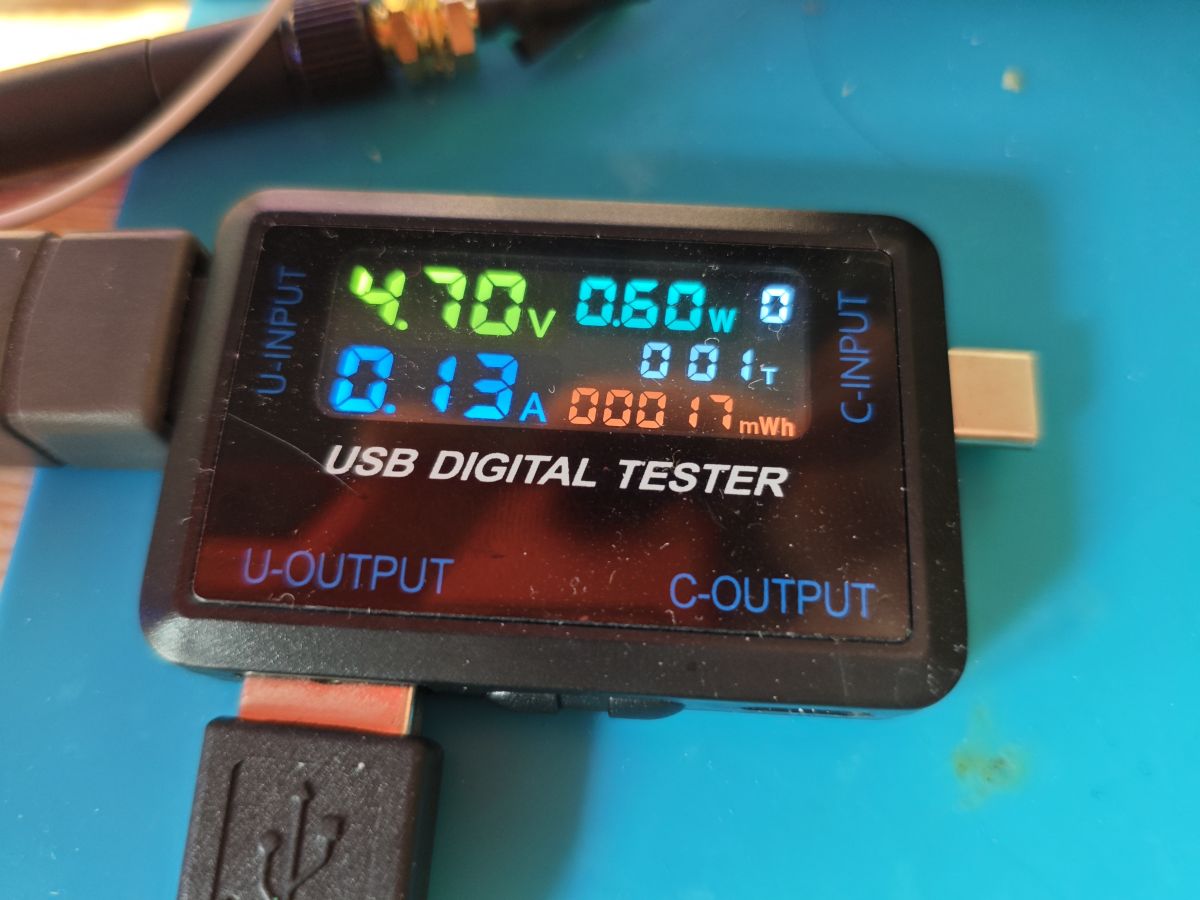
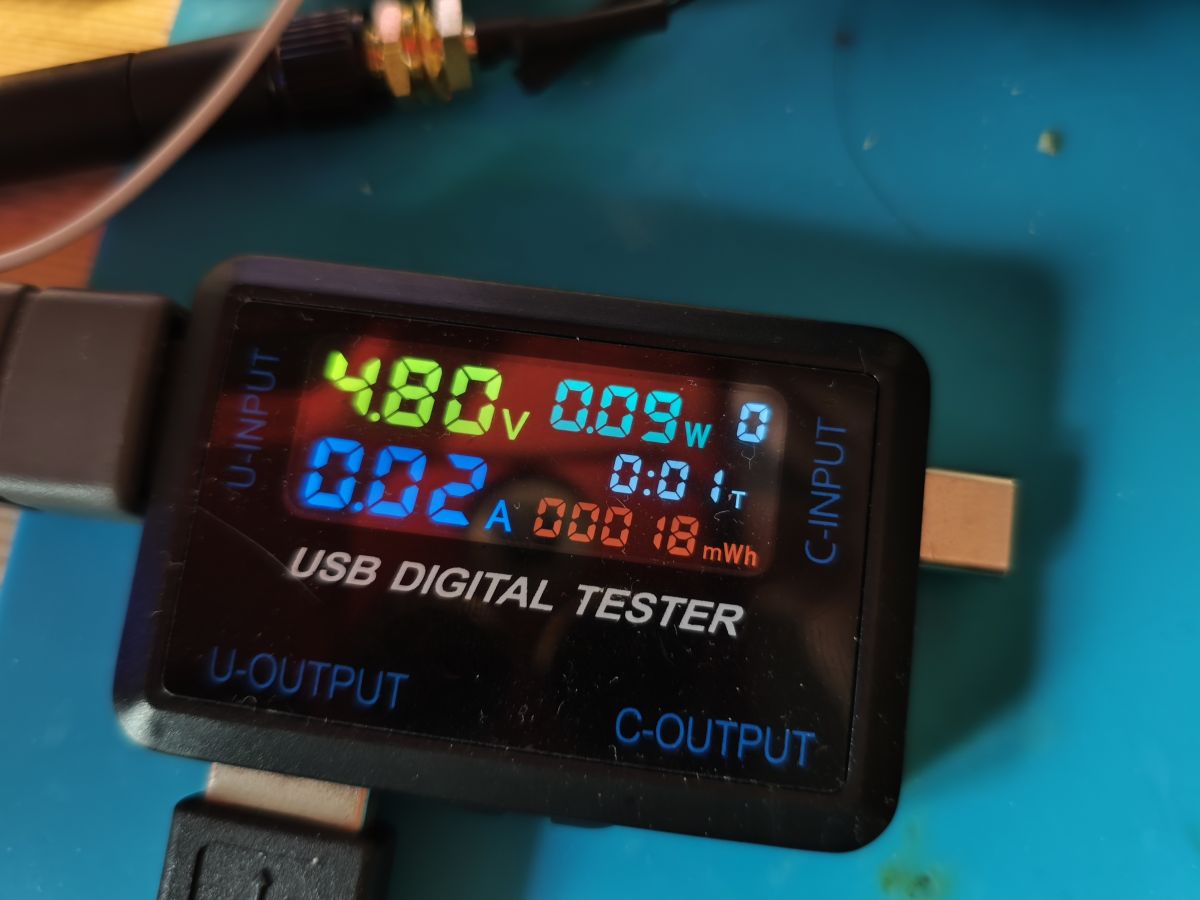
forgot i just bought this
powersave 0
powersave 1
Added after 16 [minutes]:
not really sure what's happening with deepsleep. this is it on mains USB, no powersave, then deepsleep 10 which you can see kicking in and dropping to 0, but then it draws too quickly again, drops and rises. hmm
So it can connect after deep sleep? Even if not, this is still better, that what i've had with older sdk. It failed to even find AP, stuck at scanning.
There is also powersave 2.
Powersave 2 keeps device responsive at 0.02–0.03 A
@jasperro did you ever finish conversion of LSC dimmer to OpenECR6600? I notice we only have one ECR6600 device in the device list and went hunting for the others we've seen.
Discussion centers on reverse engineering and porting OpenBK/OpenECR6600 support for the LSC Connect Smart Wall Dimmer based on the ESWIN ECR6600 / AXY2S Tuya module. Participants share firmware backups, boot logs, partition layouts, UART pin mappings, and SDK/tooling details from GitHub and vendor sources. The thread tracks progress on building and booting custom images, identifying TuyaOS 3.x firmware behavior, extracting or editing partitions, handling OTA updates, and adapting drivers for UART, PWM, BL0937, ADC, MAC storage, and Wi‑Fi settings. Later posts include newer SDK drops from SkyLab/Hi-Flying, improved booting of OpenECR6600 builds, ongoing Wi‑Fi stability testing, and notes about module variants, antenna performance, and configuration storage in nv_amt. AI summary based on the discussion. May contain errors.
TL;DR: For modders backing up or porting the LSC Connect Smart Wall Dimmer 3207304, the working path is clear: read a 2048KB flash dump over UART0, because “READ Flash Success!” is confirmed with RDTool plus the ECR6600 stub. This FAQ helps anyone handling the AXY2S/ECR6600 platform, TuyaOS 3 storage changes, and early OpenECR6600 support. [#21377851]
Why it matters: This thread turns a previously unsupported Tuya dimmer into a documented ECR6600 case study for backup, reverse-engineering, and early open-firmware migration.
Option
What it does well
Main limitation
Practical status
Stock Tuya firmware
Boots reliably and exposes Tuya app logs
Closed platform, config extraction fails
Best baseline
RDTool + ECR6600 stub
Reads full flash backup to PC
Wording is confusing; timing matters on VBat
Confirmed working
OpenECR6600 / OpenBK
Custom firmware, UART, OTA, TuyaMCU support
Wi-Fi and sleep behavior varied by module/SDK
Usable, still maturing
WG236A test modules
Good for bench testing and SDK work
Reported weak receive performance on some units
Mixed results
Key insight: The hardest blocker was not dumping flash. It was platform maturity: TuyaOS 3 storage changed, UART logs split across ports, and ECR6600 Wi‑Fi and sleep behavior depended heavily on module, partitions, and SDK version.
Quick Facts
The confirmed backup size for the LSC dimmer is 2048KB, read after desoldering the AXY2S module and using RDTool with the ECR6600 stub. [#21377851]
On the original Tuya dimmer firmware, UART0 handled flashing access while the readable Tuya application log appeared on UART1 (L_TX/L_RX). [#21406440]
One captured stock boot string reported TuyaOS V:3.3.105 built on 2024-01-10 08:49:07 for eswin_ecr6600. [#21389968]
Early OpenECR6600 testing showed default serial mappings of RX0=P5, TX0=P6 and alternate UART1 on P1/P2. [#21461296]
Power-save testing on a newer ECR6600 build dropped current from about 0.12A to roughly 0.02–0.03A with powersave 1 or powersave 2. [#21622863]
How do I back up the flash on an LSC Connect Smart Wall Dimmer 3207304 with an AXY2S/ECR6600 module using RDTool and the ECR6600 stub?
Use UART0 and the ECR6600 stub to read a full 2048KB dump. 1. Desolder the AXY2S module and wire TX->RX, RX->TX, GND->GND, plus a loose VBat lead. 2. In RDTool, load the stub in the Develop tab, press Start, then quickly connect VBat to 3.3V when the log says it begins downloading the stub. 3. In the Flash tab, choose a save path and start the read. RDTool then counts up 10%, 20%, and ends with “READ Flash Success!”. [#21377851]
What is the AXY2S module, and how is it related to the ESWIN ECR6600 chip in Tuya-based smart devices?
The AXY2S module is the radio module used on this dimmer, and it is built around the ESWIN ECR6600 chip. "AXY2S is a Wi‑Fi/BLE module that integrates the ECR6600 SoC, exposing the chip through a packaged module used by Tuya devices." In this thread, the LSC Connect Smart Wall Dimmer 3207304 uses an AXY2S/ECR6600 combination, which is why OpenBK support had to be ported to ECR6600 rather than a better-known Beken part. [#21377851]
Why does the LSC Connect Smart Wall Dimmer output the Tuya app boot log on UART1 (L_TX/L_RX) instead of UART0?
Because this device routes the Tuya application log to UART1, while UART0 stays available for flashing and lower-level access. The captured boot log showed full Tuya app output on L_TX/L_RX, including the SDK banner and product string, while UART0 only printed ty heap base: 1f000 size: 196352 followed by repeated garbage characters. That split is device-specific: a standard WG236P firmware later showed logs on UART0, but the Tuya dimmer dump did not. [#21391389]
What does the repeating UART INIT and UART DEINIT log mean on the ECR6600-based LSC dimmer, and is it normal?
It appears normal for this stock Tuya firmware. The dimmer repeatedly printed UART INIT and UART DEINIT on the app-log UART after boot, and later testing confirmed other users saw the same behavior on the LSC firmware. One developer explicitly said that if you see the same INIT/DEINIT loop, “it is probably working fine.” So treat it as expected firmware behavior, not proof of a bad flash or dead module. [#21417576]
Which UART interface should I use to flash or back up an ECR6600 device: UART0 or the LOG port on L_TX/L_RX?
Use UART0 for flashing and backup. The thread confirms the working backup connection was the normal TX/RX port, not the LOG pads. Later follow-up made it explicit: backup is taken via UART0, while log output may appear on UART0 or UART1 depending on the firmware. On the LSC Tuya dump, flashing used UART0 and the readable boot log appeared on UART1. [#21406440]
Why can’t Tuya config extractor or LTChipTool unpack the config from an ECR6600 TuyaOS 3 firmware dump?
Because the dump uses a newer TuyaOS 3 storage layout that the existing extractors do not understand. The thread showed both tools finding Tuya markers but failing validation: the config extractor reported bad CRCs and “no json start found,” while LTChipTool failed at block magic. One contributor summarized the reason directly: “TuyaOS3 has changed the way config is stored.” That means the failure is a format mismatch, not proof that the dump is corrupt. [#21389968]
What is RDTool for ECR6600, and how are its upload and download options labeled compared with what they actually do?
RDTool is the vendor-style flashing and readback utility used with ECR6600 chips, but its labels are reversed. In this tool, upload actually means reading data from the device to the PC, and download means writing data from the PC to the MCU. That matters when you back up flash, because the correct operation is the one labeled as an upload even though you are saving a file locally. The thread calls this out as a specific trap. [#21377851]
How do OpenECR6600 and OpenBK compare with stock Tuya firmware on ECR6600 devices for flashing, OTA, and device support?
Stock Tuya firmware is the reliable baseline, while OpenECR6600 adds real custom-firmware control but still had edge cases during development. By March 2025, developers had booted compiled OpenECR6600 binaries, added UART and BL0937 IRQ support, and offered all-in-one images that did not need a stub. OTA also worked in some paths, but classic HTTP URL OTA was preferred because POST-based OTA could crash after upload. Real-device support improved later, and users reported ECR6600/BL0937 EU plugs running OpenECR6600 without obvious Wi‑Fi trouble. [#21522945]
Why is Wi-Fi reception reported as weak or inconsistent on some WG236A ECR6600 modules even when transmit power seems fine?
Because several testers saw a receive-side problem on WG236A modules, not a simple transmit-power issue. One report said the module could show about -75dBm on the router but -90dBm on the device log, with HTTP already broken. Another needed the module oriented perpendicular to the access point or placed within 20cm of the antenna to keep the GUI usable. Later tests on real devices looked better, so the issue seems concentrated on some test modules and antenna setups. [#21523878]
What GPIOs, UART pins, and ADC pins are mapped on the WG236 or WG236A ECR6600 modules when using OpenECR6600?
OpenECR6600 testing mapped the standard UART to RX0=P5 and TX0=P6, with alternate UART1 on P1 RX and P2 TX. The thread also corrected board notes: IO13 is TX2, ADC1 is IO15, and ADC0 is IO14 in code. "WG236 is an ECR6600 module that exposes GPIO, UART, ADC, and PWM functions through board pins, but several alternate functions share pads and caused mapping confusion in testing." That is why screenshots and silkscreen labels did not always match code behavior. [#21461296]
How can I change or preserve the MAC address on an ECR6600 module when flashing OpenECR6600, especially if the MAC is stored in flash instead of efuse?
Back up the original flash first, because some ECR6600 modules store the MAC in flash, not efuse. Developers noted that on at least one WG236P, the MAC lived in the nv_amt partition, and erasing flash could replace it with a generic default. OpenECR6600 later added MAC changing, and testers confirmed that changing the MAC inside OBK updated the value stored in flash. Preserving the original backup also keeps RF calibration data, which is stored there too. [#21459742]
What is the BL0937 chip in these smart dimmer and plug devices, and how is it used with OpenECR6600 or TuyaMCU setups?
BL0937 is the metering chip used for power measurement in several ECR6600 smart plugs, and OpenECR6600 added early support for its interrupt path. "BL0937 is an energy-monitoring IC that measures mains parameters and reports them to the main Wi‑Fi MCU, often through pulse or interrupt-based signaling." In this thread, developers first reported “no irq for bl0937,” then later implemented BL0937 IRQ support. Another tester identified an ECR6600 device as TuyaMCU-based, meaning the Wi‑Fi module and external controller can split duties instead of running everything on one MCU. [#21461296]
Why does ECR6600 OTA sometimes upload successfully but still fail to update, and how do bootloader or partition mismatches affect it?
OTA can complete the transfer but still fail because the bootloader, OTA image format, or partition layout does not match. A related TR6260 test showed the bootloader saying “patch check pass” and “OTA Update Done,” yet the firmware never changed. On ECR6600, developers also warned that partition sizing mattered, and newer images sometimes required UART flashing rather than OTA after partition updates. One clear failure case was trying a 4MB Hi-Flying firmware on a 2MB module, which only printed HF-LPT6200 and did not behave normally. [#21474737]
What device template or config is available for the LSC Connect Smart Wall Dimmer 3207304, including the known Tuya dpIDs like switch_led_1 and bright_value_1?
A complete OpenECR6600 device template was not published in this thread, but the Tuya datapoints were identified. In January 2026, the dimmer was matched to model ID ecx4sg with dpIDs including switch_led_1 as ability 1, bright_value_1 as ability 2, brightness_min_1 as ability 3, and countdown_1 as ability 6. The brightness range was listed as 10 to 1000. A placeholder add to the device list was also linked, showing the device was at least partially characterized. [#21809988]
How do deep sleep and power save modes behave on newer ECR6600 SDK builds, and what problems should I expect after wake-up?
Newer SDK builds improved power save, but deep sleep still behaved inconsistently after wake. One tester measured about 0.12A at powersave 0 and 0.02–0.03A at powersave 1 or powersave 2, while the device stayed responsive. Deep sleep entered correctly with commands like deepsleep 30, and the module could wake after 30s, but Wi‑Fi rejoin was erratic. In several wake cycles, the device booted, scanned, reached state 6, then disconnected repeatedly until a hard power cycle or later reboot restored normal joins. [#21622863]
AI summary based on the discussion. May contain errors.