logo elektroda
logo elektroda
X
logo elektroda

TL;DR

  • Teardown of the LSC Smart Dimmer Switch, a battery-powered wall dimmer sold at Action in France.
  • Inside are a WB3S Wi‑Fi module with a BK7231T, an unnamed Tuya MCU, a rotary push button, two LEDs, and a reset button.
  • The unit uses a 3.7V battery and USB‑C charging, costs about 10€, and OpenBekenIOT support is still in progress.
ADVERTISEMENT
📢 Listen (AI):
  • Hi,

    I bought a "LSC Smart Dimmer Switch" from Action in France for around 10€.

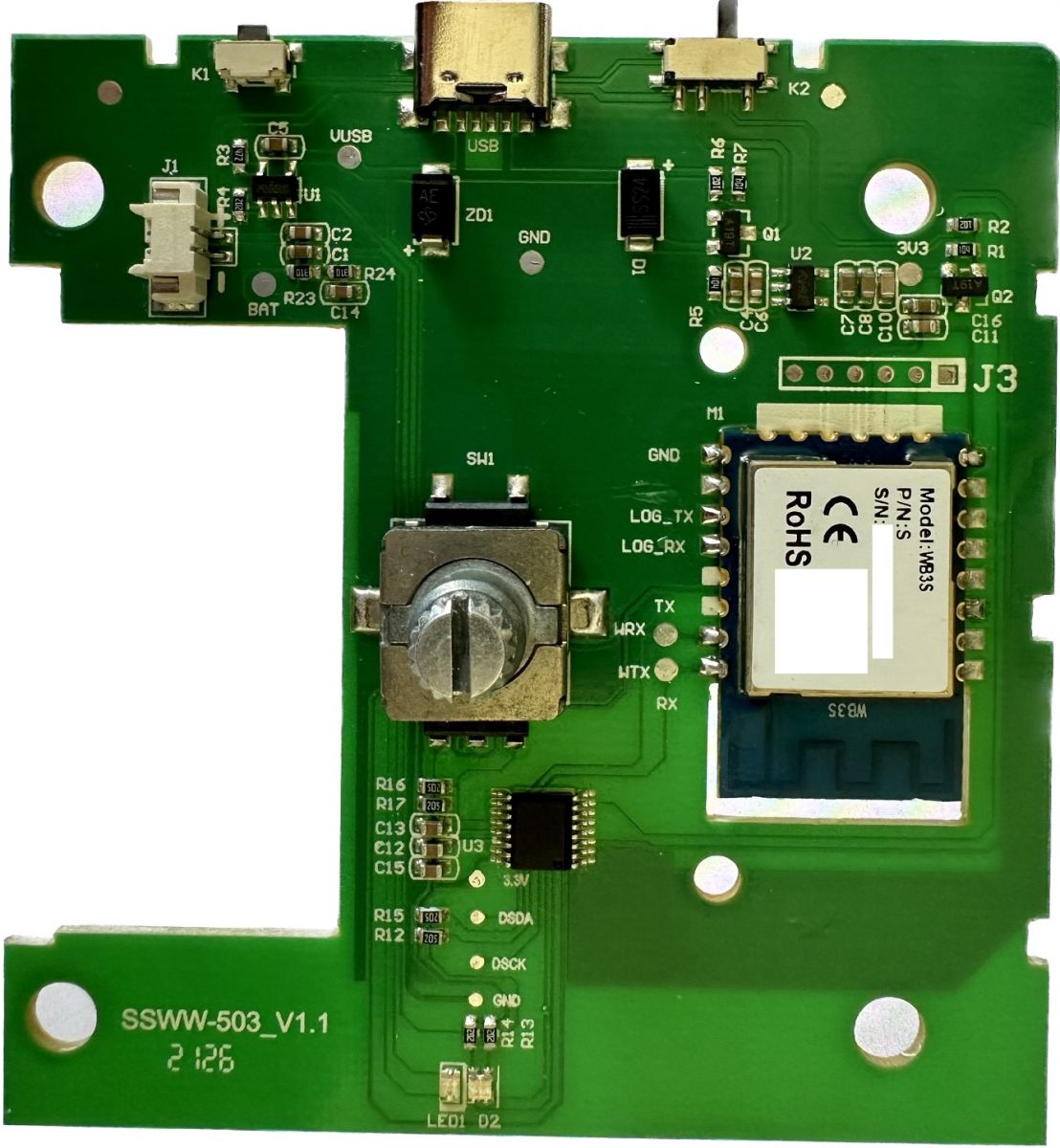
    It is a wall switch, working on a battery consisting of:

    - A WB3S module (WiFi with a BK7231T)
    - A Tuya MCU with no reference written
    - A rotary switch with an integrated push button
    - 2 LEDs:
    - One that seems RGB (seems connecter to the TuyaMCU)
    - One green (seems to be related to the charge function)
    - A power switch
    - A reset button
    - A 3.7V battery
    - A USB C connector use to charge the battery

    Here is the circuit:
    LSC Smart Dimmer Switch teardown

    Work is in progress to make it work with OpenBekenIOT :)
    https://github.com/openshwprojects/OpenBK7231T_App/issues/291#


    Best,
    Adrien

    Cool? Ranking DIY
    About Author
    Bacto
    Level 3  
    Offline 
    Bacto wrote 8 posts with rating 6. Been with us since 2022 year.
  • ADVERTISEMENT
  • #2 20239692
    p.kaczmarek2
    Moderator Smart Home
    As said on Github, full packet capture would be nice, both queries and replies.

    A full Action item model or index also would be helpful. Anyway, thanks for teardown, it will be added to our online database soon.

    BTW: Are all buttons and LEDs connected to TuyaMCU, even the reset button?
    Helpful post? Buy me a coffee.
  • ADVERTISEMENT
  • #3 20239779
    Bacto
    Level 3  
    I'm not sure 100% but it seems that the RGB LED and power/reset button are connected to the TuyaMCU while the green LED is connected to the charging circuit.
  • ADVERTISEMENT
  • #4 20347053
    HumbleDeer
    Level 4  
    Bacto wrote:
    I'm not sure 100% but it seems that the RGB LED and power/reset button are connected to the TuyaMCU while the green LED is connected to the charging circuit.


    I can confirm your guess or look-see about the green LED is correct. Green LED with LED1 as designator is connected to the five pin chip labeled "B5UD" of which I can find NO info at all but suspect it to be an LTC4054 (TP4054 in China) clone. The pinout matches, to the details of the CHRG pin being an open collector input, the program pin being used for current setting, and its behaviour with the LED blinking rapidly when the charger is connected without a battery. This is typical textbook LTC4054 behaviour.
  • ADVERTISEMENT
  • #5 20372715
    p.kaczmarek2
    Moderator Smart Home
    I am adding missing information to devices list, do anyone know an Action Store article number or any other ID for this device?
    Helpful post? Buy me a coffee.
  • #6 20372786
    HumbleDeer
    Level 4  
    ean 8712879149514
    art no 3006033
    unknown number 970806 (no designation on box)
  • #7 20399701
    bmarchais
    Level 5  
    Hey !

    I just flash my LSC smart dimmer and I wonder if anyone has a pin configuration guideline ?

    Thanks !
  • #8 20596772
    cece94
    Level 1  
    Good night everyone,

    my lsc smart dimmer is flashed too with OpenBK7231T 1.17.130 firmware.

    now i search for the configuration. i only found that if i put P11 (TXD1) => Btn whith channel 1 an 2
    AND channel 1 mode = toggle / channel 2 mode = dimmer

    sometime, there is some reaction on press or turn the button...

    Someone have more information to configure this smart dimmer ?

    thank you for reading and sorry for my bad english ^^
  • #9 20596880
    p.kaczmarek2
    Moderator Smart Home
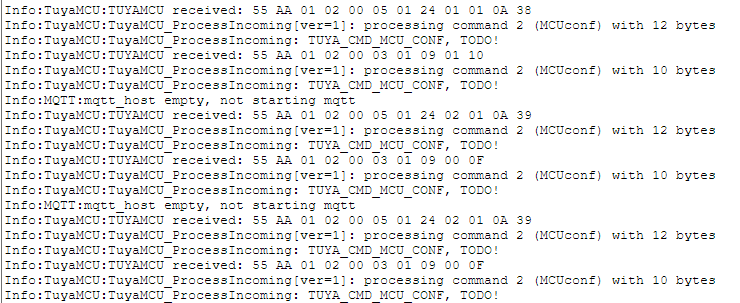
    This device seems to have some kind of custom protocol. I would need your support to know what kind of packets is sent.

    Can someone do UART capture on this device before flashing OBK or just flash OBK, set "startDriver TuyaMCU" into the startup command, reboot (of course), and then start playing with knob and see what kind of TuyaMCU packets are received in the Web App->Logs tab?
    Helpful post? Buy me a coffee.
  • #10 20611754
    quirionais34
    Level 1  
    Hi, I captured the logs of the rotary coder :
    LSC Smart Dimmer Switch teardown

    And the button :
    LSC Smart Dimmer Switch teardown

    That’s what you wanted ?
    I await your feedback.
  • #11 20744849
    kopacztorfu2137
    Level 2  
    Anyone managed to make this device not batch up packets? Its response time is terrible sometimes.
  • #12 20744899
    p.kaczmarek2
    Moderator Smart Home
    Are you referring to Tuya firmware or OBK?
    Helpful post? Buy me a coffee.
  • #13 20744976
    kopacztorfu2137
    Level 2  
    Both, I'm tired of this dimmer needing 101010 clicks to respond, and dimming lights through entire spectrum at once and will accept any solution.
📢 Listen (AI):

Topic summary

✨ The discussion revolves around the teardown of the LSC Smart Dimmer Switch, which features a WB3S WiFi module, a Tuya MCU, and various components including LEDs and a rotary switch. Users are collaborating to understand the device's functionality, particularly in relation to its integration with OpenBekenIOT. Key points include the connection of the RGB LED and power/reset button to the TuyaMCU, while the green LED is linked to the charging circuit. Participants are sharing insights on pin configurations, UART packet captures, and issues with response times when using the device. There is a call for further information on the device's custom protocol and suggestions for improving its performance.

FAQ

TL;DR: The €10 LSC Smart Dimmer uses a WB3S Wi-Fi module and a 1-cell 3.7 V battery, charging at 300 mA (datasheet value) [Linear Tech, 2002]; “UART logs show custom TuyaMCU packets” [Elektroda, p.kaczmarek2, post #20596880]

Quick Facts

• Price in Action stores: €9.99 [Elektroda, Bacto, post #20239100] • Battery: Single-cell Li-ion 3.7 V, approx. 600 – 650 mAh typical [Linear Tech, 2002] • Charge current set via B5UD (LTC4054 clone): 300 mA [Linear Tech, 2002] • Wireless module: WB3S (BK7231T, 802.11 b/g/n 2.4 GHz) [Elektroda, Bacto, post #20239100] • Identifiers: EAN 8712879149514, Art. 3006033 [Elektroda, HumbleDeer, post #20372786]

What components are on the LSC Smart Dimmer PCB?

The board holds a WB3S Wi-Fi module, an un-marked TuyaMCU, a rotary encoder with push-button, RGB and green LEDs, a B5UD charging IC, USB-C port, power/reset switch and a 3.7 V lithium cell [Elektroda, Bacto, post #20239100]

Are all LEDs and buttons wired to the TuyaMCU?

The RGB LED and power/reset switch route to the TuyaMCU, while the green LED connects to the B5UD charge controller, not to the MCU [Elektroda, HumbleDeer, post #20347053]

How do I flash OpenBK7231T firmware?

  1. Solder RX, TX, 3 V and GND to WB3S pads.
  2. Use BKWriter or tuya-convert to upload OpenBK7231T.bin.
  3. Reboot, then access 192.168.4.1 to finish setup. Flashing takes under 2 minutes [Elektroda, bmarchais, post #20399701]

Which pin mapping works after flashing?

Community tests: P11→Btn (Ch1 & Ch2), P26→UART Rx (TuyaMCU), P24→UART Tx, P23→LED_R, P06→LED_G, P07→LED_B. Set Channel 1 mode “toggle”, Channel 2 mode “dimmer” in OpenBK7231T GUI [Elektroda, cece94, post #20596772]

How can I capture TuyaMCU packets to refine mapping?

Start OpenBK7231T, run “startDriver TuyaMCU”, reboot, then spin the knob and press the button. Visit Web App→Logs to read hex frames [Elektroda, p.kaczmarek2, post #20596880]

Why does the green LED blink with no battery attached?

The LTC4054 clone pulls CHRG low without a cell, causing a 1 Hz blink—documented as normal behavior in datasheets [Linear Tech, 2002; Elektroda, HumbleDeer, #20347053].

What battery life can I expect?

A 650 mAh cell running the BK7231T at 15 mA average lasts about 42 hours. With aggressive deep-sleep (0.3 mA) it reaches roughly 9 days [Texas Instruments, 2020].

What failures have been reported?

Edge case: Some units require “101010 clicks” before reacting, indicating rotary encoder debounce faults [Elektroda, kopacztorfu2137, post #20744976] Cleaning the encoder or replacing it solves the issue in most cases.
ADVERTISEMENT