FAQ 
TL;DR: For Kasa HS200 owners reflashing RTL87X0C hardware, 2 board variants exist, and one expert note says, "OTA was implemented even before the release." Use 5V, TX, RX, and short GPIO0 to 3V3, then restart to enter bootloader. This FAQ solves flashing, templates, Wi‑Fi LED behavior, safe mode, and OTA confusion for both HS200 revisions. [#21528805]
Why it matters: The thread shows that the HS200 is refl ashable, but success depends on choosing the right template for the exact PCB revision and understanding how OpenBeken/OpenRTL handles LEDs, buttons, OTA, and Wi‑Fi recovery.
| HS200 variant |
Main pinout clue |
Relay pin |
Main button pin |
Extra button pin |
Notes |
| Original board |
Wi‑Fi LED uses P7+P9 |
8 |
12 |
19 |
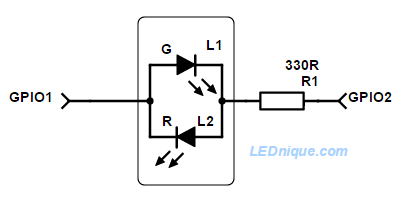
Tri‑color Wi‑Fi LED from two pins |
| Newer board |
Different layout, same accessible pads |
18 |
17 |
19 |
Two-pin bi‑color LED, updated template needed |
Key insight: The hardest part is not flashing the HS200. The real risk is using the wrong board template, which can break LED behavior, require double presses, or force unwanted safe-mode behavior.
Quick Facts
- The original HS200 reflashing method uses 5V power from the USB serial converter, with GPIO0 shorted to 3V3 and the Restart tact switch used to reboot into bootloader mode. [#21384347]
- One flash dump shows dual firmware slots: Fw1 at 0x010000, length 0x0f0000, and Fw2 at 0x100000, length 0x0f0000. [#21424140]
- The original tri-color Wi‑Fi LED is built from 2 pins: P7 = green, P9 = red, and P7+P9 = amber. [#21385370]
- A user replaced the suspect electrolytic with a 470µF 16V, 8000h @ 105C capacitor after reports involving the stock 470µF 10V part. [#21598616]
How do I put a TP-Link Kasa HS200 smart switch with an RTL87X0C chip into bootloader mode and reflash it with OpenBeken?
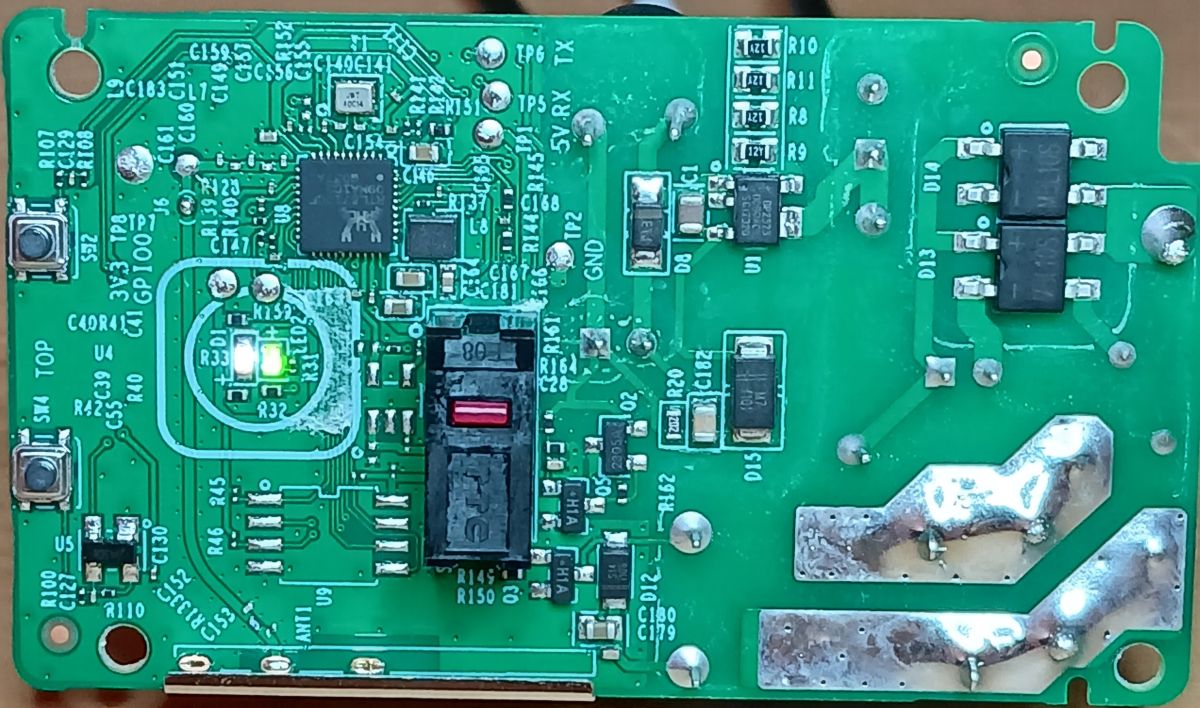
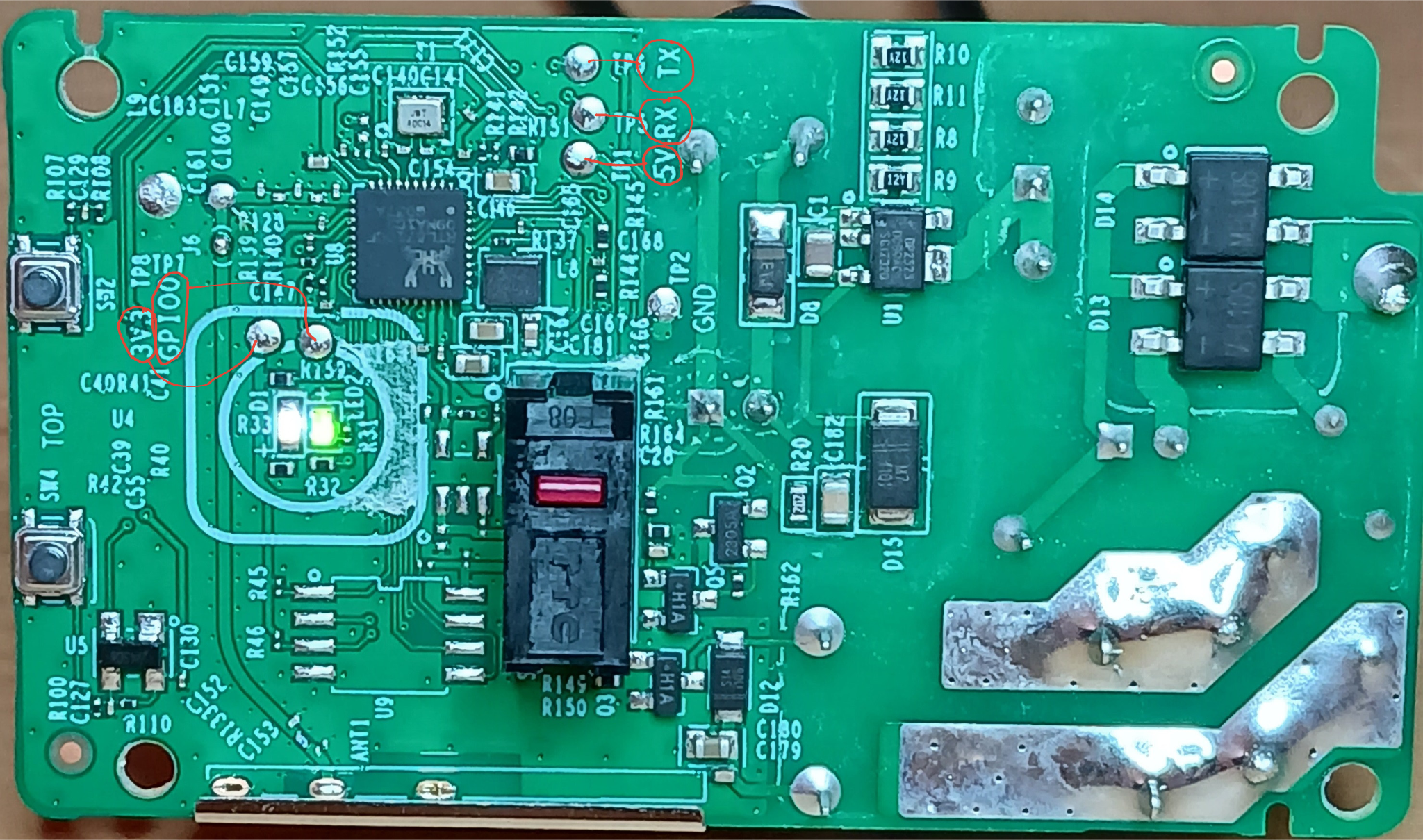
Put the HS200 into bootloader by shorting GPIO0 to 3V3, then pressing the Restart tact switch. Use a USB serial converter connected to the labeled pads, power the board from the 5V pad, and then flash it with the OpenBeken/OpenRTL guide linked in the thread. 1. Connect 5V, TX, RX, and ground. 2. Short GPIO0 to 3V3. 3. Press Restart and flash. The separate Reset switch is only another input, not the bootloader trigger.
[#21384347]
Which PCB pads on the Kasa HS200 should I connect to a USB serial converter for flashing, including 5V, GPIO0, 3V3, TX, and RX?
Connect the HS200’s labeled test pads directly to your USB serial converter: 5V to the converter’s 5V rail, plus TX, RX, and ground on their matching pads. Short the GPIO0 pad to the nearby 3V3 pad only to enter bootloader mode, then reboot with Restart. Later posts confirm that even the newer PCB revision keeps the flashing test pads accessible, though one pad may sit under a small foam pad.
[#21598616]
Why does the Kasa HS200 WiFi LED stay lit after connecting in OpenBeken, and how can I make it behave more like the stock firmware?
The Wi‑Fi LED stays lit because the available LED roles do not fully reproduce the stock three-color logic on this switch. One user got only partial behavior: green stayed on for about 30 seconds after Wi‑Fi connection, red showed no connection, and amber/green blinking showed app-config mode. To get closer to stock behavior, the thread points to scripting and role changes, because the HS200 combines two pins for three colors instead of using a simple single-color Wi‑Fi LED.
[#21385370]
What pin template works for the original TP-Link Kasa HS200 board revision with the RTL8710C/RTL87X0C MCU?
The original HS200 template uses relay on pin 8, main switch on pin 12, reset input on pin 19, and LEDs on pins 4, 7, and 9. The posted JSON maps pin 4 to LED_n;0, pin 7 to LED_n;1, pin 8 to Rel;0, pin 9 to LED_n;1, pin 12 to Btn;0, and pin 19 to Btn;1. It was enough to control the relay, the main LED, and map the Wi‑Fi LED hardware for further testing.
[#21384347]
What template should I use for the newer Kasa HS200 board variant with the different pinout and accessible test pads?
Use the updated template for the newer HS200 variant, not the original one. The final posted mapping sets pin 2 to WifiLED;0, pin 3 to AlwaysHigh;0, pin 4 to LED;0, pin 17 to Btn;0, pin 18 to Rel;0, and pin 19 to Btn;1. Its command line is
backlog setButtonTimes 50 0 255; addEventHandler OnHold 19 SafeMode. That version also sets the white LED to turn off when the relay is on.
[#21767614]
How can I use the HS200 reset button to trigger OpenBeken safe mode instead of leaving it unmapped?
Map the extra reset button to a normal button role and attach an OnHold event that enters SafeMode. The working example for the newer variant uses
addEventHandler OnHold 19 SafeMode and a 5-second hold behavior was described for safe-mode entry. A later pull request was merged specifically to make the reset button useful instead of leaving it inactive.
[#21767614]
What is safe mode in OpenBeken, and how is it useful when experimenting with templates on devices like the Kasa HS200?
Safe mode is OpenBeken’s recovery state that lets the device boot with risky template logic bypassed, so you can fix bad pin mappings or scripts.
"Safe mode" is a recovery feature that boots the firmware in a safer state, avoids normal automation behavior, and helps restore access after template or button mistakes. On the HS200, users explicitly repurposed the extra reset button to enter SafeMode after a 5-second hold.
[#21767614]
What is CEN on Realtek RTL87X0C-based boards, and how is it different from a normal GPIO-connected reset button?
CEN is the hardware reset line, not a normal software-mappable GPIO input.
"CEN" is a hardware control pin that resets the Realtek MCU directly, bypassing normal GPIO logic, so a button wired to it restarts the chip instead of acting like a configurable template button. In this thread, the Restart button was identified as connected to CEN, while the other reset-labeled button was just another GPIO.
[#21623063]
Why might an OpenRTL87X0C-flashed Kasa HS200 stop reconnecting after a Wi‑Fi outage until the restart button is pressed?
It can happen because earlier RTL87X0C Wi‑Fi behavior was still being improved, and reconnect logic could stall after an outage. One user reported the HS200 blinking red-green for hours after Wi‑Fi returned, only reconnecting after the Restart button was pressed. Another expert reply said recent updates improved the Wi‑Fi code, enabled Realtek’s own auto-reconnect, and that older code could even crash devices under some conditions.
[#21528550]
Which OpenBeken or OpenRTL firmware versions improved Wi‑Fi reconnection on RTL8710B, RTL8720D, and RTL87X0C devices?
Later builds after the first RTL8710C-support release improved reconnection behavior. The user with the HS200 said they were running the version that first introduced RTL8710C support, and the maintainer replied that newer updates had improved Wi‑Fi handling and enabled Realtek’s own auto-reconnect. The same reply also said an RTL8710B plug had stayed up for about 1 month despite Wi‑Fi outages, though load-related instability still appeared on one device.
[#21528550]
What’s the difference between the OTA update option in the device Configure menu and OTA from the OpenBeken Web App on RTL87X0C devices?
On version 1.18.12, the device’s Configure menu could report that OTA was not implemented for OpenRTL87X0C, while OTA from the Web App still worked. One maintainer checked the code and explained that the newer Configure-menu OTA approach was not yet present in that version, but Web Application OTA should still function. The user then confirmed that the Web App had an OTA menu available.
[#21528852]
How do LED_WIFI and LED_WIFI_n roles work in OpenBeken when a device uses a two-pin or tri-color Wi‑Fi status LED?
They let OpenBeken drive Wi‑Fi state LEDs, but multi-color hardware may need two pins or scripting to match stock behavior. In the original HS200, two pins create three colors: P7 alone gives green, P9 alone gives red, and P7+P9 gives amber. Another user also reported that assigning two WiFiLed roles on a two-LED device made both behave as one combined indicator, producing a purple reconnect/search effect.
[#21424343]
Btn vs Btn_n in OpenBeken templates for the Kasa HS200: which button role matches the hardware and prevents double-press or safe-mode boot issues?
Btn matched the newer HS200 hardware better and fixed the double-press problem. A user updated pin 17 from Btn_n to Btn after seeing that Btn_n required two presses to toggle the light and created noisy Button_OnLongPressHold logs. The same follow-up also noted that using Btn_n on pin 19 earlier in the thread had contributed to the switch boot-looping into safe mode.
[#21796863]
Why do MQTT entities like build, IP, RSSI, SSID, and uptime become 'unknown' in Home Assistant after a while on an OpenBeken-flashed HS200?
The thread reports the symptom but does not provide a fix yet. The user said the switch itself worked fine with MQTT and Home Assistant, but the extra entities for build, IP, RSSI, SSID, and uptime all became “unknown” after some time. No later reply in the thread explains the cause, so the only thread-grounded answer is that it remained unresolved as of July 6, 2025.
[#21598616]
What hardware reliability issues have users reported with Kasa HS200 switches, including the failing 470uF 10V capacitor, and what replacement parts are safer?
Users reported capacitor failures on some Kasa devices, centered on the board’s only 470µF 10V electrolytic. One user said their workplace stopped using Kasa hardware after a capacitor blew up, adding that a quick Google search found many similar reports. For home use, they preemptively replaced that capacitor with a Rubicon 470µF 16V rated 8000h at 105C, calling it a safer long-life substitute.
[#21598616]
AI summary based on the discussion. May contain errors.