FAQ 
TL;DR: A confirmed 6-pin mapping and a working template make this ECR6600 smart plug practical to flash and use. One tester said, "It works" after applying the BL0937 pin setup, which enabled relay control plus voltage, current, power, and MQTT reporting for users replacing Tuya firmware or recovering a stubborn plug. [#21522523]
Why it matters: This FAQ gives owners of the ECR6600/BL0937 Tuya plug the shortest path to identify pins, flash OpenECR6600, restore Wi‑Fi, and enable energy monitoring.
Reported energy readings after 24 hours: [#21595107]
| Device |
Reported energy after 24 h |
Notes |
| TNCE ECR6600 plug |
1.46 kWh |
Read slightly high |
| Aubess plug |
1.38 kWh |
Closest to reference after self-consumption adjustment |
| Silvercrest wattmeter |
1.41 kWh |
Standalone reference |
Key insight: The breakthrough is not the chip alone but the confirmed GPIO map: once pins 14, 15, 20, 22, 24, and 25 are assigned correctly, OpenECR6600 can drive the relay and read BL0937 energy data on this plug.
Quick Facts
- BL0937 date code 2439 indicates the plug was made after week 39 of 2024, even though the PCB had no printed board marking. [#21441371]
- The exposed programming area has 5 pads, and the isolated fifth pad was later traced to pin 26, used as RST/BOOT access during flashing. [#21515988]
- A successful OpenECR6600 configuration used 6 functional GPIOs: BL0937 on pins 14, 15, 20, WiFi LED on 22, button on 24, and relay on 25. [#21500105]
- One user measured approximate standby overhead of 0.03 kWh per 24 h for 2 smart plugs, or about 0.7 W per socket, when comparing TNCE and Aubess plugs against a Silvercrest meter. [#21595107]
- A field reset worked by power-cycling the plug about 4–5 times with short pauses, after which its open Wi‑Fi AP reappeared for reconfiguration. [#21819463]
How can I identify the GPIO pin assignments on this Tuya smart plug with ECR6600 and BL0937 for the relay, button, WiFi LED, and energy metering pins?
You can identify them from the confirmed device config posted for this exact plug. The working map is relay on GPIO25, button on GPIO24, WiFi LED on GPIO22, and BL0937 on GPIO14, GPIO15, and GPIO20. The relay LED is hardwired, so you cannot control it separately. That means the useful functional map is six GPIO roles, not seven.
[#21500105]
What is the correct OpenECR6600 template for the ECR6600 Tuya WiFi smart plug with BL0937 energy measurement?
The correct template assigns GPIO14=BL0937CF, GPIO15=BL0937SEL, GPIO20=BL0937CF1, GPIO22=WifiLED, GPIO24=Btn, and GPIO25=Rel. Importing that template, or setting those pins manually, is enough on OpenECR6600 versions with BL0937 support. The same config was later confirmed to expose electricity status on the web UI and MQTT.
[#21521656]
What steps are needed to flash OpenECR6600 onto this ECR6600 smart plug using RDTool or BurnTool?
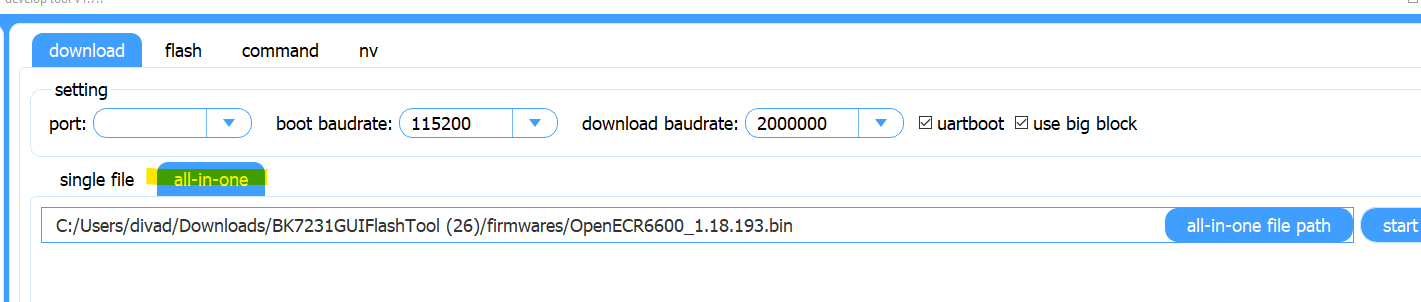
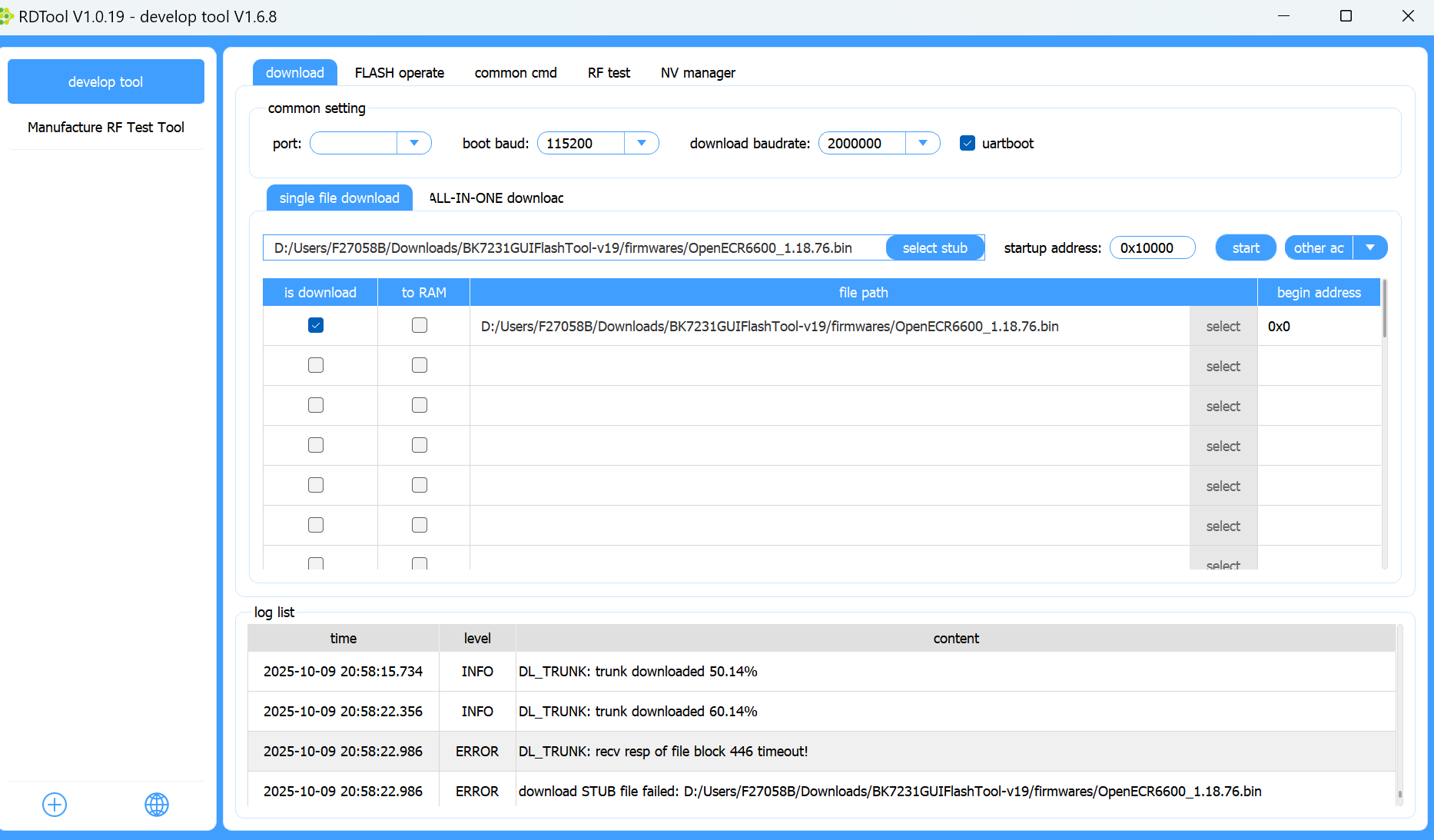
You flash it by wiring UART, using the all-in-one image, and briefly resetting the chip at the right moment. 1. Connect the plug to a separate 3.3V-capable supply and UART pads. 2. In RDTool or BurnTool, load the OpenECR6600 all-in-one file and press Start. 3. About 1 second later, momentarily short RST to GND so programming begins. One user reported this exact timing finally produced a complete successful write.
[#21521544]
Why does RDTool show "sync failed" or "download failed" when trying to program an ECR6600 plug, and how can that be fixed?
RDTool shows those errors when the chip misses programming sync or the wrong flashing method is selected. The thread fixed it by retrying Start several times, then shorting RST to GND about 1 second later. Another user also fixed repeated failure by lowering the baud rate and using the correct all-in-one workflow instead of selecting the firmware as a stub. Those are the two concrete recovery steps reported.
[#21716613]
Where is the BOOT or RST pad on this ECR6600 smart plug, and how do you use it to enter programming mode?
The separate fifth test pad is connected to chip pin 26 and was used as the reset/programming access point. You do not need it for every flash attempt, but it helps when sync is unreliable. To enter programming mode, start the transfer in the tool, then briefly short that pad to GND. A user verified the pad-to-pin-26 continuity with a multimeter before using it successfully.
[#21515988]
How do I enable BL0937 power monitoring in OpenECR6600 so the plug reports voltage, current, power, and MQTT telemetry?
Set the three BL0937 pins correctly and reboot. Use GPIO14 for BL0937CF, GPIO15 for BL0937SEL, and GPIO20 for BL0937CF1, with GPIO22 as WifiLED, GPIO24 as Btn, and GPIO25 as Rel. BL0937 support was added in OpenECR6600 v1.18.61, so version 1.18.76 already works. After applying the pin map, one user immediately saw electricity values on the device page and in MQTT.
[#21522523]
What is BL0937, and how does it handle energy measurement inside Tuya smart plugs?
"BL0937" is an energy-metering IC that measures electrical parameters, using dedicated pulse outputs for power-related data inside low-cost smart plugs. In this plug, OpenECR6600 uses three BL0937-related GPIOs: CF on pin 14, SEL on pin 15, and CF1 on pin 20. Once mapped correctly, the plug reports electricity status through the web UI and MQTT.
[#21500105]
What is AT firmware on ECR6600 and how is it related to RDTool, efuse access, and WG236 modules?
In this thread, AT firmware means the Skylab firmware used on WG236 modules and discussed as a way to read efuse data with RDTool. The idea was to flash WG236 firmware onto a real Tuya ECR6600 device, then inspect efuse configuration in RDTool. The thread never confirmed that method on this exact plug, but it clearly links AT firmware, WG236 hardware, and RDTool-based efuse experiments.
[#21500213]
Why doesn’t the ECR6600 plug enter pairing mode properly after flashing a backup without the BL0937 connected?
It can fail because the firmware expects the BL0937 hardware to be present during startup. One tester restored a backup onto a WG236 board and found it never reached pairing mode, likely because BL0937 was absent. The boot log still started TuyaOS, but the device stayed in a broken state instead of pairing normally. The same tester noted that IO24 appeared to be the reset or button input.
[#21444807]
How can I read efuse data on an ECR6600 device, and what do the first bytes usually represent?
You can read efuse by modifying firmware to dump it directly. One user reported that the first 21 bytes, addresses 0x00 through 0x14, contained non-zero data while the rest were 0. The posted bytes looked more like chip configuration or calibration than encryption keys. That matters because the same thread also noted normal firmware read and write access, which argues against mandatory flash encryption here.
[#21500643]
Is there any way to get a boot log from TX0 on the ECR6600 smart plug, and what UART pin should be used instead?
No confirmed boot log from TX0 was provided for this plug. The successful shared boot log came from IO13 on a WG236 after flashing a backup, not from TX0 on the original smart plug. Later, another user explicitly asked whether boot log output was possible on TX0, which shows that point remained unresolved in the thread. So the only demonstrated boot-log pin here is IO13 on WG236 hardware.
[#21444807]
How does WiFi performance on ECR6600 plugs compare with older BK7231-based smart plugs under stock firmware or OpenECR6600?
Results were mixed. One owner said stock-style Wi‑Fi performance looked good and RSSI was similar to a nearby BK7231N device. Another later reported poor reconnect behavior on flashed ECR6600 plugs compared with ESP32, ESP8266, and older smart plugs, especially after router restarts. So the thread supports a split conclusion: basic signal strength looked competitive, but OpenECR6600 stability was inconsistent across versions and setups.
[#21499705]
Why do some ECR6600 plugs stop reconnecting to WiFi after a few reboots on newer OpenECR6600 versions, and what troubleshooting steps help?
Some units reconnect for only the first 2 or 3 reboots, then fail until recovery mode or OTA reflashing. Users reproduced that pattern on versions 1.18.158, 1.18.187, 1.18.188, and 1.18.189. The useful troubleshooting steps were updating to a newer build, testing whether safe mode restores access, and reflashing OTA when the device stops rejoining Wi‑Fi. One report said a newer SDK seemed promising, but the fix did not hold.
[#21713072]
What should I do if my ECR6600 smart plug LED keeps blinking, ignores the button, and won’t reconnect after repeated power outages?
Power-cycle the plug about five times to force it back into its default open Wi‑Fi mode. A later report said the AP actually reappeared on the fourth plug-in, after which reconfiguration worked. The same user suspected multiple rapid outages had pushed the plug into a bad state. Check for an open Wi‑Fi network before reflashing, because this reset may recover the device without opening it.
[#21819463]
How accurate is the BL0937-based power meter in these TNCE or Tuya ECR6600 plugs compared with Aubess plugs and a standalone Silvercrest wattmeter?
It was usable but read a little high in the shared 24-hour comparison. The TNCE ECR6600 plug reported 1.46 kWh, the Silvercrest wattmeter showed 1.41 kWh, and the Aubess plug showed 1.38 kWh. After subtracting about 0.03 kWh per 24 hours for two smart plugs, the Aubess result matched the reference more closely. The thread’s practical verdict was that the TNCE wattmeter worked, but overestimated consumption slightly.
[#21595107]
AI summary based on the discussion. May contain errors.