logo elektroda
logo elektroda
X
logo elektroda

Building an Atari XF 351 with a laptop drive and a case from a 3D printer

zaxoniec 4140 6

TL;DR

  • Built an Atari XF 351-style 3.5-inch floppy station for the 8-bit Atari series, based on the XF551.
  • Designed a new SMD electronics board in DipTrace from an online schematic and paired it with an IBM laptop drive.
  • Printed the enclosure in Hyper PLA on a Creality K1 MAX; the case took over 220 minutes, and the SIO plug used an internet model.
  • Added an FT232 module for SIO2PC and Aspeqt, installed a VL1772 controller with Hyper XF ROM, but the drive-number switch no longer fit.
Generated by the language model.
ADVERTISEMENT
Treść została przetłumaczona polish » english Zobacz oryginalną wersję tematu
📢 Listen (AI):
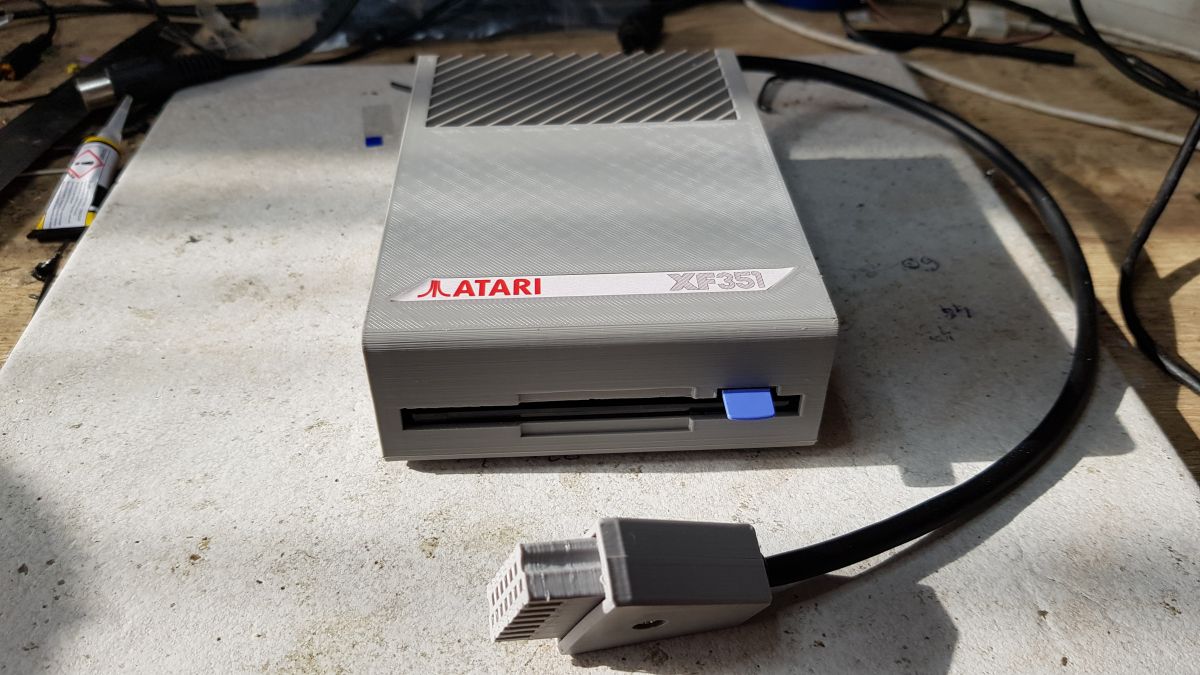
  • Prototype Atari XF351 floppy disk drive with SIO cable on a white surface. .

    Ot, Atari never made a 3.5" station for the 8-bit series. The XF 351 never got beyond the prototype stage. I thought I would change that ;) The choice fell on the XF551.
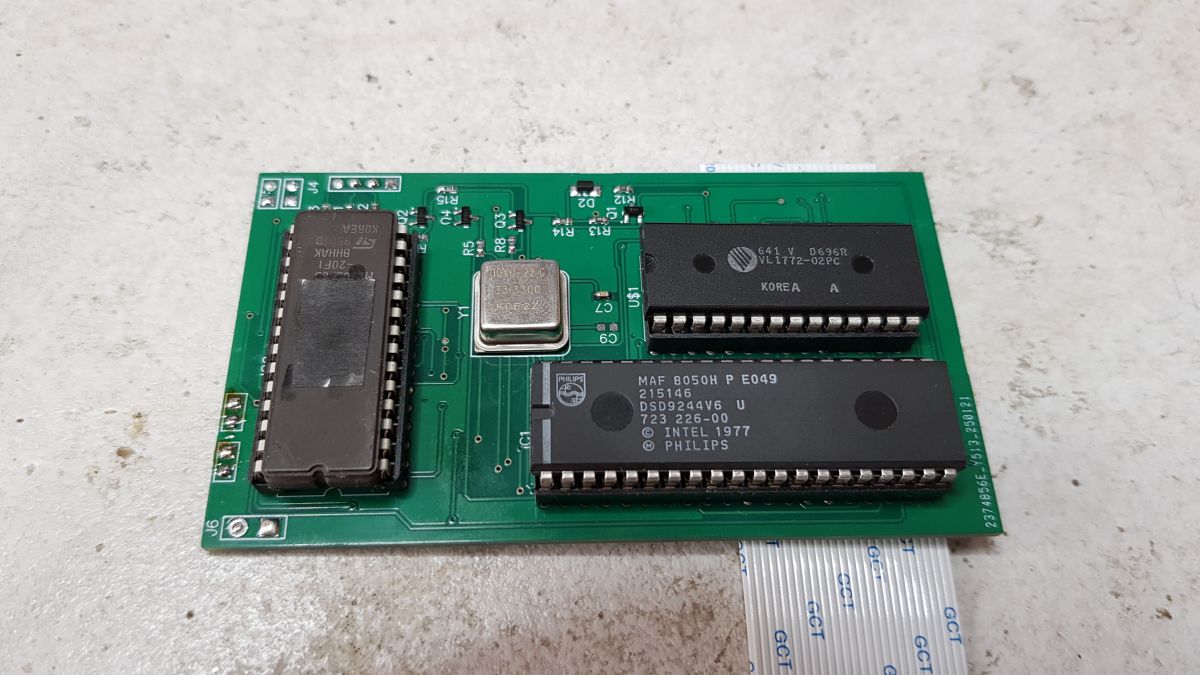
    I built the electronics based on a schematic from the net. New board in SMD drawn in DipTrace, ordered from JLCPCB.

    XF 551 schematic.
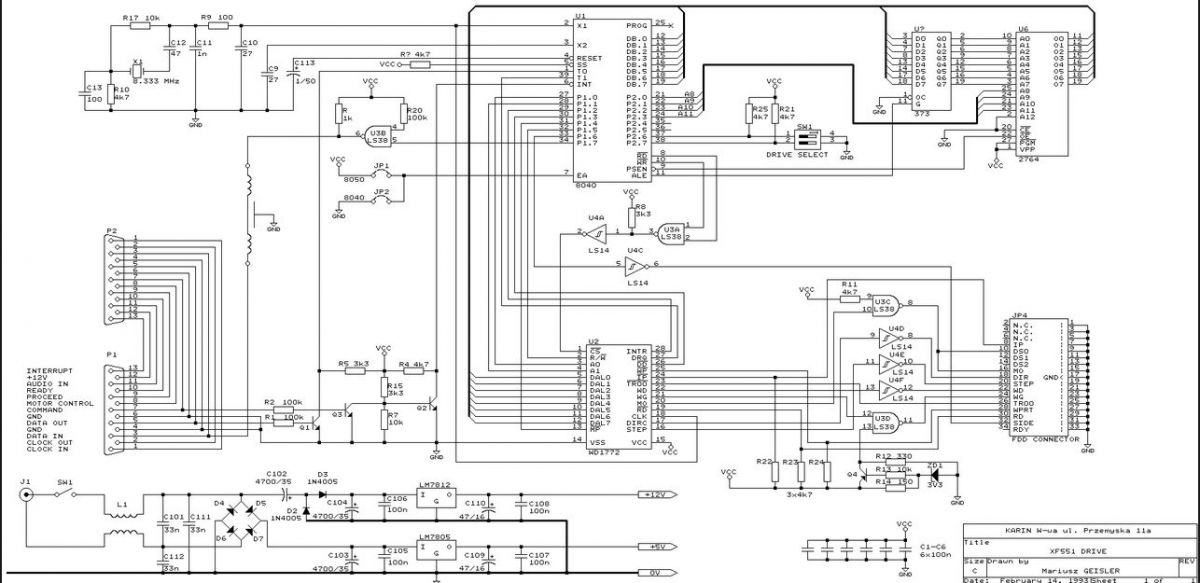
    Electrical schematic of Atari XF551 floppy disk drive .

    Plate.

    Close-up of a prototype electronic board with integrated circuits .

    The choice of drive from a laptop was dictated by dimensions and availability. You can still buy new stock loungers. Here I have used the drive from an IBM laptop.
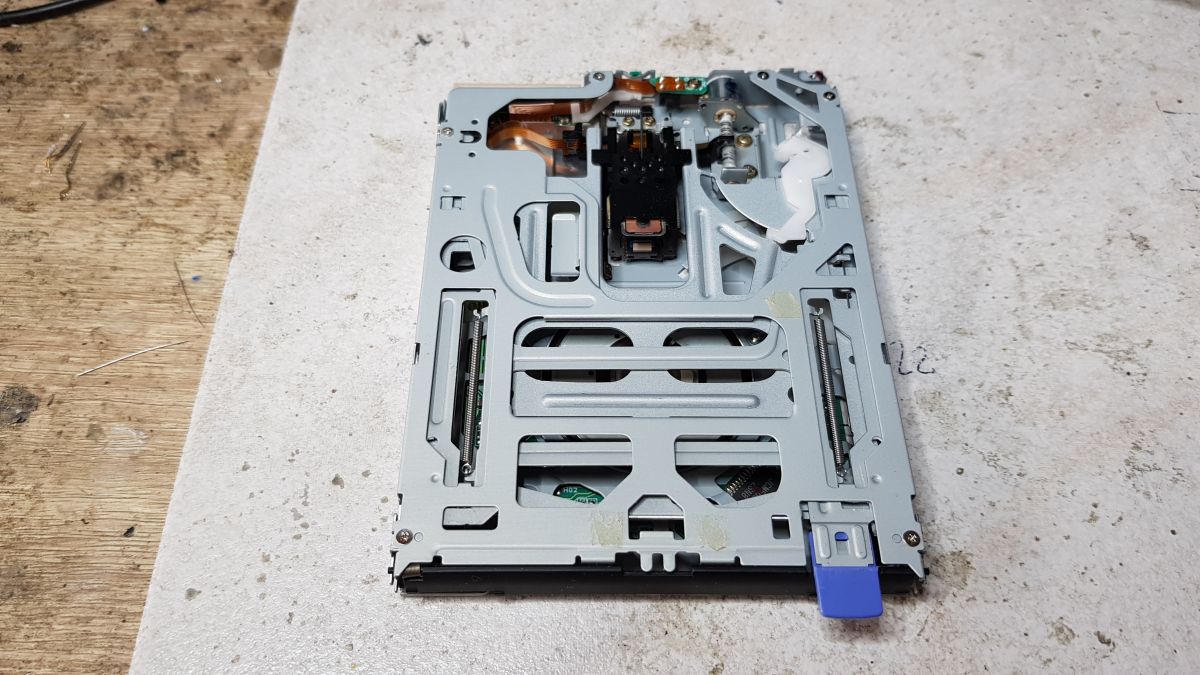
    Close-up of the interior of an IBM laptop floppy disk drive. .

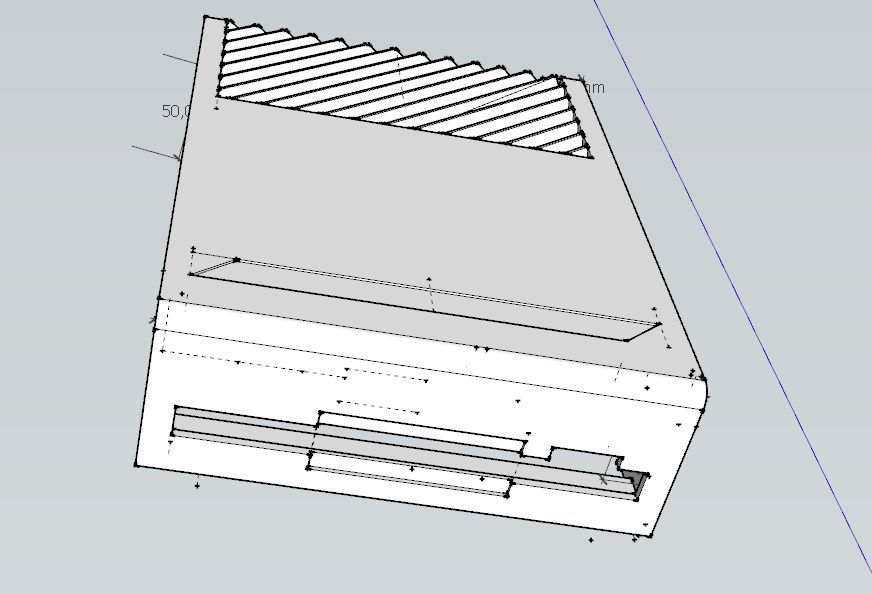
    I drew the housing in SketchUP.

    Design of an Atari XF551 disk drive case in SketchUp. .

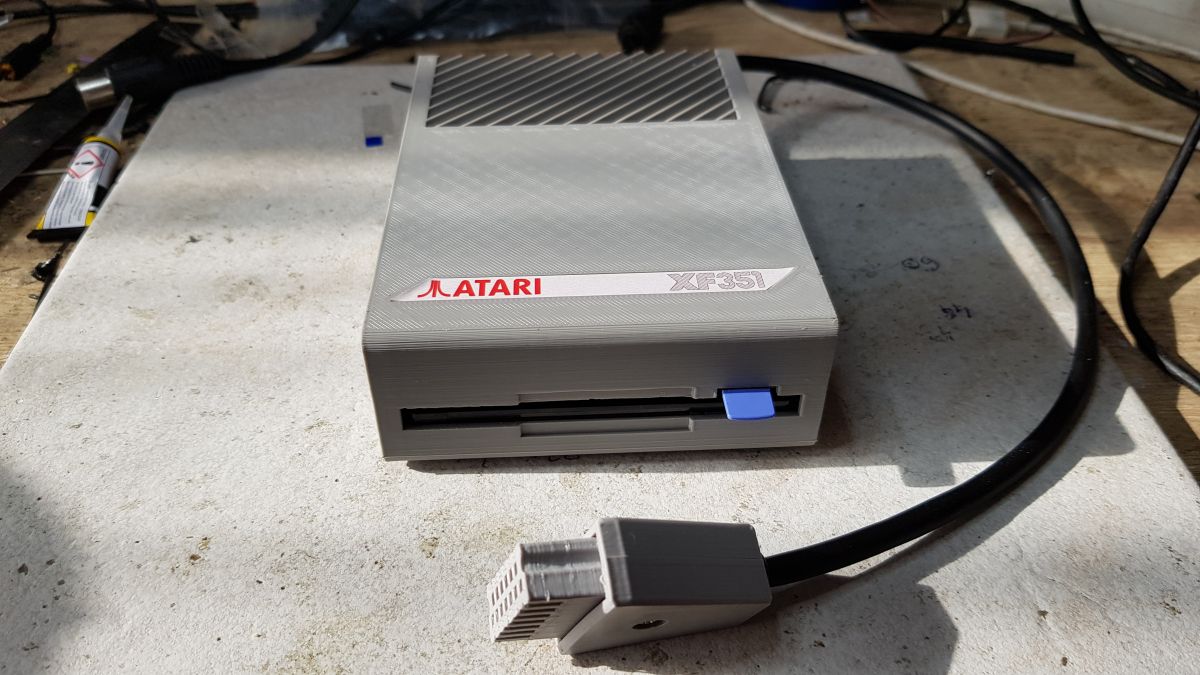
    Printed from Hyper PLA on Creality K1 MAX. It could have come out better, but here I made a compromise between quality and speed. It takes over 220 minutes to print anyway.
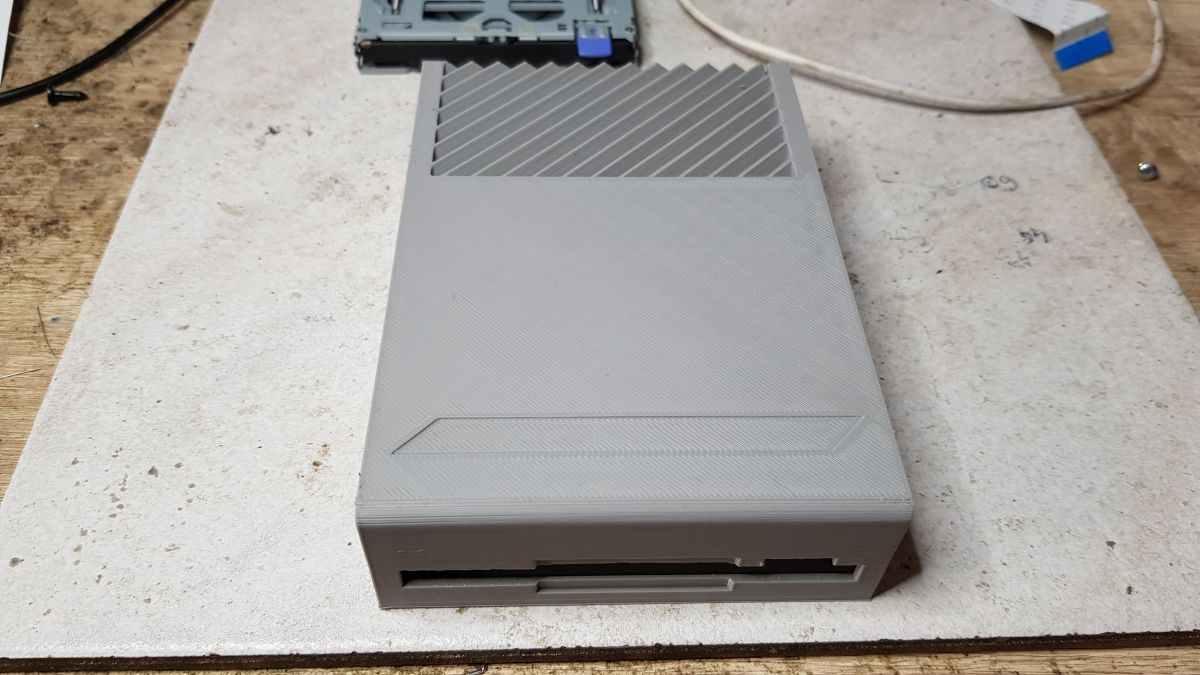
    Prototype 3'5 inch floppy drive case for Atari with gray diagonal striped pattern. .

    SIO plug to connect the station to the Atari printed from a model from the internet.
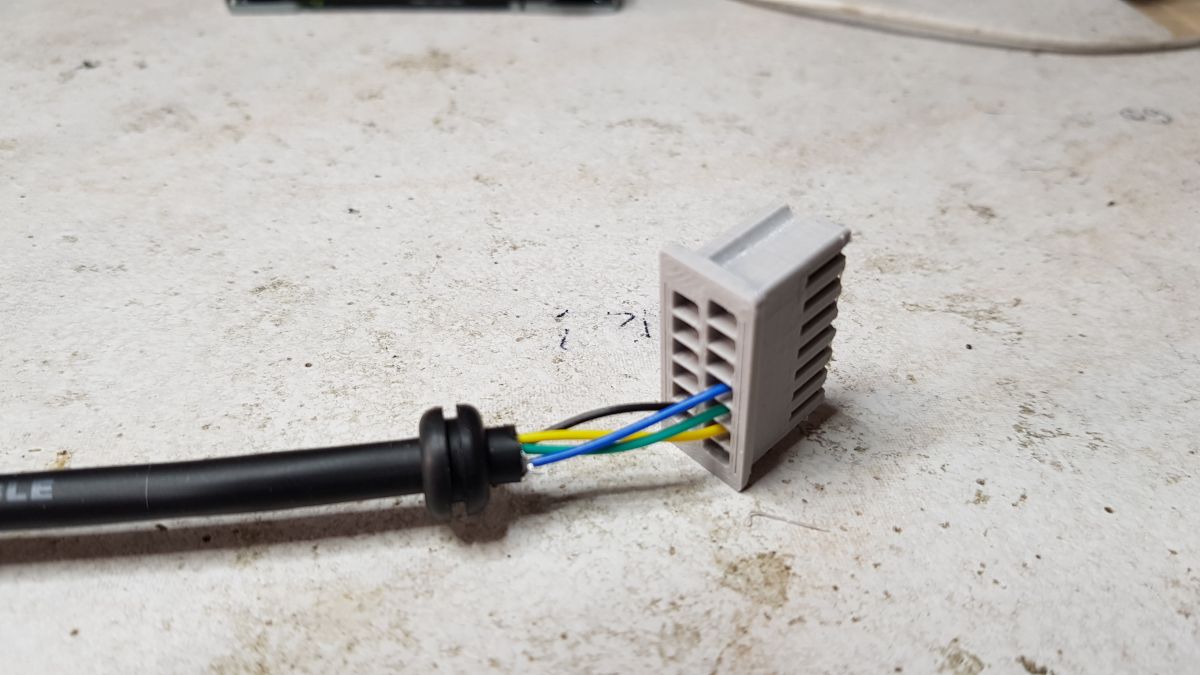
    3D-printed SIO connector with wires. .

    I also added a module on FT232 to communicate the station with the PC and the Aspeqt program to load disk images.
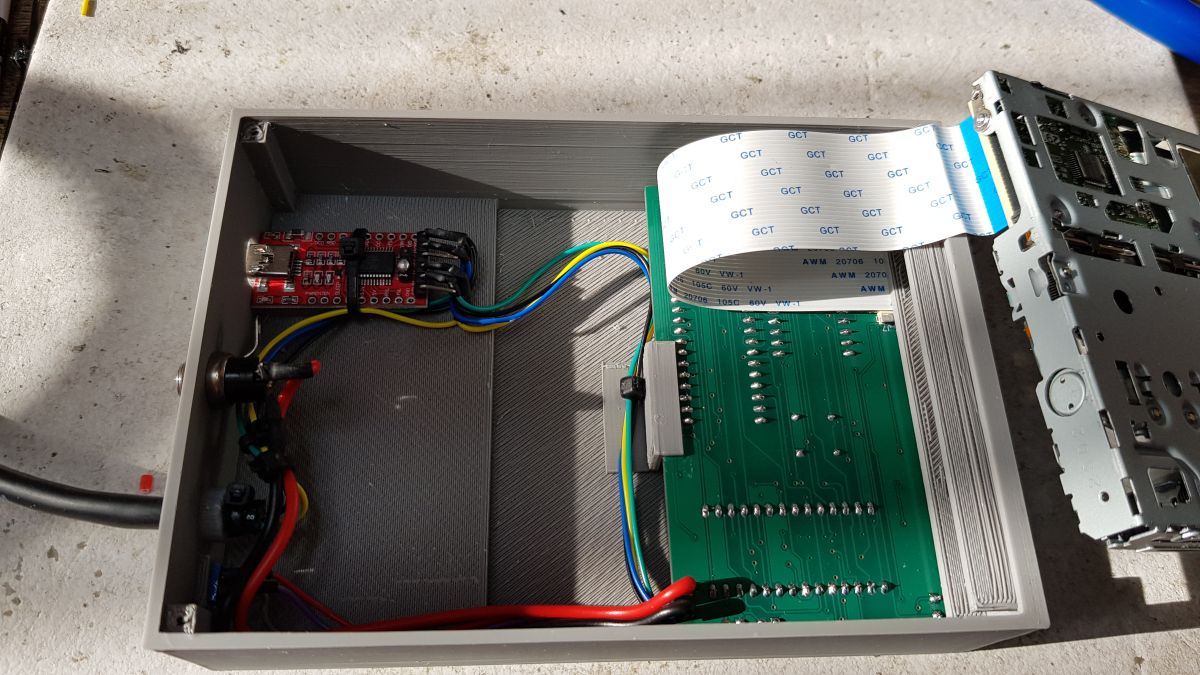
    Inside view of the Atari XF 551 disk drive casing with visible cables and electronics. .

    On the back of the drive is a switch to select the station number. D1 to D4. There is a power socket and a SIO2PC USB output. The switch didn't quite fit anymore, so I dispensed with it.
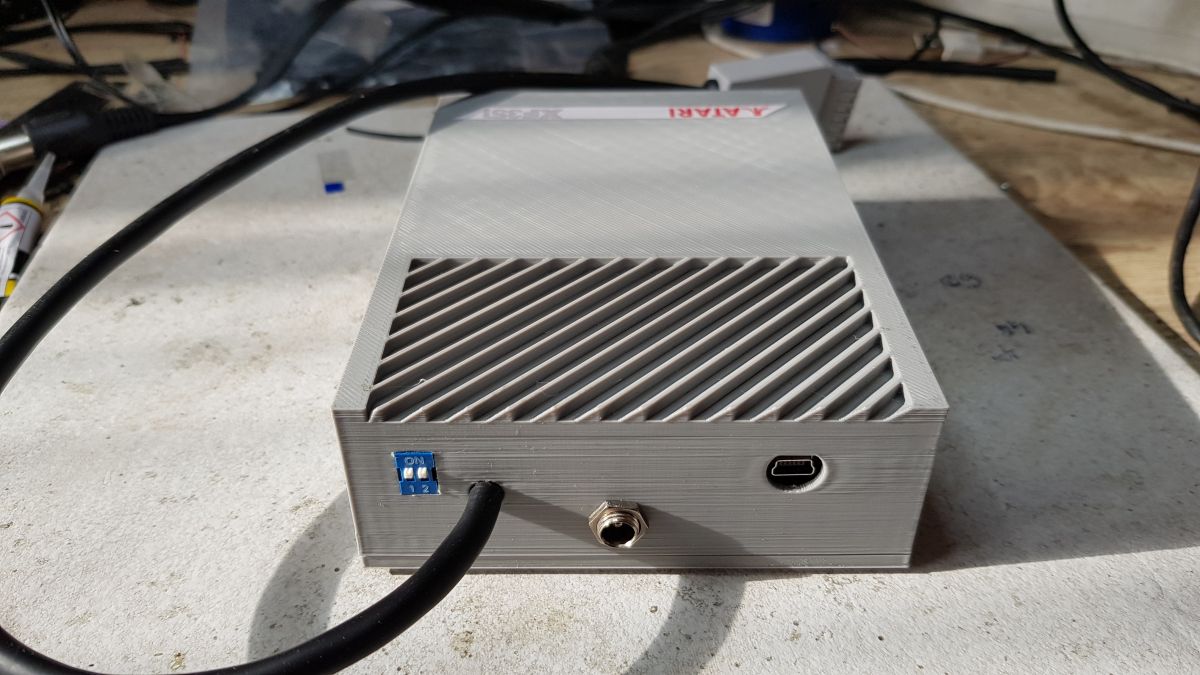
    Prototype Atari XF 551 disk drive with custom-designed electronics and 3D-printed casing. .

    I also managed to get hold of a WD1772 controller, a VL1772 to be precise (unfortunately these are hard to find and quite expensive), so I installed Hyper XF, an alternative ROM to speed up the station.

    A graphic designer friend also made a sticker.
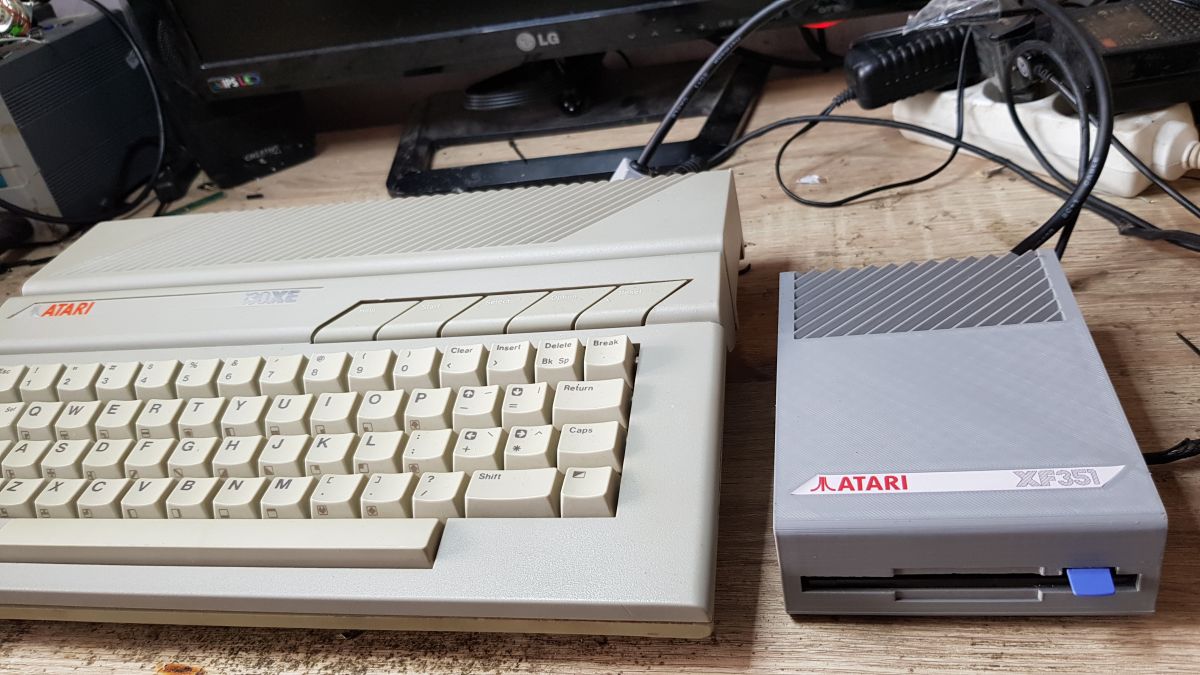
    So there you have it ;) .

    View of a prototype Atari XF351 disk drive with SIO cable on a white surface. .
    Atari XE computer and prototype disk drive XF 351 lying next to each other on a desk. .

    Cool? Ranking DIY
    About Author
    zaxoniec
    Level 14  
    Offline 
    zaxoniec wrote 190 posts with rating 835. Been with us since 2007 year.
  • ADVERTISEMENT
  • #2 21442122
    LA72
    Level 41  
    Posts: 6582
    Help: 646
    Rate: 1648
    zaxoniec wrote:
    I built the electronics using a schematic from the net.


    And here it would be useful to provide a link to the author of the original.
  • ADVERTISEMENT
  • #3 21443025
    lombard1
    Level 14  
    Posts: 117
    Rate: 7
    LA72 wrote:
    zaxoniec wrote:
    I built the electronics based on a schematic from the net.
    .

    And here it would be useful to provide a link to the author of the original.


    After all, there is the author's name on the schematic, and anyone who knows how to search will find the link.
    This is a very well-known interface for the eight-bit Atari.
  • ADVERTISEMENT
  • #4 21445733
    piog1977
    Level 13  
    Posts: 149
    Help: 1
    Rate: 3
    Great job Zaxon!!!
  • ADVERTISEMENT
  • #5 21451984
    gulson
    System Administrator
    Posts: 29234
    Help: 148
    Rate: 5984
    It came out amazingly! This looks like the original drive. Good retro design of the case and even found a sticker. The case came out pretty well, you have to take into account that there were not perfect cases in those years either.
    It makes you want to use in this climate.
    Send a parcel and I'll send a small gift.
  • #6 21452190
    gregor124
    Level 28  
    Posts: 1458
    Help: 91
    Rate: 798
    Link to diagram of the original:
    https://atariwiki.org/wiki/attach/Atari%20XF551/XF551_schematic.pdf
    The XF551 is a 5 1/4" station and here it is 3.5". Then I have a question, is it possible to write/read data on it in formats typical for 3.5" floppy disks, i.e. e.g. 720 kB per page, or only in formats like for a 5 1/4" floppy disk?
    I see that you have dispensed with the expansion slot, which may bother some people, e.g. if they want to use the station and a tape recorder at the same time, which mostly don't have one either.
    Helpful post? Buy me a coffee.
  • #7 21456572
    ^ToM^
    Level 42  
    Posts: 9048
    Help: 495
    Rate: 2929
    zaxoniec wrote:
    Prototype Atari XF351 floppy disk drive with SIO cable on a white surface. .

    .

    Looks like the original. :D .
    Brilliant!
📢 Listen (AI):

Topic summary

✨ The discussion revolves around the construction of an Atari XF 351 floppy disk drive using a laptop drive and a 3D-printed case. The creator utilized a schematic for the XF 551, adapting it for a 3.5" format, as Atari never produced a 3.5" drive for the 8-bit series. The electronics were designed in SMD using DipTrace and manufactured by JLCPCB. The laptop drive, sourced from an IBM model, was chosen for its compact size and availability. The case was designed in SketchUP and printed with Hyper PLA on a Creality K1 MAX. Feedback from the community praised the design's retro aesthetic and functionality, with inquiries about data compatibility and expansion slot usage.
Generated by the language model.

FAQ

TL;DR: This project turns XF551 electronics into a 3.5-inch Atari drive in a printed case, and one expert reaction called it "Looks like the original." It suits Atari 8-bit builders who want a compact XF351-style drive with PC image loading, a laptop mechanism, and a retro enclosure that prints in over 220 minutes. [#21441683]

Why it matters: It shows a practical way to build the Atari 3.5-inch drive Atari never released, while keeping XF551 compatibility and a period-correct look.

Option Drive size Core electronics Enclosure PC link
Atari XF551 5.25-inch Original XF551 design Factory case Not discussed
Custom XF351-style build 3.5-inch laptop drive New SMD board from XF551 schematic 3D-printed in Hyper PLA FT232 + SIO2PC USB

Key insight: The strongest idea is not the case alone, but the full integration: XF551-compatible electronics, a laptop floppy mechanism, SIO connectivity, and PC image loading in one custom 3.5-inch build.

Quick Facts

  • The builder used a 3.5-inch IBM laptop floppy drive because of its smaller dimensions and current availability as new old stock. [#21441683]
  • The enclosure was modeled in SketchUp and printed on a Creality K1 Max from Hyper PLA; one print took over 220 minutes. [#21441683]
  • The rear panel carries a D1–D4 drive-number selector, a power socket, and a SIO2PC USB output based on an FT232 module. [#21441683]
  • The build uses a WD1772-compatible VL1772 controller and Hyper XF ROM; the controller is described as hard to find and expensive. [#21441683]
  • A commenter linked the original XF551 schematic PDF, confirming the donor design is the 5.25-inch Atari XF551. [#21452190]

How do you build an Atari XF 351-style 3.5-inch floppy drive based on the XF551 electronics?

You build it by reusing the XF551 design and repackaging it around a 3.5-inch laptop mechanism. 1. Start from the XF551 schematic found online. 2. Redraw the electronics as a new SMD PCB in DipTrace and order the board from JLCPCB. 3. Fit the board, laptop drive, SIO connector, and printed enclosure into one custom unit styled as an XF351-like drive. [#21441683]

What laptop floppy drives work best as replacements when building a 3.5-inch Atari XF551/XF351 clone?

The thread only confirms an IBM laptop floppy drive, chosen for dimensions and availability. That makes slim laptop mechanisms the safest match for a compact 3.5-inch enclosure, while full desktop drives were not used here. The builder also notes that new old stock units are still available, which matters for repeatability. [#21441683]

How do you design and print a retro-looking Atari drive enclosure in SketchUp and on a Creality K1 Max using Hyper PLA?

You model the shell in SketchUp, then print it in Hyper PLA on a Creality K1 Max. The builder accepted a speed-versus-finish compromise, and the print still took more than 220 minutes. The visual target was clearly retro, because multiple commenters said the finished case looked like an original Atari drive. [#21441683]

What is the WD1772 or VL1772 controller, and why is it important in an Atari XF551-compatible drive?

"WD1772" is a floppy-disk controller chip that manages disk read/write operations, a key characteristic in XF551-compatible hardware. In this build, the builder obtained a VL1772 variant and installed it so the drive could run Hyper XF ROM. That chip matters because the builder specifically links it to the speed-up modification and also says these parts are hard to find and expensive. [#21441683]

What is Hyper XF ROM, and how does it speed up an Atari floppy drive?

Hyper XF is an alternative ROM installed to make the drive run faster. The builder says he fitted it after sourcing a WD1772-compatible VL1772 controller, so in this project the ROM upgrade depends on that controller choice. The thread does not give a transfer-rate number, but it clearly presents Hyper XF as a speed-focused replacement ROM for the drive. [#21441683]

How does an FT232 module work with SIO2PC USB and AspeQt for loading Atari disk images from a PC?

"FT232" is a USB-to-serial interface module that links hardware to a PC, a key characteristic in SIO2PC-style connections. Here, the builder added an FT232 board so the drive could communicate with a PC through a rear SIO2PC USB output, then used AspeQt to load disk images. That turns the custom drive into both a physical floppy unit and a PC-connected image-loading setup. [#21441683]

Why would someone choose an IBM laptop floppy drive for an Atari XF351-style project instead of a standard desktop 3.5-inch drive?

An IBM laptop floppy drive was chosen because its dimensions fit the custom case better and the mechanism is still obtainable. The builder states size and availability were the deciding factors, which is consistent with a compact 3.5-inch XF351-style enclosure. The thread does not claim any performance advantage over desktop drives. [#21441683]

XF551 vs a custom 3.5-inch XF351-style build: which is better for an Atari 8-bit setup and why?

The custom 3.5-inch build is better if you want smaller size, PC image loading, and a new enclosure. The XF551 remains the correct reference if you want the original 5.25-inch format and factory hardware concept, because this project merely borrows its electronics. In short, choose XF551 for originality and the custom build for compactness and added FT232-based PC connectivity. [#21452190]

How do you set up drive numbers D1 to D4 in an Atari floppy drive project when space for a switch is limited?

You place a rear selector for D1 to D4 and accept tighter mechanical packaging. This build has the drive-number switch on the back panel alongside the power socket and SIO2PC USB output. The builder also notes a real limitation: another switch no longer fit, so he removed it to preserve space. [#21441683]

What floppy disk formats can an Atari XF551-compatible 3.5-inch drive actually read and write, and how does that compare with standard 720 kB PC disks?

The thread does not confirm support for standard 720 kB PC disk formats. A commenter asks whether the drive reads and writes normal 3.5-inch PC formats or only formats used like the 5.25-inch XF551, but no technical reply appears in the provided posts. The safe conclusion is that media size changed to 3.5-inch, while format compatibility remained unanswered in this discussion. [#21452190]

Why is the expansion slot on an Atari disk drive important if you want to use other peripherals like a tape recorder at the same time?

The expansion slot matters because some users need to chain multiple Atari peripherals on one setup. A commenter points out that removing it can be a practical problem if someone wants to use the disk drive and a tape recorder together, especially since those recorders often lack their own pass-through connector. That makes the missing slot a compatibility trade-off, not just a cosmetic omission. [#21452190]

Where can you find the original Atari XF551 schematic and how do you adapt it into a modern SMD PCB in DipTrace?

You can find the original XF551 schematic through the PDF link posted in the thread, then redraw it as a modern SMD board in DipTrace. The builder says he used an online schematic as the basis, created a new SMD PCB layout, and ordered the board from JLCPCB. A commenter later added the direct schematic link for the original XF551 design. [#21452190]

What are the biggest compatibility issues when connecting a modern PC to an Atari floppy drive through SIO2PC and AspeQt?

The main issue shown here is physical and interface integration, not software failure. The builder solved PC communication by adding an FT232 module and exposing a rear SIO2PC USB output for AspeQt, but the crowded rear panel already forced one switch to be omitted. In this thread, space and connector planning are the clearest integration risks. [#21441683]

How hard is it to source original WD1772-compatible chips today, and what alternatives do builders use when those controllers are expensive or unavailable?

Sourcing a WD1772-compatible chip is difficult enough that the builder explicitly calls the VL1772 hard to find and expensive. The thread names VL1772 as the actual part used, but it does not mention any fallback controller if one cannot be found. That means chip availability is a real blocker for reproducing the exact Hyper XF-enabled configuration. [#21441683]

What is the Atari SIO plug, and how do you make or 3D print one for a custom Atari disk drive project?

"SIO plug" is an Atari peripheral connector that links devices to the computer, a key characteristic in the Atari 8-bit serial I/O chain. In this build, the plug used to connect the drive to the Atari was 3D-printed from a model found on the internet. That approach lets a custom enclosure keep Atari-compatible cabling without needing an original molded connector. [#21441683]
Generated by the language model.
ADVERTISEMENT