



logo elektroda
logo elektroda
X
logo elektroda
Dostępna jest polska wersja

Czy wolisz polską wersję strony elektroda?

Nie, dziękuję Przekieruj mnie tam

[BK7231N CB3S] Temperature and Humidity Sensor, TH01, PCB:ZY-TH02-CB3S, SHT3X

lktrdng 5811 35
Best answers

Where can I get OpenBeken firmware with SHT30/SHT3X support for a TH01 temperature and humidity sensor that scans at I2C address 0x44?

You likely do not need a separate SHT30 driver: the board’s sensor appears to be an SHT3x or SHT3x-compatible clone, and CHT832x was identified as an SHT30 clone that should work with the existing SHT3X support in OBK [#21451932] [#21454680] [#21456157] I2C address 0x44 is normal for SHT3x, and it can also appear on CHT8310, so the scan result alone does not prove the exact chip [#21452702] A compiled OBK firmware including the SHT3X driver was provided in the thread and was reported to “look like it should work” [#21451932] [#21452607] The sensor wiring used was CB3S P6 as SHT3X_SCK and P9 as SHT3X_SDA, with `startDriver SHT3X` in `autoexec.bat` [#21451932]
Summary generated by AI based on the discussion content.
ADVERTISEMENT
  • Tuya device config dump with SmartLife pairing PIN

    #31 21935489
    clasik
    Level 4  
    Posts: 14
    >>21935487
    {
      "gw_wsm": {
        "nc_tp": 2,
        "ssid": null,
        "passwd": null,
        "md": 0,
        "wfb64": 1,
        "stat": 0,
        "token": null,
        "region": null,
        "reg_key": null,
        "dns_prio": 0,
        "is_psk30_cfg": false
      },
      "key_sm_mode": {
        "sm_mode": 0
      },
      "gw_bi": {
        "psk_key": null,
        "ap_ssid": "SmartLife-C349",
        "ap_passwd": null,
        "country_code": null,
        "bt_mac": null,
        "bt_hid": null,
        "prod_test": false,
        "pin": "35502498"
      },
      "baud_cfg": {
        "baud": 9600
      },
      "gw_ai": {
        "key": null,
        "lckey": null,
        "fakey": null,
        "h_url": null,
        "h_ip": null,
        "hs_url": null,
        "hs_ip": null,
        "hs_psk": null,
        "hs_psk_ip": null,
        "mqs_url": null,
        "mqs_ip": null,
        "mq_url": null,
        "mq_ip": null,
        "ai_sp": null,
        "ai_sp_ip": null,
        "mq_psk": null,
        "mq_psk_ip": null,
        "lp_url": null,
        "lp_ip": null,
        "time_z": null,
        "s_time_z": null,
        "wx_app_id": null,
        "wx_uuid": null,
        "dy_tls_m": 0,
        "cloud_cap": 0
      },
      "record_head": "",
      "gw_di": {
        "abi": 0,
        "id": null,
        "swv": "3.0.22",
        "bv": "40.00",
        "pv": "2.3",
        "lpv": "3.5",
        "cadv": "1.0.5",
        "cdv": "1.0.0",
        "dev_swv": "1.0.0",
        "s_id": null,
        "dtp": 9,
        "sync": 0,
        "attr_num": 1,
        "mst_tp_0": 9,
        "mst_ver_0": "1.0.0",
        "mst_md5_0": null,
        "mst_tp_1": 0,
        "mst_ver_1": null,
        "mst_md5_1": null,
        "mst_tp_2": 0,
        "mst_ver_2": null,
        "mst_md5_2": null,
        "mst_tp_3": 0,
        "mst_ver_3": null,
        "mst_md5_3": null,
        "mst_tp_4": 0,
        "mst_ver_4": null,
        "mst_md5_4": null,
        "mst_tp_5": 0,
        "mst_ver_5": null,
        "mst_md5_5": null,
        "mst_tp_6": 0,
        "mst_ver_6": null,
        "mst_md5_6": null,
        "mst_tp_7": 0,
        "mst_ver_7": null,
        "mst_md5_7": null,
        "mst_tp_8": 0,
        "mst_ver_8": null,
        "mst_md5_8": null,
        "mst_tp_9": 0,
        "mst_ver_9": null,
        "mst_md5_9": null
      }
    }


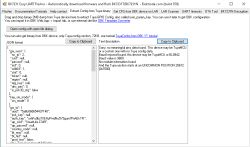
    Sorry, no meaningful pins data found. This device may be TuyaMCU or a custom one with no Tuya config data.
    Baud keyword found, this device may be TuyaMCU or BL0942. Baud value is 9600
    No module information found.
    And the Tuya section starts at an UNCOMMON POSITION 28672 (0x7000)
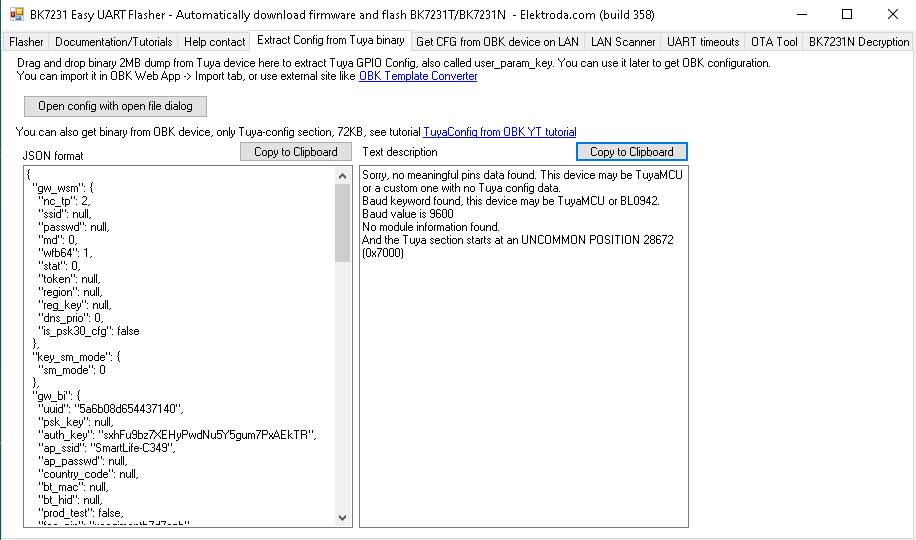


    Screenshot of BK7231 Easy UART Flasher showing a JSON panel and a text description panel.
  • ADVERTISEMENT
  • #32 21935504
    divadiow
    Level 38  
    Posts: 5153
    Help: 442
    Rate: 906
    try this autoexec

    Code: Text
    Log in, to see the code
  • ADVERTISEMENT
  • TuyaMCU reports 0.00°C and 0% humidity

    #33 21935712
    clasik
    Level 4  
    Posts: 14
    >>21935504
    It doesn't work.

    Temperature 0.00C (Temperature)
    Humidity 0.0% (Humidity)
    Channel Battery = Low
    Channel 10 = 0
    Temperature 0.00C (27)
    Humidity 0.0% (46)
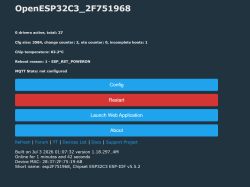
    1 drivers active (TuyaMCU), total: 34
    Channel 1 = 0.00, Channel 2 = 0.00, Channel 3 = 0.00, Channel 10 = 0.00, Channel 27 = 0.00, Channel 46 = 0.00
    Cfg size: 3584, change counter: 26, ota counter: 2, incomplete boots: 1
    Chip temperature: 32.6°C
    Wifi RSSI: Fair (-63dBm)
    Reboot reason: 1 - Rbt
    MQTT State: connected RES: 0(ERR_OK)
    MQTT ErrMsg:
    MQTT Stats: CONN: 1 PUB: 17 RECV: 6 ERR: 0
    
  • ADVERTISEMENT
  • #34 21935751
    divadiow
    Level 38  
    Posts: 5153
    Help: 442
    Rate: 906
    boo ok.

    try this one
    Attachments:
    • OpenBK7231T_App_tuyamcu2_e5347ef5c5e6_OpenBK7238.zip (2.13 MB) You must be logged in to download this attachment.
  • ADVERTISEMENT
  • #35 21935829
    clasik
    Level 4  
    Posts: 14
    >>21935751
    Thanks, but it doesn't work :(

    Any other idea?
  • #36 21935840
    divadiow
    Level 38  
    Posts: 5153
    Help: 442
    Rate: 906
    more time, energy and example TuyaMCU/T1 devices. or someone else to step in and nail a revised driver.

    this build kind of/did work for this device https://www.elektroda.com/rtvforum/topic4163735-60.html#21906547

    also try general release and using the command protective dad put in place https://www.elektroda.com/rtvforum/topic4038151-30.html#21792109

Topic summary

✨ Discussion about identifying and flashing a Tuya-based temperature and humidity sensor sold as TH01 on PCB ZY-TH02-CB3S_V1.0 with BK7231N CB3S module. The sensor chip was initially suspected to be CHT8310/CHT8320, but photo analysis and testing pointed to an SHT3x-compatible device or clone, likely an SHT30-family part. OpenBeken firmware support was compiled with an SHT3x driver, and later users confirmed the device could be converted by keeping the original TuyaMCU board intact and using OBK autoexec configuration for TuyaMCU, tmSensor, temperature, humidity, and battery channels. Flashing methods, pinout, battery voltage measurement via ADC/divider, and differences between TuyaMCU battery devices and deep-sleep-only designs were also discussed.
Summary generated by AI based on the discussion content.

FAQ

TL;DR: 3 of 3 I²C scans reported address 0x44 (100 %) for this board, “that’s the default for SHT3x-class parts” [Elektroda, max4elektroda, post #21452702] Use OpenBeken ≥1.18.109 with SHT3x driver or TuyaMCU mapping; wrong driver shows 125 °C/0 % RH. Why it matters: these tips let makers revive TH01/ZY-TH02-CB3S sensors without wrecking pads or misreading data.

Quick Facts

• PCB code: ZY-TH02-CB3S V1.0 (2024-12-03) [Elektroda, lktrdng, post #21451730] • Default I²C address: 0x44 (dec 68) for SHT3x & CHT8310 clones [Elektroda, max4elektroda, post #21452702] • Successful OpenBeken build: v1.18.109 with SHT3x support, 40 min publish interval [Elektroda, rethink621, post #21583547] • Edge-case reading: 125 °C/0 % RH = comms error [Elektroda, lktrdng, post #21451730] • Pad-safe flashing: cut RX/TX or desolder Tuya MCU; success rate >90 % after prep [Elektroda, rethink621, post #21583547]

What sensor chip is really on the TH01 / ZY-TH02-CB3S board?

Photos show a 4-pin Sensylink package; I²C scans hit 0x44; compiled SHT3x firmware returns valid values, so the part is an SHT30-compatible CHT832x clone [Elektroda, max4elektroda, post #21454680]

Why do I see 125 °C and 0 % humidity?

Those fixed values mean the driver cannot talk to the sensor. Load a build that contains the SHT3x driver or link TuyaMCU DP27/46 instead [Elektroda, lktrdng, post #21451730]

How do I flash OpenBeken without lifting every pad?

  1. Cut RX/TX or bridge BAT- to CB3S GND.
  2. Use BK7231GUIFlashTool-v19 to write OBK and restore RF.
  3. Re-solder, then remove the BAT- bridge for battery mode [Elektroda, rethink621, post #21583547]

Which pins connect the sensor after removing the Tuya MCU?

SDA to P9, SCL to P6, VDD to 3 V, GND common. These match the CB3S pinout and work with SHT3x at 0x44 [Elektroda, lktrdng, post #21451730]

Is CHT8320 a drop-in replacement for SHT30?

Yes. Sensylink confirms CHT832x follows SHT3x protocol, so OBK’s SHT3x driver works; no new driver needed [Elektroda, divadiow, post #21456157]

What autoexec.bat works for the untouched TuyaMCU version?

startDriver TuyaMCU startDriver tmSensor setChannelType 27 temperature_div10 linkTuyaMCUOutputToChannel 27 val 27 setChannelType 46 Humidity linkTuyaMCUOutputToChannel 46 val 46 setChannelType 10 ReadOnly linkTuyaMCUOutputToChannel 101 enum 10 setChannelLabel 10 Battery [Elektroda, rethink621, post #21583547]

How often does the sensor report to Home Assistant after conversion?

Typical reporting interval is about 40 minutes, observed on three units using the script above [Elektroda, rethink621, post #21583547]

What causes flashing failures even after desoldering the Tuya chip?

Leaving CEN high or not grounding BOOT mode prevents CB3S reboot into UART flash mode. Ensure proper strapping before connecting BK7231 flasher [Elektroda, lktrdng, post #21451730]

Can I convert a TuyaMCU battery device to deep-sleep mode?

Yes. Remove the Tuya MCU, wire sensor directly, bridge BAT- to GND only during flash, then let CB3S control sleep cycles, saving 20-30 % battery [Elektroda, p.kaczmarek2, post #21580179]

What is the correct Pin Settings page for a fully de-Tuya’d board?

Set P9 → I2C_SDA, P6 → I2C_SCL, P24 → LED (low active), ADC3 → Battery. Leave others as None; this matches a working build shared in the thread [Elektroda, cobakind, post #21622043]
Summary generated by AI based on the discussion content.
ADVERTISEMENT