




logo elektroda
logo elektroda
X
logo elektroda

WebScreen - AMOLED display with ESP32-S3 - open source project

gulson 1242 2

TL;DR

  • WebScreen is a small open-source AMOLED display built around an ESP32-S3 for keeping notifications and live information visible without reaching for a phone.
  • It connects over USB Type-C, Wi‑Fi, and Bluetooth, with configuration handled via WebSocket and custom JavaScript apps loaded from a microSD card.
  • The hardware uses a 240 x 536 AMOLED panel with 16.7 million colours, and the enclosure measures 74 x 80 x 53 mm at 53 grams.
  • Mounting threads on the bottom and a top 1/4-inch screw allow desk placement or webcam-style mounting, while planned Crowd Supply crowdfunding signals upcoming availability.
Generated by the language model.
ADVERTISEMENT
This content has been translated flag-pl » flag-en View the original version here
📢 Listen (AI):
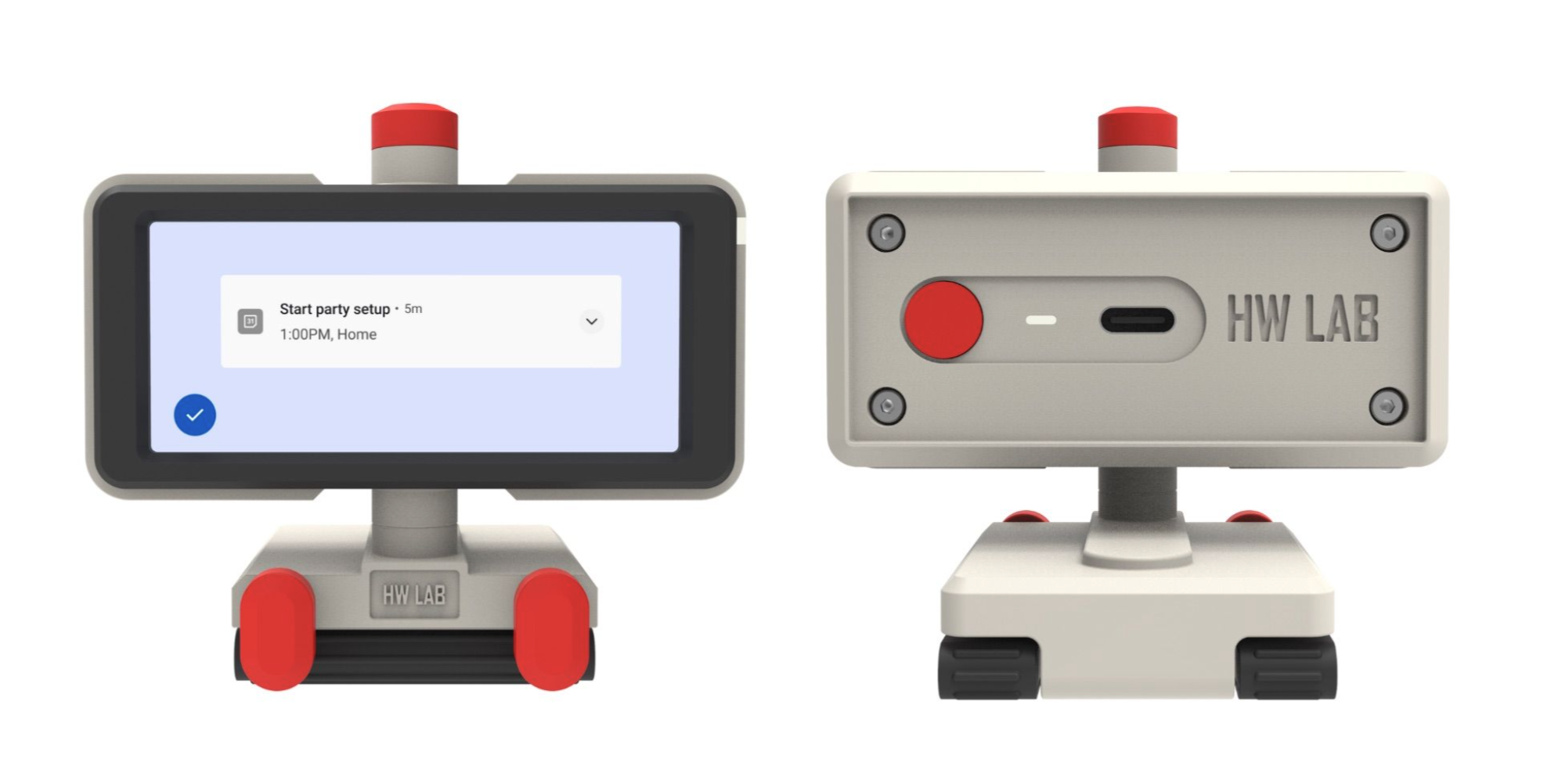
  • Front and back view of the WebScreen display from HW Lab with an AMOLED screen.
    I was written to by Eleo from HW Media Lab asking for a peek at their product called Webscreen. The Webscreen is a small AMOLED display, powered by the ESP32-S3 microcontroller, that allows users to monitor important information without being distracted from work or entertainment. As the author wrote, the device is particularly useful during intense work, gaming or streaming, when constantly checking your phone can be distracting and interfere with your concentration.

    Technical specification .
    Display: AMOLED panel with 240 x 536 pixel resolution and 16.7 million colour depth
    Processor: ESP32-S3 microcontroller
    Communications: USB Type-C (configuration via WebSocket), Wi-Fi and Bluetooth
    Dimensions: 74 x 80 x 53 mm
    Weight: just 53 grams
    Mounting: 1/4 inch threads on the bottom of the unit and a 1/4 inch screw on the top to mount the webcam

    Interestingly, the WebScreen is a fully open-source project, certified by the Open Source Hardware Association. All elements of the project - from the PCB schematics to the bill of materials (BOM), firmware, desktop application and STEP files for 3D printing - have been made available under the MIT licence. All documentation is available on the project's GitHub page:
    https://github.com/HW-Lab-Hardware-Design-Agency

    WebScreen also offers a platform for creating personalised applications. It is a system where users can create and run their own JavaScript applications directly on the device using a microSD card.

    Applications .
    Monitoring notifications during intensive work
    Track viewer comments while streaming games
    View calendar reminders
    Monitoring system statistics

    The project is in the pipeline for a crowdfunding campaign:
    https://www.crowdsupply.com/hw-media-lab/webscreen


    Post is not promotional and no one is being compensated for this, I am describing a hardware curiosity. .

    Cool? Ranking DIY

    About Author
    gulson
    System Administrator
    Offline 
    gulson wrote 29141 posts with rating 5962, helped 148 times. Live in city Kielce. Been with us since 2001 year.
  • ADVERTISEMENT
  • #2 21483869
    rysin
    Level 12  
    gulson wrote:
    The ESP32-S3 microcontroller
    .
    And where is the ESP32P4?
    They've been ratting on it for a few years now.
  • #3 21483873
    gulson
    System Administrator
    According to the specifications, they use the ESP32-S3
📢 Listen (AI):

FAQ

TL;DR: WebScreen is a 240 x 536 AMOLED desk display for people who want to “monitor important information” during work, gaming, or streaming without checking a phone. It uses an ESP32-S3, supports USB-C, Wi‑Fi, and Bluetooth, and the project publishes hardware, firmware, app, and 3D files as open source. [#21481301]

Why it matters: It targets a common desk-setup problem: showing notifications and status data in view without pulling attention to a phone.

Feature WebScreen / ESP32-S3 ESP32-P4 in this thread
Processor used ESP32-S3 Not used
Project status Shown in product specs Mentioned only as a question
Evidence in thread Explicit specification No specification provided

Key insight: The thread confirms WebScreen’s real design choice, not a roadmap: it ships with ESP32-S3 and exposes the whole project as open source, including PCB, BOM, firmware, desktop app, and STEP files.

Quick Facts

  • The display is an AMOLED panel with 240 x 536 pixels and 16.7 million colors, which fits dense status widgets better than a tiny single-line display. [#21481301]
  • WebScreen uses USB Type-C, Wi‑Fi, and Bluetooth, so it supports both wired setup and wireless connectivity in one 53 g device. [#21481301]
  • The enclosure measures 74 x 80 x 53 mm and includes 1/4 inch mounting threads plus a 1/4 inch top screw for webcam mounting. [#21481301]
  • The project publishes PCB schematics, BOM, firmware, desktop application, and STEP files for 3D printing under the MIT licence on GitHub. [#21481301]
  • The intended use cases are notification monitoring, stream comment viewing, calendar reminders, and system-stat displays during focused work or gaming. [#21481301]

What is WebScreen, and what kinds of information is it designed to show without distracting you from work or gaming?

WebScreen is a small AMOLED status display built around the ESP32-S3 for desk use. It is designed to show notifications, viewer comments during streaming, calendar reminders, and system statistics, so you can keep key information visible without repeatedly checking a phone during work, gaming, or entertainment. [#21481301]

How does the WebScreen use the ESP32-S3, and why did the project choose it instead of the ESP32-P4?

WebScreen uses the ESP32-S3 as its specified microcontroller. The thread does not give a reason for choosing it over the ESP32-P4; it only states that the published specifications list ESP32-S3 as the processor actually used in the product. [#21483873]

What happened to the ESP32-P4, and why are products like WebScreen still shipping with the ESP32-S3?

The thread does not explain what happened to the ESP32-P4. It only shows that a commenter expected it, while WebScreen’s posted specification still names the ESP32-S3, so this product is presented as shipping with the older, clearly specified controller rather than an unconfirmed alternative. [#21483869]

What is an AMOLED display, and how does it compare with LCD for a small status screen like WebScreen?

“AMOLED” is a display panel that shows visual data directly on the device, with the key characteristic here being a 240 x 536 resolution and 16.7 million-color depth. The thread confirms WebScreen uses AMOLED, but it does not provide an LCD comparison, so only the panel type and its color and pixel figures are stated. [#21481301]

How do you configure WebScreen over USB Type-C using WebSocket?

The thread says WebScreen supports configuration over USB Type-C using WebSocket, but it does not publish the exact setup steps. A safe summary is: 1. connect WebScreen by USB-C, 2. open the project’s configuration path that uses WebSocket, 3. apply settings through that interface. [#21481301]

What is WebSocket in the context of WebScreen configuration, and how is it different from a normal USB serial connection?

“WebSocket” is a configuration method that lets WebScreen be set up over USB Type-C, with the key characteristic that the thread names WebSocket specifically instead of a serial console. The thread does not describe a normal USB serial mode or compare protocols, so the only confirmed fact is that USB-C configuration uses WebSocket. [#21481301]

How can you create and run your own JavaScript apps on WebScreen from a microSD card?

You can create and run your own JavaScript apps directly on WebScreen by using a microSD card. The thread describes WebScreen as a platform for personalized applications and says users can create and run their own JavaScript applications on the device, but it does not give file structure, API, or deployment steps. [#21481301]

Which notifications and system stats make the most sense to display on a small 240 x 536 WebScreen panel?

The best fits are the ones the project names directly: notifications, viewer comments, calendar reminders, and system statistics. A 240 x 536 panel favors compact, glanceable information, so short text, simple widgets, and priority alerts make more sense than dense dashboards or long message threads. [#21481301]

How well does a 240 x 536, 16.7 million color AMOLED display work for viewer comments, calendar reminders, and PC monitoring widgets?

It should work well for short comments, reminder cards, and compact monitoring widgets because the panel combines 240 x 536 pixels with 16.7 million colors. The practical limit is size: the thread presents it as a small status display, so it suits glanceable information better than large windows or detailed multi-panel interfaces. [#21481301]

What is the Open Source Hardware Association certification, and what does it mean for an open-source device like WebScreen?

In this thread, the Open Source Hardware Association certification means WebScreen is presented as a fully open-source hardware project. The post says the certification covers a design whose PCB schematics, BOM, firmware, desktop app, and STEP files have all been made available under the MIT licence. [#21481301]

Where can you download the WebScreen PCB schematics, BOM, firmware, desktop app, and STEP files from GitHub?

You can download them from the project’s GitHub page linked in the post. The thread states that all documentation is available there, including PCB schematics, the bill of materials, firmware, the desktop application, and STEP files for 3D printing. [#21481301]

How do the 1/4 inch threads and top screw on WebScreen work for mounting a webcam on a desk setup?

WebScreen supports webcam mounting with 1/4 inch threads on the bottom and a 1/4 inch screw on the top. That layout lets you place the display on a mount or stand from below, while also attaching a webcam above it as part of a compact desk setup. [#21481301]

What should you check before backing the WebScreen crowdfunding campaign on Crowd Supply?

You should check the campaign page, the GitHub documentation, and whether the open-source files you need are already published. The thread only says the project is in the pipeline for a Crowd Supply crowdfunding campaign, so delivery timing, pricing, and final production details are not confirmed there. [#21481301]

ESP32-S3 vs ESP32-P4 for a smart display project: which one is better for Wi-Fi, Bluetooth, UI performance, and future-proofing?

This thread does not provide enough data to rank ESP32-S3 against ESP32-P4 for Wi‑Fi, Bluetooth, UI speed, or future-proofing. It only confirms that WebScreen uses ESP32-S3 and that ESP32-P4 was raised as an expected alternative by one commenter. [#21483873]

What are the practical limitations of using WebScreen as a secondary information display during streaming, gaming, or focused work?

Its main limitation is scope: WebScreen is built for small, glanceable information, not full secondary-screen workflows. The thread supports focused uses like comments, reminders, notifications, and system stats, but the 74 x 80 x 53 mm form factor and 240 x 536 panel imply less room for dense layouts, long text, or complex multitasking views. [#21481301]
Generated by the language model.
ADVERTISEMENT