FAQ
TL;DR: Yes, in-circuit flashing is possible by wiring 4 pins (3.3V, GND, RX, TX); however, some units need bottom pads and patched firmware blocks OTA. “Just solder the four wires and flash.” [Elektroda, xury, post #21787928]
Why it matters: This FAQ helps makers decide if the MTG276-WF-RL’s WBR3 module can be flashed without desoldering and how to proceed safely.
- WBR3 uses 3.3V UART; connect 3.3V, GND, RX, TX for serial flashing. ["WBR3 Module Datasheet"]
- Several builds require access to underside pads; RX/TX alone may not suffice. [Elektroda, p.kaczmarek2, post #21787984]
- Firmware seen in thread: Module 2.7.7, MCU v1.0.6 (CloudCutter steps failed). [Elektroda, lamero345, post #21789123]
- Hidden BK7231GUIFlashTool read: click Offset 3Ă—, Length 4Ă— to reveal Read. [Elektroda, insmod, post #21787988]
- Cloud exploit may be patched for this device series; plan for wired flashing. [Elektroda, divadiow, post #21789209]
Quick Facts
- WBR3 uses 3.3V UART; connect 3.3V, GND, RX, TX for serial flashing. ["WBR3 Module Datasheet"]
- Several builds require access to underside pads; RX/TX alone may not suffice. [Elektroda, p.kaczmarek2, post #21787984]
- Firmware seen in thread: Module 2.7.7, MCU v1.0.6 (CloudCutter steps failed). [Elektroda, lamero345, post #21789123]
- Hidden BK7231GUIFlashTool read: click Offset 3Ă—, Length 4Ă— to reveal Read. [Elektroda, insmod, post #21787988]
- Cloud exploit may be patched for this device series; plan for wired flashing. [Elektroda, divadiow, post #21789209]
Can I flash the MTG276-WF-RL (WBR3) without desoldering?
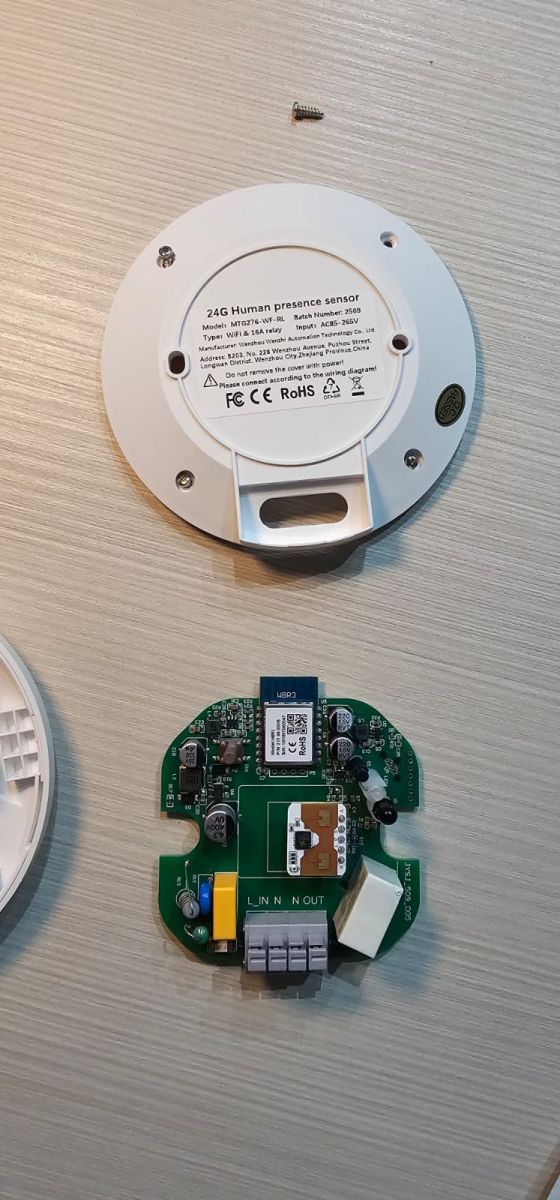
Often yes. Solder four wires to the WBR3 UART pads (3.3V, GND, RX, TX). Some boards still need bottom pads, so full access is required. If OTA tools fail due to patched firmware, use wired flashing. A user confirmed, “Just solder the four wires and flash.” Bring stable 3.3V and avoid powering from USB-TTL alone if unstable. [Elektroda, xury, post #21787928]
Which pins do I need to connect on WBR3 for serial flashing?
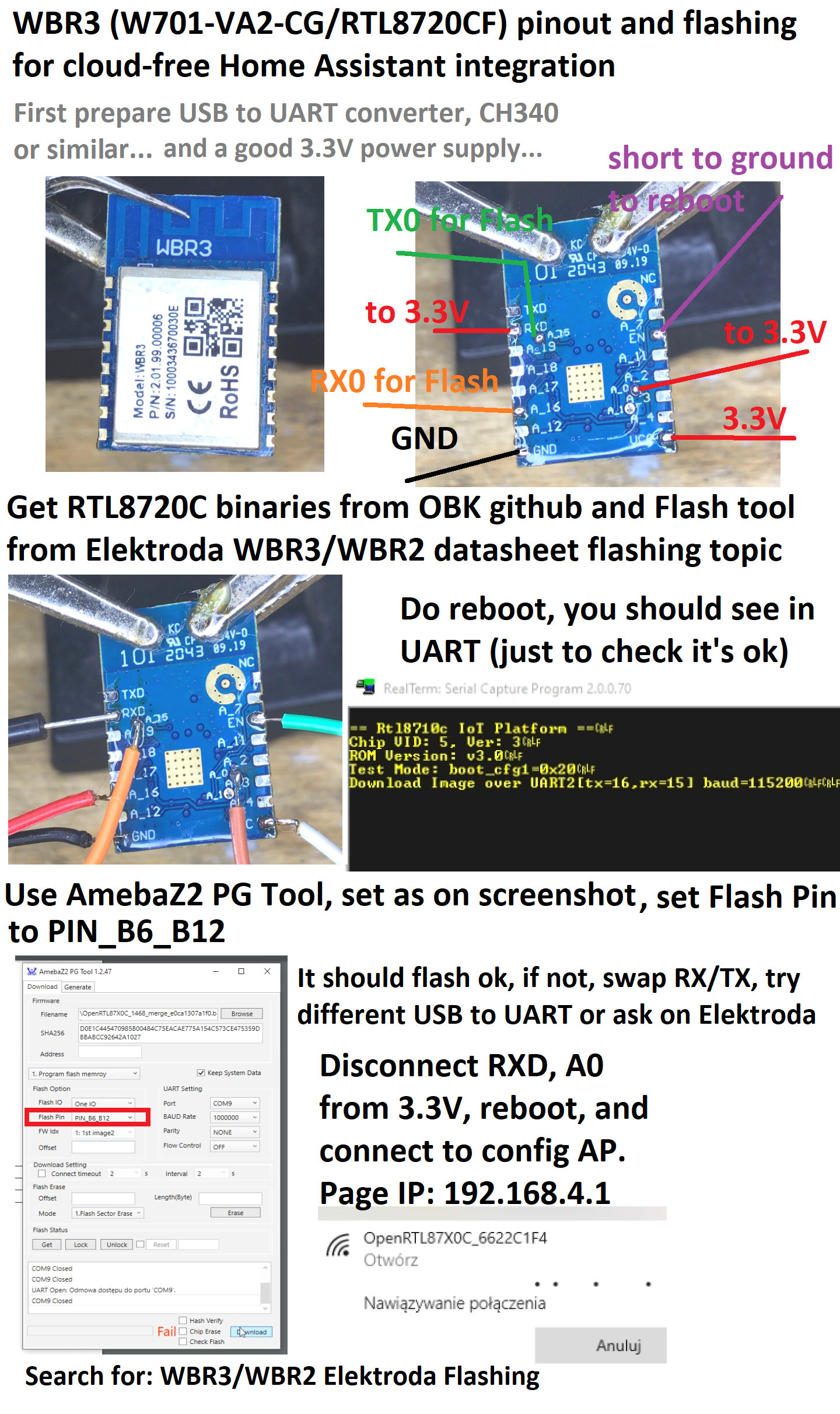
Connect 3.3V, GND, TX, and RX. Observe 3.3V logic levels only. Cross TX to RX between adapter and module. Do not use 5V on UART. The Tuya WBR3 datasheet documents the UART interface and electrical levels for safe in-circuit programming. ["WBR3 Module Datasheet"]
Is RX/TX alone enough, or do I need extra pads?
RX/TX alone may not work on some boards. Access to pads on the underside is often needed to place the module in the correct mode and ensure reliable flashing. Plan for bottom-pad access when in-circuit attempts fail. [Elektroda, p.kaczmarek2, post #21787984]
Does CloudCutter work on this sensor’s firmware?
Reports show the firmware appears patched against the CloudCutter exploit. Users trying the known-secrets flow did not succeed with module 2.7.7 and MCU v1.0.6. Expect to use wired flashing instead of OTA for this device. [Elektroda, divadiow, post #21789209]
How do I back up the original firmware before flashing?
Use BK7231GUIFlashTool’s hidden Read function: left-click Offset three times, then right-click Length four times to reveal Read. Dump flash before any erase or write. “Don’t forget to take a backup.” This step protects recovery options. [Elektroda, insmod, post #21787988]
What tool supports WBR3 read/write today?
BK7231GUIFlashTool now supports WBR3, with a hidden Read option for RTL8720C-based flows. Follow the tool’s sequence to enable Read and capture a full backup before writing new firmware. [Elektroda, insmod, post #21787988]
What is Tuya and why does it matter here?
Tuya provides IoT modules, firmware, and cloud services used in many smart devices. The WBR3 is a Tuya Wi‑Fi module. Tuya’s firmware versions and security updates influence whether OTA exploits work, pushing many users to wired flashing. [Elektroda, lamero345, post #21789123]
How do I enter flashing mode on WBR3?
Use the module’s documented boot/IO pads per the WBR3 datasheet, then apply 3.3V and connect UART. If the board lacks exposed pads, solder thin wires to the underside test points to assert the required state during power‑up. ["WBR3 Module Datasheet"]
What’s a safe, short how-to for in-circuit flashing?
- Identify WBR3 3.3V, GND, RX, TX and required mode pads from the datasheet.
- Solder four wires; power with a stable 3.3V source; connect USB‑TTL (3.3V).
- Use BK7231GUIFlashTool to Read (backup), then Erase/Write as needed. ["WBR3 Module Datasheet"]
What if my unit still refuses to flash in-circuit?
Your firmware may be patched and the board may gate boot pins. Remove the module or expose underside pads for proper boot mode. Some users replaced WBR3 with a supported module to proceed. Wired access remains the reliable path. [Elektroda, p.kaczmarek2, post #21787984]
Is module replacement a viable path if flashing fails?
Yes. One user swapped the original module for a CB3S on a similar sensor and achieved a working configuration. This avoids patched firmware issues but requires hot‑air rework skills and reconfiguration. Files were offered upon request. [Elektroda, tomik67, post #21792038]
What baud rate should I use with Tuya UART tools?
Use the UART interface as specified by the WBR3 datasheet and your flashing tool guidance. Start with the tool’s default and adjust only if logs indicate mismatches. Keep levels at 3.3V and wiring short for signal integrity. ["WBR3 Module Datasheet"]
What is an edge case I should plan for?
If your board ships with module firmware 2.7.7 and MCU v1.0.6, CloudCutter’s known-secret method may still fail. This indicates patched security; proceed with wired backup and flashing to avoid bricking. [Elektroda, lamero345, post #21789123]
Any expert tips before I start?
Back up first and verify reads with a checksum. As one member advised, “Don’t forget to take a backup.” Stable 3.3V power and short UART leads improve reliability during flashing. [Elektroda, divadiow, post #21787976]