logo elektroda
logo elektroda
X
logo elektroda

[Solved] [CBU/BK7238] TuyaSmartlife Temperature hygrometer TH06-variant

thermiq 1479 9
Best answers LABEL_AI_GENERATED

How can I flash and configure a Tuya Smartlife TH06 temperature/humidity sensor that is actually BK7238/T1-based and reboots when flashed with BK7231 firmware?

Flash it with OpenBK7238, not OpenBK7231; the module is BK7238/T1-based, and the working firmware was OpenBK7238_QIO_1.18.247_battery.bin [#21795783][#21812552] To program it, lift pin 5 (Tuya MCU TX1) because the MCU is directly connected to the Wi‑Fi module RX1/TX1 [#21812552] Configure it as a normal TuyaMCU ver. 3 device and do not use tmSensor or TuyaMCULE; the device only reports during the short power window controlled by the Tuya MCU [#21812552] The Wi‑Fi module is powered for less than 30 seconds at the configured interval, so all reporting must happen quickly [#21812552] Static IP can speed startup, and a 30 ms delay may be needed so the TuyaMCU driver loads properly [#21812552]
AI summary based on the discussion. May contain errors.
ADVERTISEMENT
  • TuyaMCU blocks BK7231 flashing on TH06 sensor

    #1 21795647
    thermiq
    Level 4  
    Posts: 14
    Help: 1
    Rate: 3
    [Updated topic to reflect new findings and simplify future searches]

    Bought a genereic Tuya/Smartlife temperature and humidity sensor from here: Aliexpress

    Identified as TH06 in Smartlife app

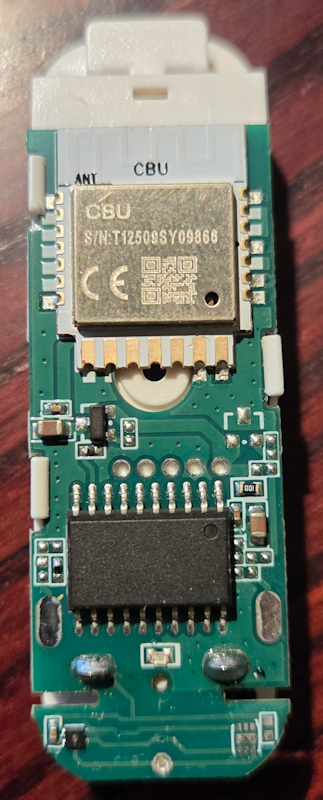
    It is marked CBU/BK7231N but is BK7238 based with a TuyaMCU handling the sensor and controlling power-on/VDD of CBU. RX1/TX1 are directly connected to TuyaMCU prohibiting BK7231 Easy Flasher from doing it's job.
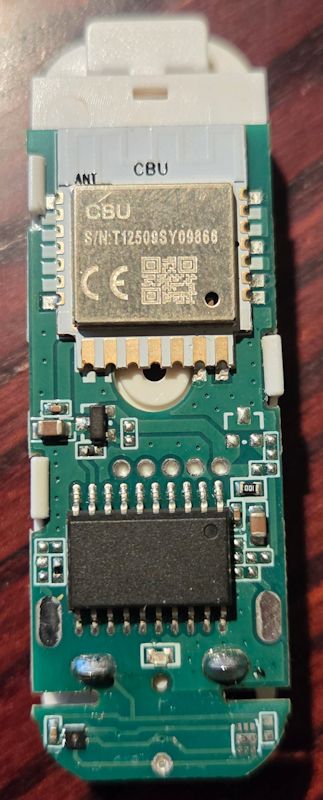
    PCB with CBU communication module and integrated circuits visible

    I lifted pin 5, TX1 from the TuyaMCU and connected to CBU TX1/RX1. Got the following warning in the log WARNING! Non-standard encryption key!

    Skipping Key check, and got following log:

    Code: Text
    Log in, to see the code


    Then I tried to program with "OpenBK7231N_Q10_1.18.229.bin but it continously reboots....

    From the debug log (TX2)

    Code: Text
    Log in, to see the code


    Any ideas what to do next?
    AI: Can you provide a detailed wiring diagram or clear description of how you currently have the TX/RX and other relevant pins connected between the CBU/BK7231N and the TuyaMCU (including any modifications you made)?
    Soldered wires to USB-adapter, separate power supply. TuyaMCU communicationg serially to CBU RX1/TX1
    AI: Did you perform a full flash erase (chip erase) before flashing the OpenBK7231N firmware, or did you just write the new firmware over the existing contents?
    Full flash

    Added after 2 [hours] 17 [minutes]:

    This is the log from the original fw:


    Code: Text
    Log in, to see the code
  • ADVERTISEMENT
  • Helpful post
    #2 21795783
    divadiow
    Level 38  
    Posts: 5220
    Help: 449
    Rate: 918
    CBU labelled modules also now seem to be BK7238 as well as BK7231N. Flash to OpenBK7238.
  • ADVERTISEMENT
  • #3 21795939
    thermiq
    Level 4  
    Posts: 14
    Help: 1
    Rate: 3
    Flashing OpenBK7238_QIO_1.18.233.bin

    Starts successfully, connects to my Wi-Fi and sends MQTT! Great.

    Next step is to figure out the required OBK config.

    Thanks for your help!
  • Helpful post
    #4 21796154
    p.kaczmarek2
    Moderator Smart Home
    Posts: 14770
    Help: 659
    Rate: 12913
    Do you have original flash 2 MB backup? Or maybe did you try packets capture?

    Still, I'd be hoping that they didn't change dpIDs since BK7231 version and they will match...

    Alternatively, what kind of sensor do you have there? We may have it already supported. What do you think, @divadiow ?
    Helpful post? Buy me a coffee.
  • Helpful post
    #5 21796258
    divadiow
    Level 38  
    Posts: 5220
    Help: 449
    Rate: 918
    I think my bets are on it having a different schema, but yeh we'd need the tuya config/full flash to be sure. Or could try a couple of TuyaMCU TH0x autoexecs to see if any temp/hum readings show

    eg https://www.elektroda.com/rtvforum/topic3968377-30.html#20904927

    there seem to be others in that thread
  • ADVERTISEMENT
  • tmSensor blocks TuyaMCU dpId updates

    #6 21796287
    thermiq
    Level 4  
    Posts: 14
    Help: 1
    Rate: 3
    I did a backup of the original FW; it does not work with "Extract Config from Tuya binary"

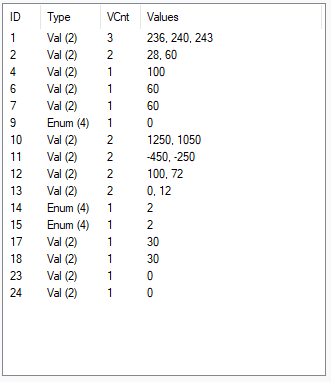
    TuyaMCU analyzer shows the following:

    Table with columns ID, Type, VCnt, and Values showing various numerical values


    Looks close to a "normal" TH01.
    Battery level (4) is 100%.
    High temperature alarm (10) level before low temp. (11)
    Humidity high (12) before low (13).


    Trying the following setup:
    Code: Text
    Log in, to see the code


    I've gotten one read, which was correct, but then it never updates. Read somewhere that CBU will only update on power-on; is that what tmSensor does?

    Added after 45 [minutes]:

    Looking at the debug logs directly at CBU TX2:

    Code: Text
    Log in, to see the code


    Added after 4 [hours] 20 [minutes]:

    I can see that using TuyaMCU Analyzer with the above config will never show any dpId's being sent.

    If I comment out "startDriver tmSensor" I will get continous reads of dpId matching the original fw and having correct values.
    But power to CBU will be shut-off after a minute
  • BK7238 UART init and memory allocation suspected

    #7 21797565
    thermiq
    Level 4  
    Posts: 14
    Help: 1
    Rate: 3
    When looking at the debug log, it looks like the startDriver TuyaMCU command constantly fails, thus the linkTuyaMCUOutputToChannel fails.
    When running without the tmSensor driver, the startDriver TuyaMCU command randomly works and then a reading is possible.

    Is there anything with the BK7238 UART that differs from BK7231 or the amount of memory? The fail seems to be before the commands being added in the Tuya driver, and that is only the buffer alloc and UART init?


    drv_tuyaMCU.c

    Code: Text
    Log in, to see the code
  • ADVERTISEMENT
  • #8 21798769
    thermiq
    Level 4  
    Posts: 14
    Help: 1
    Rate: 3
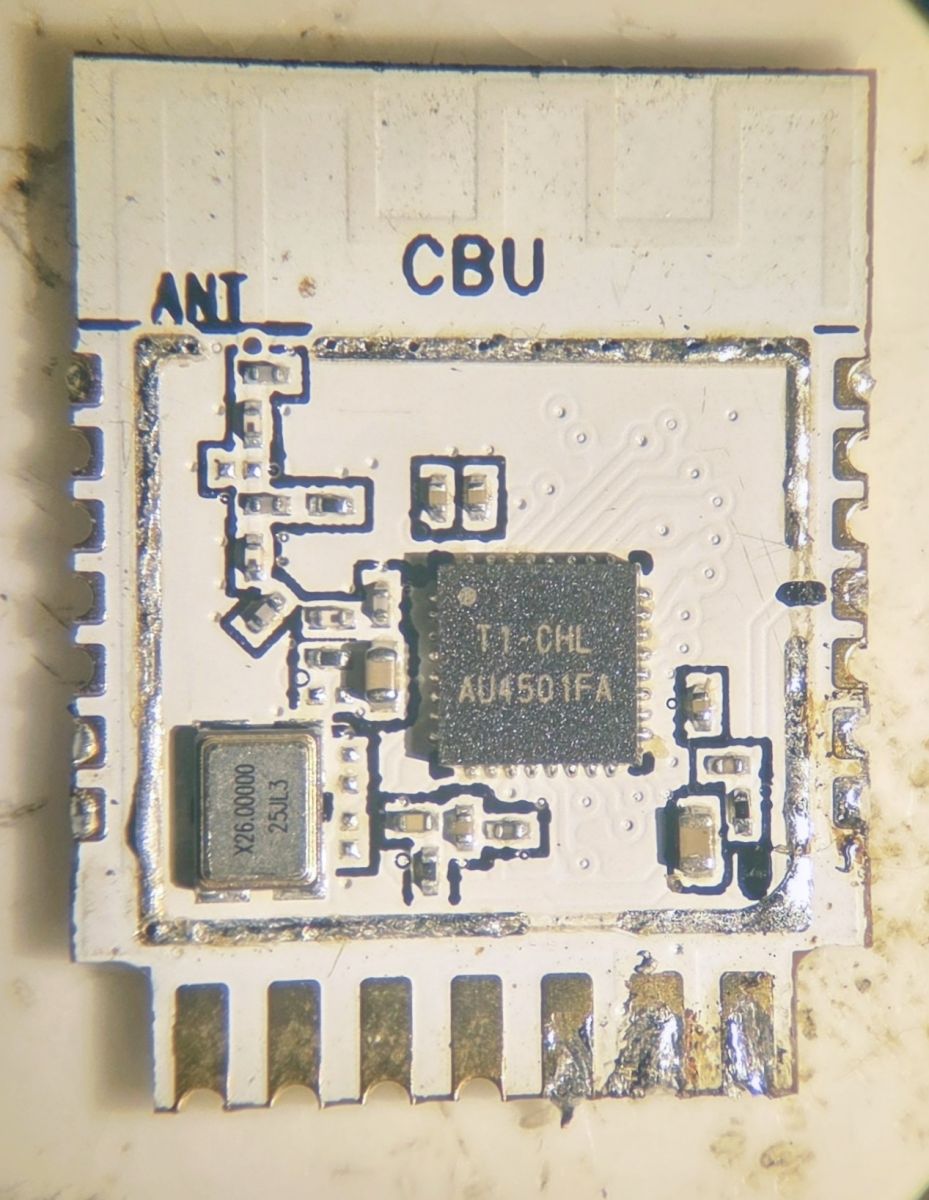
    I can confirm that the module is T1-based.
    Electronic module with CBU, ANT labels and T1 CHL AU4501FA microchip
  • OpenBK7238 config and TuyaMCU findings for TH06 variant

    #9 21812552
    thermiq
    Level 4  
    Posts: 14
    Help: 1
    Rate: 3
    I finally got this device working using the new OpenBK7238_QIO_1.18.247_battery.bin

    and the following (partiall) config:

    Code: Text
    Log in, to see the code


    Findings:
    - The CBU cannot be programmed directly as Tuya-CPU is connected to RX1. Lift pin5 of Tuya-CPU to program.
    - The device uses TuyaMCU ver=3 protocoll, this is the default TuyaMCU, not TuyaMCULE. tmSensor should not be used.
    - The WIFI module is powered-on for less than 30 sec by Tuya-CPU at the configured interval, all reporting must be done within this frame
    - The battery release has less startup delay than previous versions and connects to wifi/mqtt faster, might be other changes as well
    - Static IP-config speeds things up
    delay_ms 30 might be needed to ensure that tuyaMCU driver is loaded properly
  • #10 21812553
    thermiq
    Level 4  
    Posts: 14
    Help: 1
    Rate: 3
    Solved as per previous post...

Topic summary

LABEL_AI_GENERATED
A generic Tuya/SmartLife temperature and humidity sensor identified in the app as TH06 was found to use a BK7238-based CBU module with a TuyaMCU controlling the sensor and power sequencing. Because the UART lines were routed through the TuyaMCU, flashing required lifting TX1 and connecting it directly to the CBU. The device was successfully flashed with OpenBK7238 firmware, after which it connected to Wi‑Fi and MQTT. Further work focused on configuring OpenBK7238/TuyaMCU mappings for temperature, humidity, battery level, and report interval. The original flash backup could not be extracted with Tuya config tools, but the device was eventually made to work using OpenBK7238_QIO_1.18.247_battery.bin and a partial TuyaMCU configuration with dpID mappings for temperature, humidity, battery state, and a persistent temperature report interval setting.
AI summary based on the discussion. May contain errors.
ADVERTISEMENT