FAQ 
TL;DR: For DIY users flashing a cheap WiFi relay, this teardown shows a €1.4 ONiOFF AL-034A switch using a WinnerMicro W600 on a T102 w600-v2.0 board, and one expert correction matters: "TYWE3S is not the same footprint". It solves the key problems of pin mapping, no-desolder flashing access, and module identification. [#20767272]
Why it matters: This FAQ helps you identify the board correctly, flash it faster, and avoid footprint mistakes when working with low-cost Tuya-style relay switches.
| Item |
Alternative 1 |
Alternative 2 |
What the thread shows |
| Main WiFi platform |
Realtek |
WinnerMicro W600 |
This switch family appears to have moved from Realtek to W600 |
| Module footprint note |
TYWE3S |
TYWE2S |
TYWE2S matches the listed footprint family; TYWE3S does not |
| Programming access |
Desolder module |
Use exposed TX/RX pads |
TX/RX pads allow flashing without removing the board |
Key insight: The most valuable finding is not just that the switch uses W600, but that the T102 w600-v2.0 board exposes programming access in a usable layout. That makes a €1.4 relay switch practical for firmware replacement and GPIO reuse. [#20764156]
Quick Facts
- The switch was bought for about €1.4 each, and a later follow-up reports 4 more pieces purchased at the same price, making it a very low-cost W600 test platform. [#20767692]
- The reported working upload speed for wm_tools was 460800 baud, which is the only concrete flashing rate given in the thread. [#20764156]
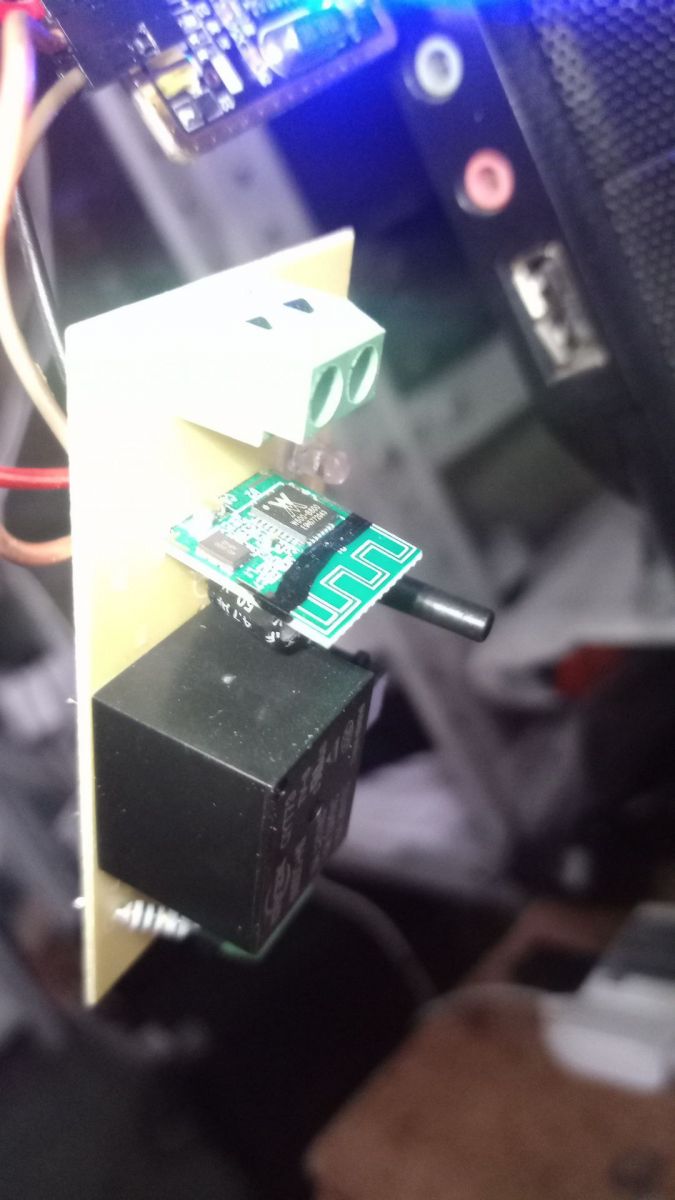
- The programming pads are arranged in a 6-pin row, with the row cut after VDD and GND, so TX/RX access remains usable without removing the module. [#20764156]
- GPIO Finder identified three active control lines: GPIO 6 for the button, GPIO 14 for the relay, and GPIO 16 for the inverted LED. [#20764156]
- The board is identified as T102 w600-v2.0, and its goldfinger-style footprint is said to match WA2, CB2S, WR2S, and TYWE2S after a footprint typo was corrected. [#20767272]
How do I flash firmware onto a W600 SmartSwitch with the T102 w600-v2.0 board using wm_tools?
Flash it with wm_tools through the exposed programming pads at 460800 baud. 1. Connect to the board’s TX, RX, VDD, and GND access points. 2. Use the W600 flashing method linked in the thread and run wm_tools. 3. Set the port speed to 460800 and upload the firmware. The thread’s key advantage is that you can do this without desoldering the module.
[#20764156]
What GPIO pins are used for the button, relay, and LED on the ONiOFF WiFi Smart Switch AL-034A with the W600 chip?
The posted pin map uses GPIO 6 for the button, GPIO 14 for the relay, and GPIO 16 for the LED with inverted logic. The JSON template names them as "Btn;1," "Rel;1," and "LED_n;1." That gives you a ready-made starting point for OpenBeken-style configuration on the AL-034A.
[#20764156]
What is the T102 w600-v2.0 board, and how does it relate to Tuya-style WiFi switch modules?
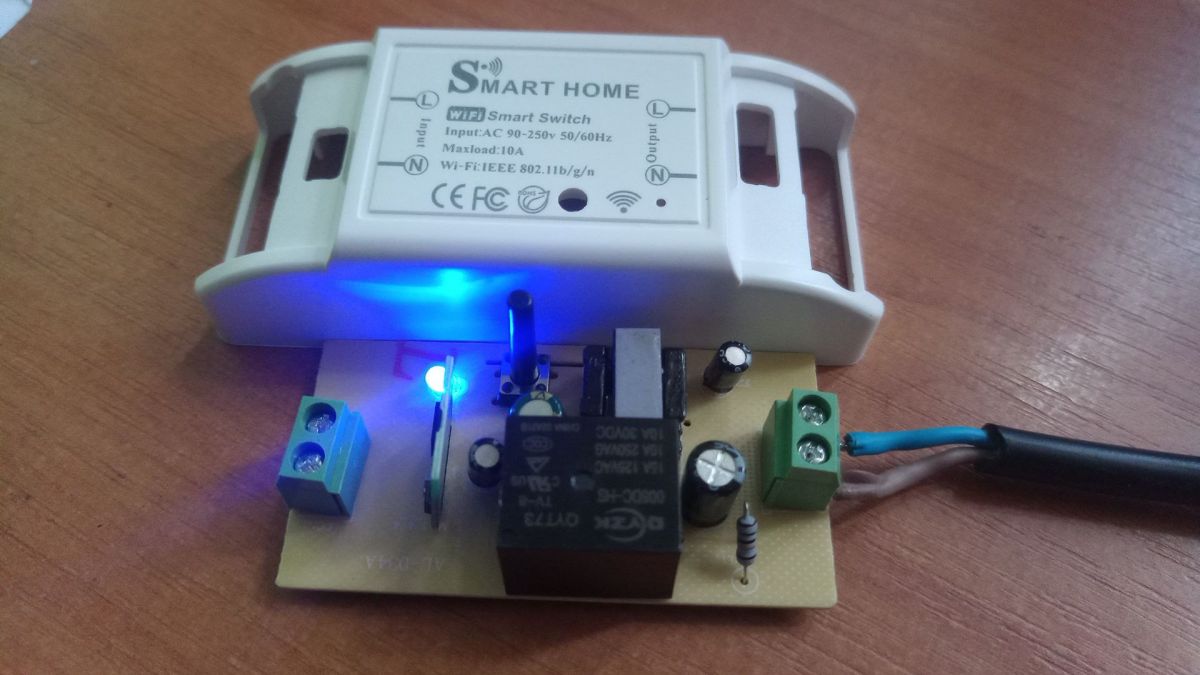
T102 w600-v2.0 is the internal W600-based module board found inside this ONiOFF WiFi Smart Switch. The posted JSON identifies the vendor as Tuya, the chip as W600, and the board as T102 w600-v2.0. The author also notes that the box and PCB layout closely resemble an earlier switch family, suggesting a platform swap inside a familiar Tuya-style design.
[#20764156]
What is a goldfinger module footprint, and how is it similar to WA2, CB2S, WR2S, and TYWE2S?
"Goldfinger module footprint" is a board-edge connector format that uses plated contact fingers for mounting and signals, letting one module family share a common mechanical layout. In this thread, T102 w600-v2.0 is said to use the same footprint family as WA2, CB2S, WR2S, and TYWE2S, which matters for identification and replacement planning.
[#20764156]
TYWE2S vs TYWE3S footprint: what is the difference, and why does it matter when replacing or identifying WiFi modules?
TYWE2S matters here because it matches the listed footprint family, while TYWE3S does not. A correction in the thread states plainly, "TYWE3S is not the same footprint," and the original post was fixed to TYWE2S. If you use the wrong footprint name, you can misidentify the module or choose a replacement that will not fit the board.
[#20767272]
What's the best way to program a W600 module in this switch without desoldering the board?
The best method is to use the exposed TX/RX programming access instead of removing the module. The author reports that the extra pads are accessible and “it is possible not to solder out the board for programming.” That saves rework time and reduces the risk of lifting pads on a cheap, lightly built relay board.
[#20764156]
How are the TX and RX programming pads arranged on the T102 w600-v2.0 board, and where do VDD and GND fit in?
They are laid out as a 6-pin row, and the row is cut after VDD and GND. The author says the TX-RX extra pads are not attached directly to the main board area in a way that forces module removal, so the programming points remain usable. In practice, VDD and GND sit in that same 6-pin programming line.
[#20764156]
Why are some low-cost WiFi switches switching from Realtek modules to WinnerMicro W600 modules?
This thread shows that at least one low-cost switch family appears to have moved from Realtek to W600 while keeping a very similar enclosure and board layout. The teardown author explicitly says the device previously used Realtek and “started installing the w600.” The thread does not give a reason, so the safe conclusion is only that the platform changed inside a familiar product design.
[#20764156]
What baud rate works best when uploading firmware to a WinnerMicro W600 with wm_tools, and how do I troubleshoot flashing issues at 460800?
The only confirmed working speed in this thread is 460800 baud. If flashing fails at that rate, first recheck TX/RX wiring, VDD, and GND on the 6-pin access row, because the thread gives no alternative baud setting. A wrong pad connection is the clearest failure case described, since the main benefit is direct pad access without desoldering.
[#20764156]
How do I use GPIO Finder to identify the correct pins on a W600-based smart switch?
Use GPIO Finder to test the board and then record the discovered functions in a device template. In this switch, GPIO Finder produced a clean 3-signal map: button on 6, relay on 14, and LED_n on 16. The author then placed those exact values into the JSON template for the AL-034A, which is the practical end goal of the scan.
[#20764156]
Which sensors are supported by OpenBK7231T_App on W600 devices, and which drivers are not enabled by default?
The thread does not list supported sensors by name, but it does point to the OpenBK7231T_App drivers list and warns that not all drivers are enabled by default on W600. That means support exists in the project, yet W600 builds may ship with a reduced default set. For exact coverage, the linked drivers.md file is the reference mentioned in the post.
[#20769196]
How can I connect external sensors like DHT11, I2C light sensors, or temperature sensors to the free GPIOs on this W600 switch?
You can connect external sensors to unused GPIOs on the W600 board. One reply says DHT11 and similar sensors can be connected easily, while the buyer specifically wanted to add I2C light and temperature sensors to free GPIOs. The thread does not provide a full wiring map, but it clearly supports the idea of reusing spare pins on this switch.
[#20767813]
What effect can the PowerSave command have on cheap Chinese power modules when external sensors are connected?
The thread gives no confirmed effect. One user asks whether PowerSave on cheap Chinese power modules will affect external sensors, and the reply says the best method is to test and compare results, adding, “I dont think it may affect external sensor, but I am not sure.” Treat that as an unverified, device-specific behavior rather than a fixed rule.
[#20767813]
What should I check to judge build quality and soldering quality when tearing down a cheap 1.4 euro WiFi relay switch?
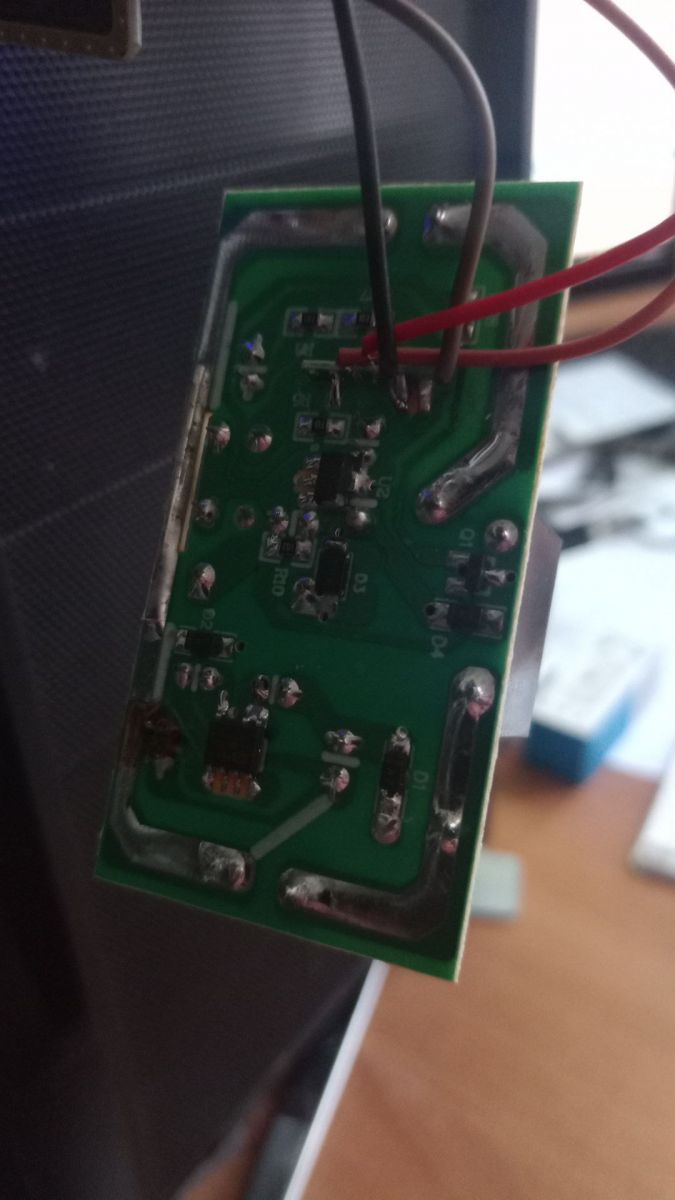
Check soldering cleanliness, overall assembly finish, and whether programming pads are accessible and mechanically usable. The teardown calls the build and soldering quality “disgusting,” even though the switch still exposes useful TX/RX access and a clearly identifiable module board. On a €1.4 relay, poor solder quality is the first red flag because it can affect reliability and safe rework.
[#20764156]
Where can I find or create a JSON device template for a Tuya-based W600 smart switch such as the AL-034A?
You can create it directly from your teardown findings, using the posted AL-034A JSON as a model. The example includes vendor "Tuya," model "AL-034A," chip "W600," board "T102 w600-v2.0," flags "1024," and the 3 discovered GPIO assignments. The same post also mentions an attached template file, so you can either reuse that structure or adapt the published JSON.
[#20764156]
AI summary based on the discussion. May contain errors.







Comments
Thanks! It's interesting to see next WinnerMicro device. That's very informative, however, I can see a typo here: TYWE3S is not the same footprint as other modules listed. I think you meant TYWE2S. [Read more]
yes, fixed ;) i have bought additional 4pcs of this switch today for 1.4eur/each, it's interesting to connect some sensors (i2c light, temp etc) to free gpio ports. as far as i understand, you recommend... [Read more]
The best way is just to try. Compare results. I dont think it may affect external sensor, but I am not sure. DHT11 and similiar sensors can be easily connected to unused GPIOs [Read more]
Is there any list of supported sensors? I have not found it. [Read more]
Well, here is a drivers list, but not all of them are enabled by default on W600: https://github.com/openshwprojects/OpenBK7231T_App/blob/main/docs/drivers.md [Read more]