logo elektroda
logo elektroda
X
logo elektroda

How to flash BK7231M/BL2028N non-Tuya devices with 000000 keys?

p.kaczmarek2  16 5787 Cool? (+7)
📢 Listen (AI):

TL;DR

  • BK7231M/BL2028N non-Tuya devices can be flashed with OpenBK7231N/Tasmota-style firmware, but only when the efuse encryption key matches the binary.
  • Use BK7231GUIFlashTool v1.3+ to read the chip key, select BK7231M mode, and flash a build compiled for that key.
  • Some devices use the all-zero key 00000000 00000000 00000000 00000000; Tuya BK7231N commonly uses 510fb093 a3cbeadc 5993a17e c7adeb03.
  • Flashing leaves the old M-style bootloader intact, appends OBK, and the device boots into an AP at 192.168.4.1 for setup.
  • Make a 2MB backup first, because not all BL2028N units use zero keys and overwritten bootloaders may need restoring.
Generated by the language model.
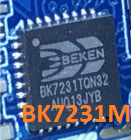
Close-up of a Beken BK7231M chip on a blue circuit board.
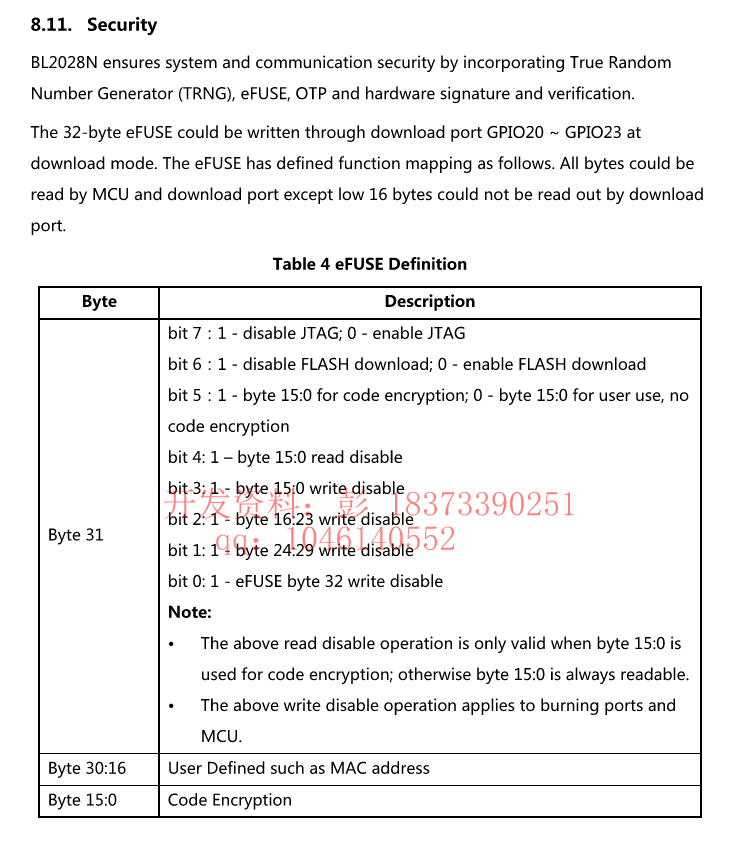
Here I will show you how to flash BK7231M chips (or BL2028N) with our open source, Tasmota-style firmware. BK7231M/BL2028N are very similiar to BK7231N, and the only difference in the encryption key stored in efuse.
eFUSE Definition Table for BL2028N
Tuya BK7231N seems to be using always the following key: 510fb093 a3cbeadc 5993a17e c7adeb03.
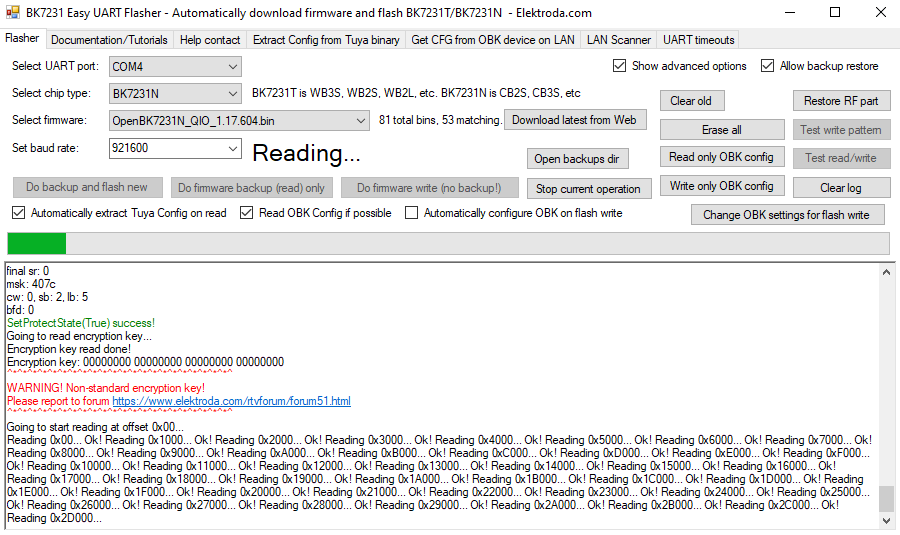
There are, however, also some BK7231M or BL2028N devices that are using other key, namely: 00000000 00000000 00000000 00000000. Note that not all BL2028N are using the "all zero" keys, only some of them.
In their case, for the firmware to work, you must flash a proper version (compiled with correct key).
You can do it easily with out flasher (version 1.3 or later):
https://github.com/openshwprojects/BK7231GUIFlashTool
To know your key, just run Do firmware backup (read) only. In older versions, it will just print the key:
User interface of BK7231 Easy UART Flasher for BK7231N firmware updating.
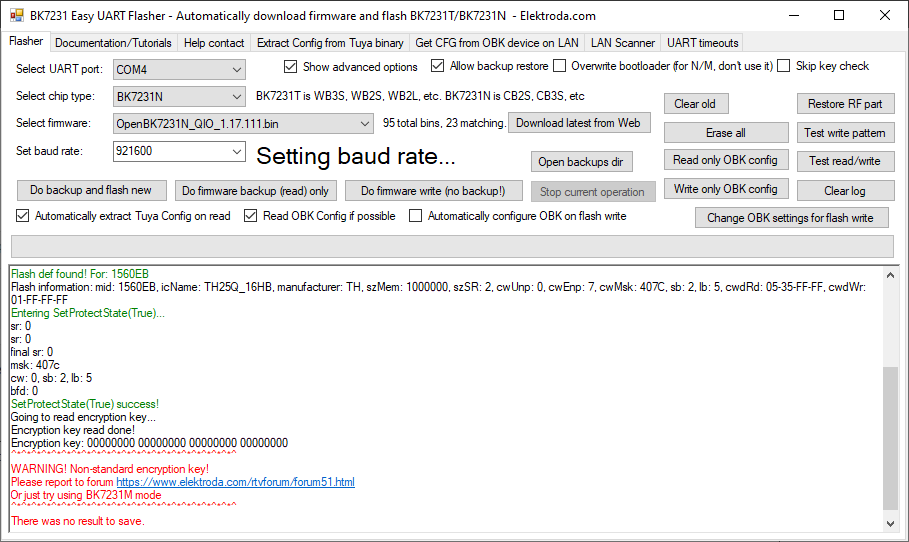
In new versions, if you are using BK7231N mode and key is not as expected, it will show error:
BK7231 Easy UART Flasher application interface for flashing BK7231N/BK7231T chips.
So, the solution is simple - but just remember to make 2MB backup first!.
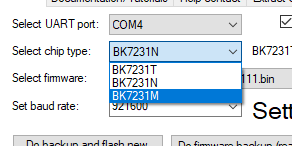
Just set the BK7231M role:
Screenshot of the flasher tool for BK7231 chips with a dropdown menu of chip types.
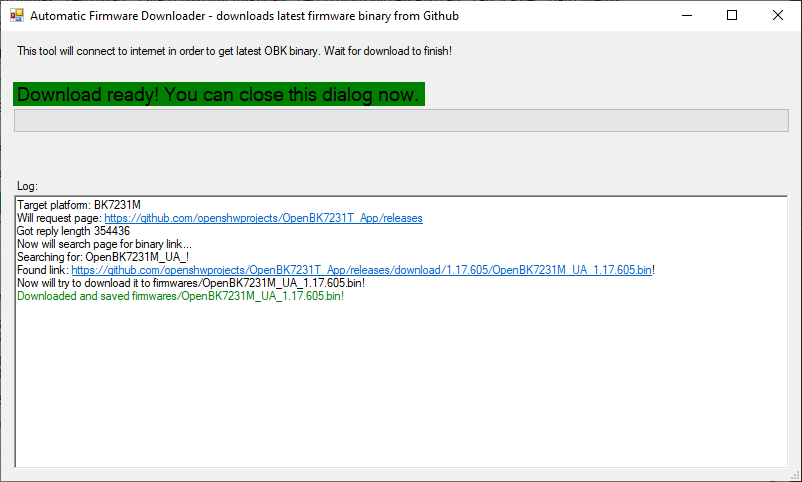
Then get latest build from web:
Screenshot of the automatic firmware download tool.
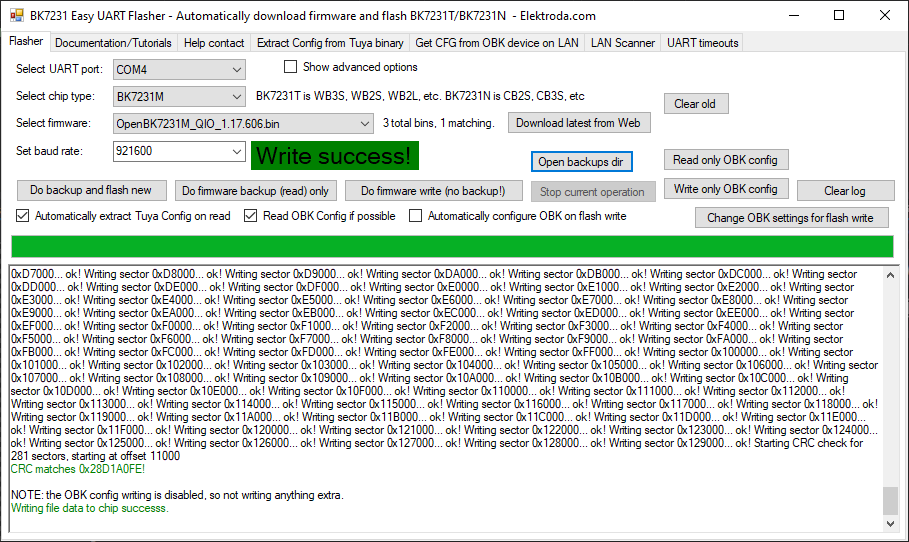
And then, finally, flash it to your BK7231M/similiar in BK7231M mode.
BK7231M firmware flashing tool interface with write success message.
The flasher is configured in such a way that even for QIO, it will leave old M-style bootloader, and only append OBK to it.
Now you can also do two more things:
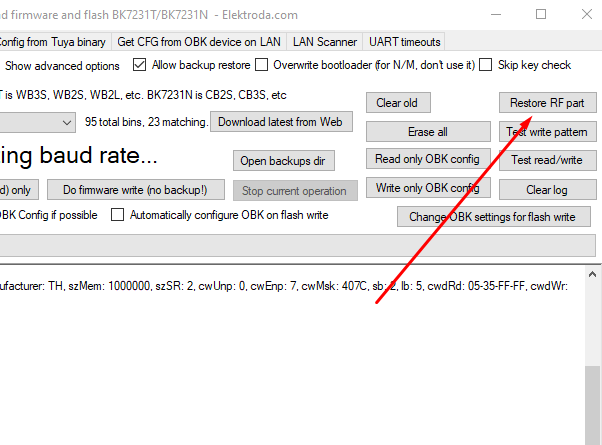
- do restore RF (if your MAC ends with 00 00 , and most likely it will):
BK7231 GUI Flash Tool interface in operation
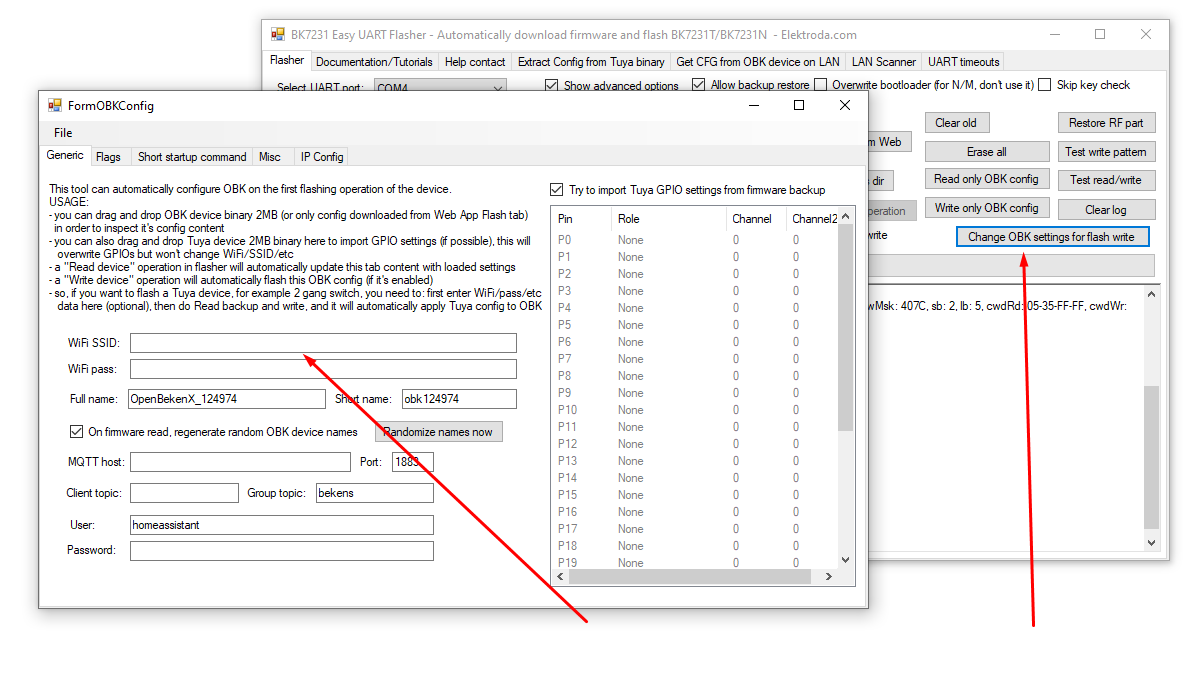
- configure your WiFi without using AP mode, in the flasher (this is also optional):
Screenshot of flasher software for BK7231M/BL2028N chips
It should flash correctly, and OBK should boot:

        BK7231n_1.0.11
REG:cpsr        spsr        r13         r14
SVC:0x000000D3              0x00401C1C  0x000033AC
IRQ:0x000000D2  0x00000010  0x00401E0C  0x9CB94EF0  
FIR:0x000000D1  0x00000010  0x00401FFC  0xBF77FAB6  
SYS:0x000000DF              0x0040192C  0x00000158  
ST:0x00000000
[I/FAL] Fal(V0.4.0)success
[I/OTA] RT-Thread OTA package(V0.2.4) initialize success.
[E/OTA] (ota_main:171) App verify failed! Need to recovery factory firmware.


go os_addr(0x10000)..........
bk_misc_init_start_type 0 0
prvHeapInit-start addr:0x4143d8, size:113704
[Flash]id:0xeb6015
sctrl_sta_ps_init
cset:0 0 0 0
Entering initLog()...
Commands registered!
initLog() done!
Info:MAIN:Main_Init_Before_Delay
Info:CFG:####### Boot Count 2 #######
Warn:CFG:CFG_InitAndLoad: Correct config has been loaded with 1 changes count.
Error:CMD:lfs is absent
Info:GEN:PIN_SetupPins pins have been set up.
Info:MAIN:Main_Init_Before_Delay done

Main_Init_Before_Delay done
Info:MAIN:Main_Init_Delay

Main_Init_Delay

delaying start
bandgap_calm_in_efuse=0x61
[load]bandgap_calm=0x61->0x21,vddig=4->5
[FUNC]rwnxl_init
[bk]tx_txdes#Startup delayed 0ms#
cyed 0ms#
[FUNC]intc_init
[FUNC]calibration_main
gpio_level=1,txpwr_state=0
user define rfcali mode:1 
get rfcal#Startup delayed 10ms#
ielayed 10ms#
#Startup delayed 20ms#
#Startup delayed 30ms#
#Startup delayed 40ms#
#Startup delayed 50ms#
#Startup delayed 60ms#
#Startup delayed 70ms#
#Startup delayed 80ms#
#Startup delayed 90ms#
#Startup delayed 100ms#
#Startup delayed 110ms#
#Startup delayed 120ms#
#Startup delayed 130ms#
#Startup delayed 140ms#
#Startup delayed 150ms#
#Startup delayed 160ms#
#Startup delayed 170ms#
#Startup delayed 180ms#
#Startup delayed 190ms#
#Startup delayed 200ms#
#Startup delayed 210ms#
#Startup delayed 220ms#
#Startup delayed 230ms#
#Startup delayed 240ms#
#Startup delayed 250ms#
#Startup delayed 260ms#
#Startup delayed 270ms#
#Startup delayed 280ms#
#Startup delayed 290ms#
#Startup delayed 300ms#
#Startup delayed 310ms#
#Startup delayed 320ms#
#Startup delayed 330ms#
#Startup delayed 340ms#
#Startup delayed 350ms#
#Startup delayed 360ms#
#Startup delayed 370ms#
#Startup delayed 380ms#
#Startup delayed 390ms#
#Startup delayed 400ms#
#Startup delayed 410ms#
#Startup delayed 420ms#
#Startup delayed 430ms#
#Startup delayed 440ms#
#Startup delayed 450ms#
#Startup delayed 460ms#
calibration_main over
NO TXPWR_TAB_TAB found in flash
Load default txpwr for b:0xb229c
Load default txpwr for g:0xb22aa
fit n20 table with dist:4
Load default txpwr for n40:0xb22b8
Load default txpwr for ble:0xb3131
#Startup delayed 470ms#

temp in flash is:350
xtal in flash is:12
xtal_cali:12
--init_xtal = 12
[FUNC]ps_init
[FUNC]func_init_extende#Startup delayed 480ms#
d
start_type:0
Version:
Initializing TCP/IP stack
app_init finished
#Startup delayed 490ms#
#Startup delayed 500ms#
#Startup delayed 510ms#
#Startup delayed 520ms#
#Startup delayed 530ms#
#Startup delayed 540ms#
#Startup delayed 550ms#
#Startup delayed 560ms#
#Startup delayed 570ms#
#Startup delayed 580ms#
#Startup delayed 590ms#
#Startup delayed 600ms#
#Startup delayed 610ms#
#Startup delayed 620ms#
#Startup delayed 630ms#
#Startup delayed 640ms#
#Startup delayed 650ms#
#Startup delayed 660ms#
#Startup delayed 670ms#
#Startup delayed 680ms#
#Startup delayed 690ms#
#Startup delayed 700ms#
#Startup delayed 710ms#
#Startup delayed 720ms#
#Startup delayed 730ms#
#Startup delayed 740ms#

starting....
Info:MAIN:Main_Init_Delay done

Main_Init_Delay done
Info:MAIN:Main_Init_After_Delay
Info:MAIN:Using SSID []
Info:MAIN:Using Pass []
Info:MQTT:MQTT_RegisterCallback called for bT obk8C000000/ subT obk8C000000/+/set
Info:MQTT:MQTT_RegisterCallback called for bT bekens_n/ subT bekens_n/+/set
Info:MQTT:MQTT_RegisterCallback called for bT cmnd/obk8C000000/ subT cmnd/obk8C000000/+
Info:MQTT:MQTT_RegisterCallback called for bT cmnd/bekens_n/ subT cmnd/bekens_n/+
Info:MQTT:MQTT_RegisterCallback called for bT obk8C000000/ subT obk8C000000/+/get
Error:CMD:LFS_ReadFile: lfs is absent
Info:CMD:CMD_StartScript: failed to get file autoexec.bat
Info:MAIN:Main_Init_After_Delay done
temperature_type=2
temp_code:36 - adc_code:328 - adc_trend:[13]:350->[15]:330
Info:MAIN:Time 1, idle 262300/s, free 80816, MQTT 0(0), bWifi 0, secondsWithNoPing -1, socks 2/38 
Info:MAIN:Time 2, idle 190742/s, free 80816, MQTT 0(0), bWifi 0, secondsWithNoPing -1, socks 2/38 
Info:MAIN:Time 3, idle 188788/s, free 80816, MQTT 0(0), bWifi 0, secondsWithNoPing -1, socks 2/38 
Info:MAIN:Time 4, idle 188580/s, free 80816, MQTT 0(0), bWifi 0, secondsWithNoPing -1, socks 2/38 
Info:MAIN:Time 5, idle 189736/s, free 80816, MQTT 0(0), bWifi 0, secondsWithNoPing -1, socks 2/38 
Info:MAIN:no flash configuration, use default
Info:MAIN:set ip info: 192.168.4.1,255.255.255.0,192.168.4.1
Info:MAIN:ssid:OpenBK7231N_8C000000  key: mode:0
hostapd_main_exiting
hostapd_exit_handler
hostapd_exit_done
Soft_AP_start
[saap]MM_RESET_REQ
[bk]tx_txdesc_flush
[saap]ME_CONFIG_REQ
[saap]ME_CHAN_CONFIG_REQ
[saap]MM_START_REQ
hapd_intf_add_vif,type:3, s:0, id:0
apm start with vif:0
me_set_ps_disable:840 0 0 1 0 0
------beacon_int_set:100 TU
set_active param 0
[msg]APM_STOP_CFM
update_ongoing_1_bcn_update
vif_idx:0, ch_idx:0, bcmc_idx:1
update_ongoing_1_bcn_update
enter low level!
mac c8:47:8c: 0: 0: 1
leave low level!
net_wlan_add_netif done!, vif_idx:0
uap_ip_start

configuring interface uap (with Static IP)WARN: TCPIP mutex is NOT locked (1) caller 53D07

def netif is no ap's netif, sending boardcast or no-subnet ip packets may failed
sending broadcast_deauth:5
Info:MAIN:Time 6, idle 184226/s, free 73096, MQTT 0(0), bWifi 0, secondsWithNoPing -1, socks 5/38 
Info:MAIN:Boot complete time reached (5 seconds)
Info:CFG:####### Set Boot Complete #######
Info:MAIN:Time 7, idle 180838/s, free 73096, MQTT 0(0), bWifi 0, secondsWithNoPing -1, socks 5/38 
Info:MAIN:Time 8, idle 188316/s, free 73096, MQTT 0(0), bWifi 0, secondsWithNoPing -1, socks 5/38 
temp_code:38 - adc_code:323 - adc_trend:[15]:330->[16]:320
Info:MAIN:Time 9, idle 187432/s, free 73096, MQTT 0(0), bWifi 0, secondsWithNoPing -1, socks 5/38 
Info:MAIN:Time 10, idle 188399/s, free 73096, MQTT 0(0), bWifi 0, secondsWithNoPing -1, socks 5/38 
Info:GEN:dhcp=0 ip=0.0.0.0 gate=0.0.0.0 mask=0.0.0.0 mac=00:00:00:00:00:00
Info:GEN:sta: 0, softap: 1, b/g/n
Info:GEN:softap:ssid=OpenBK7231N_8C000000,channel=1,dhcp=1,cipher_type:OPEN
Info:GEN:ip=192.168.4.1,gate=192.168.4.1,mask=255.255.255.0,dns=192.168.4.1
Info:MAIN:Time 11, idle 196627/s, free 73096, MQTT 0(0), bWifi 0, secondsWithNoPing -1, socks 5/38 
Info:MAIN:Time 12, idle 188566/s, free 73096, MQTT 0(0), bWifi 0, secondsWithNoPing -1, socks 5/38 
Info:MAIN:Time 13, idle 188681/s, free 73096, MQTT 0(0), bWifi 0, secondsWithNoPing -1, socks 5/38 
Info:MAIN:Time 14, idle 203628/s, free 73096, MQTT 0(0), bWifi 0, secondsWithNoPing -1, socks 5/38 


Info:MAIN:Time 320, idle 187125/s, free 73008, MQTT 0(0), bWifi 0, secondsWithNo
Ping -1, socks 5/38 
                                                          
Info:GEN:dhcp=0 ip=0.0.0.0 gate=0.0.0.0 mask=0.0.0.0 mac=00:00:00:00:00:00
    
Info:GEN:sta: 0, softap: 1, b/g/n
                                             
Info:GEN:softap:ssid=OpenBK7231N_8C000000,channel=1,dhcp=1,cipher_type:OPEN
   
Info:GEN:ip=192.168.4.1,gate=192.168.4.1,mask=255.255.255.0,dns=192.168.4.1

   
Info:MAIN:Time 321, idle 180226/s, free 73008, MQTT 0(0), bWifi 0, secondsWithNo
Ping -1, socks 5/38 
                                                          
Info:MAIN:Time 322, idle 185042/s, free 73008, MQTT 0(0), bWifi 0, secondsWithNo
Ping -1, socks 5/38 
                                                          
Info:MAIN:Time 323, idle 187819/s, free 73008, MQTT 0(0), bWifi 0, secondsWithNo
Ping -1, socks 5/38 
                                                          
Info:MAIN:Time 324, idle 185465/s, free 73008, MQTT 0(0), bWifi 0, secondsWithNo
Ping -1, socks 5/38 
                                                          
Info:MAIN:Time 325, idle 183827/s, free 73008, MQTT 0(0), bWifi 0, secondsWithNo
Ping -1, socks 5/38 
                                                          
Info:MAIN:Time 326, idle 187444/s, free 73008, MQTT 0(0), bWifi 0, secondsWithNo
Ping -1, socks 5/38 
                                                          
Info:MAIN:Time 327, idle 185459/s, free 73008, MQTT 0(0), bWifi 0, secondsWithNo
Ping -1, socks 5/38 
                                                          
Info:MAIN:Time 328, idle 185320/s, free 73008, MQTT 0(0), bWifi 0, secondsWithNo
Ping -1, socks 5/38 
                                                          
Info:MAIN:Time 329, idle 187294/s, free 73008, MQTT 0(0), bWifi 0, secondsWithNo
Ping -1, socks 5/38 
                                                          
Info:MAIN:Time 330, idle 184974/s, free 73008, MQTT 0(0), bWifi 0, secondsWithNo
Ping -1, socks 5/38 
                                                          
Info:GEN:dhcp=0 ip=0.0.0.0 gate=0.0.0.0 mask=0.0.0.0 mac=00:00:00:00:00:00
    
Info:GEN:sta: 0, softap: 1, b/g/n
                                             
Info:GEN:softap:ssid=OpenBK7231N_8C000000,channel=1,dhcp=1,cipher_type:OPEN
   
Info:GEN:ip=192.168.4.1,gate=192.168.4.1,mask=255.255.255.0,dns=192.168.4.1
   
Info:MAIN:Time 331, idle 194209/s, free 73008, MQTT 0(0), bWifi 0, secondsWithNo
Ping -1, socks 5/38 
                                                          
hapd_intf_sta_add:1, vif:0
                                                    
rc_init: station_id=0 format_mod=0 pre_type=0 short_gi=0 max_bw=0
              
                                                                  rc_init: nss_m
ax=0 mcs_max=255 r_idx_min=0 r_idx_max=11 no_samples=10
                        
                                                        sta_idx:0, pm_state:0
 
ctrl_port_hdl:1
                                                               
Info:MAIN:Time 332, idle 183041/s, free 72816, MQTT 0(0), bWifi 0, secondsWithNo
Ping -1, socks 5/38 
                                                          
WARN: TCPIP mutex is NOT locked (1) caller 51DFF
                               
WARN: TCPIP mutex is NOT locked (1) caller 52DC9

                              
WARN: TCPIP mutex is NOT locked (1) caller 51E25

                              
WARN: TCPIP mutex is NOT locked (1) caller 51DFF

                              
WARN: TCPIP mutex is NOT locked (1) caller 52DC9

                              
WARN: TCPIP mutex is NOT locked (1) caller 51E25

                              
Info:MAIN:Time 333, idle 176355/s, free 72816, MQTT 0(0), bWifi 0, secondsWithNo
Ping -1, socks 5/38 
                                                          
Info:MAIN:Time 334, idle 181786/s, free 72816, MQTT 0(0), bWifi 0, secondsWithNo
Ping -1, socks 5/38 
                                                          
Info:MAIN:Time 335, idle 185663/s, free 72816, MQTT 0(0), bWifi 0, secondsWithNo
Ping -1, socks 5/38 
                                                          
Info:MAIN:Time 336, idle 184417/s, free 72816, MQTT 0(0), bWifi 0, secondsWithNo
Ping -1, socks 5/38 
                                                          
Info:MAIN:Time 337, idle 183804/s, free 72816, MQTT 0(0), bWifi 0, secondsWithNo
Ping -1, socks 5/38 
                                                          
Info:MAIN:Time 338, idle 186666/s, free 72816, MQTT 0(0), bWifi 0, secondsWithNo
Ping -1, socks 5/38 
                                                          
Info:MAIN:Time 339, idle 186983/s, free 72816, MQTT 0(0), bWifi 0, secondsWithNo
Ping -1, socks 5/38 
                                                          
Info:MAIN:Time 340, idle 184551/s, free 72816, MQTT 0(0), bWifi 0, secondsWithNo
Ping -1, socks 5/38 
                                                          
Info:GEN:dhcp=0 ip=0.0.0.0 gate=0.0.0.0 mask=0.0.0.0 mac=00:00:00:00:00:00
    
Info:GEN:sta: 0, softap: 1, b/g/n
                                             
Info:GEN:softap:ssid=OpenBK7231N_8C000000,channel=1,dhcp=1,cipher_type:OPEN
   
Info:GEN:ip=192.168.4.1,gate=192.168.4.1,mask=255.255.255.0,dns=192.168.4.1



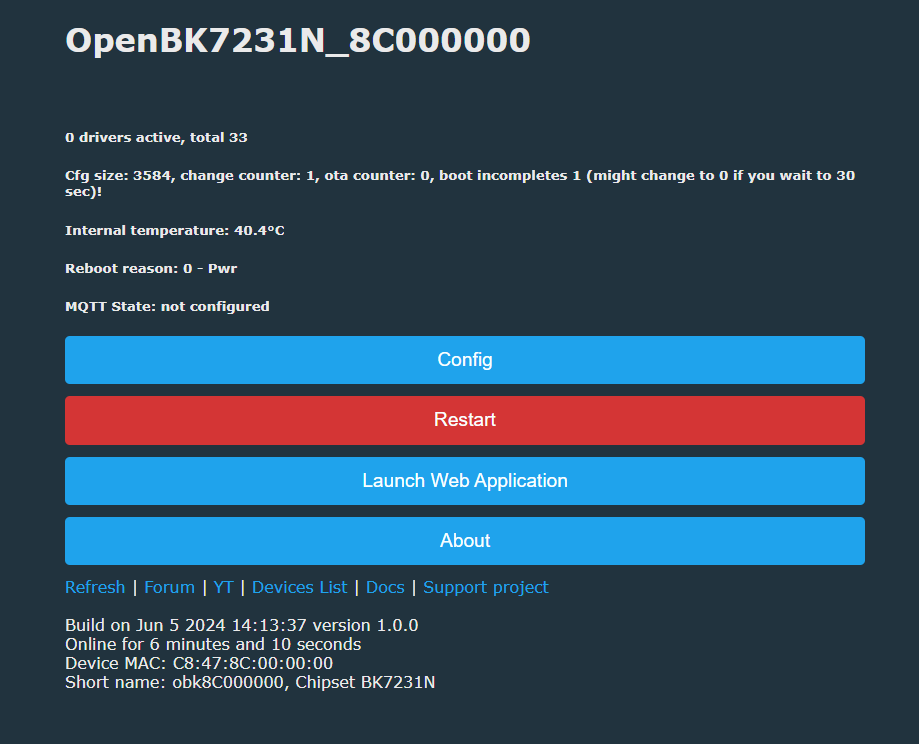
Even in AP mode, you should be able to access your device and configure it:
OpenBK7231N interface control panel with configuration, restart, and launch application buttons.
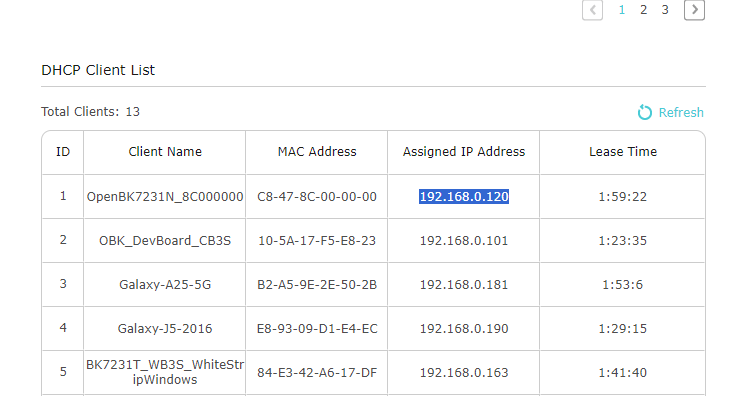
Once you configure it, it should connect to your WiFi easily.
DHCP client list displaying various devices, IPs, and lease times.
And that's all! That's how you can run your BK7231M modules with OBK.

Now, here is some miscelaneous information:
- BK7231 Easy UART flasher used to overwrite bootloader for N platform, but this is no longer the case - it detects QIO file and skips the bootloader section. You can still change this behaviour in advanced options
- here is a TX2 boot log from BK7231M:

       BK7231n_1.0.11
REG:cpsr        spsr        r13         r14
SVC:0x000000D3              0x00401C1C  0x000033AC
IRQ:0x000000D2  0x00000010  0x00401E0C  0x8C204EB0  
FIR:0x000000D1  0x00000010  0x00401FFC  0xBF75EAB6  
SYS:0x000000DF              0x0040192C  0x00000158  
ST:0x00000000
[I/FAL] Fal(V0.4.0)success
[I/OTA] RT-Thread OTA package(V0.2.4) initialize success.


go os_addr(0x10000)..........
 0
prvHeapInit-start addr:0x40ecb0, size:136016
[Flash]id:0xeb6015
[Flash]init over
sctrl_sta_ps_init
SDK Rev: 3.0.56 7e6923f
[THD]app:[tcb]40fe80 [stack]40ee78-40fe78:4096:5
[THD]extended_app:[tcb]4106f0 [stack]40fee8-4106e8:2048:4
[THD]idle:[tcb]410b60 [stack]410758-410b58:1024:0
[THD]timer_thd:[tcb]4118e8 [stack]410ce0-4118e0:3072:2
OSK Rev: F-3.0.35 7e6923f
cset:0 0 0 0
[D/FAL] (fal_flash_init:42) Flash device |                bl7231n2m | addr: 0x00000000 | len: 0x00025000 | blk_size: 0x00001000 |initialized finish.

[I/FAL] ==================== FAL partition table ====================

[I/FAL] | name     | flash_dev |   offset   |    length  |

[I/FAL] -------------------------------------------------------------

[I/FAL] | usercfg  | bl7231n2m | 0x00000000 | 0x00010000 |

[I/FAL] | fac_data | bl7231n2m | 0x00010000 | 0x00004000 |

[I/FAL] | log      | bl7231n2m | 0x00014000 | 0x00010000 |

[I/FAL] =============================================================

[I/FAL] Flash Abstraction Layer (V0.5.99) initialize success.

[FlashDB][kv][usercfg] (fdb_kvdb_init:1638) KVDB size is 65536 bytes.
[FlashDB][kv][usercfg] (fdb_kvdb_init:1642) kv load result 0 
[FlashDB]FlashDB V1.1.2 is initialize success.
[FlashDB]You can get the latest version on https://github.com/armink/FlashDB .
[FlashDB][kv][fac_data] (fdb_kvdb_init:1638) KVDB size is 16384 bytes.
[FlashDB][kv][fac_data] (fdb_kvdb_init:1642) kv load result 0 
[FlashDB][kv][log] (fdb_kvdb_init:1638) KVDB size is 65536 bytes.
[FlashDB][kv][log] (fdb_kvdb_init:1642) kv load result 0 
[THD]ves_evt:[tcb]413fe0 [stack]4133d8-413fd8:3072:6
[THD]ves_scanner:[tcb]414918 [stack]414110-414910:2048:6
[THD]ves_init:[tcb]415358 [stack]414b50-415350:2048:3
bandgap_calm_in_efuse=0x61
[load]bandgap_calm=0x20->0x21,vddig=4->5
[FUNC]rwnxl_init
chip id=7231c device id=20521028
IP Rev: W4-3.0.56-P0
txdesc flush
[FUNC]intc_init
[FUNC]calibration_main
get rfcali_mode:1
device_id=0x20521028
calibration_main over
NO TXPWR_TAB_TAB found in flash
Load default txpwr for b:0xe3720
Load default txpwr for g:0xe3756
fit n20 table with dist:4
Load default txpwr for n40:0xe3666
Load default txpwr for ble:0xe372e
uncali adc value:[00 00 00]
NO TXID_THERMAL found in flash, use def temp:330
temp in flash is:330
[THD]temp_detct:[tcb]415948 [stack]415540-415940:1024:3
NO TXID_LPFCAP found in flash, use def 114, 108
NO TXID_THERMAL found in flash, use def xtal:38
xtal in flash is:38
xtal_cali:38
--init_xtal = 38
[FUNC]ps_init
int watchdog enabled, period=10000
task watchdog enabled, period=60000
[FUNC]func_init_extended OVER!!!

start_type:0
[THD]kmsgbk:[tcb]416a10 [stack]415a08-416a08:4096:6
[THD]init_thread:[tcb]417250 [stack]416a78-417248:2000:5
Initializing TCP/IP stack
tcp_port:60281
[THD]tcp/ip:[tcb]417ca0 [stack]417498-417c98:2048:7
[THD]wpas_thread:[tcb]419168 [stack]418160-419160:4096:4
bk_wlan_app_init finished
[THD]core_thread:[tcb]41a0c8 [stack]4198c0-41a0c0:2048:7
[THD]rf_arbitrate:[tcb]41aa30 [stack]41a228-41aa28:2048:8
rf_thread_init ok
[THD]ble:[tcb]41b348 [stack]41ab40-41b340:2048:5
ble mac:fc-58-4a-b8-cf-d3
xvr_reg_init
h4tl_init-1 ok
hci_init ok
!!!!!!init_type=0
rwble_hl_init ok
BLE Rev: B5-3.0.56-P0
rwble_init ok
rwip_driver_init ok
enter normal mode
EM_BLE_END:0x1b40
!!!!!!init_type=1
llm_init:312
[gapm_cmp_evt_handler] conidx:0,operation:0x1,status:0x0
cmd->addr.addr[5] :0
!!!!!!init_type=2
[gapm_cmp_evt_handler] conidx:0,operation:0x3,status:0x0
gapm_cmp_evt:GAPM_SET_DEV_CONFIG
gapm_cmp_evt:wait GAPM_GEN_RAND_NB
[gapm_cmp_evt_handler] conidx:0,operation:0x1a,status:0x0
gapm_cmp_evt:GAPM_GEN_RAND_NB
[gapm_cmp_evt_handler] conidx:0,operation:0x1a,status:0x0
gapm_cmp_evt:GAPM_GEN_RAND_NB
[gapm_cmp_evt_handler] conidx:0,operation:0x28,status:0x0
gapm_cmp_evt:BLE_STACK_OK
[THD]cli:[tcb]41c2a8 [stack]41bea0-41c2a0:1024:3
[THD]ves_ble:[tcb]41d4c0 [stack]41c4b8-41d4b8:4096:5
ble create new db
ble_env->start_hdl = 0x10
[gapm_profile_added_ind_handler] prf_task_id:0x78,prf_task_nb:9,start_hdl:16,state:0x1
conidx:0x0,role:0x0,dest_id:0x3,src_id:0x7,param->status:0x0
[gapm_cmp_evt_handler] conidx:0,operation:0x1b,status:0x0
ble create new db
ble_env->start_hdl = 0x16
[gapm_profile_added_ind_handler] prf_task_id:0x79,prf_task_nb:10,start_hdl:22,state:0x1
conidx:0x0,role:0x0,dest_id:0x3,src_id:0x7,param->status:0x0
[gapm_cmp_evt_handler] conidx:0,operation:0x1b,status:0x0
[gapm_cmp_evt_handler] conidx:0,operation:0xa0,status:0x0
[gapm_cmp_evt_handler] conidx:0,operation:0xaa,status:0x0
[gapm_cmp_evt_handler] conidx:0,operation:0xa9,status:0x0
rw_ieee80211_set_country code:
code: EP
channel: 1 - 13
mode: MANUAL
[gapm_cmp_evt_handler] conidx:0,operation:0xa4,status:0x0
[THD]ves_mqtt:[tcb]40f940 [stack]41d6b8-41e6b8:4096:5
[SDK W vesync_net_config_read_from_flash:97] read flash error
[SDK W vesync_device_print_info:277] 
---------------Device Info---------------
  Device MAC: fc:58:4a:b8:cf:d2
  Device CID: vsotada32554d609b9c408a0919e68bd
  Device type: outlet
  Device model: BSDOG02
  Device alias model: BSDOG02
  Firmware type: release
  Hardware version: 1.0
  Vesync SDK version: v1.2.1-1d1881fe
  Firmware version: 1.0.01
  Country code: EU
----------------------------------------
[SDK W tb_default_rd_cfg_cb:120] read flash fail[1]
[SDK W vesync_timebase_init:660] config no found: -5
value:0x400, group:0, channel:1
ctrl:0x400
mode: 34, REG_PWM_GROUP_CTRL= 0x1400
value:0x1c04, group:0, channel:0
ctrl:0x1c04
mode: 34, REG_PWM_GROUP_CTRL= 0x1c14
[SDK W away_default_rd_cfg_cb:131] read flash fail[1]
[THD]app_task:[tcb]416c68 [stack]41a228-41aa28:2048:5
[THD]ves_netcfg:[tcb]416cf8 [stack]41e6c0-41f2c0:3072:4
[gapm_cmp_evt_handler] conidx:0,operation:0xa9,status:0x0
[sa_sta]MM_RESET_REQ
txdesc flush
[sa_sta]ME_CONFIG_REQ
[sa_sta]ME_CHAN_CONFIG_REQ
[sa_sta]MM_START_REQ
[gapm_cmp_evt_handler] conidx:0,operation:0xa9,status:0x0
sizeof(wpa_supplicant)=1016
mm_add_if_req_handler:0
hapd_intf_add_vif,type:2, s:0, id:0
wpa_dInit
hapd_intf_del_key: mac ff:ff:ff:ff:ff:ff, hw key idx 65
wpa S: DISCONNECTED -> INACTIVE
wpa S: INACTIVE -> DISCONNECTED
enter low level!
mac fc:58:4a:b8:cf:d2
leave low level!
[net]addvif_idx:0
wpa_supplicant_req_scan
Setting scan request: 0.000000 sec
wpa_supplicant_scan
wpa S: DISCONNECTED -> SCANNING
wpa_supplicant_scan 1004
wpa_drv_scan
wpa_send_scan_req
no ht in scan
scan_start_req_handler
wpa_driver_scan_start_cb
wpa rx E SCAN_STARTED
temperature_type=2
temp_code:18 - adc_code:343 - adc_trend:[13]:330->[12]:339
init_xtal:38, delta:3, last_xtal:38
wpa_driver_scan_cb
wpa rx E SCAN_RESULTS
Scan completed in 1.326000 seconds
wpa_get_scan_rst:8
wpa S: SCANNING -> DISCONNECTED
temp_code:17 - adc_code:346 - adc_trend:[12]:339->[11]:348
init_xtal:38, delta:4, last_xtal:41
[SDK W report_cloud:79] cloud disconnect. state(0)
[SDK W report_cloud:79] cloud disconnect. state(0)
[SDK W report_cloud:79] cloud disconnect. state(0)
[SDK W report_cloud:79] cloud disconnect. state(0)
[SDK W report_cloud:79] cloud disconnect. state(0)
[SDK W report_cloud:79] cloud disconnect. state(0)
[SDK W report_cloud:79] cloud disconnect. state(0)
[SDK W report_cloud:79] cloud disconnect. state(0)
temp_code:19 - adc_code:341 - adc_trend:[11]:348->[12]:339
init_xtal:38, delta:3, last_xtal:42
[SDK W report_cloud:79] cloud disconnect. state(0)


If you see a similiar bootlog before flashing, it may be BK7231M
- CB2S with BK7231M was send to me by a reader and it was in LSPA9 clone marked as BSD33
- if you have overwritten your bootloader before (for example, with old flasher, that flashed QIO without skipping bootloader), you may need to restore the original bootloader for your chip to work

That's all for now, let me know if the new binary type works for you! I'm available and ready to fix potential issues, just let me know.

About Author
p.kaczmarek2
p.kaczmarek2 wrote 14444 posts with rating 12414 , helped 650 times. Been with us since 2014 year.

Comments

p.kaczmarek2 07 Jun 2024 08:42

There were some bugfixes made, latest version is now 1.3.2, thanks @divadiow for pointing that out via private message. @divadiow is 1.3.2 working better now? https://github.com/openshwprojects/BK... [Read more]

divadiow 07 Jun 2024 10:13

yes, thanks. 1.3.2 appears to have resolved the issue of Easy Flasher quitting unexpectedly when trying the 'Restore RF part' function in M-type chip mode. Also, the overwrite bootloader advanced option... [Read more]

p.kaczmarek2 07 Jun 2024 10:15

Ok any other suggestions? Or do you think it's a good time to just add an advanced (hidden for most users) "write N bytes at offset X" command? [Read more]

divadiow 07 Jun 2024 18:16

Well, I would certainly make use of more flexible flashing options. The ability to flash from a specific address and or skip a custom portion of a file. Even specifying the start and end address of a source... [Read more]

p.kaczmarek2 08 Jun 2024 12:24

Sure, would something like that work for you? https://obrazki.elektroda.pl/9838494800_1717842270_thumb.jpg [Read more]

divadiow 08 Jun 2024 12:31

Ooh yeh [Read more]

p.kaczmarek2 08 Jun 2024 13:15

I pushed release due to the ReadOBKConfig bug: https://github.com/openshwprojects/BK7231GUIFlashTool/releases/ This release contains unfinished custom read. [Read more]

ferbulous 21 Jun 2024 03:39

Hi, I’ve flashed another one of the matter relay module with cbu following your instructions (no rf restore yet) But when I plugged it to the main, there’s no access point. What am i missing here? Here... [Read more]

divadiow 21 Jun 2024 07:31

these Beken-based Matter devices are different. I've flashed your dumps to my CB3S uHome device and both have the RT-Threads 1.0.13 bootloader. The experience with these will be the same as mine here... [Read more]

ferbulous 21 Jun 2024 09:18

@divadiow just to clarify after some flashing acrobatics, you could get it to boot up and connected to wifi? Just that it can’t show the AP? Should be the same one you’ve purchased before from aliexpress Just... [Read more]

divadiow 21 Jun 2024 09:23

oh interesting. I didn't know some come with a CBU. Yes, mine is CB3S. No, no AP and no connecting to wifi. No mac assigned wireless interface, as seen in OBK boot log in other thread. Added after... [Read more]

p.kaczmarek2 24 Jun 2024 09:43

So how are they different @divadiow ? Have you tried restoring or transplanting RF partition from, for example, the working OBK BK7231M device? By the way, it seems we've got first user that flashed... [Read more]

divadiow 24 Jun 2024 11:32

Yes. I have tried restoring RF from normal Tuya device and the one from factory from this device. Both to usual RF address and I think to the different address the factory fw has RF. I'm away from home... [Read more]

p.kaczmarek2 02 Jul 2024 15:00

Ok, I've added the warning you mentioned to the flasher: https://github.com/openshwprojects/BK7231GUIFlashTool/commit/2ee1f316036454f0ca1684433b4d39e9a44accb8 [Read more]

divadiow 22 Feb 2025 00:13

I have flashed your dump of that LSPA9 clone/BSD33 to a 4mb SparkleIoT XH-CB2S/BK7231M module from a Matter device - the same as can be seen here https://www.elektroda.com/rtvforum/topic4086986.html The... [Read more]

divadiow 04 Mar 2025 08:57

@ferbulous your backups are queued to be added to collection. Did you ever get/dump the 2CH version? https://github.com/openshwprojects/FlashDumps/commit/19f54aa1690bcda9b623f9063e089c431303284a [Read more]

FAQ

TL;DR: For modders flashing 2 MB BK7231M or BL2028N devices, the fix is simple: back up 2 MB first, then use BK7231M mode and the matching all-zero-key build. As the author says, "make 2MB backup first!" This solves key-mismatch errors and gets OpenBeken booting on supported non-Tuya hardware. [#21108619]

Why it matters: This FAQ turns a scattered flashing thread into a fast decision guide for choosing the right mode, preserving RF data, and avoiding bootloader mistakes.

Item BK7231N typical Tuya devices BK7231M / some BL2028N non-Tuya devices
Expected efuse key 510fb093 a3cbeadc 5993a17e c7adeb03 00000000 00000000 00000000 00000000 on supported zero-key units
Flasher mode BK7231N mode BK7231M mode
Firmware requirement Standard N-key build Build compiled for the zero-key M-style target
Backup guidance Backup recommended 2 MB backup required before flashing
Common post-flash action Normal setup Often restore RF if MAC ends with 00 00

Key insight: The chip family is not the whole story; the efuse key and platform flavor decide whether OpenBeken boots correctly. If BK7231N mode reports a key mismatch, switch to BK7231M mode and use the matching binary, not the N build. [#21108619]

Quick Facts

  • BK7231GUIFlashTool support for this workflow starts at version 1.3, and 1.3.2 fixed an issue where Easy Flasher could quit during "Restore RF part" in M-type mode. [#21110397]
  • The guide explicitly says to make a 2 MB firmware backup before changing mode or flashing a new binary. [#21108619]
  • Example OpenBeken AP fallback values shown in the boot log are SSID OpenBK7231N_8C000000, IP 192.168.4.1, mask 255.255.255.0, and boot-complete time 5 seconds. [#21108619]
  • One captured BK7231M-style factory log shows SDK Rev 3.0.56, Vesync SDK v1.2.1-1d1881fe, firmware 1.0.01, and model BSDOG02. [#21450591]

How do I flash a BK7231M or BL2028N non-Tuya device with OpenBeken when the efuse key is 00000000000000000000000000000000?

Use BK7231M mode and flash a build compiled for the all-zero key. 1. Make a full 2 MB backup. 2. In BK7231GUIFlashTool, switch the chip role to BK7231M. 3. Download the latest BK7231M build and flash it in BK7231M mode. After flashing, restore RF if the MAC ends in 00 00, then set Wi-Fi in the flasher or through AP mode. [#21108619]

What is the difference between BK7231N and BK7231M/BL2028N when it comes to encryption keys and firmware flashing?

The practical difference is the efuse encryption key, not the flashing workflow alone. The thread states Tuya BK7231N devices use 510fb093 a3cbeadc 5993a17e c7adeb03, while some BK7231M or BL2028N units use 00000000 00000000 00000000 00000000. That means OpenBeken must be built and flashed for the matching key, or the device will not boot correctly. [#21108619]

How can I check whether my BK7231 chip uses the normal Tuya key or the all-zero key in BK7231GUIFlashTool?

Run Do firmware backup (read) only in BK7231GUIFlashTool. Older versions print the detected key directly. Newer versions show an error in BK7231N mode when the key does not match the expected N-key pattern. That quick readout tells you whether the device behaves like a standard Tuya BK7231N target or needs BK7231M handling. [#21108619]

Why does BK7231GUIFlashTool show a key mismatch error in BK7231N mode, and how do I fix it for BK7231M devices?

It shows that error because BK7231N mode expects the standard Tuya key, but your device uses a different key. The fix is to stop using BK7231N mode, switch the role to BK7231M, and flash the matching BK7231M-targeted build. This behavior was described as intentional in newer tool versions to prevent writing the wrong binary. [#21108619]

What steps should I take before flashing OpenBeken to a BK7231M device, including backup size and RF restore?

Back up first, then plan for RF recovery. 1. Read and save a full 2 MB dump before any write. 2. Flash in BK7231M mode with the correct build for the detected key. 3. After flashing, use Restore RF part if the MAC ends with 00 00. The thread presents that order as the safe path for keeping Wi-Fi calibration and identity data intact. [#21108619]

Why does a flashed CBU or CB3S Matter relay module boot without creating an OpenBeken access point, and what am I missing?

Some Matter modules discussed there boot OpenBeken only partially and still provide no usable Wi-Fi interface. The reported failure case shows RT-Thread BK7231n_1.0.13 bootloader devices where OpenBeken can sometimes boot, but there is no AP, no Wi‑Fi connection, and sometimes no boot at all after the flashing steps. Those devices were described as not yet usable with OpenBeken. [#21126765]

What does the 'Restore RF part' function do in BK7231GUIFlashTool, and when should I use it after flashing BK7231M hardware?

It restores the RF partition that holds radio calibration and identity-related data needed for wireless operation. Use it after flashing if the device shows an invalid MAC, especially when the MAC ends in 00 00. Version 1.3.2 also fixed a bug where Easy Flasher could quit unexpectedly during Restore RF part in M-type chip mode. [#21110397]

What is the RF partition in BK7231M/BK7231N devices, and why does its address matter for OpenBeken and factory firmware recovery?

"RF partition" is a flash data region that stores radio calibration and device-specific wireless parameters, including values needed for a valid MAC and stable Wi‑Fi. Its key characteristic is that firmware often expects it at a specific offset. If factory firmware uses a different RF address, restoring the wrong block or writing it to the usual address can leave OpenBeken without a working wireless interface. [#21130297]

BK7231M vs BK7231N mode in Easy Flasher: which one should I choose for BL2028N, CB2S, CBU, or CB3S modules?

Choose the mode by platform behavior and key, not by module name alone. Use BK7231M mode for BK7231M and similar zero-key BL2028N targets. The thread also links CB2S hardware with BK7231M in a Matter device and notes CBU or CB3S Matter modules can behave differently, especially with RT-Thread firmware. If BK7231N mode reports a key mismatch, move to BK7231M mode. [#21108619]

How do I recognize from the boot log that a device is using a BK7231M-style platform or RT-Thread bootloader before flashing?

Look for RT-Thread style boot text and early go os_addr(0x10000) execution. The thread shows examples with BK7231n_1.0.11 and BK7231n_1.0.13, followed by FAL and OTA initialization lines. It also notes that seeing a similar TX2 boot log before flashing can indicate BK7231M-style hardware. Those clues help you avoid assuming a normal Tuya BK7231N layout. [#21108619]

Why can some devices report 000000 keys in Easy Flasher even when the real coeff key is different and efuse read-out is blocked?

Because an all-zero readout can be a read-protection symptom, not the real coeff value. One report says a uHome device used coeff key 4862379A 8612784B 85C5E258 75754528 but still read as all zeros, "presumably because efuse read-out is disallowed." Treat zero keys on unusual Matter hardware as a warning sign, not automatic proof of a true zero-key chip. [#21130297]

What problems can happen if an old flasher overwrote the bootloader on a BK7231M device, and how do I restore the original bootloader?

An overwritten bootloader can stop the chip from starting the right firmware layout. The thread warns that older BK7231 Easy UART flasher versions could overwrite the bootloader for N-platform handling, and that devices previously flashed that way may need the original bootloader restored. Newer behavior skips the bootloader for QIO files unless you force overwrite in advanced options. [#21108619]

How can custom read/write by offset help with dumping partitions or flashing back factory RF data on non-Tuya Beken devices?

It lets you work around unknown or nonstandard partition maps. The thread proposes custom commands to write N bytes at offset X, skip custom parts of a file, and define separate source and destination ranges. That is useful for experiments such as dumping a factory RF block or flashing it back to a specific address when standard full-image flashing is too coarse. [#21110874]

What is VeSync in BK7231M boot logs, and how is it related to BSD33/BSDOG02 Matter plugs and the VeSync app?

VeSync is the vendor platform shown in the factory boot logs of some BK7231M Matter plugs. One dump identifies model BSDOG02, device type outlet, firmware 1.0.01, and Vesync SDK version: v1.2.1-1d1881fe. The same post says the VeSync mobile app finds and pairs the BSD33/BSDOG02 plug successfully, linking the boot log branding to a real consumer ecosystem. [#21450591]

Where can I find known flash dumps, product references, and example devices like the LSPA9 clone, SparkleIoT XH-CB2S, or BSD33 that use BK7231M?

Use the examples and dump links named in the thread itself. It mentions an LSPA9 clone marked BSD33, a SparkleIoT XH-CB2S/BK7231M module from a Matter device, and a VeSync dump named VeSync_BSD33_BSDOG02_Plug_1.0.0.1.bin stored in the OpenSHWProjects FlashDumps collection under IoT/BK7231M. It also references a first successful user report for BK7231M support on the forum. [#21450591]
Generated by the language model.
%}