logo elektroda
logo elektroda
X
logo elektroda

PACHMET G600 Microscope with 4,3 "LCD - made in china - Test / Review / Des

CMS 18150 65

TL;DR LABEL_AI_GENERATED

  • PACHMET G600 is a cheap microscope with a 4.3-inch LCD, aimed at electronics work and sold with plastic or metal tripod options.
  • The seller claims 3.6MP imaging, 1-600X continuous magnification, 15mm-to-infinity working distance, and 5MP photo capture.
  • The screen is readable but far from Full HD, yet the microscope shows enough detail for soldering, hot air work, and microprint inspection.
  • The tested unit crashed repeatedly, then froze on the welcome screen after USB disconnect, and the attempted 25Q80 firmware swap did not revive it.
AI summary based on the discussion. May contain errors.
ADVERTISEMENT
Treść została przetłumaczona polish » english Zobacz oryginalną wersję tematu
Listen:
  • #61 18017393
    tplewa
    Level 39  
    Posts: 6741
    Help: 222
    Rate: 1009
    Darek.S wrote:

    But I can't take pictures with a stereoscopic microscope and the attachment costs a lot, therefore


    There are eyepiece cameras on Ali at quite reasonable prices and they should fit this delta optical ...

    For my stereoscopic head (three eyepieces), I made reductions for the camera on a 3D printer, but overall it's rather convenient ... I only use it when I need very good quality photos ...

    On the other hand, I also use this topic mainly for photos or inspection after soldering, etc.
    Helpful post? Buy me a coffee.
  • ADVERTISEMENT
  • #62 18017837
    Darek.S
    Level 34  
    Posts: 6738
    Help: 216
    Rate: 979
    tplewa wrote:

    On the other hand, I also use this topic mainly for photos or inspection after soldering, etc.

    and this was exactly the idea behind the purchase. I just took it not very fortunately with the wrong tripod. But as I wrote a wise Pole after the damage. This is what I was recommended to, this is what I ordered ...
  • ADVERTISEMENT
  • #63 18017919
    tplewa
    Level 39  
    Posts: 6741
    Help: 222
    Rate: 1009
    Darek.S wrote:
    tplewa wrote:

    On the other hand, I also use this topic mainly for photos or inspection after soldering, etc.

    and this was exactly the idea behind the purchase. I just took it not very fortunately with the wrong tripod. But as I wrote a wise Pole after the damage. This is what I was recommended to, this is what I ordered ...


    Let's say that, I also bought the one with a suction cup because the one with the regulation seemed a bit small to me and there may be a problem with larger PCBs. In fact, as I mentioned in this post on this topic https://www.elektroda.pl/rtvforum/topic3519429.html#17624283

    I use such a tripod from a dial indicator, the idea from somewhere on YT and it works well ...

    However, I bought the microscope more out of curiosity, the price is not great, so I could take the risk. Which does not change the fact that I still prefer stereoscopic, even such a delta optical (I watched it once in a store) if you have it, there is nothing to compare - and you can buy these microscopes at a reasonable price ... you will not believe what the comfort of soldering is and that despite the price, it is worth investing ...
    Helpful post? Buy me a coffee.
  • ADVERTISEMENT
  • #64 18019893
    Darek.S
    Level 34  
    Posts: 6738
    Help: 216
    Rate: 979
    tplewa wrote:


    There are eyepiece cameras on Ali at quite reasonable prices and they should fit this delta optical ...

    On the other hand, I also use this topic mainly for photos or inspection after soldering, etc.

    Thanks, I will consider it, but since I already have the one from the subject and takes good photos provided the correct setting (distance) is there any point in making an additional investment? Because I will not use G600 for soldering and why it has already been explained ...
  • ADVERTISEMENT
  • #65 18245132
    mrozilla
    Level 17  
    Posts: 534
    Rate: 30
    I have a problem writing to the memory card. Very often, when saving a photo, it hangs on a black screen (the LED is on) and does not turn on anymore, you have to restart. Sometimes when recording, it suddenly crashes and so does reboot. After a crash when saving a file when you want to enter the "gallery" it also crashes, only restart. Format helps, but that doesn't solve the problem. I tried on 3 different 2GB cards. I noticed that it freezes much more often when formatting the card in the device (FAT), when it is done from the PC to FAT32 it freezes less often, but still often, it is impossible to use normally. Without cards, everything works 100% well, even when a card is inserted it works fine until you want to write something on it. I was molding with a different allocation size setting and I think the bigger the size the less it hangs (but often anyway).
    I undressed, decorated to see if nothing was objectionable but everything looks very nice. The firmware version is 1.3.0.
    Is it possible to do something about it so that it can be used normally? I checked the card with a speed test and the minimum is 11MB recording and 30MB reading, so it should be enough for such an "old recorder" (it has the same menu as car cameras from a few years ago), the more that on 3 different cards (with the same capacity) the same problems occur.

    I would like to add that when you set the photo resolution to 1.3 or the movie resolution to VGA, the hang does not occur at all.
  • Improved microscope setup with book spacers

    #66 19306453
    Darek.S
    Level 34  
    Posts: 6738
    Help: 216
    Rate: 979
    Darek.S wrote:
    just not very fortunate enough to take with the wrong tripod.

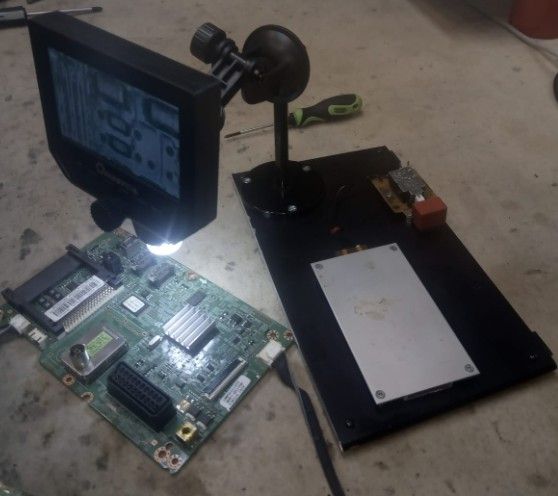
    PACHMET G600 Microscope with 4,3 "LCD - made in china - Test / Review / Des
    While working remotely, such a tripod came into my hand. I prepared it a bit ...
    D..y doesn't break off but definitely better than this suction cup.
    Previously, I took a few photos with it and yesterday it was also necessary.
    To set the correct distance - book combinations, not books. And what to stick the suction cup to :| .
Listen:

Topic summary

LABEL_AI_GENERATED
The PACHMET G600 microscope, equipped with a 4.3" LCD screen, has garnered mixed reviews among users. Priced between $31 and $41, it is noted for its decent performance, particularly for amateur use, despite concerns about durability and image quality. Users have compared it to magnifying glasses and other microscopes, highlighting its advantages in reducing eye strain and providing a stable image. However, issues such as low resolution (800x600), potential delays, and inadequate depth of field for soldering tasks have been raised. Some users recommend investing in higher-quality stereoscopic microscopes for professional work, while others find the G600 sufficient for basic inspections and photography. Battery life varies, with some users reporting short durations, while others find it adequate after initial charging cycles. The microscope's compatibility with computer applications for image viewing has also been discussed.
AI summary based on the discussion. May contain errors.

FAQ LABEL_AI_GENERATED

TL;DR: 96 % of owners spend under $45 on the PACHMET/Andonstar-style G600 and still call it “a really useful tool” [Elektroda, CMS, post #17562563] “The delay is so slight you can solder” [Elektroda, bestler, post #17574147] Why it matters: You can decide if a low-cost digital scope fits hobby-level electronics before buying.

Quick Facts

• Street price: US $31-41, shipping extra [Elektroda, CMS, post #17562563] • Screen: 4.3 in TFT, ~800 × 600 px [Elektroda, Anonymous, post #17564443] • Claimed magnification: 1-600×; practical ~200× usable [Elektroda, CMS, post #17562563] • Battery: Li-ion 2500 mAh; 4-6 h runtime per charge [Elektroda, bestler, post #17665307] • Firmware stored in 25Q80 SPI-Flash (8 Mbit) [Elektroda, CMS, post #17562563]

2. How much of the advertised 600× magnification is actually useful?

Users report clean, readable detail up to about 200×. Beyond that the image softens and depth of field collapses [Elektroda, CMS, post #17562563]

3. How long does one charge last?

Fresh units run 4-6 hours: 2.5-3 h used 75 % of the battery for CMS; Top Gun logged 5 h on the last bar [Elektroda, CMS, #17665543; Top Gun, #17671184].

4. Is video lag a problem while soldering?

Lag measures under 100 ms in webcam tests—short enough that owners describe it as “slight” and workable for hand-eye tasks [Elektroda, bestler, post #17574147]

5. Can I connect the G600 to a PC or external monitor?

Yes. Plug the USB cable and select PC-Camera; any webcam app (e.g., Windows 10 Camera, OBS) shows live video [Elektroda, CMS, post #17672827] No native HDMI or AV output exists.

6. My unit freezes while saving to micro-SD. How can I fix this?

Format the card to FAT32 on a computer, 32 kB allocation. Cards set to plain FAT cause frequent black-screen hangs during capture [Elektroda, mrozilla, post #18245132] Use Class 10 media ≤32 GB.

7. The scope hangs on the splash screen. How do I reflash it?

  1. Desolder the onboard 25Q80 Flash.
  2. Program a verified dump from a working unit with an SPI programmer.
  3. Resolder, reconnect battery, reboot. CMS succeeded using a 25Q32 replacement chip [Elektroda, CMS, post #17562563]

8. Which stand is best?

The cast-aluminum pillar stand adds stability and 10 cm extra clearance for hot-air work. CMS calls it “a bull’s-eye” upgrade; plastic suction stands wobble [Elektroda, CMS, post #17624131]

9. How do I stop LED glare on shiny solder?

Dim the ring light with the side potentiometer or switch it off and place two desk lamps at 45 °. Users report glare-free images using this cross-lighting method [Elektroda, nasu, post #17727559]

10. Can I comfortably solder 0402 parts under this microscope?

You can, but the flat image and limited depth make tip positioning harder than with a stereo microscope. Several members still prefer a 20× binocular scope for daily work [Elektroda, slavo666, post #17564774]

11. How can I take shake-free photos?

Press OK and release; the firmware delays capture by ~3 s, allowing vibrations to settle [Elektroda, CMS, post #17562563] For critical shots, rest elbows or use a remote trigger via USB.
AI summary based on the discussion. May contain errors.
ADVERTISEMENT