

logo elektroda
logo elektroda
X
logo elektroda
Dostępna jest polska wersja

Czy wolisz polską wersję strony elektroda?

Nie, dziękuję Przekieruj mnie tam

Huawei SUN2000 Inverter: WIFI Dongle Connection, Firmware Update & FusionSolar

Bob271 430887 1369
Best answers

How do I get a Huawei SUN2000 Wi‑Fi dongle online when FusionSolar shows the SDongleA as offline?

To get the dongle/configuration working, connect to the inverter’s own Wi‑Fi AP, open FusionSolar, choose “Putting the device into operation,” scan the QR code on the inverter and enter the password from the label (or the default 00000a if it was not changed) [#18928339][#19344455] If Wi‑Fi setup keeps failing, one user gave up on wireless and connected the dongle/router by Ethernet cable directly, which worked immediately [#18870485] Another user reported that installing the latest FusionSolar fixed a case where the dongle was detected but all networks looked open and no connection would complete [#19386137] During commissioning and software updates, the inverter should have DC power available; without DC, Huawei units may behave oddly and not finish configuration/update properly [#18871886]
Generated by the language model.
ADVERTISEMENT
Treść została przetłumaczona polish » english Zobacz oryginalną wersję tematu
  • #751 20023742
    miikew1
    Level 6  
    zenq wrote:
    You have an 8kw inverter and are you surprised that it does not release 10?

    is it so hard to read a question before stumbling over the keys?

  • ADVERTISEMENT
  • #752 20023746
    zenq
    Level 12  
    Take it easy. I wrote from the screen so the keys are not sticking out ;-)
    Sorry, but that's how I understood the question, you uploaded screenshots where it reaches the max everywhere and often cuts off the production, so what's the problem?
  • #753 20023751
    miikew1
    Level 6  
    the problem is that I have an oversized installation for this month and I do not know why 9.69KW panels do not reach 8.8KW on a sunny day on the other hand, they reach 8.8KW on a cloudy day when the sun comes out completely behind the clouds from time to time
  • #754 20023760
    zenq
    Level 12  
    I get it. For me it is the same, it does not reach the maximum on sunny days, but the all-day production is better than on the days with cloud cover and too much power cut. Probably the temperature, you can see it after the "peaks", when the panels cool down after temporary shading.
  • #755 20023835
    szczukot
    Level 14  
    Panels 9.7 and an inverter 8. What's the point?
    I did the opposite. I have panels for 7 and the inverter for 8 :)
    Thanks to this, I have a reserve, as if I wanted to add panels, and the inverter is not wired at maximum speed.
  • #756 20023839
    miikew1
    Level 6  
    szczukot wrote:
    Panels 9.7 and an inverter 8. What's the point?
    I did the opposite. I have panels for 7 and the inverter for 8 :)
    Thanks to this, I have a reserve, as if I wanted to add panels, and the inverter is not wired at maximum speed.

    This is a congratulations on your satisfaction with the set, or do not read more about PV, just use what you have - you may get spoiled
  • #757 20023853
    zenq
    Level 12  
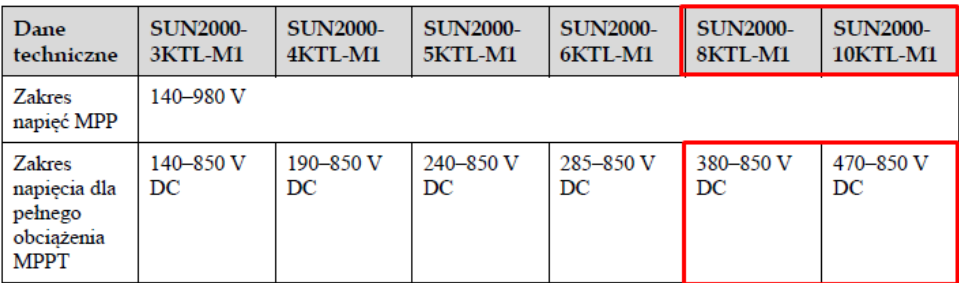
    It makes a lot of sense. He gets up earlier and produces longer. Voltages for the optimal operation of the inverter, etc. Panels are not selected only according to KWp. I also have "oversized" panels in relation to the inverter.
  • ADVERTISEMENT
  • #759 20023913
    szczukot
    Level 14  
    Well, if someone gives them panels to produce electricity for 10 minutes longer, that's ok. But don't let him wonder why he has to cut it.
    Oversizing the panels certainly does not help to optimize the operation of the inverter.
    By the way, I am 100% convinced that these few / a dozen additional minutes in the morning and evening will not generate enough electricity to make these additional panels come back throughout the life of the investor and his children and grandchildren.
    The efficiency of the inverter, even counting between the two extreme voltages that will be given (some mega overstated and mega understated), is a maximum of 1% of the difference in operation.

    And as for the "sunny day" itself, it is logical. The panels are overheated, that's it.

    Added after 1 [minutes]:

    miikew1 wrote:

    This is a congratulations on your satisfaction with the set, or do not read more about PV, just use what you have - your mood may be spoiled


    Will you elaborate on the topic?

    Added after 1 [hours] 27 [minutes]:

    zenq wrote:
    It makes a lot of sense. He gets up earlier and produces longer. Voltages for the optimal operation of the inverter, etc.
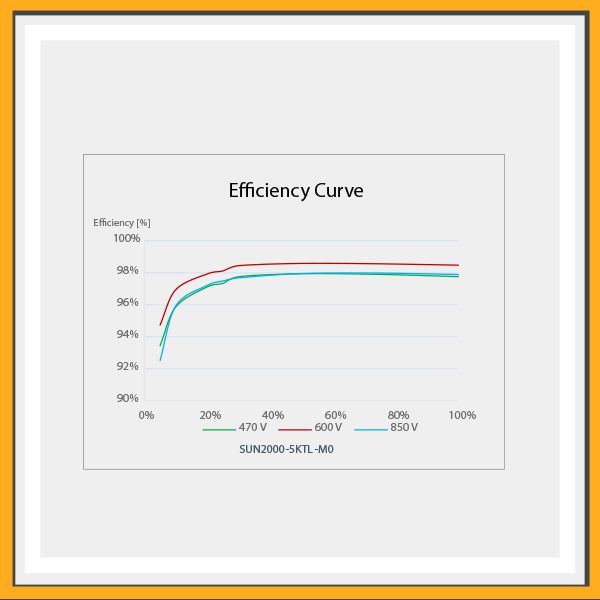
    These are generalities repeated everywhere. In my opinion, this is not entirely untrue.
    First of all: yes, it will start earlier and work longer. But just the first and last minutes have so little sunlight that probably in the entire production it will not even be 0.01%
    Secondly, the optimal operation of the inverter is not at the highest voltages, i.e. adding a large number of panels. The most effective one is much lower. For me, the installation works on average at 630V DC. How many do you have? 850V? Well, out of curiosity, I add the graph:
    Huawei SUN2000 Inverter: WIFI Dongle Connection, Firmware Update & FusionSolar
  • #760 20024355
    zenq
    Level 12  
    szczukot wrote:
    First of all: yes, it will start earlier and work longer. But the first and last minutes have so little sunlight that probably in the entire production it will not even be 0.01%


    right here, general. but more production is available all day, not just at 4:00 or 20:00.
    And for example, when the panels are hot and their efficiency decreases, they produce me as much as the panels should produce without "excess" at the optimal temperature. If I had their nominal amount, the entire "graph" would simply be lower and the production would not reach the maximum efficiency of the inverter. Now it comes without a problem. And the fact that on some days it cuts the hill for two hours at noon, it compensates for me with more production in the remaining hours.

    szczukot wrote:
    Secondly, the optimal operation of the inverter is not at the highest voltages, i.e. adding a large number of panels.


    Yes, I know, I paid attention to it when selecting the installation.

    szczukot wrote:
    For me, the installation works on average at 630V DC. How many do you have? 850V?


    And you see, my average is slightly below 600V, and according to the efficiency in KWp, I have some oversized panels for the power of the inverter.

    and - if it wasn't - I'm not talking about putting 10kwp into a 5kw inverter or making 1000v on the string, but adding one or 2 panels is neither a masochistic expense, nor will it worsen the operation of the installation. By matching the voltages to the optimal for the inverter, it can only get better, especially on those less sunny days. Plus, it can look better on the roof :)
  • #762 20024404
    zenq
    Level 12  
    Thanks for the nice link, I'll take a look at it in the evening, but quickly - it seems to me that it shows the opposite of what you say. There, the number of panels does not change, but the power of the inverter changes, and it shows that the installation on a smaller inverter (i.e. oversized panels) produces minimum values less than on the dedicated one. So (for example) throwing 10KWp panels into an 8KWp inverter will produce almost the same energy as 10KWp panels on a 10KW inverter. So we do not waste money on "additional" panels, and save on a cheaper inverter?
    Well, I will look at it later, because the topic interested me.

    I do not know about the Fronius (from the link), but in Huałej we can switch the max power (factory default: 10% from the nominal), so theoretically, we do not lose anything from a slight oversizing, because the inverter will process it anyway.
  • #763 20025555
    jmper
    Level 7  
    I will only refresh my problem because I solved it and maybe it will help someone.
    Let me remind you, a dozen or so posts earlier, the FusionSolar application for iOS, it is not possible to set the inverter parameters.
    The solution turned out to be trivial: Huawei simply removed this functionality from the iOS application. And it's probably quietly because there is nothing on this topic anywhere. In the end, in desperation, I dug up some old Android phone, I spent half a day struggling to update it to Android 7 (because it also turns out to be the minimum version for FusionSolar to start, although Huawei writes that the minimum required version of Android is 5), installed FS, fired, connected to the inverter and everything is flashing.
    In addition, a few pebbles for the Huawei garden (apart from those above):
    - parameters can be set from the portal through a browser, but it turns out that not all of them
    - when I try to set something, it either writes that timeout and it failed, or sometimes it will succeed - but there is no rule
    - when I write that I succeeded, either this parameter has actually been set or not - there is no rule either. But what I wanted, i.e. the QU power control, was not possible to set through the portal
    - the only thing that actually works is Device commissioning in the android application

    And from Huawei's support, after 2 days, I got a generic answer with instructions on how to configure the connection with the inverter. It was just that no one even wanted to read what I wrote to them.
    Just gorgeous.
  • #764 20027962
    szeryfff
    Level 24  
    zenq wrote:
    I do not know about the Fronius (from the link), but in Huałej we can switch the max power (factory default: + 10% from the nominal), so theoretically, we do not lose anything from a slight oversizing, because the inverter will process it anyway.

    I have sun2000-5ktl-m0 at home, it produces up to 5.5kW, if I understand your post correctly, can I slightly increase this power?
  • #765 20030274
    speedy9
    Helpful for users
    zenq wrote:
    the addition of one or two panels is not a masochistic expense, nor will it worsen the operation of the installation

    Well, it can be different here. I just wanted to add 3 panels to my installation (to an existing string). I got a quote for ... PLN 6,000. 3x450W panels. A simple topic, a metal roof with a seam, so mounting with clamps and connecting to already lying panels. No pulling on cables etc.
  • ADVERTISEMENT
  • #766 20030285
    szeryfff
    Level 24  
    @ speedy9 I paid a little less for adding 3 370W panels: / for sure when you install the target quantity right away, it is cheaper.
  • #767 20030366
    speedy9
    Helpful for users
    @szeryfff and I already thought that they gave me an offer "for a detachable", because they do not want to come, because they have a piece and so they will go all day ...
    Such 450W panels cost about PLN 700 net, In addition, the mounting system for several hundred PLN max. In my opinion, they charge a bit for the job.
  • #768 20030442
    szeryfff
    Level 24  
    szeryfff wrote:
    zenq wrote:
    I do not know about the Fronius (from the link), but in Huałej we can switch the max power (factory default: + 10% from the nominal), so theoretically, we do not lose anything from a slight oversizing, because the inverter will process it anyway.

    I have sun2000-5ktl-m0 at home, it produces up to 5.5kW, if I understand your post correctly, can I slightly increase this power?


    I checked that 5500 is the maximum value :)
  • ADVERTISEMENT
  • #769 20033446
    ROBAK75
    Level 12  
    qrko wrote:
    Check what your reactive power compensation setting is, this feature works wonders. For me, it has reduced the number of exclusions by 3 times.

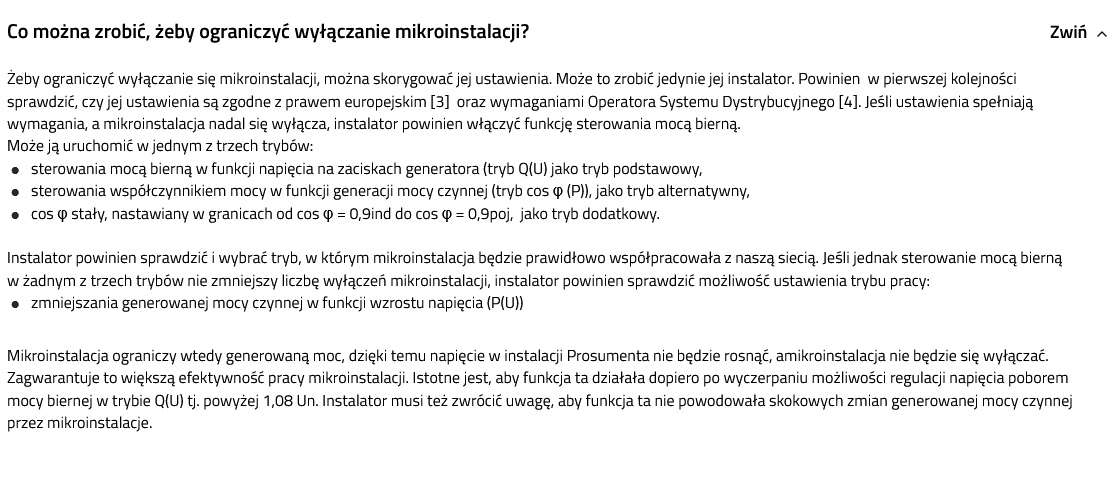
    For two months I have been a user of photovoltaics with the HUAWEI SUN2000-5KTL-M1 inverter. Of course, on hot days, the inverter turns off several times a day. Tauron suggests changing the settings for reactive power compensation, but I don't know where to change it :)
    I do not see this in the FusionSolar application, after logging in to my computer https://region03eu5.fusionsolar.huawei.com/pvmswebsite/assets/build/index.html#/home/list I also do not see the settings related to the settings.
    The inverter has the software v141.
  • #770 20033479
    rokbok
    Level 39  
    ROBAK75 wrote:
    Tauron suggests changing the settings for reactive power compensation, but I don't know where to change it


    Use the built-in app in Fusion Solar, option on the home page -> Me -> Commissioning devices, or use the standalone SUN2000 app.
  • #771 20033500
    ROBAK75
    Level 12  
    rokbok wrote:
    ROBAK75 wrote:
    Tauron suggests changing the settings for reactive power compensation, but I don't know where to change it


    Use the built-in app in Fusion Solar, option on the home page -> Me -> Commissioning devices, or use the standalone SUN2000 app.

    Thanks for the quick response.
    To use the first option, I must be at the inverter, because it connects locally (I will try after work :) )
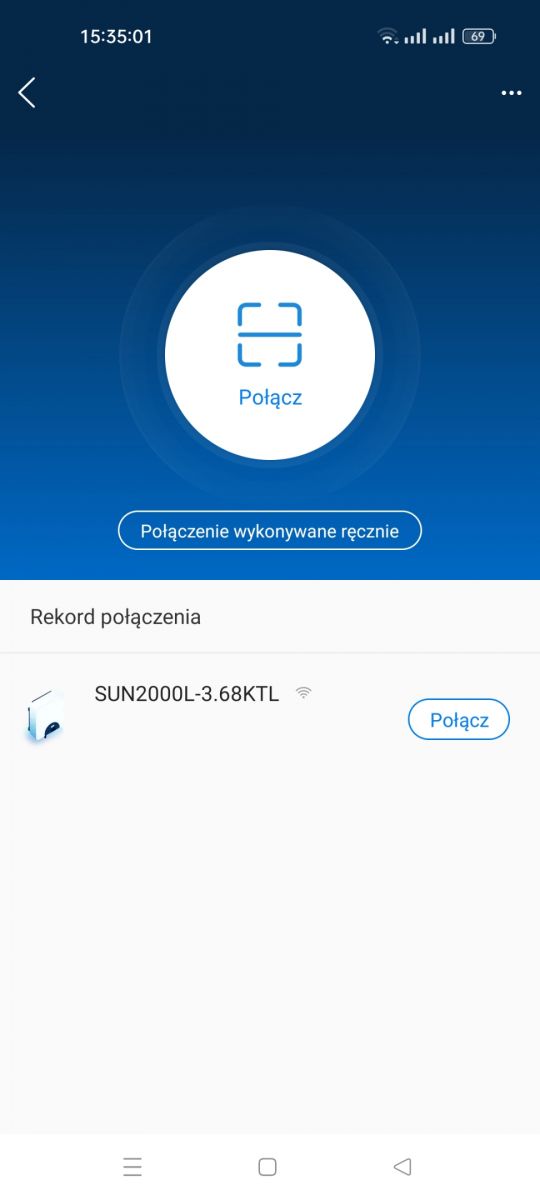
    How do you use this standalone SUN2000 app? Where to download it? Google shows me SUN2000 for Apple devices. I don't think that was what it was about :)
  • #772 20033503
    kotbury
    Gantry automation specialist
    From the Huawei Store (their Google Play counterpart). Or from apk archive sites like apkstore, apkcombo etc.
  • #773 20033515
    ROBAK75
    Level 12  
    kotbury wrote:
    From the Huawei Store (their Google Play counterpart). Or from apk archive sites like apkstore, apkcombo etc.

    OK thanks. I am already searching :)
  • #774 20033544
    kotbury
    Gantry automation specialist
    For example, in the attachment.
    But how and if it works - I don't know. A friend with whom we did an on / offgrid hybrid installation with a warehouse, a meter and a Box has a phone from Huaweia and he downloaded the app, so to speak, "as standard" so that I did not have the opportunity to try it.
    Attachments:
    • SUN2000_v2.2.00.050_apkpure.com.zip (5.77 MB) You must be logged in to download this attachment.
  • #775 20033641
    szczukot
    Level 14  
    Well, I have Huaweia on my phone.
    Thanks to this, when a new version is released, it updates itself.
  • #776 20033646
    ROBAK75
    Level 12  
    kotbury wrote:
    For example, in the attachment.
    But how and if it works - I don't know. A friend with whom we did an on / offgrid hybrid installation with a warehouse, a meter and a Box has a phone from Huaweia and he downloaded the app, so to speak, "as standard" so that I did not have the opportunity to try it.

    Thanks, I'll be testing soon :)
  • #777 20033661
    rokbok
    Level 39  
    ROBAK75 wrote:
    To use the first option, I must be at the inverter, because it connects locally


    The built-in and the standalone app are the same, they also connect to the inverter.
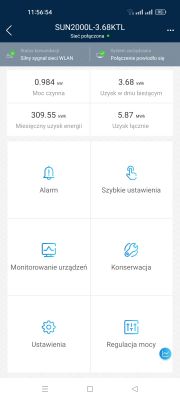
    It is enough to be within the range of your home WiFi, the one you have set on the inverter, using the app, built-in or autonomous, you connect to the WiFi network set on the inverter, then enter the password 00000a (if the installer has not changed it) and you are connected to the inverter.

    This is what it looks like.

    Huawei SUN2000 Inverter: WIFI Dongle Connection, Firmware Update & FusionSolar

    Once you are connected you will see an options screen.
    Huawei SUN2000 Inverter: WIFI Dongle Connection, Firmware Update & FusionSolar
  • #778 20034891
    ROBAK75
    Level 12  
    rokbok wrote:
    ROBAK75 wrote:
    To use the first option, I must be at the inverter, because it connects locally


    The built-in and the standalone app are the same, they also connect to the inverter.
    It is enough to be within the range of your home WiFi, the one you have set on the inverter, using the app, built-in or autonomous, you connect to the WiFi network set on the inverter, then enter the password 00000a (if the installer has not changed it) and you are connected to the inverter.

    This is what it looks like.

    Huawei SUN2000 Inverter: WIFI Dongle Connection, Firmware Update & FusionSolar

    Once you are connected you will see an options screen.

    Huawei SUN2000 Inverter: WIFI Dongle Connection, Firmware Update & FusionSolar

    Thanks to it yesterday.
    I changed the reactive power settings to the following: Huawei SUN2000 Inverter: WIFI Dongle Connection, Firmware Update & FusionSolar
    Do you think the inverter will turn off less often? Do you want to change these settings to something else?
  • #779 20035081
    speedy9
    Helpful for users
    ROBAK75 wrote:
    Of course, on hot days, the inverter turns off several times a day.

    And have you checked why it turns off? Review the alarms in the SUN2000 APP to see the reason for the shutdown. If it turns off because the mains voltage is too high, you will do nothing.
  • #780 20035129
    ROBAK75
    Level 12  
    speedy9 wrote:
    ROBAK75 wrote:
    Of course, on hot days, the inverter turns off several times a day.

    And have you checked why it turns off? Review the alarms in the SUN2000 APP to see the reason for the shutdown. If it turns off because the mains voltage is too high, you will do nothing.

    So what is written on TAURON's website is just gibberish?
    Huawei SUN2000 Inverter: WIFI Dongle Connection, Firmware Update & FusionSolar

Topic summary

✨ The discussion centers on issues and configurations related to Huawei SUN2000 series inverters, particularly focusing on WiFi dongle connectivity, firmware updates, and the FusionSolar platform. Users report successful inverter commissioning and firmware updates but face persistent problems connecting the WiFi dongle, which often blinks red and appears offline in FusionSolar. A reliable workaround is connecting the dongle via Ethernet cable to the router. Changing WiFi network credentials requires logging directly into the inverter through FusionSolar or FusionHome apps, as remote password changes are not supported. Installer accounts have broader configuration permissions than owner accounts, which often restrict access to settings such as location, currency, and power configuration. The discussion also covers optimal network code selection (e.g., Germany-VDE-AR-N-4105 for Poland), MPPT multi-peak scanning settings for shadowed panels, and string capacity configuration aligning with physical panel connections. Users note that inverter startup voltage and MPPT voltage ranges affect minimum panel string length, with debates on using 140V or 240V for calculations. Firmware updates are available but may not always be visible to all users simultaneously; some recommend downgrading FusionSolar app versions to resolve login or configuration issues. The FusionSolar platform's interface and permissions can be non-intuitive, with some users unable to modify installation parameters without installer access. Additional topics include inverter automatic shutdown due to high grid voltage, anti-PID function requiring external devices, and integration with Huawei DTSU666-H smart meters, which are often auto-detected. Overall, the thread provides practical advice on inverter setup, network configuration, firmware management, and troubleshooting communication issues with Huawei SUN2000 inverters and associated software tools.
Generated by the language model.

FAQ

TL;DR: A 10-min average grid voltage ≥ 253 V forces the SUN2000 inverter to disconnect [Elektroda, lizak1983, post #19657944] “Huawei is a good inverter, I would not be afraid to install it” [Elektroda, Rhaavir, post #18871886] Latest firmware SPC136 fixes battery and startup issues.

Why it matters: Correct settings stop nuisance shutdowns, improve yield and keep the warranty intact.

Quick Facts

• Default grid code for PL installers: Germany VDE-AR-N-4105 or Custom 50 Hz with 253 V/10-min limit [Elektroda, domelek, post #19529531] • SUN2000-M0/M1: MPPT range 200–850 V; Startup 200 V; Max string current 11 A (oper.), 15 A (Isc) [Huawei Datasheet]. • Firmware: SPC136 (inverter) & SPC118 (SDongleA-05) – update in daylight, 20 min per device [Elektroda, lizak1983, post #19640000] • Wi-Fi dongle LED codes: steady green = online; red blink = no router link [Elektroda, JackRze, post #19489029] • Warranty checker: https://support.huawei.com – serial + e-mail required [Elektroda, maneks, post #19359819]
How do I change the inverter’s Wi-Fi after replacing a router?

  1. On the router set the new SSID and password identical to the old ones – the inverter reconnects automatically [Elektroda, lizak1983, post #19657944]
  2. If you prefer to edit the inverter, open the SUN2000 app, connect to the inverter’s AP, choose Maintenance > Communication > Router Wi-Fi and enter the new credentials; save and wait for the LED to turn steady green.

What causes the SUN2000 to trip on sunny days?

A 10-minute average grid voltage at the terminals above 253 V triggers disconnection per VDE-AR-N-4105 [Elektroda, lizak1983, post #19657944] High roof-top cable resistance adds 1-2 V, so measure at the inverter. Load shifting (e.g., 2 kW boiler) or DSO tap change fixes the issue.

Can I lift the 253 V reconnection limit?

Raising “Upper voltage limit when reconnecting to grid” breaches EU NC RfG and risks neighbour equipment damage. Installers and DSOs can audit logs [Elektroda, rokbok, post #19639893] Keep 253 V unless your DSO grants a written exception.

Firmware: what’s new in SPC136 and how do I install it?

SPC136 adds battery-version alarm, M1–M3 parallel support and faster offline self-check [Huawei ReleaseNotes 2021]. Download via SUN2000 or FusionSolar app (Me > Device Commissioning > Update). Stay within inverter Wi-Fi, tap Update, wait ~20 min; the inverter reboots once at ~80 % [Elektroda, MisiekDPx, post #19639882]

How do I update the SDongleA-05 Wi-Fi dongle?

Unplug the dongle, re-insert: it broadcasts “Dongle–AP”. Connect with SUN2000 app, default pwd 00000a, go to Maintenance > Update Device, choose SPC118 file and start. LED blinks fast green during upgrade, steady green when done (≈10 min) [Elektroda, lizak1983, post #19640000]

Grid code list shows only three Chinese entries – what now?

Import units lack EU presets. Select Custom 50 Hz and manually enter: U/Un 0.85 = 0 s, 1.10 = 10 min, 1.15 = 0.1 s; cos φ = 0.9 lead/lag; Q/U droop 4 % [Elektroda, domelek, post #19529531] A valid NC RfG declaration is still required for DSO acceptance.

My Wi-Fi dongle flashes red every few days – fix?

LED red blink means router unreachable. Common causes: weak signal or changed password. Move a repeater within 5 m (-55 dBm or better) [Elektroda, JackRze, post #19489219] If stable signal still fails, reboot the dongle or update its firmware (see above).

Installer owns the FusionSolar site – can I get control?

Yes. Ask the installer to delete the plant from their account, then register a new Installer account with your e-mail and inverter serial; Huawei cloud blocks duplicate serials [Elektroda, rokbok, post #19636492] Warranty remains tied to the serial, not the account.

Lost inverter password – how to reset?

Connect SUN2000 app to the inverter AP, choose “Reset Password”. You must input the 6-digit ESN from the side sticker and the current date. The default admin password resets to 00000a [Huawei Manual].

What’s the correct string current for SUN2000-M1?

Design strings so Isc ≤ 15 A and operating current ≤ 11 A. Example: 12×340 W modules give Isc 10.3 A, within limits [Elektroda, mariusz.lubicz, post #19656018] Exceeding Isc risks optimizer derating and warranty issues.

Will Huawei optimizers shut a whole string when one panel is shaded?

No. Each SUN2000-450W-P acts as a DC/DC converter. A shaded panel continues at lower power while the rest maintain maximum current [Elektroda, jsw, post #19656269] The inverter therefore keeps production and avoids hot-spot bypass.

How do I clear old alarms in FusionSolar?

Go to Device > Alarms, tap the three-dot menu, choose “Clear”. Alarms caused by firmware mismatch disappear automatically after updating both inverter and dongle [Elektroda, stratus84, post #19490242]

Edge case: inverter shows 2 V DC after switch-on – diagnosis?

Reverse-polarity MC4 crimps drop the PV voltage to ≈ 2 V and block startup [Elektroda, kravat3, post #19536568] Disconnect, verify red = + and black = – with a multimeter, then re-crimp.

Quick 3-step: add new owner without installer

  1. Installer deletes plant in FusionSolar. 2. Owner installs SUN2000 app, taps “Create Installer Account”, enters S/N and e-mail. 3. Log in, add plant, then invite personal “Owner” user. Done.
Generated by the language model.
ADVERTISEMENT
