How do I get a Huawei SUN2000 Wi‑Fi dongle online when FusionSolar shows the SDongleA as offline?
To get the dongle/configuration working, connect to the inverter’s own Wi‑Fi AP, open FusionSolar, choose “Putting the device into operation,” scan the QR code on the inverter and enter the password from the label (or the default 00000a if it was not changed) [#18928339][#19344455] If Wi‑Fi setup keeps failing, one user gave up on wireless and connected the dongle/router by Ethernet cable directly, which worked immediately [#18870485] Another user reported that installing the latest FusionSolar fixed a case where the dongle was detected but all networks looked open and no connection would complete [#19386137] During commissioning and software updates, the inverter should have DC power available; without DC, Huawei units may behave oddly and not finish configuration/update properly [#18871886]
AI summary based on the discussion. May contain errors.
I have this older version of the inverter (TL3-S), the service changed the power remotely. So it is probably also possible with MOD. I just do not know if they will want it, since the power on the plate coincides with what is real. For me there was a mistake, i.e. the 9kW inverter behaved like 8kW, so it has been corrected.
I have this older version of the inverter (TL3-S), the service changed the power remotely. So it is probably also possible with MOD. I just do not know if they will want it, since the power on the plate coincides with what is real. For me there was a mistake, i.e. the 9kW inverter behaved like 8kW, so it has been corrected.
I bought the inverter in China, so the pl distributor ignored me at all.
Hello. Is it possible to change the scale of the grid voltage graph? Well, everything overlaps and you can't see exactly when the voltages are greater than 253V ...
Attachments:
Screenshot_2022-07-24-23-28-29-07_81922fc742ed931ad7de97e3169fc6f0.jpg(370.14 KB)
You must be logged in to download this attachment.
You can't change it, but you can slide your finger on the chart and it shows you all the tensions at a given time. For example, I don't see alarms in my app. I can see that they are there. This is where you should be informed when the 253V voltage has been exceeded.
Hello everyone. I think I lost Wifi Dongle (no LED is on). How can I check if it is damaged or is it a problem with the router?
A few days ago I had the same message and problem. The next day it got up without any problems and works until today . Also, the problem is rather temporary and is not due to hardware failure.
A few days ago I had the same message and problem. The next day he got up without any problems and works until today. Also, the problem is rather temporary and is not due to hardware failure.
It wasn't shining either? Because with me it's been over 3 days and then nothing. I tried to connect to the computer but it didn't light either.
He has been using PV installations with the SUN2000-5KTL-M1 inverter for over a month. I am connected to the PGE network and I have problems with feeding power to the grid (AC> 253V) described on this forum (sometimes power reduction and sometimes inverter shutdown). I am connected to the inverter with Modbus TCP IP and I can read the error codes. I noticed that sometimes the generated DC voltage exceeds 600V (this is just temporary only) and then the inverter shuts down and generates Fault code 3401. Has anyone encountered this problem? I wonder why the inverter turns off above 600V DC, when it should withstand even DC 1000V?
Mains overvoltage, not 600 V DC, triggers shutdown
He has been using PV installations with the SUN2000-5KTL-M1 inverter for over a month. I am connected to the PGE grid and I have problems with feeding the power to the grid (AC> 253V) described on this forum (sometimes power reduction and sometimes turning off the inverter). I am connected to the inverter with modbus TCP IP and I can read the error codes. I noticed that sometimes the generated DC voltage exceeds 600V (this is just temporary only) and then the inverter shuts down and generates Fault code 3401. Has anyone encountered this problem? I wonder why above 600V DC the inverter turns off when it should withstand even DC 1000V?
It is not the DC voltage above 600V that disables the inverter, but the mains voltage above 253V. Take a look at the DC voltage charts for each day. The inverter boosts the DC voltage during startup and shutdown
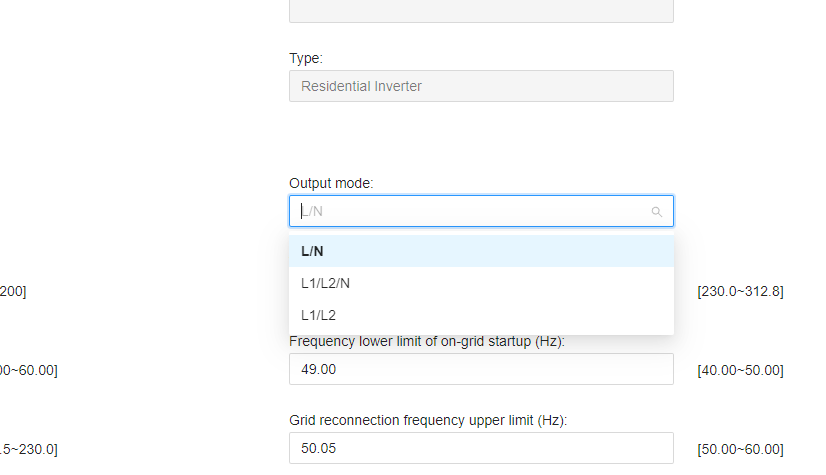
I have a SUN2000-3KTL-L1 inverter, which is single phase. The installation is three-phase. The inverter is connected to L2. Everything has been working as it should for a year. Recently, however, I came across settings where as output it is possible to set L / N (and so I have) L1 / L2 / N and L1 / L2. Does this mean that this inverter can also work, for example, on 2 phases? Hooking up in this way could increase self-consumption.
A few days ago I had the same message and problem. The next day he got up without any problems and works until today. Also, the problem is rather temporary and is not due to hardware failure.
A few days have passed and Dongle still does not shine. I submitted it under the warranty and ... I got a new one, which also does not light up when connected to the inverter !!! What else could be wrong? USB port on the inverter?
Single-phase output limits battery backup to 2–3 kW
unfortunately only with one phase. However, it has many disadvantages, most of all it turns off with a load of 2-3 kW (and it should withstand 5, because I have 2 batteries). And a terribly intricate change to default settings. Huawei should try better for this money.
It's good that you wrote, because I was somehow focused on this LUNE in the 10kWh configuration, but if it does not give these 5kW for any phase at home, then I need something like that. Induction is in a phase different from that of the refrigerator and electronics. 2/3 of the hardware will not work without the 2 remaining phases.
So I understand that when the sun goes down and your battery is loaded, you power Phase 1 from the battery, and the other 2 phases are taken from the network? I am not afraid to power 3 phases only from a battery within these 2-3kW (supposedly 5kW)?
As for me, it is a strong failure of the manufacturer to disseminate the documentation for this equipment.
Clarifies Luna backup power and off-grid phase limits
It's not like that. If there is current in the grid and the inverter is synchronized with it, without the sun, Luna gives power to all phases within the capacity of the battery and inverter, i.e. slightly over 3 kW per phase. The demand for energy exceeding its capacity is selected by the inverter from the grid separately for each phase. The colleague's entry above is for Off-Grid work. When there is no power in the network, the inverter uses the Backup-Box to switch the L1 phase from the normal installation to a separate backup output - and then only one L1 phase works from the battery (or more precisely, its clone in the form of a separate backup circuit, which, however, in the presence of the network works as a normal phase L1, so in the case of "W" you do not need to run and plug the equipment to the second sockets) within the limits of its efficiency from the inverter, i.e. about 3 kW. But it's an emergency. The full power on the Off-Grid backup is given by the single-phase version of SUN - i.e. 3 or 5 kW depending on the version of the inverter.
Clarifying three-phase power and battery charging behavior
Oh, the limitation to one phase is only off-grid. And if the user could share insights like on-grid: - Is then the declared power of 5kw available divided into 3 phases? - What power is the inverter charging the battery with, when, for example, the production is 5.5 kW at a given time, then the battery goes to somehow limited power, e.g. 2.5kW permanently, and the rest is distributed between home and export, or is charged with dynamic power, depending on what is the production at the moment and the house demand? Or maybe it can be set somewhere in the software, how is it supposed to charge?
Local WiFi app needed for detailed inverter settings
Not my equipment - Sun 2000 3-phase 10 kW inverter (I did for installers who "had no training" yet) and I did the hardware and initial configuration and the owner himself took care of more precise settings, but it reminds me that the adjustment of the power output with one Luna in total for 3 phases, it ended at 3 kW (it is set, in addition, you can set the minimum charge from which the battery no longer outputs electricity and limit the maximum charge level in advance - to increase the battery life). Tomorrow I will ask about it and about the maximum charging power (the maximum efficiency of the inverter is easily achieved because the guest has 12 kW on the roof). I know that if the generating power exceeds the charging power of the battery - the surplus is first used "on the spot" and the rest goes to the network for the prosumer (but these priorities can also be set - e.g. the first prosumer, then charging with battery leftovers - everything is in a rather complicated manual inverter and battery) PS. For precise settings and power readings, we use the SUN 2000 program working under the local WiFi network of the inverter. Fusion Solar with the Internet is only useful for remote quick reading of the inverter status via the net and there are as many settings there as nothing.
The buddy replied. With one Luna battery, the maximum charge / discharge power is 3 kW. With two batteries and one power supply - 5 kW (both powers for all phases in total). He learned that if you add a second battery tower (2 or 3 xLuna) with a second power supply, the download / charging power will increase to the maximum capacity of the inverter, i.e. 10 kW. You can use up to 2 towers of 3 Luna each, i.e. 18 kWh capacity. For 100,000 .... ?. As for the apps - after the latest updates, the Sun 2000 app and the local network of the inverter no longer clutter. Fusion Solar has taken over all the functions of this app and it goes on the net. From a cursory glance it appears that it has all the functions of both the previous ones aggregated into one.
FusionSolar replaces Sun2000 local network functions
after the latest updates, the Sun 2000 app and the inverter's local network no longer clutter. Fusion Solar has taken over all the functions of this app and it goes on the net.
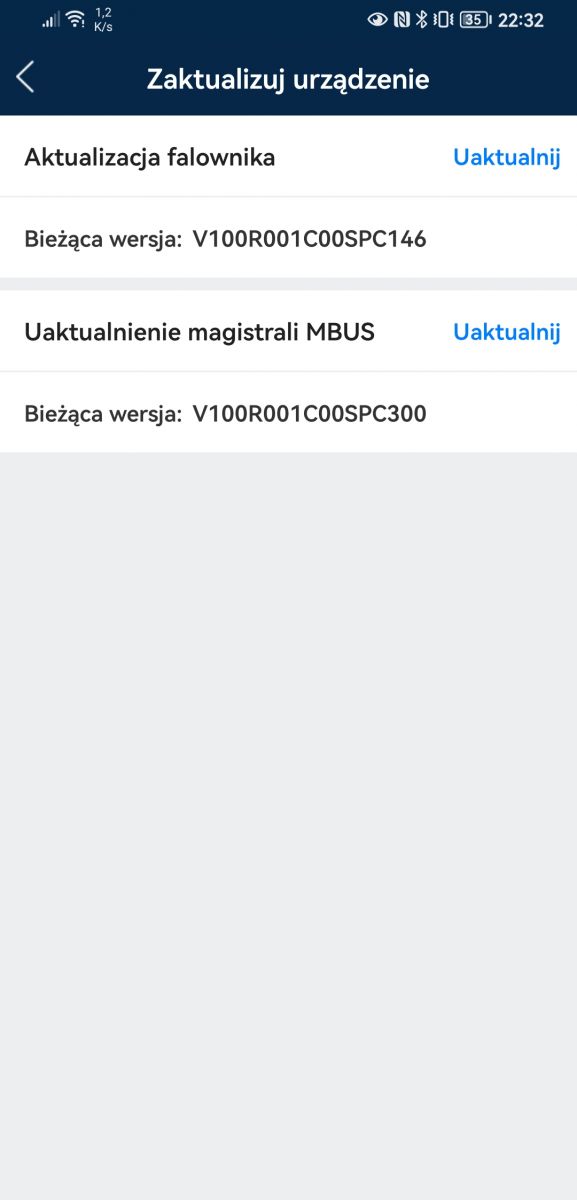
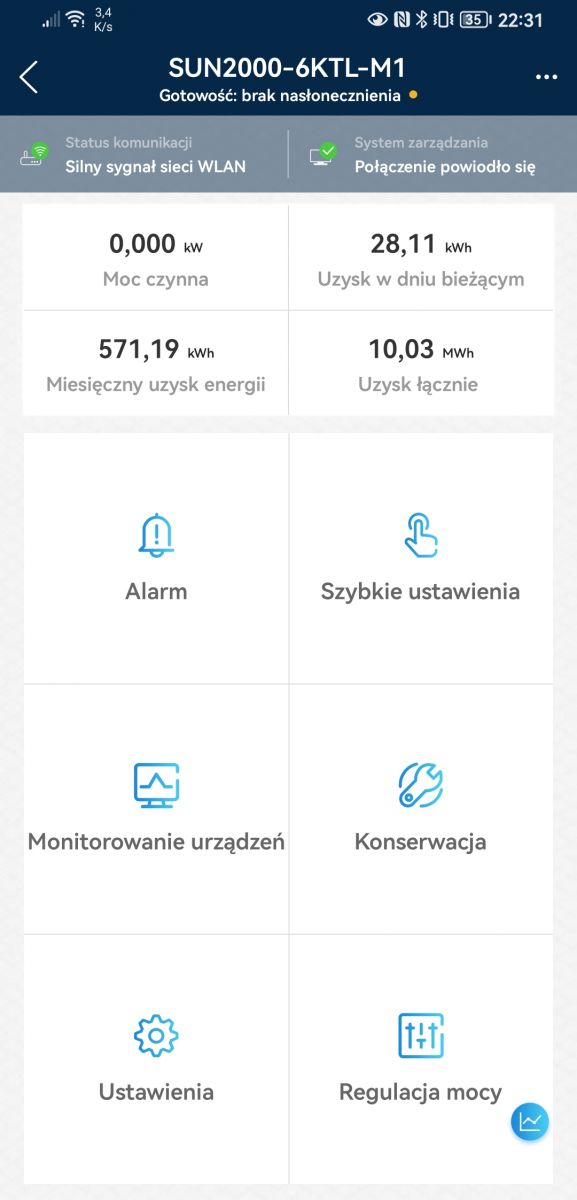
I do not know what kind of inverters that are not bangla. My 6ktl bangla with the sun2000 app on the latest spc146 software and normally broadcasts its local area network.
Thanks for the response. Thus, the 600DC overrun occurs whenever the 253V is exceeded. I had the impression that there were also situations where the AC did not exceed 253V and the excess was 600DC, but maybe it's some delay on the chart
As for the error code, it is not in the manual or the protocol description.
Robyn212 wrote:
01rafalm wrote:
It is not the DC voltage above 600V that disables the inverter, but the mains voltage above 253V. Take a look at the DC voltage charts for each day. The inverter boosts the DC voltage during startup and shutdown
Check FusionSolar installation time zone permissions
I have an hour shift there on the chart - now it is 4:00 PM and the chart shows me production at 5:00 PM.
I do not know what permissions the installer gave you and what you have access to on the web version on the website you provided, for me it is like this:
1. I log in to the website https://eu5.fusionsolar.huawei.com 2. At the top, in the tabs, I have Settings 3. Click on the Settings tab - the System settings / Account settings window should be displayed with your data, user name (partially asterisks), avatar (if you have added one), password (stars), telephone number if you have entered, e-mail address (partially stars) 4. Click in the menu on the left in Manage the installation, give a tick next to the name of your installation and click on modify at the top right, a new window called Modify will appear, this box will / should contain information, the name of the company that installed the installation, the name of the installation, installation capacity, date of connection and some information such as Installation without social purposes 5. At the top, in the Configuration of the electricity price tab, you can define the price, transmission separately, energy separately 6. In the Other information tab you can set the time zone so that it shows you correctly on the charts.
If you do not have these options after logging in, press the installer to give you the appropriate permissions.
I have it too, only I have moved half an hour ahead. The time zone is correct. The time on the chart is ahead of the real time.
✨ Discussion about Huawei SUN2000 inverter commissioning, FusionSolar/FusionHome access, and Wi‑Fi dongle communication problems. The inverter firmware update and initial setup succeeded, but the SDongleA Wi‑Fi dongle stayed offline in FusionSolar and the red LED blinked; the practical workaround was to connect the dongle by Ethernet cable directly to the router, which restored Internet communication. Later posts covered related Huawei inverter configuration topics: selecting the correct grid code for Poland/Germany, MPPT multi-peak scanning, string capacity configuration, owner vs installer permissions in FusionSolar, changing Wi‑Fi credentials, dongle firmware updates, time synchronization/NTP, smart meter DTSU666-H detection, and firmware/version availability. Several users also discussed production expectations, MPPT voltage ranges, and inverter shutdown due to grid overvoltage. AI summary based on the discussion. May contain errors.
If you prefer to edit the inverter, open the SUN2000 app, connect to the inverter’s AP, choose Maintenance > Communication > Router Wi-Fi and enter the new credentials; save and wait for the LED to turn steady green.
What causes the SUN2000 to trip on sunny days?
A 10-minute average grid voltage at the terminals above 253 V triggers disconnection per VDE-AR-N-4105 [Elektroda, lizak1983, post #19657944] High roof-top cable resistance adds 1-2 V, so measure at the inverter. Load shifting (e.g., 2 kW boiler) or DSO tap change fixes the issue.
Can I lift the 253 V reconnection limit?
Raising “Upper voltage limit when reconnecting to grid” breaches EU NC RfG and risks neighbour equipment damage. Installers and DSOs can audit logs [Elektroda, rokbok, post #19639893] Keep 253 V unless your DSO grants a written exception.
Firmware: what’s new in SPC136 and how do I install it?
SPC136 adds battery-version alarm, M1–M3 parallel support and faster offline self-check [Huawei ReleaseNotes 2021]. Download via SUN2000 or FusionSolar app (Me > Device Commissioning > Update). Stay within inverter Wi-Fi, tap Update, wait ~20 min; the inverter reboots once at ~80 % [Elektroda, MisiekDPx, post #19639882]
How do I update the SDongleA-05 Wi-Fi dongle?
Unplug the dongle, re-insert: it broadcasts “Dongle–AP”. Connect with SUN2000 app, default pwd 00000a, go to Maintenance > Update Device, choose SPC118 file and start. LED blinks fast green during upgrade, steady green when done (≈10 min) [Elektroda, lizak1983, post #19640000]
Grid code list shows only three Chinese entries – what now?
Import units lack EU presets. Select Custom 50 Hz and manually enter: U/Un 0.85 = 0 s, 1.10 = 10 min, 1.15 = 0.1 s; cos φ = 0.9 lead/lag; Q/U droop 4 % [Elektroda, domelek, post #19529531] A valid NC RfG declaration is still required for DSO acceptance.
My Wi-Fi dongle flashes red every few days – fix?
LED red blink means router unreachable. Common causes: weak signal or changed password. Move a repeater within 5 m (-55 dBm or better) [Elektroda, JackRze, post #19489219] If stable signal still fails, reboot the dongle or update its firmware (see above).
Installer owns the FusionSolar site – can I get control?
Yes. Ask the installer to delete the plant from their account, then register a new Installer account with your e-mail and inverter serial; Huawei cloud blocks duplicate serials [Elektroda, rokbok, post #19636492] Warranty remains tied to the serial, not the account.
Lost inverter password – how to reset?
Connect SUN2000 app to the inverter AP, choose “Reset Password”. You must input the 6-digit ESN from the side sticker and the current date. The default admin password resets to 00000a [Huawei Manual].
What’s the correct string current for SUN2000-M1?
Design strings so Isc ≤ 15 A and operating current ≤ 11 A. Example: 12×340 W modules give Isc 10.3 A, within limits [Elektroda, mariusz.lubicz, post #19656018] Exceeding Isc risks optimizer derating and warranty issues.
Will Huawei optimizers shut a whole string when one panel is shaded?
No. Each SUN2000-450W-P acts as a DC/DC converter. A shaded panel continues at lower power while the rest maintain maximum current [Elektroda, jsw, post #19656269] The inverter therefore keeps production and avoids hot-spot bypass.
How do I clear old alarms in FusionSolar?
Go to Device > Alarms, tap the three-dot menu, choose “Clear”. Alarms caused by firmware mismatch disappear automatically after updating both inverter and dongle [Elektroda, stratus84, post #19490242]
Edge case: inverter shows 2 V DC after switch-on – diagnosis?
Reverse-polarity MC4 crimps drop the PV voltage to ≈ 2 V and block startup [Elektroda, kravat3, post #19536568] Disconnect, verify red = + and black = – with a multimeter, then re-crimp.
Quick 3-step: add new owner without installer
Installer deletes plant in FusionSolar. 2. Owner installs SUN2000 app, taps “Create Installer Account”, enters S/N and e-mail. 3. Log in, add plant, then invite personal “Owner” user. Done.
AI summary based on the discussion. May contain errors.








 .
.