logo elektroda
logo elektroda
X
logo elektroda

[BK7231N - CBU] TONGOU TO-Q-SY1-JWT Din Rail Wifi Switch with power metering

valeklubomir 15630 61

TL;DR

  • TONGOU TO-Q-SY1-JWT DIN-rail WiFi switch from AliExpress uses a BK7231N CBU module and includes power metering.
  • It uses a magnetic polarized relay driven by an MD7620 bridge driver; forward closes the contact and reverse opens it.
  • The relay needs a 100–200 ms pulse to change position, then holds its last state without power.
  • Pin mapping includes P9 relay status LED, P15 WiFi LED, P17 button, P24 bridge forward, and P26 bridge reverse.
  • OpenBK7231T_App firmware supports the platform, but MD7620 bridge-driver support is not finished yet.
Generated by the language model.
ADVERTISEMENT
📢 Listen (AI):
  • #61 21823833
    divadiow
    Level 38  
    Posts: 4859
    Help: 424
    Rate: 860
    Sllaci01 wrote:
    This was originally the Ewelink version and it had voltage and current limitation, maximization.


    I am not aware of an equivalent ability within OpenBL602

  • ADVERTISEMENT
  • #62 21833136
    Sllaci01
    Level 4  
    Posts: 7
    Thanks for the info.
    I haven't had time to work on the project for a long time, but now I'm back

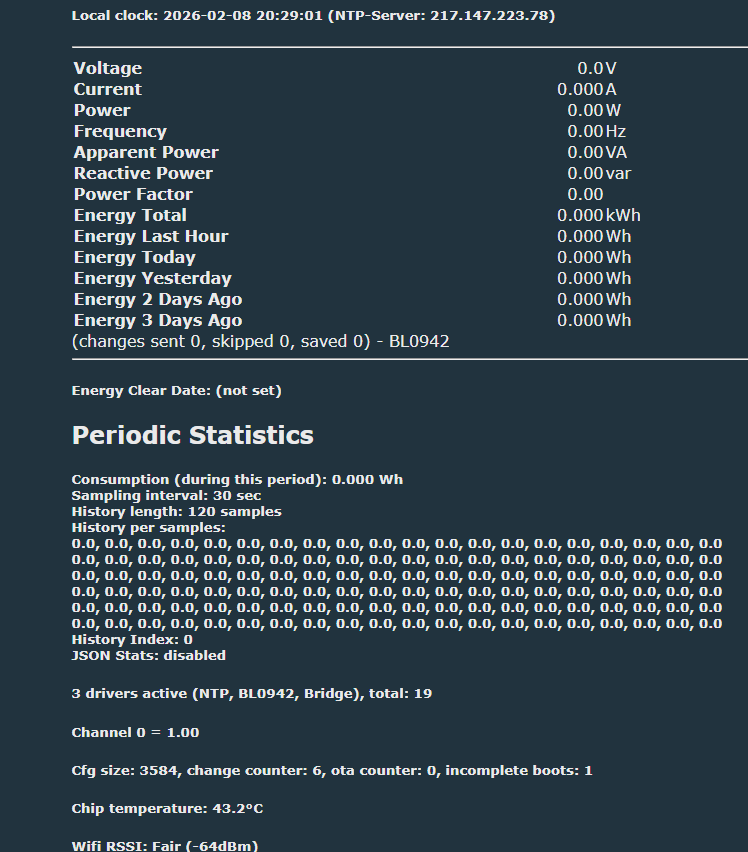
    Is it possible that this would implement current limitation?
    I think that for this it is necessary to monitor the current consumption and, if it is greater than the set value, the relay switches off.

    BL0942 driver can be loaded, but unfortunately it doesn't work.
    There are no values ​​read.
    And it doesn't accept commands, for example: "VoltageSet 230"
    Maybe it is possible that SPI is connected?

    Added after 4 [minutes]:


    Screenshot of an energy monitoring dashboard with voltage/current/power readings and a “Periodic Statistics” section.

    Added after 8 [minutes]:

    My startup:
    delay_s 5
    startDriver BL0942
    startDriver NTP
    ntp_timeZoneOfs 1
    SetupEnergyStats 1 30 120 0
    startDriver Bridge
    BridgePulseLength 100

    And need enable flag 26 ([UART]
📢 Listen (AI):

Topic summary

✨ The discussion centers on the TONGOU TO-Q-SY1-JWT DIN Rail WiFi switch featuring the BK7231N chipset (CBU module) and integrated power metering via the BL0942 chip. The device uses a magnetic polarized relay driven by an MD7620 bridge driver IC, requiring 100-200 ms pulses to toggle relay contacts, which then hold position without continuous power. Initial firmware lacked support for the MD7620 bridge driver, but a pull request was submitted and merged to add this functionality. Proper pin configuration is critical: pins 24 and 26 must be assigned as BridgeFWD and BridgeREV respectively, not as simple relay outputs (Rel/Rel_n), to avoid continuous coil energizing and overheating. The bridge driver should start automatically on reboot, but manual startDriver Bridge command may be necessary if autostart is disabled. Adjusting the bridge pulse length is possible but not fully documented; some users reported issues with pulse timing affecting relay operation. Flashing the device can be done without desoldering the module by connecting to UART pins, though some users experienced difficulties with programming stability and recommended using hid_download_py or the BK7231GUIFlashTool. Power metering calibration remains imperfect, with non-zero power readings at no load and issues distinguishing real, apparent, and reactive power. Firmware flags and startup commands can influence metering behavior and device startup states after power outages. Community members shared updated JSON templates for device configuration, emphasizing correct pin roles and startup commands to enable bridge driver and energy monitoring. The discussion also touched on hardware modifications for broken pads and soldering techniques for module removal.
Generated by the language model.

FAQ

TL;DR: A 100–200 ms pulse is enough to flip the MD7620 latching relay, and “Bridge driver will start automatically after reboot” [Elektroda, valeklubomir, post #20448030] OpenBK v1.17.441 adds native Bridge support and fixes over-heating caused by continuous coil drive [Elektroda, robert21965, post #20942245]

Why it matters: Correct pin roles and pulse timing stop the relay from drawing >2 W as heat and extend module life.

Quick Facts

• Wi-Fi SoC: Beken BK7231N, 32-bit, 2.4 GHz [Elektroda, valeklubomir, post #20288620] • Relay driver: MD7620 H-bridge, 100–200 ms activation pulse [Elektroda, valeklubomir, post #20288620] • Metering IC: BL0942, ±1 % typical after calibration [Elektroda, valeklubomir, post #20288620] • Latest tested OpenBK: v1.17.441 (Jan 2024) [Elektroda, robert21965, post #20942245] • Flash speed: 921 600 bps UART; HID tool removes 100-attempt issue [Elektroda, romanfarki, post #20476727]

How do I enable the H-bridge driver in OpenBK?

  1. Set P24 to BridgeFWD;1 and P26 to BridgeREV;1. 2. Reboot so the Bridge driver autostarts. 3. If 0 drivers show, issue startDriver Bridge once [Elektroda, Osrx, post #20863693]

My relay stays energised and overheats—why?

Using Rel/Rel_n roles powers the coil continuously. Switch to BridgeFWD/BridgeREV roles so the driver sends a 100–200 ms pulse only [Elektroda, przemsi_ele, post #20862770]

Can I flash a CBU module without desoldering?

Yes. Solder 4–5 dupont wires (3V3, GND, RX, TX, CEN) on-board, hold CEN low, and flash with BK7231GUIFlashTool or hid_download_py [Elektroda, p.kaczmarek2, post #20797962]

How do I calibrate BL0942 measurements?

Supply a known resistive load, then issue EnergyCal Voltage , Current , Power . Repeat until readings match within ±1 % [Elektroda, robert21965, post #20935273]

Module reboots when measuring solar inverter output—why?

Negative current can exceed firmware assumptions and trip a watchdog, causing resets [Elektroda, thealphahelix, post #20475897] Bridge to a conventional load during testing.

How do I change the power-on state of relay and LED?

Open Configure Startup, set Channel 1 to –1 (restore last), 0 (off) or 1 (on); LED follows the relay channel [Elektroda, windo31, post #21591074]

Three-step flashing recap

  1. Hold CEN low and power the board.
  2. Run BK7231GUIFlashTool, select OpenBK .bin, click Flash.
  3. Release CEN; connect to the new Wi-Fi AP to finish setup [Elektroda, p.kaczmarek2, post #20797962]
Generated by the language model.
ADVERTISEMENT