





logo elektroda
logo elektroda
X
logo elektroda

Our IoT teardowns/templates list has reached 500 entries!

p.kaczmarek2 2085 0

TL;DR

  • The IoT Device Interior List aggregates Elektroda links to IoT teardowns, flashing guides, and GPIO templates, and it has now reached 500 entries.
  • It targets mostly Wi‑Fi modules, with some Zigbee devices, and helps users identify chips, firmware-change difficulty, and ready-made OpenBeken configurations.
  • OpenBeken supports BK7231T, BK7231N, T34, BL2028N, XR809, BL602, LF686, W800/W801, W600/W601, and LN882H platforms.
  • Users can filter by hardware platform and keyword, then copy templates into the OpenBeken web app or import them as scripts.
  • New entries should include exact model identification, flashing steps, and GPIO templates, while duplicate topics should be avoided; the JSON database also accepts pull requests.
Generated by the language model.
ADVERTISEMENT
Treść została przetłumaczona polish » english Zobacz oryginalną wersję tematu
📢 Listen (AI):
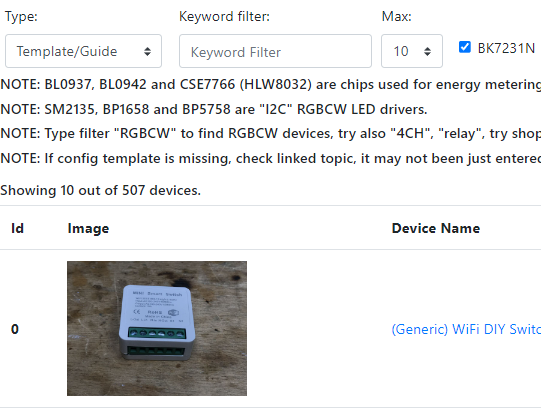
  • Screenshot of IoT device list interface with an image and device name.
    Due to reaching 500 entries on our website Electrode list of interior IoT devices , I will remind you what this list is, how it works, why it was created and I will show you how every user can contribute to our initiative.

    What is the IoT Device Interior List?
    Our list of IoT device interiors is essentially an improved version of the search engine, an aggregator of links to Elektroda topics or posts where information about IoT devices was provided. The list can be seen here:
    https://openbekeniot.github.io/webapp/devicesList.html
    It is also worth visiting our English-language Elektroda channel, which is slightly related to this initiative, and there are also instructions on how to change the firmware of devices on various WiFi modules:
    https://www.youtube.com/@elektrodacom

    Why was there a list of interiors of IoT devices?
    The list of IoT device interiors was created because more and more people modify purchased IoT devices to work independently of the manufacturer`s servers, often changing their firmware for this purpose. Our descriptions of the interior of the devices provide information on how to change the firmware, what difficulties can be expected in the case of a given device, what system it is built on, and often also provide a ready-made configuration template. Therefore, our list focuses on devices based on WiFi modules, although I must admit that several Zigbee devices are also included in it.

    Why change the batch of IoT devices?
    Motivation often varies from user to user, but the reasons I see most often are (in random order):
    - the desire to free the device from potential spying by the manufacturer (freeing from the cloud)
    - the desire to protect yourself in the event that the manufacturer goes bankrupt or changes the services offered (there have already been stories that the camera supplier went bankrupt and the cameras became useless)
    - the desire to develop the functionality of the device (we even have tutorials how to add missing button to led strip on the Electrodes channel), similarly you can add a temperature sensor or an IR receiver
    - desire to connect to Home Assistant ( tutorial here ), or with ioBroker ( tutorial ), or with your own HTTP server, etc
    - the desire to combine devices from different manufacturers into one ecosystem

    What is it necessary to change the firmware of such a device?
    Usually, the whole thing comes down to soldering 4 or 5 cables and connecting to a USB to UART converter, it is best to provide an additional stable 3.3V power supply, but some users have even used NodeMCU or Arduino as part of such a "programmer" (with the main MCU capable of RESET) and were also successful. For details, please refer to the topics on the list, or you can also visit: Youtube Electrodes .

    How to use the IoT device interior list
    First, we check the checkboxes next to the hardware platforms we are interested in (usually all), then enter the keyword and click "Apply filtering":

    Screenshot of the IoT devices list search interface with selection filters.
    You can also change the number of results displayed from the default limit of 10 to a larger one.
    Additionally, we also have a search function all templates , even the short ones, or just " detailed teardowns ", i.e. detailed instructions on how to flash a given device.
    Into the field keyword we can enter the name of the device model, the store where we bought it or its PCB designation. For example:
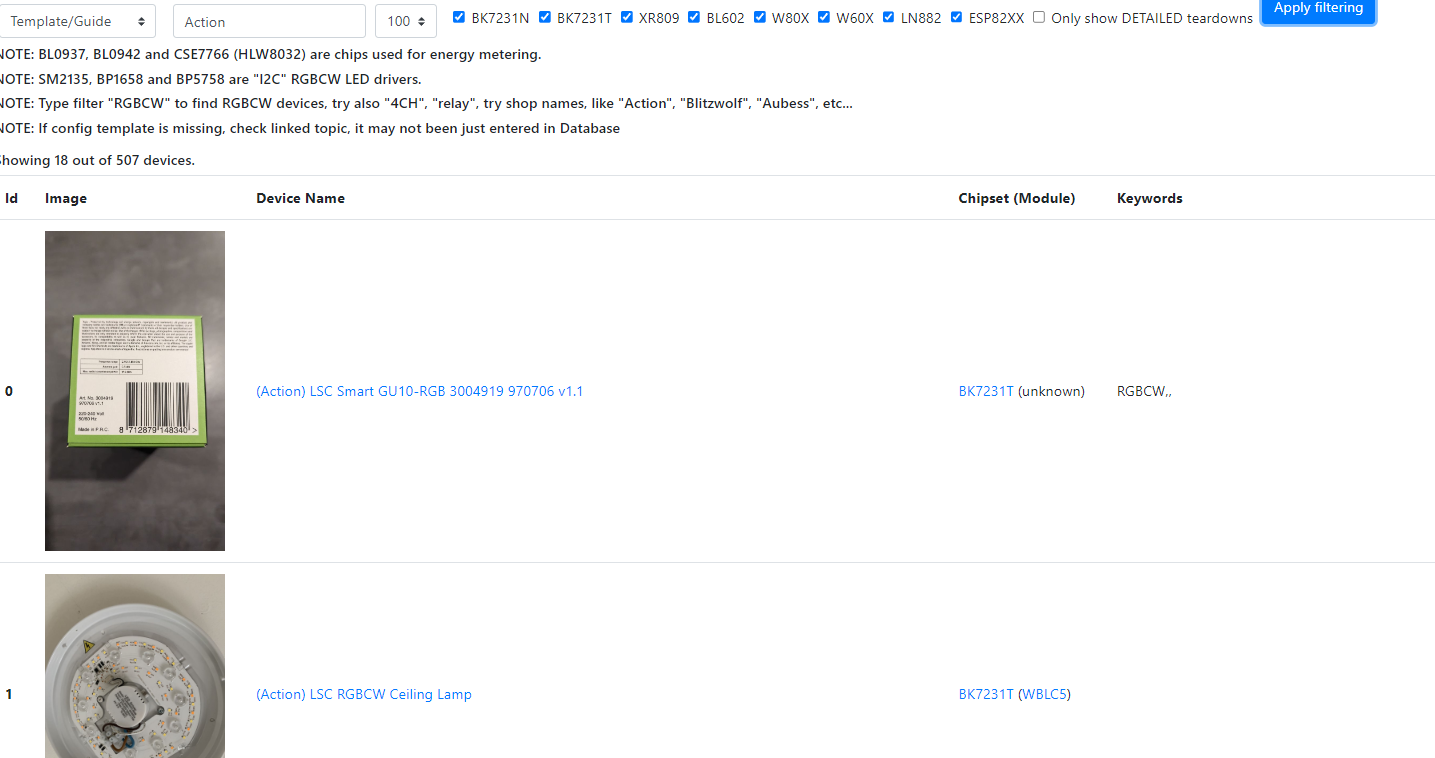
    A section of the IoT devices list with information about LSC products.
    Similarly, for a popular shipping portal:
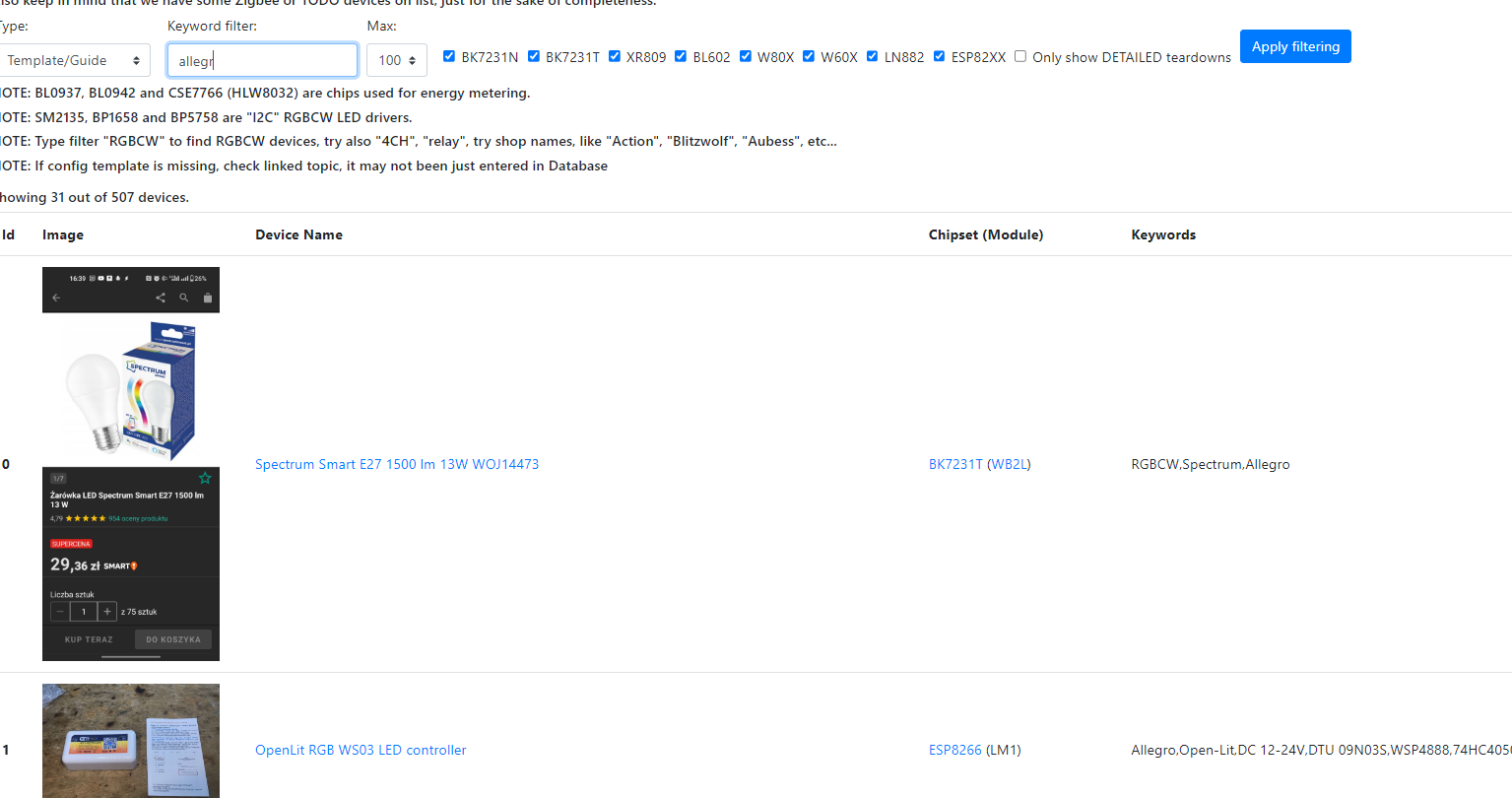
    IoT device list on a page with filtering results based on the keyword alllegro.
    You can use the list in two ways - you can look there before purchasing the equipment (e.g. if you are looking for something on ESP and want to see where there is a chance to get, for example, such a light switch), or after purchasing the equipment (e.g. if you have already bought something and we are looking for instructions on how to flash)

    Integration with OpenBeken
    The list of device interiors is also integrated with the firmware OpenBeken . OBK currently supports the following platforms:
    
    BK7231T (WB3S, WB2S, WB2L, etc)
    BK7231N (CB2S, CB2L, WB2L_M1, etc)
    T34 (T34 is based on BK7231N)
    BL2028N (BL2028N is a Belon version of BK7231N)
    XR809 (XR3, etc)
    BL602 (SM-028_V1.3 etc)
    LF686 (flash it as BL602)
    W800 (W800-C400, WinnerMicro WiFi & Bluetooth), W801
    W600 (WinnerMicro chip), W601 (WIS600, ESP-01W, TW-02, TW-03, etc)
    LN882H WIP platform, see sample device teardown and flashing
    

    on these platforms you can upload OBK and then open the "Web App", on its main page there is a list available:
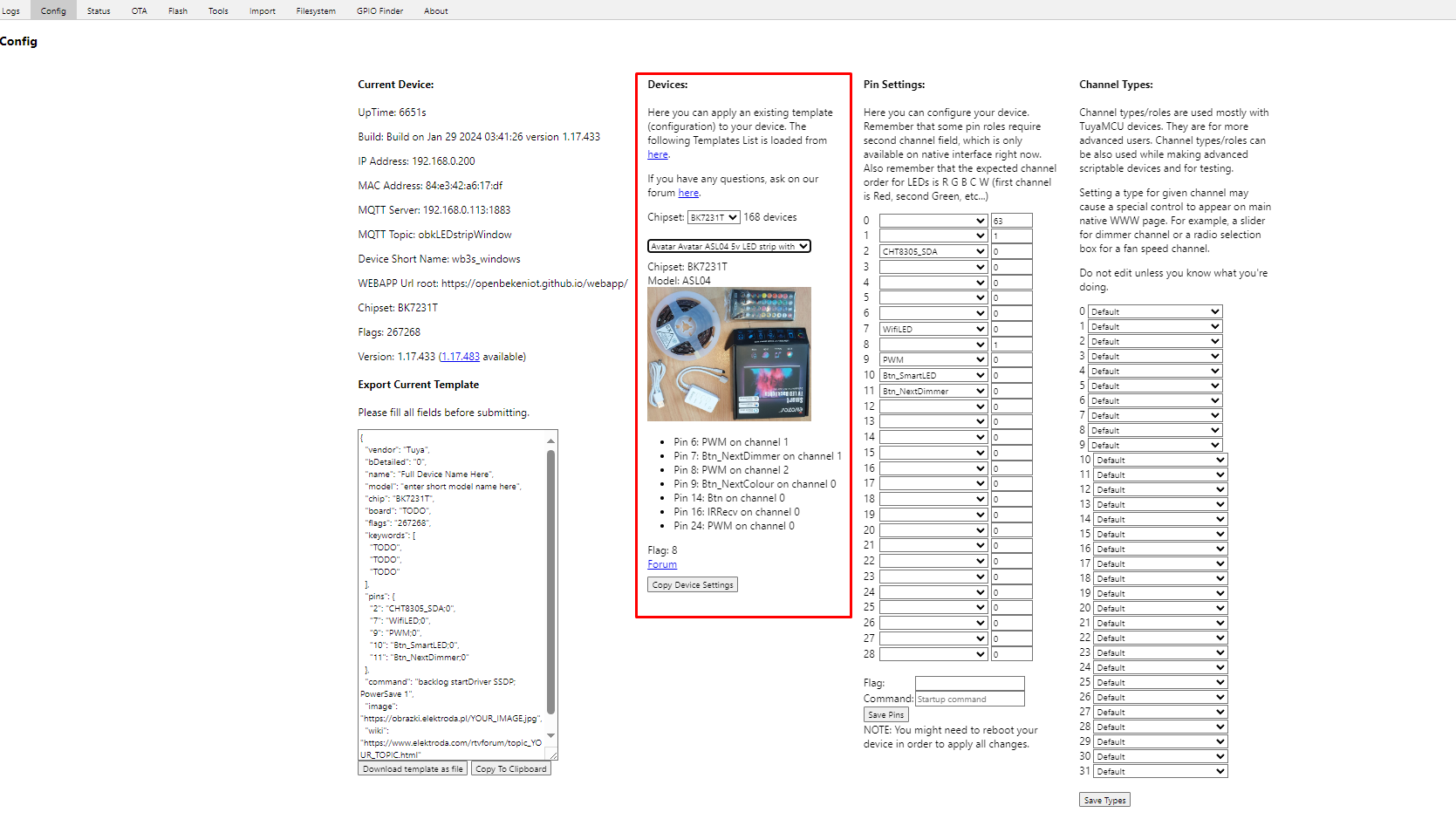
    IoT device configuration interface with device list and PIN settings.
    Button Copy device settings will copy the selected template to the remaining fields, then you need to save them.

    The second method is to import the template there is the Import tab:
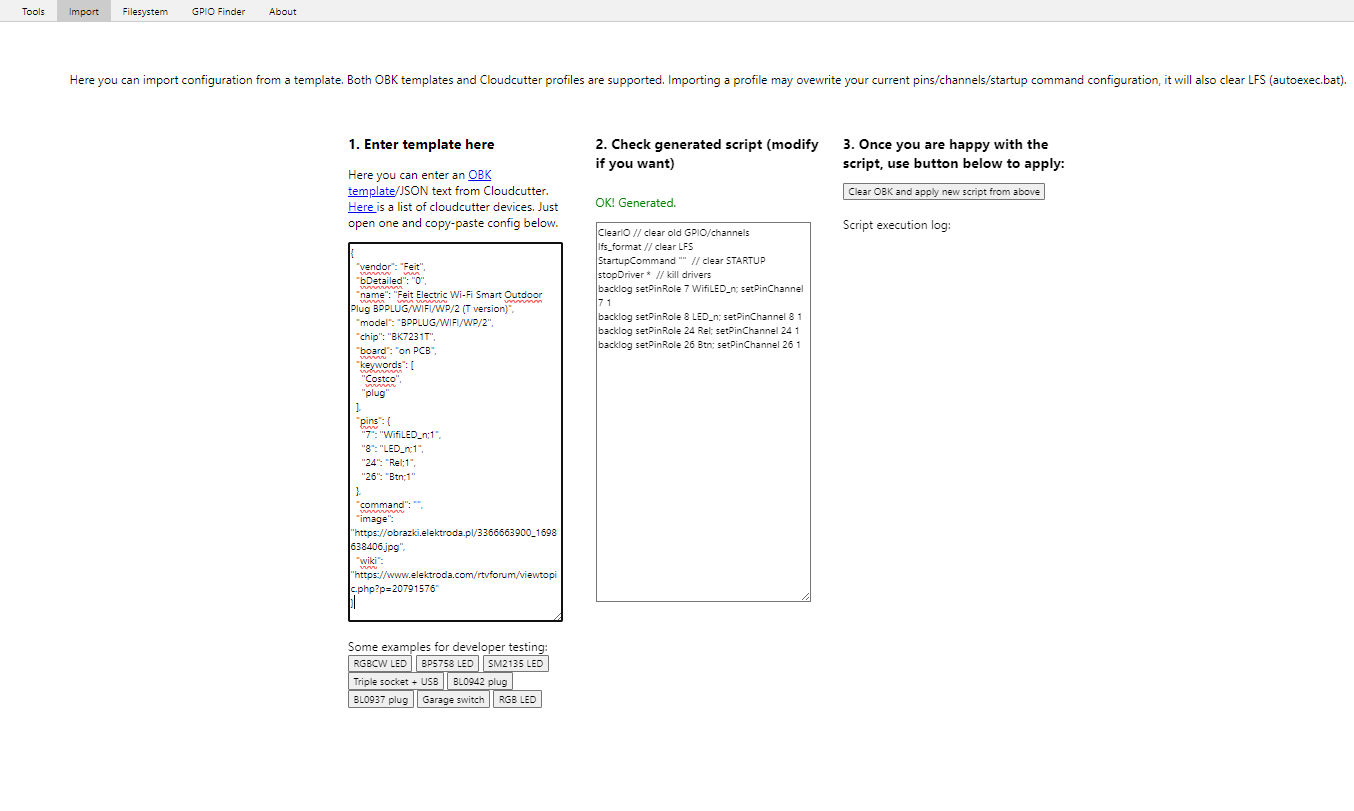
    View of a tool for importing configuration from a template for IoT devices.
    We paste the template there (e.g. copied from the forum), the website generates a script that performs the given settings and then we approve it.

    What should a topic on the device list contain?
    We place each new topic about the device in the appropriate section:
    https://www.elektroda.pl/rtvforum/forum507.html
    The topic should contain enough information - the more details, the better. As a rule, the basis is:
    - the exact model of the device and other information allowing it to be identified and distinguished from others, so that others will be able to find it
    - information on how to change the firmware and potentially the GPIO role template/schedule
    This basis is required to make it easier for others to repeat the firmware change. You can also post additional photos from inside the device, pay attention to its construction, describe its use, etc., place a copy of its original firmware (it may be useful for reading its GPIO configuration in our programming program
    Please also avoid duplicates. There are probably a few on the list right now.

    Database source
    The database itself is in JSON format and is available on our repository:
    https://github.com/OpenBekenIOT/webapp/blob/gh-pages/devices.json
    If someone adds an entry, they can also open a PR to this list, and if not, I will do it in my own time.

    Summary
    Thank you to everyone who participated in this project. 500 entries is really a lot! Not all of them are so detailed, but I still think that many people will definitely benefit from them.
    In case you had any questions, I`ll be glad to help. I hope that we will soon be able to reach 1,000 devices.

    Cool? Ranking DIY
    Helpful post? Buy me a coffee.

    About Author
    p.kaczmarek2
    Moderator Smart Home
    Offline 
    p.kaczmarek2 wrote 14418 posts with rating 12376, helped 650 times. Been with us since 2014 year.
  • ADVERTISEMENT
📢 Listen (AI):

FAQ

TL;DR: With 500 entries, this OpenBekenIOT list is “an improved version of the search engine” for people who need fast IoT teardowns, flashing guidance, and reusable templates before buying or after opening a WiFi device. [#20980415]

Why it matters: It turns scattered forum posts into a practical lookup tool for cloud-free firmware work, hardware identification, and template reuse.

Option Best use What you get
All templates Fast matching by model, seller, or PCB code Short and full entries from the database
Detailed teardowns Full flashing work Step-by-step device interior and firmware-change instructions

Key insight: The list is most valuable because it links identification data, flashing notes, and ready-made templates in one place. That combination reduces guesswork before purchase and during modification.

Quick Facts

  • The list had 500 entries on 2024-02-27, and the stated next milestone was 1,000 devices. [#20980415]
  • Typical flashing access uses 4 or 5 cables plus a stable 3.3V supply and a USB-to-UART connection. [#20980415]
  • The list targets WiFi-module devices first, but it also includes several Zigbee devices as exceptions. [#20980415]
  • The web list shows 10 results by default, and users can raise that limit after filtering by platform and keyword. [#20980415]
  • OpenBeken support in the post spans at least 10 platform lines, including BK7231T, BK7231N, BL602, XR809, W600/W601, W800/W801, and LN882H. [#20980415]

What is the IoT Device Interior List on OpenBekenIOT, and how is it different from a normal search engine?

The IoT Device Interior List is a curated index of Elektroda posts about device internals, flashing, and templates. It differs from a normal search engine because it aggregates only relevant IoT teardown topics and adds structured lookup by platform, keyword, and template type. The post describes it as an improved search tool rather than a general web search, and the database had reached 500 entries when announced. [#20980415]

Why do people replace the original firmware in WiFi IoT devices to remove cloud dependence and integrate with Home Assistant or ioBroker?

People replace the original firmware to remove cloud dependence, avoid vendor lock-in, and connect devices to their own automation stack. The post lists four concrete motives: privacy, protection against a vendor shutdown, added functions such as extra buttons or sensors, and integration with Home Assistant, ioBroker, or a private HTTP server. It also notes that users often want one ecosystem for devices from different brands. [#20980415]

How do I use the OpenBeken device interiors list to find a teardown or template by model name, store name, or PCB marking?

Use the filter controls and a targeted keyword. 1. Tick the hardware-platform checkboxes you want, usually all of them. 2. Enter a keyword such as the model, seller, marketplace, or PCB marking. 3. Click “Apply filtering” and, if needed, raise the default 10-result limit. The post says these fields work for both pre-purchase checks and finding flashing instructions after you already own the device. [#20980415]

What is OpenBeken, and which platforms like BK7231T, BK7231N, BL602, XR809, W600, W800, and LN882H does it support?

OpenBeken is firmware integrated with the device list and its Web App so users can apply templates to supported WiFi platforms. The post lists BK7231T, BK7231N, T34, BL2028N, XR809, BL602, LF686, W800, W801, W600, W601, and LN882H as supported or work-in-progress lines. It also notes that LF686 should be flashed as BL602, and LN882H is marked WIP. [#20980415]

How do I flash an IoT device using a USB-to-UART adapter, and what wiring and 3.3V power setup are typically needed?

You usually flash it by wiring the device to a USB-to-UART adapter with 4 or 5 cables and powering it from a stable 3.3V source. The post says that is the normal setup and recommends the extra 3.3V supply for stability. It also states that some users succeeded with NodeMCU or Arduino-based programmers when the main MCU could perform RESET. [#20980415]

What should a good Elektroda device teardown topic include so other users can identify the device and repeat the firmware change?

A good teardown topic includes the exact device model, distinguishing details, and clear firmware-change information. The post says the minimum is enough identification data so others can find the same device, plus the flashing method and a GPIO role template or schedule. Extra value comes from internal photos, build notes, use-case comments, and even a copy of the original firmware. [#20980415]

How does the 'Copy device settings' feature in the OpenBeken Web App work when applying a template from the device list?

The “Copy device settings” button copies the chosen template into the remaining configuration fields in the Web App. After the copy, you still need to save those values. The post presents this as one of two template-application methods available from the OpenBeken-integrated device list inside the main Web App page. [#20980415]

How do I import a template into the OpenBeken Web App and generate the script that applies the device settings?

Open the Import tab, paste the template, and let the Web App build the script. The post says the site generates a script that performs the specified settings, and you then approve it. This is the second template workflow, alongside direct copying with the “Copy device settings” button. [#20980415]

What's the difference between 'all templates' and 'detailed teardowns' in the OpenBeken IoT device list, and when should I use each filter?

“All templates” searches the full template pool, including short entries, while “detailed teardowns” narrows results to full flashing guides. Use all templates when you want the fastest match by device name, store, or PCB code. Use detailed teardowns when you need the full interior description, flashing method, and likely difficulties for a specific device. [#20980415]

Which search keywords work best in the OpenBeken devices list when I only know the seller, marketplace, or PCB code of an IoT device?

Use the seller name, marketplace name, device model, or PCB marking as your keyword. The post explicitly says the keyword field accepts those identifiers, not just the retail model. That makes the list useful when the product is rebranded and the only reliable clue is where you bought it or what is printed on the board. [#20980415]

What is a GPIO role template in OpenBeken, and why is it important when documenting an IoT device teardown?

A GPIO role template is a device configuration record that assigns board pins to functions, making the same setup repeatable on matching hardware. It matters because the post treats the GPIO role template or schedule as core information needed so another user can repeat the firmware change correctly. Without it, a teardown is harder to reuse and validate. [#20980415]

How does the devices.json database on GitHub fit into the OpenBekenIOT web app, and what is the process for submitting a new entry or pull request?

The web app uses a JSON database, and the post identifies that source as devices.json in the project repository. If someone adds an entry, they can open a pull request against that list; otherwise, the maintainer said he would add it later himself. This makes the public JSON file the practical content source for the searchable device list. [#20980415]

What are the practical differences between using a dedicated USB-to-UART converter and repurposing a NodeMCU or Arduino as a programmer for IoT firmware flashing?

A dedicated USB-to-UART converter is the standard method, while NodeMCU or Arduino are fallback programmer options that some users have used successfully. The post recommends USB-to-UART plus stable 3.3V power, then notes that reused boards can work if the main MCU can handle RESET. The practical difference is predictability: the dedicated converter is the baseline, and the reused board is a workaround. [#20980415]

How can I check before buying an IoT switch, bulb, or controller whether it is likely based on ESP, BK7231, or another supported WiFi module?

Check the list before purchase by filtering for the platform you want and searching the product name or seller terms. The post gives this exact use case: a buyer can look for ESP-based hardware and see where a matching switch or other device may appear. This pre-purchase workflow reduces blind buys because the list links model clues to teardown and template records. [#20980415]

What common problems should I expect when flashing WiFi IoT devices, and how can teardown posts help avoid mistakes like duplicates, missing pinouts, or unsupported hardware?

Expect platform mismatches, unclear flashing details, and duplicate forum entries that waste time. The post says teardown topics should document the exact model, flashing method, and GPIO template so others can identify the hardware and repeat the process. It also warns that duplicates already exist on the list, and it flags LN882H as work in progress, which is a clear support-limit edge case. [#20980415]
Generated by the language model.
ADVERTISEMENT