logo elektroda
logo elektroda
X
logo elektroda

Tuya CHT8310 Sensor: Adjusting Sleep Mode for Hourly Data Updates

qrmonzergamal 1314 12
ADVERTISEMENT
  • #1 21271142
    qrmonzergamal
    Level 2  
    Posts: 15
    hello again,
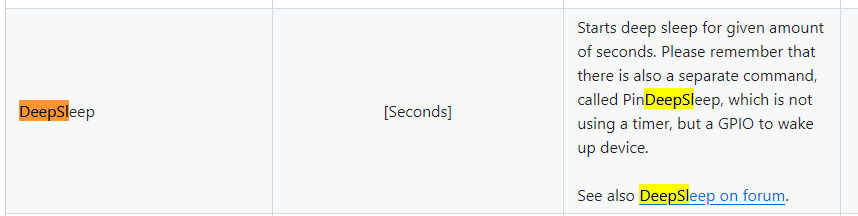
    i'm using tuya humidity and temp sensor cht8310, when i use DoorSnsrWSleep, it slept after 50 seconds and never go online again to send Hum and Temp data, are there any commands that i can use to make the sensor open every hour to publish data?
  • ADVERTISEMENT
  • #3 21271635
    qrmonzergamal
    Level 2  
    Posts: 15
    No i used DoorSnsrWSleep
  • #4 21271643
    divadiow
    Level 38  
    Posts: 4867
    Help: 424
    Rate: 863
    what is your device exactly?
  • ADVERTISEMENT
  • #5 21271646
    qrmonzergamal
    Level 2  
    Posts: 15
    Tuya temperature and humidity sensor [CHT8310]
  • #6 21271647
    divadiow
    Level 38  
    Posts: 4867
    Help: 424
    Rate: 863
    a battery-powered TH01? with or without TuyaMCU?

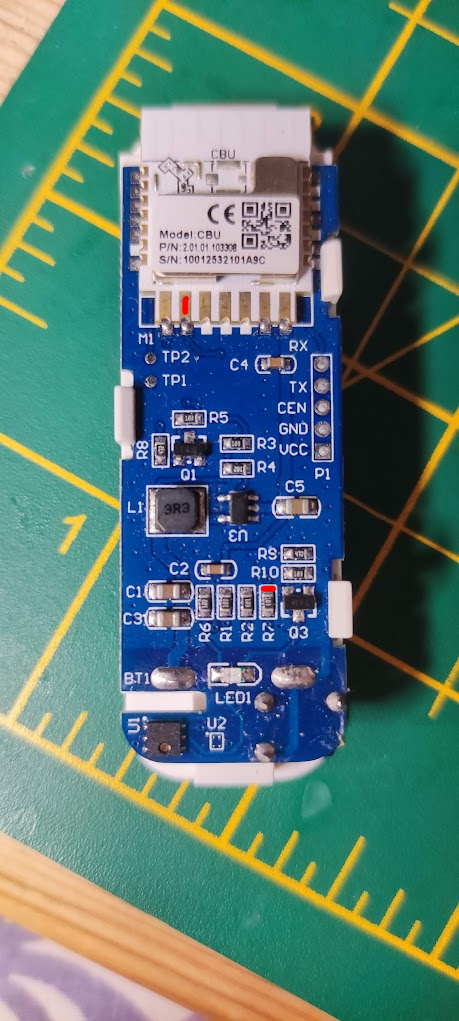
    Do you have a pic of the PCB inside?
  • #7 21271656
    qrmonzergamal
    Level 2  
    Posts: 15
    Electronic module with connectors on a printed circuit board.

    Same like this
  • ADVERTISEMENT
  • #9 21271703
    qrmonzergamal
    Level 2  
    Posts: 15
    Ya I used the first method, in method 2 the battery will be empty in less than an hour
  • #10 21271939
    insmod
    Level 31  
    Posts: 1354
    Help: 161
    Rate: 426
    >>21271703
    Try autoexec from https://www.elektroda.com/rtvforum/topic4019974-90.html#21185662
    You may also try https://github.com/openshwprojects/OpenBK7231T_App/pull/1297, if you don't plan to change any settings on your wifi router (ota file attached).
    Attachments:
    • OpenBK7231N_1297_merge_1890f8ec2ce0.zip (493.49 KB) You must be logged in to download this attachment.
  • #11 21271947
    divadiow
    Level 38  
    Posts: 4867
    Help: 424
    Rate: 863
    OK. the template is only part of the story for these sorts of devices. They require autoexec.bat setup too: https://youtu.be/kXi8S12tmC8?si=3bqBoq3pLyk40u0z

    I dug my device out and the template is this (I'll update the first post in other thread to match)
    Code: JSON
    Log in, to see the code


    and my autoexec looks like this:

    Code: Text
    Log in, to see the code


    note this configuration relies on an MQTT connected state before it'll go to sleep for 1 day, if no "connected" status it will sleep for 5 mins then try again, ad infinitum.

    Added after 1 [minutes]:

    ah @insmod beat me to a response
  • ADVERTISEMENT
  • #12 21271974
    insmod
    Level 31  
    Posts: 1354
    Help: 161
    Rate: 426
    >>21271947 Btw, cht_alert is now a little different. You should have 4 parameters - where second is for humidity
  • #13 21272067
    divadiow
    Level 38  
    Posts: 4867
    Help: 424
    Rate: 863
    ah, very good

Topic summary

✨ The discussion revolves around the Tuya CHT8310 humidity and temperature sensor, specifically addressing issues with the device entering sleep mode and failing to wake up for data transmission. The user initially employed the DoorSnsrWSleep command, which resulted in the sensor not reconnecting to send updates. Suggestions include using the deepsleep command to control sleep duration and implementing an autoexec.bat setup for better power management. The conversation also touches on the importance of selecting the correct template for the device and adjusting parameters for optimal performance, including the cht_alert command for humidity monitoring.
Generated by the language model.

FAQ

TL;DR: "They require autoexec.bat setup." Use OpenBK deepsleep/PinDeepSleep in seconds (typical 300–86400), publish, then sleep; set 3600 for hourly. [Elektroda, divadiow, post #21271947]

Why it matters: For Tuya CHT8310/TH01 owners on OpenBK, this enables reliable hourly MQTT updates without killing the battery.

Quick-Facts

Quick Facts

How do I make the Tuya CHT8310 wake every hour and publish data?

Use OpenBK autoexec to publish, then sleep. Example plan: 1) Configure drivers and MQTT. 2) publishChannels, set mqtt_broadcastInterval 3, delay_s 60. 3) PinDeepSleep 3600 for hourly cadence. This mirrors the posted working logic using PinDeepSleep with second-based values. [Elektroda, divadiow, post #21271947]

What’s the correct OpenBK template/pin map for the TH01/CHT8310 board?

Use the updated template for BK7231N. Pins: 7 dInput, 8 BAT_Relay, 14 Btn, 16 WifiLED_n, 20 CHT83XX_SCK, 22 CHT83XX_SDA, 23 BAT_ADC. Apply this template before scripting sleep. It matches the working configuration shared in-thread. [Elektroda, divadiow, post #21271947]

DoorSnsrWSleep made my sensor sleep and never wake—how do I fix it?

Skip DoorSnsrWSleep for periodic TH use. Use deepsleep with seconds in autoexec to control wake intervals. This approach, suggested in-thread, targets scheduled reporting rather than door interrupts. [Elektroda, divadiow, post #21271630]

How do I calibrate temperature/humidity on CHT8310?

Use CHT_Calibrate temp_offset humidity_offset. Example: CHT_Calibrate -8 0 applies a -8°C temperature offset and zero humidity offset. Verify with a trusted reference and adjust. Keep offsets minimal to avoid drift. [Elektroda, divadiow, post #21271947]

What CHT_Alert syntax should I use now?

Use four parameters; the second parameter is the humidity threshold. Update older scripts to the new syntax to avoid errors. "cht_alert is now a little different." [Elektroda, insmod, post #21271974]

How do I ensure Home Assistant gets a reading before sleep?

At boot, call publishChannels. Set mqtt_broadcastInterval 3 to push quickly. Add delay_s 60 to allow delivery, then PinDeepSleep. This ensures HA receives at least one payload per wake. [Elektroda, divadiow, post #21271947]

MQTT is down—how should the device behave?

Gate sleep on $MQTTState. If disconnected, publishChannels, wait about 30 seconds, then PinDeepSleep 300 and retry later. This avoids long blackouts while the broker is unavailable. [Elektroda, divadiow, post #21271947]

Do I really need autoexec for this device?

Yes. "They require autoexec.bat setup." Autoexec manages power saving, sensor cadence, MQTT publishing, and timed deepsleep reliably. It also provides a safe-mode fallback. [Elektroda, divadiow, post #21271947]

Which command schedules the sleep timer: deepsleep or PinDeepSleep?

Both accept seconds for sleep duration. The shared working script uses PinDeepSleep after a short delay to allow MQTT publishing. Either way, schedule via autoexec. [Elektroda, divadiow, post #21271947]

Wi‑Fi reconnection is flaky—any firmware I can try?

Test the OTA build linked from PR #1297. It’s suggested when you cannot alter router settings. Flash it and re-test wake/publish cycles. [Elektroda, insmod, post #21271939]

Does aggressive polling hurt battery life?

Yes. The example polls sensor and battery every 2 seconds. Reduce these cycles or extend deepsleep to save power. Shorter awake windows also help. [Elektroda, divadiow, post #21271947]

Can I wake on big temperature changes instead of on a schedule?

Use CHT_Alert to trigger early wake on thresholds. On newer builds, configure four parameters with the second for humidity. Tune thresholds cautiously. [Elektroda, insmod, post #21271974]

How do I add a long-press to enter Safe Mode?

Bind the button hold to Safe Mode using addEventHandler OnHold 4 SafeMode. This provides a recovery path if a script misbehaves. [Elektroda, divadiow, post #21271947]
Generated by the language model.
ADVERTISEMENT