logo elektroda
logo elektroda
X
logo elektroda

Experience? / ONENUO 228WTH Smoke Detector with Temp/Humidity: OBK Flashing, Chip Info, Battery Life

io2345 2019 44
Best answers

Can the ONENUO 228WTH smoke detector with temperature/humidity be flashed to OpenBK/OBK, and what chip and battery-life behavior should I expect?

Yes, it can be brought up in OBK as a TuyaMCU + tmSensor device, but it is still a battery-powered design and the short wake window is the main limitation; the board inside uses a UM8005 MCU and a CB3S Wi‑Fi module [#21576200][#21576266][#21567720] The mapped dpIDs are 1=smoke alarm, 15=battery %, 16=mute, 23=temperature, 24=humidity, 101=self-test, and 107=overtemperature, with UART baud set to 9600 [#21576266][#21581784] OBK also supports `TUYA_V0_CMD_OBTAINLOCALTIME`, but you need `startDriver NTP` first, and `tuyaMcu_setBatteryAckDelay 3` is the documented knob for battery sleep timing [#21581793][#21586220] In practice, battery-powered Tuya devices are hard because the MCU controls Wi‑Fi power and the module only wakes briefly, so MQTT uploads can be cut off before all values are sent; the thread shows temp/humidity sometimes arriving while other values do not [#21583988][#21586241] So OBK is possible, but not yet a clean drop-in battery solution; if you need dependable battery operation, a Zigbee alternative or a simple wired DIY sensor may be easier [#21580163][#21567720]
Generated by the language model.
ADVERTISEMENT
  • #31 21590440
    p.kaczmarek2
    Moderator Smart Home
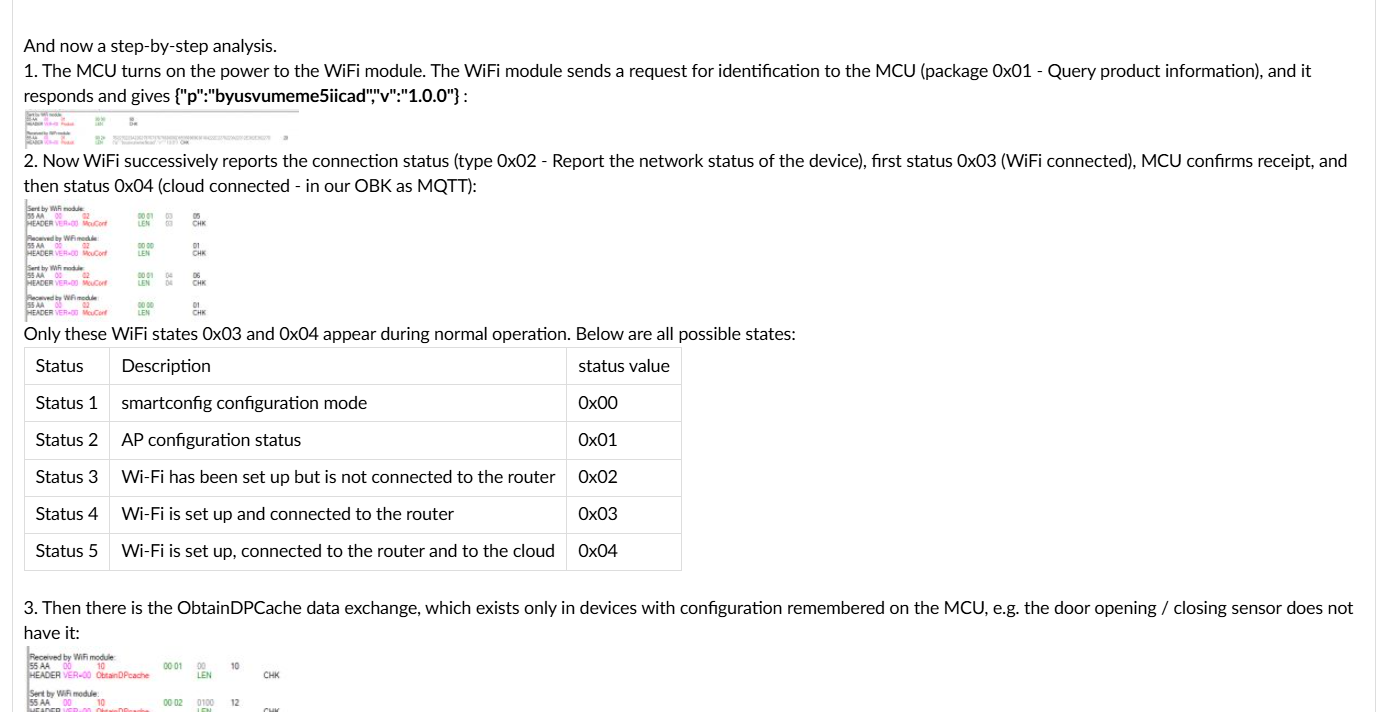
    Almost, but not exactly. I know it's inconvenient, because I went through this when doing previous TuyaMCu topics, including this presentation:
    [CB3S/BK7231N] Temperature/Humidity Sensor with TuyaMCU - Diagram, Reverse Engin
    but you need to manually order those packets. Our Analyzer tool is not quick enough to maintain order.
    You can use information from article linked above, especially this paragraph:
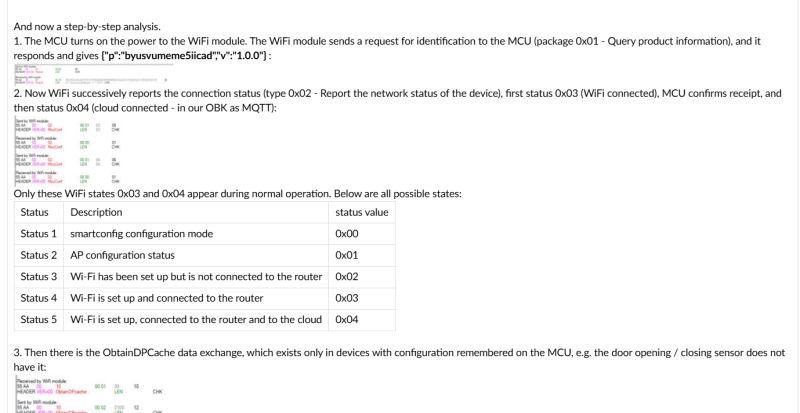
    Experience? / ONENUO 228WTH Smoke Detector with Temp/Humidity: OBK Flashing, Chip Info, Battery Life
    Honestly I don't even remember myself this protocol well at the moment, but it is also described on Tuya site, I'll attach the link if I find it.

    So, the basic workflow for solving your issue would be:
    1. create a clearly described, step by step log of communication with TuyaMCU on Tuya device - but not unsorted, like you posted
    2. create the same for OBK
    3. Figure out exactly at which point of time communication breaks, i.e. which exactly packet is sent by OBK incorrectly
    Helpful post? Buy me a coffee.
  • ADVERTISEMENT
  • #32 21590469
    io2345
    Level 9  
    I see. Let me try it a last time. I can use the existing logs for that, right? Just sort them.

    Still not convinced, that the communication breaks. The Wifi-module isn't powered longer with stock firmware, but they manage to transfer data. MQTT is probably not the best way to do it, it seems too slow. Is there no other way to transfer the data?

    Furthermore it is still unclear, why the TuyaMcu_setBatteryAckDelay doesn't work although supposed to do.
  • #33 21591177
    io2345
    Level 9  
    Have a look, is that ok? (Better check in the Excel-File, as in PDF some lines are missing. But fields are identical)
    Of course, for the short wakeup a lot of the function is missing. But even for the long wakeup, there is one line of the connection status missing. And that's probably the reason, why in the webpage log this line appears (the last one):

    Info:TuyaMCU:Received: 55 AA 00 02 00 00 01 
    Info:TuyaMCU:ProcessIncoming[v=0]: cmd 2 (MCUconf) len 7
    Info:TuyaMCU:ProcessIncoming: TUYA_CMD_MCU_CONF, TODO!
    Attachments:
    • TUYA_OBK.pdf (317.07 KB) You must be logged in to download this attachment.
    • Tuya_OBK.xlsx (10.77 KB) You must be logged in to download this attachment.
  • #34 21592854
    io2345
    Level 9  
    It's quite obvious that this task is too hard - at least for summer time ;-).
    I think I should opt for this device: Link on elektroda forum
    It delivers these values, that I need: Temperature and VOC (in time, to prevent battery from burning), CO2 and CH2O (if it is already burning). Sadly the device has no alarm function itself, but I will build something in ioBroker.
  • #35 21594427
    io2345
    Level 9  
    >>21590440 Is this log-message generated by OBK, or by the MCU - and what does it mean? Is there something missing?:

    Info:TuyaMCU:ProcessIncoming[v=0]: cmd 2 (MCUconf) len 7
    Info:TuyaMCU:ProcessIncoming: TUYA_CMD_MCU_CONF, TODO!


    What is "To do"?

    These two lines are the last on each short power-up cycle of the WiFi-module (if it's not by chance). So that should be where the communication breaks.
    Is there anything that can be done about it?
  • ADVERTISEMENT
  • #36 21599554
    io2345
    Level 9  
    >>21594427 I going to send the device back by end of this week. So, if we want to check something more, we should do it now.

    To be honest, I'm a little disillusioned. I thought, that every Tuya-device can be converted to and run with OBK. Now I see, it is not necessarily true.
  • ADVERTISEMENT
  • #37 21599574
    p.kaczmarek2
    Moderator Smart Home
    Every device can be converted, it's just that battery-powered devices are much harder to convert and require more work, and not much work is done on them futher because WiFi hardware is not efficient enough for battery-powered devices anyway when there is also a Zigbee option.

    Those packets in PDFs are sorted?

    So you are saying that OBK is not sending
    
    55 AA 00 02 00 01 02 04
    HEADER VER=00 McuConf LEN 02 CHK
    
    ?

    Maybe we can also ping @DeDaMrAz , he was creating the previous battery powered guide with me
    Helpful post? Buy me a coffee.
  • #38 21599590
    io2345
    Level 9  
    >>21599574 As far as I can tell they are sorted from start to end. I monitored traffic with Real-Term. Wonder how one message could possibly overtake the following anyway.

    Exactly, I looks to me, like the mcuconf 02 message is missing, only 03 and 04 are present.

    I understand that investing time in inefficent devices is questionable. So, don't invest too much. I'll order a Zigbee gateway the next days and hope to cause less trouble then ;-)
  • ADVERTISEMENT
  • #39 21599653
    p.kaczmarek2
    Moderator Smart Home
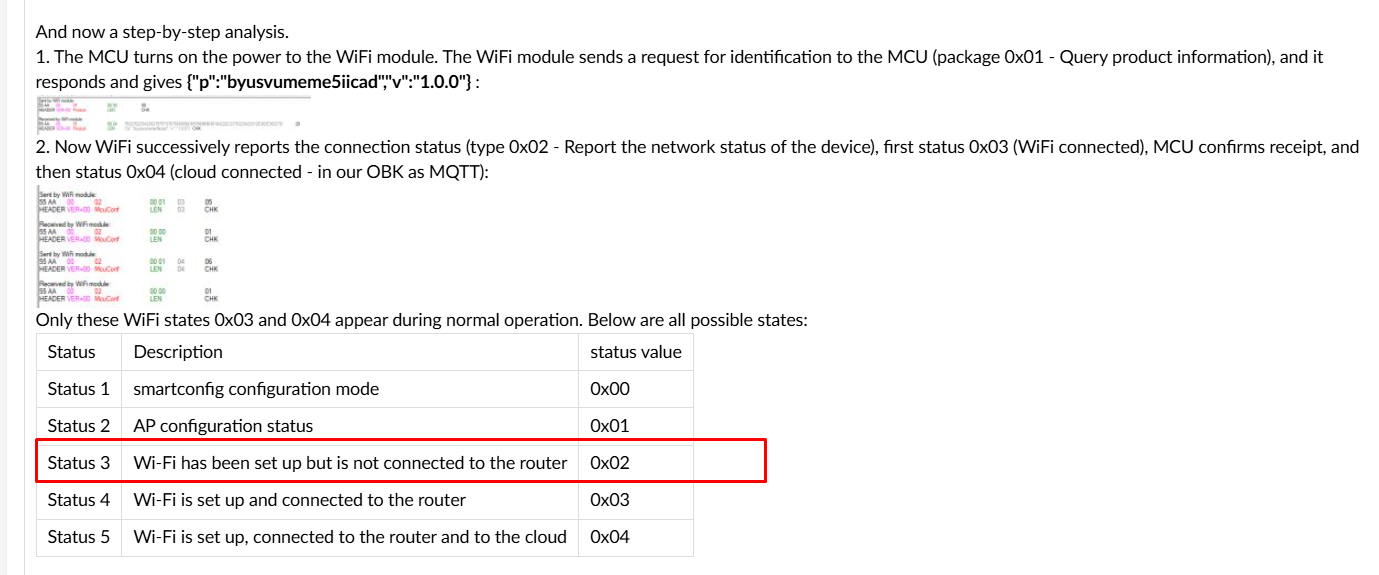
    but if the MCUconf with 0x02 status is missing, it just means that OBK (?) reports a quicker connection:
    Experience? / ONENUO 228WTH Smoke Detector with Temp/Humidity: OBK Flashing, Chip Info, Battery Life
    I'm not sure if it can be the issue. Maybe there is a futher difference down in the exchange? For example, in dpCache?
    Helpful post? Buy me a coffee.
  • #40 21599661
    io2345
    Level 9  
    You're probably right. I did set Flag 37 + 51, so it should do a fast connect.

    What about the message "Info:TuyaMCU:ProcessIncoming: TUYA_CMD_MCU_CONF, TODO!" in the logs?
  • #41 21599930
    p.kaczmarek2
    Moderator Smart Home
    I've looked at the code and it seems implemented, probably message can be removed.

    Now, the question is - ignoring the extra WiFi state 0x02 packet, what else in OBK deviates from Tuya? Can you point to exact packet?
    Helpful post? Buy me a coffee.
  • #42 21600009
    DeDaMrAz
    Level 22  
    @io2345

    Can you share your LFS (autoexec) maybe??

    do you have

    waitFor WiFiState 4

    in there? I don't remember from the top of my head but this is needed for OBK to send status that you are missing (don't quote me on that!!)

    Also you can use this in combination.

    //configure flag 2 in general/flag settings
    waitFor MQTTState 1
    mqtt_broadcastInterval 1
    mqtt_broadcastItemsPerSec 6
  • #43 21600115
    p.kaczmarek2
    Moderator Smart Home
    waitFor WiFiState 4
    is not needed by TuyaMCU, only for deepsleep devices
    Helpful post? Buy me a coffee.
  • #44 21600447
    io2345
    Level 9  
    >>21600009 Thank you for replying. Autoexec.bat is in Post#27, and "waitFor WiFiState 4" is not in there. But p.kaczmarek2 is probably right when he says, that this line is missing when using fast WiFi connect (Flags 37 + 51).

    Currently the device is back on stock ROM and ready to be shipped, but if you are willing to try to solve some of the riddles, I can flash back to OBK without any problem.
    One riddle is the strange behaviour when entering and removing the "TuyaMcu_setBatteryAckDelay" command in autoexec.bat. When entered there was no effect (short 8 seconds wakeup), but after removing it always had long wakeups of more than 20 seconds, no matter which time value was in there before.
    If you want to try out one thing or the other, let me know. It will be back to OBK within some minutes.
  • #45 21600594
    DeDaMrAz
    Level 22  
    I am willing to buy that device from you, would you be willing to ship to Poland or Serbia? If so PM me to arrange something.

    I am not sure I can devote too much time at the moment and I would like to have it in hand to test it all.

    Let me know.

Topic summary

✨ The discussion centers on the ONENUO 228WTH smoke detector featuring temperature and humidity sensing, focusing on its compatibility with OBK firmware (OpenBK7231T_App) and the TuyaMCU protocol. The device uses a TuyaMCU + tmSensor architecture with a BK7321N chip, communicating via UART at 9600 baud. Key challenges include flashing the battery-powered device, managing power consumption, and ensuring reliable data transmission from the WiFi module to MQTT within the limited wake-up time (approximately 8 seconds). The device wakes periodically (about every minute) to report temperature, humidity, battery level, smoke, and overtemperature alarms. Attempts to extend WiFi module uptime using the tuyaMcu_setBatteryAckDelay command showed no effect, possibly due to firmware version or protocol adherence issues. Communication logs reveal incomplete MCU configuration handling (TUYA_CMD_MCU_CONF marked as TODO), which may cause premature WiFi module shutdown and data loss. Solutions discussed include capturing and comparing factory firmware traffic with OBK logs to identify protocol deviations, adjusting OBK autoexec.bat configurations for channel mapping and baud rate, and considering alternative devices or communication protocols (e.g., Zigbee) for better battery efficiency. The device’s hardware buttons ("WiFi" and "Test") and limited configurable features (e.g., smoke sensitivity) were noted. Overall, the device is functional but challenging to integrate fully with OBK due to battery constraints and protocol complexities, with ongoing efforts to optimize MQTT data transmission timing and power management.
Generated by the language model.

FAQ

TL;DR: This FAQ is for anyone trying to flash the ONENUO 228WTH to OBK and keep reporting inside an 8-second wake window. The thread’s clearest expert takeaway is: "battery powered devices are hard to flash". In practice, the detector uses a CB3S Wi-Fi module plus a UM8005 MCU, works like a TuyaMCU tmSensor device, and may report unreliably under OBK because the MCU powers Wi‑Fi for too little time. [#21567720]

Why it matters: If you want early heat or smoke warning for a solar or home battery pack, protocol timing matters more here than basic flashing success.

Option Power style What the thread found Best fit
ONENUO 228WTH on stock firmware 2×AAA battery Reports temp/humidity/battery, usually wakes about 8 seconds, sometimes sleeps up to 7 minutes Keep original behavior
ONENUO 228WTH on OBK 2×AAA battery Flashing is possible in principle, but reporting can miss the wake window Protocol debugging
Zigbee battery sensor Battery Repeatedly recommended as easier and more efficient for battery devices Long battery life
DIY wired sensor from inverter power Wired or local 5 V source Suggested as a simpler path for heat monitoring Reliable continuous reporting

Key insight: The hard part is not identifying the chip. The hard part is matching the TuyaMCU battery-device wake and packet sequence closely enough that OBK can publish before the MCU cuts power.

Quick Facts

  • The detector was identified as CB3S + UM8005, and the Tuya data model exposed dpIDs 1, 15, 16, 23, 24, 101, and 107 for smoke, battery, mute, temperature, humidity, self-test, and temperature alarm. [#21576200]
  • The device runs from two AAA cells. During testing, the Wi‑Fi module was seen at about 3.0 V for 8 seconds, then below 0.5 V, while a high-temperature alarm could hold it near 2.0 V after the initial 8 seconds. [#21581784]
  • Stock behavior was not fixed to one minute. The detector sometimes reported every 60 seconds, but later stock captures showed sleep gaps of up to 7 minutes when values changed little. [#21578215]
  • The verified UART speed was 9600 baud, and the most useful packet families were MCUconf, ObtainDPcache, realtime dpID reports, and TUYA_V0_CMD_OBTAINLOCALTIME. [#21577842]

How do I flash the ONENUO 228WTH smoke detector with temperature and humidity to OBK when it uses a CB3S module and a UM8005 MCU?

You treat it as a TuyaMCU battery sensor, not as a fully standalone CB3S device. Flash OBK to the CB3S, then configure TuyaMCU and tmSensor, set the UART to 9600 baud, and map the detector’s dpIDs in autoexec.bat. The thread showed that the hardware is CB3S + UM8005, so OBK runs on the Wi‑Fi module while the UM8005 stays the main MCU. Flashing alone is not the finish line here; reliable reporting depends on matching the battery-device protocol during short wake periods. [#21576266]

What chip and module are inside the ONENUO 228WTH smoke detector, and how does that affect OpenBK7231 compatibility?

The detector contains a CB3S Wi‑Fi module and a UM8005 MCU. That means OBK can run on the CB3S side, but the device still behaves as a TuyaMCU + tmSensor design, with the UM8005 controlling wake timing, alarms, and power. In other words, compatibility is partial: the module is flashable, yet the whole product only works well if OBK mirrors the TuyaMCU battery workflow closely. That is why the thread moved from chip identification to UART captures and dpID mapping. [#21576200]

Why are battery-powered TuyaMCU devices like the ONENUO 228WTH harder to convert to OBK than mains-powered devices?

They are harder because the main MCU gives the Wi‑Fi module only a short, power-limited wake window. In this detector, users repeatedly observed roughly 8 seconds of full Wi‑Fi power per wake, with much longer reporting gaps when values barely changed. That leaves little time for Wi‑Fi association, MQTT connection, TuyaMCU exchange, and publishing. The maintainer’s direct guidance was that “battery powered devices are hard to flash” and that Zigbee is usually a better battery option. Mains-powered devices avoid this timing bottleneck. [#21567720]

What is tmSensor in OBK, and how is it used with TuyaMCU battery-powered sensors?

tmSensor is the OBK driver layer used for TuyaMCU sensor-style devices that wake, report datapoints, and sleep again. It works alongside TuyaMCU, not instead of it.
"tmSensor" is a sensor driver class in OBK that handles TuyaMCU-style datapoint reporting on low-power devices, with the key characteristic that the external MCU controls wake time and OBK mainly maps dpIDs to channels.
For the ONENUO 228WTH, the suggested setup was startDriver TuyaMCU, startDriver tmSensor, then dpID-to-channel mapping in autoexec.bat. [#21576266]

What is ObtainDPcache in the TuyaMCU protocol, and how does OBK use it on battery-powered devices?

ObtainDPcache is the TuyaMCU request that asks the Wi‑Fi side for cached datapoint state during a short wake cycle. On this detector, it appears as command 0x10 in the UART logs, often right before the MCU sends temperature and humidity dpIDs. OBK already supports this flow, and the maintainer pointed to an existing example showing how battery devices use cached values plus a later SetDP exchange. For this model, ObtainDPcache matters because the MCU may wake the CB3S briefly, ask for state, push readings, and then cut power again. [#21580163]

How do I create an autoexec.bat for a TuyaMCU tmSensor device with dpIDs for smoke, battery, temperature, humidity, self-test, and overtemperature alarm?

Create it in three steps.
  1. Start the needed drivers: TuyaMCU, tmSensor, and NTP.
  2. Set tuyaMCU_setBaudRate 9600, then define channel types and labels.
  3. Link each dpID with linkTuyaMCUOutputToChannel, then test against UART captures.
A working draft in the thread mapped dpID 1 smoke, 15 battery, 16 mute, 23 temperature, 24 humidity, 101 self-test, and 107 overtemperature. The maintainer advised triple-checking the config before flashing because battery devices wake only briefly and errors are harder to debug. [#21581784]

Which channel types and linkTuyaMCUOutputToChannel values should be used in OBK for dpIDs 1, 15, 16, 23, 24, 101, and 107 on the ONENUO 228WTH?

The best thread-tested mapping was: dpID 1 as ReadOnly with enum, 15 as BatteryLevelPercent with val, 16 as Toggle with bool, 23 as temperature_div10 with val, 24 as Humidity with val, 101 as Toggle with bool, and 107 as ReadOnly with enum. That exact structure started without syntax errors and produced real updates for temperature and humidity. The thread also showed that arbitrary channel types do not always work, so the safe rule is to use the device’s actual Tuya data type: enum, val, or bool. [#21581784]

Why does the ONENUO 228WTH WiFi module wake for only about 8 seconds under OBK, and what makes it sometimes stay awake for around 20 to 28 seconds?

The UM8005 MCU controls wake time, not OBK. Under normal conditions, the user measured about 8 seconds at roughly 3 V, then power dropped. In alarm conditions, the MCU could keep the module semi-powered around 2 V after the initial full-power stage. The strange 20–28 second wakeups appeared inconsistently during testing, especially after editing tuyaMcu_setBatteryAckDelay, but they were not repeatable across reboots. The thread never confirmed a single cause, so the long wakes should be treated as test artifacts or protocol-state side effects, not stable behavior. [#21586241]

How does tuyaMcu_setBatteryAckDelay work in OBK, and why might it appear to have no effect on this smoke detector?

It is meant to delay OBK’s battery-device acknowledgement path so the MCU leaves the Wi‑Fi side awake longer. The maintainer said the command syntax is tuyaMcu_setBatteryAckDelay 3, placed after starting tmSensor and TuyaMCU. On this detector, values of 3, 5, 16, and 20 seconds appeared to have no consistent effect: the wake window usually stayed around 8 seconds. The likely explanation from the thread is that this detector may cut power when the Tuya battery protocol sequence does not fully match stock behavior, so a delay alone cannot override the MCU’s decision. [#21589446]

Why does MQTT reporting seem too slow for the ONENUO 228WTH wake window, and what settings could help OBK publish sensor values before the MCU powers the module down?

MQTT is slow here because the device must boot Wi‑Fi, reconnect, exchange TuyaMCU packets, and publish before the MCU removes power. The user saw good publishing when externally powering the Wi‑Fi module or when alarms kept it awake longer, but not during the normal 8-second wake. A forum suggestion was to reduce publish latency with waitFor MQTTState 1, mqtt_broadcastInterval 1, and mqtt_broadcastItemsPerSec 6, while another OBK pull request added an MQTT-finish delay path for battery devices. Those settings may help, but the thread did not confirm a fully reliable fix. [#21600009]

How do I capture and compare TuyaMCU UART traffic between stock firmware and OBK to find where the packet exchange starts to differ?

Do it in three steps.
  1. Capture both RX and TX UART lines on stock firmware, then on OBK, at 9600 baud.
  2. Sort packets manually into exact time order; the maintainer said unsorted analyzer output is not enough.
  3. Compare the handshake, MCUconf, ObtainDPcache, datapoint reports, and time-setting packets until the first divergence appears.
The maintainer explicitly asked for step-by-step ordered logs because the right debug question is not “does it wake,” but “which exact packet differs first from stock.” [#21590440]

What does the OBK log message 'TUYA_CMD_MCU_CONF, TODO!' mean, and does it indicate a real protocol problem on battery-powered TuyaMCU devices?

It is an OBK log message, not a proof that the MCU itself failed. Near the end of the thread, the maintainer checked the code and said the command seems implemented and that the message can probably be removed. Earlier, the user suspected this line marked the failure point because it appeared at the end of short cycles, but that was not confirmed. The stronger thread conclusion was that any real issue must be found by comparing the full ordered packet exchange, not by treating this log line alone as the cause. [#21599930]

How does TUYA_V0_CMD_OBTAINLOCALTIME work, and why do I need to start the NTP driver in OBK for this device?

It is the TuyaMCU request asking the Wi‑Fi module for current local time. On this detector, OBK logged received TUYA_V0_CMD_OBTAINLOCALTIME, so sending back time, but the maintainer explained that this only works correctly if the NTP driver is running first. That is why startDriver NTP was added to the autoexec.bat. After NTP was active, OBK logged real time values such as 2025-06-22 11:50:14 and then replied to the MCU with a proper timestamp. Without NTP, OBK may answer with zero or invalid time. [#21581793]

OBK WiFi battery device vs Zigbee sensor: which approach is better for long battery life and reliable reporting in smoke or temperature monitoring applications?

Zigbee is the better battery choice. The maintainer repeatedly advised Zigbee alternatives because Wi‑Fi battery devices are inefficient and harder to keep reliable over time. This thread is the practical example: the ONENUO 228WTH can be flashed in principle, but its 2×AAA power budget and short wake cycles made steady OBK reporting difficult. If you need dependable temperature or alarm telemetry from a sleeping sensor, Zigbee is the lower-risk route. If you have a nearby power source, a wired sensor is even simpler than battery Wi‑Fi. [#21583988]

What are practical alternatives to the ONENUO 228WTH for monitoring a solar battery or home battery pack for overheating, smoke, VOC, CO2, or CH2O?

The thread suggested two practical alternatives. First, build a simple wired monitor using a local power source and a sensor such as DHT11, DHT22, or DS18B20 for temperature tracking near the hot spot. Second, the user decided a different sensor discussed on the forum was more suitable because it reports temperature, VOC, CO2, and CH2O, even though it has no built-in alarm. For a battery pack, that second route better matches early-gas and overheating detection, while the wired DIY route is the easiest continuous-reporting option if inverter-side power is available. [#21592854]
Generated by the language model.
ADVERTISEMENT