logo elektroda
logo elektroda
X
logo elektroda

Flashing BL602 SDV-002_V1.2 Water Gas Shutoff Valve via BouffaloLabDevCube

lamero345 1104 13
Best answers LABEL_AI_GENERATED

How can I flash a TOMZN BL602 SDV-002_V1.2 water/gas shutoff valve module and get it into BOOT mode?

Put the module into BOOT mode by connecting R2 to VCC during power-up, then flash it; one report says a similar SDV-002_V1.2 unit flashed successfully and booted at 921600 baud, and another confirms the same board was flashed with BK7231Flasher [#21772611] [#21775504] BouffaloLab/OpeBeken webapp support was being added in PR 237, which is the linked reference for this device family [#21769632]
AI summary based on the discussion. May contain errors.
ADVERTISEMENT
  • BL602 pin mapping for SDV-002_V1.2 valve

    #1 21769124
    lamero345
    Level 2  
    Posts: 33
    Help: 1
    Rate: 3
    Name: Water Gas Shutoff Automated Ball Valve

    Url: https://www.aliexpress.com/item/1005007161169914.html

    Module: BL602 Module SDV-002_V1.2

    Photos:
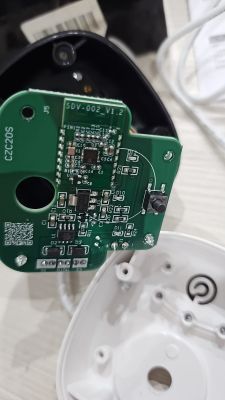
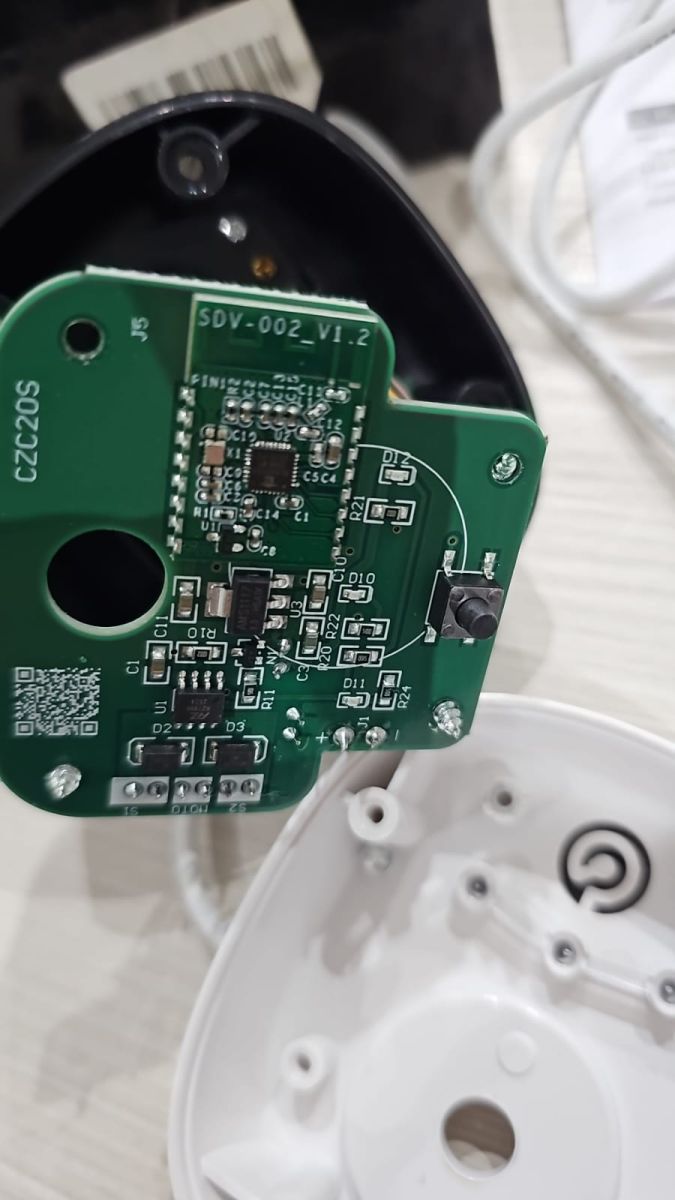
    Flashing BL602 SDV-002_V1.2 Water Gas Shutoff Valve via BouffaloLabDevCube

    Flashing BL602 SDV-002_V1.2 Water Gas Shutoff Valve via BouffaloLabDevCube

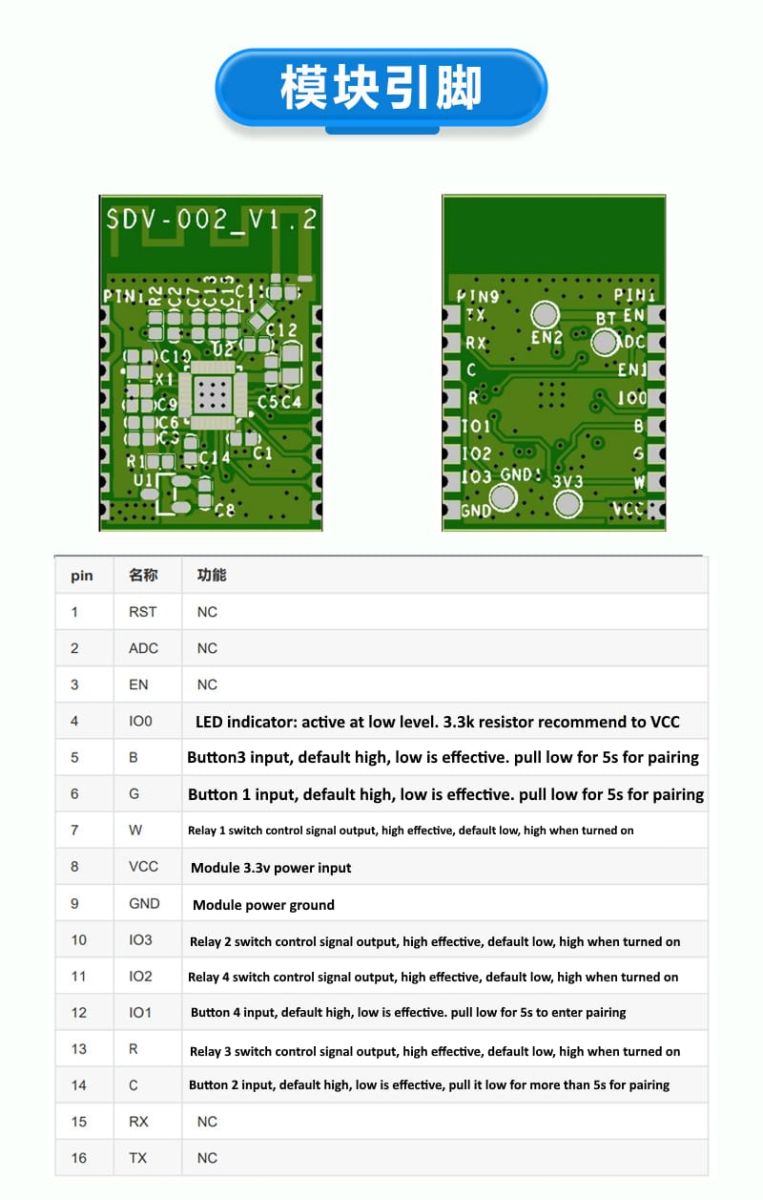
    Connection: Connecting a wire to R2 and connecting it to VCC during power on is enough to put the module in BOOT mode as described here. TX, RX, VCC and GND pins are as described
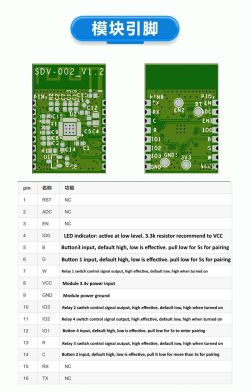
    SDV-002_V1.2 PCBs with pinout diagram and function descriptions in table.

    Logs: Before flash the module I get these values from UART log

    
    GPIO config is :
    cfg->wifi_led = 200
    cfg->led_status = 0
    cfg->led_ch_status = 1
    cfg->backlight_en = 0
    cfg->backlight_init = 0
    cfg->backlight_level = 0
    cfg->backlight_pin = 200
    cfg->led_level = 0
    cfg->led0 = 12
    cfg->led1 = 200
    cfg->led2 = 200
    cfg->led3 = 200
    cfg->relay_type = 0
    cfg->lr0_on = 200
    cfg->lr0_off = 200
    cfg->lr1_on = 200
    cfg->lr1_off = 200
    cfg->lr2_on = 200
    cfg->lr2_off = 200
    cfg->lr3_on = 200
    cfg->lr3_off = 200
    cfg->lr_pulse_width = 30
    cfg->lr_interval_width = 250
    cfg->all_on_off = 200
    cfg->relay0 = 2
    cfg->relay1 = 200
    cfg->relay2 = 200
    cfg->relay3 = 200
    cfg->key0 = 14
    cfg->key1 = 200
    cfg->key2 = 200
    cfg->key3 = 200


    Template:
    
    {
    "vendor": "TOMZN",
    "bDetailed": "1",
    "name": "WIFI Smart ATS",
    "model": "TOQ7E-125/4 220V",
    "chip": "BL602",
    "board": "SDV-002_V1.2",
    "keywords": [
    "switch",
    "relay",
    "button",
    "bl602"
    ],
    "pins": {
    "2": "Rel;1",
    "14": "Btn;1",
    "12": "LED;1"
    }
    }
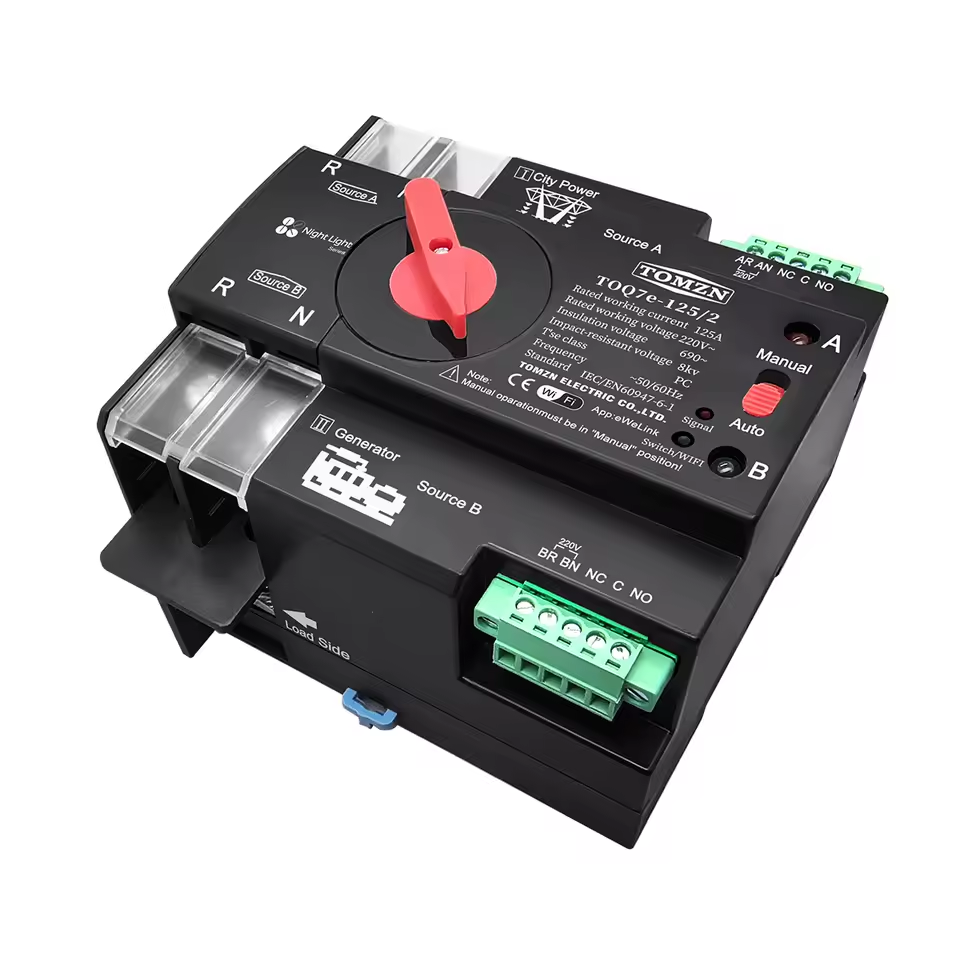
    
    Attachments:
    • readResult_BL602_2026-07-1-19-20-38.bin (2 MB) You must be logged in to download this attachment.
  • ADVERTISEMENT
  • #3 21769675
    insmod
    Level 31  
    Posts: 1432
    Help: 168
    Rate: 455
    >>21769124
    Do you remember what the problem was with BK7231GUIFlashTool?
  • #4 21771871
    lamero345
    Level 2  
    Posts: 33
    Help: 1
    Rate: 3
    Never starts backup or flash. I will retry with a new product on next week. I will try to do a backup also.
  • ADVERTISEMENT
  • #5 21772611
    divadiow
    Level 38  
    Posts: 5220
    Help: 449
    Rate: 918
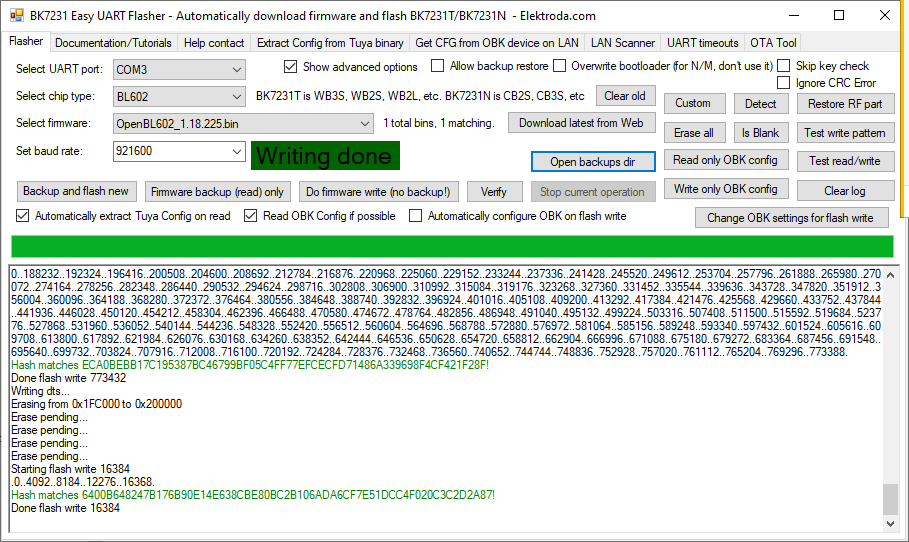
    ideal conditions testing with an ai-wb2-32s but I can flash OK at 921600 and it boots.

    Screenshot of BK7231 Easy UART Flasher with message “Writing done”
  • #6 21775504
    lamero345
    Level 2  
    Posts: 33
    Help: 1
    Rate: 3
    Other TOMZN WiFi Smart ATS BL602 SDV-002_V1.2 flashed with BK7231Flasher. This is the dump :)
    Attachments:
    • readResult_BL602_2025-09-12-07-17-25.bin (2 MB) You must be logged in to download this attachment.
  • Boot log confirms BL602 firmware and partition table load

    #7 21776266
    divadiow
    Level 38  
    Posts: 5220
    Help: 449
    Rate: 918
    cool. here is full boot log

    Code: Text
    Log in, to see the code
  • Pin indexes likely come from a config struct in flash

    #8 21787177
    p.kaczmarek2
    Moderator Smart Home
    Posts: 14770
    Help: 659
    Rate: 12913
    I am reading this topic and I wonder. Aren't those pin indexes stored in flash somewhere? It looks like they are from C struct. I tried to search binary for 0xC8 (200) pattern, but didn't find good matches yet.
    lamero345 wrote:

    Logs: Before flash the module I get these values from UART log

    
    GPIO config is :
    cfg->wifi_led = 200
    cfg->led_status = 0
    cfg->led_ch_status = 1
    cfg->backlight_en    = 0
    cfg->backlight_init  = 0
    cfg->backlight_level = 0
    cfg->backlight_pin   = 200
    cfg->led_level = 0
    cfg->led0 = 12
    cfg->led1 = 200
    cfg->led2 = 200
    cfg->led3 = 200
    cfg->relay_type  = 0
    cfg->lr0_on  = 200
    cfg->lr0_off = 200
    cfg->lr1_on  = 200
    cfg->lr1_off = 200
    cfg->lr2_on  = 200
    cfg->lr2_off = 200
    cfg->lr3_on  = 200
    cfg->lr3_off = 200
    cfg->lr_pulse_width = 30
    cfg->lr_interval_width = 250
    cfg->all_on_off = 200
    cfg->relay0 = 2
    cfg->relay1 = 200
    cfg->relay2 = 200
    cfg->relay3 = 200
    cfg->key0 = 14
    cfg->key1 = 200
    cfg->key2 = 200
    cfg->key3 = 200
    

    Helpful post? Buy me a coffee.
  • DTB scanner extracts GPIO pins from firmware dumps

    #9 21787528
    divadiow
    Level 38  
    Posts: 5220
    Help: 449
    Rate: 918
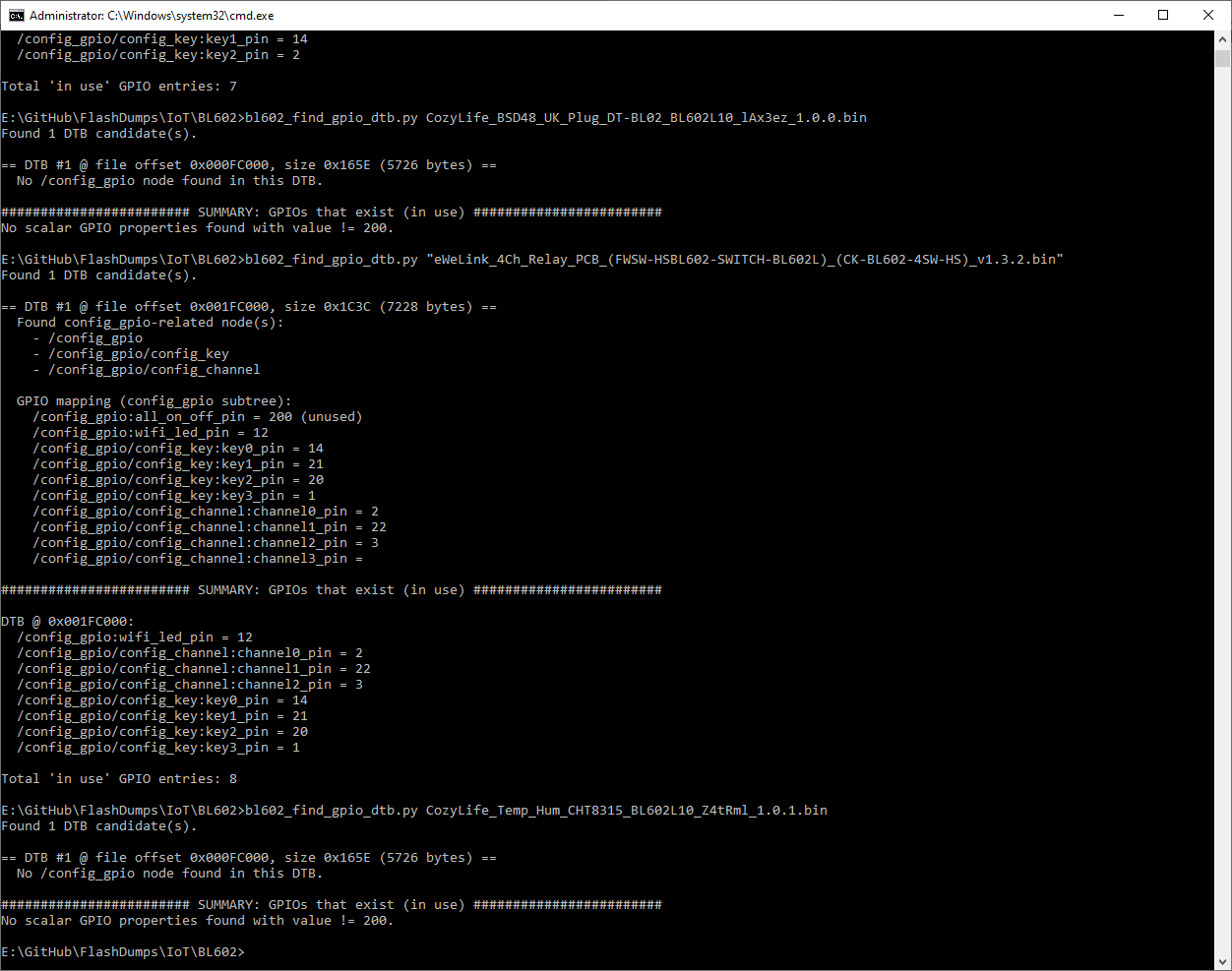
    GPT is going on about it being stored as a flattened device tree (DTB).

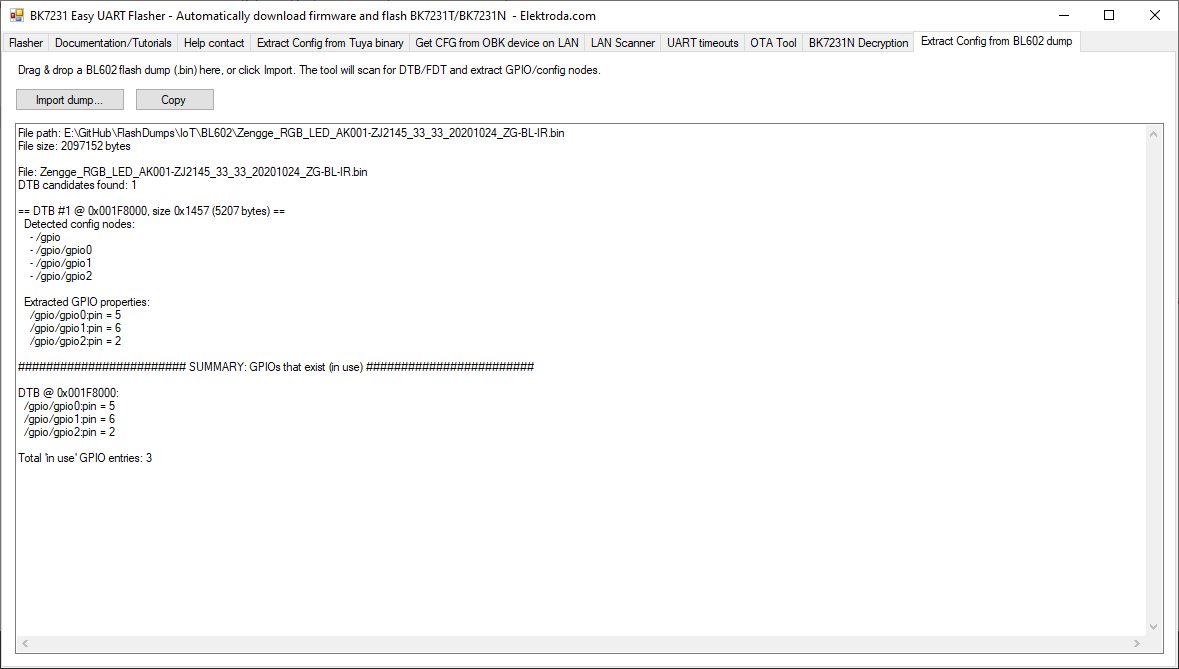
    Screenshot of CMD terminal showing GPIO analysis from a Python script.

    This script seems OK at getting GPIOs for some dumps, though CozyLife seems different

    Code: Text
    Log in, to see the code


    Code: Python
    Log in, to see the code


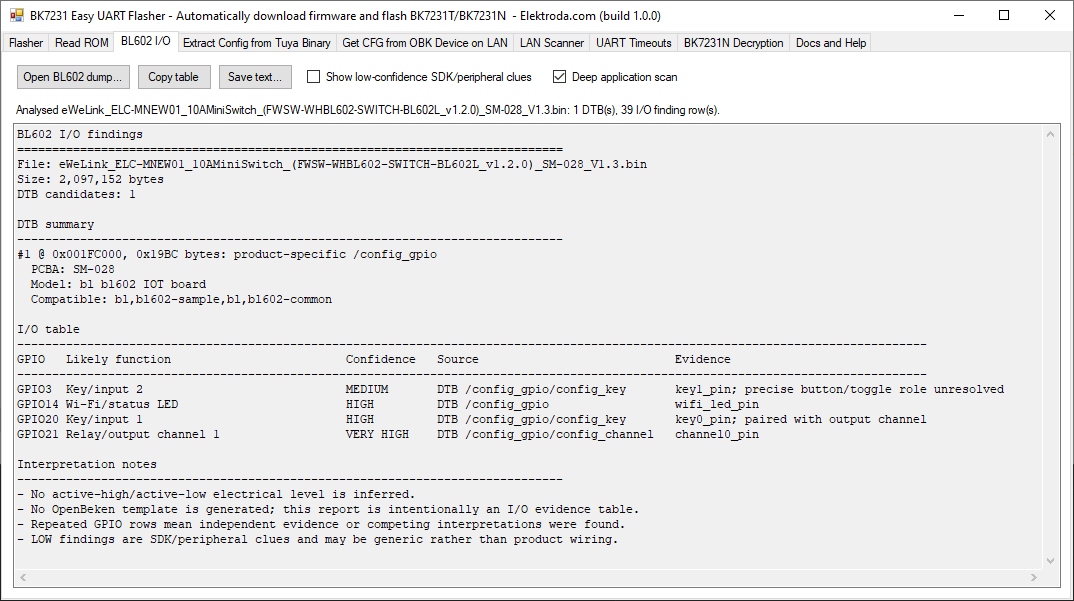
    This could totally be a new BL602 config extractor tab in EF or something. A text window with json IO config translation for pasting into the web app import

    Added after 7 [minutes]:

    oh lol

    Code: Text
    Log in, to see the code


    Code: Text
    Log in, to see the code


    Added after 4 [hours] 37 [minutes]:

    fiddling
    Application window showing extracted GPIO results from BL602 .bin file
  • ADVERTISEMENT
  • #10 21788392
    p.kaczmarek2
    Moderator Smart Home
    Posts: 14770
    Help: 659
    Rate: 12913
    I am confused - is it reliable? Or is it giving false, non-existent pins?
    How did LLM know to use Flattened Devicetree (DTB) Format?
    Helpful post? Buy me a coffee.
  • Basic Python FDT parser for BL602 firmware blobs

    #11 21788797
    divadiow
    Level 38  
    Posts: 5220
    Help: 449
    Rate: 918
    OK, so it's just early trying things.

    I've taken a step back to work on a more basic script.

    Code: Python
    Log in, to see the code


    Code: Text
    Log in, to see the code


    Code: Text
    Log in, to see the code


    That dump is from this device with this template

    Code: Text
    Log in, to see the code


    so we see the 3 pins are clearly retrievable from the dump.

    Another one:

    Code: Text
    Log in, to see the code


    Code: Text
    Log in, to see the code


    which kinda matches this https://www.elektroda.com/rtvforum/topic4009765.html#20795350

    Code: Text
    Log in, to see the code


    Added after 25 [minutes]:

    hmm. this next script should print more (attached as zip)

    Code: Text
    Log in, to see the code


    Code: Text
    Log in, to see the code


    OBK config for this bulb is

    "3": "PWM;5",
    "14": "PWM;1",
    "20": "PWM;2",
    "21": "PWM;3",
    "22": "PWM;4"

    not sure how to translate what's printed out into a working template in this case
    Attachments:
    • bl602_find_gpio_dtb.zip (2.25 KB) You must be logged in to download this attachment.
  • #12 21944012
    divadiow
    Level 38  
    Posts: 5220
    Help: 449
    Rate: 918
    still fiddling

    Flashing BL602 SDV-002_V1.2 Water Gas Shutoff Valve via BouffaloLabDevCube
  • #13 21944146
    p.kaczmarek2
    Moderator Smart Home
    Posts: 14770
    Help: 659
    Rate: 12913
    Seems useful and acceptable to merge - just how reliable is that? One could suggest merging with Tuya extract - and rename to Extract Config - but I realize how different it is, so maybe merging would not be the best idea.
    Helpful post? Buy me a coffee.
  • ADVERTISEMENT
  • BL602 config helper cross-references dumps and devices.json

    #14 21944447
    divadiow
    Level 38  
    Posts: 5220
    Help: 449
    Rate: 918
    ah. it's a WIP. I'm tuning it further. it's managing to either get the whole template or at least some of the IOs for devices we know about already. Or sometimes nothing. It seems eWeLink, CozyLife, Zengge etc all have different way of doing things.

    I'm testing with all BL602 dumps and cross-referencing with devices.json.

    It's not as consistent as the Tuya KV way. I think it's definitely worth something, but more as a helper.

    I thought about integration with the Tuya config tab, but I dunno, it didn't seem like the right fit. Also, I'd love to see the IO mappings stuff refactored, so there was the thought of that changing in the back of my mind anyway

    Added after 11 [minutes]:

    it's here if anyone wants to give it a go
    https://github.com/divadiow/BK7231GUIFlashTool/tree/bl602config

Topic summary

LABEL_AI_GENERATED
Discussion about flashing and backing up a BL602-based water/gas shutoff automated ball valve module (SDV-002_V1.2) using BouffaloLabDevCube and related flashing tools. The original issue was that backup/flash would not start, but later testing showed successful flashing at 921600 baud on an AI-WB2-32S and successful booting of another TOMZN WiFi Smart ATS BL602 SDV-002_V1.2 unit with BK7231Flasher. The thread also includes UART boot logs, partition table output, and investigation of how GPIO configuration is stored in firmware, including speculation about a flattened device tree (DTB/FDT) structure and scripts for extracting GPIO pin assignments from dumps.
AI summary based on the discussion. May contain errors.
ADVERTISEMENT