logo elektroda
logo elektroda
X
logo elektroda

Tuya ZY-TH01ProCB3S_v1.4 Temp & Humidity Sensor Firmware Programming

Dnomis77 648 25
ADVERTISEMENT
  • #1 21784000
    Dnomis77
    Level 2  
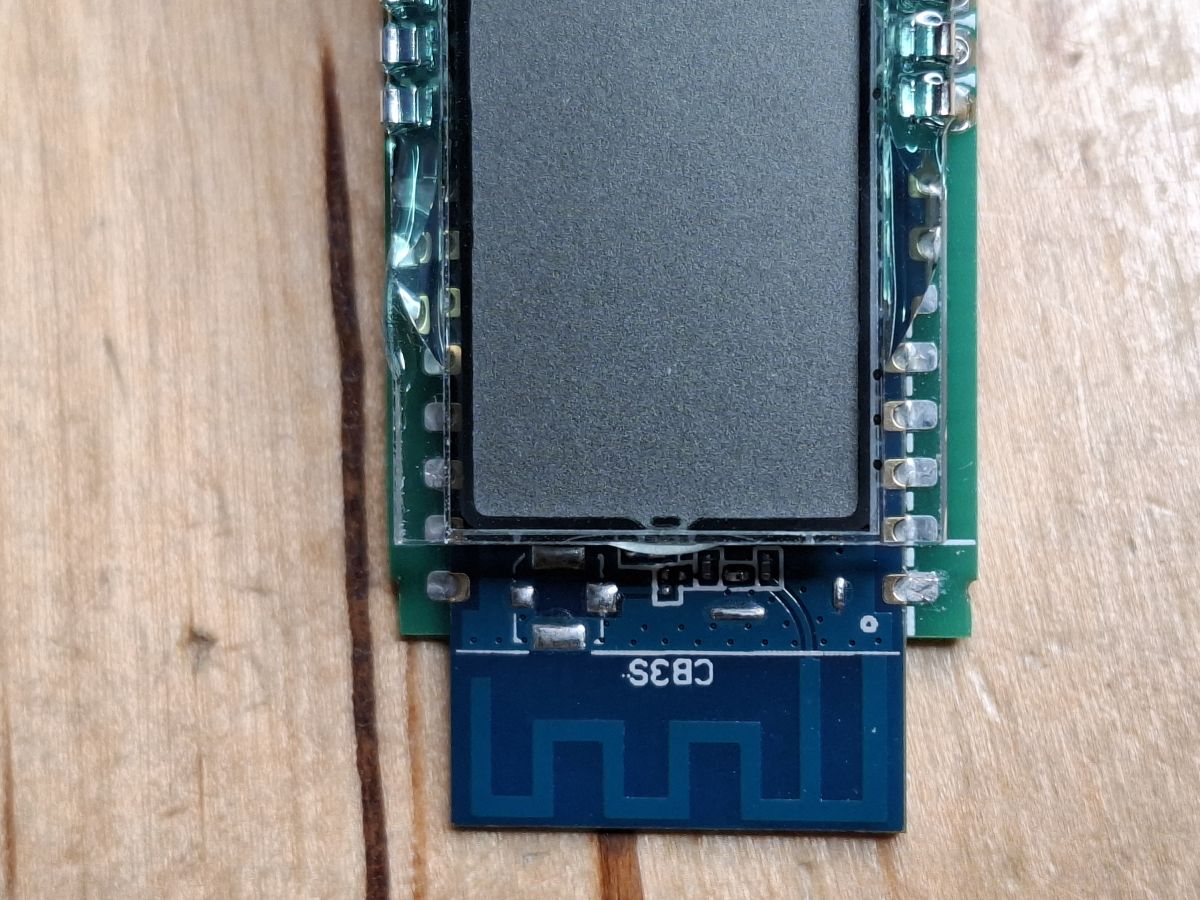
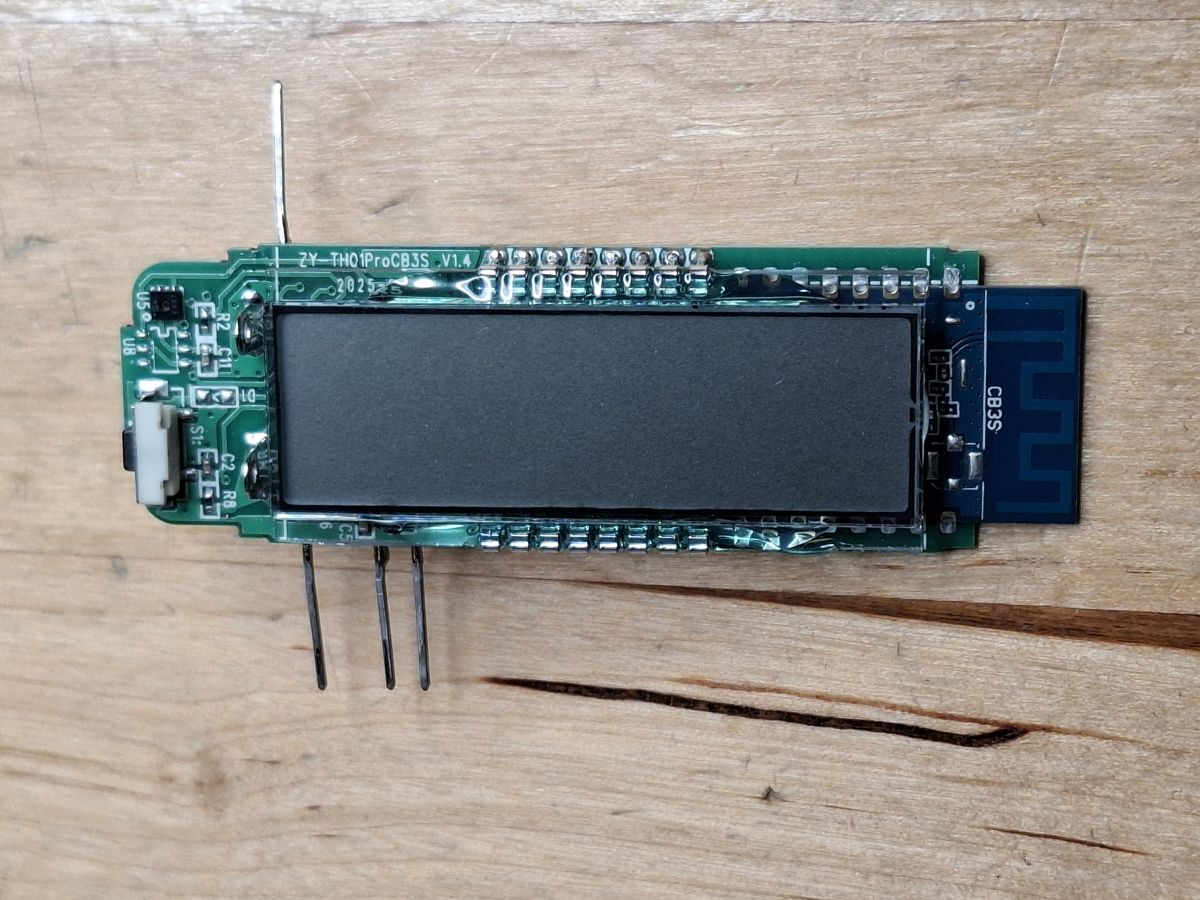
    Close-up of CB3S module with visible pins and PCB antenna on wooden surface
    TH01ProCB3S electronic module with sensor and antenna on wooden background
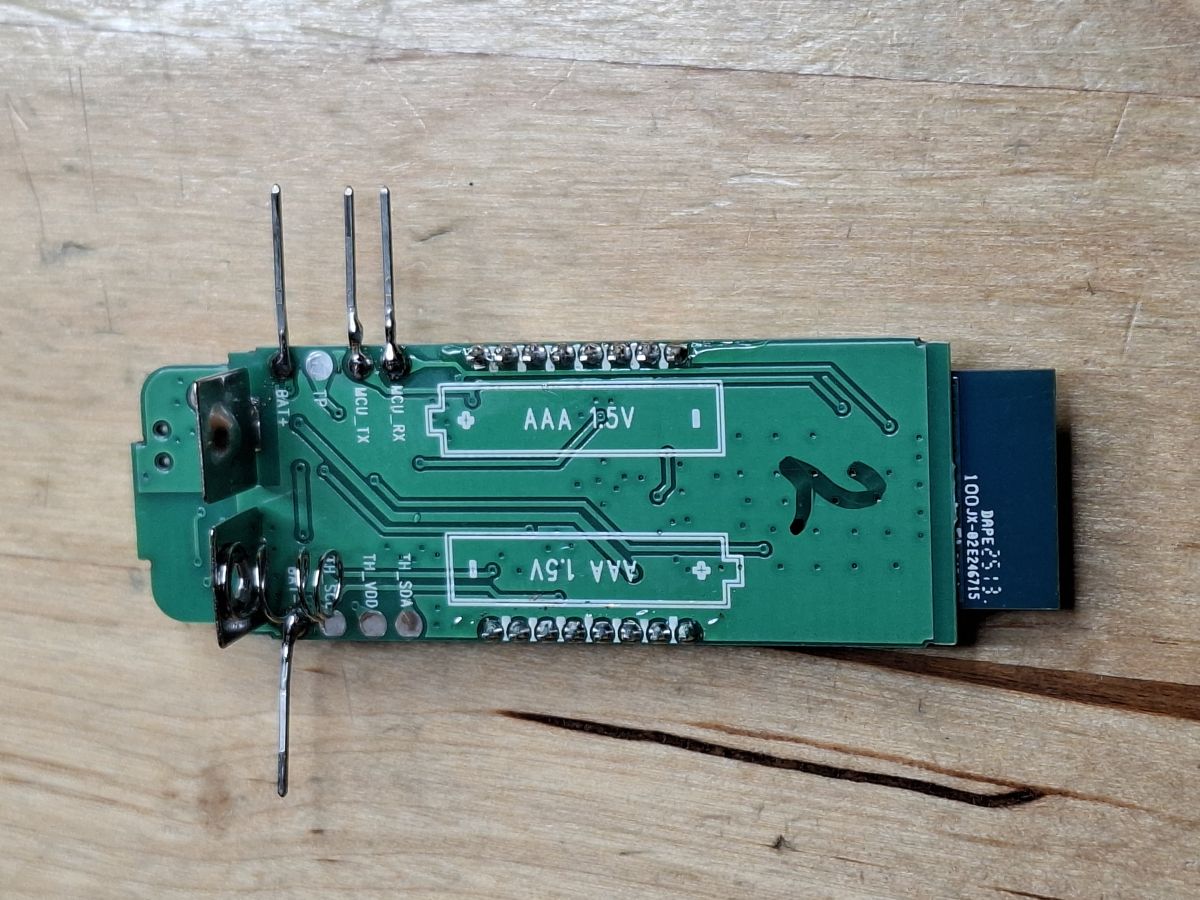
    Printed circuit board with AAA 1.5V markings and pin headers
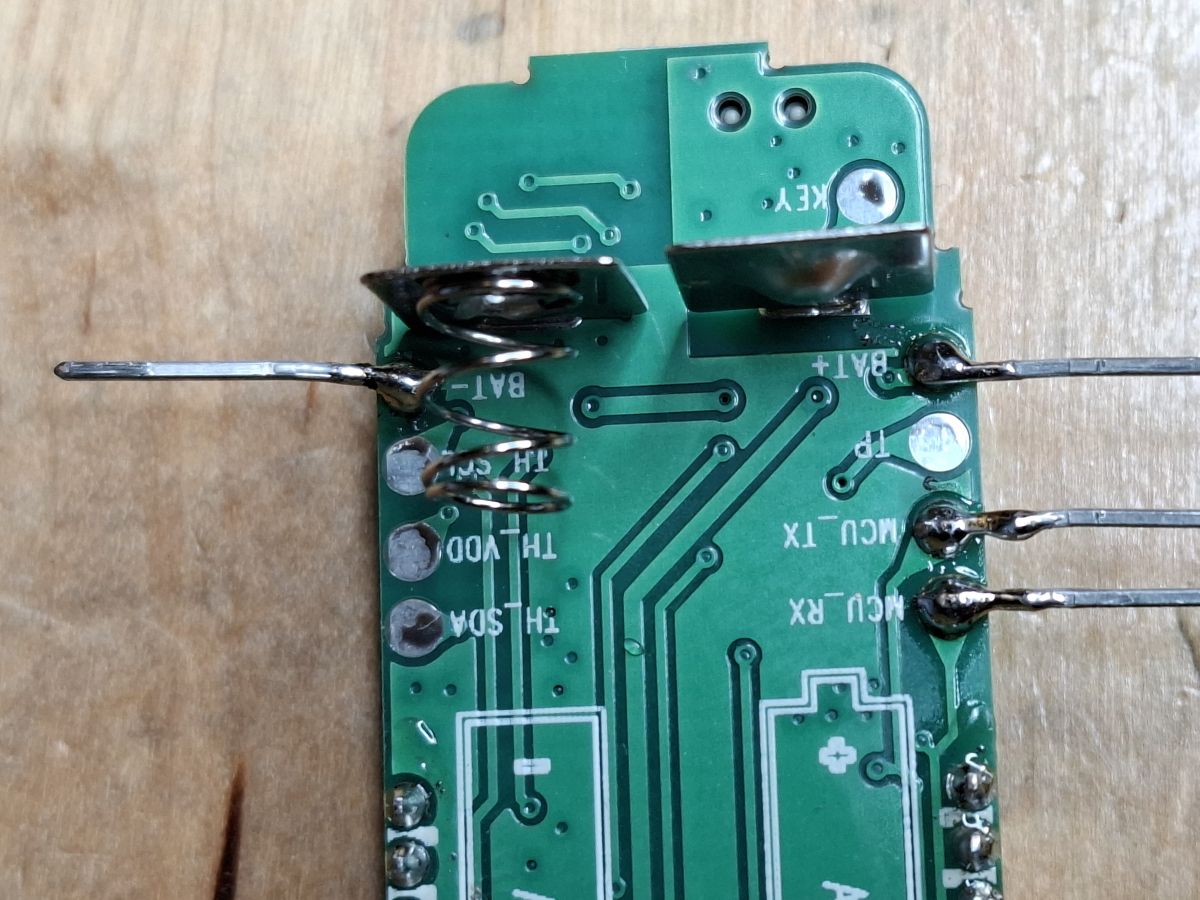
    Printed circuit board with battery holders and visible soldered wire connections

    I have a couple of Tuya ZY-TH01ProCB3S_v1.4 temp & humidity sensors with LCD display; see the attached pictures.

    I tried to use CloudCutter on the first one and that seemed to go well and I managed to reflash it OTA with what I now assume is rubbish.
    So, I have been trying to reflash it using a serial TTL adapter...
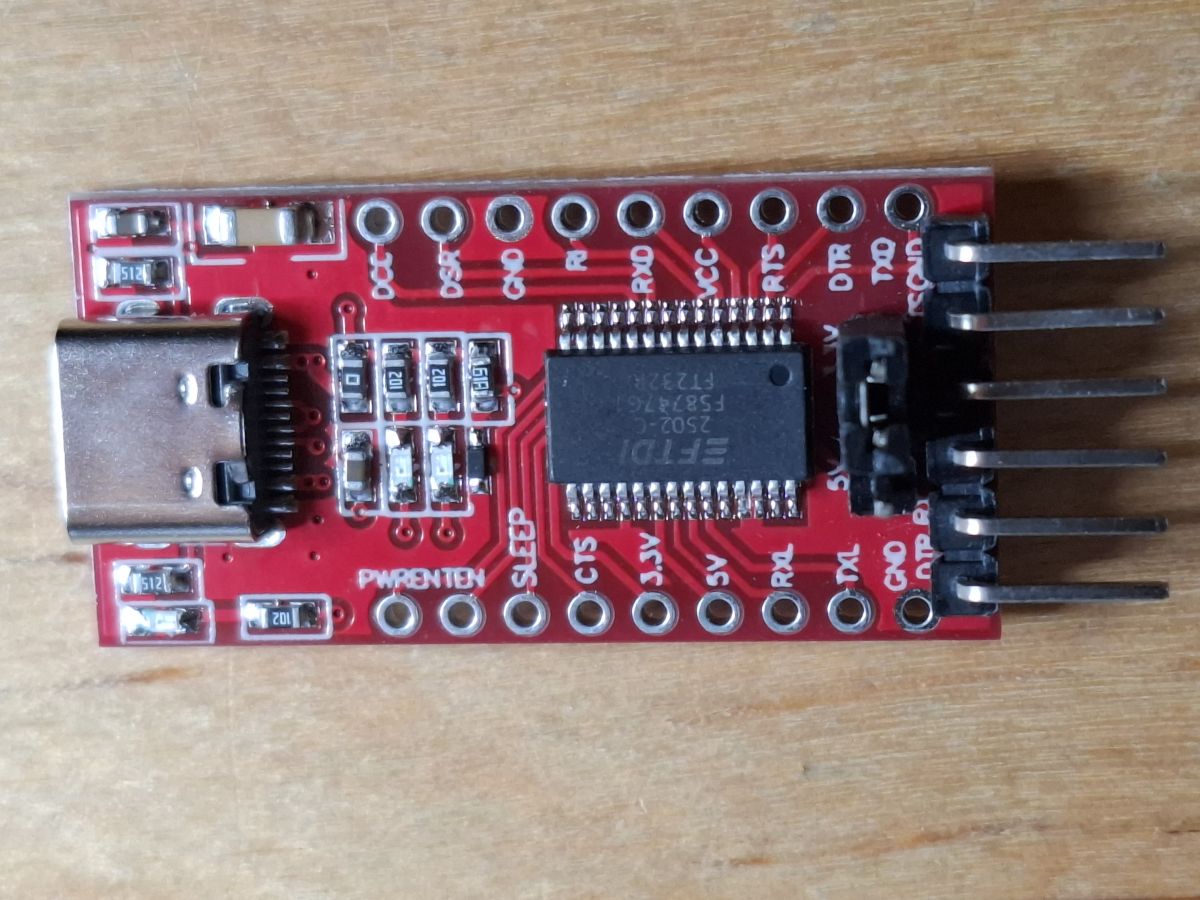
    USB to UART converter module with FTDI chip on red PCB

    The problem seems to occur when I try to get it to reset the card using the Reset pin on the CB3S card; nothing happens.
    I have tried connecting directly to the CB3S card, but even if I put the power and TX/RX connections directly on the pins there, it still powers up the LCD display and will not reset.

    Anybody have any ideas on where I am going wrong with this board, please?

    AI: Can you provide more details or a diagram of how you’ve connected the serial TTL adapter to the CB3S card, including which pins you’re using and what voltage your adapter supplies?
    I have tried both to the pins as shown in the picture and to the CB3S card directly.
    The TTL adapter is sending out 3.3 V.
    AI: What exact steps are you following to try to put the CB3S into flashing mode—are you holding any buttons or using any specific software settings (like baud rate, reset sequence, etc.)?
    I have tried pressing the button once, several times, and holding it. I have tried grounding the top-left (RST) pin on the CB3S. I have tried 9600, 115200, and 1,000,000 baud. I have tried BK7231 Easy UART flasher on my Windows laptop and ltchiptool on my Linux laptop.
  • ADVERTISEMENT
  • #3 21784320
    Dnomis77
    Level 2  
    Hi, thanks. I have tried using the top 2 RHS pins on the CB3S module directly also, but it didn't behave any differently. It never seems to reset, and seems to have a path to power for the LCD even if I apply power at the CB3S pins.
  • ADVERTISEMENT
  • #4 21784324
    divadiow
    Level 37  
    hmm yes. TuyaMCU is also known to get in the way of flashing so often rx and or tx needs to be isolated from the TuyaMCU. This can be done by removing the CB3S completely or severing a PCB trace then repairing it later. The LCD on these makes CB3S removal quite a chore. Your wires definitely short to CB3S RX/TX and they cross with your USB-TTL RX->TX and TX->RX?

    You may be able to hold the TuyaMCU is reset mode too I think I've seen reported, but I haven't had a device where that's been possible yet. More difficult if you can't even see the chip and then if it's pins are known.
  • #5 21784339
    Dnomis77
    Level 2  
    I've not tried removing a surface mount board before, it was hard enough trying to solder to it!
    I removed the wires from direct connection at the CB3S TX/RX and yes, I tried lots of combinations of TX - TX, TX -RX etc and baud rates, I saw someone posted that they had to use 15000000 so will try that tomorrow.
    Not sure how to go about removing the CB3S heat up and cut the join with a scalpel? Solder Pump? Presumably I only need to remove the 3.3v and Tx/ Rx lines
  • #6 21784350
    divadiow
    Level 37  
    I was thinking hot air gun removal after desoldering the LCD, but that's probably not an option.

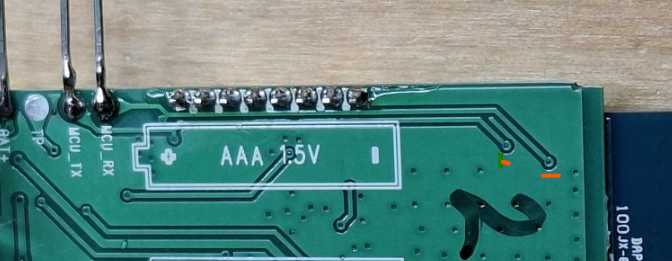
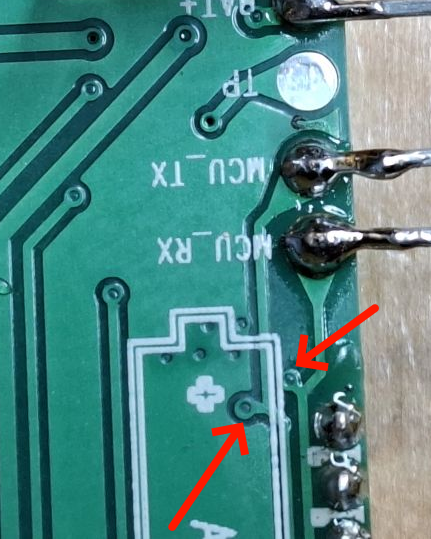
    But actually, look, the RX/TX on CB3S do look to go those headers on the back. I hadn't spotted that. Looks like they each have a little trace breaking out to the TuyaMCU? maybe?

    Section of green PCB labeled MCU_TX, MCU_RX with solder joints and red arrows

    Maybe it'll just be a case of severing the CB3S's RX at that little junction so TuyaMCU can't transmit stuff and get in the way.

    How are you powering your device btw? external 3.3v power supply with common grounds to USB-TTL or powering whole thing from USB-TTL 3.3v or 5v with LDO?

    Added after 2 [minutes]:

    that assumes these two come off CB3S RX/TX

    View of PCB segment labeled for AAA 1.5V battery placement
  • #7 21784365
    Dnomis77
    Level 2  
    I have tried powering it via just the TTL converter, via batteries and via one of those USB-to-3 V battery eliminators. The circuit board looks multi-layered so not easy to trace where those two go, I'll have another look in the morning. I don't have a hot air gun suitable for SMD removal so that option is out. And I really didn't want to remove the LCD unless I have to.
  • ADVERTISEMENT
  • #8 21784646
    Dnomis77
    Level 2  
    OK, now we are getting somewhere!
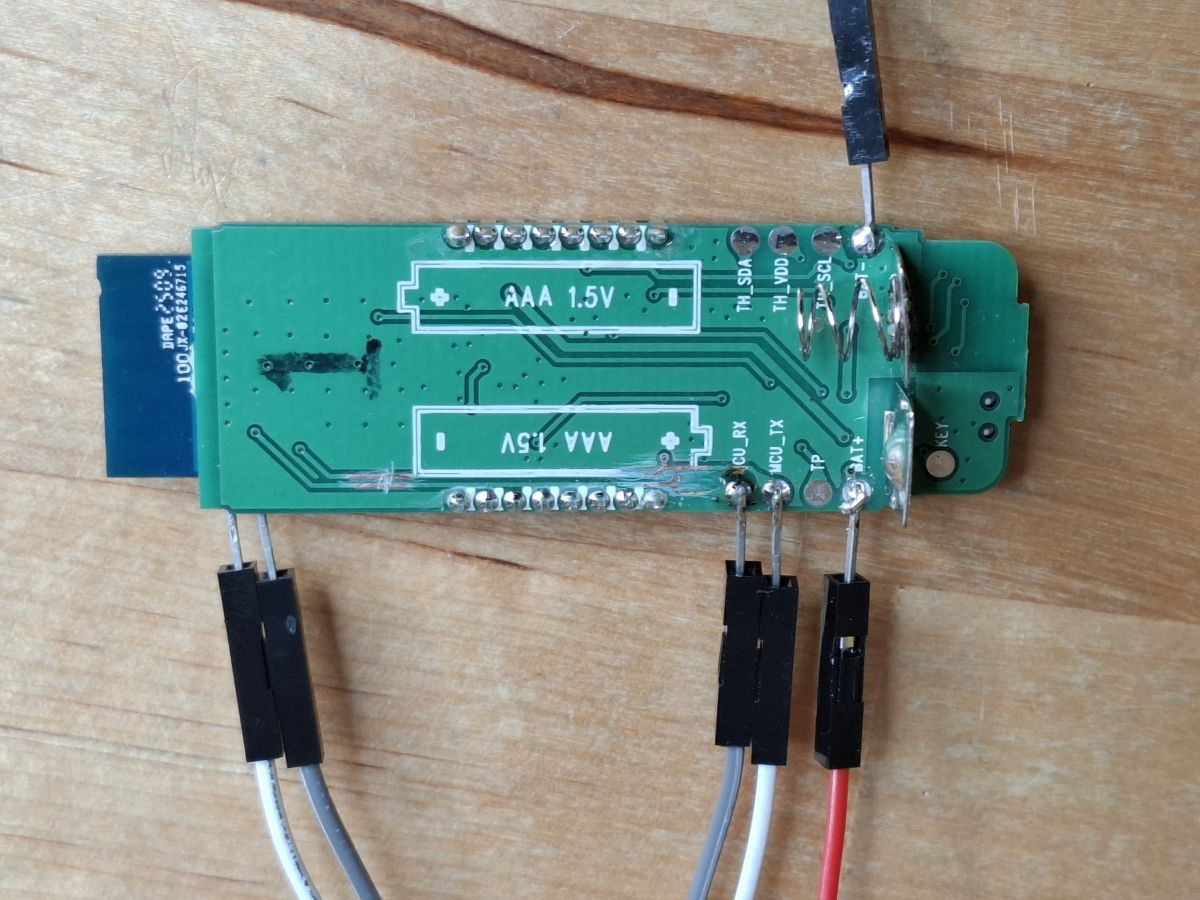
    I pondered the option of trying to cut the 2 small traces by those pads, but opted to cut them further up the trace (don't ask me why I staggered them)

    Green PCB with marked AAA 1.5V slots and connected jumper wires.

    I then was able to get it to connect via the CB3S TX/RX
    It would not read the firmware successfully and kept failing at the same place; I assume this was where the previous OTA flash failed.
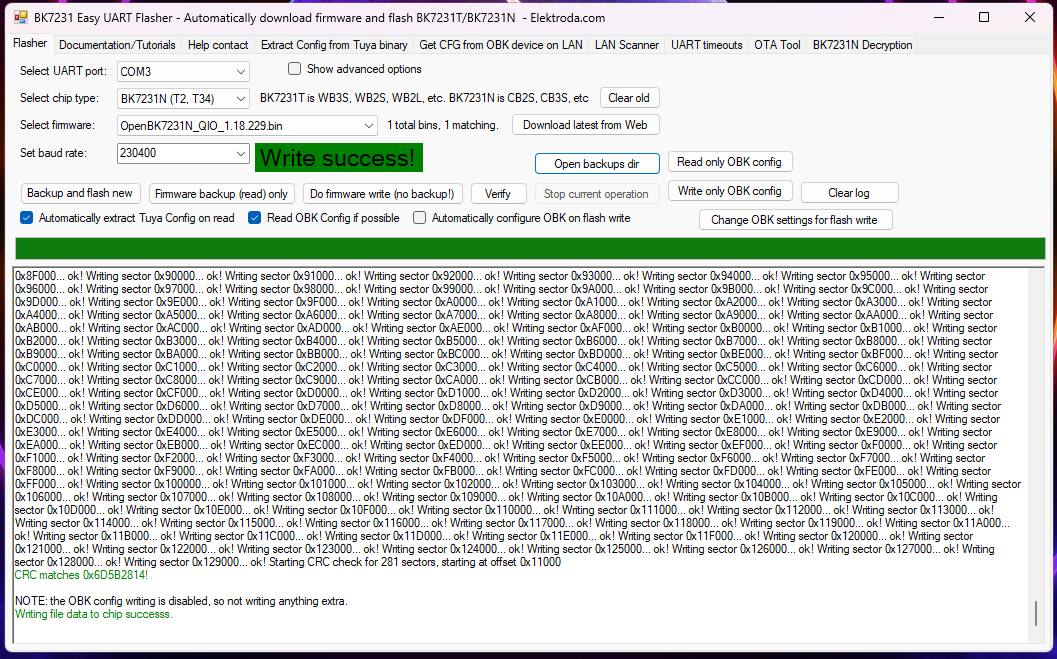
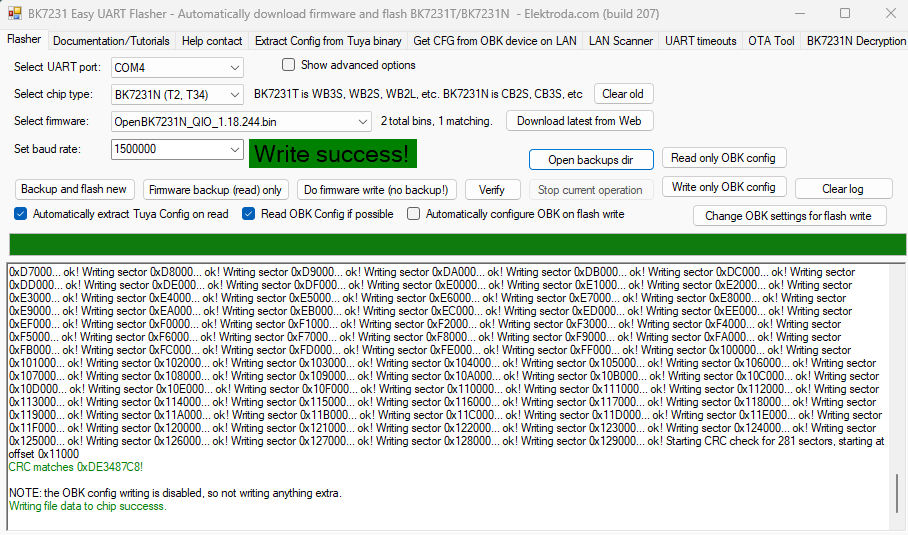
    So I bit the bullet and tried to flash the latest firmware with success!!
    BK7231 Easy UART Flasher interface showing “Write success!” message
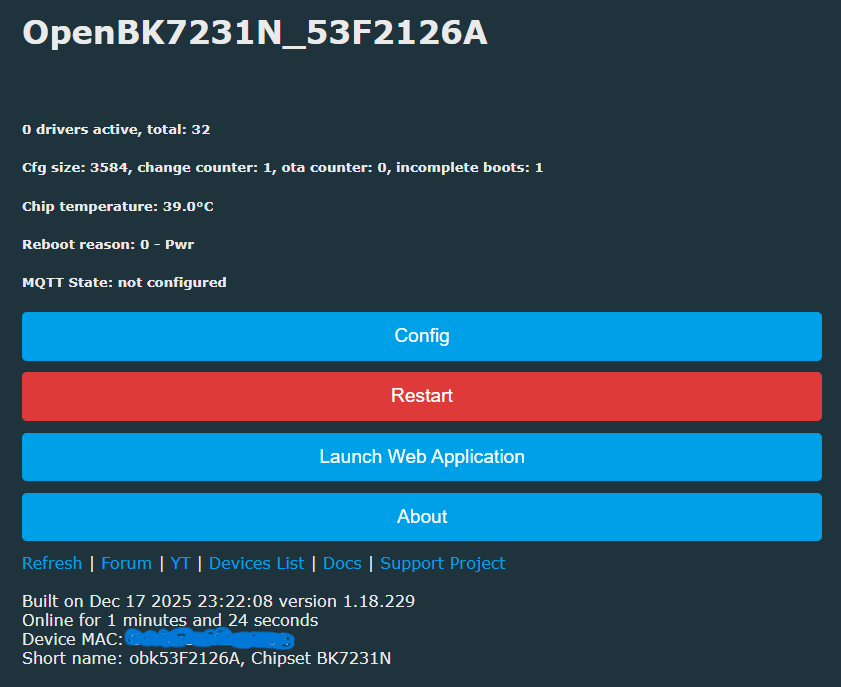
    I can now talk to it!
    Control panel of OpenBK7231N device with setup and restart buttons
    I have changed the WiFi details and can now talk to it via my network!

    Now all I need to do is work out how to stop it from turning itself off after 30 seconds or so so I can talk to it long enough to figure out how to configure it. I have never played with OpenBK before, so this is a massive learning curve for me!
  • #9 21785939
    p.kaczmarek2
    Moderator Smart Home
    Battery-powered devices are inherently hard to flash and convert. The turning off after 30 seconds it's just one of the issues.

    You can either power the CB3S directly (via 3.3V pad) or try pressing pair button repeatedly.

    Be aware that powering CB3S is just a first step. You also need to properly setup tmSensor driver and dpIDs, so they match what Tuya used in this particular device. Each device may have totally different dpID meaning.

    I usually do a communication capture with Tuya firmware first, and then change to OBK. Here is the tool I use: https://www.elektroda.com/rtvforum/topic3970199.html

    By the way, it's indeed a very interesting sensor. I haven't seen that one yet. Thanks for sharing!
    Helpful post? Buy me a coffee.
  • #10 21786112
    Dnomis77
    Level 2  
    Really struggling to get started with this... I tried to get Gemini to help me, and it kept sending me in circles, asking me to set pins 10 and 11 to TuyaMCU_RX and TuyaMCU_TX, but they aren't in the pull-downs of either the web app or the config pages.
    It then keeps going over and over different commands that don't work, and keeps telling me I have the "lite" version of the firmware with no Tuya support, and I need a different version.
    I used the Get Latest Firmware from the Flash program, which put this one on...
    https://github.com/openshwprojects/OpenBK7231...es/download/1.18.230/OpenBK7231N_1.18.230.rbl

    Not sure where to go from here; I'm stuck. Is there a tutorial on finding the right pin setup anywhere please?
  • #12 21786120
    p.kaczmarek2
    Moderator Smart Home
    Dnomis77 wrote:
    Really struggling to get started with this... I tired to get Gemini to help me and it kept sending me in circles asking me to set pins 10 and 11 to TuyaMCU_RX and TuyaMCU_TX but they aren't in the pull downs of either the web app or the config pages.

    TuyaMCU UART is always on the same UART port so we don't have those pins roles. I believe this is a halucination. Do not trust LLMs.

    Dnomis77 wrote:

    It then keeps going over and over different commands that doesn't work and keeps telling me I have the "lite" version of the firmware with no Tuya support and I need a different version.

    TuyaMCU and tmSensors drivers are in default OBK build, so you have them. AI says it just because it fits to the context (it's just a prediction mechanism).

    Dnomis77 wrote:

    finding the right pin setup anywhere please?

    UART pins are always correct by default, but you need to know the baud rate.


    Dnomis77 wrote:

    Is there a tutorial

    In my opinion converting those devices is somewhat advanced topic, but you can start with my guide for a door sensor:
    https://www.elektroda.com/rtvforum/topic3914412.html
    Your device most likely works more or less the same, but have different dpIDs.
    Helpful post? Buy me a coffee.
  • #13 21786123
    Dnomis77
    Level 2  
    Thanks, both. I'll start reading tomorrow. I didn't think this would have been such a tough choice of sensor to start with. I do know not to trust LLM, but they do come up with some useful stuff sometimes... This time, I just went round in circles pointing out to it why it was wrong!
  • #14 21786151
    p.kaczmarek2
    Moderator Smart Home
    Don't worry that much about it, I never ever seen such sensor with LCD before, so at least you taught us something new.

    I saw you said the firmware backup failed, but maybe you can at least recover Tuya config partition?
    https://www.youtube.com/watch?v=WunlqIMAdgw&ab_channel=Elektrodacom
    This will not contain GPIO on your device, but may contain baud setting.

    WiFi battery powered devices are hard to convert in general. I am usually choosing Zigbee in that matter.
    Helpful post? Buy me a coffee.
  • #15 21786343
    Dnomis77
    Level 2  
    Attached is the Tuya Config Partition.

    The Flasher reports...

    Sorry, no meaningful pins data found. This device may be TuyaMCU or a custom one with no Tuya config data.
    No module information found.
    And the Tuya section starts at an UNCOMMON POSITION 0.

    Code: JSON
    Log in, to see the code
  • #16 21786374
    divadiow
    Level 37  
    try this autoexec

    Code: Text
    Log in, to see the code
  • #17 21786488
    Dnomis77
    Level 2  
    Hi,
    I got to the same place!

    I have my startup command set to this...

    startDriver TuyaMCU
    startDriver tmSensor
    // Temperature
    setChannelType 1 temperature_div10
    linkTuyaMCUOutputToChannel 27 val 1
    // Humidity
    setChannelType 2 Humidity
    linkTuyaMCUOutputToChannel 46 val 2
    // Unknown Sensor/Mode from logs (dpID 101)
    setChannelType 3 ReadOnly
    linkTuyaMCUOutputToChannel 101 val 3


    And it works! I can now report the temp and humidity (and the odd one) via MQTT into HA
    With tmSensor not running, the Wi‑Fi board stays alive for 88 seconds but does not report any values before its power is cut.
    As soon as I enable tmSensor, it reports the values and shuts down the Wi‑Fi board at 12 seconds.

    Presumably for power-saving measures.
    Is there a way to force it on all the time other than hard-wiring it to power? I will be running via 3.3 V external power, not batteries
  • ADVERTISEMENT
  • #18 21786576
    divadiow
    Level 37  
    as far as I recall you're at the mercy of the TuyaMCU. I think it usually cuts the power to module (?) so maybe a case of simply tying the CB3S ground into a plane?
  • #19 21786679
    Dnomis77
    Level 2  
    Yes, that works, tying the CB3S GND to the "battery" -ve keeps the WiFi alive.
    But the TuyaMCU doesn't like it... The LCD and readings refuse to update, even when the temperature/humidity changes on the sensor (like breathing on it)
  • #20 21786761
    p.kaczmarek2
    Moderator Smart Home
    GND or power? I think it disconnected power from CB3S.

    How this LCD works, how often is it refreshed? Is it on all the time? As I said, i never saw such device before, I'm curious.

    The problem is that TuyaMCU MCU has a state machine, and it expects tmSensor to send packet when it turns on the power for the WiFi module, so, if you power WiFi module all the time, the tmSensor will not know when to send packet, so there will be no data exchange, so no measurements.
    Helpful post? Buy me a coffee.
  • #21 21786859
    Dnomis77
    Level 2  
    If I make a permanent connection of the CB3S GND to the battery ground, then the WiFi does not turn off. It also stops sending readings and the LCD no longer updates.

    The LCD display is always on; even with the original firmware, it was always on.
    This is where I purchased the sensor...
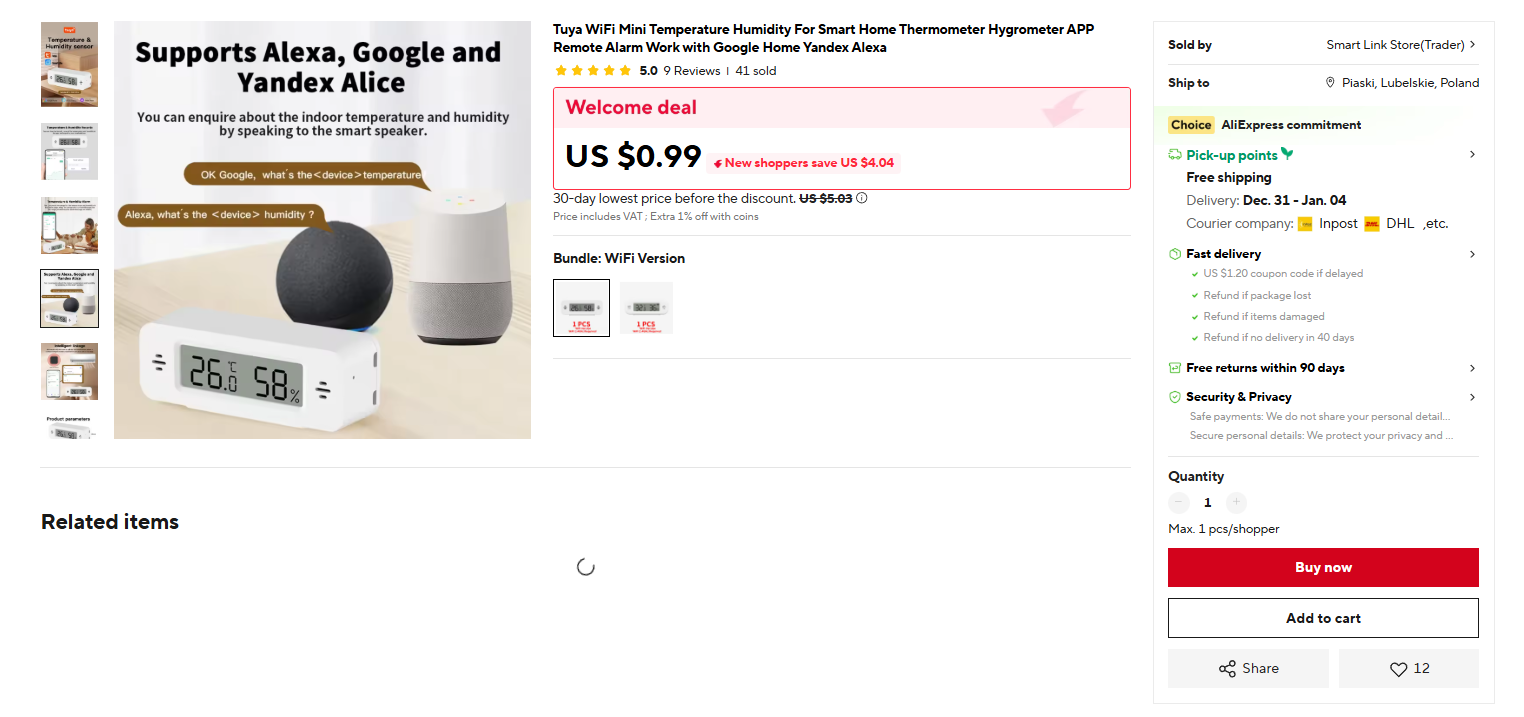
    https://www.aliexpress.com/item/1005008123502170.html
  • #22 21787168
    p.kaczmarek2
    Moderator Smart Home
    Oh I see, they offer a nice deal for this device right now:
    WiFi thermometer and hygrometer supporting Alexa, Google, and Yandex Alice

    I'm suprised that you're saying they disconnect GND, but maybe you are right. Chinese devices often suprise me.

    It would be interesting to see what's under LCD, but maybe someday...
    Helpful post? Buy me a coffee.
  • #24 21802842
    siggiullrich
    Level 2  
    Hello,
    I am just starting to look into Tuya and OpenBeken. I have also purchased this temperature sensor and am trying to install OpenBeken for the first time.
    If there is any further information regarding the next steps and configuration (autoexec.bat), I would be very grateful if you could share it here.
  • #25 21803113
    Dnomis77
    Level 2  
    By far the hardest thing about this sensor is keeping the thing alive long enough to do anything with it. It automatically goes to sleep very quickly. If you keep pressing the button, then it will keep it alive longer, but I found it difficult to concentrate on typing or pressing buttons on the computer at the same time as pressing the button on the sensor every few seconds; it was a bit like trying to rub your tummy and pat your head at the same time!

    As for configuration, I used the 229 version of the OpenBeken firmware and used the code listed above in the startup command box of the home page of the sensor.

    I have done a second one since and did not need to break the tracks anywhere. I used the MCU_TX & MCU_RX, BAT and BAT- on the circuit board and disconnected the BAT or BAT- from the board to reboot and get the flasher to catch.
    I also found I had to use 230400 baud rate, otherwise the thing fell asleep before it finished getting or writing the data.

    With hindsight I wish I had started with a Wi-Fi switch or something that didn't go to sleep so quickly as they have been a walk in the park to flash since cutting my teeth on this Temp Sensor!
  • Helpful post
    #26 21803579
    siggiullrich
    Level 2  
    After some more reading in different topics I decided not to cut RX/TX, but connect Pin9 (GND) of the CB3S to BAT-.
    That way, powered by USB-Serial 3,3V on BAT+,BAT- and connected RX/TX, the CB3S permanently stays on.
    Then I was able to flash the firmware (1.18.244) with the BK7231 Easy UART Flasher (Baud 1500000)
    and could do the config (Wifi/MQTT) via WebInterface.
    BK7231 Easy UART Flasher window with Write success! message visible

    StartUp Command Text
    
    startDriver TuyaMCU
    startDriver tmSensor
    // dpID 27 is temperature div 10
    setChannelType 27 temperature_div10
    linkTuyaMCUOutputToChannel 27 val 27
    // dpID 46 is % humidity
    setChannelType 46 Humidity
    linkTuyaMCUOutputToChannel 46 val 46
    // dpID 101 is battery state - low(0), mid(1) and high(2)
    setChannelType 10 ReadOnly
    linkTuyaMCUOutputToChannel 101 enum 10
    setChannelLabel 10 Battery 


    After finishing the config, the Pin9 (GND) CB3S to BAT- connection must be removed to get any data.

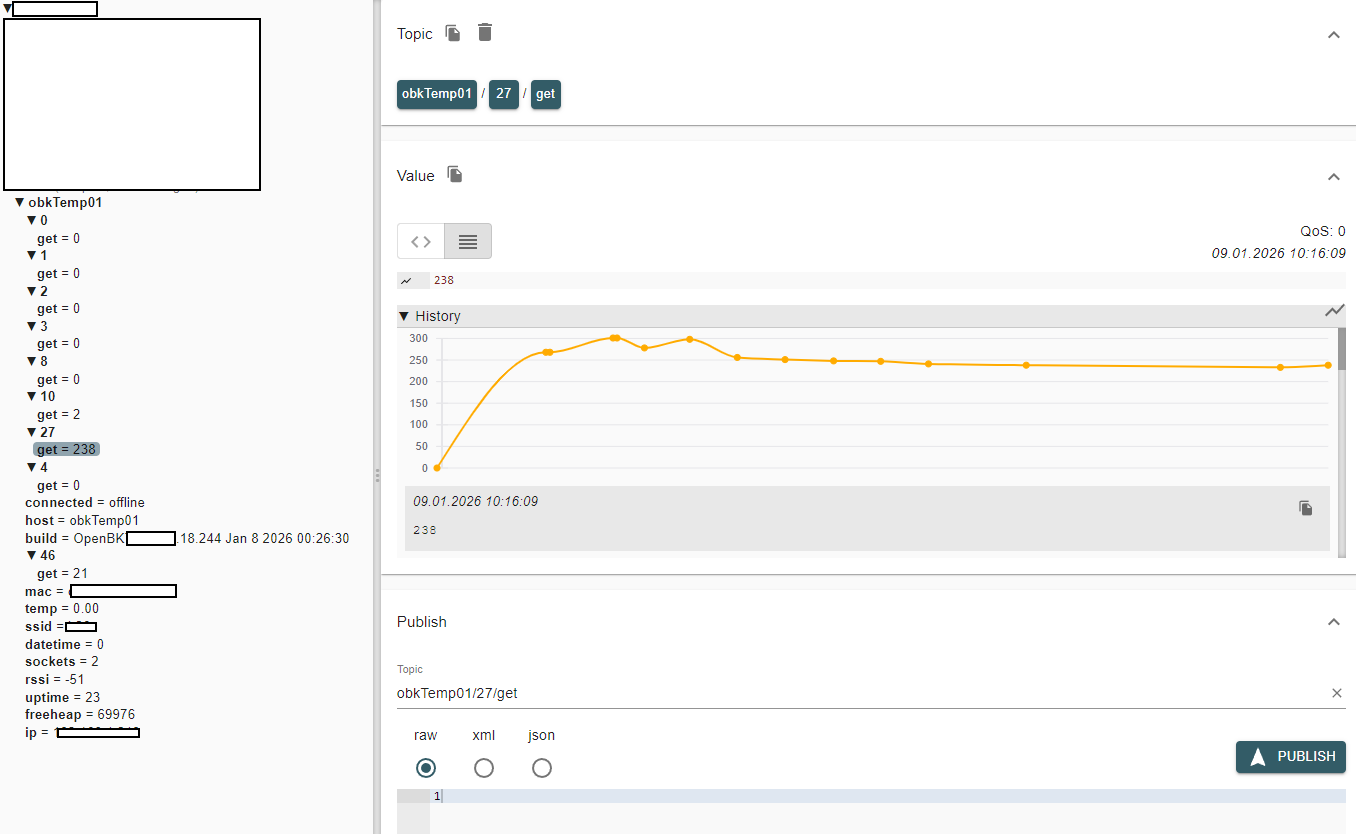
    Channel 27 value graph for obkTemp01 device in OpenBK web interface

    Added after 6 [hours] 15 [minutes]:

    I have now converted three of the sensors, and they run on batteries and deliver the values via MQTT.
    I would like to convert a few sensors to USB power supply (5V->3V conversion) and be able to determine the interval of data transmission myself. In addition, the sensor should always have WiFi turned on so that I can access the configuration pages via a browser. This can already be achieved with the Pin9->BAT connection.

    But the question is how to adjust the start commands so that the value transmission still works in this case.

    I will first have to read up on the TuyaMCU topics. Maybe the project is not feasible at all.
    If anyone has any information on whether someone has already done this for other sensors of this type, I would be very grateful.

Topic summary

The discussion focuses on reflashing the Tuya ZY-TH01ProCB3S_v1.4 temperature and humidity sensor with an LCD display. The main issue is the inability to reset the CB3S module via the Reset pin when attempting serial TTL programming after an unsuccessful OTA reflash using CloudCutter. It is suggested that the RX/TX pads on the device may be connected to the TuyaMCU rather than the CB3S, complicating direct serial communication. To successfully flash the CB3S, isolating or removing the TuyaMCU is recommended, potentially by severing PCB traces or removing the CB3S module, though the LCD presence makes physical removal challenging. Various wiring configurations and baud rates, including a high 15,000,000 baud rate, have been tested without success. Powering methods tried include USB-TTL 3.3V, batteries, and USB-to-3V battery eliminators. The complexity of multilayer PCB traces and lack of suitable SMD removal tools (e.g., hot air gun) further complicate the process. Visual inspection of PCB traces suggests possible points to sever the CB3S RX line to prevent interference from the TuyaMCU during flashing.
Summary generated by the language model.
ADVERTISEMENT