


logo elektroda
logo elektroda
X
logo elektroda

[BK7231N] Teardown and flashing of Atorch GR2P-WS: DIN rail device with graphic screen

morgan_flint 12369 83

TL;DR

  • Teardown and OpenBeken flashing of the Atorch GR2P-WS DIN-rail power monitor with a graphic TFT screen and Tuya app support.
  • Inside, it uses a CB2S module with BK7231N, a CH573F Tuya MCU, BL0942 metering chip, PN8016 supply, and a bistable relay driver.
  • The power board measured 10.1V from the rectified AC and 3.23V on the downstream regulator, and the Tuya model exposed 44 DpIDs.
  • After isolating TX1/RX1 and flashing with bk7231flasher 1.1.6, the relay, network parameters, and programmed values worked in OpenBeken.
  • Mapping remains incomplete because some DpIDs act oddly or as read-only, and leakage-current hardware is not populated, though spare PCB space exists.
Generated by the language model.
ADVERTISEMENT
📢 Listen (AI):
  • #61 21784557
    yarik8117
    Level 5  
    Posts: 10
    Rate: 1
    >>21784541
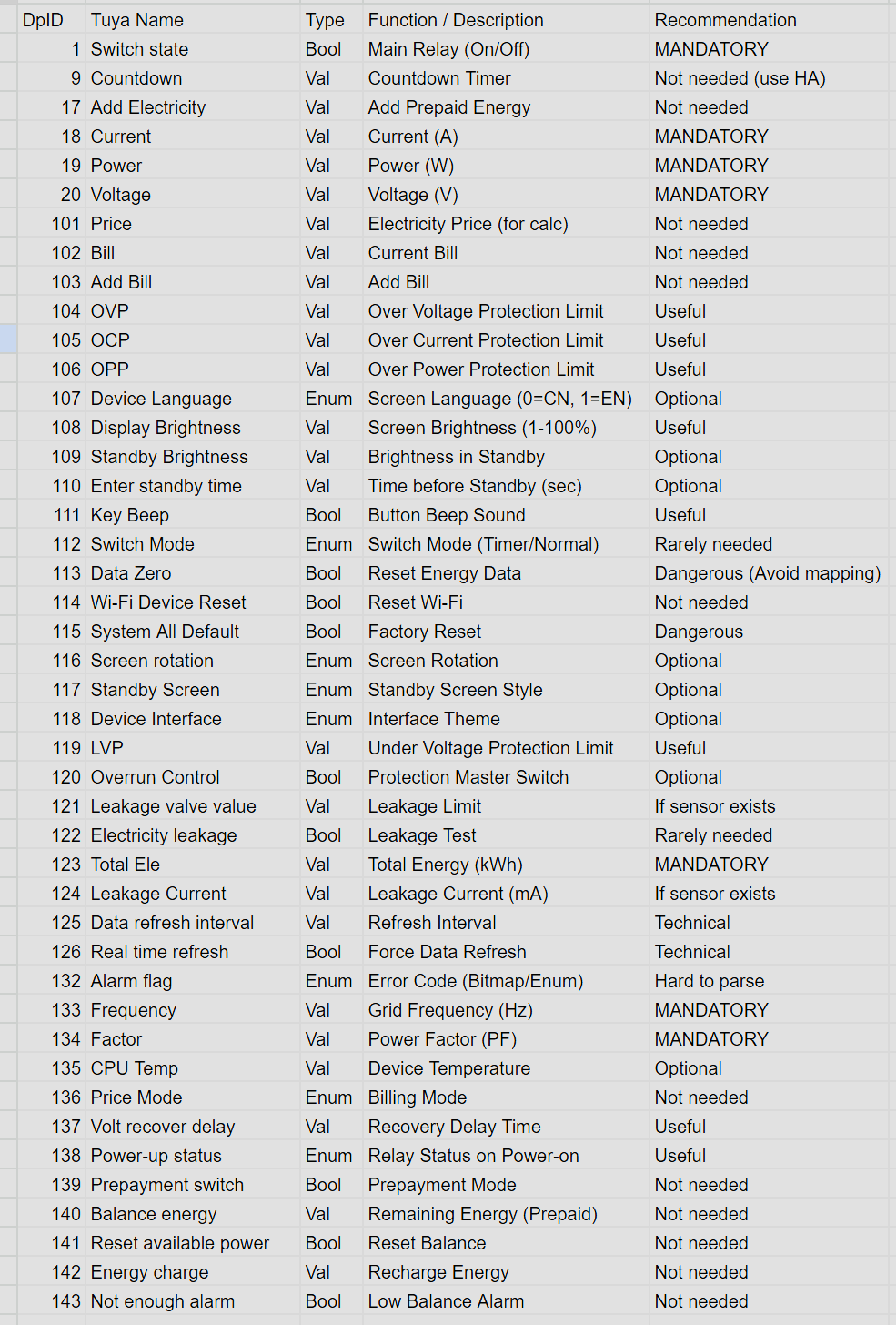
    Tuya device parameter table with functions and recommendations
    Attachments:
    • dpid in.txt (544 Bytes) You must be logged in to download this attachment.
  • ADVERTISEMENT
  • #62 21784561
    GoldMember
    Level 12  
    Posts: 26
    Rate: 1
    divadiow wrote:
    I imagine the dpIDs have changed, different schema?

    If you have a factory fw dump and it wasn't paired with Tuya first feel free to post file and I'll see if I can get the schema. or DM me file and I'll reset it and check.


    Here is the fw dump.
    Attachments:
    • readResult_BK7238_QIO_gr2p_2025-17-12-17-45-14.bin (2 MB) You must be logged in to download this attachment.
  • ADVERTISEMENT
  • #64 21784898
    GoldMember
    Level 12  
    Posts: 26
    Rate: 1
    I imported JSON in webapp and nothing changed.
  • #65 21784907
    divadiow
    Level 38  
    Posts: 4859
    Help: 424
    Rate: 860
    the JSON blocks are just information about the device from which to extract details needed to make a working autoexec. The JSON is from the Tuya dev site after pairing your firmware with the Tuya app in a test device. The second block in the previous post is just an easier to read version of the code above it.

    TuyaMCU guides and examples:

    TuyaMCU flashing, setup and configuration guide - configure dpIDs for Home Assistant
    https://www.elektroda.com/rtvforum/topic4038151.html

    TuyaMCU protocol - communication between the microcontroller and the WiFi module
    https://www.elektroda.com/rtvforum/topic3880546.html

    OpenBeken and TuyaMCU dimmer - configuration guide/tutorial
    https://www.elektroda.com/rtvforum/topic3898502.html

    Extracting DpIDs for TUYA MCU devices
    https://www.elektroda.com/rtvforum/topic4021129.html

    How to get dpID list of types and values for flashed TuyaMCU devices with OpenBeken
    https://www.elektroda.com/rtvforum/topic4049908.html

    How to make TuyaMCU device send more data points? Why are dpIDs not sent? Processing by the Wi-Fi...
    https://www.elektroda.com/rtvforum/topic4089722.html

    Scripting the behaviour of TuyaMCU relay OpenBeken - custom buttons, timers, events, countdown
    https://www.elektroda.com/rtvforum/topic4009196.html

    Autoexec Examples
    https://github.com/openshwprojects/OpenBK7231T_App/blob/main/docs/autoexecExamples.md
  • #66 21784956
    yarik8117
    Level 5  
    Posts: 10
    Rate: 1
    >>21784898
    Does your chip temperature also remain at 82 degrees after reflashing? Or is it just me? I haven't been able to start reading data yet. I think the firmware from BK7238 may not be entirely suitable for our T1-2S-NL. What specific firmware did you install?
  • #67 21784969
    divadiow
    Level 38  
    Posts: 4859
    Help: 424
    Rate: 860
    is anything giving sign OpenBK7238 is talking to the TuyaMCU? what about with flag 26 enabled to swap uart?
  • #68 21785019
    yarik8117
    Level 5  
    Posts: 10
    Rate: 1
    >>21784969 >>21784969
    I don't see any signs of interaction. No buttons or data are being transmitted. I enabled flag 26 and disabled it, but it doesn't help.
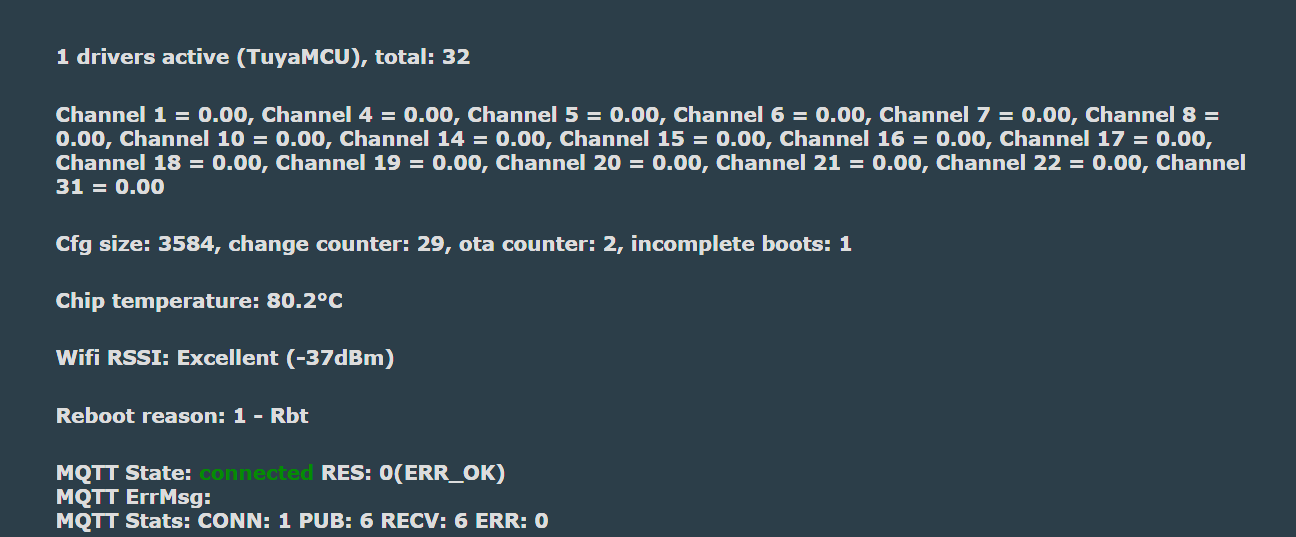
    Screenshot of system status with one active TuyaMCU driver and 32 total channels
  • #69 21785120
    GoldMember
    Level 12  
    Posts: 26
    Rate: 1
    yarik8117 wrote:
    >>21784898
    Does your chip temperature also remain at 82 degrees after reflashing? Or is it just me? I haven't been able to start reading data yet. I think the firmware from BK7238 may not be entirely suitable for our T1-2S-NL. What specific firmware did you install?


    Yes, mine is too about 82. I downloaded the newest firmware via Beken flasher.
  • ADVERTISEMENT
  • #70 21785131
    insmod
    Level 31  
    Posts: 1353
    Help: 160
    Rate: 425
    Ignore it, it's different for every chip.
    Some BK7238's can even have negative temperature.
  • #71 21785208
    yarik8117
    Level 5  
    Posts: 10
    Rate: 1
    No data from TuyaMCU in the console or on the sensor. No data at all. What else can I do? I am new to this and am trying to figure it out. Apparently, the DpId is the same, exactly the same as in the first post, only the bit width of some sensors is different. But no data is coming in at all, as if TuyaMCU does not exist.
  • #72 21785332
    divadiow
    Level 38  
    Posts: 4859
    Help: 424
    Rate: 860
    How did you flash BK7238? Did you have to cut traces or desolder t1-2s-nl module? How are you powering the device now, is it all back together and on the mains?

    Any results from command tuyaMcu_sendQueryState?
  • ADVERTISEMENT
  • #73 21785444
    GoldMember
    Level 12  
    Posts: 26
    Rate: 1
    In my case I desoldered the module and flashed it with BK Flasher. Everythinhg went ok so I put it back together and connected to mains.
    Result of command:
    Error:CMD:cmd tuyaMcu_sendQueryState NOT found (args )
    Unknown command
  • #74 21785449
    yarik8117
    Level 5  
    Posts: 10
    Rate: 1
    >>21785332
    In my case, I isolated RX and TX. And flashed it with BK Flasher. After a while, I flashed it again, thinking that it had been flashed with an error. Everything was flashed without errors.
    Info:CMD:[WebApp Cmd 'tuyaMcu_sendQueryState' Result] OK

    I'll add this. After a lot of hassle trying to get it to work on OpenBeken, I decided to check if the chip was actually working. I flashed the backup and it started working again on the factory firmware. It's working fine now and passing all the values normally. I flashed the backup without isolating TX and RX. Everything flashed without any problems. How can I now make it work on OpenBeken?
  • #75 21787621
    GoldMember
    Level 12  
    Posts: 26
    Rate: 1
    It's working!

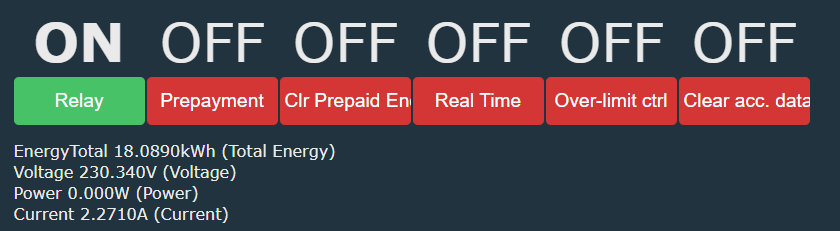
    Interface with relay button and electrical data, status ON

    Except the power meter. I tried command startDriver BL0942 in autoexec but when is on nothing works.
    Any idea why is not showing power?
  • #76 21787625
    divadiow
    Level 38  
    Posts: 4859
    Help: 424
    Rate: 860
    what does your line for power in autoexec look like?

    startdriver bl0942 is not for TuyaMCU devices. Power reading will just be another dpID like the other things.
  • #77 21787638
    yarik8117
    Level 5  
    Posts: 10
    Rate: 1
    >>21787621
    Can you show me your autoexec file?
  • #78 21787689
    GoldMember
    Level 12  
    Posts: 26
    Rate: 1
    Autoexec.bat
    
    clearIO
    
    flags 0
    
    SetFlag 46 1
    
    startDriver TuyaMCU
    tuyaMcu_setBaudRate 115200
    startDriver NTP
    ntp_setServer  150.214.94.5
    ntp_timeZoneOfs 2
    
    waitFor MQTTState 1
    //tuyaMcu_defWiFiState 4
    
    
    linkTuyaMCUOutputToChannel 1 bool 1
    setChannelType 1 toggle
    setChannelLabel 1 "Relay"
    
    
    linkTuyaMCUOutputToChannel 139 bool 2
    setChannelType 2 toggle
    setChannelLabel 2 "Prepayment"
    
    linkTuyaMCUOutputToChannel 141 bool 3
    setChannelType 3 toggle
    setChannelLabel 3 "Clr Prepaid Energy"
    
    linkTuyaMCUOutputToChannel 123 val 4
    setChannelType 4 EnergyTotal_kWh_div1000
    setChannelLabel 4 "Total Energy"
    
    linkTuyaMCUOutputToChannel 18 val 7
    setChannelType 7 Current_div1000
    setChannelLabel 7 "Current"
    linkTuyaMCUOutputToChannel 10 val 6
    setChannelType 6 Power_div100
    setChannelLabel 6 "Power"
    linkTuyaMCUOutputToChannel 20 val 5
    setChannelType 5 Voltage_div100
    setChannelLabel 5 "Voltage"
    
    linkTuyaMCUOutputToChannel 124 val 8
    setChannelType 8 TextField
    setChannelLabel 8 "Leakage Current"
    
    
    linkTuyaMCUOutputToChannel 132 val 9
    setChannelType 9 Readonly
    setChannelLabel 9 "Alarms"
    
    linkTuyaMCUOutputToChannel 104 val 10
    setChannelType 10 TextField
    setChannelLabel 10 "Overvoltage limit"
    
    
    linkTuyaMCUOutputToChannel 140 val 11
    setChannelType 11 EnergyTotal_kWh_div100
    setChannelLabel 11 "Remaining Prepaid Energy"
    
    linkTuyaMCUOutputToChannel 142 val 12
    setChannelType 12 TextField
    setChannelLabel 12 "Recharge Prepaid Energy [kWh*100], i.e. 1kWh = 100"
    
    linkTuyaMCUOutputToChannel 121 val 13
    setChannelType 13 TextField
    setChannelLabel 13 "Leakage threshold"
    
    linkTuyaMCUOutputToChannel 134 val 14
    setChannelType 14 PowerFactor_div100
    setChannelLabel 14 "Power Factor"
    
    linkTuyaMCUOutputToChannel 133 val 15
    setChannelType 15 Frequency_div100
    setChannelLabel 15 "Frequency [Hz]"
    
    linkTuyaMCUOutputToChannel 105 val 16
    setChannelType 16 TextField
    setChannelLabel 16 "Overcurrent limit"
    
    linkTuyaMCUOutputToChannel 106 val 17
    setChannelType 17 TextField
    setChannelLabel 17 "Power limit"
    
    linkTuyaMCUOutputToChannel 119 val 18
    setChannelType 18 TextField
    setChannelLabel 18 "Undervoltage limit"
    
    linkTuyaMCUOutputToChannel 125 val 19
    setChannelType 19 TextField
    setChannelLabel 19 "Refresh interval"
    
    linkTuyaMCUOutputToChannel 126 bool 20
    setChannelType 20 toggle
    setChannelLabel 20 "Real Time"
    
    linkTuyaMCUOutputToChannel 120 bool 21
    setChannelType 21 Toggle
    setChannelLabel 21 "Over-limit ctrl"
    
    linkTuyaMCUOutputToChannel 113 bool 22
    setChannelType 22 Toggle
    setChannelLabel 22 "Clear acc. data"
    
    linkTuyaMCUOutputToChannel 101 val 27
    setChannelType 27 TextField
    setChannelLabel 27 "Electricity price"
    
    linkTuyaMCUOutputToChannel 102 val 28
    setChannelType 28 ReadOnly
    setChannelLabel 28 "Total electricity cost"
    
    
    linkTuyaMCUOutputToChannel 143 val 30
    setChannelType 30 TextField
    setChannelLabel 30 "Low prepaid energy alarm value"
    
    linkTuyaMCUOutputToChannel 137 val 31
    setChannelType 31 TextField
    setChannelLabel 31 "Overvolt recov. delay"
    
    // test other Dpid - Ch 0
    // linkTuyaMCUOutputToChannel 138 enum 0
    // setChannelType 0 TextField
    // setChannelLabel 0 "Test DpID 138 Pwr on status" 
    
    // NOTE: addRepeatingEvent [RepeatTime] [RepeatCount]
    // code below will forever Send query state command every 5 seconds
    // addRepeatingEvent 5 -1 tuyaMcu_sendQueryState
    // Not needed in this device, since TuyaMCU sends everything when necessary
    // we need it just first time to obtain initial status. Some dpIDs not reported without asking
    tuyaMcu_sendQueryState
  • #79 21787703
    yarik8117
    Level 5  
    Posts: 10
    Rate: 1
    >>21787689
    I didn't see a single line about Power at all.

    linkTuyaMCUOutputToChannel 19 val 6
    setChannelType 6 Power_div100
    setChannelLabel 6 "Power"

    My mistake was probably in "tuyaMcu_setBaudRate 115200". I set it to 9600.
  • #80 21787724
    GoldMember
    Level 12  
    Posts: 26
    Rate: 1
    Now power is also working, it has to be like that:
    linkTuyaMCUOutputToChannel 19 val 6
    setChannelType 6 Power_div100
    setChannelLabel 6 "Power"
  • #81 21788001
    yarik8117
    Level 5  
    Posts: 10
    Rate: 1
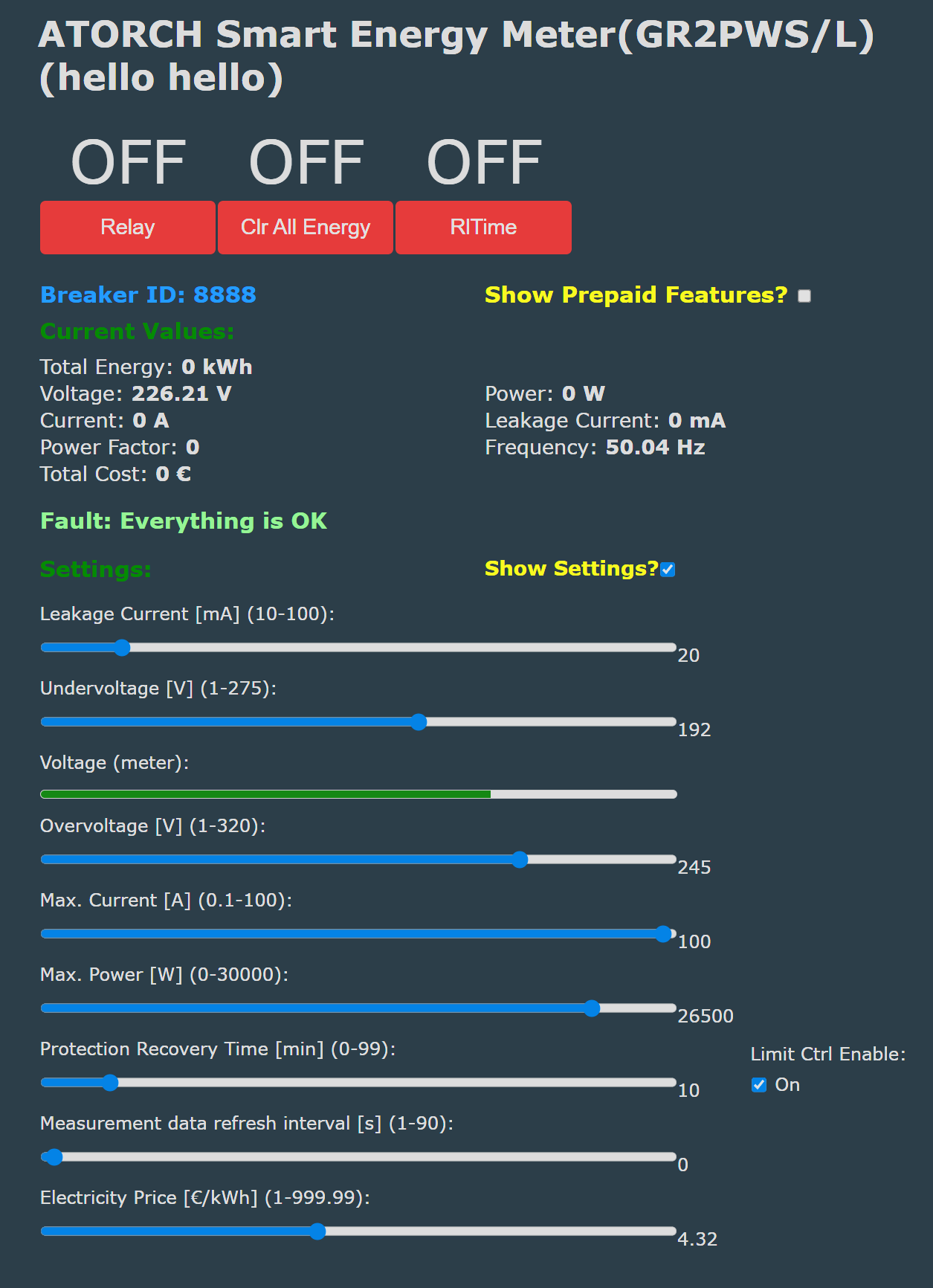
    Everything worked for me. I had to fiddle with the HTML file a bit. But in the end, it works. Thank you all.
    ATORCH energy meter UI screen showing current values and adjustable settings
  • #82 21795755
    KaosuNeko
    Level 2  
    Posts: 3
    yarik8117 wrote:
    Everything worked for me. I had to fiddle with the HTML file a bit. But in the end, it works. Thank you all.
    ATORCH energy meter UI screen showing current values and adjustable settings


    Hello! I have the same device on T1-2S-NL. Can you attach your html? Thanks!
  • #83 21796023
    yarik8117
    Level 5  
    Posts: 10
    Rate: 1
    >>21795755
    script.js.gz and style.css.gz, just upload them as an archive. I couldn't upload them any other way, there wasn't enough space. I would like to add that this is for the T1-2S-NL processor. I am not sure how it will work with others.
    Attachments:
    • hello.html.txt (8.12 KB) You must be logged in to download this attachment.
    • style.css.gz (877 Bytes) You must be logged in to download this attachment.
    • script.js.gz (2.91 KB) You must be logged in to download this attachment.
    • GR2PWS_autoexec.bat.txt (2.91 KB) You must be logged in to download this attachment.
  • #84 21796936
    KaosuNeko
    Level 2  
    Posts: 3
    >>21796023
    yarik8117 wrote:
    upload them as an archive. I couldn't upload them any other way, there wasn't enough space. I would like to add that this is for the T1-2S-NL processor.


    Thanks! It works great!
📢 Listen (AI):

Topic summary

✨ The discussion centers on the teardown, firmware flashing, and integration of the Atorch GR2P-WS DIN rail energy meter featuring a graphic screen and BK7231N WiFi module. Users share experiences flashing OpenBK7231N firmware to replace the original Tuya firmware, aiming to eliminate cloud dependencies and enable local control via Home Assistant. Challenges include configuring WiFi credentials, MQTT setup, and linking Tuya MCU outputs to OBK channels through customized autoexec.bat scripts. The MCU firmware (CH573F) versions (1.0.3, 1.0.4, 1.0.9) and update mechanisms are discussed, with attempts to dump and reflash MCU firmware via USB ISP and UART ISP modes proving difficult due to bootloader restrictions and hardware specifics. Newer GR2PWSL versions with external current transformers and different MCU firmware are noted, with similar device schema IDs but differing update availability in the Tuya app. Diagnostic data reporting (RSSI, IP, SSID) to Home Assistant via MQTT is enabled by adjusting OBK flags. The relay internals and driver IC datasheet are shared. Community members contribute modified autoexec.bat configurations adding SSDP, NTP, and Wemo drivers. The discussion also covers the translation of Chinese JSON strings in device models to English for better integration. Overall, the thread provides detailed technical insights into hardware teardown, firmware flashing, MCU communication, and Home Assistant integration of Atorch GR2P-WS devices using BK7231N and CH573F chips.
Generated by the language model.

FAQ

TL;DR: With 44 DpIDs and “flash OpenBeken on it,” this thread shows GR2P-WS owners how to replace Tuya cloud with OpenBeken, map TuyaMCU datapoints, and restore Wi‑Fi, MQTT, and Home Assistant reporting on both CB2S/BK7231N and newer T1-2S-NL variants. [#21142057]

Why it matters: This FAQ turns a long reverse-engineering thread into a fast, quotable setup guide for getting Atorch GR2P-WS energy breakers working locally.

Variant Wi‑Fi module / chip TuyaMCU baud rate reported Key flashing note
GR2P-WS, early CB2S / BK7231N 9600 Needed RX/TX isolation; bk7231flasher 1.1.6 worked reliably
GR2PWSL Different main MCU + same TuyaMCU-style mapping Not highlighted as changed Added leakage CT hardware and newer schema details
GR2P-WS, late T1-2S-NL / BK7238-class handling 115200 Needed OpenBeken BK7238 path and corrected autoexec

Key insight: GR2P-WS is not a simple standalone smart relay. It is a TuyaMCU design, so flashing OpenBeken only replaces the Wi‑Fi module; the device works correctly only after you map the right DpIDs and baud rate in autoexec.bat.

Quick Facts

  • The early GR2P-WS schema exposed 44 DpIDs, including relay control, voltage, current, power, total energy, prepaid functions, alarms, frequency, power factor, and display settings. [#21142057]
  • On the early CB2S board, measured rails were about 10.1 V from the PN8016 supply and 3.23 V for logic, with the relay coil presumed to be 9 V. [#21142057]
  • The GR2PWSL leakage version adds an external residual-current transformer with a reported 1:1000 ratio plus roughly 510 Ω shunt and ~500 Ω series parts for leakage sensing. [#21572984]
  • A late T1-2S-NL GR2P-WS worked only after switching TuyaMCU speed to 115200 baud; using DpID 19 for power fixed the broken power reading. [#21787724]

How do I flash OpenBeken on the Atorch GR2P-WS with a CB2S BK7231N module and get it working with the TuyaMCU autoexec.bat?

Flash the CB2S module with OpenBK7231N, then add the TuyaMCU mapping file. 1. Disconnect the device from mains, wire 3V3, GND, RX, and TX, and isolate CB2S RX1/TX1 if flashing fails. 2. Flash OpenBeken, boot it, join its AP or web UI, and configure Wi‑Fi and MQTT. 3. Create autoexec.bat in LittleFS, paste the GR2P-WS TuyaMCU mapping, reboot, and run Home Assistant discovery. The original working map used startDriver TuyaMCU, tuyaMcu_setBaudRate 9600, and linked relay, voltage, current, power, and energy channels. [#21142057]

Why does the Atorch GR2P-WS sometimes fail to flash with bk7231flasher 1.3.3, and why did version 1.1.6 work better for some users?

Some users saw bk7231flasher 1.3.3 freeze during flashing, while 1.1.6 completed successfully on the same hardware. The failure appeared when CB2S TX1 and RX1 still interacted with the main PCB, so cleaning the solder bridge and isolating those lines helped. One user explicitly reported errors without isolation, then a successful flash after isolating signals and switching from 1.3.3 to 1.1.6. That makes the issue a tool-and-bus-interference problem, not a GR2P-WS lockout. [#21142057]

What is a TuyaMCU device, and how is it different from a standalone OpenBeken device?

A TuyaMCU device uses one MCU for the product logic and a separate Wi‑Fi module for networking, so OpenBeken does not control the hardware directly. "TuyaMCU" is a controller architecture that keeps the relay, display, metering, and buttons on a dedicated MCU, while the BK Wi‑Fi module only exchanges datapoints over UART. On GR2P-WS, the early board used a CH573F as the Tuya MCU and a CB2S BK7231N module for Wi‑Fi. That is why flashing OpenBeken alone shows no useful values until you map DpIDs in autoexec.bat. [#21142057]

What are DpIDs in TuyaMCU devices, and how do I extract the GR2P-WS schema or Things Data Model from Tuya Developer?

DpIDs are Tuya datapoint identifiers that represent functions like switch state, power, voltage, or alarms. "DpIDs" are protocol fields that define each readable or writable function, including type, scale, unit, and access mode. For GR2P-WS, the thread extracted the Things Data Model from Tuya Developer using “Query Things Data Model,” then reformatted it into a readable table. The early model exposed 44 DpIDs, while a later T1-2S-NL dump still matched modelId e1kylf6c, confirming the same basic schema even on newer hardware. [#21784596]

Why does the original GR2PWS_Reset_BK7231N backup reconnect to Tuya instead of behaving like OpenBeken firmware?

Because that file is a backup of the stock Tuya firmware, not OpenBeken. One user restored GR2PWS_Reset_BK7231N_QIO_2024-23-6-20-54-08.bin and saw the device appear in the router as a Tuya client again, which matched the expected behavior. The thread author clarified that the backup exists for rollback and analysis only. To run locally, you must flash a real OpenBK7231N build and then load the GR2P-WS autoexec.bat. [#21269095]

How can I make an Atorch GR2P-WS show up correctly in Home Assistant over MQTT, including sensors like current, voltage, power, and total energy?

Configure MQTT in OpenBeken, add the correct TuyaMCU mapping, then start Home Assistant discovery. The working mapping linked DpID 18 to current, 19 to power, 20 to voltage, and 123 to total energy. After reboot, users were told to open the device web UI, create autoexec.bat, paste the mapping, then use the Home Assistant Configuration page and press “Start Home Assistant discovery.” That produced MQTT entities such as current, voltage, power, total energy, frequency, and power factor. [#21264172]

Why do OBK internal diagnostic entities like RSSI, IP, SSID, uptime, and build show as unknown in Home Assistant even when values appear on the OpenBeken web page?

They show as unknown when the relevant OpenBeken state-report flags are not enabled for MQTT reporting. A user later found that RSSI, IP, SSID, and similar diagnostics started reporting after enabling those states in the Flags section. The same post noted that flags 0 in autoexec.bat clears all flags at boot, so removing that line is the safer fix if you want diagnostics in Home Assistant. The web page can still show local values even when MQTT entities remain unknown. [#21375420]

What is the difference between the Atorch GR2PWS and GR2PWSL hardware, especially around leakage current measurement and the external current transformer?

GR2PWSL adds real leakage-current hardware, while the older GR2PWS board leaves that section mostly unpopulated. The GR2PWSL version included an external residual-current transformer with a measured 1:1000 ratio, plus a roughly 510 Ω shunt resistor, a series resistor near 500 Ω, and a capacitor to ground. Earlier GR2PWS boards exposed DpIDs for leakage functions, but the thread marked that hardware as “not implemented.” That means GR2PWSL can report and trip on leakage, while the plain GR2PWS usually cannot without board modification. [#21572984]

How does the GR2P-WS compare with the TOMPD63-WIFI, TOMPD63-LW, and Atorch AT4P family for OpenBeken flashing and TuyaMCU mapping?

GR2P-WS is broadly similar to those TuyaMCU breakers, but its screen, DpID mix, and fault handling differ. The author reused parts of the TOMPD63-LW mapping because channel layouts for current, voltage, power, and energy were similar. Compared with TOMPD63-WIFI and TOMPD63-LW, GR2P-WS had a graphical TFT screen and no implemented leakage hardware on early boards. The thread also linked Atorch AT4P-family posts, noting they share related functionality but only use subsets of the full DpID range. [#21142057]

What is the best way to recover Wi-Fi access on a freshly flashed GR2P-WS if it does not join the network after OpenBK7231N is installed?

Reset the device into AP mode and configure Wi‑Fi through the OpenBeken web interface. The thread recommends reflashing without embedded credentials or power-cycling the device five times, without letting each boot fully complete, to trigger the AP. Then connect to 192.168.4.1, enter the SSID and password, and reboot. This worked better than guessing Wi‑Fi and MQTT fields in the flasher. If needed, reflash again with only OpenBeken and add network settings later from the UI. [#21264172]

How do I map the GR2P-WS power reading correctly in autoexec.bat, and why did using DpID 10 instead of DpID 19 break the power sensor?

Map power to DpID 19, not DpID 10. A late T1-2S-NL user posted an autoexec.bat that incorrectly linked linkTuyaMCUOutputToChannel 10 val 6, which broke the power sensor. The fix was to restore the original mapping: linkTuyaMCUOutputToChannel 19 val 6, then setChannelType 6 Power_div100. After that change, the power value started working. This matches the earlier CB2S schema, where DpID 19 is cur_power and DpID 10 is not the live power datapoint. [#21787724]

Why does a newer GR2PWS with a T1-2S-NL chip need different OpenBeken handling, including BK7238 firmware and a 115200 TuyaMCU baud rate?

Because the late hardware revision replaced the CB2S/BK7231N path with a T1-2S-NL module that users handled as BK7238 and at a faster UART rate. A user flashed the new module as BK7238 and initially saw no values. The breakthrough came when the thread switched the TuyaMCU baud rate to 115200 instead of 9600 and kept the same core DpID map. Once corrected, relay, measurements, and custom HTML worked on the new revision. [#21788001]

What troubleshooting steps help when a T1-2S-NL based GR2PWS shows no TuyaMCU data at all after flashing OpenBK7238?

Check UART setup first, then verify the module still talks to the MCU. 1. Confirm the device runs on mains again and OpenBeken boots normally after reassembly. 2. Set startDriver TuyaMCU, try tuyaMcu_setBaudRate 115200, and test tuyaMcu_sendQueryState; one user got OK only after fixing setup. 3. If nothing changes, restore the stock backup to prove the hardware still works, then reflash OpenBeken and correct the mapping. The thread also tested flag 26 for UART swap, but the durable fix was proper baud plus correct power mapping. [#21785449]

How can the CH573F MCU in older Atorch GR2P-WS units be accessed over USB boot mode, and what limits prevent full firmware dumping or reflashing?

You can enter CH573F USB boot mode, but full firmware extraction is blocked by read protection. One user wired USB D+, D-, GND, and grounded the BOOT pin, then WCHISPStudio detected the MCU with bootloader version 2.90. The tools could read the 32 KB EEPROM, but not the full code flash. Another user’s wchisp info showed CFG_ROM_READ 0, which disables normal flash readout. That protection, plus possible encryption, stopped practical full dumping and easy reflashing. [#21568865]
What options are there for updating or restoring the Atorch GR2P-WS MCU firmware, including Tuya app OTA, USB flashing, and backup-based recovery?

The practical options are Tuya app OTA when stock firmware still runs, restoring the Wi‑Fi-module backup to rejoin Tuya, or risky MCU-side USB experiments. The thread confirmed a rollback path: flash the saved BK backup, pair with Tuya again, and use the app if an MCU update is offered. Users also shared an MCU OTA binary for version 1.0.3, but later recovery attempts could end in boot loops. A January 2025 report showed MCU firmware 1.0.4 still worked fine with OpenBK7231N 1.17.822, so updating the MCU is not required for normal OpenBeken use. [#21373484]
Generated by the language model.
ADVERTISEMENT

