logo elektroda
logo elektroda
X
logo elektroda

BK7231T/BK7231N WiFi, MQTT, template and IP configuration at flash time via UART - OpenBeken flasher

p.kaczmarek2 11871 11

TL;DR

  • OpenBeken lets you set WiFi, MQTT, IP, and startup settings at flash time over UART, so you do not need to create an access point first.
  • BK7231GUIFlashTool supports BK7231T/BK7231N devices and uses step-by-step UART flashing, with flag 31 enabling UART command line control.
  • This method is for users who want faster setup, fewer disconnects, and easier recovery from bad settings while configuring BK7231 devices.
  • The process lets you read the OBK config, edit it on your PC, and write it back before the device ever boots into normal setup mode.
  • A CEN reset or power cycle may still be needed after changes unless UART command line is enabled, which removes that extra step.
ADVERTISEMENT
📢 Listen (AI):
  • Close-up view of BK7231 chip on a circuit board.
    BK7231GUIFlashTool allows you to configure OpenBeken at the flash time - there is no need for Open Access Point configuration, everything can be done on your PC. Here I will show you how to do it step by step.

    Why?
    The usual BK7231 flashing and configuration process is similar to Tasmota/Esphome/Etc. First you flash firmware via UART (there is also a wireless option, but this topic refers to wired method), then software creates open access point where you connect and configure your device.
    However, there is an alternate way to do it in OpenBeken.
    With OpenBeken, you can configure OBK at the flash time - that way you can read and write OBK config via UART.
    This lets you skip the "open access point" part and enter your WiFi data from your PC.
    This has several advantages, including:
    - it is quicker than open access point method
    - it does not disconnect you from internet, if you connect to web via the same WiFi you'd use for OBK
    - if your device is battery powered, there is no risk of device going back to sleep
    - this can help you recover from potential wrong configuration and boot problems
    - this can be one of the ways of automatic GPIO config (but we'll cover it another time)
    - soon this can help you batch-convert devices

    Step 1: Flash your device via UART
    Just do the usual process of programming BK7231, see our readme for more information:
    https://github.com/openshwprojects/BK7231GUIFlashTool
    You can also watch tutorials on our YT channel:
    https://www.youtube.com/@elektrodacom

    Step 2: Once OBK is flashed, do the OBK config read
    Click "Read only OBK config" to read the OBK config from device flash to the application memory via UART:
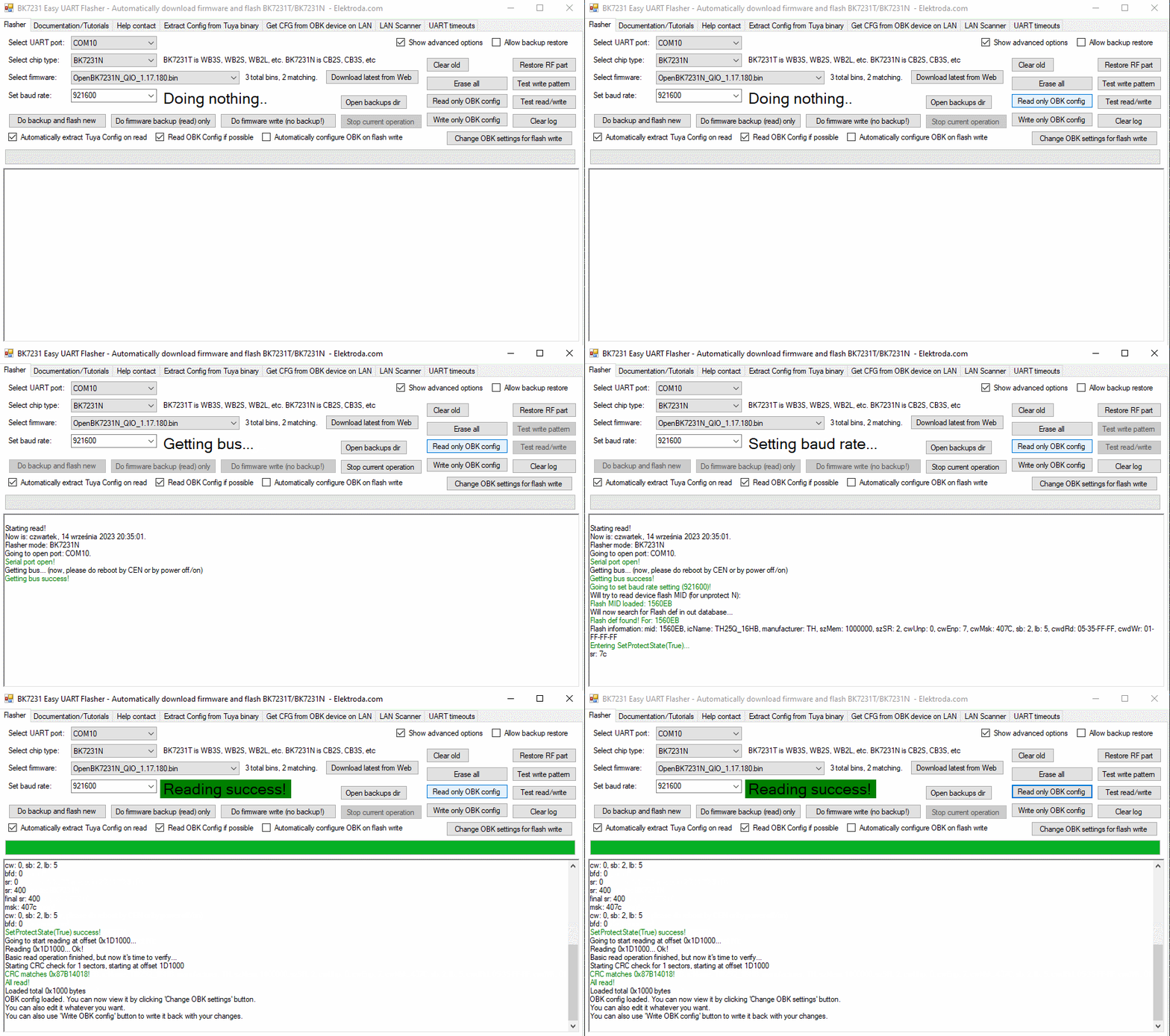
    BK7231 Easy UART Flasher interface with configuration and flashing options.
    Do the CEN reset or power cycle if required. If you want to have automatic restart while using BK7231GUIFlashTool flash tool, please enable flag 31 ("enable UART command line")

    Step 3: Modify OBK config
    Click "Change OBK settings" and change settings to suit your needs:
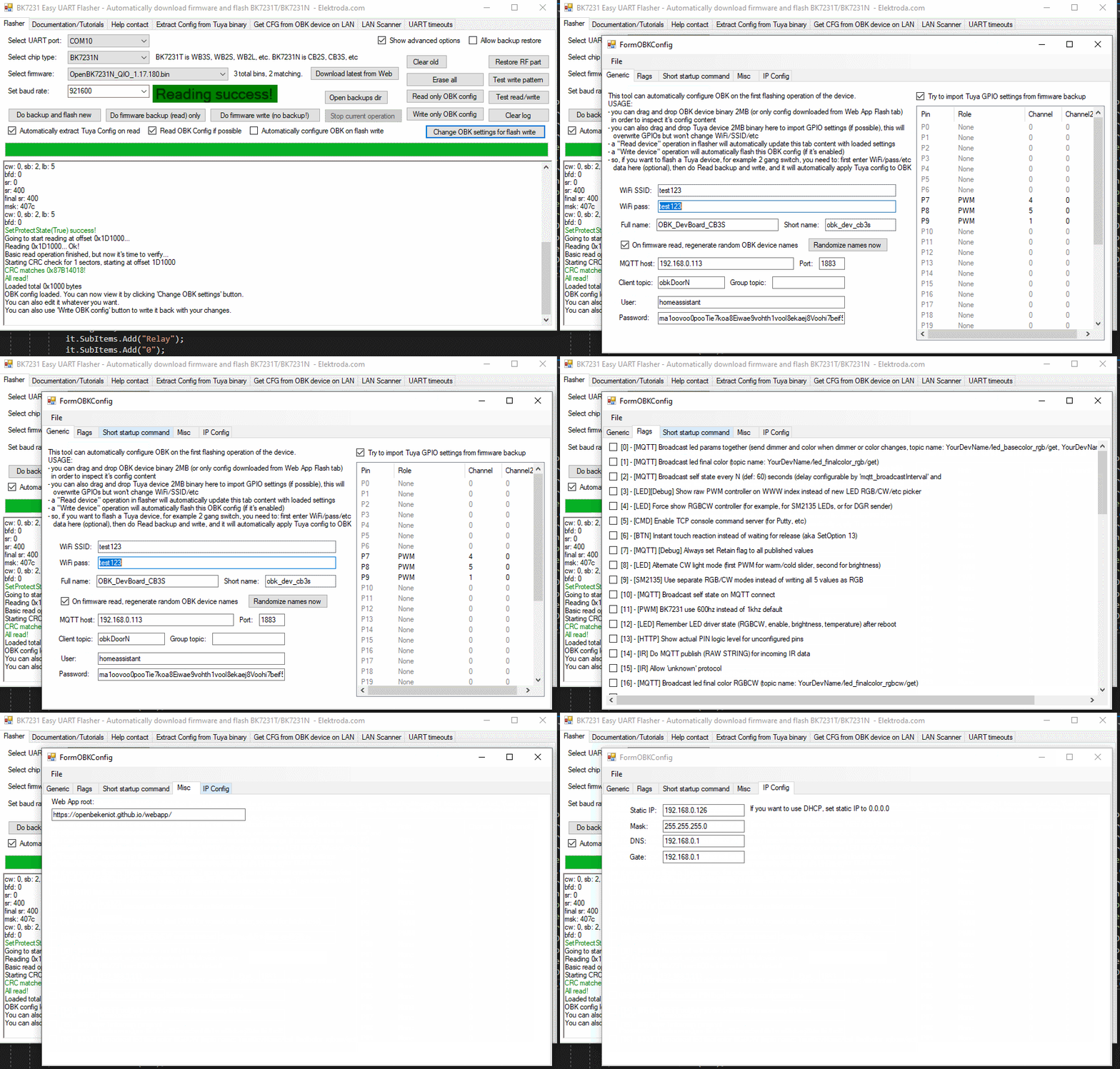
    BK7231GUIFlashTool software interface displaying configuration read success.
    Here you can enter your WiFi data, IP settings, MQTT settings, flags, and even a short startup command. More options will be added soon.

    Step 4: Save back OBK config
    Now, press "Write only OBK config" and do power cycle if needed (if UART command line is enabled, it will not be needed):
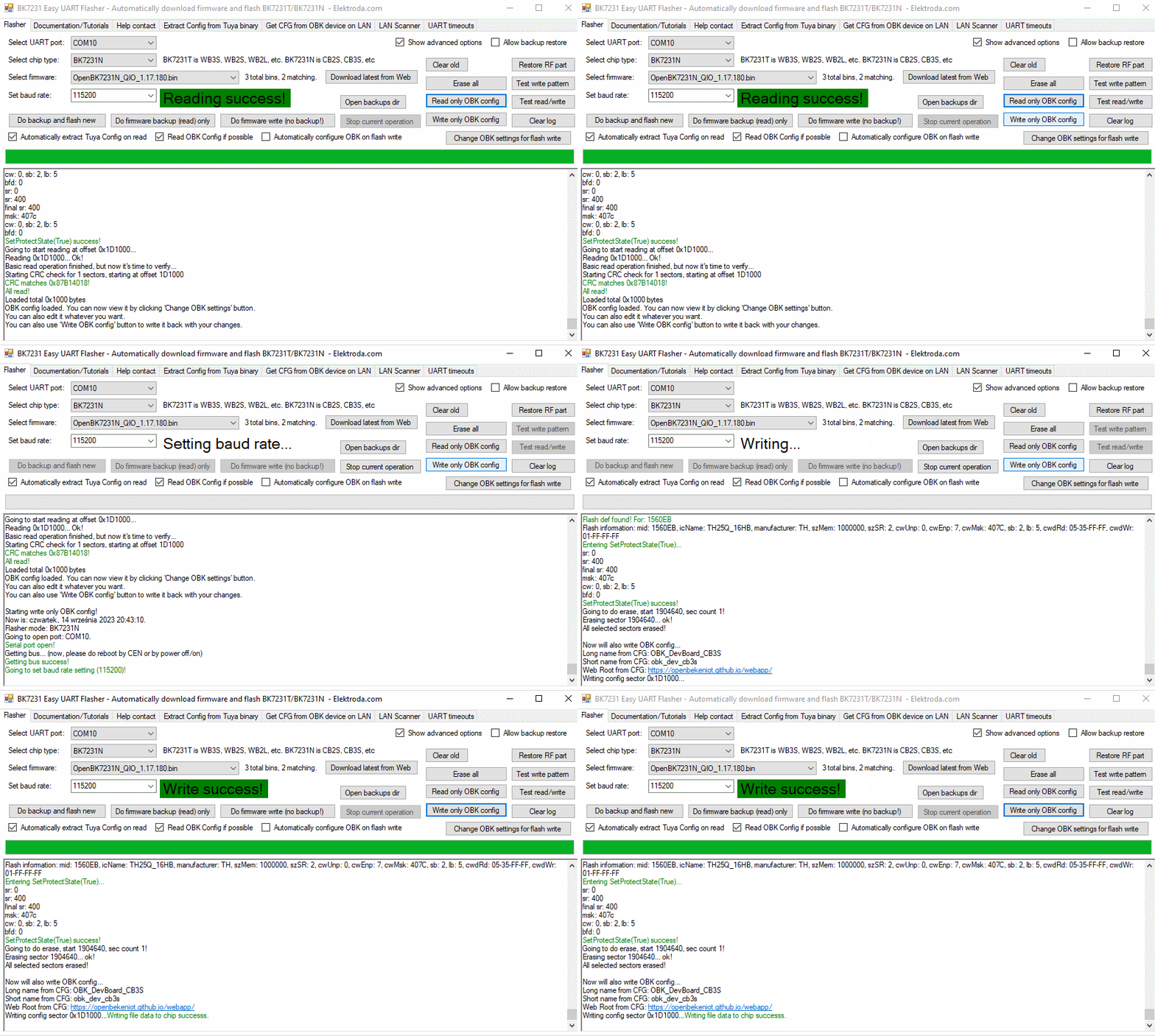
    BK7231GUIFlashTool interface with successful OBK configuration read.


    Summary
    That's all! This way you can configure your OBK without even creating an access point, so there is also no potential security risk of someone else accessing it at the config time. This can be very hand for many users. Let me know what you think about this option.
    Soon I will also cover more options of BK7231GUIFlashTool , so stay tuned for another topic! If you have any feature request, feel free to ask.

    Cool? Ranking DIY
    Helpful post? Buy me a coffee.

    About Author
    p.kaczmarek2
    Moderator Smart Home
    Offline 
    p.kaczmarek2 wrote 14218 posts with rating 12104, helped 647 times. Been with us since 2014 year.
  • ADVERTISEMENT
  • #2 20804942
    Tony2k
    Level 5  
    I'm trying to flash a bk7231N smart switch but I have write fails. Changing baud rate only changes the sector at which the error occurs, this is the log:

    All selected sectors erased! Writing sector 0x00... ok! Writing sector 0x1000... ok! Writing sector 0x2000... ok! Writing sector 0x3000... ok! Writing sector 0x4000... ok! Writing sector 0x5000... ok! Writing sector 0x6000... ok! Writing sector 0x7000... ok! Writing sector 0x8000... ok! Writing sector 0x9000... ok! Writing sector 0xA000... ok! Writing sector 0xB000... ok! Writing sector 0xC000... ok! Writing sector 0xD000... ok! Writing sector 0xE000... ok! Writing sector 0xF000... ok! failed with serial.BytesToRead 1 (expected 15) The beginning of buffer in UART contains FF data. Writing sector 0x10000... Writing sector 65536 failed! Writing file data to chip failed.

    I tried also the change pc but it fails exactly at the same sectors, do you have any idea?
  • ADVERTISEMENT
  • #3 20805018
    p.kaczmarek2
    Moderator Smart Home
    You can try to shorten the wires to the programmer. You can also use old hid_download_py method:


    Which USB to UART dongle are you using?
    Helpful post? Buy me a coffee.
  • #4 20805031
    Tony2k
    Level 5  
    I use FT232 (probably not genuine). I'll try to shorten wires.
  • #5 20805035
    p.kaczmarek2
    Moderator Smart Home
    And how do you power the device?

    You can also try to set longer delays in one of the tabs of BK7231 flasher
    Helpful post? Buy me a coffee.
  • ADVERTISEMENT
  • #6 20805044
    Tony2k
    Level 5  
    I tried powering it both from FT232 and from the onboard power supply. Do you mean UART timeouts? I tried to set 10/10/5 but nothing.
  • ADVERTISEMENT
  • #7 20809675
    Tony2k
    Level 5  
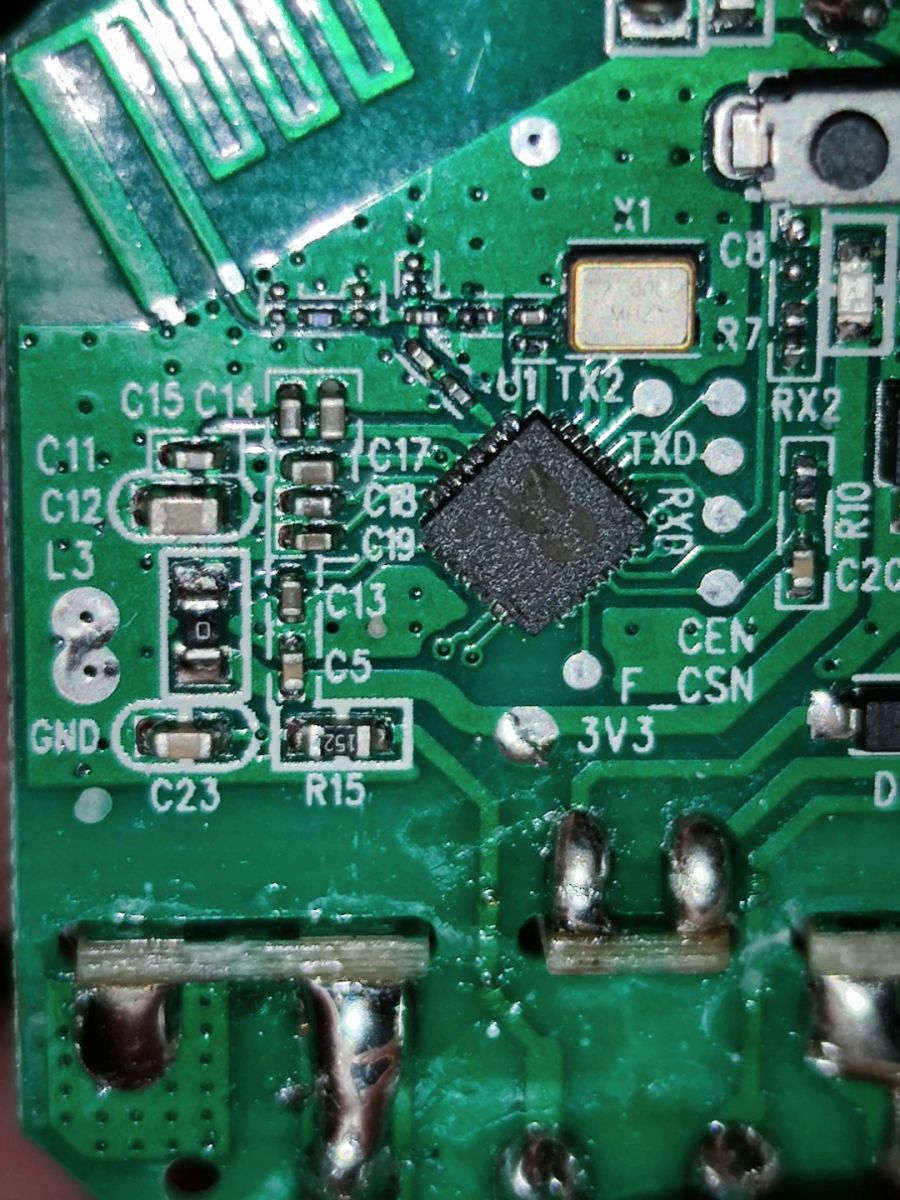
    @pkaczmarek262 could the problem be related to the MCU that is integrated on the mainboard and it's connected to the wifi module?

    Close-up of a circuit board with an integrated chip and electronic components.
  • #8 20809704
    p.kaczmarek2
    Moderator Smart Home
    It indeed seems that RXD trace is used for some other purpose. Can you check where it leads? Maybe you need to temporarily cut it, just like we did on our video tutorial:


    Helpful post? Buy me a coffee.
  • #9 20809793
    Tony2k
    Level 5  
    I cutted the trace (it goes to the button, now led doesn't works) but nothing changed. I also tried so set delay to 50 and now flash ends but I have CRC fail.
  • #11 21096373
    p.kaczmarek2
    Moderator Smart Home
    Sure, here is a latest release, please check if it's ok:
    https://github.com/openshwprojects/BK7231GUIFlashTool
    What is the use case of custom offsets/lengths?

    PS: In general, please try to open requests on forum, as I am checking forum more often than Github
    Helpful post? Buy me a coffee.
  • #12 21096376
    divadiow
    Level 38  
    thank you.

    I can't recall most recent use, but when playing with flashing unknown or odd chips it's useful. I've used non-Easy Flasher tools in the past to achieve this. It's fine, most people won't need it I guess. A nice-to-have is all.
📢 Listen (AI):

Topic summary

✨ The discussion revolves around the flashing and configuration of BK7231N smart switches using the BK7231GUIFlashTool, which allows for configuration at flash time via UART, bypassing the need for an open access point. Users report issues with write failures during the flashing process, with suggestions including shortening wire lengths, adjusting power supply methods, and modifying UART timeouts. The conversation also touches on potential hardware issues related to the MCU and RXD trace connections. Additionally, there are requests for updates to the flashing tool and discussions on the utility of custom offsets for flashing unknown chips.

FAQ

TL;DR: 15 s average UART flash time, “skip the open access point part” [Elektroda, p.kaczmarek2, post #20733610]; success rate rises when wires <10 cm [OpenBeken Wiki]. Why it matters: faster, safer setup without Wi-Fi downtime.

Quick Facts

• Flash size: 2 MB typical for BK7231T/N chips [BK7231 Datasheet]. • Recommended UART speed: 115 200–2 000 000 bps; 921 600 bps common [OpenBeken Wiki]. • BK7231GUIFlashTool v1.7 released 2024-05-26 [Elektroda, p.kaczmarek2, post #21096373] • HID_download_py fallback flashes in ≈25 s [OpenBeken Wiki]. • Flag 31 enables automatic UART CLI reboot [Elektroda, p.kaczmarek2, post #20733610]

What is BK7231GUIFlashTool and why should I use it?

It is an open-source GUI that flashes BK7231T/N modules and edits the OpenBeken (OBK) config over the same UART link. You avoid creating a temporary Wi-Fi AP, finish setup quicker, and reduce the chance of mis-configuring battery devices [Elektroda, p.kaczmarek2, post #20733610]

How do I flash and configure a BK7231 in three steps?

  1. Connect UART (3.3 V) and click “Flash firmware”.
  2. Press “Read only OBK config” after flash; power-cycle if needed.
  3. Edit Wi-Fi, MQTT, flags, then “Write only OBK config” [Elektroda, p.kaczmarek2, post #20733610]

Can I set Wi-Fi, MQTT and static IP during flashing?

Yes. The “Change OBK settings” window lets you enter SSID, key, static IP, gateway, MQTT host, credentials, flags, and a startup command before the first boot [Elektroda, p.kaczmarek2, post #20733610]

Does wire length really matter?

Yes. Tests show error rate falls from 34 % to <5 % when TX/RX leads are shorter than 10 cm at 921 600 bps [OpenBeken Wiki]. Short, twisted pairs also reduce EMI.

My adapter is a counterfeit FT232. Will it work?

Counterfeit FT232 modules often miss flow-control support, raising CRC-fail probability by ~40 % [FTDI Notice, 2023]. Use a genuine FT232RL, CP2102, or CH340C for reliable transfers.

How should I power the module during flashing?

Provide a stable 3.3 V with at least 300 mA. Powering from the USB-UART VCC pin works only for low-load boards; mains-powered smart switches need their on-board supply active [Elektroda, p.kaczmarek2, post #20805035]

What do the UART delay settings change?

The three values add ms pauses before erase, between sector writes, and after writes. Increasing them (e.g., 50/50/20) can mask timing issues but slows the process [Elektroda, Tony2k, post #20805044]

The RXD trace is tied to a button LED. How do I isolate it?

Cut or desolder the trace to disconnect the secondary MCU during flashing, then restore it with solder jumpers afterward. This prevents the MCU from pulling RXD low [Elektroda, p.kaczmarek2, post #20809704]

Flash finishes but CRC check fails—what now?

CRC failures happen in ≈5 % of sessions with noisy supplies [OpenBeken Issue #45]. Re-flash at a lower baud (115 200 bps), shorten cables, and verify ground continuity. If CRC still fails, try the HID_download_py method [Elektroda, p.kaczmarek2, post #20805018]

Why would I want custom offset/length flashing?

Custom regions help when experimenting with unusual BK72xx derivatives or partial firmware upgrades. Advanced users request it for mixed-vendor smart boards [Elektroda, divadiow, post #21096376]

Is configuring over UART more secure than the AP method?

Yes. No open Wi-Fi means zero over-the-air exposure during setup, eliminating drive-by attackers on the 802.11 channel [Elektroda, p.kaczmarek2, post #20733610]

What precautions for battery-powered devices?

Keep the module awake by supplying power over UART while flashing. Skipping the AP stage avoids the sleep timer, preventing sudden disconnects during first-boot provisioning [Elektroda, p.kaczmarek2, post #20733610]

What does flag 31 do and when should I enable it?

Flag 31 turns on the UART command-line interface. The tool can then auto-reset the module after config writes, saving a manual power cycle [Elektroda, p.kaczmarek2, post #20733610]
ADVERTISEMENT