logo elektroda
logo elektroda
X
logo elektroda

AHT10/AHT2X/AHT30 I2C Temperature & Humidity Sensor Driver in OpenBeken presentation

divadiow  18 7083 Cool? (+5)
📢 Listen (AI):

TL;DR

  • OpenBeken gains an AHT10/AHT2X/AHT30 I2C temperature-and-humidity driver for direct control of ASAIR sensors on BK7231N-based boards.
  • Testing used a NodeMCU with a transplanted BK7231N CB3S module, softi2c scanning, and P20/P21 assigned as AHT2X_SCL and AHT2X_SDA.
  • The sensors all report the I2C address 0x38, and the special build is OpenBK7231N_1187_merge_4738dd2d9ba2.
  • After reboot, the AHT2X driver started automatically, displayed temperature and humidity, and Home Assistant discovery exposed the sensor tile and readings.
  • The AHTXX driver is disabled in general releases, requires special binaries, and the AHT21 humidity reading looked inconsistent.
Generated by the language model.
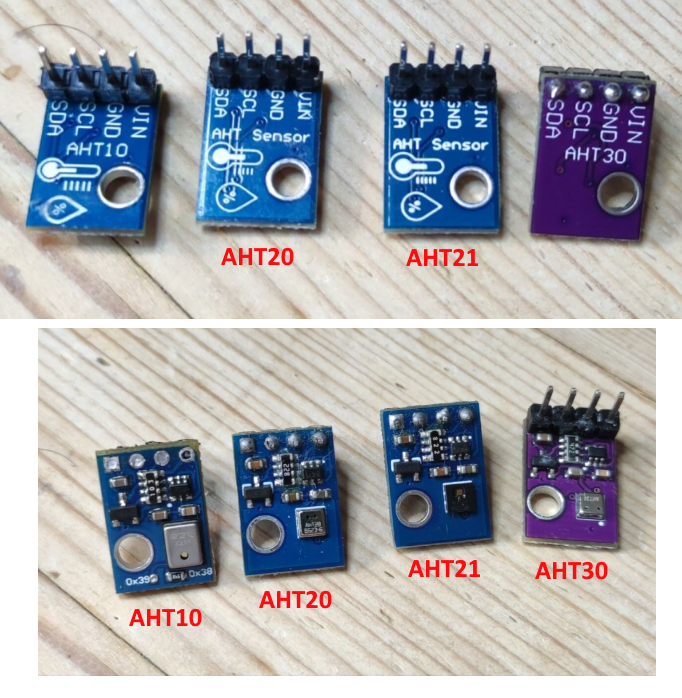
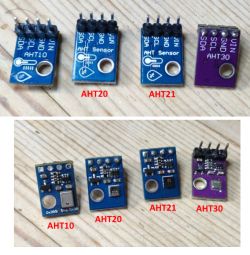
Images of AHT10, AHT20, AHT21, and AHT30 sensors with visible pin labels.
I noticed this pull request (PR) to add support for AHT10/AHT2x/AHT30 temperature and humidity sensors. We've seen the AHT30 in use in the TH01 device, but it is controlled by a TuyaMCU so does not need a driver for direct control by OpenBeken (OBK) in that instance. Same situation for the S09 with an AHT20.

As the Github user NonPlayerCharacter posted in the pull request, this driver will be needed for devices where the user has decided to remove the TuyaMCU, and so control the sensor directly with OBK, or where a device does not come with an MCU at all and the Beken chip interfaces directly.

Code: Text
Log in, to see the code

The sensors are made by Guangzhou Aosong Electronic Co. Ltd under the ASAIR brand name.

The product pages for each:
AHT10
AHT15
AHT20
AHT21
AHT25
AHT30

A comparison of the main specs:
Code: Text
Log in, to see the code


The English datasheets for each are attached to this thread for reference.

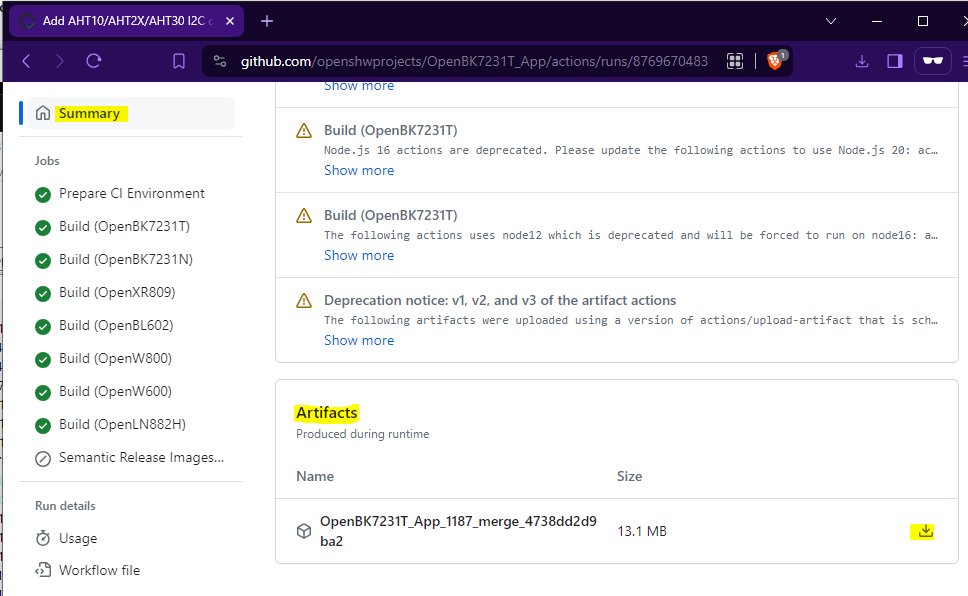
Onto some testing. I am using a NodeMCU dev board with a transplanted BK7231N based CB3S module. To save space, the AHTXX driver is disabled by default, ie it is not included in the general release builds. The binaries specific to the PR need to be flashed to make use of the driver. To download the special binaries navigate to https://github.com/openshwprojects/OpenBK7231T_App/actions/runs/8769670483, login to Github, scroll to the bottom of the Summary page and download the zip file under the Artifacts section
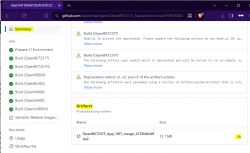
Screenshot of a Github page showing artifacts available for download.

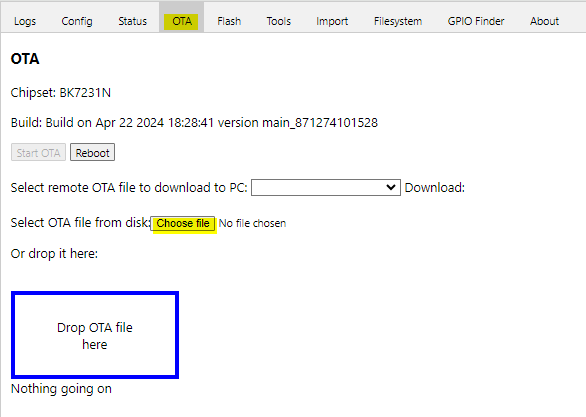
If flashing a BK7231N device that's already running OBK you'll need to use the OTA update method to flash the OpenBK7231N_1187_merge_4738dd2d9ba2.rbl file in the downloaded zip. If flashing by UART using Easy UART Flasher then use OpenBK7231N_QIO_1187_merge_4738dd2d9ba2.bin

I used OTA method from the web application
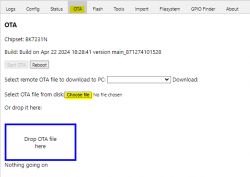
Screenshot of the OTA tab for the BK7231N chipset.

After either method your build details on the OBK main page will be

Screenshot of the device information page on NodeMCU with BK7231N chipset.

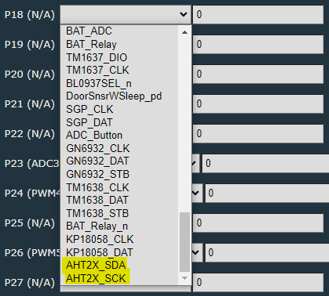
and you'll see AHT2X driver options in the drop-downs on the module page
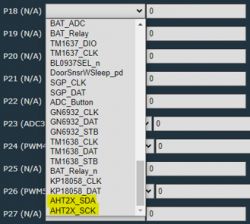
Pin configuration for AHT2X sensors in the user interface.

The AHT chips use the i2c protocol to communicate. The i2c (Inter-Integrated Circuit) protocol is a widely used communication method between components on a single integrated circuit, commonly used in microcontrollers and other digital electronics. It was developed by Philips Semiconductors (now NXP Semiconductors) in the early 1980s. i2c is particularly notable for its simplicity and effectiveness in managing communication between multiple integrated circuits over short distances using a minimum number of pins.

You'll notice the AHT (and other i2c drivers in OBK) require an SDA and an SCL pin configuring. This is because i2c only requires two wires to transmit data between devices:
SDA (Serial Data Line): This line is used for transmitting data between the master and slave devices.
SCL (Serial Clock Line): This line is used by the master device to synchronize data transmission across the i2c bus.

Additionally:
-Each device on the i2c bus has a unique address which is used by the master device to communicate with a specific slave device.
-The i2c protocol operates on a master-slave principle, where the master device initiates and controls the data transfer, and the slave devices respond to the master's requests.
-Although it is a master-slave protocol, i2c supports multiple masters on the same bus, allowing more than one master to control the bus without interference through a built-in arbitration process.
-All i2c transactions are synchronized with the clock pulses on the SCL line, making it a synchronous serial communication protocol.

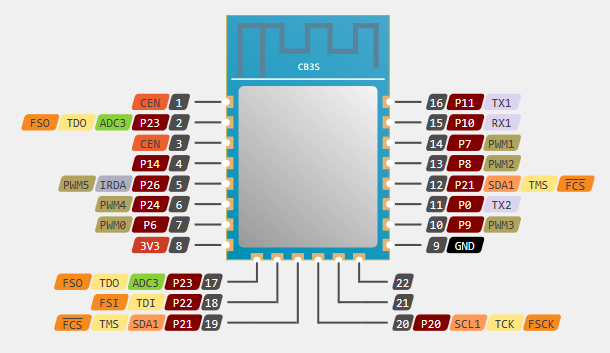
With that in mind, it looks like I will need to use P20 (SCL1) for AHT2X_SCL and P21 (SDA1) for AHT2X_SDA with the CB3S module I have for testing
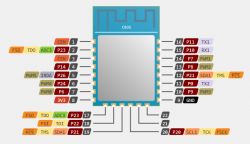
Pin diagram of the CB3S module with function labels.

First, here are the AHT sensors I have to play with. They're all from Ali Express. AHT10, AHT20, AHT21 and AHT30. This means I will not be able to test AHT15 or AHT25.

Images of AHT10, AHT20, AHT21, and AHT30 sensors with visible pin labels.

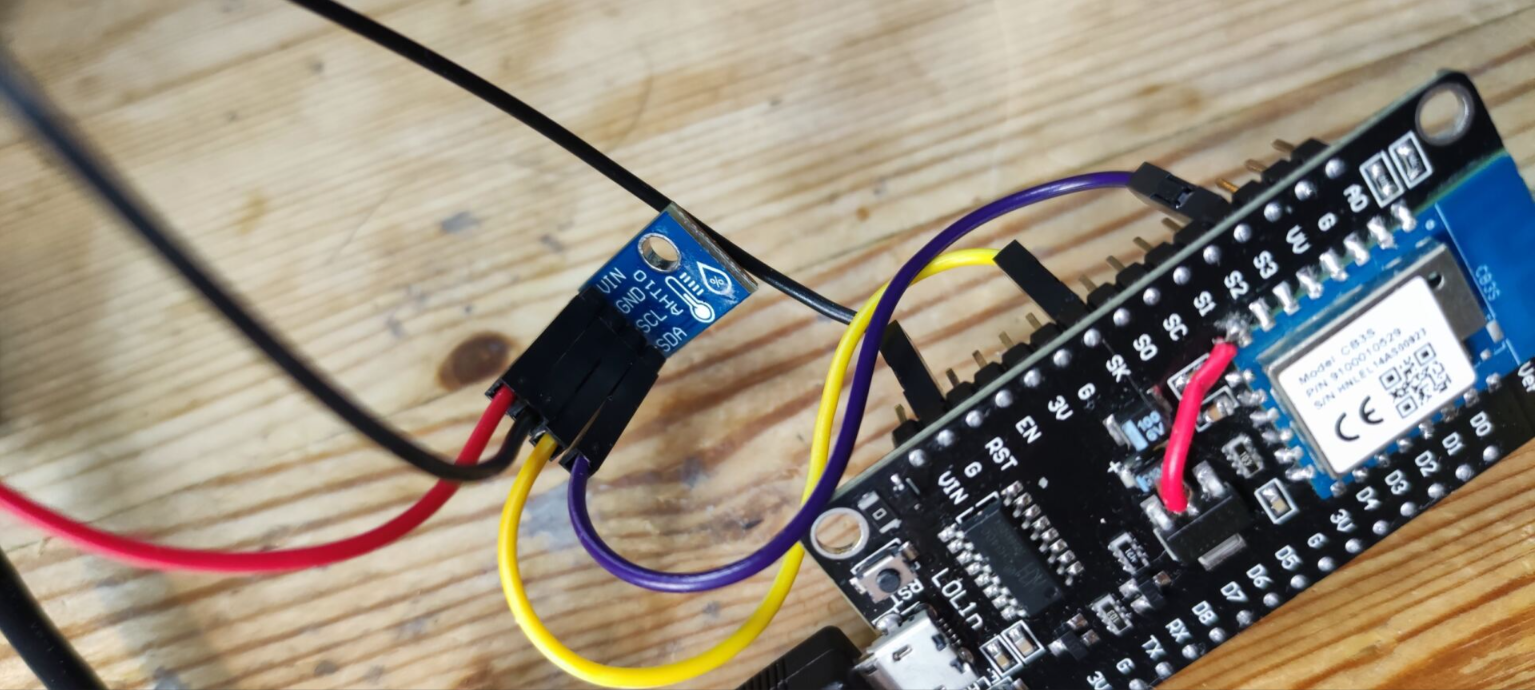
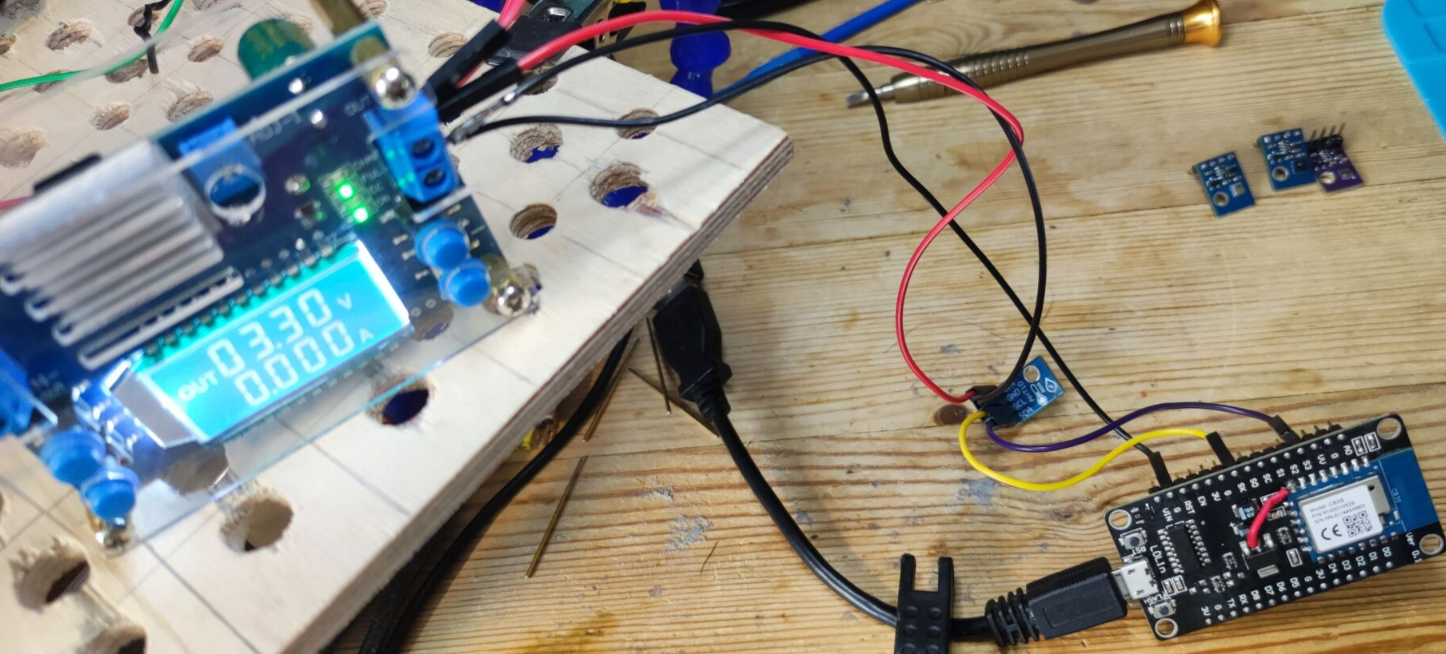
Starting with the AHT10, I connect SDA to P21 (which maps to S3 on NodeMCU) and SCL to P20 (which maps to SK on NodeMCU). I am powering the AHTs with an external 3.3v so a common ground is established between the PSU, the sensor and the NodeMCU.
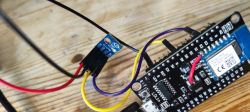
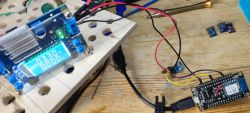
AHT10 sensor module connected to NodeMCU board. NodeMCU development board connected with a sensor and power supply.

To confirm the sensor is detected we can use OBKs Softi2c feature to detect the address of the device. Set SoftSDA and SoftSCL pins as appropriate. In my case:

Screenshot of SoftSCL and SoftSDA settings on ports P20 and P21.

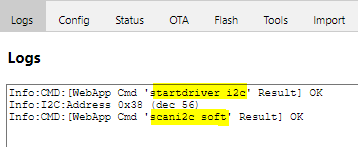
in the web application log tab we check the i2c driver is started by entering command startdriver i2c then we can scan for i2c devices with command scani2c soft
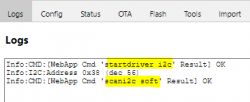
Screenshot of OBK configuration logs with i2c sensor detection

We see in the log it detects and returns the correct address for the AHT10 - 0x38 (in decimal = 56). We should be able to swap to the AHT2X driver now. (note SCK = SCL). All the AHTXX tested will return 0x38 as their address.

Screenshot of AHT2X pin configuration on NodeMCU.

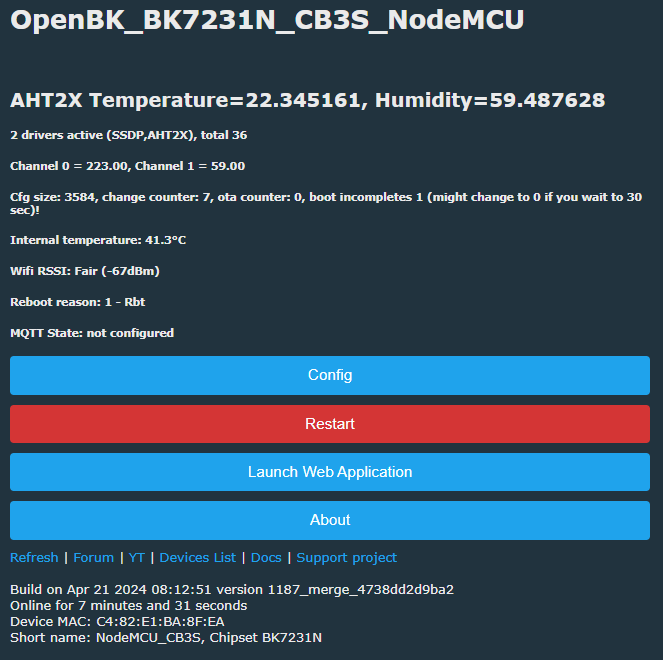
You'll need to save changes after swapping to reveal the second channel box for the SDA assignment. Ensure both channels differ from any other in use. After a reboot the AHT2X driver starts automatically and the temperature and humidity data is displayed as expected
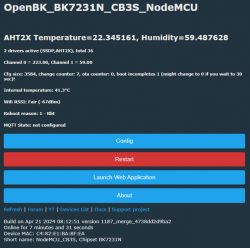
NodeMCU module configuration homepage with temperature and humidity data from AHT2X sensor

Zipping through the remaining sensors:

AHT20

Temperature and humidity readings from the AHT2X sensor in user interface.

AHT21
Screenshot showing temperature and humidity readings from AHT2X sensor.

AHT30
Screenshot showing temperature and humidity readings from the AHT2X sensor.

Apart from the AHT21 humidity, they all seem consistent. Perhaps the AHT21 will sort itself out if left untouched powered for a while. I also do not have any professional equipment to compare measurements against so not sure how accurate these readings are.

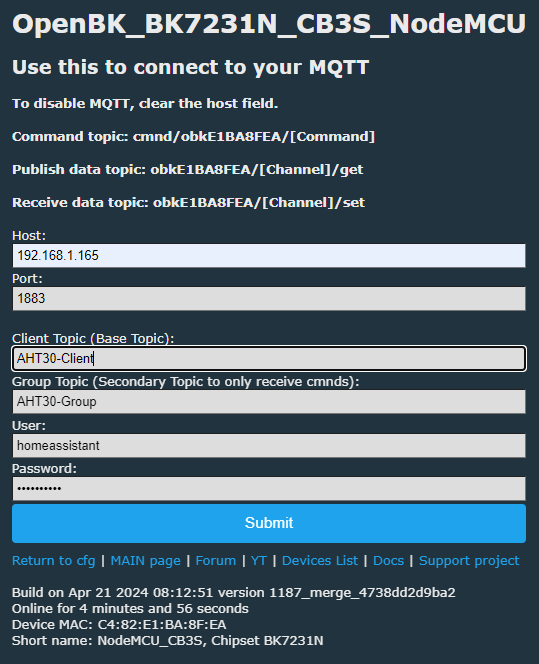
Sticking with the AHT30 I'll demonstrate MQTT/HomeAssistant configuration and discovery. From the Config->Configure MQTT menu I'll set some test topic names, my HA server IP and the username/password credentials specific to my setup and click submit.
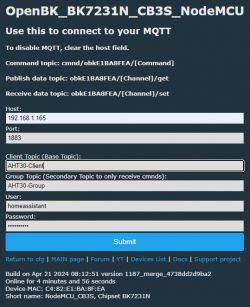
MQTT configuration for AHT30 on the OpenBeken platform.

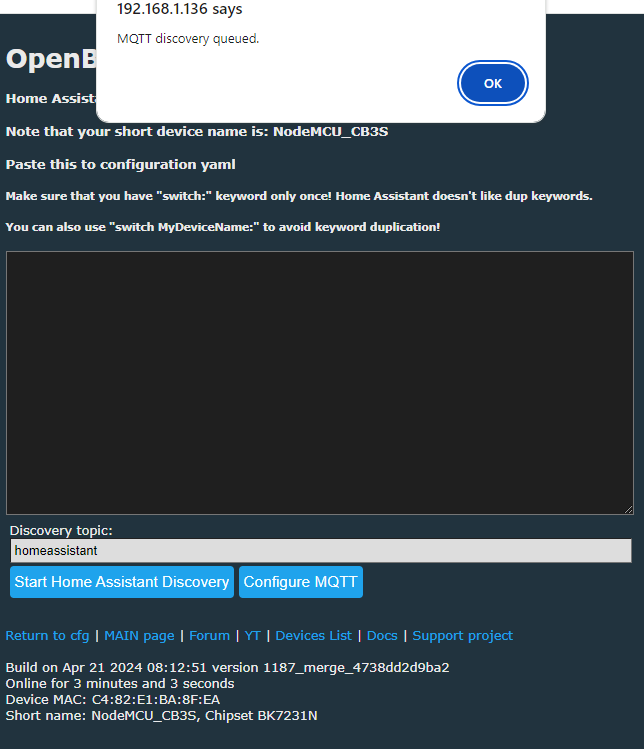
Then under Config->Home Assistant Configuration->Start Home Assistant Discovery
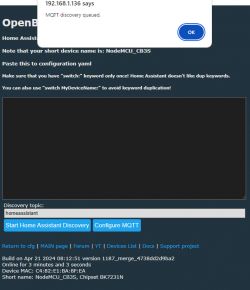
MQTT discovery in OpenBeken with Home Assistant discovery enabled

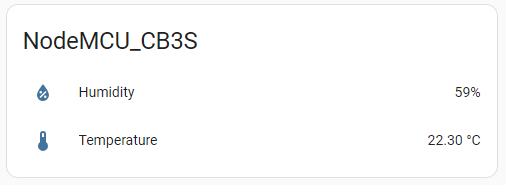
A few seconds later the device tile should appear in HA complete with device name and the sensor readings
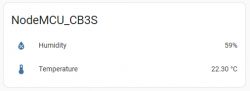
Humidity and temperature readings on a NodeMCU CB3S device.
Attachments:
  • AHT21.pdf (1.36 MB) You must be logged in to download this attachment.
  • AHT20.pdf (1.45 MB) You must be logged in to download this attachment.
  • AHT25.pdf (950.51 KB) You must be logged in to download this attachment.
  • AHT30.pdf (1.26 MB) You must be logged in to download this attachment.
  • AHT10.pdf (1.06 MB) You must be logged in to download this attachment.
  • AHT15.pdf (710.22 KB) You must be logged in to download this attachment.

About Author
divadiow
divadiow wrote 4859 posts with rating 861 , helped 424 times. Live in city Bristol. Been with us since 2023 year.

Comments

p.kaczmarek2 07 May 2024 21:54

While all of these modules seem very cool, they miss one important feature - alert signal. Alert signal could be used to wake OBK when temperature reaches given threshold, thus help us save the battery. I... [Read more]

divadiow 07 May 2024 23:51

That'd be cool. Also, I wondered about this: https://github.com/openshwprojects/OpenBK7231T_App/pull/1187#issuecomment-2095717188 How does a unified driver cater for the differences between the sensors... [Read more]

p.kaczmarek2 08 May 2024 20:05

If I understand correctly, this is a question for the PR contributor, not for myself. Still, we can just check out the code... Are you saying that I2C scanner does not pick up the address? You... [Read more]

divadiow 08 May 2024 20:53

I mean OBK doesn't scan for any i2c address then match driver for device automatically. my device i2c is detected fine. yes that's cool. just linking this thread to that comment really. [Read more]

p.kaczmarek2 08 May 2024 21:10

The code you are referring to has I2C address hardcoded. It should be possible to adjust it to be taken from a variable or to rewrite the code so it can support multiple sensors if necessary. http... [Read more]

insmod 09 May 2024 01:13

I hardcoded the address, as from what i have seen, only AHT10 has the ability to change its address. And it still comes with 0x38 as default, and very few will have the tools | ability to change it. It... [Read more]

divadiow 24 May 2024 09:07

how easy would adding the alert feature be @insmod ? ;) [Read more]

insmod 24 May 2024 10:07

Impossible, i believe. The sensors lack the alert pin. Where CHT83XX have it, AHT is NC. [Read more]

divadiow 24 May 2024 10:09

ah, fair enough! [Read more]

divadiow 03 Jan 2025 20:48

in the case of builds where including the AHT2X driver does not lead to a drop-down entry in the module config page (eg BK-T https://github.com/openshwprojects/OpenBK7231T_App/pull/1490), the driver can... [Read more]

maxim2002 03 Feb 2025 04:46

I've tried this approach on one of aliexpress tuya generic th sensors. https://obrazki.elektroda.pl/9315335600_1738554233_thumb.jpg Did a build with ath2x and some mods to output the data from... [Read more]

p.kaczmarek2 03 Feb 2025 10:43

Which sensor do you have there, exactly? I am asking because I have a dev board here, with AHT20 from Aliexpress: https://obrazki.elektroda.pl/2863851200_1738575760_thumb.jpg https://obrazki.elektroda.pl/4177936600_1738575760_thumb.jpg... [Read more]

maxim2002 03 Feb 2025 11:23

Board pix + log attached in previous post. It just sends back 18 38 20 00 00 00 all the time. Odd thing is that init and rest of stuff up to "Unrealistic humidity, will not update values" you have in drv_aht2x.c... [Read more]

taggbricka 13 Jun 2025 22:48

Is it possible to find a working OTA bin file for BK7231N and AHT30? The link in the original post seems to be broken. [Read more]

divadiow 13 Jun 2025 23:27

it seems it's enabled in the general release https://github.com/openshwprojects/OpenBK7231T_App/edit/main/src/obk_config.h#L219 https://github.com/openshwprojects/OpenBK7231T_App/releases [Read more]

taggbricka 14 Jun 2025 21:06

Will DRIVER_AHT2X work also for AHT30? I have got some AHT30 breakout boards an am considering buying some CB3S boards if they will work together. Tasmota presently has no support for AHT30. [Read more]

insmod 15 Jun 2025 05:29

Tasmota should work with AHT30. There is no difference between aht20/21/25 and aht30 code-wise. And with some tuning, like i've done on AHT2X driver in OBK, all AHT chips will work with the same driver... [Read more]

taggbricka 15 Jun 2025 14:13

Great! I am not so familiar with openbeken. There was no AHT2x_SDA pin alternative present, so could not try that. startdriver AHT2x with SoftSDA on P7 and SoftSDA on P6 gave device timeout. But startdriver... [Read more]

FAQ

TL;DR: The OpenBeken AHT2X driver lets BK7231N or CB3S users read AHT10, AHT20, AHT21, and AHT30 sensors over I2C at address 0x38; as one contributor put it, "all AHT chips will work with the same driver." This FAQ helps OpenBeken users wire, flash, scan, and start the driver, including manual startup when the dropdown is missing. [#21579691]

Why it matters: This thread shows the practical path from unsupported Tuya hardware to direct OpenBeken temperature and humidity reporting, MQTT publishing, and Home Assistant discovery.

Option OpenBeken handling Address behavior Alert pin mentioned?
AHT10 Works with AHT2X driver Default 0x38; address change discussed No
AHT20/AHT21/AHT25/AHT30 Works with same AHT2X driver Hardcoded as 0x38 in driver No
CHT8305 Pin-compatible replacement discussed Different driver path Yes, compared favorably
MCP9808 Separate OBK driver Separate device support Yes, cited for wake/alert use

Key insight: OpenBeken does not auto-match AHT sensors from an I2C scan; you must assign SDA/SCL pins and start or select the AHT2X driver yourself. [#21074905]

Quick Facts

  • The thread’s comparison table lists 0 to 100% RH humidity range for AHT10, AHT15, AHT20, AHT21, AHT25, and AHT30, with ±2% RH accuracy across all six models. [#21071961]
  • Temperature specs differ by model: AHT10, AHT15, AHT20, and AHT30 are listed at -40 to 85°C; AHT21 at -40 to 120°C; AHT25 at -40 to 80°C. [#21071961]
  • Supply voltage also splits by family: AHT10 and AHT15 are listed at 1.8 to 3.6V, while AHT20, AHT21, AHT25, and AHT30 are listed at 2.2 to 5.5V. [#21071961]
  • In OpenBeken testing, every AHT model checked by the author returned the same I2C address, 0x38 decimal 56, during scani2c soft. [#21071961]
  • AHT sensors in this thread lack an alert pin, so they cannot provide the battery-saving wake-on-threshold behavior discussed for MCP9808 or CHT83XX-style parts. [#21094192]

How do I wire an AHT10, AHT20, AHT21, or AHT30 sensor to a BK7231N or CB3S module in OpenBeken using I2C SDA and SCL pins?

Wire the sensor’s SDA line to the chosen OpenBeken SDA pin, SCL to the chosen SCL pin, and share 3.3V and ground. In the CB3S test setup, P21 was used for SDA1 and P20 for SCL1. The author powered the AHT boards from an external 3.3V source and tied sensor, PSU, and NodeMCU grounds together. That same two-wire pattern was then reused across AHT10, AHT20, AHT21, and AHT30. [#21071961]

What is I2C, and what do the SDA and SCL pins do when connecting AHT2X temperature and humidity sensors to OpenBeken?

I2C is a two-wire serial bus that lets a controller talk to peripherals over short distances. "I2C is a communication protocol that connects multiple integrated circuits over two signal lines, using one shared clock and one shared data path." In this setup, SDA carries data and SCL carries the clock that synchronizes each transfer. OpenBeken therefore needs both pins assigned before the AHT2X driver can communicate with the sensor. [#21071961]

What is TuyaMCU, and why would someone remove it to control an AHT20 or AHT30 sensor directly from OpenBeken?

People remove TuyaMCU when they want OpenBeken to talk to the sensor directly instead of through a separate microcontroller. "TuyaMCU is a device-side microcontroller that mediates between the main Wi-Fi chip and peripherals, often hiding sensors behind a vendor protocol instead of direct GPIO or I2C access." The thread says this driver matters when a user removes that MCU or when a device has no MCU at all and the Beken chip must interface with AHT hardware itself. [#21071961]

How can I scan for an AHT10 or AHT30 on OpenBeken with SoftI2C and confirm that address 0x38 is detected correctly?

Use OpenBeken’s SoftI2C scan and look for address 0x38. 1. Set SoftSDA and SoftSCL to the pins you wired. 2. In the web log, run startdriver i2c. 3. Run scani2c soft and confirm the sensor appears at 0x38. The author reports that all tested AHTXX parts, including AHT10 and AHT30, returned address 0x38, which is decimal 56. [#21071961]

What's the procedure for flashing an OpenBeken build with AHT2X driver support by OTA or UART on a BK7231N device?

Flash a build that includes the AHT2X driver, then use the correct file for your method. 1. Download the special build artifact mentioned in the thread. 2. For OTA on an already-running BK7231N device, upload OpenBK7231N_1187_merge_4738dd2d9ba2.rbl. 3. For UART with Easy UART Flasher, use OpenBK7231N_QIO_1187_merge_4738dd2d9ba2.bin. After flashing, the main page should show the PR-specific build details and expose AHT2X options if that build includes the UI entry. [#21071961]

Why doesn’t the AHT2X driver show up in the OpenBeken module configuration dropdown on some builds, and how do I start it manually with startDriver?

Some builds include the driver but do not expose the dropdown entry in the module page. A later post gives the workaround directly: start it from the console with startDriver AHT2X [SCKpin] [SDApin] [TempCH] [HumCH]. The thread cites BK-T as an example where the AHT2X dropdown was missing, yet manual startup still worked. That makes the command-line start path the practical fallback when the web UI does not list AHT2X. [#21375611]

How do I use the startDriver AHT2X command in OpenBeken, and what do the SCK pin, SDA pin, temperature channel, and humidity channel arguments mean?

Use startDriver AHT2X followed by four numbers that define wiring and channel mapping. In the example startDriver AHT2X 26 24 1 2, 26 is the clock pin, 24 is the data pin, 1 is the temperature channel, and 2 is the humidity channel. A later user also confirms that startdriver AHT2x 6 7 1 2 worked correctly on their board after the pin dropdown option was unavailable. [#21579968]

Why does an AHT2X sensor in OpenBeken initialize successfully but then report 'Unrealistic humidity, will not update values' and raw data like 18 38 20 00 00 00?

That log usually points to a configuration error, wrong wiring, or even the wrong sensor board. The failing report showed successful init but repeated raw bytes 18 38 20 00 00 00, followed by Unrealistic humidity, will not update values. A maintainer replied that their own AliExpress AHT20 worked correctly and said the problem was most likely bad configuration, wrong pins, or a mismatched sensor. That makes pin verification and sensor identification the first checks. [#21422646]

What causes an AHT21 sensor to show humidity readings that differ from AHT10, AHT20, and AHT30 in the same test setup?

The thread does not identify a confirmed cause. In the author’s side-by-side test, AHT10, AHT20, and AHT30 looked consistent, but AHT21 humidity differed. The author suggested the AHT21 might settle after being left powered for a while, yet also stated they had no professional reference equipment to verify absolute accuracy. So the only supported answer here is that the discrepancy was observed, but not conclusively explained. [#21071961]

How does the unified OpenBeken AHT2X driver handle differences between AHT10, AHT20, AHT21, AHT25, and AHT30 sensors?

It handles them with one shared driver rather than separate per-model code paths. A contributor later states that, with tuning done in the OpenBeken AHT2X driver, “all AHT chips will work with the same driver,” and contrasts that with Tasmota’s split between AHT1x and AHT2x handling. The thread also notes that OpenBeken does not auto-detect the exact chip from I2C address, so the driver unifies operation without model-specific address discovery in the UI. [#21579691]

AHT2X vs CHT8305 vs MCP9808: which sensor is the better choice for OpenBeken if I need direct I2C support, battery saving features, or an alert pin?

Choose AHT2X for direct I2C temperature and humidity, but choose MCP9808 or CHT83XX-style parts if you need an alert pin. The thread says AHT chips can replace CHT8305 mechanically enough for SDA, SCL, VDD, and GND, yet later clarifies that AHT lacks the alert signal because those pins are NC. A maintainer specifically cites MCP9808 as a driver already added to OBK for wake-on-threshold style use, which helps battery-saving designs. [#21094192]

Why is the AHT2X I2C address hardcoded in the OpenBeken driver, and how would you adapt the code if a sensor used a different address?

The address is hardcoded because the contributor saw little practical need to expose it. They wrote that only AHT10 appears able to change address, but it still ships with default 0x38, and few users would change it. Another maintainer adds that the code could be adjusted to read the address from a variable or rewritten to support multiple sensors. So the current design optimizes for the common 0x38 case, not flexible address selection. [#21075158]

How can I publish AHT30 temperature and humidity readings from OpenBeken to MQTT and make Home Assistant discover the device automatically?

Configure MQTT first, then trigger Home Assistant discovery. 1. In OpenBeken, open Config > Configure MQTT and enter topic names, HA server IP, and credentials. 2. Save the settings. 3. Go to Config > Home Assistant Configuration > Start Home Assistant Discovery. The thread shows that after a few seconds, Home Assistant created a device tile with the device name and live sensor readings from the AHT30 setup. [#21071961]

What's the difference between AHT1x and AHT2x handling in Tasmota versus the single AHT2X driver approach used in OpenBeken?

OpenBeken uses one tuned AHT2X driver for the full AHT range discussed, while Tasmota separates AHT1x and AHT2x. A contributor states that Tasmota should still work with AHT30 because there is no code-level difference between AHT20, AHT21, AHT25, and AHT30. They then say OpenBeken was tuned so all AHT chips can share one driver instead of using two separate driver families. That is the clearest implementation difference described in the thread. [#21579691]

Where can I find a current OpenBeken release or OTA binary with AHT2X support after the original GitHub Actions artifact link has expired?

Use the normal OpenBeken releases, not the expired GitHub Actions artifact. In June 2025, a user asked for a working BK7231N OTA binary after the original link broke. The reply says AHT2X support appears enabled in the general release and points readers to the project releases instead of the old temporary artifact. That means current release binaries are the right place to look for OTA-capable images with AHT2X support. [#21578725]
Generated by the language model.
%}