Teardown of the Sonoff B05-BL-A60 smart bulb, chosen for its advertised API support and explicitly distinguished from the different B05-B-A60 variant.
Opening the bulb reveals a BP5758 LED driver on the LED plate, with the power supply and Wi‑Fi components underneath and easy access to 3.3V, Ground, TX, RX, and Boot pins.
Each bulb costs around 11€ and carries energy class F.
Flashing is described as feasible with online guides and SDK tools, but the current firmware does not yet support the BP5758, and the API is awkward for multiple devices because of different IDs.
AI summary based on the discussion. May contain errors.
no, i've no backup, but i've others new bulb...
i'm a little bit lost...
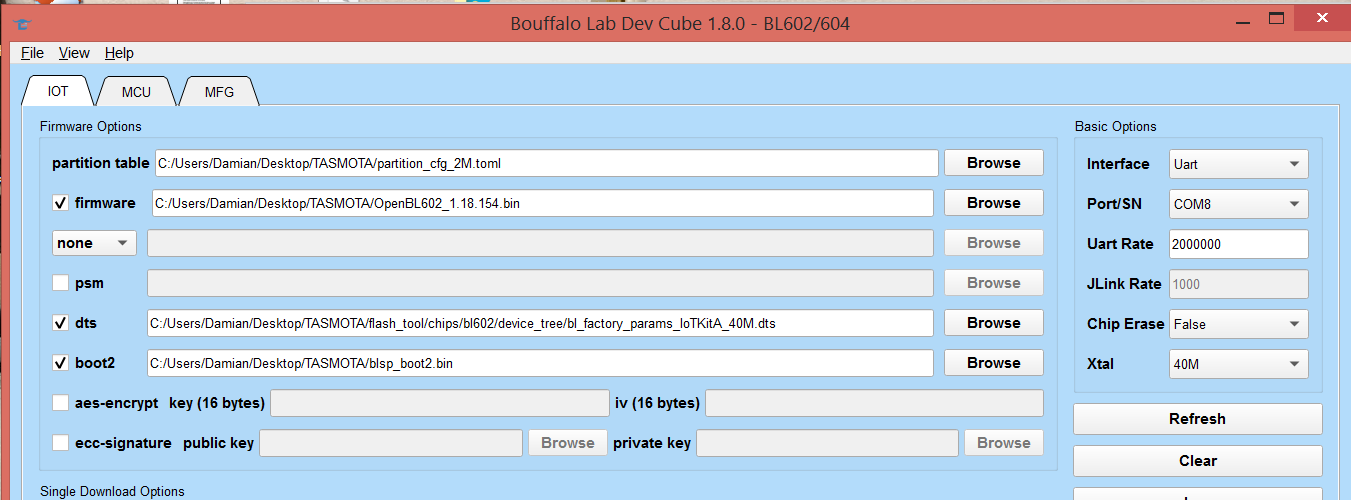
with BL602 we don't use lab dev cube software ?
i've try to flash bulb with easyguiflashtool but i've always problem to enter flash mode
(i've allready flash lsc action plug whitout problem...)
thank a lot !
i'll try and back to give the result ....
Added after 11 [minutes]:
ok, i've installed mono on ubuntu 20.04
and now the result ...
the boot pin is high, what more can I do?
Backup name has not been set, so output file will only contain flash type/date.
Now is: Sunday, 08 March 2026 19:11:37.
Flasher mode: BL602
Going to open port: /dev/ttyUSB0.
Port ready!
Sync attempt 0/1000 ... failed, will retry!
Sync attempt 1/1000 ... failed, will retry!
If doing something immediately after another operation, it might not sync for about half a minute
Otherwise, please pull high BOOT/IO8 and reset.
Sync attempt 2/1000 ... failed, will retry!
Sync attempt 3/1000 ... failed, will retry!
Sync attempt 4/1000 ... failed, will retry!
Sync attempt 5/1000 ... failed, will retry!
>>21857957 it's OK now,
i've use this command BP5758D_Map 2 1 0 3 4
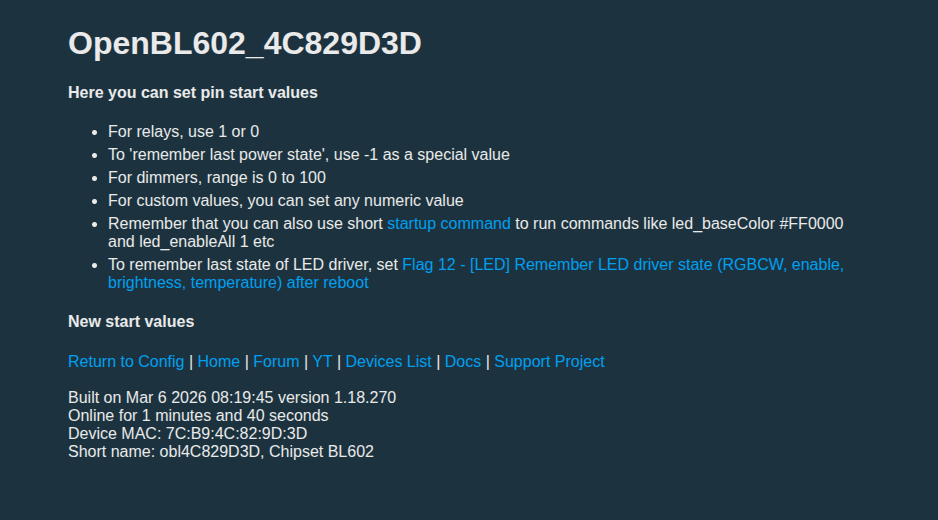
last thing i've checked flag 12 but light don't keep brightness or color when reboot
regards
Added after 45 [minutes]:
it's strange in startup menu i've no possibility to change values...
Discussion centers on teardown and flashing of Sonoff B05-BL-A60/B05-BL-A19 smart bulbs using the local DIY HTTP API and OpenBeken/OpenBL602 firmware. The bulb hardware is identified as a BL602-based design with a BP5758D LED driver, and the API is confirmed to work locally after entering DIY mode, though it is considered inconvenient because device IDs, cloud registration, and firmware update limitations complicate use. Community responses explain that BP5758D support was added/enabled for BL602, with commands for RGB/CW testing, current adjustment, gamma correction, and LED mapping. Several users report issues such as no light output after flashing, incorrect RGB color order, reduced brightness, blue-tinted startup state, and OTA limitations on BL602. Solutions discussed include using BLDevCube/EasyGUIFlashTool for flashing, selecting the correct BL602 configuration, setting BP5758D pins, applying BP5758D_Current, and correcting channel order with BP5758D_Map. AI summary based on the discussion. May contain errors.
Which LED driver does the bulb use and why does it matter?
It uses a BP5758D 5-channel constant-current driver. OpenBK uses its I²C interface for independent R-G-B-C-W control, enabling true RGBCW output instead of preset scenes [Elektroda, Thom4Fun, post #20261237]
Can I flash OpenBeken on the BL602 version?
Yes. Connect 3 V3, GND, TX, RX, and BOOT pads, then run the OpenBL602 flasher from the SDK tools [Elektroda, Thom4Fun, post #20261237] Current stable build is ≈320 KB—well under the 508 KB DIY limit.
Is OTA upgrading supported once OpenBK is installed?
Full OTA isn’t implemented for BL602 yet because the stock SDK lacks a stable OTA stack [Elektroda, p.kaczmarek2, post #20381744] Use wired UART for updates until developers finish the port.
How do I wire the BP5758D pins in OpenBK?
Typical mapping: set BP5758D_CLK to Pin 2 and BP5758D_DTA to Pin 21, then reboot [Elektroda, Thom4Fun, post #20276360] If “command not found” appears, update firmware and issue BP5758D_RGBCW to remap colours.
RGB colours look wrong—how can I fix them?
Use BP5758D_RGBCW to reorder channels and then apply LedGamma 2.2–3.0 for perceptual correction [Elektroda, p.kaczmarek2, post #20378399] An upcoming gamma-control patch further tightens colour accuracy.
Brightness dropped after flashing—what’s the remedy?
Send BP5758D_Current with safe decimal currents (e.g., 20 mA per channel). Avoid exceeding datasheet limits or lifespan will shorten [Elektroda, p.kaczmarek2, post #20378399]
Why does my bulb always boot up blue even with Flag 12 set?
A firmware bug stores state yet resets RGB channels. Disable Flag 12 and add a startup backlog such as “led_dimmer 100; led_temperature 500; led_enableAll 1” until developers patch it [Elektroda, Zain00, post #20381762]
Is flashing via Cloudcutter or other Tuya exploits possible?
No. The bulb is not Tuya-based, and its BL602 bootloader isn’t supported by Cloudcutter [Elektroda, p.kaczmarek2, post #20921510] Use UART or the limited DIY API instead.
Does the DIY HTTP API require the Sonoff cloud?
No—once you enter DIY mode, the RESTful API is fully local; however, firmware upgrades through the API demand cloud registration, which many users avoid for privacy [Elektroda, Thom4Fun, post #20274285]
Run blflash with OpenBL602_xxx.bin; wait for “SUCCESS”.
Power-cycle, connect to OpenBK Wi-Fi AP, and finish setup.
Experienced users finish the process in under five minutes.
What happens if the bulb won’t light after flashing?
Check if you flashed the A19 four-wire variant; mis-wired channels leave LEDs dark. Re-flash, then adjust BP5758D_CLK/DTA pins as Zain00 did to recover illumination [Elektroda, Zain00, post #20378329]
How energy-efficient is the B05-BL-A60?
It ships with EU energy class F despite only 9 W draw because efficiency metrics consider standby and lumen output; expect about 90 lm/W compared to class G bulbs at <75 lm/W [Elektroda, Thom4Fun, #20261237; Sonoff, 2023].
Can the bulb remember its last state after power loss?
Yes—enable Flag 12 (Power retain). Note the earlier blue-boot bug; include a startup backlog if you need exact colour restoration [Elektroda, Zain00, post #20379108]
What’s the maximum firmware size for OTA via the DIY API?
508 KB per binary; larger images are rejected by the ota_flash endpoint [Elektroda, protectivedad, post #20273925] A minimal loader under this limit can then pull a full image over UART.
AI summary based on the discussion. May contain errors.