logo elektroda
logo elektroda
X
logo elektroda

[BK7231N][CB2S] Generic Wifi Smart Switch

giovannij600 3507 13

TL;DR

  • Teardown covers a generic AliExpress Wi‑Fi smart switch based on BK7231N and a CB2S module, sold in Tuya as "Latched hidden Switch Single pro."
  • Flashing uses tuya-cloudcutter with the `aubess-16a-mini-smart-switch` profile and `OpenBK7231N_UG_1.15.517.bin`.
  • The switch is described as simple to flash, and the post includes a configuration section for the OpenBK7231N firmware.
Generated by the language model.
ADVERTISEMENT
📢 Listen (AI):
  • Hi! Here is a teardown of a r generic smart switch from aliexpress.
    On Tuya app is named: Latched hidden Switch Single pro

    Bought From:
    https://it.aliexpress.com/item/1005004152926240.html

    Pictures:

    [BK7231N][CB2S] Generic Wifi Smart Switch [BK7231N][CB2S] Generic Wifi Smart Switch [BK7231N][CB2S] Generic Wifi Smart Switch [BK7231N][CB2S] Generic Wifi Smart Switch [BK7231N][CB2S] Generic Wifi Smart Switch [BK7231N][CB2S] Generic Wifi Smart Switch

    ADVERTISEMENT


    Flashing:

    Is simple to flash with tuya-cloudcutter:

    sudo ./tuya-cloudcutter.sh -p aubess-16a-mini-smart-switch -fOpenBK7231N_UG_1.15.517.bin


    Config:

    [BK7231N][CB2S] Generic Wifi Smart Switch


    Code: JSON
    Log in, to see the code

    Cool? Ranking DIY
    About Author
    giovannij600
    Level 3  
    Offline 
    giovannij600 wrote 16 posts with rating 1. Been with us since 2023 year.
  • ADVERTISEMENT
  • #2 20465783
    p.kaczmarek2
    Moderator Smart Home
    Posts: 14410
    Help: 650
    Rate: 12352
    Thank you, can you provide the pins configuration for that device?
    Helpful post? Buy me a coffee.
  • ADVERTISEMENT
  • #3 20465807
    giovannij600
    Level 3  
    Posts: 16
    Rate: 1
    I'm trying to find it, but using the configuration like this

    [BK7231N][CB2S] Generic Wifi Smart Switch
    only relay work.

    S1 and S2 and push button not work
  • #4 20465815
    p.kaczmarek2
    Moderator Smart Home
    Posts: 14410
    Help: 650
    Rate: 12352
    Well, you have either to look at the board and check traces with multimeter to see where things are connected, or just try pin roles one by one... you can also search for similar devices on our template list. https://openbekeniot.github.io/webapp/devicesList.html
    Helpful post? Buy me a coffee.
  • #5 20466792
    giovannij600
    Level 3  
    Posts: 16
    Rate: 1
    I find it, I put it on post

    Thanks
  • ADVERTISEMENT
  • #6 20466798
    p.kaczmarek2
    Moderator Smart Home
    Posts: 14410
    Help: 650
    Rate: 12352
    You can also copy JSON template from the Launch Web Application in obk firmware.
    Helpful post? Buy me a coffee.
  • #7 20466832
    giovannij600
    Level 3  
    Posts: 16
    Rate: 1
    Ok I get it, where I have to copy?
  • #8 20467175
    p.kaczmarek2
    Moderator Smart Home
    Posts: 14410
    Help: 650
    Rate: 12352
    Copy from Web Application and paste here in the post, make sure to use syntax = json tag here on the forum.
    Helpful post? Buy me a coffee.
  • #9 20467540
    giovannij600
    Level 3  
    Posts: 16
    Rate: 1
    Ok I put it on first post
  • #10 21725502
    mcgyver83
    Level 2  
    Posts: 3
    Hi, I just bought this but it goes offline afte 12hours. Doesn't matter if close do the router,2.4Ghz and no AP isolation.
    I want to tray to flash it. I need it as timer to turn on garden light 21:00 - 06:00, no switch attached, just scheduling from app.

    Would it fit my needs once flashed?
  • #11 21725548
    p.kaczmarek2
    Moderator Smart Home
    Posts: 14410
    Help: 650
    Rate: 12352
    In OBK, you can enable NTP driver and use addClockEvent in autoexec.bat to script your smart switch to do given action at certain time.
    Helpful post? Buy me a coffee.
  • ADVERTISEMENT
  • #12 21726283
    mcgyver83
    Level 2  
    Posts: 3
    >>21725548 Ok, probably I miss a lot of knowledge about OBK.
    I used a couple of device with Tasmota and they have a web gui interface.
    You suggest to add something manually to autoexec.bat, so I think OBK is a little bit less user friendly I suppose.
    I will try, first I need to understand / find guide how to flash.
    I flashed 2 sonoff using a usb to pin board, I hope is something similar :)

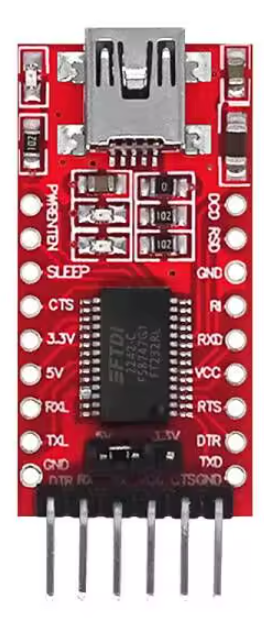
    I used this board to flash sonoff. Is it ok for OpenBK?

    USB to UART converter module with FTDI chip and micro USB port
  • #13 21727453
    p.kaczmarek2
    Moderator Smart Home
    Posts: 14410
    Help: 650
    Rate: 12352
    This may be ok, as long as you power WiFi module from external LDO, not from 3.3V pin on this board.
    Helpful post? Buy me a coffee.
  • #14 21728142
    mcgyver83
    Level 2  
    Posts: 3
    Ops :)
    I miss that.

    I though I need to connect TX,RX,Gnd, 3,3v from my USB board to pins on the blue board shown in first post.
📢 Listen (AI):

Topic summary

✨ A user shared a teardown of a generic smart switch from AliExpress, identified in the Tuya app as the "Latched hidden Switch Single pro." The device utilizes the BK7231N chip and can be flashed using tuya-cloudcutter with a specific command. Users discussed the pin configuration for the device, with one user initially struggling to get all functions working. Suggestions included checking the board traces with a multimeter and referring to a template list for similar devices. The user later found the correct configuration and shared it in the discussion. Additional guidance was provided on copying JSON templates from the OpenBK firmware web application.
Generated by the language model.

FAQ

TL;DR: 150+ Tuya Wi-Fi products are flashable with Cloudcutter [“Tuya-Cloudcutter”, 2023]; “flash once, configure forever,” says p.kaczmarek2 [Elektroda, p.kaczmarek2, post #20466798] The CB2S switch runs a BK7231N SoC and accepts OpenBeken in roughly three minutes. Why it matters: Local firmware ends cloud dependence and boosts privacy.

Quick Facts

• Chipset: Beken BK7231N [Elektroda, giovannij600, post #20465634] • Rated load: 16 A @ 250 VAC, 50/60 Hz [AliExpress Listing] • Unit price: ≈ US $5 in 10-piece lots [AliExpress Listing] • Flashing time: approx. 3 min with Cloudcutter [Elektroda, giovannij600, post #20465634] • GPIO map: Relay GPIO8, LED GPIO7, Buttons GPIO10/26 [Elektroda, giovannij600, post #20465634]

How do I flash OpenBeken using Tuya Cloudcutter?

  1. Run sudo ./tuya-cloudcutter.sh -p aubess-16a-mini-smart-switch -f OpenBK7231N_UG_1.15.517.bin. 2. Wait until Cloudcutter injects the payload. 3. Re-connect power; the device now hosts the OpenBeken AP [Elektroda, giovannij600, post #20465634]

Where can I copy a ready JSON template?

Open the OpenBeken Web Application, click Launch, choose “Copy JSON,” then paste it into your forum post using syntax=json tags [Elektroda, p.kaczmarek2, post #20467175]

What are the electrical limits of the switch?

The listing specifies 16 A at up to 250 VAC, equal to 4 kW resistive load [AliExpress Listing].

Can I revert to the stock Tuya firmware?

Yes. Back up the original image during Cloudcutter; re-flash via UART if needed. Without a backup, restoration is impossible [“Tuya-Cloudcutter”, 2023].

How many devices does Cloudcutter currently support?

The project lists more than 150 officially tested Tuya devices [“Tuya-Cloudcutter”, 2023].

Does OpenBeken work without internet?

Yes. After flashing, all control and MQTT functions operate locally; zero outbound connections are required [OpenBeken Docs, 2023].

What happens if power is lost during flashing?

An interrupted write can brick the bootloader; recovery then needs a 3.3 V UART and bkwriter tool [OpenBeken Docs, 2023].

Are there alternative modules for similar projects?

ESP8266-based ESP-01S or ESP8285-based TYWE3L offer similar Wi-Fi control but have lower RAM than BK7231N [Espressif Datasheet, 2022].
Generated by the language model.
ADVERTISEMENT