logo elektroda
logo elektroda
X
logo elektroda
Dostępna jest polska wersja

Czy wolisz polską wersję strony elektroda?

Nie, dziękuję Przekieruj mnie tam

New firmware for WT5 Multi-Channel LED controller with RF - TuyaMCU?

Kinsi55 13278 107
Best answers

Can I flash alternative firmware on a WT5 multi-channel LED controller and use it as a TuyaMCU device with RF still working?

Yes — the WT5 was identified as a TuyaMCU-style device, so flashing the WB3S Wi‑Fi module is supported, and the RF side should keep working because the RF is handled by the secondary MCU, not by the Wi‑Fi firmware [#20687286][#21364024] A working OpenBeken setup was posted with `startDriver TuyaMCU`, `tuyaMcu_setBaudRate 115200`, `tuyaMcu_defWiFiState 4`, and `tuyaMcu_setupLED 24 0`, and users confirmed that OBK works on these WT5/TuyaMCU LED controllers [#20785808][#20838429] The device’s TuyaMCU protocol was also captured and mapped to dpIDs like 20 for on/off, 22 for brightness, 23 for color temperature, and 24 for RGB color, so OBK can control the light through those TuyaMCU values [#20885149][#20884346] One remaining issue was that OBK could overwrite the MCU’s saved startup state, but that was later addressed with `tuyaMcu_enableAutoSend 0` to suppress automatic sending during boot [#21619412]
Generated by the language model.
ADVERTISEMENT
  • #31 20715683
    p.kaczmarek2
    Moderator Smart Home
    Posts: 14631
    Help: 655
    Rate: 12647
    I don't think you can say that those chips are 5V-tolerant. While there indeed may be present the clamping protection diodes at the IO pins, it doesn't justify saying that those are 5V tolerant. Going against manufacturer specs is always a risk, it may work at first, but the real question is, would it work reliably and in a long term?

    If you only need to read from 5V logic, maybe a simple resistor divider could help.

    Ok, let's try with that driver. Can I help you with it somehow? Please open a pull request so you can use online builds, they are very handy if you don't want to setup toolchain on your machine.

    Added after 9 [hours] 58 [minutes]:

    UPDATE: I had some time so I've added a teardowns list entry for this device:
    https://github.com/OpenBekenIOT/webapp/commit/e847d083b41f853f40eca1dc0493e5cb7883ba42
    It will now appear on our guides list:
    https://openbekeniot.github.io/webapp/devicesList.html
    Helpful post? Buy me a coffee.
  • ADVERTISEMENT
  • #32 20716947
    Kinsi55
    Level 4  
    Posts: 22
    Rate: 1

    I checked the datasheet of the RF chip, and according to the datasheet, it also isn't 5V tolerant. So, as expected, when I just add a resistor to divide down the voltage on MOSI, it still functions fine. So, I guess that's the way forward.

    I think I should be able to build something that works myself. It almost certainly won't be something shippable, but at least give you a reference :D If I get stuck, I will let you know. Thanks for all the help!
  • #33 20717055
    p.kaczmarek2
    Moderator Smart Home
    Posts: 14631
    Help: 655
    Rate: 12647
    My first idea would be to trigger an interrupt on the given rising/falling edge:
    Code: C / C++
    Log in, to see the code

    and then check the logical bit value on data:
    Code: C / C++
    Log in, to see the code

    However, I am starting to think that it may be better to use hardware SPI, because Beken is using some kind of flash caching and there may be some extra delay interfering with stuff. I had that issue with WS2812B driver (or similar), where I tried to get very precise timing down to single instruction cycles and it turned out to be impossible without ramfunc.... or maybe you don't need that precise timing, it depends.
    Helpful post? Buy me a coffee.
  • #34 20717950
    electroda2
    Level 2  
    Posts: 2

    I arrived here from a Google search. I have the newer version of this from AliExpress called the WB5. I can't find anything on this site for it. I have flashed the WB5 with the latest OpenBK7231N firmware today but I don't quite know how to configure it.

    Here are the resources I've found so far:

    https://templates.blakadder.com/WB5.html

    Should I make a new thread?
  • #35 20717986
    p.kaczmarek2
    Moderator Smart Home
    Posts: 14631
    Help: 655
    Rate: 12647
    Please open a new thread, put device name in the title, along with chip name/module. Provide some basic information about the module, some photos, some screenshots from the seller page, and we will do our best to guide you step by step with the flashing and integration process.
    Helpful post? Buy me a coffee.
  • #36 20784330
    atomphil
    Level 10  
    Posts: 31
    Help: 4
    Rate: 17
    p.kaczmarek2 wrote:
    UPDATE: I had some time so I've added a teardowns list entry for this device:
    https://github.com/OpenBekenIOT/webapp/commit/e847d083b41f853f40eca1dc0493e5cb7883ba42It will now appear on our guides list:
    https://openbekeniot.github.io/webapp/devicesList.html


    I think the true manufacturer of the device is Skydance (https://www.iskydance.com).

    Product page for WT5
  • ADVERTISEMENT
  • #37 20784706
    p.kaczmarek2
    Moderator Smart Home
    Posts: 14631
    Help: 655
    Rate: 12647
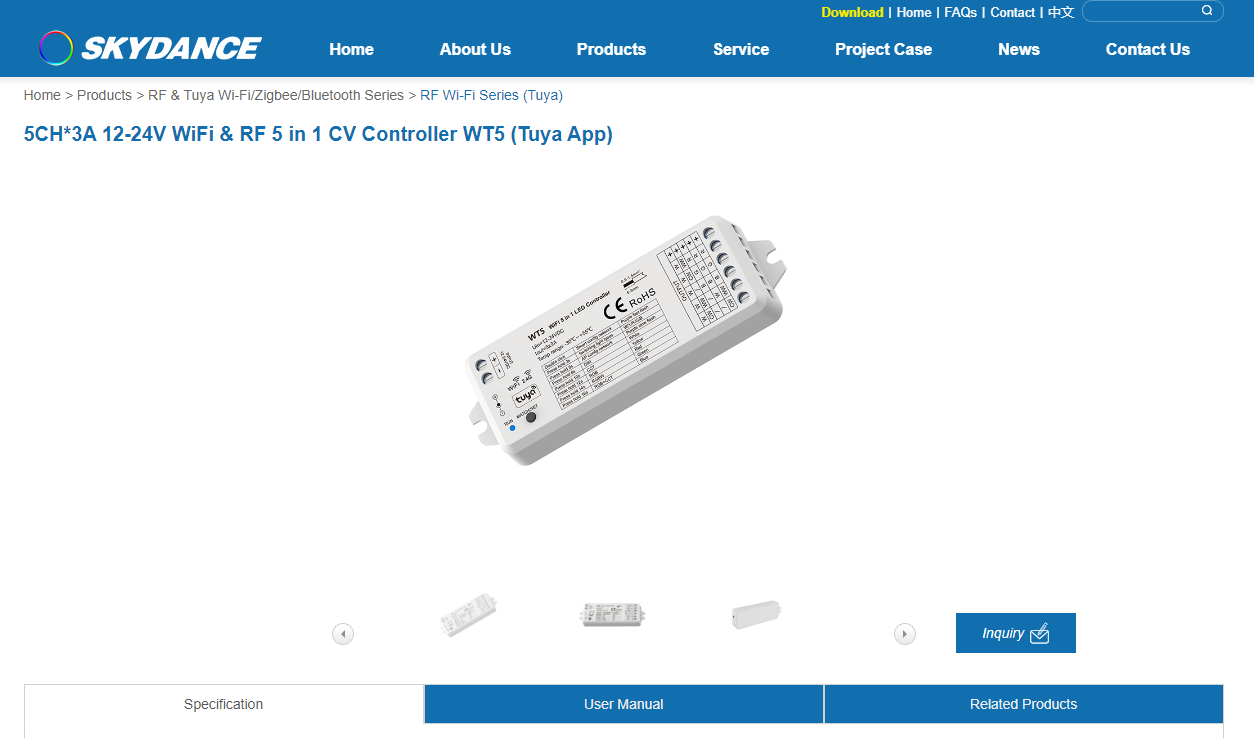
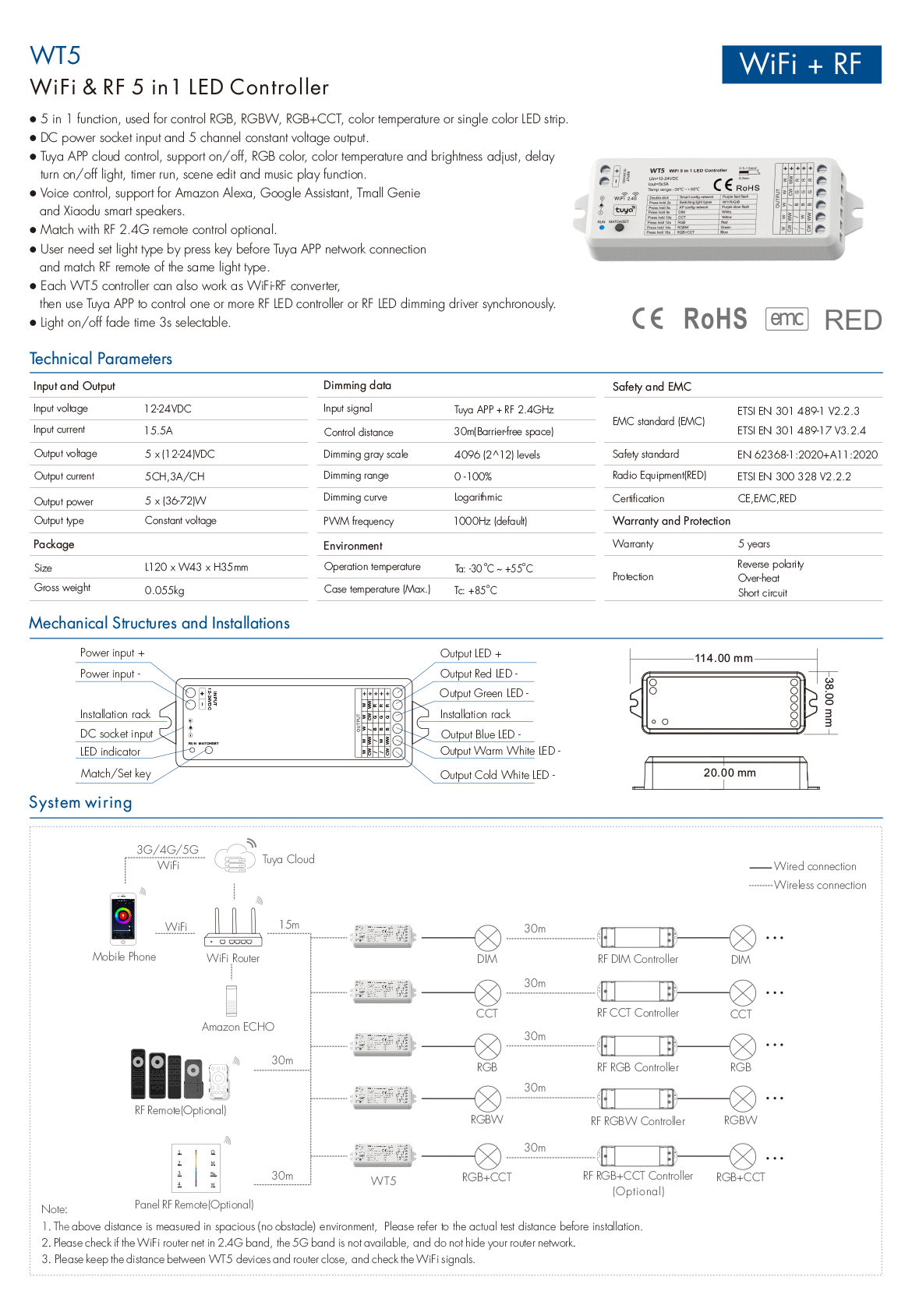
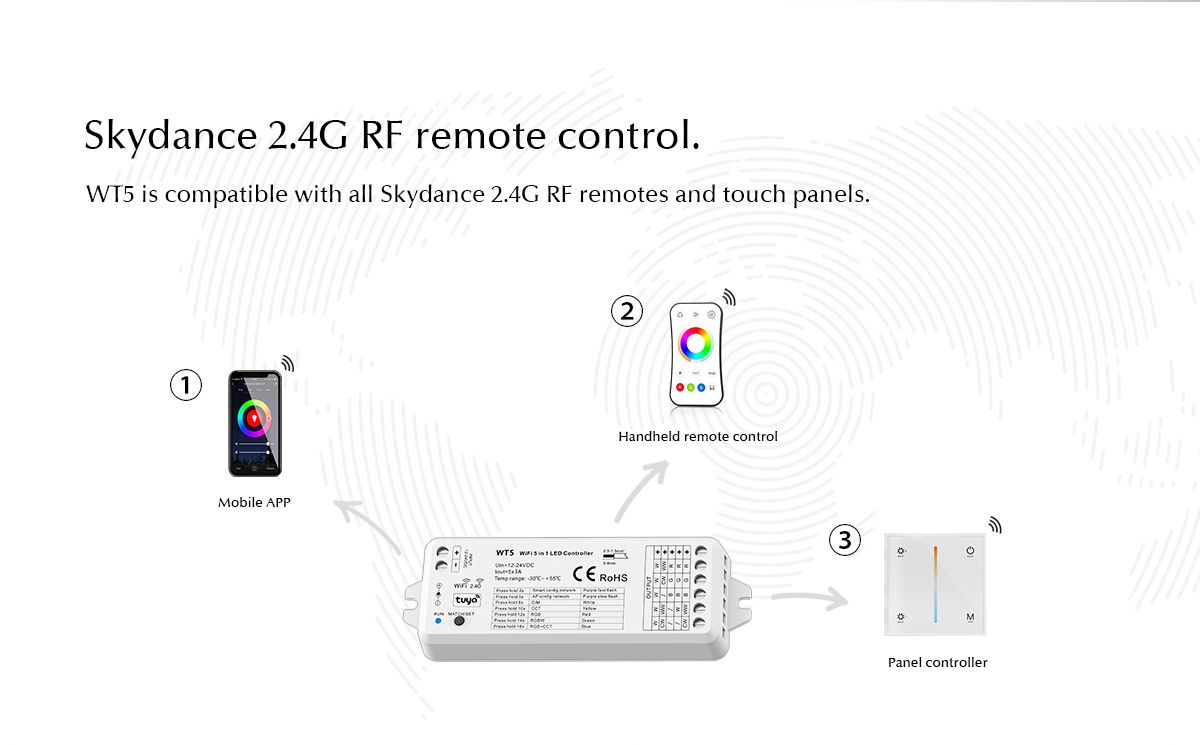
    That's a very useful information indeed. Let me post here some screenshots:
    Shown is a wireless LED controller Skydance 5CH*3A 12-24V Wi-Fi and RF 5 in 1 CV WT5.
    Diagram and specifications for the WiFi and RF LED controller WT5.
    The illustration shows a Skydance 2.4G RF controller with three control options: mobile app, handheld remote, and panel controller.
    I like how detailed their specs are. Even the PWM frequency is listed. They also have reverse polarity protection.
    Helpful post? Buy me a coffee.
  • #38 20785808
    atomphil
    Level 10  
    Posts: 31
    Help: 4
    Rate: 17
    I have now managed to flash one of my WT5s with OBK. Unfortunately, I can't get any further now.

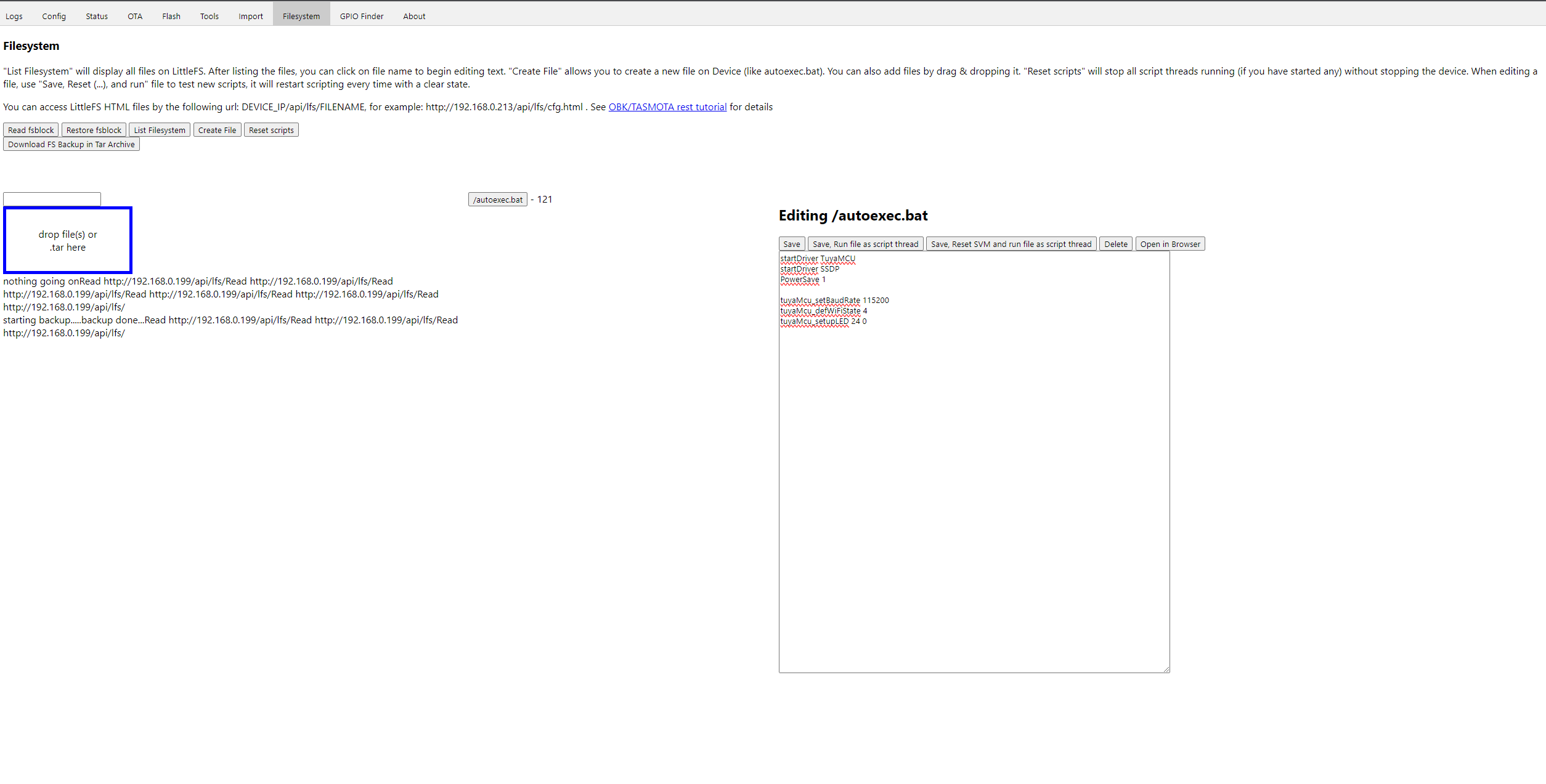
    I have managed it :-) My autoexec.bat for the moment looks like this:

    startDriver TuyaMCU
    startDriver SSDP
    PowerSave 1
    
    tuyaMcu_setBaudRate 115200
    tuyaMcu_defWiFiState 4
    tuyaMcu_setupLED 24 0
  • ADVERTISEMENT
  • #39 20838189
    mashgsm
    Level 15  
    Posts: 236
    Help: 5
    Rate: 26
    Hello,

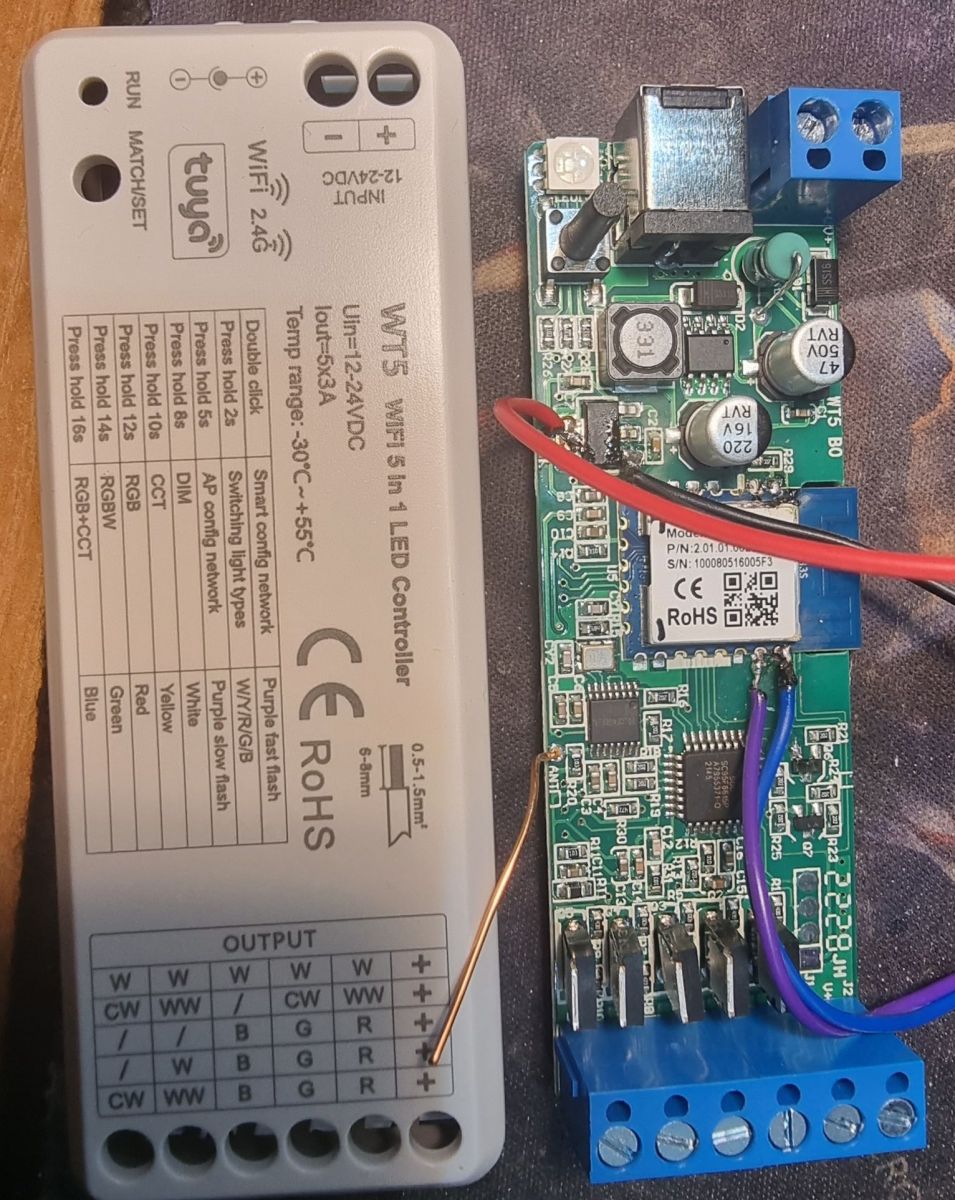
    I have the same drivers and I can't connect to them. I had no problems with other devices. RX-TX TX-RX connected, separate 3.3V power supply and BK7231 Easy Uart Flasher program. I cut off the connection to the transistor from TX to be sure (user @Kinsi55 drew this connection), the RX pin seems not to be connected anywhere. Shorting CEN to mass does not help either. Power is supplied, the converter is operational. Photo of the device, marking on the housing WT5, WB3S chip inside.

    Image of a device labeled WT5 with an internal WB3S chip.
  • #40 20838429
    p.kaczmarek2
    Moderator Smart Home
    Posts: 14631
    Help: 655
    Rate: 12647
    Good job, @atomphil ! It's nice to hear that OBK works well on TuyaMCU RGBCW (it's RGBCW, yes?) devices as well.

    Btw do you know that you can add a custom button to WiFi module GPIO to control LEDs and it will work even with TuyaMCU LED driver? Just set a proper GPIO role and it will work, no pull up resistor needed, BK7231 has internall pullups that are enabled in our code.
    Helpful post? Buy me a coffee.
  • #41 20841382
    mashgsm
    Level 15  
    Posts: 236
    Help: 5
    Rate: 26
    Hello,

    Successfully programmed. It turned out that I had damaged the programmer when connecting it (initially I had connected RX and TX incorrectly). For programming, I used the ESP8266 Nodemcu board with connected EN-G pins - a lifesaver if someone did not have a separate programmer but had a free ESP board. We then use the RX and TX pins and the ESP system is turned off. Script by @atomphil loaded and successful.

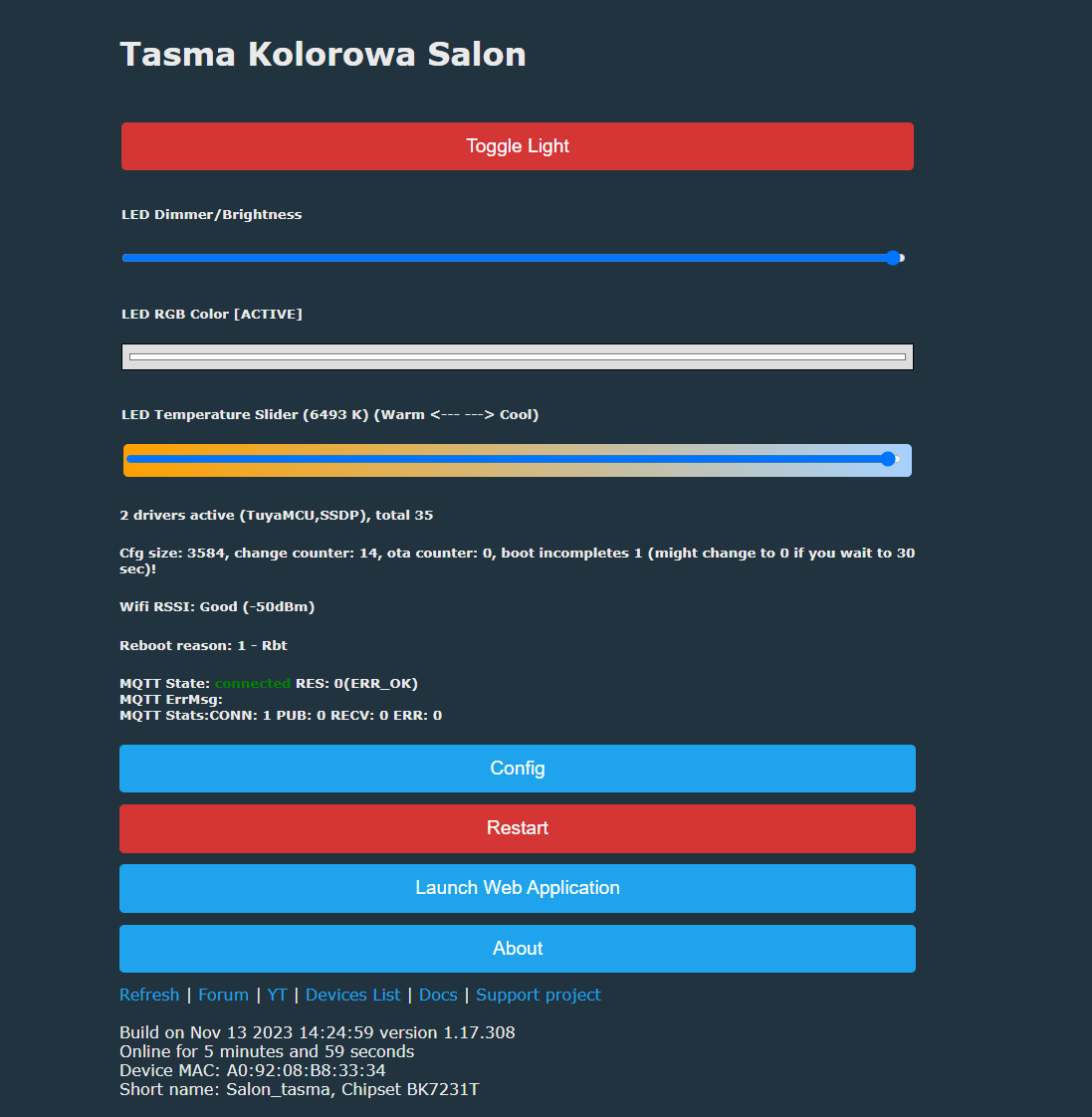
    User interface for controlling an LED strip with options for adjusting brightness, RGB color, and temperature. Graphical user interface with a section for script file editing.
  • #42 20841440
    p.kaczmarek2
    Moderator Smart Home
    Posts: 14631
    Help: 655
    Rate: 12647
    @mashgsm I'm glad everything works. If you have any questions, write.
    PS: You can also use Arduino for programming in a similar way.
    Helpful post? Buy me a coffee.
  • #43 20869760
    atomphil
    Level 10  
    Posts: 31
    Help: 4
    Rate: 17

    Two things do not work in the daily operation of my WT5 with OpenBeken:

    Firstly, if I change the settings via the RF remote control, the new values are not adopted by the BK7231T. They are therefore not displayed in the web interface or in HA.

    The second, far more annoying, is the behavior at startup. I switch the controller (and power supply unit) via a light switch, so it is not powered when it is not in use. When the light is switched on, the controller starts up correctly with the last setting before it was switched off (regardless of how it was set).
    After a few seconds, the boot process of the BK7231T seems to be completed and it overwrites the correct values. Depending on how the flag 12 is set, the light will then always be 100% brightness cold white (terrible!) or one of the last values set via the web interface or HA, but not via RF. Saving the last values via the web interface or HA is also not always consistent.

    Two things would be very nice for usable operation:

    Firstly, very important: The module should ideally not send any settings to the Tuya MCU at startup, as the Tuya MCU already displays the last values correctly. It should therefore only send something when changes are made via the web interface, CLI or HA.

    Secondly: It would be nice if the values of the TuyaMCU were mirrored back to the BK7231T after starting or after changes via RF.
  • #44 20869781
    DeDaMrAz
    Level 22  
    Posts: 605
    Help: 34
    Rate: 129
    atomphil wrote:
    ...

    Secondly: It would be nice if the values of the TuyaMCU were mirrored back to the BK7231T after starting or after changes via RF.


    I can only answer the second part because I tested it on a physical device, there is no communication between RF part and WiFI portion, so whatever you set via RF will not be reflected back to the original TuyaAPP hence not to OBK.

    The first part is a bit tricky as I haven't test such scenario (completely powering off the device) as the WiFi part has a bootup (5-10 seconds depending on the settings) time. But there is a certain retain values setting that you can use for TuyaMCU but I am not sure if that particular TuyaMCU has that.

    See this post for more clarification on the matter - https://www.elektroda.com/rtvforum/topic4003825.html#20743842

    EDIT: also search here for tuyaMCU and familiarize with the commands that may help you setup the device in your desired configuration - https://github.com/openshwprojects/OpenBK7231T_App/blob/main/docs/commands.md
  • ADVERTISEMENT
  • #45 20869827
    atomphil
    Level 10  
    Posts: 31
    Help: 4
    Rate: 17

    For the first part, everything would be fine if there was an option for the Wi-Fi part to simply not send anything at startup. Because without this communication, it works. The Tuya MCU sets the correct settings at the start but is then unfortunately overwritten.

    You can test this by pre-setting any light setting and then interrupting the communication between the BK7231T and Tuya MCU (e.g. by changing the OBK settings).
  • #46 20869884
    p.kaczmarek2
    Moderator Smart Home
    Posts: 14631
    Help: 655
    Rate: 12647
    atomphil wrote:

    Secondly: It would be nice if the values of the TuyaMCU were mirrored back to the BK7231T after starting or after changes via RF.

    Please check what happens in the Web App Log when you change settings via RF. Are any dpIDs sent? If so, how do they look like? Please provide comprehensive information dump, which dpIDs are send for which settings, and what is your autoexec.bat. I think I can help with that, I can parse those dpIDs if they are really sent.
    Helpful post? Buy me a coffee.
  • #47 20870344
    atomphil
    Level 10  
    Posts: 31
    Help: 4
    Rate: 17
    My autoexec.bat is still the one I published in post 38:

    
    startDriver TuyaMCU
    startDriver SSDP
    PowerSave 1
    
    tuyaMcu_setBaudRate 115200
    tuyaMcu_defWiFiState 4
    tuyaMcu_setupLED 24 0


    Unfortunately, only some of the inputs made via RF remote control can be found in the weblog. I have set it to log level debug and checked feature TuyaMCU.

    log of on/off (dpId 20):
    Info:TuyaMCU:TUYAMCU received: 55 AA 03 07 00 05 14 01 00 01 01 25 
    Info:TuyaMCU:TuyaMCU_ProcessIncoming[ver=3]: processing command 7 (State) with 12 bytes
    Info:TuyaMCU:TuyaMCU_ParseStateMessage: processing dpId 20, dataType 1-DP_TYPE_BOOL and 1 data bytes
    Info:TuyaMCU:TuyaMCU_ParseStateMessage: raw data 1 byte: 1
    Info:TuyaMCU:Color is sent as 00DF03AC00AA
    Debug:TuyaMCU:TuyaMCU_ApplyMapping: id 20 with value 1 is not mapped
    Info:TuyaMCU:TUYAMCU received: 55 AA 03 07 00 05 14 01 00 01 01 25 
    Info:TuyaMCU:TuyaMCU_ProcessIncoming[ver=3]: processing command 7 (State) with 12 bytes
    Info:TuyaMCU:TuyaMCU_ParseStateMessage: processing dpId 20, dataType 1-DP_TYPE_BOOL and 1 data bytes
    Info:TuyaMCU:TuyaMCU_ParseStateMessage: raw data 1 byte: 1
    Info:TuyaMCU:Color is sent as 00DF03AC00AA
    Debug:TuyaMCU:TuyaMCU_ApplyMapping: id 20 with value 1 is not mapped
    Info:TuyaMCU:TUYAMCU received: 55 AA 03 07 00 10 18 03 00 0C 30 30 44 46 30 33 41 43 30 30 41 41 F3 
    Info:TuyaMCU:TuyaMCU_ProcessIncoming[ver=3]: processing command 7 (State) with 23 bytes
    Info:TuyaMCU:TuyaMCU_ParseStateMessage: processing dpId 24, dataType 3-DP_TYPE_STRING and 12 data bytes
    Info:TuyaMCU:TUYAMCU received: 55 AA 03 07 00 10 18 03 00 0C 30 30 44 46 30 33 41 43 30 30 41 41 F3 
    Info:TuyaMCU:TuyaMCU_ProcessIncoming[ver=3]: processing command 7 (State) with 23 bytes
    Info:TuyaMCU:TuyaMCU_ParseStateMessage: processing dpId 24, dataType 3-DP_TYPE_STRING and 12 data bytes
    Info:MQTT:mqtt_host empty, not starting mqtt
    Info:MAIN:Time 1988, idle 56648/s, free 77640, MQTT 0(124), bWifi 1, secondsWithNoPing 1909, socks 4/38 POWERSAVE
    Info:MAIN:HA discovery is scheduled, but MQTT connection is not present yet
    Info:MAIN:Time 1989, idle 70553/s, free 77640, MQTT 0(124), bWifi 1, secondsWithNoPing 1910, socks 4/38 POWERSAVE
    Info:MAIN:HA discovery is scheduled, but MQTT connection is not present yet
    Info:TuyaMCU:TUYAMCU received: 55 AA 03 00 00 01 01 04 
    Info:TuyaMCU:TuyaMCU_ProcessIncoming[ver=3]: processing command 0 (Hearbeat) with 8 bytes
    Info:MAIN:Time 1990, idle 71418/s, free 77640, MQTT 0(124), bWifi 1, secondsWithNoPing 1911, socks 4/38 POWERSAVE
    Info:MAIN:HA discovery is scheduled, but MQTT connection is not present yet
    Info:MAIN:Time 1991, idle 68112/s, free 77640, MQTT 0(124), bWifi 1, secondsWithNoPing 1912, socks 4/38 POWERSAVE
    Info:MAIN:HA discovery is scheduled, but MQTT connection is not present yet

    Info:TuyaMCU:TUYAMCU received: 55 AA 03 07 00 05 14 01 00 01 00 24 
    Info:TuyaMCU:TuyaMCU_ProcessIncoming[ver=3]: processing command 7 (State) with 12 bytes
    Info:TuyaMCU:TuyaMCU_ParseStateMessage: processing dpId 20, dataType 1-DP_TYPE_BOOL and 1 data bytes
    Info:TuyaMCU:TuyaMCU_ParseStateMessage: raw data 1 byte: 0
    Debug:TuyaMCU:TuyaMCU_ApplyMapping: id 20 with value 0 is not mapped
    Info:TuyaMCU:TUYAMCU received: 55 AA 03 07 00 05 14 01 00 01 00 24 
    Info:TuyaMCU:TuyaMCU_ProcessIncoming[ver=3]: processing command 7 (State) with 12 bytes
    Info:TuyaMCU:TuyaMCU_ParseStateMessage: processing dpId 20, dataType 1-DP_TYPE_BOOL and 1 data bytes
    Info:TuyaMCU:TuyaMCU_ParseStateMessage: raw data 1 byte: 0
    Debug:TuyaMCU:TuyaMCU_ApplyMapping: id 20 with value 0 is not mapped


    log of brightness change (dpId 22):
    Info:TuyaMCU:TUYAMCU received: 55 AA 03 07 00 08 16 02 00 04 00 00 00 00 2D 
    Info:TuyaMCU:TuyaMCU_ProcessIncoming[ver=3]: processing command 7 (State) with 15 bytes
    Info:TuyaMCU:TuyaMCU_ParseStateMessage: processing dpId 22, dataType 2-DP_TYPE_VALUE and 4 data bytes
    Info:TuyaMCU:TuyaMCU_ParseStateMessage: raw data 4 int: 0
    Debug:TuyaMCU:TuyaMCU_ApplyMapping: id 22 with value 0 is not mapped
    Info:MAIN:Time 923, idle 60259/s, free 77648, MQTT 0(57), bWifi 1, secondsWithNoPing 844, socks 4/38 POWERSAVE
    Info:MAIN:HA discovery is scheduled, but MQTT connection is not present yet
    Info:TuyaMCU:TUYAMCU received: 55 AA 03 07 00 08 16 02 00 04 00 00 00 00 2D 
    Info:TuyaMCU:TuyaMCU_ProcessIncoming[ver=3]: processing command 7 (State) with 15 bytes
    Info:TuyaMCU:TuyaMCU_ParseStateMessage: processing dpId 22, dataType 2-DP_TYPE_VALUE and 4 data bytes
    Info:TuyaMCU:TuyaMCU_ParseStateMessage: raw data 4 int: 0
    Debug:TuyaMCU:TuyaMCU_ApplyMapping: id 22 with value 0 is not mapped
    Info:MAIN:Time 924, idle 70340/s, free 77648, MQTT 0(57), bWifi 1, secondsWithNoPing 845, socks 4/38 POWERSAVE
    Info:MAIN:HA discovery is scheduled, but MQTT connection is not present yet

    Info:TuyaMCU:TUYAMCU received: 55 AA 03 07 00 08 16 02 00 04 00 00 00 00 2D 
    Info:TuyaMCU:TuyaMCU_ProcessIncoming[ver=3]: processing command 7 (State) with 15 bytes
    Info:TuyaMCU:TuyaMCU_ParseStateMessage: processing dpId 22, dataType 2-DP_TYPE_VALUE and 4 data bytes
    Info:TuyaMCU:TuyaMCU_ParseStateMessage: raw data 4 int: 0
    Debug:TuyaMCU:TuyaMCU_ApplyMapping: id 22 with value 0 is not mapped
    Info:MAIN:Time 925, idle 64556/s, free 77648, MQTT 0(57), bWifi 1, secondsWithNoPing 846, socks 4/38 POWERSAVE
    Info:MAIN:HA discovery is scheduled, but MQTT connection is not present yet
    Info:TuyaMCU:TUYAMCU received: 55 AA 03 00 00 01 01 04 
    Info:TuyaMCU:TuyaMCU_ProcessIncoming[ver=3]: processing command 0 (Hearbeat) with 8 bytes
    Info:TuyaMCU:TUYAMCU received: 55 AA 03 07 00 08 16 02 00 04 00 00 00 00 2D 
    Info:TuyaMCU:TuyaMCU_ProcessIncoming[ver=3]: processing command 7 (State) with 15 bytes
    Info:TuyaMCU:TuyaMCU_ParseStateMessage: processing dpId 22, dataType 2-DP_TYPE_VALUE and 4 data bytes
    Info:TuyaMCU:TuyaMCU_ParseStateMessage: raw data 4 int: 0
    Debug:TuyaMCU:TuyaMCU_ApplyMapping: id 22 with value 0 is not mapped
    Info:TuyaMCU:TUYAMCU received: 55 AA 03 07 00 08 16 02 00 04 00 00 00 00 2D 
    Info:TuyaMCU:TuyaMCU_ProcessIncoming[ver=3]: processing command 7 (State) with 15 bytes
    Info:TuyaMCU:TuyaMCU_ParseStateMessage: processing dpId 22, dataType 2-DP_TYPE_VALUE and 4 data bytes
    Info:TuyaMCU:TuyaMCU_ParseStateMessage: raw data 4 int: 0
    Debug:TuyaMCU:TuyaMCU_ApplyMapping: id 22 with value 0 is not mapped
    Info:MAIN:Time 926, idle 65327/s, free 77648, MQTT 0(57), bWifi 1, secondsWithNoPing 847, socks 4/38 POWERSAVE
    Info:MAIN:HA discovery is scheduled, but MQTT connection is not present yet

    Info:TuyaMCU:TUYAMCU received: 55 AA 03 07 00 08 16 02 00 04 00 00 00 00 2D 
    Info:TuyaMCU:TuyaMCU_ProcessIncoming[ver=3]: processing command 7 (State) with 15 bytes
    Info:TuyaMCU:TuyaMCU_ParseStateMessage: processing dpId 22, dataType 2-DP_TYPE_VALUE and 4 data bytes
    Info:TuyaMCU:TuyaMCU_ParseStateMessage: raw data 4 int: 0
    Debug:TuyaMCU:TuyaMCU_ApplyMapping: id 22 with value 0 is not mapped
    Info:MAIN:Time 927, idle 61702/s, free 77648, MQTT 0(57), bWifi 1, secondsWithNoPing 848, socks 4/38 POWERSAVE
    Info:MAIN:HA discovery is scheduled, but MQTT connection is not present yet

    Info:TuyaMCU:TUYAMCU received: 55 AA 03 07 00 08 16 02 00 04 00 00 00 00 2D 
    Info:TuyaMCU:TuyaMCU_ProcessIncoming[ver=3]: processing command 7 (State) with 15 bytes
    Info:TuyaMCU:TuyaMCU_ParseStateMessage: processing dpId 22, dataType 2-DP_TYPE_VALUE and 4 data bytes
    Info:TuyaMCU:TuyaMCU_ParseStateMessage: raw data 4 int: 0
    Debug:TuyaMCU:TuyaMCU_ApplyMapping: id 22 with value 0 is not mapped
    Info:MAIN:Time 928, idle 67997/s, free 77432, MQTT 0(57), bWifi 1, secondsWithNoPing 849, socks 5/38 POWERSAVE
    Info:MAIN:HA discovery is scheduled, but MQTT connection is not present yet
    Info:TuyaMCU:TUYAMCU received: 55 AA 03 07 00 08 16 02 00 04 00 00 00 00 2D 
    Info:TuyaMCU:TuyaMCU_ProcessIncoming[ver=3]: processing command 7 (State) with 15 bytes
    Info:TuyaMCU:TuyaMCU_ParseStateMessage: processing dpId 22, dataType 2-DP_TYPE_VALUE and 4 data bytes
    Info:TuyaMCU:TuyaMCU_ParseStateMessage: raw data 4 int: 0


    log of CCT change (dpId 23):
    Info:TuyaMCU:TUYAMCU received: 55 AA 03 07 00 08 17 02 00 04 00 00 00 00 2E 
    Info:TuyaMCU:TuyaMCU_ProcessIncoming[ver=3]: processing command 7 (State) with 15 bytes
    Info:TuyaMCU:TuyaMCU_ParseStateMessage: processing dpId 23, dataType 2-DP_TYPE_VALUE and 4 data bytes
    Info:TuyaMCU:TuyaMCU_ParseStateMessage: raw data 4 int: 0
    Debug:TuyaMCU:TuyaMCU_ApplyMapping: id 23 with value 0 is not mapped
    Info:MAIN:Time 1571, idle 143017/s, free 77640, MQTT 0(97), bWifi 1, secondsWithNoPing 1492, socks 4/38 POWERSAVE
    Info:MAIN:HA discovery is scheduled, but MQTT connection is not present yet
    Info:MQTT:mqtt_host empty, not starting mqtt
    Info:MAIN:Time 1572, idle 71776/s, free 77640, MQTT 0(98), bWifi 1, secondsWithNoPing 1493, socks 4/38 POWERSAVE
    Info:MAIN:HA discovery is scheduled, but MQTT connection is not present yet
    Info:TuyaMCU:TUYAMCU received: 55 AA 03 07 00 08 17 02 00 04 00 00 00 61 8F 
    Info:TuyaMCU:TuyaMCU_ProcessIncoming[ver=3]: processing command 7 (State) with 15 bytes
    Info:TuyaMCU:TuyaMCU_ParseStateMessage: processing dpId 23, dataType 2-DP_TYPE_VALUE and 4 data bytes
    Info:TuyaMCU:TuyaMCU_ParseStateMessage: raw data 4 int: 97
    Debug:TuyaMCU:TuyaMCU_ApplyMapping: id 23 with value 97 is not mapped
    Info:MAIN:Time 1573, idle 70552/s, free 69032, MQTT 0(98), bWifi 1, secondsWithNoPing 1494, socks 5/38 POWERSAVE
    Info:MAIN:HA discovery is scheduled, but MQTT connection is not present yet
    Info:TuyaMCU:TUYAMCU received: 55 AA 03 00 00 01 01 04 
    Info:TuyaMCU:TuyaMCU_ProcessIncoming[ver=3]: processing command 0 (Hearbeat) with 8 bytes
    Info:TuyaMCU:TUYAMCU received: 55 AA 03 07 00 08 17 02 00 04 00 00 00 C3 F1 
    Info:TuyaMCU:TuyaMCU_ProcessIncoming[ver=3]: processing command 7 (State) with 15 bytes
    Info:TuyaMCU:TuyaMCU_ParseStateMessage: processing dpId 23, dataType 2-DP_TYPE_VALUE and 4 data bytes
    Info:TuyaMCU:TuyaMCU_ParseStateMessage: raw data 4 int: 195
    Debug:TuyaMCU:TuyaMCU_ApplyMapping: id 23 with value 195 is not mapped
    Info:MAIN:Time 1574, idle 69903/s, free 77640, MQTT 0(98), bWifi 1, secondsWithNoPing 1495, socks 4/38 POWERSAVE
    Info:MAIN:HA discovery is scheduled, but MQTT connection is not present yet
    Info:TuyaMCU:TUYAMCU received: 55 AA 03 07 00 08 17 02 00 04 00 00 01 24 53 
    Info:TuyaMCU:TuyaMCU_ProcessIncoming[ver=3]: processing command 7 (State) with 15 bytes
    Info:TuyaMCU:TuyaMCU_ParseStateMessage: processing dpId 23, dataType 2-DP_TYPE_VALUE and 4 data bytes
    Info:TuyaMCU:TuyaMCU_ParseStateMessage: raw data 4 int: 292
    Debug:TuyaMCU:TuyaMCU_ApplyMapping: id 23 with value 292 is not mapped
    Info:TuyaMCU:TUYAMCU received: 55 AA 03 07 00 08 17 02 00 04 00 00 01 86 B5 
    Info:TuyaMCU:TuyaMCU_ProcessIncoming[ver=3]: processing command 7 (State) with 15 bytes
    Info:TuyaMCU:TuyaMCU_ParseStateMessage: processing dpId 23, dataType 2-DP_TYPE_VALUE and 4 data bytes
    Info:TuyaMCU:TuyaMCU_ParseStateMessage: raw data 4 int: 390
    Debug:TuyaMCU:TuyaMCU_ApplyMapping: id 23 with value 390 is not mapped
    Info:MAIN:Time 1575, idle 70886/s, free 77640, MQTT 0(98), bWifi 1, secondsWithNoPing 1496, socks 4/38 POWERSAVE
    Info:MAIN:HA discovery is scheduled, but MQTT connection is not present yet
    Info:TuyaMCU:TUYAMCU received: 55 AA 03 07 00 08 17 02 00 04 00 00 01 E8 17 
    Info:TuyaMCU:TuyaMCU_ProcessIncoming[ver=3]: processing command 7 (State) with 15 bytes
    Info:TuyaMCU:TuyaMCU_ParseStateMessage: processing dpId 23, dataType 2-DP_TYPE_VALUE and 4 data bytes
    Info:TuyaMCU:TuyaMCU_ParseStateMessage: raw data 4 int: 488
    Debug:TuyaMCU:TuyaMCU_ApplyMapping: id 23 with value 488 is not mapped
    Info:MAIN:Time 1576, idle 72449/s, free 77640, MQTT 0(98), bWifi 1, secondsWithNoPing 1497, socks 4/38 POWERSAVE
    Info:MAIN:HA discovery is scheduled, but MQTT connection is not present yet
    Info:TuyaMCU:TUYAMCU received: 55 AA 03 07 00 08 17 02 00 04 00 00 02 49 79 
    Info:TuyaMCU:TuyaMCU_ProcessIncoming[ver=3]: processing command 7 (State) with 15 bytes
    Info:TuyaMCU:TuyaMCU_ParseStateMessage: processing dpId 23, dataType 2-DP_TYPE_VALUE and 4 data bytes
    Info:TuyaMCU:TuyaMCU_ParseStateMessage: raw data 4 int: 585
    Debug:TuyaMCU:TuyaMCU_ApplyMapping: id 23 with value 585 is not mapped
    Info:MAIN:Time 1577, idle 69982/s, free 77640, MQTT 0(98), bWifi 1, secondsWithNoPing 1498, socks 4/38 POWERSAVE
    Info:MAIN:HA discovery is scheduled, but MQTT connection is not present yet
    Info:TuyaMCU:TUYAMCU received: 55 AA 03 00 00 01 01 04 
    Info:TuyaMCU:TuyaMCU_ProcessIncoming[ver=3]: processing command 0 (Hearbeat) with 8 bytes
    Info:TuyaMCU:TUYAMCU received: 55 AA 03 07 00 08 17 02 00 04 00 00 02 AB DB 
    Info:TuyaMCU:TuyaMCU_ProcessIncoming[ver=3]: processing command 7 (State) with 15 bytes
    Info:TuyaMCU:TuyaMCU_ParseStateMessage: processing dpId 23, dataType 2-DP_TYPE_VALUE and 4 data bytes
    Info:TuyaMCU:TuyaMCU_ParseStateMessage: raw data 4 int: 683
    Debug:TuyaMCU:TuyaMCU_ApplyMapping: id 23 with value 683 is not mapped
    Info:MAIN:Time 1578, idle 70875/s, free 77640, MQTT 0(98), bWifi 1, secondsWithNoPing 1499, socks 4/38 POWERSAVE
    Info:MAIN:HA discovery is scheduled, but MQTT connection is not present yet
    Info:TuyaMCU:TUYAMCU received: 55 AA 03 07 00 08 17 02 00 04 00 00 03 0D 3E 
    Info:TuyaMCU:TuyaMCU_ProcessIncoming[ver=3]: processing command 7 (State) with 15 bytes
    Info:TuyaMCU:TuyaMCU_ParseStateMessage: processing dpId 23, dataType 2-DP_TYPE_VALUE and 4 data bytes
    Info:TuyaMCU:TuyaMCU_ParseStateMessage: raw data 4 int: 781
    Debug:TuyaMCU:TuyaMCU_ApplyMapping: id 23 with value 781 is not mapped
    Info:MAIN:Time 1579, idle 71079/s, free 77640, MQTT 0(98), bWifi 1, secondsWithNoPing 1500, socks 4/38 POWERSAVE
    Info:MAIN:HA discovery is scheduled, but MQTT connection is not present yet
    Info:TuyaMCU:TUYAMCU received: 55 AA 03 03 00 00 05 
    Info:TuyaMCU:TuyaMCU_ProcessIncoming[ver=3]: processing command 3 (WiFiState) with 7 bytes
    Info:TuyaMCU:TUYAMCU received: 55 AA 03 07 00 08 17 02 00 04 00 00 03 6E 9F 
    Info:TuyaMCU:TuyaMCU_ProcessIncoming[ver=3]: processing command 7 (State) with 15 bytes
    Info:TuyaMCU:TuyaMCU_ParseStateMessage: processing dpId 23, dataType 2-DP_TYPE_VALUE and 4 data bytes
    Info:TuyaMCU:TuyaMCU_ParseStateMessage: raw data 4 int: 878
    Debug:TuyaMCU:TuyaMCU_ApplyMapping: id 23 with value 878 is not mapped
    Info:MAIN:Time 1580, idle 143117/s, free 77640, MQTT 0(98), bWifi 1, secondsWithNoPing 1501, socks 4/38 POWERSAVE
    Info:MAIN:HA discovery is scheduled, but MQTT connection is not present yet
    Info:MAIN:Time 1581, idle 70554/s, free 77640, MQTT 0(98), bWifi 1, secondsWithNoPing 1502, socks 4/38 POWERSAVE
    Info:MAIN:HA discovery is scheduled, but MQTT connection is not present yet
    Info:TuyaMCU:TUYAMCU received: 55 AA 03 00 00 01 01 04 
    Info:TuyaMCU:TuyaMCU_ProcessIncoming[ver=3]: processing command 0 (Hearbeat) with 8 bytes
    Info:TuyaMCU:TUYAMCU received: 55 AA 03 07 00 08 17 02 00 04 00 00 03 E8 19 
    Info:TuyaMCU:TuyaMCU_ProcessIncoming[ver=3]: processing command 7 (State) with 15 bytes
    Info:TuyaMCU:TuyaMCU_ParseStateMessage: processing dpId 23, dataType 2-DP_TYPE_VALUE and 4 data bytes
    Info:TuyaMCU:TuyaMCU_ParseStateMessage: raw data 4 int: 1000
    Debug:TuyaMCU:TuyaMCU_ApplyMapping: id 23 with value 1000 is not mapped


    Log of (soft)OFF via the big on/off-button on the remote:
    Info:TuyaMCU:TUYAMCU received: 55 AA 03 00 00 01 01 04 
    Info:TuyaMCU:TuyaMCU_ProcessIncoming[ver=3]: processing command 0 (Hearbeat) with 8 bytes
    Info:TuyaMCU:TUYAMCU received: 55 AA 03 07 00 05 14 01 00 01 00 24 
    Info:TuyaMCU:TuyaMCU_ProcessIncoming[ver=3]: processing command 7 (State) with 12 bytes
    Info:TuyaMCU:TuyaMCU_ParseStateMessage: processing dpId 20, dataType 1-DP_TYPE_BOOL and 1 data bytes
    Info:TuyaMCU:TuyaMCU_ParseStateMessage: raw data 1 byte: 0
    Info:TuyaMCU:TUYAMCU received: 55 AA 03 07 00 05 14 01 00 01 00 24 
    Info:TuyaMCU:TuyaMCU_ProcessIncoming[ver=3]: processing command 7 (State) with 12 bytes
    Info:TuyaMCU:TuyaMCU_ParseStateMessage: processing dpId 20, dataType 1-DP_TYPE_BOOL and 1 data bytes
    Info:TuyaMCU:TuyaMCU_ParseStateMessage: raw data 1 byte: 0
    Info:CFG:####### Flash Save LED #######


    Log of (soft)ON via the big on/off-button on the remote:
    Info:TuyaMCU:TUYAMCU received: 55 AA 03 07 00 05 14 01 00 01 01 25 
    Info:TuyaMCU:TuyaMCU_ProcessIncoming[ver=3]: processing command 7 (State) with 12 bytes
    Info:TuyaMCU:TuyaMCU_ParseStateMessage: processing dpId 20, dataType 1-DP_TYPE_BOOL and 1 data bytes
    Info:TuyaMCU:TuyaMCU_ParseStateMessage: raw data 1 byte: 1
    Info:TuyaMCU:Color is sent as 00DF03AC00AA
    Info:TuyaMCU:TUYAMCU received: 55 AA 03 07 00 05 14 01 00 01 01 25 
    Info:TuyaMCU:TuyaMCU_ProcessIncoming[ver=3]: processing command 7 (State) with 12 bytes
    Info:TuyaMCU:TuyaMCU_ParseStateMessage: processing dpId 20, dataType 1-DP_TYPE_BOOL and 1 data bytes
    Info:TuyaMCU:TuyaMCU_ParseStateMessage: raw data 1 byte: 1
    Info:TuyaMCU:Color is sent as 00DF03AC00AA
    Info:TuyaMCU:TUYAMCU received: 55 AA 03 07 00 10 18 03 00 0C 30 30 44 46 30 33 41 43 30 30 41 41 F3 
    Info:TuyaMCU:TuyaMCU_ProcessIncoming[ver=3]: processing command 7 (State) with 23 bytes
    Info:TuyaMCU:TuyaMCU_ParseStateMessage: processing dpId 24, dataType 3-DP_TYPE_STRING and 12 data bytes
    Info:TuyaMCU:TUYAMCU received: 55 AA 03 07 00 10 18 03 00 0C 30 30 44 46 30 33 41 43 30 30 41 41 F3 
    Info:TuyaMCU:TuyaMCU_ProcessIncoming[ver=3]: processing command 7 (State) with 23 bytes
    Info:TuyaMCU:TuyaMCU_ParseStateMessage: processing dpId 24, dataType 3-DP_TYPE_STRING and 12 data bytes
    Info:CFG:####### Flash Save LED #######


    In the log of RGB change I can´t see anything:
    
    Info:MQTT:mqtt_host empty, not starting mqtt
    Info:MAIN:Time 1892, idle 72805/s, free 77640, MQTT 0(118), bWifi 1, secondsWithNoPing 1813, socks 4/38 POWERSAVE
    Info:MAIN:HA discovery is scheduled, but MQTT connection is not present yet
    Info:MAIN:Time 1893, idle 71688/s, free 77640, MQTT 0(118), bWifi 1, secondsWithNoPing 1814, socks 4/38 POWERSAVE
    Info:MAIN:HA discovery is scheduled, but MQTT connection is not present yet
    Info:TuyaMCU:TUYAMCU received: 55 AA 03 00 00 01 01 04 
    Info:TuyaMCU:TuyaMCU_ProcessIncoming[ver=3]: processing command 0 (Hearbeat) with 8 bytes
    Info:MAIN:Time 1894, idle 73461/s, free 77640, MQTT 0(118), bWifi 1, secondsWithNoPing 1815, socks 4/38 POWERSAVE
    Info:MAIN:HA discovery is scheduled, but MQTT connection is not present yet
    Info:TuyaMCU:TUYAMCU received: 55 AA 03 03 00 00 05 
    Info:TuyaMCU:TuyaMCU_ProcessIncoming[ver=3]: processing command 3 (WiFiState) with 7 bytes
    Info:MAIN:Time 1895, idle 74458/s, free 77640, MQTT 0(118), bWifi 1, secondsWithNoPing 1816, socks 4/38 POWERSAVE
    Info:MAIN:HA discovery is scheduled, but MQTT connection is not present yet
    Info:MAIN:Time 1896, idle 72171/s, free 77640, MQTT 0(118), bWifi 1, secondsWithNoPing 1817, socks 4/38 POWERSAVE
    Info:MAIN:HA discovery is scheduled, but MQTT connection is not present yet
    Info:MAIN:Time 1897, idle 79883/s, free 77640, MQTT 0(118), bWifi 1, secondsWithNoPing 1818, socks 4/38 POWERSAVE
    Info:MAIN:HA discovery is scheduled, but MQTT connection is not present yet
    Info:TuyaMCU:TUYAMCU received: 55 AA 03 00 00 01 01 04 
    Info:TuyaMCU:TuyaMCU_ProcessIncoming[ver=3]: processing command 0 (Hearbeat) with 8 bytes
    Info:MAIN:Time 1898, idle 72700/s, free 77640, MQTT 0(118), bWifi 1, secondsWithNoPing 1819, socks 4/38 POWERSAVE
    Info:MAIN:HA discovery is scheduled, but MQTT connection is not present yet
    Info:MAIN:Time 1899, idle 71955/s, free 77640, MQTT 0(118), bWifi 1, secondsWithNoPing 1820, socks 4/38 POWERSAVE
    Info:MAIN:HA discovery is scheduled, but MQTT connection is not present yet
    Info:MAIN:Time 1900, idle 73651/s, free 77432, MQTT 0(118), bWifi 1, secondsWithNoPing 1821, socks 5/38 POWERSAVE
    Info:MAIN:HA discovery is scheduled, but MQTT connection is not present yet
    Info:MAIN:Time 1901, idle 71674/s, free 77640, MQTT 0(118), bWifi 1, secondsWithNoPing 1822, socks 4/38 POWERSAVE
    Info:MAIN:HA discovery is scheduled, but MQTT connection is not present yet
    Info:TuyaMCU:TUYAMCU received: 55 AA 03 00 00 01 01 04 
    Info:TuyaMCU:TuyaMCU_ProcessIncoming[ver=3]: processing command 0 (Hearbeat) with 8 bytes
    Info:MAIN:Time 1902, idle 74300/s, free 77640, MQTT 0(118), bWifi 1, secondsWithNoPing 1823, socks 4/38 POWERSAVE
    Info:MAIN:HA discovery is scheduled, but MQTT connection is not present yet
    Info:MAIN:Time 1903, idle 83305/s, free 77640, MQTT 0(118), bWifi 1, secondsWithNoPing 1824, socks 4/38 POWERSAVE
    Info:MAIN:HA discovery is scheduled, but MQTT connection is not present yet
    Info:MAIN:Time 1904, idle 71323/s, free 77640, MQTT 0(118), bWifi 1, secondsWithNoPing 1825, socks 4/38 POWERSAVE
    Info:MAIN:HA discovery is scheduled, but MQTT connection is not present yet
    Info:MAIN:Time 1905, idle 60630/s, free 77640, MQTT 0(118), bWifi 1, secondsWithNoPing 1826, socks 4/38 POWERSAVE
    Info:MAIN:HA discovery is scheduled, but MQTT connection is not present yet
    Info:TuyaMCU:TUYAMCU received: 55 AA 03 00 00 01 01 04 
    Info:TuyaMCU:TuyaMCU_ProcessIncoming[ver=3]: processing command 0 (Hearbeat) with 8 bytes
    Info:MAIN:Time 1906, idle 58462/s, free 77640, MQTT 0(118), bWifi 1, secondsWithNoPing 1827, socks 4/38 POWERSAVE
    Info:MAIN:HA discovery is scheduled, but MQTT connection is not present yet
    Info:MAIN:Time 1907, idle 73793/s, free 77640, MQTT 0(118), bWifi 1, secondsWithNoPing 1828, socks 4/38 POWERSAVE
    Info:MAIN:HA discovery is scheduled, but MQTT connection is not present yet
    Info:MQTT:mqtt_host empty, not starting mqtt
    Info:MAIN:Time 1908, idle 74978/s, free 77640, MQTT 0(119), bWifi 1, secondsWithNoPing 1829, socks 4/38 POWERSAVE
    Info:MAIN:HA discovery is scheduled, but MQTT connection is not present yet


    Selecting or changing scenes via RF remote control is also not shown in the log.

    Is there an easy way to monitor the communication between BK and TuyaMCU before the WLAN connection is established? Perhaps something interesting is sent by the TuyaMCU at startup.

    But all this is only what would be nice.
    Firstly, it would help a lot if the WLAN module did not overwrite the TuyaMCU's start values after startup.
  • #48 20870701
    p.kaczmarek2
    Moderator Smart Home
    Posts: 14631
    Help: 655
    Rate: 12647
    Which of those dpIDs are not received correctly by OBK?

    atomphil wrote:

    Is there an easy way to monitor the communication between BK and TuyaMCU before the WLAN connection is established? Perhaps something interesting is sent by the TuyaMCU at startup.

    Well, there is one method. Select quick connect flag in OBK flags, then go to the web app, then, on obk native panel, click "reboot", clear Web App log but keep it open, and after up to 5-10 seconds, when OBK reconnects, you should get whole log (since reboot) in the web App anyway. This is because OBK firmware has a buffer of a certain size that can store the log for some time and it will send it to the App once it reaches WiFi
    Helpful post? Buy me a coffee.
  • #49 20872464
    atomphil
    Level 10  
    Posts: 31
    Help: 4
    Rate: 17
    The method only returns the log from wifi connect. Here is the log when the entire controller is started by switching the supply voltage:
    sChange - WIFI_STA_CONNECTING - 1
    Info:MAIN:Time 7, idle 37723/s, free 78792, MQTT 0(0), bWifi 0, secondsWithNoPing -1, socks 3/38 POWERSAVE
    Info:MAIN:HA discovery is scheduled, but MQTT connection is not present yet
    Info:MAIN:Main_OnWiFiStatusChange - WIFI_STA_DISCONNECTED - 2
    Info:MAIN:Time 8, idle 102740/s, free 80680, MQTT 0(0), bWifi 0, secondsWithNoPing -1, socks 3/38 POWERSAVE
    Info:MAIN:HA discovery is scheduled, but MQTT connection is not present yet
    Info:MAIN:Time 9, idle 64186/s, free 80680, MQTT 0(0), bWifi 0, secondsWithNoPing -1, socks 3/38 POWERSAVE
    Info:MAIN:HA discovery is scheduled, but MQTT connection is not present yet
    Info:TuyaMCU:TUYAMCU received: 55 AA 03 00 00 01 01 04 
    Info:TuyaMCU:TuyaMCU_ProcessIncoming[ver=3]: processing command 0 (Hearbeat) with 8 bytes
    Info:MAIN:Time 10, idle 64379/s, free 80680, MQTT 0(0), bWifi 0, secondsWithNoPing -1, socks 3/38 POWERSAVE
    Info:GEN:dhcp=0 ip=0.0.0.0 gate=0.0.0.0 mask=0.0.0.0 mac=XX:XX:XX:XX:XX:XX
    Info:GEN:sta: 0, softap: 0, b/g/n
    Info:MAIN:HA discovery is scheduled, but MQTT connection is not present yet
    Info:MAIN:Time 11, idle 62636/s, free 80680, MQTT 0(0), bWifi 0, secondsWithNoPing -1, socks 3/38 POWERSAVE
    Info:MAIN:HA discovery is scheduled, but MQTT connection is not present yet
    Info:MAIN:Time 12, idle 64201/s, free 80680, MQTT 0(0), bWifi 0, secondsWithNoPing -1, socks 3/38 POWERSAVE
    Info:MAIN:HA discovery is scheduled, but MQTT connection is not present yet
    Info:MAIN:Time 13, idle 63286/s, free 80680, MQTT 0(0), bWifi 0, secondsWithNoPing -1, socks 3/38 POWERSAVE
    Info:MAIN:HA discovery is scheduled, but MQTT connection is not present yet
    Info:TuyaMCU:TUYAMCU received: 55 AA 03 00 00 01 01 04 
    Info:TuyaMCU:TuyaMCU_ProcessIncoming[ver=3]: processing command 0 (Hearbeat) with 8 bytes
    Info:MAIN:Time 14, idle 62124/s, free 80680, MQTT 0(0), bWifi 0, secondsWithNoPing -1, socks 3/38 POWERSAVE
    Info:MAIN:HA discovery is scheduled, but MQTT connection is not present yet
    Info:MAIN:Time 15, idle 64146/s, free 80680, MQTT 0(0), bWifi 0, secondsWithNoPing -1, socks 3/38 POWERSAVE
    Info:MAIN:HA discovery is scheduled, but MQTT connection is not present yet
    Info:MAIN:Time 16, idle 63277/s, free 80680, MQTT 0(0), bWifi 0, secondsWithNoPing -1, socks 3/38 POWERSAVE
    Info:MAIN:HA discovery is scheduled, but MQTT connection is not present yet
    Info:MAIN:Main_OnWiFiStatusChange - WIFI_STA_AUTH_FAILED - 3
    Info:MAIN:Time 17, idle 82675/s, free 80008, MQTT 0(0), bWifi 0, secondsWithNoPing -1, socks 3/38 POWERSAVE
    Info:MAIN:HA discovery is scheduled, but MQTT connection is not present yet
    Info:TuyaMCU:TUYAMCU received: 55 AA 03 00 00 01 01 04 
    Info:TuyaMCU:TuyaMCU_ProcessIncoming[ver=3]: processing command 0 (Hearbeat) with 8 bytes
    Info:MAIN:Time 18, idle 200682/s, free 80008, MQTT 0(0), bWifi 0, secondsWithNoPing -1, socks 3/38 POWERSAVE
    Info:MAIN:HA discovery is scheduled, but MQTT connection is not present yet
    Info:MAIN:Time 19, idle 120067/s, free 79424, MQTT 0(0), bWifi 0, secondsWithNoPing -1, socks 3/38 POWERSAVE
    Info:MAIN:HA discovery is scheduled, but MQTT connection is not present yet
    Info:MAIN:Main_OnWiFiStatusChange - WIFI_STA_CONNECTING - 1
    Info:MAIN:Main_OnWiFiStatusChange - WIFI_STA_CONNECTED - 4
    Info:MAIN:Main_OnWiFiStatusChange - WIFI_STA_CONNECTED - 4
    Info:MQTT:mqtt_host empty, not starting mqtt
    Info:MAIN:Time 20, idle 74734/s, free 80480, MQTT 0(1), bWifi 1, secondsWithNoPing -1, socks 3/38 POWERSAVE
    Info:GEN:dhcp=0 ip=192.168.XXX.XXX gate=192.168.XXX.XXX  mask=255.255.255.0 mac=XX:XX:XX:XX:XX:XX
    Info:GEN:sta: 1, softap: 0, b/g/n
    Info:GEN:sta:rssi=-62,ssid=XXXXX,bssid=XX:XX:XX:XX:XX:XX,channel=9,cipher_type:CCMP
    Info:MAIN:HA discovery is scheduled, but MQTT connection is not present yet
    Info:MAIN:Time 21, idle 59496/s, free 80520, MQTT 0(1), bWifi 1, secondsWithNoPing -1, socks 3/38 POWERSAVE
    Info:MAIN:HA discovery is scheduled, but MQTT connection is not present yet
    Info:TuyaMCU:TUYAMCU received: 55 AA 03 00 00 01 01 04 
    Info:TuyaMCU:TuyaMCU_ProcessIncoming[ver=3]: processing command 0 (Hearbeat) with 8 bytes
    Info:MAIN:Time 22, idle 60328/s, free 80520, MQTT 0(1), bWifi 1, secondsWithNoPing -1, socks 3/38 POWERSAVE
    Info:MAIN:HA discovery is scheduled, but MQTT connection is not present yet
    Info:MAIN:Time 23, idle 62473/s, free 80520, MQTT 0(1), bWifi 1, secondsWithNoPing -1, socks 3/38 POWERSAVE
    Info:MAIN:HA discovery is scheduled, but MQTT connection is not present yet
    Info:HTTP:DRV_SSDP_Shutdown
    Info:MAIN:Drv SSDP stopped.
    Info:HTTP:DRV_SSDP_Init
    Info:HTTP:DRV_SSDP_CreateSocket_Receive: Socket created, waiting for packets
    Info:MAIN:Started SSDP.
    Info:MAIN:Time 24, idle 60583/s, free 80176, MQTT 0(1), bWifi 1, secondsWithNoPing -1, socks 4/38 POWERSAVE
    Info:MAIN:HA discovery is scheduled, but MQTT connection is not present yet
    Info:MAIN:Time 25, idle 57229/s, free 79296, MQTT 0(1), bWifi 1, secondsWithNoPing -1, socks 4/38 POWERSAVE
    Info:MAIN:HA discovery is scheduled, but MQTT connection is not present yet
    Info:TuyaMCU:TUYAMCU received: 55 AA 03 00 00 01 01 04 
    Info:TuyaMCU:TuyaMCU_ProcessIncoming[ver=3]: processing command 0 (Hearbeat) with 8 bytes
    Info:MAIN:Time 26, idle 64980/s, free 78048, MQTT 0(1), bWifi 1, secondsWithNoPing -1, socks 4/38 POWERSAVE
    Info:MAIN:HA discovery is scheduled, but MQTT connection is not present yet
    Info:MAIN:Time 27, idle 67344/s, free 78048, MQTT 0(1), bWifi 1, secondsWithNoPing -1, socks 4/38 POWERSAVE
    Info:MAIN:HA discovery is scheduled, but MQTT connection is not present yet
    Info:MAIN:Time 28, idle 62934/s, free 78048, MQTT 0(1), bWifi 1, secondsWithNoPing -1, socks 4/38 POWERSAVE
    Info:MAIN:HA discovery is scheduled, but MQTT connection is not present yet
    Info:MAIN:Time 29, idle 60859/s, free 66352, MQTT 0(1), bWifi 1, secondsWithNoPing -1, socks 5/38 POWERSAVE
    Info:MAIN:HA discovery is scheduled, but MQTT connection is not present yet
    Info:TuyaMCU:TUYAMCU received: 55 AA 03 00 00 01 01 04 
    Info:TuyaMCU:TuyaMCU_ProcessIncoming[ver=3]: processing command 0 (Hearbeat) with 8 bytes
    Info:MAIN:Time 30, idle 124144/s, free 66352, MQTT 0(1), bWifi 1, secondsWithNoPing -1, socks 5/38 POWERSAVE
    Info:GEN:dhcp=0 ip=192.168.XXX.XXX gate=192.168.XXX.XXX  mask=255.255.255.0 mac=XX:XX:XX:XX:XX:XX
    Info:GEN:sta: 1, softap: 0, b/g/n
    Info:GEN:sta:rssi=-62,ssid=XXXXX,bssid=XX:XX:XX:XX:XX:XX,channel=9,cipher_type:CCMP
    Info:MAIN:HA discovery is scheduled, but MQTT connection is not present yet
    Info:MAIN:Time 31, idle 61339/s, free 66352, MQTT 0(1), bWifi 1, secondsWithNoPing -1, socks 5/38 POWERSAVE
    Info:MAIN:HA discovery is scheduled, but MQTT connection is not present yet
    Info:MAIN:Time 32, idle 61113/s, free 66352, MQTT 0(1), bWifi 1, secondsWithNoPing -1, socks 5/38 POWERSAVE
    Info:MAIN:HA discovery is scheduled, but MQTT connection is not present yet
    Info:MAIN:Time 33, idle 63401/s, free 66352, MQTT 0(1), bWifi 1, secondsWithNoPing -1, socks 5/38 POWERSAVE
    Info:MAIN:HA discovery is scheduled, but MQTT connection is not present yet
    Info:TuyaMCU:TUYAMCU received: 55 AA 03 00 00 01 01 04 
    Info:TuyaMCU:TuyaMCU_ProcessIncoming[ver=3]: processing command 0 (Hearbeat) with 8 bytes
    Info:MAIN:Time 34, idle 61934/s, free 66352, MQTT 0(1), bWifi 1, secondsWithNoPing -1, socks 5/38 POWERSAVE
    Info:MAIN:HA discovery is scheduled, but MQTT connection is not present yet
    Info:MAIN:Time 35, idle 61503/s, free 66136, MQTT 0(1), bWifi 1, secondsWithNoPing -1, socks 6/38 POWERSAVE
    Info:MAIN:HA discovery is scheduled, but MQTT connection is not present yet

    And here after rebooting the wifi module via web interface:
    Info:MQTT:mqtt_host empty, not starting mqtt
    Info:MAIN:Time 164, idle 77949/s, free 77736, MQTT 0(10), bWifi 1, secondsWithNoPing 85, socks 4/38 POWERSAVE
    Info:MAIN:HA discovery is scheduled, but MQTT connection is not present yet
    Info:MAIN:Module reboot in 2...
    Info:MAIN:Time 165, idle 71018/s, free 77736, MQTT 0(10), bWifi 1, secondsWithNoPing 86, socks 4/38 POWERSAVE
    Info:MAIN:HA discovery is scheduled, but MQTT connection is not present yet
    Info:MAIN:Module reboot in 1...
    Info:TuyaMCU:TUYAMCU received: 55 AA 03 00 00 01 01 04 
    Info:TuyaMCU:TuyaMCU_ProcessIncoming[ver=3]: processing command 0 (Hearbeat) with 8 bytes
    tes
    Info:MAIN:Time 5, idle 0/s, free 80336, MQTT 0(0), bWifi 0, secondsWithNoPing -1, socks 3/38 POWERSAVE
    Info:MAIN:HA discovery is scheduled, but MQTT connection is not present yet
    Info:TuyaMCU:TUYAMCU received: 55 AA 03 00 00 01 01 04 
    Info:TuyaMCU:TuyaMCU_ProcessIncoming[ver=3]: processing command 0 (Hearbeat) with 8 bytes
    Info:MAIN:Time 6, idle 0/s, free 80336, MQTT 0(0), bWifi 0, secondsWithNoPing -1, socks 3/38 POWERSAVE
    Info:MAIN:Boot complete time reached (5 seconds)
    Info:CFG:####### Set Boot Complete #######
    Info:MAIN:HA discovery is scheduled, but MQTT connection is not present yet
    Info:TuyaMCU:TUYAMCU received: 55 AA 03 03 00 00 05 
    Info:TuyaMCU:TuyaMCU_ProcessIncoming[ver=3]: processing command 3 (WiFiState) with 7 bytes
    Info:MAIN:Main_OnWiFiStatusChange - WIFI_STA_CONNECTING - 1
    Info:MAIN:Time 7, idle 39398/s, free 78792, MQTT 0(0), bWifi 0, secondsWithNoPing -1, socks 3/38 POWERSAVE
    Info:MAIN:HA discovery is scheduled, but MQTT connection is not present yet
    Info:MAIN:Main_OnWiFiStatusChange - WIFI_STA_DISCONNECTED - 2
    Info:MAIN:Time 8, idle 100227/s, free 80680, MQTT 0(0), bWifi 0, secondsWithNoPing -1, socks 3/38 POWERSAVE
    Info:MAIN:HA discovery is scheduled, but MQTT connection is not present yet
    Info:MAIN:Time 9, idle 60567/s, free 80680, MQTT 0(0), bWifi 0, secondsWithNoPing -1, socks 3/38 POWERSAVE
    Info:MAIN:HA discovery is scheduled, but MQTT connection is not present yet
    Info:TuyaMCU:TUYAMCU received: 55 AA 03 00 00 01 01 04 
    Info:TuyaMCU:TuyaMCU_ProcessIncoming[ver=3]: processing command 0 (Hearbeat) with 8 bytes
    Info:MAIN:Time 10, idle 61630/s, free 80680, MQTT 0(0), bWifi 0, secondsWithNoPing -1, socks 3/38 POWERSAVE
    Info:GEN:dhcp=0 ip=0.0.0.0 gate=0.0.0.0 mask=0.0.0.0 mac=XX:XX:XX:XX:XX:XX
    Info:GEN:sta: 0, softap: 0, b/g/n
    Info:MAIN:HA discovery is scheduled, but MQTT connection is not present yet
    Info:MAIN:Time 11, idle 60723/s, free 80680, MQTT 0(0), bWifi 0, secondsWithNoPing -1, socks 3/38 POWERSAVE
    Info:MAIN:HA discovery is scheduled, but MQTT connection is not present yet
    Info:MAIN:Time 12, idle 60501/s, free 80680, MQTT 0(0), bWifi 0, secondsWithNoPing -1, socks 3/38 POWERSAVE
    Info:MAIN:HA discovery is scheduled, but MQTT connection is not present yet
    Info:MAIN:Time 13, idle 60512/s, free 80680, MQTT 0(0), bWifi 0, secondsWithNoPing -1, socks 3/38 POWERSAVE
    Info:MAIN:HA discovery is scheduled, but MQTT connection is not present yet
    Info:TuyaMCU:TUYAMCU received: 55 AA 03 00 00 01 01 04 
    Info:TuyaMCU:TuyaMCU_ProcessIncoming[ver=3]: processing command 0 (Hearbeat) with 8 bytes
    Info:MAIN:Time 14, idle 61522/s, free 80680, MQTT 0(0), bWifi 0, secondsWithNoPing -1, socks 3/38 POWERSAVE
    Info:MAIN:HA discovery is scheduled, but MQTT connection is not present yet
    Info:MAIN:Time 15, idle 60562/s, free 80680, MQTT 0(0), bWifi 0, secondsWithNoPing -1, socks 3/38 POWERSAVE
    Info:MAIN:HA discovery is scheduled, but MQTT connection is not present yet
    Info:MAIN:Time 16, idle 60461/s, free 80680, MQTT 0(0), bWifi 0, secondsWithNoPing -1, socks 3/38 POWERSAVE
    Info:MAIN:HA discovery is scheduled, but MQTT connection is not present yet
    Info:MAIN:Main_OnWiFiStatusChange - WIFI_STA_AUTH_FAILED - 3
    Info:MAIN:Time 17, idle 81411/s, free 80008, MQTT 0(0), bWifi 0, secondsWithNoPing -1, socks 3/38 POWERSAVE
    Info:MAIN:HA discovery is scheduled, but MQTT connection is not present yet
    Info:TuyaMCU:TUYAMCU received: 55 AA 03 00 00 01 01 04 
    Info:TuyaMCU:TuyaMCU_ProcessIncoming[ver=3]: processing command 0 (Hearbeat) with 8 bytes
    Info:MAIN:Time 18, idle 116881/s, free 80008, MQTT 0(0), bWifi 0, secondsWithNoPing -1, socks 3/38 POWERSAVE
    Info:MAIN:HA discovery is scheduled, but MQTT connection is not present yet
    Info:MAIN:Time 19, idle 116473/s, free 79424, MQTT 0(0), bWifi 0, secondsWithNoPing -1, socks 3/38 POWERSAVE
    Info:MAIN:HA discovery is scheduled, but MQTT connection is not present yet
    Info:MAIN:Main_OnWiFiStatusChange - WIFI_STA_CONNECTING - 1
    Info:MAIN:Main_OnWiFiStatusChange - WIFI_STA_CONNECTED - 4
    Info:MAIN:Main_OnWiFiStatusChange - WIFI_STA_CONNECTED - 4
    Info:MQTT:mqtt_host empty, not starting mqtt
    Info:MAIN:Time 20, idle 74332/s, free 80496, MQTT 0(1), bWifi 1, secondsWithNoPing -1, socks 3/38 POWERSAVE
    Info:GEN:dhcp=0 ip=192.168.XXX.XXX gate=192.168.XXX.XXX mask=255.255.255.0 mac=XX:XX:XX:XX:XX:XX
    Info:GEN:sta: 1, softap: 0, b/g/n
    Info:GEN:sta:rssi=-62,ssid=XXXXX,bssid=XX:XX:XX:XX:XX:XX,channel=9,cipher_type:CCMP
    Info:MAIN:HA discovery is scheduled, but MQTT connection is not present yet
    Info:MAIN:Time 21, idle 66321/s, free 80536, MQTT 0(1), bWifi 1, secondsWithNoPing -1, socks 3/38 POWERSAVE
    Info:MAIN:HA discovery is scheduled, but MQTT connection is not present yet
    Info:TuyaMCU:TUYAMCU received: 55 AA 03 00 00 01 01 04 
    Info:TuyaMCU:TuyaMCU_ProcessIncoming[ver=3]: processing command 0 (Hearbeat) with 8 bytes
    Info:MAIN:Time 22, idle 62674/s, free 80536, MQTT 0(1), bWifi 1, secondsWithNoPing -1, socks 3/38 POWERSAVE
    Info:MAIN:HA discovery is scheduled, but MQTT connection is not present yet
    Info:MAIN:Time 23, idle 58799/s, free 80536, MQTT 0(1), bWifi 1, secondsWithNoPing -1, socks 3/38 POWERSAVE
    Info:MAIN:HA discovery is scheduled, but MQTT connection is not present yet
    Info:HTTP:DRV_SSDP_Shutdown
    Info:MAIN:Drv SSDP stopped.
    Info:HTTP:DRV_SSDP_Init
    Info:HTTP:DRV_SSDP_CreateSocket_Receive: Socket created, waiting for packets
    Info:MAIN:Started SSDP.
    Info:MAIN:Time 24, idle 60204/s, free 71568, MQTT 0(1), bWifi 1, secondsWithNoPing -1, socks 5/38 POWERSAVE
    Info:MAIN:HA discovery is scheduled, but MQTT connection is not present yet
    Info:MAIN:Time 25, idle 59277/s, free 79664, MQTT 0(1), bWifi 1, secondsWithNoPing -1, socks 4/38 POWERSAVE
    Info:MAIN:HA discovery is scheduled, but MQTT connection is not present yet
    Info:TuyaMCU:TUYAMCU received: 55 AA 03 00 00 01 01 04 
    Info:TuyaMCU:TuyaMCU_ProcessIncoming[ver=3]: processing command 0 (Hearbeat) with 8 bytes
    Info:MAIN:Time 26, idle 59511/s, free 79664, MQTT 0(1), bWifi 1, secondsWithNoPing -1, socks 4/38 POWERSAVE
    Info:MAIN:HA discovery is scheduled, but MQTT connection is not present yet
    Info:MAIN:Time 27, idle 57433/s, free 79448, MQTT 0(1), bWifi 1, secondsWithNoPing -1, socks 5/38 POWERSAVE
    Info:MAIN:HA discovery is scheduled, but MQTT connection is not present yet
    Info:MAIN:Time 28, idle 60769/s, free 79664, MQTT 0(1), bWifi 1, secondsWithNoPing -1, socks 4/38 POWERSAVE
    Info:MAIN:HA discovery is scheduled, but MQTT connection is not present yet
    Info:MAIN:Time 29, idle 61657/s, free 79664, MQTT 0(1), bWifi 1, secondsWithNoPing -1, socks 4/38 POWERSAVE
    Info:MAIN:HA discovery is scheduled, but MQTT connection is not present yet
    Info:TuyaMCU:TUYAMCU received: 55 AA 03 00 00 01 01 04 
    Info:TuyaMCU:TuyaMCU_ProcessIncoming[ver=3]: processing command 0 (Hearbeat) with 8 bytes
    Info:MAIN:Time 30, idle 53578/s, free 79664, MQTT 0(1), bWifi 1, secondsWithNoPing -1, socks 4/38 POWERSAVE
    Info:GEN:dhcp=0 ip=192.168.XXX.XXX gate=192.168.XXX.XXX mask=255.255.255.0 mac=XX:XX:XX:XX:XX:XX
    Info:GEN:sta: 1, softap: 0, b/g/n
    Info:GEN:sta:rssi=-62,ssid=XXXXX,bssid=XX:XX:XX:XX:XX:XX,channel=9,cipher_type:CCMP
    Info:MAIN:HA discovery is scheduled, but MQTT connection is not present yet
    Info:MAIN:Time 31, idle 58526/s, free 79664, MQTT 0(1), bWifi 1, secondsWithNoPing -1, socks 4/38 POWERSAVE
    Info:MAIN:HA discovery is scheduled, but MQTT connection is not present yet
    Info:MAIN:Time 32, idle 61872/s, free 79664, MQTT 0(1), bWifi 1, secondsWithNoPing -1, socks 4/38 POWERSAVE
    Info:MAIN:HA discovery is scheduled, but MQTT connection is not present yet
    Info:MAIN:Time 33, idle 58282/s, free 79664, MQTT 0(1), bWifi 1, secondsWithNoPing -1, socks 4/38 POWERSAVE
    Info:MAIN:HA discovery is scheduled, but MQTT connection is not present yet
    Info:TuyaMCU:TUYAMCU received: 55 AA 03 00 00 01 01 04 
    Info:TuyaMCU:TuyaMCU_ProcessIncoming[ver=3]: processing command 0 (Hearbeat) with 8 bytes
    Info:MAIN:Time 34, idle 62506/s, free 79664, MQTT 0(1), bWifi 1, secondsWithNoPing -1, socks 4/38 POWERSAVE
    Info:MAIN:HA discovery is scheduled, but MQTT connection is not present yet
    Info:MAIN:Time 35, idle 64662/s, free 79664, MQTT 0(1), bWifi 1, secondsWithNoPing -1, socks 4/38 POWERSAVE
    Info:MAIN:HA discovery is scheduled, but MQTT connection is not present yet
    Info:MQTT:mqtt_host empty, not starting mqtt
    Info:MAIN:Time 36, idle 70079/s, free 79664, MQTT 0(2), bWifi 1, secondsWithNoPing -1, socks 4/38 POWERSAVE
    Info:MAIN:HA discovery is scheduled, but MQTT connection is not present yet
    Info:MAIN:Time 37, idle 72181/s, free 79664, MQTT 0(2), bWifi 1, secondsWithNoPing -1, socks 4/38 POWERSAVE
    Info:MAIN:HA discovery is scheduled, but MQTT connection is not present yet
    Info:TuyaMCU:TUYAMCU received: 55 AA 03 00 00 01 01 04 
    Info:TuyaMCU:TuyaMCU_ProcessIncoming[ver=3]: processing command 0 (Hearbeat) with 8 bytes
    Info:MAIN:Time 38, idle 67294/s, free 79664, MQTT 0(2), bWifi 1, secondsWithNoPing -1, socks 4/38 POWERSAVE
    Info:MAIN:HA discovery is scheduled, but MQTT connection is not present yet


    In both cases, the wifi module has already overwritten the correct values of the TuyaMCU before the log starts.

    Once again. It would be very very very helpful if the Wifi module would send NOTHING to the Tuya MCU at startup. It is not necessary and is even counterproductive in the current state.
  • #50 20872838
    p.kaczmarek2
    Moderator Smart Home
    Posts: 14631
    Help: 655
    Rate: 12647
    I don't know what WiFi module is sending to your TuyaMCU at startup. Maybe we should check what is being send first, and then try to fix the issue.

    If your logs are not complete due to the very early boot, then there is one very simple solution.
    Modify your autoexec.bat to contain:
    
    delay_s 20
    startDriver TuyaMCU
    [your remaining autoexec.bat here]
    

    This will add artificial 20 seconds delay after reboot and before TuyaMCU start.

    Alternatively, you could connect USB to UART converter and capture the data sent.
    Helpful post? Buy me a coffee.
  • #51 20873136
    atomphil
    Level 10  
    Posts: 31
    Help: 4
    Rate: 17
    Okay, I have tried the following:

    I have disabled all MQTT and HA stuff and used the following autoexec.bat:

    delay_s 20
    startDriver TuyaMCU
    
    //startDriver SSDP
    tuyaMcu_defWiFiState 4
    tuyaMcu_setBaudRate 115200
    //PowerSave 1
    
    tuyaMcu_setupLED 24 0
    
    //Set blue after 15s for testing
    delay_s 15
    tuyaMCU_sendColor 24 0 0 1 1


    I then set the light to red via the web interface and switched it on and off to save the value in the EEPROM. I then set the light to warm white via RF remote and switched off the controller using the mains switch.

    After deleting the log, I switched the controller on again using the mains switch. The light immediately came on in the right colour (warm white). After a while it changed to red (which the WLAN module had saved as the last colour) and after a further 15 seconds to my test command blue.

    I have recorded the following log:

    Info:MAIN:Main_Init_Before_Delay
    Info:CFG:####### Boot Count 1278 #######
    Warn:CFG:CFG_InitAndLoad: Correct config has been loaded with 19 changes count.
    Error:CMD:no file early.bat err -2
    Info:GEN:PIN_SetupPins pins have been set up.
    Info:MAIN:Main_Init_Before_Delay done
    Info:MAIN:Main_Init_Delay
    Info:MAIN:Main_Init_Delay done
    Info:MAIN:Main_Init_After_Delay
    Info:MAIN:ssid:XXXXX key:XXXXX
    Info:MAIN:Using SSID [XXXXX]
    Info:MAIN:Using Pass [XXXXX]
    Info:MQTT:MQTT_RegisterCallback called for bT Bad_LED/ subT Bad_LED/+/set
    Info:MQTT:MQTT_RegisterCallback called for bT bekens/ subT bekens/+/set
    Info:MQTT:MQTT_RegisterCallback called for bT cmnd/Bad_LED/ subT cmnd/Bad_LED/+
    Info:MQTT:MQTT_RegisterCallback called for bT cmnd/bekens/ subT cmnd/bekens/+
    Info:MQTT:MQTT_RegisterCallback called for bT Bad_LED/ subT Bad_LED/+/get
    Info:CMD:CMD TCP server started!
    Info:CMD:CMD_StartScript: started autoexec.bat at the beginning
    Info:MAIN:Main_Init_After_Delay done
    Info:MAIN:Time 1, idle 248248/s, free 82088, MQTT 0(0), bWifi 0, secondsWithNoPing -1, socks 3/38 
    Info:MAIN:Time 2, idle 248886/s, free 81504, MQTT 0(0), bWifi 0, secondsWithNoPing -1, socks 3/38 
    Info:MAIN:Time 3, idle 96176/s, free 81584, MQTT 0(0), bWifi 0, secondsWithNoPing -1, socks 3/38 
    Info:MAIN:Time 4, idle 0/s, free 81584, MQTT 0(0), bWifi 0, secondsWithNoPing -1, socks 3/38 
    Info:MAIN:Main_OnWiFiStatusChange - WIFI_STA_CONNECTING - 1
    Info:MAIN:Time 5, idle 157589/s, free 80048, MQTT 0(0), bWifi 0, secondsWithNoPing -1, socks 3/38 
    Info:MAIN:Main_OnWiFiStatusChange - WIFI_STA_DISCONNECTED - 2
    Info:MAIN:Time 6, idle 246662/s, free 81936, MQTT 0(0), bWifi 0, secondsWithNoPing -1, socks 3/38 
    Info:MAIN:Boot complete time reached (5 seconds)
    Info:CFG:####### Set Boot Complete #######
    Info:MAIN:Time 7, idle 246059/s, free 81936, MQTT 0(0), bWifi 0, secondsWithNoPing -1, socks 3/38 
    Info:MAIN:Time 8, idle 250053/s, free 81936, MQTT 0(0), bWifi 0, secondsWithNoPing -1, socks 3/38 
    Info:MAIN:Time 9, idle 250014/s, free 81936, MQTT 0(0), bWifi 0, secondsWithNoPing -1, socks 3/38 
    Info:MAIN:Time 10, idle 253671/s, free 81936, MQTT 0(0), bWifi 0, secondsWithNoPing -1, socks 3/38 
    Info:GEN:dhcp=0 ip=0.0.0.0 gate=0.0.0.0 mask=0.0.0.0 mac=XX:XX:XX:XX:XX:XX
    Info:GEN:sta: 0, softap: 0, b/g/n
    Info:MAIN:Time 11, idle 248309/s, free 81936, MQTT 0(0), bWifi 0, secondsWithNoPing -1, socks 3/38 
    Info:MAIN:Time 12, idle 249894/s, free 81936, MQTT 0(0), bWifi 0, secondsWithNoPing -1, socks 3/38 
    Info:MAIN:Time 13, idle 251674/s, free 81936, MQTT 0(0), bWifi 0, secondsWithNoPing -1, socks 3/38 
    Info:MAIN:Time 14, idle 249901/s, free 81936, MQTT 0(0), bWifi 0, secondsWithNoPing -1, socks 3/38 
    Info:MAIN:Main_OnWiFiStatusChange - WIFI_STA_AUTH_FAILED - 3
    Info:MAIN:Time 15, idle 250189/s, free 81264, MQTT 0(0), bWifi 0, secondsWithNoPing -1, socks 3/38 
    Info:MAIN:Time 16, idle 499812/s, free 80680, MQTT 0(0), bWifi 0, secondsWithNoPing -1, socks 3/38 
    Info:MAIN:Main_OnWiFiStatusChange - WIFI_STA_CONNECTING - 1
    Info:MAIN:Time 17, idle 253976/s, free 81760, MQTT 0(0), bWifi 0, secondsWithNoPing -1, socks 3/38 
    Info:MAIN:Main_OnWiFiStatusChange - WIFI_STA_CONNECTED - 4
    Info:MAIN:Main_OnWiFiStatusChange - WIFI_STA_CONNECTED - 4
    Info:MQTT:mqtt_host empty, not starting mqtt
    Info:MAIN:Time 18, idle 244285/s, free 81792, MQTT 0(1), bWifi 1, secondsWithNoPing -1, socks 3/38 
    Info:MAIN:Time 19, idle 247070/s, free 81832, MQTT 0(1), bWifi 1, secondsWithNoPing -1, socks 3/38 
    4/s, free 81832, MQTT 0(1), bWifi 1, secondsWithNoPing -1, socks 3/38 
    Info:GEN:dhcp=0 ip=192.168.XXX.XXX gate=192.168.XXX.XXX mask=255.255.255.0 mac=XX:XX:XX:XX:XX:XX
    Info:GEN:sta: 1, softap: 0, b/g/n
    Info:GEN:sta:rssi=-66,ssid=XXXXX,bssid=XX:XX:XX:XX:XX:XX,channel=9,cipher_type:CCMP
    Info:MAIN:Started TuyaMCU.
    Info:MAIN:Time 21, idle 249330/s, free 80920, MQTT 0(1), bWifi 1, secondsWithNoPing -1, socks 3/38 
    Info:TuyaMCU:TUYAMCU received: 55 AA 03 00 00 01 00 03 
    Info:TuyaMCU:TuyaMCU_ProcessIncoming[ver=3]: processing command 0 (Hearbeat) with 8 bytes
    Info:MAIN:Time 22, idle 254550/s, free 80920, MQTT 0(1), bWifi 1, secondsWithNoPing -1, socks 3/38 
    Info:TuyaMCU:TUYAMCU received: 55 AA 03 01 00 2A 7B 22 70 22 3A 22 65 6C 78 38 31 69 65 67 6A 6E 34 72 79 6E 72 33 22 2C 22 76 22 3A 22 31 2E 30 2E 30 22 2C 22 6D 22 3A 30 7D E0 
    Info:TuyaMCU:TuyaMCU_ProcessIncoming[ver=3]: processing command 1 (QueryProductInformation) with 49 bytes
    Info:TuyaMCU:TuyaMCU_ParseQueryProductInformation: received {"p":"elx81iegjn4rynr3","v":"1.0.0","m":0}
    Info:MAIN:Time 23, idle 242510/s, free 80920, MQTT 0(1), bWifi 1, secondsWithNoPing -1, socks 3/38 
    Info:TuyaMCU:TUYAMCU received: 55 AA 03 02 00 00 04 
    Info:TuyaMCU:TuyaMCU_ProcessIncoming[ver=3]: processing command 2 (MCUconf) with 7 bytes
    Info:TuyaMCU:TuyaMCU_ProcessIncoming: TUYA_CMD_MCU_CONF, TODO!
    Info:MAIN:Time 24, idle 489190/s, free 80920, MQTT 0(1), bWifi 1, secondsWithNoPing -1, socks 3/38 
    Info:TuyaMCU:TUYAMCU received: 55 AA 03 07 00 05 14 01 00 01 01 25 
    Info:TuyaMCU:TuyaMCU_ProcessIncoming[ver=3]: processing command 7 (State) with 12 bytes
    Info:TuyaMCU:TuyaMCU_ParseStateMessage: processing dpId 20, dataType 1-DP_TYPE_BOOL and 1 data bytes
    Info:TuyaMCU:TuyaMCU_ParseStateMessage: raw data 1 byte: 1
    Info:TuyaMCU:Color is sent as 000003E800B4
    Info:TuyaMCU:TUYAMCU received: 55 AA 03 07 00 05 15 04 00 01 00 28 
    Info:TuyaMCU:TuyaMCU_ProcessIncoming[ver=3]: processing command 7 (State) with 12 bytes
    Info:TuyaMCU:TuyaMCU_ParseStateMessage: processing dpId 21, dataType 4-DP_TYPE_ENUM and 1 data bytes
    Info:TuyaMCU:TuyaMCU_ParseStateMessage: raw data 1 byte: 0
    Info:TuyaMCU:TUYAMCU received: 55 AA 03 07 00 08 16 02 00 04 00 00 03 40 70 
    Info:TuyaMCU:TuyaMCU_ProcessIncoming[ver=3]: processing command 7 (State) with 15 bytes
    Info:TuyaMCU:TuyaMCU_ParseStateMessage: processing dpId 22, dataType 2-DP_TYPE_VALUE and 4 data bytes
    Info:TuyaMCU:TuyaMCU_ParseStateMessage: raw data 4 int: 832
    Info:TuyaMCU:TUYAMCU received: 55 AA 03 07 00 08 17 02 00 04 00 00 00 00 2E 
    Info:TuyaMCU:TuyaMCU_ProcessIncoming[ver=3]: processing command 7 (State) with 15 bytes
    Info:TuyaMCU:TuyaMCU_ParseStateMessage: processing dpId 23, dataType 2-DP_TYPE_VALUE and 4 data bytes
    Info:TuyaMCU:TuyaMCU_ParseStateMessage: raw data 4 int: 0
    Info:TuyaMCU:TUYAMCU received: 55 AA 03 07 00 08 1A 02 00 04 00 00 00 00 31 
    Info:TuyaMCU:TuyaMCU_ProcessIncoming[ver=3]: processing command 7 (State) with 15 bytes
    Info:TuyaMCU:TuyaMCU_ParseStateMessage: processing dpId 26, dataType 2-DP_TYPE_VALUE and 4 data bytes
    Info:TuyaMCU:TuyaMCU_ParseStateMessage: raw data 4 int: 0
    Info:TuyaMCU:TUYAMCU received: 55 AA 03 07 00 05 14 01 00 01 01 25 
    Info:TuyaMCU:TuyaMCU_ProcessIncoming[ver=3]: processing command 7 (State) with 12 bytes
    Info:TuyaMCU:TuyaMCU_ParseStateMessage: processing dpId 20, dataType 1-DP_TYPE_BOOL and 1 data bytes
    Info:TuyaMCU:TuyaMCU_ParseStateMessage: raw data 1 byte: 1
    Info:TuyaMCU:Color is sent as 000003E800B4
    Info:TuyaMCU:TUYAMCU received: 55 AA 03 07 00 10 18 03 00 0C 30 30 30 30 30 33 45 38 30 30 42 34 B6 
    Info:TuyaMCU:TuyaMCU_ProcessIncoming[ver=3]: processing command 7 (State) with 23 bytes
    Info:TuyaMCU:TuyaMCU_ParseStateMessage: processing dpId 24, dataType 3-DP_TYPE_STRING and 12 data bytes
    Info:TuyaMCU:TUYAMCU received: 55 AA 03 07 00 10 18 03 00 0C 30 30 30 30 30 33 45 38 30 30 42 34 B6 
    Info:TuyaMCU:TuyaMCU_ProcessIncoming[ver=3]: processing command 7 (State) with 23 bytes
    Info:TuyaMCU:TuyaMCU_ParseStateMessage: processing dpId 24, dataType 3-DP_TYPE_STRING and 12 data bytes
    Info:MAIN:Time 25, idle 190548/s, free 80744, MQTT 0(1), bWifi 1, secondsWithNoPing -1, socks 3/38 
    Info:TuyaMCU:TUYAMCU received: 55 AA 03 00 00 01 01 04 
    Info:TuyaMCU:TuyaMCU_ProcessIncoming[ver=3]: processing command 0 (Hearbeat) with 8 bytes
    Info:MAIN:Time 26, idle 259141/s, free 80744, MQTT 0(1), bWifi 1, secondsWithNoPing -1, socks 3/38 
    Info:TuyaMCU:TUYAMCU received: 55 AA 03 03 00 00 05 
    Info:TuyaMCU:TuyaMCU_ProcessIncoming[ver=3]: processing command 3 (WiFiState) with 7 bytes
    Info:MAIN:Time 27, idle 256671/s, free 80744, MQTT 0(1), bWifi 1, secondsWithNoPing -1, socks 3/38 
    Info:MAIN:Time 28, idle 259263/s, free 80744, MQTT 0(1), bWifi 1, secondsWithNoPing -1, socks 3/38 
    Info:MAIN:Time 29, idle 258234/s, free 80744, MQTT 0(1), bWifi 1, secondsWithNoPing -1, socks 3/38 
    Info:TuyaMCU:TUYAMCU received: 55 AA 03 00 00 01 01 04 
    Info:TuyaMCU:TuyaMCU_ProcessIncoming[ver=3]: processing command 0 (Hearbeat) with 8 bytes
    Info:MAIN:Time 30, idle 252456/s, free 80744, MQTT 0(1), bWifi 1, secondsWithNoPing -1, socks 3/38 
    Info:GEN:dhcp=0 ip=192.168.XXX.XXX gate=192.168.XXX.XXX mask=255.255.255.0 mac=XX:XX:XX:XX:XX:XX
    Info:GEN:sta: 1, softap: 0, b/g/n
    Info:GEN:sta:rssi=-65,ssid=XXXXX,bssid=XX:XX:XX:XX:XX:XX,channel=9,cipher_type:CCMP
    Info:MAIN:Time 31, idle 507643/s, free 80744, MQTT 0(1), bWifi 1, secondsWithNoPing -1, socks 3/38 
    Info:MAIN:Time 32, idle 258705/s, free 80744, MQTT 0(1), bWifi 1, secondsWithNoPing -1, socks 3/38 
    Info:MAIN:Time 33, idle 259906/s, free 80744, MQTT 0(1), bWifi 1, secondsWithNoPing -1, socks 3/38 
    Info:TuyaMCU:TUYAMCU received: 55 AA 03 00 00 01 01 04 
    Info:TuyaMCU:TuyaMCU_ProcessIncoming[ver=3]: processing command 0 (Hearbeat) with 8 bytes
    Info:MQTT:mqtt_host empty, not starting mqtt
    Info:MAIN:Time 34, idle 259864/s, free 80744, MQTT 0(2), bWifi 1, secondsWithNoPing -1, socks 3/38 
    Info:MAIN:Time 35, idle 256538/s, free 80744, MQTT 0(2), bWifi 1, secondsWithNoPing -1, socks 3/38 
    Info:TuyaMCU:Color is sent as 00f003e803e8
    Info:TuyaMCU:TUYAMCU received: 55 AA 03 07 00 10 18 03 00 0C 30 30 66 30 30 33 65 38 30 33 65 38 36 
    Info:TuyaMCU:TuyaMCU_ProcessIncoming[ver=3]: processing command 7 (State) with 23 bytes
    Info:TuyaMCU:TuyaMCU_ParseStateMessage: processing dpId 24, dataType 3-DP_TYPE_STRING and 12 data bytes
    Info:MAIN:Time 36, idle 251465/s, free 80744, MQTT 0(2), bWifi 1, secondsWithNoPing -1, socks 3/38 
    Info:MAIN:Time 37, idle 257569/s, free 80528, MQTT 0(2), bWifi 1, secondsWithNoPing -1, socks 4/38 
    Info:TuyaMCU:TUYAMCU received: 55 AA 03 00 00 01 01 04 
    Info:TuyaMCU:TuyaMCU_ProcessIncoming[ver=3]: processing command 0 (Hearbeat) with 8 bytes
    Info:MAIN:Time 38, idle 256247/s, free 80744, MQTT 0(2), bWifi 1, secondsWithNoPing -1, socks 3/38 
    Info:MAIN:Time 39, idle 252111/s, free 80744, MQTT 0(2), bWifi 1, secondsWithNoPing -1, socks 3/38 


    These two "Info:TuyaMCU:Colour is sent as 000003E800B4" commands are the troublemakers. It would be good if they were not sent.

    When switching on the controller, the TuyaMCU starts without delay with the last set values (regardless of whether these came from the RF or the Wifi module), it makes no sense in any constellation for the Wifi module to set these again after it has started.
  • #52 20873173
    DeDaMrAz
    Level 22  
    Posts: 605
    Help: 34
    Rate: 129
    Set the color with web interface to whatever you want, power cycle the device and DO NOT touch the RF remote.

    What is the color on startup??
  • #53 20873185
    p.kaczmarek2
    Moderator Smart Home
    Posts: 14631
    Help: 655
    Rate: 12647
    Just a quick idea - maybe remembering the color on OBK side can work for you? Set Flag for "Remember LED state" and try again.
    Helpful post? Buy me a coffee.
  • #54 20873375
    atomphil
    Level 10  
    Posts: 31
    Help: 4
    Rate: 17
    DeDaMrAz wrote:
    Set the color with web interface to whatever you want, power cycle the device and DO NOT touch the RF remote.

    What is the color on startup??


    The start colour is ALWAYS the last setting, regardless of how it was made. In this case, the last colour set via the web interface.

    When the Tuya driver is loaded, this is then overwritten by the colour stored in the EEPROM. This does not have to be the same colour, even if it is entered via the web interface (it does not seem to save every change immediately).

    As I said, overwriting the colour by the Wifi module at startup brings no advantage, only problems.

    p.kaczmarek2 wrote:
    Just a quick idea - maybe remembering the color on OBK side can work for you? Set Flag for "Remember LED state" and try again.


    The flag is already set. If I uncheck "Flag 12 - [LED] Remember LED driver state (RGBCW, enable, brightness, temperature) after reboot", the Wifi module sets the light colour to 100% brightness full cold white (brrrr) after starting the Tuya driver.
  • #55 20873403
    p.kaczmarek2
    Moderator Smart Home
    Posts: 14631
    Help: 655
    Rate: 12647
    We can disable sending color early, for example, before timer reaches 60 seconds uptime.

    Still, this would make a large desync between OBK WWW panel and true device color, because OBK would not know what color is currently set.

    Would that be an acceptable solution for you?

    The other option would be to read TuyaMCU color somehow but I can't see it's dpID being sent from MCU to BK,.
    Helpful post? Buy me a coffee.
  • #56 20873477
    atomphil
    Level 10  
    Posts: 31
    Help: 4
    Rate: 17

    p.kaczmarek2 wrote:
    We can disable sending color early, for example, before the timer reaches 60 seconds uptime.
    Would that be an acceptable solution for you?


    Yes, that would be a practical workaround. 60 seconds is probably too long, only these first two autonomous "Colour is sent" commands need to be suppressed.
    Maybe you could set the waiting time in seconds via the config or a variable in the autoexec.bat. For example like:
    tuyaMcu_defStartupNoSend 12


    p.kaczmarek2 wrote:

    Still, this would make a large desync between OBK WWW panel and true device color, because OBK would not know what color is currently set.

    The other option would be to read TuyaMCU color somehow but I can't see its dpID being sent from MCU to BK,.


    Yes, that's a pity, but the desync between the state of the web interface and the actual light is the minor problem in the practical application, because the first function of the controller is the lighting and not the web interface. The web interface still works, it just shows the wrong values under certain circumstances without input.
  • #57 20873484
    p.kaczmarek2
    Moderator Smart Home
    Posts: 14631
    Help: 655
    Rate: 12647
    I will add this fix for you, but before I do, I have one more question.
    Was the desync present also in Tuya App?

    I am asking because so far I haven't seen any RGB data dpIDs sent from TuyaMCU to WiFi module and I find it strange and confusing. Maybe I am missing something.
    Helpful post? Buy me a coffee.
  • #58 20873648
    atomphil
    Level 10  
    Posts: 31
    Help: 4
    Rate: 17

    I have already asked myself this question.

    Unfortunately, I can't find out with this WT5, it runs with OpenBeken and is installed in a drywall ceiling.
    To be honest, I haven't looked at this creepy Chinese spy app yet and have flashed all my devices directly with OpenBeken or Tasmota (depending on the chip).

    However, I still have another uninstalled WT5 that I could flash back to the Tuya firmware for test purposes (how can I do that?) and pair it with the Tuya app. I could also listen to the serial interface on this one. Maybe we don't see anything yet because the status is actively requested by the Wi-Fi module with Tuya firmware?
  • #59 20873671
    p.kaczmarek2
    Moderator Smart Home
    Posts: 14631
    Help: 655
    Rate: 12647
    The status request can be done in OBK by using tuyaMcu_sendQueryState command. This will request all dpIDs. Have you tried executing this command?

    Still, you can make a capture on unflashed device with our tool:
    https://github.com/openshwprojects/TuyaMCUAnalyzer
    Of course, you need to know how to do that in safe manner. For example, when your device is using a non-isolated power supply, connecting it to your PC via UART may damage both PC and device. I think that @DeDaMrAz even had one time some kind of similiar accident.

    On the other hand, if the device is powered via an isolated 12V DC power supply, then you can do a safe capture without any extra optoisolation...
    Helpful post? Buy me a coffee.
  • #60 20873896
    atomphil
    Level 10  
    Posts: 31
    Help: 4
    Rate: 17

    After 2.5 hours of unsuccessful trying, I give up. I tried to pair the unflashed WT5 with the Tuya Smart app and with the Smart Life app on different devices, but neither of them could find the device. So unfortunately, I can't answer the question.

Topic summary

✨ The discussion centers on the WT5 Multi-Channel LED controller with RF remote support, focusing on firmware flashing, TuyaMCU protocol integration, and OpenBeken (OBK) firmware usage. The WT5 uses a WB3S Wi-Fi module and an SC95F8615 secondary MCU controlling MOSFETs, with RF communication handled by an LT8900SSK chip via SPI. Users successfully dumped the 2MB flash, confirmed TuyaMCU communication at 115200 baud, and captured UART data to analyze DPIDs for LED control functions such as on/off (DP20), mode (DP21), brightness (DP22), temperature (DP23), and color data (DP24). OpenBeken firmware supports TuyaMCU devices, allowing Wi-Fi and MQTT integration, but challenges remain in synchronizing RF remote inputs with Wi-Fi state, especially for color and brightness updates. The Wi-Fi module overwrites LED states at startup, causing desynchronization with RF inputs; a proposed workaround involves delaying or suppressing initial state transmissions from Wi-Fi to MCU. SPI slave mode is not supported on WB3S, complicating passive listening to RF-MCU SPI communication; hardware modifications or bit-banged SPI on WB3S pins are considered. The WB3S is not 5V tolerant; level shifting via resistor dividers is recommended. Users report successful flashing and configuration of WT5 and related WB5 devices with OpenBeken, including integration with Home Assistant. Issues with web panel access and Wi-Fi connectivity were resolved by restoring bootloader and RF partitions and configuring static IP addresses. The community developed and tested firmware updates to improve TuyaMCU DP handling, reduce state update loops, and enhance RF and Wi-Fi coexistence. Documentation and tools such as TuyaMCUAnalyzer and OpenBeken web app guides support ongoing development and user assistance.
Generated by the language model.

FAQ

TL;DR: With 115200 baud and 5 confirmed core dpIDs, the WT5 works in OpenBeken via TuyaMCU; as one maintainer put it, "It’s TuyaMCU device." This FAQ is for WT5 owners who want stable RGB+CCT control, RF coexistence, correct autoexec.bat setup, and a fix for boot-time state overwrite using tuyaMcu_enableAutoSend. [#20687286]

Why it matters: A WT5 can appear fully working after flashing, yet still break daily use if OpenBeken overwrites the TuyaMCU’s RF-restored state a few seconds after power-up.

Approach RGB+CCT control RF coexistence Boot-state behavior Effort
OpenBeken + TuyaMCU Works Yes Needs autosend control for best coexistence Low
ESPHome on WT5 Partial in-thread, later working but less documented here Unclear Not resolved in-thread Medium
Replacing secondary MCU / direct RF driver Possible in theory Custom Fully custom High

Key insight: The easiest stable WT5 setup is to keep the secondary MCU and RF path intact, run OpenBeken as the Wi-Fi side over TuyaMCU at 115200, and suppress automatic resend on boot when RF state retention matters. [#21619412]

Quick Facts

  • WT5 boards discussed in the thread use WB3S or CB3S Wi-Fi modules plus a secondary MCU, and the PCB was traced as a 5-MOSFET design where PWM outputs go to the MCU, not directly to the Wi-Fi module. [#20687084]
  • The confirmed TuyaMCU UART speed for WT5 is 115200 baud, found in flash config and later used successfully with the analyzer and OpenBeken. [#20688328]
  • Confirmed WT5 Tuya dpIDs include 20 = on/off, 21 = mode, 22 = brightness, 23 = color temperature, 24 = color string, and 26 = countdown/state-related value 0 in query output. [#20699088]
  • RF still works after flashing OpenBeken because the secondary TuyaMCU handles RF locally; this was confirmed in practice after OBK flashing. [#20699117]
  • A later OpenBeken command, tuyaMcu_enableAutoSend 0, was added specifically to stop OBK from overwriting the TuyaMCU’s saved state during boot; an example autoexec re-enables autosend after 12 seconds. [#21619412]

How do I configure a WT5 Multi-Channel LED controller with a WB3S/CB3S module in OpenBeken using TuyaMCU and autoexec.bat?

Use TuyaMCU at 115200 baud and place the commands in autoexec.bat, not the Import page. A working minimal setup is:
  1. startDriver TuyaMCU
  2. tuyaMcu_setBaudRate 115200
  3. tuyaMcu_defWiFiState 4 and tuyaMcu_setupLED 24 0 Several users confirmed this works on WT5 units with WB3S and CB3S modules. The Import page only runs once, while autoexec.bat runs on every reboot, which fixes the “works until power cycle” problem. [#21052871]

Why does the WT5 restore the correct RF-set lighting state at power-up and then get overwritten by OpenBeken a few seconds later?

Because the TuyaMCU restores its own last state first, then OpenBeken later pushes its saved LED state back to the MCU. Users observed the light power up correctly from RF memory, then switch a few seconds later to OBK’s stored value or to cold-white full brightness when the remember-state flag was off. The root cause is OBK’s automatic send path for LED synchronization during boot. That behavior remained the practical blocker for mixed RF and Wi-Fi use until autosend control was added. [#20873136]

What is TuyaMCU, and how does it communicate with the Wi-Fi module in devices like the WT5 LED controller?

"TuyaMCU is a secondary control MCU that drives the real device functions while the Wi-Fi module exchanges high-level state over a serial protocol, usually on UART at a fixed baud rate." In the WT5, the WB3S/CB3S module talks to the secondary MCU over UART, and the thread confirmed the working rate is 115200 baud. The RF remote path stays on the secondary MCU side, which is why RF can still work after flashing the Wi-Fi module. [#20686758]

What is dpID in TuyaMCU, and which dpIDs are used by the WT5 for on/off, brightness, temperature, RGB color, and mode?

A dpID is the Tuya data-point identifier for one device function. On the WT5, the thread mapped dpID 20 = on/off, 21 = mode enum, 22 = brightness, 23 = color temperature, 24 = RGB color string, 26 = countdown/state value, and discussed 28 as an additional compound control string. Those mappings came from UART captures and later tuyaMcu_sendQueryState results on flashed devices. For practical OpenBeken control, dpIDs 20, 21, 22, 23, and 24 are the important ones. [#20699088]

Which OpenBeken commands are needed for the WT5, such as tuyaMcu_setBaudRate, tuyaMcu_defWiFiState, tuyaMcu_setupLED, and tuyaMcu_enableAutoSend?

The core WT5 commands are tuyaMcu_setBaudRate 115200, tuyaMcu_defWiFiState 4, and tuyaMcu_setupLED 24 0. Later, tuyaMcu_enableAutoSend 0 was added to suppress OBK’s automatic resend during boot, and one proven example re-enabled it after 12 seconds with addRepeatingEvent 12 1 tuyaMcu_enableAutoSend 1. Use startDriver TuyaMCU first, then the baud and Wi-Fi-state commands, then LED setup. That sequence preserves RF coexistence and fixes the common startup overwrite issue. [#21619412]

How can I capture and analyze TuyaMCU UART traffic from a WT5 using a logic analyzer or TuyaMCUAnalyzer?

Capture the WB3S/CB3S serial lines at 115200 baud and log both state changes and app or RF actions. The thread workflow was: 1. verify whether TX1/RX1 connect to the secondary MCU, 2. run a logic analyzer or TuyaMCU analyzer at 115200, 3. trigger known actions such as on/off, mode, brightness, and temperature changes. That method exposed dpIDs 20, 21, 22, 23, 24, and color-string formats. One maintainer explicitly said UART captures for each app operation were “very useful” for determining color format. [#20687757]

Why do RF remote changes on the WT5 update DP20 but sometimes not fully sync RGB, brightness, or CCT back to the OpenBeken web interface?

Because the WT5 does not report every RF-originated state back to the Wi-Fi module consistently. The thread repeatedly showed DP20 on/off arriving reliably, while RGB changes often produced no dpID 24 updates, and some scene or remote buttons produced no log entries at all. Later builds improved dpID 22 and 23 feedback, but users still reported missing RGB sync and scene-based changes that never appeared in the web UI. So the RF path works, yet full mirror-back to OBK remains partial on this device family. [#20891466]

What is the purpose of tuyaMcu_enableAutoSend in OpenBeken, and how does it prevent OBK from overriding the TuyaMCU saved state during boot?

tuyaMcu_enableAutoSend turns OpenBeken’s automatic TuyaMCU sending on or off. Setting it to 0 stops OBK from pushing its stored LED values during boot, so the TuyaMCU can keep the last RF-restored state instead of being overwritten a few seconds later. A WT5 user later posted a working solution with tuyaMcu_enableAutoSend 0 and optional re-enable after 12 seconds. That command was added specifically to solve the long-running WT5 mixed RF and Wi-Fi startup problem. [#21619412]

How do I use tuyaMcu_sendQueryState to see which TuyaMCU dpIDs the WT5 reports in CCT mode versus RGB mode?

Run tuyaMcu_sendQueryState from the web console with the log open, first in CCT mode and then in RGB mode. In the thread, query results in CCT returned dpIDs 20, 21, 22, 23, and 26, while RGB-mode query also returned dpID 24 with the 12-byte color string. That makes tuyaMcu_sendQueryState the fastest way to verify what the MCU will actually report back on your unit. It also exposes cases where RGB state exists internally but is not pushed during normal RF use. [#20886598]

What differences were found between dpID 24 and dpID 28 on the WT5, and how is the Tuya ASCII color format interpreted?

dpID 24 was identified as the main RGB color string, while dpID 28 looked like a longer compound string that may include both RGB and white-channel information. For example, one captured dpID 24 string decoded to 00 73 03 e8 03 e8 for a green test, matching a known Tuya color format already seen in another OpenBeken topic. The thread’s working conclusion was that dpID 24 is the actionable RGB field, while dpID 28 remained less certain and appeared to mirror extra white-related data. [#20689271]

OpenBeken vs ESPHome for a WT5 Tuya LED controller: which approach works better for RGB+CCT control and RF coexistence?

OpenBeken worked better in this thread because it got a documented TuyaMCU setup, working RGB+CCT control, and later a boot-overwrite fix. One CB3S user reported ESPHome flashed successfully but had no RGB working at first, while another later confirmed OpenBeken handled CCT and RGB on the same hardware. OpenBeken also preserved RF because it kept the TuyaMCU path intact. If you want the most evidence-backed path from this thread alone, OpenBeken is the safer choice for WT5 RGB+CCT plus RF coexistence. [#20884069]

How can I troubleshoot a flashed CB3S/WB3S WT5 that joins Wi-Fi incorrectly, does not expose an AP, or does not open the basic web panel after flashing?

First restore the bootloader and RF partition, then verify network settings. The thread fix was: 1. enable overwrite bootloader in the flasher if you used Erase All, 2. perform Restore RF partition, 3. test AP mode or set a static IP if DHCP behaves incorrectly. One CB3S user had no AP, no web panel, and partial Wi-Fi until restoring the bootloader; later, static IP plus router reservation made the basic web panel work. Also remember the basic panel is on port 80. [#21408440]

What is the RF partition and bootloader in BK7231 flashing, and why can 'Erase All' break Wi-Fi or web access on a WT5?

The bootloader starts the BK7231 firmware, while the RF partition stores radio calibration and related wireless data. On the WT5, a maintainer warned that Erase All can wipe critical areas, leaving OBK flashed but with broken Wi-Fi, no AP, or no basic web panel. In one real case, restoring the bootloader solved missing Wi-Fi logs and network startup. Restoring the RF partition was also recommended when the device responded oddly after full erasure. So Erase All is risky unless you are ready to rebuild those partitions. [#21407847]

How safe is it to monitor the WT5 serial lines or RF chip SPI lines, and what precautions matter when the device power supply may or may not be isolated?

It is safe only when you know the power domain and voltage levels. The thread explicitly warned that if the device uses a non-isolated supply, connecting UART directly to a PC can damage both the PC and the controller. A safe case is an isolated 12 V DC powered device, where UART capture can be done without extra opto-isolation. The WT5 discussion also rejected calling WB3S “5 V tolerant”; users were advised to use a resistor divider when listening to 5 V logic. [#20873671]

How would you approach adding direct RF support in OpenBeken for the WT5's LT8900-based receiver, and when is using TuyaMCU easier than replacing the secondary MCU?

Use TuyaMCU first unless you specifically need custom RF features. The thread eventually identified the RF chip as LT8900-compatible over SPI with a fifth interrupt/status line, but OpenBeken did not support that RF path directly. The proposed direct-RF route was to capture SPI traffic, use GPIO interrupt plus software or hardware SPI, and possibly remove the secondary MCU if needed. Even then, the maintainer still said TuyaMCU control was “a much easier way” because most device behavior already existed in the shipped firmware and RF kept working after Wi-Fi reflashing. [#20688417]
Generated by the language model.
ADVERTISEMENT