


So, I will just try to add the feature you requested and we will see if it helps
Helpful post? Buy me a coffee.




Czy wolisz polską wersję strony elektroda?
Nie, dziękuję Przekieruj mnie tam
      {
        "code": "switch_led",
        "custom_name": "",
        "dp_id": 20,
        "time": 1703708024378,
        "value": false
      },

        "code": "work_mode",
        "custom_name": "",
        "dp_id": 21,
        "time": 1703706249327,
        "value": "white"
      },
      {
        "code": "bright_value",
        "custom_name": "",
        "dp_id": 22,
        "time": 1703706258813,
        "value": 1000
      },
      {
        "code": "temp_value",
        "custom_name": "",
        "dp_id": 23,
        "time": 1703706271490,
        "value": 514
      },
      {
        "code": "colour_data",
        "custom_name": "",
        "dp_id": 24,
        "time": 1703689075163,
        "value": "00fb03e8024b"
      },
      {
        "code": "scene_data",
        "custom_name": "",
        "dp_id": 25,
        "time": 1703689008964,
        "value": ""
      },
      {
        "code": "countdown",
        "custom_name": "",
        "dp_id": 26,
        "time": 1703705830888,
        "value": 0
      },
      {
        "code": "music_data",
        "custom_name": "",
        "dp_id": 27,
        "time": 1703689008964,
        "value": ""
      },
      {
        "code": "control_data",
        "custom_name": "",
        "dp_id": 28,
        "time": 1703689008964,
        "value": ""
      },
      {
        "code": "debug_data",
        "custom_name": "",
        "dp_id": 29,
        "time": 1703689008964,
        "value": ""

alvaroconsuegra wrote:
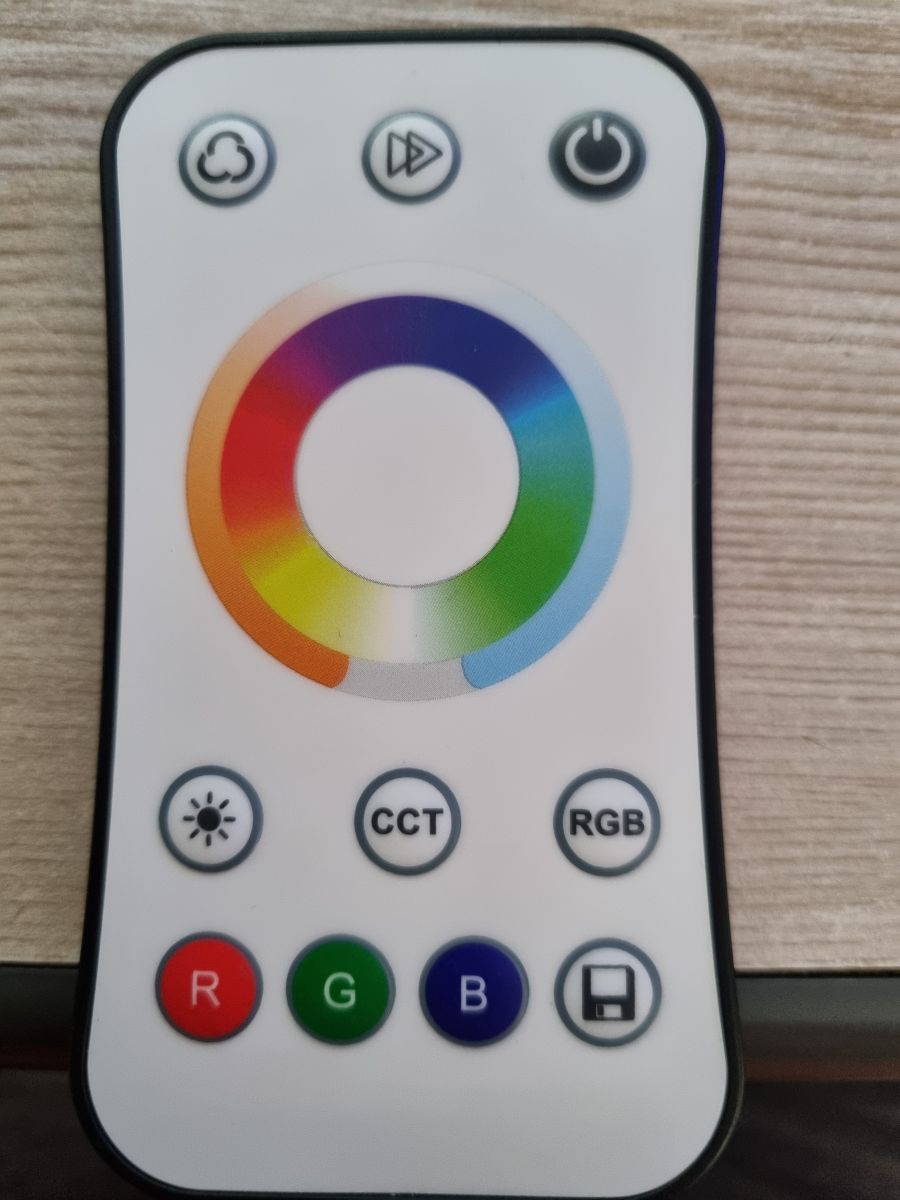
- Color (DP24), Temperature (DP23), and Bright (DP22) are not updated in openbk when modified in rf remote.)
Info:TuyaMCU:TUYAMCU received: 55 AA 03 03 00 00 05
Info:TuyaMCU:TuyaMCU_ProcessIncoming[ver=3]: processing command 3 (WiFiState) with 7 bytes
Info:TuyaMCU:TUYAMCU received: 55 AA 03 00 00 01 01 04
Info:TuyaMCU:TuyaMCU_ProcessIncoming[ver=3]: processing command 0 (Hearbeat) with 8 bytes
Info:TuyaMCU:TUYAMCU received: 55 AA 03 07 00 05 14 01 00 01 01 25
Info:TuyaMCU:TuyaMCU_ProcessIncoming[ver=3]: processing command 7 (State) with 12 bytes
Info:TuyaMCU:TuyaMCU_ParseStateMessage: processing dpId 20, dataType 1-bool and 1 data bytes
Info:TuyaMCU:TuyaMCU_ParseStateMessage: raw data 1 byte: 1
Info:TuyaMCU:Color is sent as 0000000003E8
Info:TuyaMCU:TUYAMCU received: 55 AA 03 07 00 05 14 01 00 01 01 25
Info:TuyaMCU:TuyaMCU_ProcessIncoming[ver=3]: processing command 7 (State) with 12 bytes
Info:TuyaMCU:TuyaMCU_ParseStateMessage: processing dpId 20, dataType 1-bool and 1 data bytes
Info:TuyaMCU:TuyaMCU_ParseStateMessage: raw data 1 byte: 1
Info:TuyaMCU:Color is sent as 0000000003E8
Info:TuyaMCU:TUYAMCU received: 55 AA 03 07 00 10 18 03 00 0C 30 30 30 30 30 30 30 30 30 33 45 38 A0
Info:TuyaMCU:TuyaMCU_ProcessIncoming[ver=3]: processing command 7 (State) with 23 bytes
Info:TuyaMCU:TuyaMCU_ParseStateMessage: processing dpId 24, dataType 3-str and 12 data bytes
Info:TuyaMCU:TUYAMCU received: 55 AA 03 07 00 10 18 03 00 0C 30 30 30 30 30 30 30 30 30 33 45 38 A0
Info:TuyaMCU:TuyaMCU_ProcessIncoming[ver=3]: processing command 7 (State) with 23 bytes
Info:TuyaMCU:TuyaMCU_ParseStateMessage: processing dpId 24, dataType 3-str and 12 data bytes
Info:TuyaMCU:TUYAMCU received: 55 AA 03 07 00 05 14 01 00 01 00 24
Info:TuyaMCU:TuyaMCU_ProcessIncoming[ver=3]: processing command 7 (State) with 12 bytes
Info:TuyaMCU:TuyaMCU_ParseStateMessage: processing dpId 20, dataType 1-bool and 1 data bytes
Info:TuyaMCU:TuyaMCU_ParseStateMessage: raw data 1 byte: 0
Info:TuyaMCU:TUYAMCU received: 55 AA 03 07 00 05 14 01 00 01 00 24
Info:TuyaMCU:TuyaMCU_ProcessIncoming[ver=3]: processing command 7 (State) with 12 bytes
Info:TuyaMCU:TuyaMCU_ParseStateMessage: processing dpId 20, dataType 1-bool and 1 data bytes
Info:TuyaMCU:TuyaMCU_ParseStateMessage: raw data 1 byte: 0Info:TuyaMCU:TUYAMCU received: 55 AA 03 07 00 08 17 02 00 04 00 00 01 86 B5
Info:TuyaMCU:TuyaMCU_ProcessIncoming[ver=3]: processing command 7 (State) with 15 bytes
Info:TuyaMCU:TuyaMCU_ParseStateMessage: processing dpId 23, dataType 2-val and 4 data bytes
Info:TuyaMCU:TuyaMCU_ParseStateMessage: raw data 4 int: 390
Info:TuyaMCU:TUYAMCU received: 55 AA 03 00 00 01 01 04
Info:TuyaMCU:TuyaMCU_ProcessIncoming[ver=3]: processing command 0 (Hearbeat) with 8 bytesInfo:TuyaMCU:TUYAMCU received: 55 AA 03 07 00 08 16 02 00 04 00 00 00 DE 0B
Info:TuyaMCU:TuyaMCU_ProcessIncoming[ver=3]: processing command 7 (State) with 15 bytes
Info:TuyaMCU:TuyaMCU_ParseStateMessage: processing dpId 22, dataType 2-val and 4 data bytes
Info:TuyaMCU:TuyaMCU_ParseStateMessage: raw data 4 int: 222
Info:TuyaMCU:TuyaMCU_ProcessIncoming[ver=3]: processing command 7 (State) with 15 bytes
Info:TuyaMCU:TuyaMCU_ParseStateMessage: processing dpId 22, dataType 2-val and 4 data bytes
Info:TuyaMCU:TuyaMCU_ParseStateMessage: raw data 4 int: 222
Info:TuyaMCU:TUYAMCU received: 55 AA 03 07 00 08 16 02 00 04 00 00 00 DE 0B
Info:TuyaMCU:TuyaMCU_ProcessIncoming[ver=3]: processing command 7 (State) with 15 bytes
Info:TuyaMCU:TuyaMCU_ParseStateMessage: processing dpId 22, dataType 2-val and 4 data bytes
Info:TuyaMCU:TuyaMCU_ParseStateMessage: raw data 4 int: 222
Info:TuyaMCU:TUYAMCU received: 55 AA 03 07 00 08 16 02 00 04 00 00 00 DE 0B
Info:TuyaMCU:TuyaMCU_ProcessIncoming[ver=3]: processing command 7 (State) with 15 bytes
Info:TuyaMCU:TuyaMCU_ParseStateMessage: processing dpId 22, dataType 2-val and 4 data bytes
Info:TuyaMCU:TuyaMCU_ParseStateMessage: raw data 4 int: 222
Info:TuyaMCU:TUYAMCU received: 55 AA 03 07 00 08 16 02 00 04 00 00 00 DE 0B
Info:TuyaMCU:TuyaMCU_ProcessIncoming[ver=3]: processing command 7 (State) with 15 bytes
Info:TuyaMCU:TuyaMCU_ParseStateMessage: processing dpId 22, dataType 2-val and 4 data bytes
Info:TuyaMCU:TuyaMCU_ParseStateMessage: raw data 4 int: 222
Info:TuyaMCU:TUYAMCU received: 55 AA 03 07 00 08 16 02 00 04 00 00 00 DE 0B
Info:TuyaMCU:TuyaMCU_ProcessIncoming[ver=3]: processing command 7 (State) with 15 bytes
Info:TuyaMCU:TuyaMCU_ParseStateMessage: processing dpId 22, dataType 2-val and 4 data bytes
Info:TuyaMCU:TuyaMCU_ParseStateMessage: raw data 4 int: 222
Info:TuyaMCU:TUYAMCU received: 55 AA 03 07 00 08 16 02 00 04 00 00 00 DE 0B
Info:TuyaMCU:TuyaMCU_ProcessIncoming[ver=3]: processing command 7 (State) with 15 bytes
Info:TuyaMCU:TuyaMCU_ParseStateMessage: processing dpId 22, dataType 2-val and 4 data bytes
Info:TuyaMCU:TuyaMCU_ParseStateMessage: raw data 4 int: 222
Info:TuyaMCU:TUYAMCU received: 55 AA 03 07 00 08 16 02 00 04 00 00 00 DE 0B
Info:TuyaMCU:TuyaMCU_ProcessIncoming[ver=3]: processing command 7 (State) with 15 bytes
Info:TuyaMCU:TuyaMCU_ParseStateMessage: processing dpId 22, dataType 2-val and 4 data bytes
Info:TuyaMCU:TuyaMCU_ParseStateMessage: raw data 4 int: 222
Info:TuyaMCU:TUYAMCU received: 55 AA 03 07 00 08 16 02 00 04 00 00 00 DE 0B
Info:TuyaMCU:TuyaMCU_ProcessIncoming[ver=3]: processing command 7 (State) with 15 bytes
Info:TuyaMCU:TuyaMCU_ParseStateMessage: processing dpId 22, dataType 2-val and 4 data bytes
Info:TuyaMCU:TuyaMCU_ParseStateMessage: raw data 4 int: 222
Info:TuyaMCU:TUYAMCU received: 55 AA 03 07 00 08 16 02 00 04 00 00 00 DE 0B
Info:TuyaMCU:TuyaMCU_ProcessIncoming[ver=3]: processing command 7 (State) with 15 bytes
Info:TuyaMCU:TuyaMCU_ParseStateMessage: processing dpId 22, dataType 2-val and 4 data bytes
Info:TuyaMCU:TuyaMCU_ParseStateMessage: raw data 4 int: 222
Info:TuyaMCU:TUYAMCU received: 55 AA 03 07 00 08 16 02 00 04 00 00 00 DE 0B
Info:TuyaMCU:TuyaMCU_ProcessIncoming[ver=3]: processing command 7 (State) with 15 bytes
Info:TuyaMCU:TuyaMCU_ParseStateMessage: processing dpId 22, dataType 2-val and 4 data bytes
Info:TuyaMCU:TuyaMCU_ParseStateMessage: raw data 4 int: 222
Info:TuyaMCU:TUYAMCU received: 55 AA 03 07 00 08 16 02 00 04 00 00 00 DE 0B
Info:TuyaMCU:TuyaMCU_ProcessIncoming[ver=3]: processing command 7 (State) with 15 bytes
Info:TuyaMCU:TuyaMCU_ParseStateMessage: processing dpId 22, dataType 2-val and 4 data bytes
Info:TuyaMCU:TuyaMCU_ParseStateMessage: raw data 4 int: 222
Info:TuyaMCU:TUYAMCU received: 55 AA 03 07 00 08 16 02 00 04 00 00 00 DE 0B
Info:TuyaMCU:TuyaMCU_ProcessIncoming[ver=3]: processing command 7 (State) with 15 bytes
Info:TuyaMCU:TuyaMCU_ParseStateMessage: processing dpId 22, dataType 2-val and 4 data bytes
Info:TuyaMCU:TuyaMCU_ParseStateMessage: raw data 4 int: 222
Info:TuyaMCU:TUYAMCU received: 55 AA 03 07 00 08 16 02 00 04 00 00 00 DE 0B
Info:TuyaMCU:TuyaMCU_ProcessIncoming[ver=3]: processing command 7 (State) with 15 bytes
Info:TuyaMCU:TuyaMCU_ParseStateMessage: processing dpId 22, dataType 2-val and 4 data bytes
Info:TuyaMCU:TuyaMCU_ParseStateMessage: raw data 4 int: 222
Info:TuyaMCU:TUYAMCU received: 55 AA 03 07 00 08 16 02 00 04 00 00 00 DE 0B
Info:TuyaMCU:TuyaMCU_ProcessIncoming[ver=3]: processing command 7 (State) with 15 bytes
Info:TuyaMCU:TuyaMCU_ParseStateMessage: processing dpId 22, dataType 2-val and 4 data bytes
Info:TuyaMCU:TuyaMCU_ParseStateMessage: raw data 4 int: 222
Info:TuyaMCU:TUYAMCU received: 55 AA 03 00 00 01 01 04
Info:TuyaMCU:TuyaMCU_ProcessIncoming[ver=3]: processing command 0 (Hearbeat) with 8 bytes
Info:TuyaMCU:TUYAMCU received: 55 AA 03 07 00 08 16 02 00 04 00 00 00 DE 0B
Info:TuyaMCU:TuyaMCU_ProcessIncoming[ver=3]: processing command 7 (State) with 15 bytes
Info:TuyaMCU:TuyaMCU_ParseStateMessage: processing dpId 22, dataType 2-val and 4 data bytes
Info:TuyaMCU:TuyaMCU_ParseStateMessage: raw data 4 int: 222
Info:TuyaMCU:TUYAMCU received: 55 AA 03 07 00 08 16 02 00 04 00 00 00 DE 0B
Info:TuyaMCU:TuyaMCU_ProcessIncoming[ver=3]: processing command 7 (State) with 15 bytes
Info:TuyaMCU:TuyaMCU_ParseStateMessage: processing dpId 22, dataType 2-val and 4 data bytes
Info:TuyaMCU:TuyaMCU_ParseStateMessage: raw data 4 int: 222
Info:TuyaMCU:TUYAMCU received: 55 AA 03 07 00 08 16 02 00 04 00 00 00 DE 0B
Info:TuyaMCU:TuyaMCU_ProcessIncoming[ver=3]: processing command 7 (State) with 15 bytes
Info:TuyaMCU:TuyaMCU_ParseStateMessage: processing dpId 22, dataType 2-val and 4 data bytes
Info:TuyaMCU:TuyaMCU_ParseStateMessage: raw data 4 int: 222
Info:TuyaMCU:TUYAMCU received: 55 AA 03 07 00 08 16 02 00 04 00 00 00 DE 0B
Info:TuyaMCU:TuyaMCU_ProcessIncoming[ver=3]: processing command 7 (State) with 15 bytes
Info:TuyaMCU:TuyaMCU_ParseStateMessage: processing dpId 22, dataType 2-val and 4 data bytes
Info:TuyaMCU:TuyaMCU_ParseStateMessage: raw data 4 int: 222
Info:TuyaMCU:TUYAMCU received: 55 AA 03 07 00 08 16 02 00 04 00 00 00 DE 0B
Info:TuyaMCU:TuyaMCU_ProcessIncoming[ver=3]: processing command 7 (State) with 15 bytes
Info:TuyaMCU:TuyaMCU_ParseStateMessage: processing dpId 22, dataType 2-val and 4 data bytes
Info:TuyaMCU:TuyaMCU_ParseStateMessage: raw data 4 int: 222
Info:TuyaMCU:TUYAMCU received: 55 AA 03 07 00 08 16 02 00 04 00 00 00 DE 0B
Info:TuyaMCU:TuyaMCU_ProcessIncoming[ver=3]: processing command 7 (State) with 15 bytes
Info:TuyaMCU:TuyaMCU_ParseStateMessage: processing dpId 22, dataType 2-val and 4 data bytes
Info:TuyaMCU:TuyaMCU_ParseStateMessage: raw data 4 int: 222
Info:GEN:dhcp=0 ip=192.168.0.74 gate=192.168.0.2 mask=255.255.255.0 mac=c4:82:e1:34:7a:dd
Info:GEN:sta: 1, softap: 0, b/g/n
Info:GEN:sta:rssi=-47,ssid=acopen,bssid=50:c7:bf:8b:39:de,channel=13,cipher_type:CCMPInfo:TuyaMCU:TUYAMCU received: 55 AA 03 07 00 08 17 02 00 04 00 00 00 55 83
Info:TuyaMCU:TuyaMCU_ProcessIncoming[ver=3]: processing command 7 (State) with 15 bytes
Info:TuyaMCU:TuyaMCU_ParseStateMessage: processing dpId 23, dataType 2-val and 4 data bytes
Info:TuyaMCU:TuyaMCU_ParseStateMessage: raw data 4 int: 85
Info:TuyaMCU:TUYAMCU received: 55 AA 03 07 00 08 17 02 00 04 00 00 00 90 BE
Info:TuyaMCU:TuyaMCU_ProcessIncoming[ver=3]: processing command 7 (State) with 15 bytes
Info:TuyaMCU:TuyaMCU_ParseStateMessage: processing dpId 23, dataType 2-val and 4 data bytes
Info:TuyaMCU:TuyaMCU_ParseStateMessage: raw data 4 int: 144
Info:TuyaMCU:TUYAMCU received: 55 AA 03 07 00 08 17 02 00 04 00 00 00 A4 D2
Info:TuyaMCU:TuyaMCU_ProcessIncoming[ver=3]: processing command 7 (State) with 15 bytes
Info:TuyaMCU:TuyaMCU_ParseStateMessage: processing dpId 23, dataType 2-val and 4 data bytes
Info:TuyaMCU:TuyaMCU_ParseStateMessage: raw data 4 int: 164
Info:TuyaMCU:TUYAMCU received: 55 AA 03 07 00 08 17 02 00 04 00 00 00 C3 F1
Info:TuyaMCU:TuyaMCU_ProcessIncoming[ver=3]: processing command 7 (State) with 15 bytes
Info:TuyaMCU:TuyaMCU_ParseStateMessage: processing dpId 23, dataType 2-val and 4 data bytes
Info:TuyaMCU:TuyaMCU_ParseStateMessage: raw data 4 int: 195
Info:TuyaMCU:TUYAMCU received: 55 AA 03 07 00 08 17 02 00 04 00 00 00 DE 0C
Info:TuyaMCU:TuyaMCU_ProcessIncoming[ver=3]: processing command 7 (State) with 15 bytes
Info:TuyaMCU:TuyaMCU_ParseStateMessage: processing dpId 23, dataType 2-val and 4 data bytes
Info:TuyaMCU:TuyaMCU_ParseStateMessage: raw data 4 int: 222
Info:TuyaMCU:TuyaMCU_ProcessIncoming[ver=3]: processing command 7 (State) with 15 bytes
Info:TuyaMCU:TuyaMCU_ParseStateMessage: processing dpId 23, dataType 2-val and 4 data bytes
Info:TuyaMCU:TuyaMCU_ParseStateMessage: raw data 4 int: 320
Info:TuyaMCU:TUYAMCU received: 55 AA 03 07 00 08 17 02 00 04 00 00 01 67 96
Info:TuyaMCU:TuyaMCU_ProcessIncoming[ver=3]: processing command 7 (State) with 15 bytes
Info:TuyaMCU:TuyaMCU_ParseStateMessage: processing dpId 23, dataType 2-val and 4 data bytes
Info:TuyaMCU:TuyaMCU_ParseStateMessage: raw data 4 int: 359
Info:TuyaMCU:TUYAMCU received: 55 AA 03 07 00 08 17 02 00 04 00 00 01 8E BD
Info:TuyaMCU:TuyaMCU_ProcessIncoming[ver=3]: processing command 7 (State) with 15 bytes
Info:TuyaMCU:TuyaMCU_ParseStateMessage: processing dpId 23, dataType 2-val and 4 data bytes
Info:TuyaMCU:TuyaMCU_ParseStateMessage: raw data 4 int: 398
Info:TuyaMCU:TUYAMCU received: 55 AA 03 07 00 08 17 02 00 04 00 00 01 9A C9
Info:TuyaMCU:TuyaMCU_ProcessIncoming[ver=3]: processing command 7 (State) with 15 bytes
Info:TuyaMCU:TuyaMCU_ParseStateMessage: processing dpId 23, dataType 2-val and 4 data bytes
Info:TuyaMCU:TuyaMCU_ParseStateMessage: raw data 4 int: 410
Info:TuyaMCU:TUYAMCU received: 55 AA 03 07 00 08 17 02 00 04 00 00 01 A1 D0
Info:TuyaMCU:TuyaMCU_ProcessIncoming[ver=3]: processing command 7 (State) with 15 bytes
Info:TuyaMCU:TuyaMCU_ParseStateMessage: processing dpId 23, dataType 2-val and 4 data bytes
Info:TuyaMCU:TuyaMCU_ParseStateMessage: raw data 4 int: 417
Info:TuyaMCU:TUYAMCU received: 55 AA 03 07 00 08 17 02 00 04 00 00 01 B5 E4
Info:TuyaMCU:TuyaMCU_ProcessIncoming[ver=3]: processing command 7 (State) with 15 bytes
Info:TuyaMCU:TuyaMCU_ParseStateMessage: processing dpId 23, dataType 2-val and 4 data bytes
Info:TuyaMCU:TuyaMCU_ParseStateMessage: raw data 4 int: 437
Info:TuyaMCU:TUYAMCU received: 55 AA 03 07 00 08 17 02 00 04 00 00 01 C1 F0
Info:TuyaMCU:TuyaMCU_ProcessIncoming[ver=3]: processing command 7 (State) with 15 bytes
Info:TuyaMCU:TuyaMCU_ParseStateMessage: processing dpId 23, dataType 2-val and 4 data bytes
Info:TuyaMCU:TuyaMCU_ParseStateMessage: raw data 4 int: 449
Info:TuyaMCU:TUYAMCU received: 55 AA 03 07 00 08 17 02 00 04 00 00 01 C9 F8
Info:TuyaMCU:TuyaMCU_ProcessIncoming[ver=3]: processing command 7 (State) with 15 bytes
Info:TuyaMCU:TuyaMCU_ParseStateMessage: processing dpId 23, dataType 2-val and 4 data bytes
Info:TuyaMCU:TuyaMCU_ParseStateMessage: raw data 4 int: 457
Info:TuyaMCU:TUYAMCU received: 55 AA 03 07 00 08 17 02 00 04 00 00 01 DC 0B
Info:TuyaMCU:TuyaMCU_ProcessIncoming[ver=3]: processing command 7 (State) with 15 bytes
Info:TuyaMCU:TuyaMCU_ParseStateMessage: processing dpId 23, dataType 2-val and 4 data bytes
Info:TuyaMCU:TuyaMCU_ParseStateMessage: raw data 4 int: 476
Info:TuyaMCU:TUYAMCU received: 55 AA 03 07 00 08 17 02 00 04 00 00 01 FB 2A
Info:TuyaMCU:TuyaMCU_ProcessIncoming[ver=3]: processing command 7 (State) with 15 bytes
Info:TuyaMCU:TuyaMCU_ParseStateMessage: processing dpId 23, dataType 2-val and 4 data bytes
Info:TuyaMCU:TuyaMCU_ParseStateMessage: raw data 4 int: 507
Info:TuyaMCU:TUYAMCU received: 55 AA 03 07 00 08 17 02 00 04 00 00 02 07 37
Info:TuyaMCU:TuyaMCU_ProcessIncoming[ver=3]: processing command 7 (State) with 15 bytes
Info:TuyaMCU:TuyaMCU_ParseStateMessage: processing dpId 23, dataType 2-val and 4 data bytes
Info:TuyaMCU:TuyaMCU_ParseStateMessage: raw data 4 int: 519
Info:TuyaMCU:TUYAMCU received: 55 AA 03 07 00 08 17 02 00 04 00 00 02 0F 3F
Info:TuyaMCU:TuyaMCU_ProcessIncoming[ver=3]: processing command 7 (State) with 15 bytes
Info:TuyaMCU:TuyaMCU_ParseStateMessage: processing dpId 23, dataType 2-val and 4 data bytes
Info:TuyaMCU:TuyaMCU_ParseStateMessage: raw data 4 int: 527
Info:TuyaMCU:TUYAMCU received: 55 AA 03 07 00 08 17 02 00 04 00 00 02 22 52
Info:TuyaMCU:TuyaMCU_ProcessIncoming[ver=3]: processing command 7 (State) with 15 bytes
Info:TuyaMCU:TuyaMCU_ParseStateMessage: processing dpId 23, dataType 2-val and 4 data bytes
Info:TuyaMCU:TuyaMCU_ParseStateMessage: raw data 4 int: 546
Info:TuyaMCU:TUYAMCU received: 55 AA 03 07 00 08 17 02 00 04 00 00 02 2E 5E
Info:TuyaMCU:TuyaMCU_ProcessIncoming[ver=3]: processing command 7 (State) with 15 bytes
Info:TuyaMCU:TuyaMCU_ParseStateMessage: processing dpId 23, dataType 2-val and 4 data bytes
Info:TuyaMCU:TuyaMCU_ParseStateMessage: raw data 4 int: 558
Info:TuyaMCU:TUYAMCU received: 55 AA 03 00 00 01 01 04
Info:TuyaMCU:TuyaMCU_ProcessIncoming[ver=3]: processing command 0 (Hearbeat) with 8 bytesInfo:TuyaMCU:TUYAMCU received: 55 AA 03 07 00 08 16 02 00 04 00 00 00 27 54
Info:TuyaMCU:TuyaMCU_ProcessIncoming[ver=3]: processing command 7 (State) with 15 bytes
Info:TuyaMCU:TuyaMCU_ParseStateMessage: processing dpId 22, dataType 2-val and 4 data bytes
Info:TuyaMCU:TuyaMCU_ParseStateMessage: raw data 4 int: 39
Info:TuyaMCU:TUYAMCU received: 55 AA 03 07 00 08 16 02 00 04 00 00 00 4E 7B
Info:TuyaMCU:TuyaMCU_ProcessIncoming[ver=3]: processing command 7 (State) with 15 bytes
Info:TuyaMCU:TuyaMCU_ParseStateMessage: processing dpId 22, dataType 2-val and 4 data bytes
Info:TuyaMCU:TuyaMCU_ParseStateMessage: raw data 4 int: 78
Info:TuyaMCU:TUYAMCU received: 55 AA 03 07 00 08 16 02 00 04 00 00 00 55 82
Info:TuyaMCU:TuyaMCU_ProcessIncoming[ver=3]: processing command 7 (State) with 15 bytes
Info:TuyaMCU:TuyaMCU_ParseStateMessage: processing dpId 22, dataType 2-val and 4 data bytes
Info:TuyaMCU:TuyaMCU_ParseStateMessage: raw data 4 int: 85
Info:TuyaMCU:TUYAMCU received: 55 AA 03 07 00 08 16 02 00 04 00 00 00 61 8E
Info:TuyaMCU:TuyaMCU_ProcessIncoming[ver=3]: processing command 7 (State) with 15 bytes
Info:TuyaMCU:TuyaMCU_ParseStateMessage: processing dpId 22, dataType 2-val and 4 data bytes
Info:TuyaMCU:TuyaMCU_ParseStateMessage: raw data 4 int: 97
Info:TuyaMCU:TUYAMCU received: 55 AA 03 07 00 08 16 02 00 04 00 00 00 7D AA
Info:TuyaMCU:TuyaMCU_ProcessIncoming[ver=3]: processing command 7 (State) with 15 bytes
Info:TuyaMCU:TuyaMCU_ParseStateMessage: processing dpId 22, dataType 2-val and 4 data bytes
Info:TuyaMCU:TuyaMCU_ParseStateMessage: raw data 4 int: 125
Info:TuyaMCU:TUYAMCU received: 55 AA 03 07 00 08 16 02 00 04 00 00 00 90 BD
Info:TuyaMCU:TuyaMCU_ProcessIncoming[ver=3]: processing command 7 (State) with 15 bytes
Info:TuyaMCU:TuyaMCU_ParseStateMessage: processing dpId 22, dataType 2-val and 4 data bytes
Info:TuyaMCU:TuyaMCU_ParseStateMessage: raw data 4 int: 144
Info:TuyaMCU:TUYAMCU received: 55 AA 03 07 00 08 16 02 00 04 00 00 00 A4 D1
Info:TuyaMCU:TuyaMCU_ProcessIncoming[ver=3]: processing command 7 (State) with 15 bytes
Info:TuyaMCU:TuyaMCU_ParseStateMessage: processing dpId 22, dataType 2-val and 4 data bytes
Info:TuyaMCU:TuyaMCU_ParseStateMessage: raw data 4 int: 164

Info:MAIN:Time 97, idle 80846/s, free 60040, MQTT 1(1), bWifi 1, secondsWithNoPing 25, socks 4/38 POWERSAVE
Info:TuyaMCU:TUYAMCU received: 55 AA 03 00 00 01 01 04
Info:TuyaMCU:TuyaMCU_ProcessIncoming[ver=3]: processing command 0 (Hearbeat) with 8 bytes
Info:TuyaMCU:TUYAMCU received: 55 AA 03 07 00 08 16 02 00 04 00 00 03 D0 00
Info:TuyaMCU:TuyaMCU_ProcessIncoming[ver=3]: processing command 7 (State) with 15 bytes
Info:TuyaMCU:TuyaMCU_ParseStateMessage: processing dpId 22, dataType 2-val and 4 data bytes
Info:TuyaMCU:TuyaMCU_ParseStateMessage: raw data 4 int: 976
Info:MAIN:Time 98, idle 78250/s, free 60040, MQTT 1(1), bWifi 1, secondsWithNoPing 26, socks 4/38 POWERSAVE
Info:MAIN:Time 99, idle 82125/s, free 60040, MQTT 1(1), bWifi 1, secondsWithNoPing 27, socks 4/38 POWERSAVE
Info:TuyaMCU:TUYAMCU received: 55 AA 03 07 00 08 16 02 00 04 00 00 03 D0 00
Info:TuyaMCU:TuyaMCU_ProcessIncoming[ver=3]: processing command 7 (State) with 15 bytes
Info:TuyaMCU:TuyaMCU_ParseStateMessage: processing dpId 22, dataType 2-val and 4 data bytes
Info:TuyaMCU:TuyaMCU_ParseStateMessage: raw data 4 int: 976
Info:TuyaMCU:TUYAMCU received: 55 AA 03 07 00 08 16 02 00 04 00 00 03 D0 00
Info:TuyaMCU:TuyaMCU_ProcessIncoming[ver=3]: processing command 7 (State) with 15 bytes
Info:TuyaMCU:TuyaMCU_ParseStateMessage: processing dpId 22, dataType 2-val and 4 data bytes
Info:TuyaMCU:TuyaMCU_ParseStateMessage: raw data 4 int: 976
Info:TuyaMCU:TUYAMCU received: 55 AA 03 07 00 08 16 02 00 04 00 00 03 D0 00
Info:TuyaMCU:TuyaMCU_ProcessIncoming[ver=3]: processing command 7 (State) with 15 bytes
Info:TuyaMCU:TuyaMCU_ParseStateMessage: processing dpId 22, dataType 2-val and 4 data bytes
Info:TuyaMCU:TuyaMCU_ParseStateMessage: raw data 4 int: 976
Info:TuyaMCU:TUYAMCU received: 55 AA 03 07 00 08 16 02 00 04 00 00 03 D0 00
Info:TuyaMCU:TuyaMCU_ProcessIncoming[ver=3]: processing command 7 (State) with 15 bytes
Info:TuyaMCU:TuyaMCU_ParseStateMessage: processing dpId 22, dataType 2-val and 4 data bytes
Info:TuyaMCU:TuyaMCU_ParseStateMessage: raw data 4 int: 976
Info:TuyaMCU:TUYAMCU received: 55 AA 03 07 00 08 16 02 00 04 00 00 03 D0 00
Info:TuyaMCU:TuyaMCU_ProcessIncoming[ver=3]: processing command 7 (State) with 15 bytes
Info:TuyaMCU:TuyaMCU_ParseStateMessage: processing dpId 22, dataType 2-val and 4 data bytes
Info:TuyaMCU:TuyaMCU_ParseStateMessage: raw data 4 int: 976
Info:TuyaMCU:TUYAMCU received: 55 AA 03 07 00 08 16 02 00 04 00 00 03 D0 00
Info:TuyaMCU:TuyaMCU_ProcessIncoming[ver=3]: processing command 7 (State) with 15 bytes
Info:TuyaMCU:TuyaMCU_ParseStateMessage: processing dpId 22, dataType 2-val and 4 data bytes
Info:TuyaMCU:TuyaMCU_ParseStateMessage: raw data 4 int: 976
Info:TuyaMCU:TUYAMCU received: 55 AA 03 07 00 08 16 02 00 04 00 00 03 D0 00
Info:TuyaMCU:TuyaMCU_ProcessIncoming[ver=3]: processing command 7 (State) with 15 bytes
Info:TuyaMCU:TuyaMCU_ParseStateMessage: processing dpId 22, dataType 2-val and 4 data bytes
Info:TuyaMCU:TuyaMCU_ParseStateMessage: raw data 4 int: 976
Info:TuyaMCU:TUYAMCU received: 55 AA 03 07 00 08 16 02 00 04 00 00 03 D0 00
Info:TuyaMCU:TuyaMCU_ProcessIncoming[ver=3]: processing command 7 (State) with 15 bytes
Info:TuyaMCU:TuyaMCU_ParseStateMessage: processing dpId 22, dataType 2-val and 4 data bytes
Info:TuyaMCU:TuyaMCU_ParseStateMessage: raw data 4 int: 976
Info:TuyaMCU:TUYAMCU received: 55 AA 03 07 00 08 16 02 00 04 00 00 03 D0 00
Info:TuyaMCU:TuyaMCU_ProcessIncoming[ver=3]: processing command 7 (State) with 15 bytes
Info:TuyaMCU:TuyaMCU_ParseStateMessage: processing dpId 22, dataType 2-val and 4 data bytes
Info:TuyaMCU:TuyaMCU_ParseStateMessage: raw data 4 int: 976
Info:TuyaMCU:TUYAMCU received: 55 AA 03 07 00 08 16 02 00 04 00 00 03 D0 00
Info:TuyaMCU:TuyaMCU_ProcessIncoming[ver=3]: processing command 7 (State) with 15 bytes
Info:TuyaMCU:TuyaMCU_ParseStateMessage: processing dpId 22, dataType 2-val and 4 data bytes
Info:TuyaMCU:TuyaMCU_ParseStateMessage: raw data 4 int: 976
Info:MAIN:Time 100, idle 76857/s, free 60040, MQTT 1(1), bWifi 1, secondsWithNoPing 28, socks 4/38 POWERSAVE
Info:GEN:dhcp=0 ip=192.168.0.74 gate=192.168.0.2 mask=255.255.255.0 mac=c4:82:e1:34:7a:dd
Info:GEN:sta: 1, softap: 0, b/g/n
Info:GEN:sta:rssi=-46,ssid=acopen,bssid=50:c7:bf:8b:39:de,channel=13,cipher_type:CCMP
Info:TuyaMCU:TUYAMCU received: 55 AA 03 07 00 08 16 02 00 04 00 00 03 D0 00
Info:TuyaMCU:TuyaMCU_ProcessIncoming[ver=3]: processing command 7 (State) with 15 bytes
Info:TuyaMCU:TuyaMCU_ParseStateMessage: processing dpId 22, dataType 2-val and 4 data bytes
Info:TuyaMCU:TuyaMCU_ParseStateMessage: raw data 4 int: 976
Info:TuyaMCU:TUYAMCU received: 55 AA 03 07 00 08 16 02 00 04 00 00 03 D0 00
Info:TuyaMCU:TuyaMCU_ProcessIncoming[ver=3]: processing command 7 (State) with 15 bytes
Info:TuyaMCU:TuyaMCU_ParseStateMessage: processing dpId 22, dataType 2-val and 4 data bytes
Info:TuyaMCU:TuyaMCU_ParseStateMessage: raw data 4 int: 976
Info:TuyaMCU:TUYAMCU received: 55 AA 03 07 00 08 16 02 00 04 00 00 03 D0 00
Info:TuyaMCU:TuyaMCU_ProcessIncoming[ver=3]: processing command 7 (State) with 15 bytes
Info:TuyaMCU:TuyaMCU_ParseStateMessage: processing dpId 22, dataType 2-val and 4 data bytes
Info:TuyaMCU:TuyaMCU_ParseStateMessage: raw data 4 int: 976
Info:TuyaMCU:TUYAMCU received: 55 AA 03 07 00 08 16 02 00 04 00 00 03 D0 00
Info:TuyaMCU:TuyaMCU_ProcessIncoming[ver=3]: processing command 7 (State) with 15 bytes
Info:TuyaMCU:TuyaMCU_ParseStateMessage: processing dpId 22, dataType 2-val and 4 data bytes
Info:TuyaMCU:TuyaMCU_ParseStateMessage: raw data 4 int: 976
Info:TuyaMCU:TUYAMCU received: 55 AA 03 07 00 08 16 02 00 04 00 00 03 D0 00
Info:TuyaMCU:TuyaMCU_ProcessIncoming[ver=3]: processing command 7 (State) with 15 bytes
Info:TuyaMCU:TuyaMCU_ParseStateMessage: processing dpId 22, dataType 2-val and 4 data bytes
Info:TuyaMCU:TuyaMCU_ParseStateMessage: raw data 4 int: 976
Info:TuyaMCU:TUYAMCU received: 55 AA 03 07 00 08 16 02 00 04 00 00 03 D0 00
Info:TuyaMCU:TuyaMCU_ProcessIncoming[ver=3]: processing command 7 (State) with 15 bytes
Info:TuyaMCU:TuyaMCU_ParseStateMessage: processing dpId 22, dataType 2-val and 4 data bytes
Info:TuyaMCU:TuyaMCU_ParseStateMessage: raw data 4 int: 976
Info:TuyaMCU:TUYAMCU received: 55 AA 03 07 00 08 16 02 00 04 00 00 03 D0 00
Info:TuyaMCU:TuyaMCU_ProcessIncoming[ver=3]: processing command 7 (State) with 15 bytes
Info:TuyaMCU:TuyaMCU_ParseStateMessage: processing dpId 22, dataType 2-val and 4 data bytes
Info:TuyaMCU:TuyaMCU_ParseStateMessage: raw data 4 int: 976
Info:TuyaMCU:TUYAMCU received: 55 AA 03 07 00 08 16 02 00 04 00 00 03 D0 00
Info:TuyaMCU:TuyaMCU_ProcessIncoming[ver=3]: processing command 7 (State) with 15 bytes
Info:TuyaMCU:TuyaMCU_ParseStateMessage: processing dpId 22, dataType 2-val and 4 data bytes
Info:TuyaMCU:TuyaMCU_ParseStateMessage: raw data 4 int: 976
Info:TuyaMCU:TUYAMCU received: 55 AA 03 07 00 08 16 02 00 04 00 00 03 D0 00
Info:TuyaMCU:TuyaMCU_ProcessIncoming[ver=3]: processing command 7 (State) with 15 bytes
Info:TuyaMCU:TuyaMCU_ParseStateMessage: processing dpId 22, dataType 2-val and 4 data bytes
Info:TuyaMCU:TuyaMCU_ParseStateMessage: raw data 4 int: 976
Info:TuyaMCU:TUYAMCU received: 55 AA 03 07 00 08 16 02 00 04 00 00 03 D0 00
Info:TuyaMCU:TuyaMCU_ProcessIncoming[ver=3]: processing command 7 (State) with 15 bytes
Info:TuyaMCU:TuyaMCU_ParseStateMessage: processing dpId 22, dataType 2-val and 4 data bytes
Info:TuyaMCU:TuyaMCU_ParseStateMessage: raw data 4 int: 976
Info:TuyaMCU:TUYAMCU received: 55 AA 03 07 00 08 16 02 00 04 00 00 03 D0 00
Info:TuyaMCU:TuyaMCU_ProcessIncoming[ver=3]: processing command 7 (State) with 15 bytes
Info:TuyaMCU:TuyaMCU_ParseStateMessage: processing dpId 22, dataType 2-val and 4 data bytes
Info:TuyaMCU:TuyaMCU_ParseStateMessage: raw data 4 int: 976
Info:MAIN:Time 101, idle 64883/s, free 51432, MQTT 1(1), bWifi 1, secondsWithNoPing 29, socks 5/38 POWERSAVE
Info:TuyaMCU:TUYAMCU received: 55 AA 03 00 00 01 01 04
Info:TuyaMCU:TuyaMCU_ProcessIncoming[ver=3]: processing command 0 (Hearbeat) with 8 bytes
Info:TuyaMCU:TUYAMCU received: 55 AA 03 07 00 08 16 02 00 04 00 00 03 D0 00
Info:TuyaMCU:TuyaMCU_ProcessIncoming[ver=3]: processing command 7 (State) with 15 bytes
Info:TuyaMCU:TuyaMCU_ParseStateMessage: processing dpId 22, dataType 2-val and 4 data bytes
Info:TuyaMCU:TuyaMCU_ParseStateMessage: raw data 4 int: 976
Info:TuyaMCU:TUYAMCU received: 55 AA 03 07 00 08 16 02 00 04 00 00 03 D0 00
Info:TuyaMCU:TuyaMCU_ProcessIncoming[ver=3]: processing command 7 (State) with 15 bytes
Info:TuyaMCU:TuyaMCU_ParseStateMessage: processing dpId 22, dataType 2-val and 4 data bytes
Info:TuyaMCU:TuyaMCU_ParseStateMessage: raw data 4 int: 976
Info:TuyaMCU:TUYAMCU received: 55 AA 03 07 00 08 16 02 00 04 00 00 03 D0 00
Info:TuyaMCU:TuyaMCU_ProcessIncoming[ver=3]: processing command 7 (State) with 15 bytes
Info:TuyaMCU:TuyaMCU_ParseStateMessage: processing dpId 22, dataType 2-val and 4 data bytes
Info:TuyaMCU:TuyaMCU_ParseStateMessage: raw data 4 int: 976
Info:TuyaMCU:TUYAMCU received: 55 AA 03 07 00 08 16 02 00 04 00 00 03 D0 00
Info:TuyaMCU:TuyaMCU_ProcessIncoming[ver=3]: processing command 7 (State) with 15 bytes
Info:TuyaMCU:TuyaMCU_ParseStateMessage: processing dpId 22, dataType 2-val and 4 data bytes
Info:TuyaMCU:TuyaMCU_ParseStateMessage: raw data 4 int: 976
Info:TuyaMCU:TUYAMCU received: 55 AA 03 07 00 08 16 02 00 04 00 00 03 D0 00
Info:TuyaMCU:TuyaMCU_ProcessIncoming[ver=3]: processing command 7 (State) with 15 bytes
Info:TuyaMCU:TuyaMCU_ParseStateMessage: processing dpId 22, dataType 2-val and 4 data bytes
Info:TuyaMCU:TuyaMCU_ParseStateMessage: raw data 4 int: 976
Info:MAIN:Time 102, idle 142351/s, free 60040, MQTT 1(1), bWifi 1, secondsWithNoPing 30, socks 4/38 POWERSAVE
Info:TuyaMCU:TUYAMCU received: 55 AA 03 07 00 08 16 02 00 04 00 00 03 D0 00
Info:TuyaMCU:TuyaMCU_ProcessIncoming[ver=3]: processing command 7 (State) with 15 bytes
Info:TuyaMCU:TuyaMCU_ParseStateMessage: processing dpId 22, dataType 2-val and 4 data bytes
Info:TuyaMCU:TuyaMCU_ParseStateMessage: raw data 4 int: 976
Info:MAIN:Time 103, idle 83106/s, free 60040, MQTT 1(1), bWifi 1, secondsWithNoPing 31, socks 4/38 POWERSAVE
Info:MAIN:Time 104, idle 82545/s, free 60040, MQTT 1(1), bWifi 1, secondsWithNoPing 32, socks 4/38 POWERSAVE
Info:TuyaMCU:TUYAMCU received: 55 AA 03 07 00 05 14 01 00 01 00 24
Info:TuyaMCU:TuyaMCU_ProcessIncoming[ver=3]: processing command 7 (State) with 12 bytes
Info:TuyaMCU:TuyaMCU_ParseStateMessage: processing dpId 20, dataType 1-bool and 1 data bytes
Info:TuyaMCU:TuyaMCU_ParseStateMessage: raw data 1 byte: 0
Info:MQTT:Publishing val 0 to obkE1347ADD/led_enableAll/get retain=0
Info:MQTT:MQTT client in mqtt_incoming_publish_cb topic obkE1347ADD/led_enableAll/get
Info:MAIN:Time 105, idle 73574/s, free 60040, MQTT 1(1), bWifi 1, secondsWithNoPing 33, socks 4/38 POWERSAVE
Info:TuyaMCU:TUYAMCU received: 55 AA 03 00 00 01 01 04
Info:TuyaMCU:TuyaMCU_ProcessIncoming[ver=3]: processing command 0 (Hearbeat) with 8 bytes
Info:MAIN:Time 106, idle 79564/s, free 60040, MQTT 1(1), bWifi 1, secondsWithNoPing 34, socks 4/38 POWERSAVE
Info:MAIN:Time 107, idle 83331/s, free 60040, MQTT 1(1), bWifi 1, secondsWithNoPing 35, socks 4/38 POWERSAVE
Info:TuyaMCU:TUYAMCU received: 55 AA 03 07 00 05 14 01 00 01 01 25
Info:TuyaMCU:TuyaMCU_ProcessIncoming[ver=3]: processing command 7 (State) with 12 bytes
Info:TuyaMCU:TuyaMCU_ParseStateMessage: processing dpId 20, dataType 1-bool and 1 data bytes
Info:TuyaMCU:TuyaMCU_ParseStateMessage: raw data 1 byte: 1
Info:TuyaMCU:Color is sent as 0000000003A2
Info:MQTT:Publishing val 1 to obkE1347ADD/led_enableAll/get retain=0
Info:MQTT:Publishing val 97 to obkE1347ADD/led_dimmer/get retain=0
Info:TuyaMCU:TUYAMCU received: 55 AA 03 07 00 05 14 01 00 01 01 25
Info:TuyaMCU:TuyaMCU_ProcessIncoming[ver=3]: processing command 7 (State) with 12 bytes
Info:TuyaMCU:TuyaMCU_ParseStateMessage: processing dpId 20, dataType 1-bool and 1 data bytes
Info:TuyaMCU:TuyaMCU_ParseStateMessage: raw data 1 byte: 1
Info:MQTT:MQTT client in mqtt_incoming_publish_cb topic obkE1347ADD/led_enableAll/get
Info:MQTT:MQTT client in mqtt_incoming_publish_cb topic obkE1347ADD/led_dimmer/get
Info:TuyaMCU:Color is sent as 0000000003A2
Info:TuyaMCU:TUYAMCU received: 55 AA 03 07 00 10 18 03 00 0C 30 30 30 30 30 30 30 30 30 33 41 32 96
Info:TuyaMCU:TuyaMCU_ProcessIncoming[ver=3]: processing command 7 (State) with 23 bytes
Info:TuyaMCU:TuyaMCU_ParseStateMessage: processing dpId 24, dataType 3-str and 12 data bytes
Info:TuyaMCU:TUYAMCU received: 55 AA 03 07 00 10 18 03 00 0C 30 30 30 30 30 30 30 30 30 33 41 32 96
Info:TuyaMCU:TuyaMCU_ProcessIncoming[ver=3]: processing command 7 (State) with 23 bytes
Info:TuyaMCU:TuyaMCU_ParseStateMessage: processing dpId 24, dataType 3-str and 12 data bytes
Info:MAIN:Time 108, idle 64202/s, free 60040, MQTT 1(1), bWifi 1, secondsWithNoPing 36, socks 4/38 POWERSAVE
Info:MAIN:Time 109, idle 80193/s, free 60040, MQTT 1(1), bWifi 1, secondsWithNoPing 37, socks 4/38 POWERSAVE
Info:TuyaMCU:TUYAMCU received: 55 AA 03 00 00 01 01 04
Info:TuyaMCU:TuyaMCU_ProcessIncoming[ver=3]: processing command 0 (Hearbeat) with 8 bytes
Info:MAIN:Time 110, idle 82530/s, free 60040, MQTT 1(1), bWifi 1, secondsWithNoPing 38, socks 4/38 POWERSAVE
Info:GEN:dhcp=0 ip=192.168.0.74 gate=192.168.0.2 mask=255.255.255.0 mac=c4:82:e1:34:7a:dd
Info:GEN:sta: 1, softap: 0, b/g/n
Info:GEN:sta:rssi=-43,ssid=acopen,bssid=50:c7:bf:8b:39:de,channel=13,cipher_type:CCMP
Info:MAIN:Time 111, idle 80360/s, free 51416, MQTT 1(1), bWifi 1, secondsWithNoPing 39, socks 5/38 POWERSAVE
Info:MAIN:Time 112, idle 88356/s, free 60040, MQTT 1(1), bWifi 1, secondsWithNoPing 40, socks 4/38 POWERSAVEInfo:TuyaMCU:TuyaMCU_ProcessIncoming[ver=3]: processing command 7 (State) with 15 bytes
Info:TuyaMCU:TuyaMCU_ParseStateMessage: processing dpId 22, dataType 2-val and 4 data bytes
Info:TuyaMCU:TuyaMCU_ParseStateMessage: raw data 4 int: 350
Info:TuyaMCU:TUYAMCU received: 55 AA 03 07 00 08 17 02 00 04 00 00 03 CA FB
Info:TuyaMCU:TuyaMCU_ProcessIncoming[ver=3]: processing command 7 (State) with 15 bytes
Info:TuyaMCU:TuyaMCU_ParseStateMessage: processing dpId 23, dataType 2-val and 4 data bytes
Info:TuyaMCU:TuyaMCU_ParseStateMessage: raw data 4 int: 970
Info:TuyaMCU:TUYAMCU received: 55 AA 03 07 00 08 16 02 00 04 00 00 01 A4 D2
Info:TuyaMCU:TuyaMCU_ProcessIncoming[ver=3]: processing command 7 (State) with 15 bytes
Info:TuyaMCU:TuyaMCU_ParseStateMessage: processing dpId 22, dataType 2-val and 4 data bytes
Info:TuyaMCU:TuyaMCU_ParseStateMessage: raw data 4 int: 420
Info:TuyaMCU:TUYAMCU received: 55 AA 03 07 00 08 17 02 00 04 00 00 03 CA FB
Info:TuyaMCU:TuyaMCU_ProcessIncoming[ver=3]: processing command 7 (State) with 15 bytes
Info:TuyaMCU:TuyaMCU_ParseStateMessage: processing dpId 23, dataType 2-val and 4 data bytes
Info:TuyaMCU:TuyaMCU_ParseStateMessage: raw data 4 int: 970
Info:TuyaMCU:TUYAMCU received: 55 AA 03 07 00 08 16 02 00 04 00 00 00 28 55
Info:TuyaMCU:TuyaMCU_ProcessIncoming[ver=3]: processing command 7 (State) with 15 bytes
Info:TuyaMCU:TuyaMCU_ParseStateMessage: processing dpId 22, dataType 2-val and 4 data bytes
Info:TuyaMCU:TuyaMCU_ParseStateMessage: raw data 4 int: 40
Info:TuyaMCU:TUYAMCU received: 55 AA 03 07 00 08 17 02 00 04 00 00 03 CA FB
Info:TuyaMCU:TuyaMCU_ProcessIncoming[ver=3]: processing command 7 (State) with 15 bytes
Info:TuyaMCU:TuyaMCU_ParseStateMessage: processing dpId 23, dataType 2-val and 4 data bytes
Info:TuyaMCU:TuyaMCU_ParseStateMessage: raw data 4 int: 970
Info:TuyaMCU:TUYAMCU received: 55 AA 03 07 00 08 16 02 00 04 00 00 00 50 7D
Info:TuyaMCU:TuyaMCU_ProcessIncoming[ver=3]: processing command 7 (State) with 15 bytes
Info:TuyaMCU:TuyaMCU_ParseStateMessage: processing dpId 22, dataType 2-val and 4 data bytes
Info:TuyaMCU:TuyaMCU_ParseStateMessage: raw data 4 int: 80
Info:TuyaMCU:TUYAMCU received: 55 AA 03 07 00 08 17 02 00 04 00 00 03 CA FB
Info:TuyaMCU:TuyaMCU_ProcessIncoming[ver=3]: processing command 7 (State) with 15 bytes
Info:TuyaMCU:TuyaMCU_ParseStateMessage: processing dpId 23, dataType 2-val and 4 data bytes
Info:TuyaMCU:TuyaMCU_ParseStateMessage: raw data 4 int: 970
Info:TuyaMCU:TUYAMCU received: 55 AA 03 07 00 08 16 02 00 04 00 00 01 36 64
Info:TuyaMCU:TuyaMCU_ProcessIncoming[ver=3]: processing command 7 (State) with 15 bytes
Info:TuyaMCU:TuyaMCU_ParseStateMessage: processing dpId 22, dataType 2-val and 4 data bytes
Info:TuyaMCU:TuyaMCU_ParseStateMessage: raw data 4 int: 310
Info:TuyaMCU:TUYAMCU received: 55 AA 03 07 00 08 17 02 00 04 00 00 03 CA FB
Info:TuyaMCU:TuyaMCU_ProcessIncoming[ver=3]: processing command 7 (State) with 15 bytes
Info:TuyaMCU:TuyaMCU_ParseStateMessage: processing dpId 23, dataType 2-val and 4 data bytes
Info:TuyaMCU:TuyaMCU_ParseStateMessage: raw data 4 int: 970
Info:TuyaMCU:TUYAMCU received: 55 AA 03 07 00 08 16 02 00 04 00 00 01 5E 8C
Info:TuyaMCU:TuyaMCU_ProcessIncoming[ver=3]: processing command 7 (State) with 15 bytes
Info:TuyaMCU:TuyaMCU_ParseStateMessage: processing dpId 22, dataType 2-val and 4 data bytes
Info:TuyaMCU:TuyaMCU_ParseStateMessage: raw data 4 int: 350
Info:TuyaMCU:TUYAMCU received: 55 AA 03 07 00 08 17 02 00 04 00 00 03 CA FB
Info:TuyaMCU:TuyaMCU_ProcessIncoming[ver=3]: processing command 7 (State) with 15 bytes
Info:TuyaMCU:TuyaMCU_ParseStateMessage: processing dpId 23, dataType 2-val and 4 data bytes
Info:TuyaMCU:TuyaMCU_ParseStateMessage: raw data 4 int: 970
Info:TuyaMCU:TUYAMCU received: 55 AA 03 07 00 08 16 02 00 04 00 00 01 A4 D2
Info:TuyaMCU:TuyaMCU_ProcessIncoming[ver=3]: processing command 7 (State) with 15 bytes
Info:TuyaMCU:TuyaMCU_ParseStateMessage: processing dpId 22, dataType 2-val and 4 data bytes
Info:TuyaMCU:TuyaMCU_ParseStateMessage: raw data 4 int: 420
5
Info:TuyaMCU:TuyaMCU_ProcessIncoming[ver=3]: processing command 7 (State) with 15 bytes
Info:TuyaMCU:TuyaMCU_ParseStateMessage: processing dpId 22, dataType 2-val and 4 data bytes
Info:TuyaMCU:TuyaMCU_ParseStateMessage: raw data 4 int: 40
Info:TuyaMCU:TUYAMCU received: 55 AA 03 07 00 08 17 02 00 04 00 00 03 CA FB
Info:TuyaMCU:TuyaMCU_ProcessIncoming[ver=3]: processing command 7 (State) with 15 bytes
Info:TuyaMCU:TuyaMCU_ParseStateMessage: processing dpId 23, dataType 2-val and 4 data bytes
Info:TuyaMCU:TuyaMCU_ParseStateMessage: raw data 4 int: 970
Info:TuyaMCU:TUYAMCU received: 55 AA 03 07 00 08 16 02 00 04 00 00 00 50 7D
Info:TuyaMCU:TuyaMCU_ProcessIncoming[ver=3]: processing command 7 (State) with 15 bytes
Info:TuyaMCU:TuyaMCU_ParseStateMessage: processing dpId 22, dataType 2-val and 4 data bytes
Info:TuyaMCU:TuyaMCU_ParseStateMessage: raw data 4 int: 80
Info:TuyaMCU:TUYAMCU received: 55 AA 03 07 00 08 17 02 00 04 00 00 03 CA FB
Info:TuyaMCU:TuyaMCU_ProcessIncoming[ver=3]: processing command 7 (State) with 15 bytes
Info:TuyaMCU:TuyaMCU_ParseStateMessage: processing dpId 23, dataType 2-val and 4 data bytes
Info:TuyaMCU:TuyaMCU_ParseStateMessage: raw data 4 int: 970
Info:TuyaMCU:TUYAMCU received: 55 AA 03 07 00 08 16 02 00 04 00 00 01 36 64
Info:TuyaMCU:TuyaMCU_ProcessIncoming[ver=3]: processing command 7 (State) with 15 bytes
Info:TuyaMCU:TuyaMCU_ParseStateMessage: processing dpId 22, dataType 2-val and 4 data bytes
Info:TuyaMCU:TuyaMCU_ParseStateMessage: raw data 4 int: 310
Info:TuyaMCU:TUYAMCU received: 55 AA 03 07 00 08 17 02 00 04 00 00 03 CA FB
Info:TuyaMCU:TuyaMCU_ProcessIncoming[ver=3]: processing command 7 (State) with 15 bytes
Info:TuyaMCU:TuyaMCU_ParseStateMessage: processing dpId 23, dataType 2-val and 4 data bytes
Info:TuyaMCU:TuyaMCU_ParseStateMessage: raw data 4 int: 970
Info:TuyaMCU:TUYAMCU received: 55 AA 03 07 00 08 16 02 00 04 00 00 01 5E 8C
Info:TuyaMCU:TuyaMCU_ProcessIncoming[ver=3]: processing command 7 (State) with 15 bytes
Info:TuyaMCU:TuyaMCU_ParseStateMessage: processing dpId 22, dataType 2-val and 4 data bytes
Info:TuyaMCU:TuyaMCU_ParseStateMessage: raw data 4 int: 350
Info:TuyaMCU:TUYAMCU received: 55 AA 03 07 00 08 17 02 00 04 00 00 03 CA FB
Info:TuyaMCU:TuyaMCU_ProcessIncoming[ver=3]: processing command 7 (State) with 15 bytes
Info:TuyaMCU:TuyaMCU_ParseStateMessage: processing dpId 23, dataType 2-val and 4 data bytes
Info:TuyaMCU:TuyaMCU_ParseStateMessage: raw data 4 int: 970
Info:TuyaMCU:TUYAMCU received: 55 AA 03 07 00 08 16 02 00 04 00 00 01 A4 D2
Info:TuyaMCU:TuyaMCU_ProcessIncoming[ver=3]: processing command 7 (State) with 15 bytes
Info:TuyaMCU:TuyaMCU_ParseStateMessage: processing dpId 22, dataType 2-val and 4 data bytes
Info:TuyaMCU:TuyaMCU_ParseStateMessage: raw data 4 int: 420
Info:TuyaMCU:TUYAMCU received: 55 AA 03 07 00 08 17 02 00 04 00 00 03 CA FB
Info:TuyaMCU:TuyaMCU_ProcessIncoming[ver=3]: processing command 7 (State) with 15 bytes
Info:TuyaMCU:TuyaMCU_ParseStateMessage: processing dpId 23, dataType 2-val and 4 data bytes
Info:TuyaMCU:TuyaMCU_ParseStateMessage: raw data 4 int: 970
Info:TuyaMCU:TUYAMCU received: 55 AA 03 07 00 08 16 02 00 04 00 00 00 28 55
Info:TuyaMCU:TuyaMCU_ProcessIncoming[ver=3]: processing command 7 (State) with 15 bytes
Info:TuyaMCU:TuyaMCU_ParseStateMessage: processing dpId 22, dataType 2-val and 4 data bytes
Info:TuyaMCU:TuyaMCU_ParseStateMessage: raw data 4 int: 40
Info:TuyaMCU:TUYAMCU received: 55 AA 03 07 00 08 17 02 00 04 00 00 03 CA FB
Info:TuyaMCU:TuyaMCU_ProcessIncoming[ver=3]: processing command 7 (State) with 15 bytes
Info:TuyaMCU:TuyaMCU_ParseStateMessage: processing dpId 23, dataType 2-val and 4 data bytes
Info:TuyaMCU:TuyaMCU_ParseStateMessage: raw data 4 int: 970
Info:TuyaMCU:TUYAMCU received: 55 AA 03 07 00 08 16 02 00 04 00 00 00 50 7D
Info:TuyaMCU:TuyaMCU_ProcessIncoming[ver=3]: processing command 7 (State) with 15 bytes
Info:TuyaMCU:TuyaMCU_ParseStateMessage: processing dpId 22, dataType 2-val and 4 data bytes
Info:TuyaMCU:TuyaMCU_ParseStateMessage: raw data 4 int: 80
Info:TuyaMCU:TUYAMCU received: 55 AA 03 07 00 08 17 02 00 04 00 00 03 CA FB
Info:TuyaMCU:TuyaMCU_ProcessIncoming[ver=3]: processing command 7 (State) with 15 bytes
Info:TuyaMCU:TuyaMCU_ParseStateMessage: processing dpId 23, dataType 2-val and 4 data bytes
Info:TuyaMCU:TuyaMCU_ParseStateMessage: raw data 4 int: 970
Info:TuyaMCU:TUYAMCU received: 55 AA 03 07 00 08 16 02 00 04 00 00 01 36 64
Info:TuyaMCU:TuyaMCU_ProcessIncoming[ver=3]: processing command 7 (State) with 15 bytes
Info:TuyaMCU:TuyaMCU_ParseStateMessage: processing dpId 22, dataType 2-val and 4 data bytes
Info:TuyaMCU:TuyaMCU_ParseStateMessage: raw data 4 int: 310
Quote:Info:MAIN:Time 607, idle 149715/s, free 71632, MQTT 1(1), bWifi 1, secondsWithNoPing 536, socks 3/38 POWERSAVE
Info:MAIN:Time 608, idle 73443/s, free 71632, MQTT 1(1), bWifi 1, secondsWithNoPing 537, socks 3/38 POWERSAVE
Info:MAIN:Time 609, idle 68418/s, free 71632, MQTT 1(1), bWifi 1, secondsWithNoPing 538, socks 3/38 POWERSAVE
Info:TuyaMCU:TUYAMCU received: 55 AA 03 00 00 01 01 04
Info:TuyaMCU:TuyaMCU_ProcessIncoming[ver=3]: processing command 0 (Heartbeat) with 8 bytes
Info:MAIN:Time 610, idle 138694/s, free 71632, MQTT 1(1), bWifi 1, secondsWithNoPing 539, socks 3/38 POWERSAVE
Info:GEN:dhcp=0 ip=192.168.0.74 gate=192.168.0.2 mask=255.255.255.0 mac=c4:82:e1:34:7a:dd
Info:GEN:sta: 1, softap: 0, b/g/n
Info:GEN:sta:rssi=-42,ssid=acopen,bssid=50:c7:bf:8b:39:de,channel=13,cipher_type:CCMP
Info:MAIN:Time 611, idle 67903/s, free 71632, MQTT 1(1), bWifi 1, secondsWithNoPing 540, socks 3/38 POWERSAVE
Info:MAIN:Time 612, idle 68853/s, free 71632, MQTT 1(1), bWifi 1, secondsWithNoPing 541, socks 3/38 POWERSAVE
Info:MAIN:Time 613, idle 71830/s, free 71632, MQTT 1(1), bWifi 1, secondsWithNoPing 542, socks 3/38 POWERSAVE
Info:TuyaMCU:TUYAMCU received: 55 AA 03 00 00 01 01 04
Info:TuyaMCU:TuyaMCU_ProcessIncoming[ver=3]: processing command 0 (Heartbeat) with 8 bytes
Info:MAIN:Time 614, idle 72010/s, free 71632, MQTT 1(1), bWifi 1, secondsWithNoPing 543, socks 3/38 POWERSAVE
Info:MAIN:Time 615, idle 73913/s, free 71632, MQTT 1(1), bWifi 1, secondsWithNoPing 544, socks 3/38 POWERSAVE
Info:MAIN:Time 616, idle 71711/s, free 71632, MQTT 1(1), bWifi 1, secondsWithNoPing 545, socks 3/38 POWERSAVE
Info:MAIN:Time 617, idle 69574/s, free 71416, MQTT 1(1), bWifi 1, secondsWithNoPing 546, socks 4/38 POWERSAVE
Info:TuyaMCU:TUYAMCU received: 55 AA 03 00 00 01 01 04
Info:TuyaMCU:TuyaMCU_ProcessIncoming[ver=3]: processing command 0 (Heartbeat) with 8 bytes
Info:MAIN:Time 618, idle 72275/s, free 71632, MQTT 1(1), bWifi 1, secondsWithNoPing 547, socks 3/38 POWERSAVE
Info:MAIN:Time 619, idle 74967/s, free 71632, MQTT 1(1), bWifi 1, secondsWithNoPing 548, socks 3/38 POWERSAVE
Info:MAIN:Time 620, idle 72435/s, free 71632, MQTT 1(1), bWifi 1, secondsWithNoPing 549, socks 3/38 POWERSAVE
Info:GEN:dhcp=0 ip=192.168.0.74 gate=192.168.0.2 mask=255.255.255.0 mac=c4:82:e1:34:7a:dd
Info:GEN:sta: 1, softap: 0, b/g/n
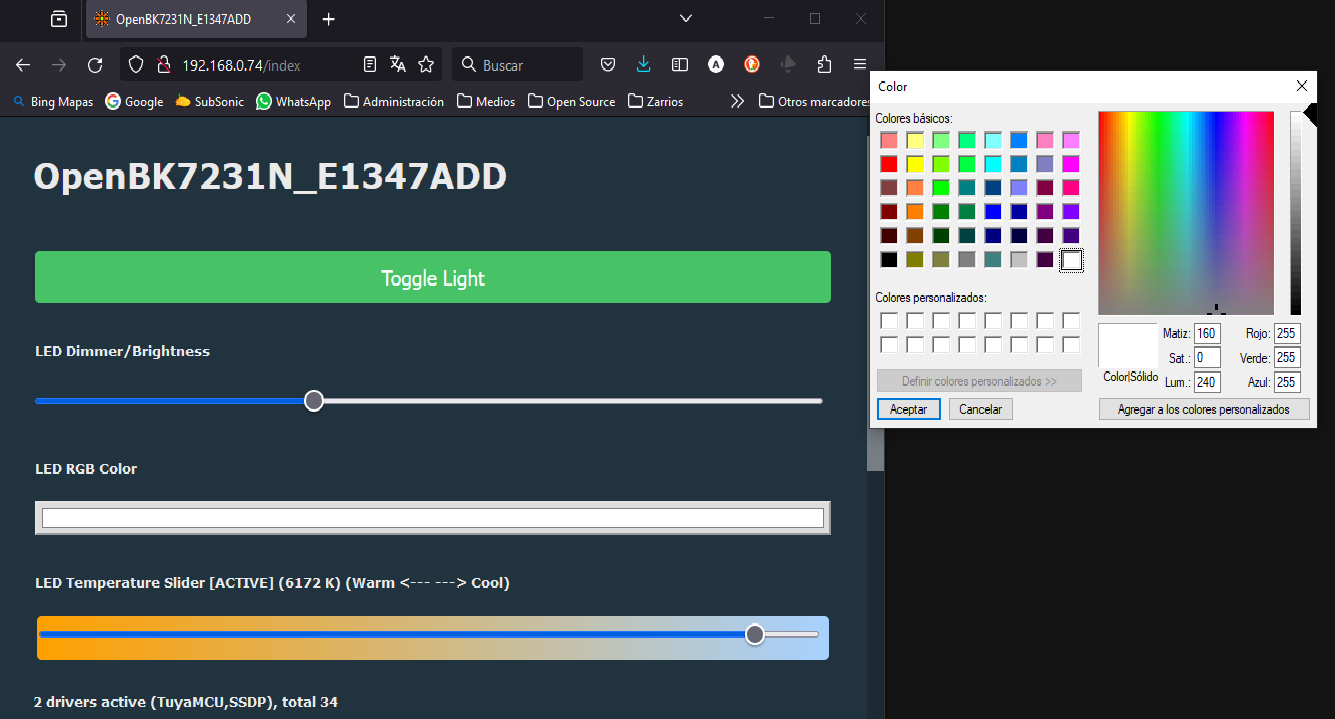
alvaroconsuegra wrote:
It looks like RGB values are not reported back correctly from MCU.
tuyaMcu_sendQueryState
Info:MAIN:Time 3649, idle 75989/s, free 71632, MQTT 1(1), bWifi 1, secondsWithNoPing 3578, socks 3/38 POWERSAVE
Info:TuyaMCU:TUYAMCU received: 55 AA 03 00 00 01 01 04
Info:TuyaMCU:TuyaMCU_ProcessIncoming[ver=3]: processing command 0 (Hearbeat) with 8 bytes
Info:MAIN:Time 3650, idle 154055/s, free 71632, MQTT 1(1), bWifi 1, secondsWithNoPing 3579, socks 3/38 POWERSAVE
Info:GEN:dhcp=0 ip=192.168.0.74 gate=192.168.0.2 mask=255.255.255.0 mac=c4:82:e1:34:7a:dd
Info:GEN:sta: 1, softap: 0, b/g/n
Info:GEN:sta:rssi=-44,ssid=acopen,bssid=50:c7:bf:8b:39:de,channel=13,cipher_type:CCMP
Info:CMD:[WebApp Cmd 'tuyaMcu_sendQueryState' Result] OK
Info:TuyaMCU:TUYAMCU received: 55 AA 03 07 00 05 14 01 00 01 00 24
Info:TuyaMCU:TuyaMCU_ProcessIncoming[ver=3]: processing command 7 (State) with 12 bytes
Info:TuyaMCU:TuyaMCU_ParseStateMessage: processing dpId 20, dataType 1-bool and 1 data bytes
Info:TuyaMCU:TuyaMCU_ParseStateMessage: raw data 1 byte: 0
Info:MQTT:Publishing val 0 to obkE1347ADD/led_enableAll/get retain=0
Info:TuyaMCU:TUYAMCU received: 55 AA 03 07 00 05 15 04 00 01 01 29
Info:TuyaMCU:TuyaMCU_ProcessIncoming[ver=3]: processing command 7 (State) with 12 bytes
Info:TuyaMCU:TuyaMCU_ParseStateMessage: processing dpId 21, dataType 4-enum and 1 data bytes
Info:TuyaMCU:TuyaMCU_ParseStateMessage: raw data 1 byte: 1
Info:TuyaMCU:TUYAMCU received: 55 AA 03 07 00 08 16 02 00 04 00 00 01 54 82
Info:TuyaMCU:TuyaMCU_ProcessIncoming[ver=3]: processing command 7 (State) with 15 bytes
Info:TuyaMCU:TuyaMCU_ParseStateMessage: processing dpId 22, dataType 2-val and 4 data bytes
Info:TuyaMCU:TuyaMCU_ParseStateMessage: raw data 4 int: 340
Info:TuyaMCU:TUYAMCU received: 55 AA 03 07 00 08 17 02 00 04 00 00 03 DE 0F
Info:TuyaMCU:TuyaMCU_ProcessIncoming[ver=3]: processing command 7 (State) with 15 bytes
Info:TuyaMCU:TuyaMCU_ParseStateMessage: processing dpId 23, dataType 2-val and 4 data bytes
Info:TuyaMCU:TuyaMCU_ParseStateMessage: raw data 4 int: 990
Info:TuyaMCU:TUYAMCU received: 55 AA 03 07 00 08 1A 02 00 04 00 00 00 00 31
Info:MQTT:MQTT client in mqtt_incoming_publish_cb topic obkE1347ADD/led_enableAll/get
Info:TuyaMCU:TuyaMCU_ProcessIncoming[ver=3]: processing command 7 (State) with 15 bytes
Info:TuyaMCU:TuyaMCU_ParseStateMessage: processing dpId 26, dataType 2-val and 4 data bytes
Info:TuyaMCU:TuyaMCU_ParseStateMessage: raw data 4 int: 0
Info:MAIN:Time 3651, idle 58770/s, free 71632, MQTT 1(1), bWifi 1, secondsWithNoPing 3580, socks 3/38 POWERSAVEInfo:MAIN:Time 12165, idle 75632/s, free 71416, MQTT 1(1), bWifi 1, secondsWithNoPing 12094, socks 4/38 POWERSAVE
Info:TuyaMCU:TUYAMCU received: 55 AA 03 00 00 01 01 04
Info:TuyaMCU:TuyaMCU_ProcessIncoming[ver=3]: processing command 0 (Hearbeat) with 8 bytes
Info:MAIN:Time 12166, idle 73700/s, free 71328, MQTT 1(1), bWifi 1, secondsWithNoPing 12095, socks 3/38 POWERSAVE
Info:CMD:[WebApp Cmd 'tuyaMcu_sendQueryState' Result] OK
Info:TuyaMCU:TUYAMCU received: 55 AA 03 07 00 05 14 01 00 01 01 25
Info:TuyaMCU:TuyaMCU_ProcessIncoming[ver=3]: processing command 7 (State) with 12 bytes
Info:TuyaMCU:TuyaMCU_ParseStateMessage: processing dpId 20, dataType 1-bool and 1 data bytes
Info:TuyaMCU:TuyaMCU_ParseStateMessage: raw data 1 byte: 1
Info:TuyaMCU:Color is sent as 000003C0026C
Info:MQTT:Publishing val 1 to obkE1347ADD/led_enableAll/get retain=0
Info:TuyaMCU:TUYAMCU received: 55 AA 03 07 00 05 15 04 00 01 01 29
Info:TuyaMCU:TuyaMCU_ProcessIncoming[ver=3]: processing command 7 (State) with 12 bytes
Info:TuyaMCU:TuyaMCU_ParseStateMessage: processing dpId 21, dataType 4-enum and 1 data bytes
Info:TuyaMCU:TuyaMCU_ParseStateMessage: raw data 1 byte: 1
Info:MQTT:MQTT client in mqtt_incoming_publish_cb topic obkE1347ADD/led_enableAll/get
Info:TuyaMCU:TUYAMCU received: 55 AA 03 07 00 08 16 02 00 04 00 00 02 6C 9B
Info:TuyaMCU:TuyaMCU_ProcessIncoming[ver=3]: processing command 7 (State) with 15 bytes
Info:TuyaMCU:TuyaMCU_ParseStateMessage: processing dpId 22, dataType 2-val and 4 data bytes
Info:TuyaMCU:TuyaMCU_ParseStateMessage: raw data 4 int: 620
Info:TuyaMCU:TUYAMCU received: 55 AA 03 07 00 08 17 02 00 04 00 00 03 DE 0F
Info:TuyaMCU:TuyaMCU_ProcessIncoming[ver=3]: processing command 7 (State) with 15 bytes
Info:TuyaMCU:TuyaMCU_ParseStateMessage: processing dpId 23, dataType 2-val and 4 data bytes
Info:TuyaMCU:TuyaMCU_ParseStateMessage: raw data 4 int: 990
Info:TuyaMCU:TUYAMCU received: 55 AA 03 07 00 08 1A 02 00 04 00 00 00 00 31
Info:TuyaMCU:TuyaMCU_ProcessIncoming[ver=3]: processing command 7 (State) with 15 bytes
Info:TuyaMCU:TuyaMCU_ParseStateMessage: processing dpId 26, dataType 2-val and 4 data bytes
Info:TuyaMCU:TuyaMCU_ParseStateMessage: raw data 4 int: 0
Info:TuyaMCU:TUYAMCU received: 55 AA 03 07 00 10 18 03 00 0C 30 30 30 30 30 33 43 30 30 32 36 43 B1
Info:TuyaMCU:TuyaMCU_ProcessIncoming[ver=3]: processing command 7 (State) with 23 bytes
Info:TuyaMCU:TuyaMCU_ParseStateMessage: processing dpId 24, dataType 3-str and 12 data bytes
Info:MAIN:Time 12167, idle 69349/s, free 71632, MQTT 1(1), bWifi 1, secondsWithNoPing 12096, socks 3/38 POWERSAVE )
)
startDriver TuyaMCU
startDriver SSDP
PowerSave 1

tuyaMcu_setBaudRate 115200
tuyaMcu_defWiFiState 4
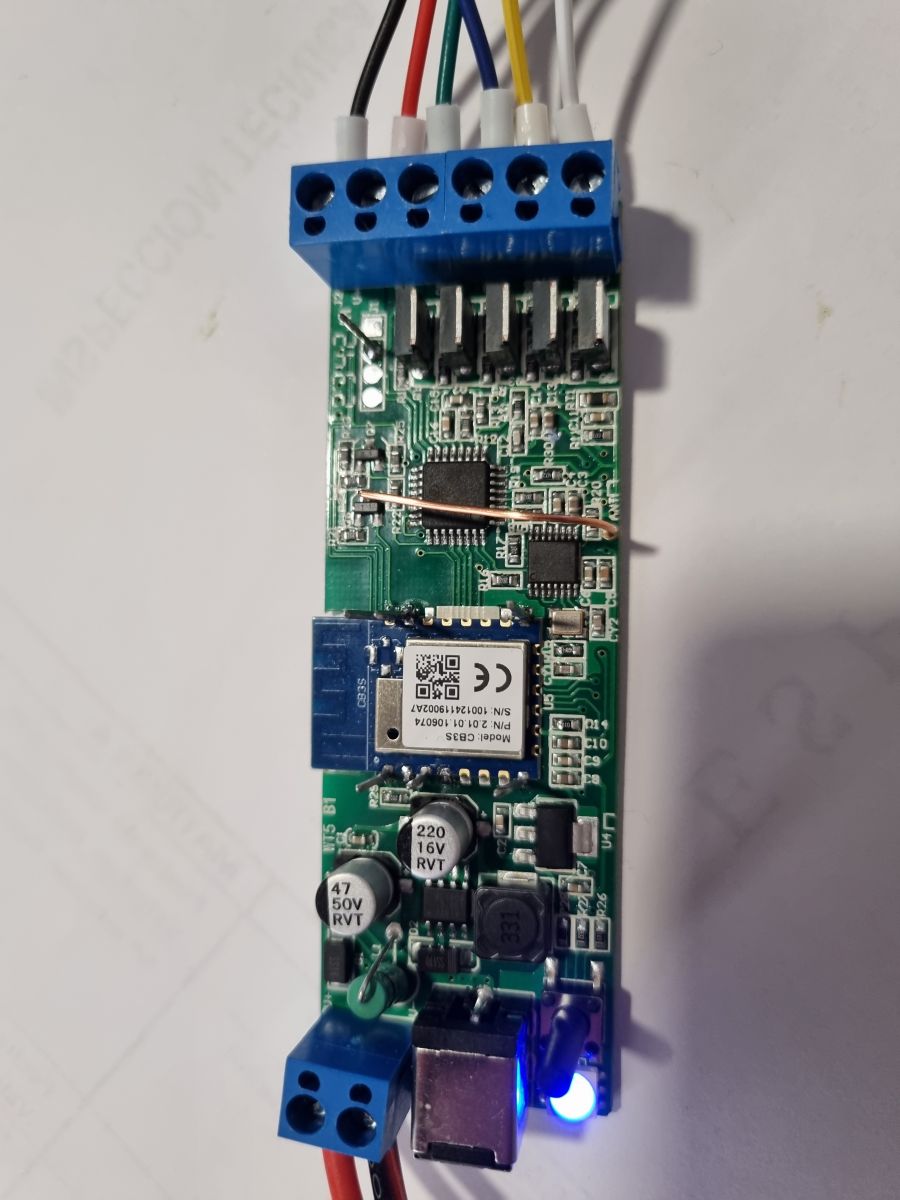
tuyaMcu_setupLED 24 0TL;DR: With 115200 baud and 5 confirmed core dpIDs, the WT5 works in OpenBeken via TuyaMCU; as one maintainer put it, "It’s TuyaMCU device." This FAQ is for WT5 owners who want stable RGB+CCT control, RF coexistence, correct autoexec.bat setup, and a fix for boot-time state overwrite using
tuyaMcu_enableAutoSend. [#20687286]
Why it matters: A WT5 can appear fully working after flashing, yet still break daily use if OpenBeken overwrites the TuyaMCU’s RF-restored state a few seconds after power-up.
| Approach | RGB+CCT control | RF coexistence | Boot-state behavior | Effort |
|---|---|---|---|---|
| OpenBeken + TuyaMCU | Works | Yes | Needs autosend control for best coexistence | Low |
| ESPHome on WT5 | Partial in-thread, later working but less documented here | Unclear | Not resolved in-thread | Medium |
| Replacing secondary MCU / direct RF driver | Possible in theory | Custom | Fully custom | High |
Key insight: The easiest stable WT5 setup is to keep the secondary MCU and RF path intact, run OpenBeken as the Wi-Fi side over TuyaMCU at 115200, and suppress automatic resend on boot when RF state retention matters. [#21619412]
tuyaMcu_enableAutoSend 0, was added specifically to stop OBK from overwriting the TuyaMCU’s saved state during boot; an example autoexec re-enables autosend after 12 seconds. [#21619412]autoexec.bat, not the Import page. A working minimal setup is:
startDriver TuyaMCUtuyaMcu_setBaudRate 115200tuyaMcu_defWiFiState 4 and tuyaMcu_setupLED 24 0
Several users confirmed this works on WT5 units with WB3S and CB3S modules. The Import page only runs once, while autoexec.bat runs on every reboot, which fixes the “works until power cycle” problem. [#21052871]tuyaMcu_sendQueryState results on flashed devices. For practical OpenBeken control, dpIDs 20, 21, 22, 23, and 24 are the important ones. [#20699088]tuyaMcu_setBaudRate 115200, tuyaMcu_defWiFiState 4, and tuyaMcu_setupLED 24 0. Later, tuyaMcu_enableAutoSend 0 was added to suppress OBK’s automatic resend during boot, and one proven example re-enabled it after 12 seconds with addRepeatingEvent 12 1 tuyaMcu_enableAutoSend 1. Use startDriver TuyaMCU first, then the baud and Wi-Fi-state commands, then LED setup. That sequence preserves RF coexistence and fixes the common startup overwrite issue. [#21619412]tuyaMcu_enableAutoSend turns OpenBeken’s automatic TuyaMCU sending on or off. Setting it to 0 stops OBK from pushing its stored LED values during boot, so the TuyaMCU can keep the last RF-restored state instead of being overwritten a few seconds later. A WT5 user later posted a working solution with tuyaMcu_enableAutoSend 0 and optional re-enable after 12 seconds. That command was added specifically to solve the long-running WT5 mixed RF and Wi-Fi startup problem. [#21619412]tuyaMcu_sendQueryState from the web console with the log open, first in CCT mode and then in RGB mode. In the thread, query results in CCT returned dpIDs 20, 21, 22, 23, and 26, while RGB-mode query also returned dpID 24 with the 12-byte color string. That makes tuyaMcu_sendQueryState the fastest way to verify what the MCU will actually report back on your unit. It also exposes cases where RGB state exists internally but is not pushed during normal RF use. [#20886598]00 73 03 e8 03 e8 for a green test, matching a known Tuya color format already seen in another OpenBeken topic. The thread’s working conclusion was that dpID 24 is the actionable RGB field, while dpID 28 remained less certain and appeared to mirror extra white-related data. [#20689271]