logo elektroda
logo elektroda
X
logo elektroda

random idea, scriptable HTML elements for OBK page - widgets/widget driver - for custom channels?

p.kaczmarek2 1464 13
ADVERTISEMENT
  • #1 21327627
    p.kaczmarek2
    Moderator Smart Home
    Posts: 14408
    Help: 650
    Rate: 12345
    I've got this idea for tiny, pluggable scriptable widgets for OBK yesterday. OBK already features a hardcoded set of channel types:
    https://github.com/openshwprojects/OpenBK7231T_App/blob/main/docs/channelTypes.md
    we also support a custom REST page for displaying channels:
    https://www.elektroda.com/rtvforum/topic4040354.html
    but we didn't have anything in between....

    so my idea is to create a WIDGET driver, that basically allows you to create short custom code snippets in HTML and JS

    they are placed on main obk page, in two modes:
    - either in refreshed automatically state div
    - or before this state div (no auto refresh)

    ADVERTISEMENT


    It's already in the main tree, enabled on Windows:
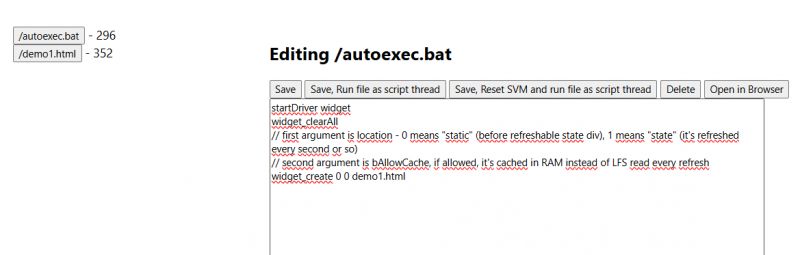
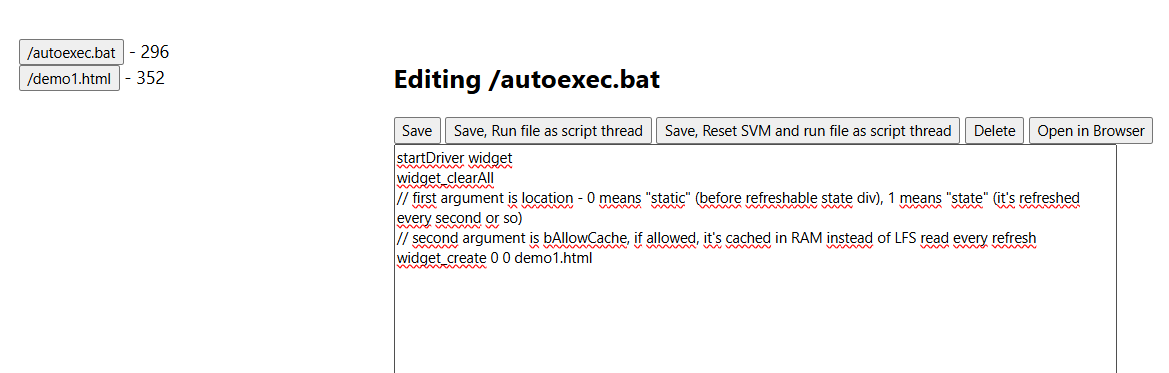
    Screenshot of a text editor with an open /autoexec.bat file containing a widget script.
    html file:
    Code: HTML, XML
    Log in, to see the code

    script:
    
    startDriver widget
    widget_clearAll
    // first argument is location - 0 means "static" (before refreshable state div), 1 means "state" (it's refreshed every second or so)
    // second argument is bAllowCache, if allowed, it's cached in RAM instead of LFS read every refresh
    widget_create 0 0 demo1.html
    

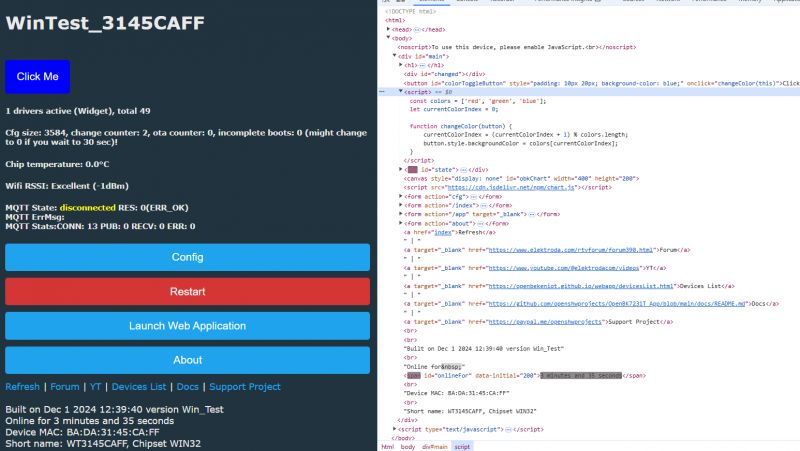
    Result:
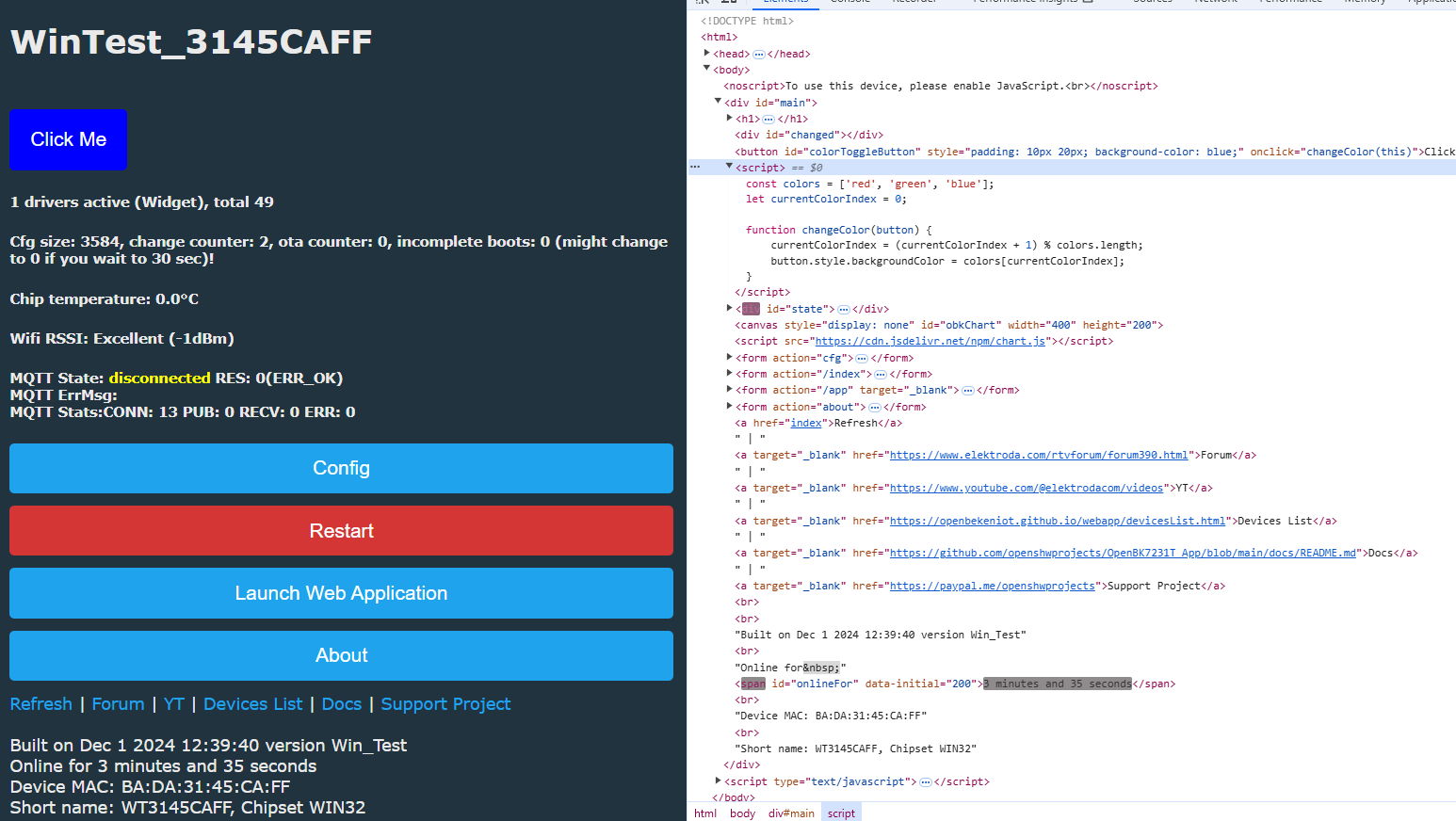
    User interface with a button, HTML script, and system data

    I am thinking that maybe it could be used, along with REST interface, to display more custom data. See REST tutorial:
    https://www.elektroda.com/rtvforum/topic3971355.html
    I am also thinking about adding something like $CH1 support to the said widgets directly, maybe?

    source:
    https://github.com/openshwprojects/OpenBK7231T_App/blob/main/src/driver/drv_widget.c

    Can you give it and try and tell me some feedback, @divadiow , @max4elektroda , @insmod , @DeDaMrAz , @XJ_ ? Watch for bCache setting, I don't think that reading LFS file on each page refresh is really that optimal... still, it's just a read, not a write, so it should not at least wear the flash.
    Helpful post? Buy me a coffee.
  • ADVERTISEMENT
  • #2 21327730
    XJ_
    Level 12  
    Posts: 140
    Help: 13
    Rate: 38
    p.kaczmarek2 wrote:
    and tell me some feedback

    That's a great idea, I've been modifying the code since the beginning to have the "config, restart and other for development and debugging" menu at the top and I was thinking about putting it as a PR, but it lacked the "flexibility". I'm changing everything in the sourcecode yet.
    Here you go, that's what I want. That's the right way.

    Added after 8 [minutes]:

    p.kaczmarek2 wrote:
    reading LFS file on each page refresh

    I don't know how big scripts users will be able to create, but I can imagine a limit where it will only be in RAM - e.g. up to 2000 kb - which is not a lot.
    On the other hand, saving to RAM won't actually add anything anyway, the speed of loading from flash will be enough. Or am I wrong? How much does reading flash vs RAM load on the CPU?

    Added after 10 [minutes]:

    p.kaczmarek2 wrote:
    support to the said widgets directly, maybe

    But I think that only we will use it, because the others have it connected somewhere else /HASS/, and the web interface using only during setup or when something goes wrong.
    Judging by the questions that sometimes appear, I guess that there will not be many users who would be able to write something themselves.
    I would start with the basics - Button, url, text. And then we will see if it attracts attention.
  • ADVERTISEMENT
  • #3 21327934
    p.kaczmarek2
    Moderator Smart Home
    Posts: 14408
    Help: 650
    Rate: 12345
    XJ_ wrote:
    p.kaczmarek2 wrote:
    and tell me some feedback

    That's a great idea, I've been modifying the code since the beginning to have the "config, restart and other for development and debugging" menu at the top and I was thinking about putting it as a PR, but it lacked the "flexibility". I'm changing everything in the sourcecode yet.
    Here you go, that's what I want. That's the right way.

    Windows Simulator makes everything very easily configurable and extendable. If you want to add such a button via Widget, it should be also possible as well.


    XJ_ wrote:

    I don't know how big scripts users will be able to create, but I can imagine a limit where it will only be in RAM - e.g. up to 2000 kb - which is not a lot.

    2000kB of RAM is a typo, I guess? Or you mean flash? BK7231 has 2MB of flash, but most of that is already used by firmware, config, etc, we also need to have space for OTA, we could use it for scripts, but then every OTA would wipe them


    XJ_ wrote:

    On the other hand, saving to RAM won't actually add anything anyway, the speed of loading from flash will be enough. Or am I wrong? How much does reading flash vs RAM load on the CPU?

    RAM can be used for charts driver, but flash read may be slower... so it's a tradeoff.


    XJ_ wrote:

    But I think that only we will use it, because the others have it connected somewhere else /HASS/, and the web interface using only during setup or when something goes wrong.

    ACtually many beginners don't even have HASS, so they will use WWW panel as well, I think.


    XJ_ wrote:

    Judging by the questions that sometimes appear, I guess that there will not be many users who would be able to write something themselves.
    I would start with the basics - Button, url, text. And then we will see if it attracts attention.

    I can try to make more examples, I will prepare a tutorial, I've created this topic to get prelimary opinion and feedback.
    Helpful post? Buy me a coffee.
  • #4 21328164
    XJ_
    Level 12  
    Posts: 140
    Help: 13
    Rate: 38
    p.kaczmarek2 wrote:
    2000kB of RAM is a typo

    Of course, 2000b ;-]

    Added after 1 [minutes]:

    p.kaczmarek2 wrote:
    I can try to make more examples, I will prepare a tutorial,

    As usual, you think of everything.
  • #5 21328167
    max4elektroda
    Level 24  
    Posts: 745
    Help: 47
    Rate: 183
    I like the general idea very much, but didn't find the time yet to test ...
    If possible, storing the code in RAM would be preferred, but as I said, I didn't actually test it yet.
  • #6 21328194
    XJ_
    Level 12  
    Posts: 140
    Help: 13
    Rate: 38
    p.kaczmarek2 wrote:
    flash read may be slower.

    I know. Speed of reading the flash on such SoC will be somewhere around 1-10MB/s, which is fast enough for these small files. You want to read approximately 1kb every second. Even if it was 10kb, it would be ok.

    Added after 5 [minutes]:

    >>21328194
    I'll try to find time to test it this week, and I'll also test the reading speed from Flash.

    Added after 6 [minutes]:

    >>21328194
    Does anyone have a datasheet for the BK7231? I don't mean the shortened version of Tuya, but the real datasheet. Where is a more detailed description of the registers and so on. Is there even such a thing?
  • ADVERTISEMENT
  • #7 21328243
    p.kaczmarek2
    Moderator Smart Home
    Posts: 14408
    Help: 650
    Rate: 12345
    max4elektroda wrote:
    If possible, storing the code in RAM would be preferred, but as I said, I didn't actually test it yet.

    The worst part would be that often-refreshing state div of OBK main page. The static part is not that crucial.

    XJ_ wrote:

    I know. Speed of reading the flash on such SoC will be somewhere around 1-10MB/s, which is fast enough for these small files. You want to read approximately 1kb every second. Even if it was 10kb, it would be ok.

    It may be also slow when some other part of code tries to access the flash at the same times. I hope the flash mutex is present in the code.... hopefully... well.


    XJ_ wrote:

    Does anyone have a datasheet for the BK7231? I don't mean the shortened version of Tuya, but the real datasheet. Where is a more detailed description of the registers and so on. Is there even such a thing?

    BK7231 datasheet, pinout, programming, specification, wiki (BK7231T, BK7231N)


    Maybe this widget method can be also used to create custom radio button/choice options for non-standard TuyaMCU devices
    Helpful post? Buy me a coffee.
  • ADVERTISEMENT
  • #8 21328275
    XJ_
    Level 12  
    Posts: 140
    Help: 13
    Rate: 38
    p.kaczmarek2 wrote:
    BK7231 datasheet, pinout, programming, specification, wiki (BK7231T, BK7231N)

    I already have these, but I didn't mean this. Or I didn't find the information I needed here. For example, there is information about UART flags, but no consequences. Information about flash and ram speed is missing... Or I just didn't found it.
  • #9 21328623
    p.kaczmarek2
    Moderator Smart Home
    Posts: 14408
    Help: 650
    Rate: 12345
    We don't have more, I afraid.


    Here is Widget for a single button - save it as "demoAnything.html" and add widget with it:
    Code: HTML, XML
    Log in, to see the code

    It will poll channel value on start and then toggle it.
    Helpful post? Buy me a coffee.
  • #10 21331733
    XJ_
    Level 12  
    Posts: 140
    Help: 13
    Rate: 38
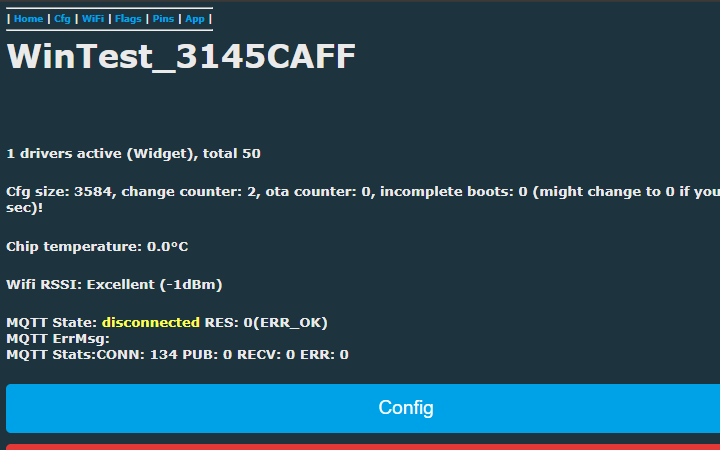
    So far I've only found time to test it in Win, it's great.
    What I would add for myself is a parameter for the option to display it on all pages. Of course, for my dev menu ;-)
    It's always at the top, even when you scroll down.

    User interface with menu and system information

    It's just simple html.

    <div style="font-size: 9px; font-weight: bold; float:left; position:fixed; top:0px; background-color: #21333e; padding:0px; border:0px; margin:0px">
    <hr/>
     | <a href="index">Home</a>
     | <a href="cfg">Cfg</a>
     | <a href="cfg_wifi">WiFi</a>
     | <a href="cfg_generic">Flags</a>
     | <a href="cfg_pins">Pins</a>
     | <a href="app">App</a>
     | <hr/>
    </div>


    I fight against animal suffering. So let's end the suffering of mouse wheels. ;-)
    Just to explain, it always bothered me a lot when I save a config, or anything else, and then I have to "crazy spin the mouse wheel" to scroll down to the menu to get back to somewhere.
  • #11 21331782
    p.kaczmarek2
    Moderator Smart Home
    Posts: 14408
    Help: 650
    Rate: 12345
    Sure, do you have this flag already implemented and can make a PR, or should I try to propose some implementation on my own?

    PS: Today I also did a OpenWeatherMap integration (separate driver)
    Helpful post? Buy me a coffee.
  • #12 21331830
    XJ_
    Level 12  
    Posts: 140
    Help: 13
    Rate: 38
    p.kaczmarek2 wrote:
    do you have this flag already implemented

    Unfortunately no, I have quite a bit of time /like everyone else these days/. I just wanted to try drv_widget on my html. I don't have time to change the code right now, maybe on the weekend.
    If you want, feel free to do it your way, I won't get to it now.
  • #13 21331832
    p.kaczmarek2
    Moderator Smart Home
    Posts: 14408
    Help: 650
    Rate: 12345
    So how do we do that? A simple way? bShowOnAllPages?

    Or maybe a wildcard-supporting path string to match so page can tell when to load?

    The latter seems better...
    Helpful post? Buy me a coffee.
  • #14 21331835
    XJ_
    Level 12  
    Posts: 140
    Help: 13
    Rate: 38
    p.kaczmarek2 wrote:
    PS: Today I also did a OpenWeatherMap integration (separate driver)

    I saw it in the changeslist in releases, I'm looking forward to checking it out. You're unstoppable.

    Added after 3 [minutes]:

    p.kaczmarek2 wrote:
    maybe a wildcard-supporting path string to match

    yeah, I thought about that too. * for everything, cfg* and so on. I think the wildcard you suggest is great, regex is unnecessary in my opinion.

    Added after 3 [minutes]:

    >>21331835
    I was still thinking about a list, but it would probably be unnecessary to complicate it that much. In reality, most of the things will be needed on the main page, and for the rest a wildcard is best solution.

Topic summary

✨ The discussion revolves around the proposal for scriptable HTML widgets for the OBK (OpenBK7231T) platform, aimed at enhancing flexibility in user interface customization. The idea is to implement a WIDGET driver that allows users to create small HTML and JavaScript snippets, which can be displayed on the main OBK page in either an auto-refreshing state or a static mode. Participants express enthusiasm for the concept, discussing potential limitations regarding script size and storage in RAM versus flash memory. They also consider the implications of reading speeds from flash and the need for a datasheet for the BK7231 chip. Suggestions for additional features, such as displaying widgets on all pages and integrating with other services like OpenWeatherMap, are also mentioned.
Generated by the language model.

FAQ

TL;DR: OBK adds scriptable HTML/JS widgets with an auto‑refresh about every 1 s; "so my idea is to create a WIDGET driver" for flexible UI. Place widgets statically or in the live state area, and optionally cache them in RAM to reduce LFS reads. [Elektroda, p.kaczmarek2, post #21327627]

Why it matters: This lets OBK users add quick custom controls and data views without forking firmware or relying on HASS.

Quick Facts

What is the OBK Widget driver?

It’s a driver that lets you add small HTML/JS snippets as pluggable widgets to the OBK web UI. Widgets can sit on the main page and act as custom controls or displays. It’s already in the main tree and enabled on Windows. [Elektroda, p.kaczmarek2, post #21327627]

Where do widgets render, and how often do they refresh?

Widgets render in two places: before the state div (static) or inside the state div (auto‑refresh). The auto‑refresh runs about every second, making it suitable for live channel data. The static area does not auto‑refresh. [Elektroda, p.kaczmarek2, post #21327627]

How do I add a widget from an HTML file?

Use the widget driver commands:
  1. startDriver widget
  2. widget_clearAll
  3. widget_create [location 0|1] [bAllowCache 0|1] [yourfile.html] Location 0 places it before the state div; 1 places it in the auto‑refreshed state area. [Elektroda, p.kaczmarek2, post #21327627]

Should I enable RAM caching or read from LFS each refresh?

Enable bAllowCache to keep the widget in RAM. Reading the LFS file on every page refresh isn’t optimal, especially in the auto‑refresh area. Reads don’t wear flash, but caching reduces overhead and latency. [Elektroda, p.kaczmarek2, post #21327627]

Is flash fast enough for small widgets?

Yes. Estimated flash read on this class of SoC is about 1–10 MB/s. Reading approximately 1 KB per second, or even 10 KB, is fine for small widget files. "You want to read approximately 1kb every second." [Elektroda, XJ_, post #21328194]

What’s the RAM vs flash trade‑off for widgets?

RAM is great for frequently accessed assets (for example, charts). Flash reads can be slower than RAM. As the author summarized, "flash read may be slower... so it’s a tradeoff." Choose caching for frequently refreshed widgets. [Elektroda, p.kaczmarek2, post #21327934]

Will OTA updates erase my widget files?

If you store scripts in the device’s flash area used during updates, OTA can wipe them. Plan storage to avoid losing your HTML/JS when updating firmware. This is a known risk highlighted by the author. [Elektroda, p.kaczmarek2, post #21327934]

Could concurrent flash access slow widgets or cause issues?

Yes. Flash may slow when other code accesses it at the same time. The author noted hoping a flash mutex is present. Treat concurrent access as an edge case that can hurt responsiveness under load. [Elektroda, p.kaczmarek2, post #21328243]

Can I show a widget on all pages or target specific pages?

A wildcard page‑matching approach is proposed. Use patterns like for all pages or cfg for configuration pages. Regex is unnecessary. This is preferred to a simple show‑everywhere flag. [Elektroda, XJ_, post #21331835]

How do I make a toggle button widget that talks to channels via REST?

Use the provided example that calls /cm?cmnd=Ch1 and toggles 0/1. It fetches JSON, updates the button state, and initializes on DOMContentLoaded. Replace the endpoint IP with your device. This demonstrates reading and writing a channel. [Elektroda, p.kaczmarek2, post #21328623]

I don’t use Home Assistant—will widgets still help me?

Yes. Many beginners don’t use HASS and rely on OBK’s web panel. Widgets let you add simple buttons or status views during setup and troubleshooting. More examples and a tutorial are planned by the author. [Elektroda, p.kaczmarek2, post #21327934]

Where can I find docs for channel types and the REST interface?

See the channel types documentation and the REST tutorial linked in the thread. They show how channels map to UI and how to query data. These references help when building widgets. [Elektroda, p.kaczmarek2, post #21327627]

Is there a full BK7231 datasheet with register details?

Only the community wiki link is provided; a deeper, register‑level datasheet isn’t available there. As noted, “We don’t have more.” Use the wiki for pinout, programming, and specs. [Elektroda, p.kaczmarek2, post #21328243]
Generated by the language model.
ADVERTISEMENT