logo elektroda
logo elektroda
X
logo elektroda
Dostępna jest polska wersja

Czy wolisz polską wersję strony elektroda?

Nie, dziękuję Przekieruj mnie tam

Alternative control html page for TOMPD-63-WIFI

Angel0fDeath 3999 8

TL;DR

  • Alternative HTML control page for TOMPD-63-WIFI automatic circuit breaker/power meter flashed with OBK, aimed at TuyaMCU dpIDs that pack multiple settings into one field.
  • It uses the Dp command at http://IP/cm?cmnd=Dp to read mapped dpIDs in their correct data types, then drives them from JavaScript, MQTT, or curl.
  • 65536 means the 16th bit is high (“Not enough purchased energy”), while 67174430 dec = 04 01 001E sets leakage protection ON at 30 mA.
  • The page runs from a PC after editing baseURL, or from http://IP/api/lfs/TOMPD-63-WIFI_rev7.html on the device, but it needs flag 46 and 32K LittleFS.
  • OTA updates on T devices wipe LFS, so keeping a PC backup of the HTML and autoexec.bat is recommended.
ADVERTISEMENT
📢 Listen (AI):
  • Screenshot of the TOMPD-63-WIFI device interface showing settings and states.
    Some TuyaMCU devices combine few settings on single dpID. This doesn't necessarily mean you cannot alter the state of such dpID from OBK web page, but in all cases you will need calculator.
    One such device is TOMPD-63-WIFI. This is automatic circuit breaker with power meter capabilities, under- and over- voltage protection, max. current protection, some prepaid functions etc. Of course, the most important is, as the name of the device states, you can control it over WiFi.
    I'm not going to explain here how to flash this device with OBK. You can find more info about that here:

    https://www.elektroda.com/rtvforum/topic4022907.html

    Now, I suppose, you already flashed your device and you have written the correct autoexec.bat file.
    If you open device's web page you will land into something like this:
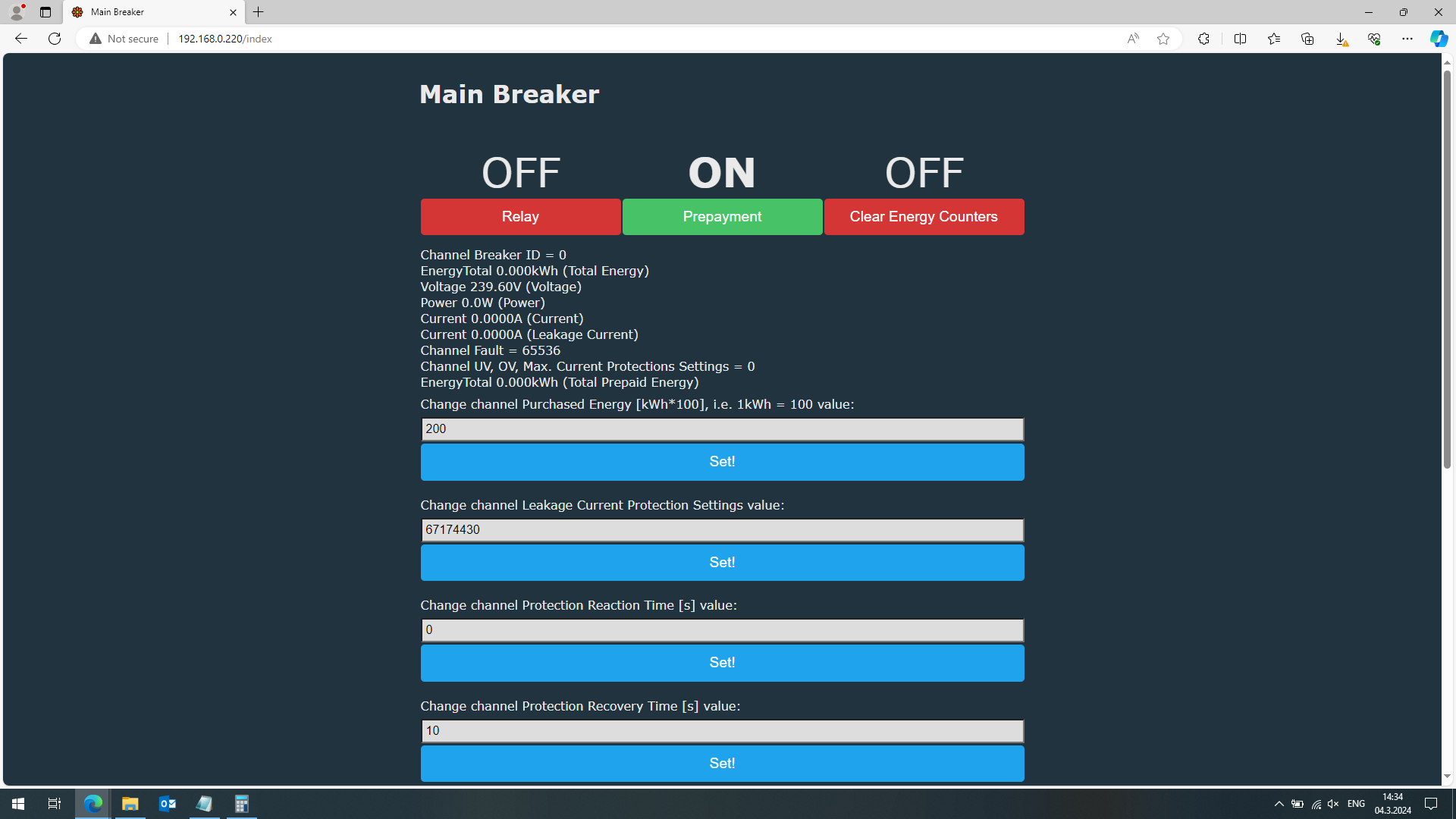
    Screenshot of the TOMPD-63-WIFI automatic breaker interface showing settings.

    From the screenshot above one can conclude everything is ok. Toggles are responding and the device performs expected functions. If we take a closer look we will discover that not everything is ok. In this case protection reaction time, protection recovery time and purchased energy are shown correct and you can change them. But what should mean channel Fault = 65536, BreakerID = 0, Leakage current protection = 67174430. Undervoltage, overvoltage and max. current - you cannot even set them (in this example I intentionally set this dpID as read only, because in general you really cannot set it from this interface).
    Now checking Fault channel and knowing the representation of the Fault we will discover everything is ok, since 65536 corresponds to 2^16, i.e. 16th bit is high and this should say 'Not enough purchased energy'. So everything is ok.
    The same is valid for leakage current protection - 67174430 dec = 04 01 001E (hex); 01 - protection is ON; 001E = 30 mA leakage current is allowed. You can even change that - enter 67108896 (04 00 00 20 - protection is OFF and 32 mA leakage current is allowed). You can check settings in the device and you will see everything is ok.

    Now comes the question - ok, should I each time calculate everything and more over how I can set the other protections?
    The problem here is when more than 1 setting is mapped on a single dpID it is possible to have overflow. TuyaMCU devices are using 32 bit CPU, which means longint is 4 bytes. So if the data of dpID is up to 4 bytes (as we see this in Fault channel and leakage protection channel) you will receive it correct, but you will need calculator to understand and alter these dpID's. If data of certain dpID is more than 4 bytes (like BreakerID and the other protections - OV, UV etc.) - we receive 0 and we cannot alter this dpID.
    There are 2 possibilities to solve this issue.
    The first possibility is to forward all data to your home automation server. The second possibility is to create alternative control web page. Both ways are using Dp command, kindly implemented by @p.kaczmarek2.
    The format of the command is:

    http:/IP/cm?cmnd=Dp

    where IP is IP address of your device.

    This will return the state of ALL MAPPED dpID's in the CORRECT DATA TYPE form they are mapped. So raw will return really array of bytes, string will return string etc.

    You can issue Dp command via MQTT - home automation (HA) server will process the incoming data, via Javascript - web page or again HA server will process incoming data. You can issue Dp command even through 'curl'.

    In this case, I created alternative web page to control this TOMPD-63-WIFI device. Initial purpose was quickly to access device's settings without writing additional modules for integration in my HA server (I'm using FHEM, which is written in Perl and definitely additional module was necessary). Now, I realise you can use this alternative page as an example to create your own module in whatever programming language your HA server understands.

    To use this alternative page you need:
    1. You successfully flashed your device
    2. You have configured it correctly via autoexec.bat. I recommend to use the attached by me autoexec.bat. EDIT: If you are not using my autoexec.bat be sure to SET flag 46 in order Dp command to work!!!
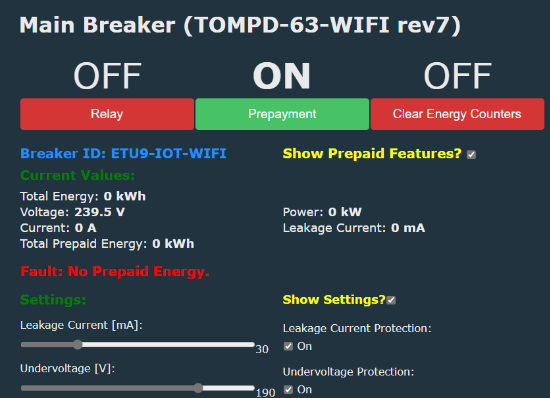
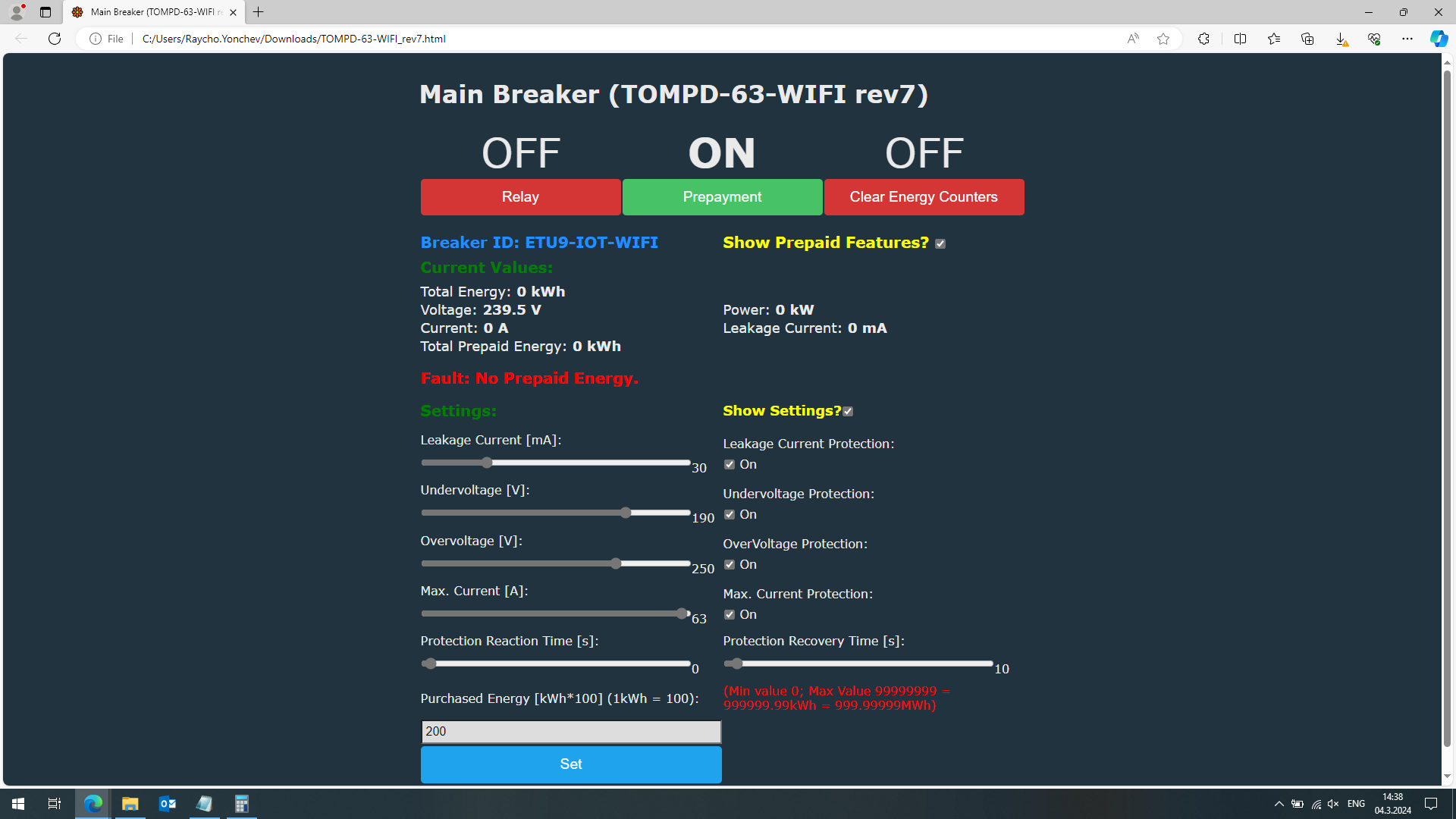
    3. To use the script, first open it with text editor (I would recommend Notepad++) from your PC and find baseURL= . Type the IP address of your device. Save, close and double click on the html file. It should open in your default web browser. You can test all functions. Once you have done everything correct, in your browser you should have something like this:
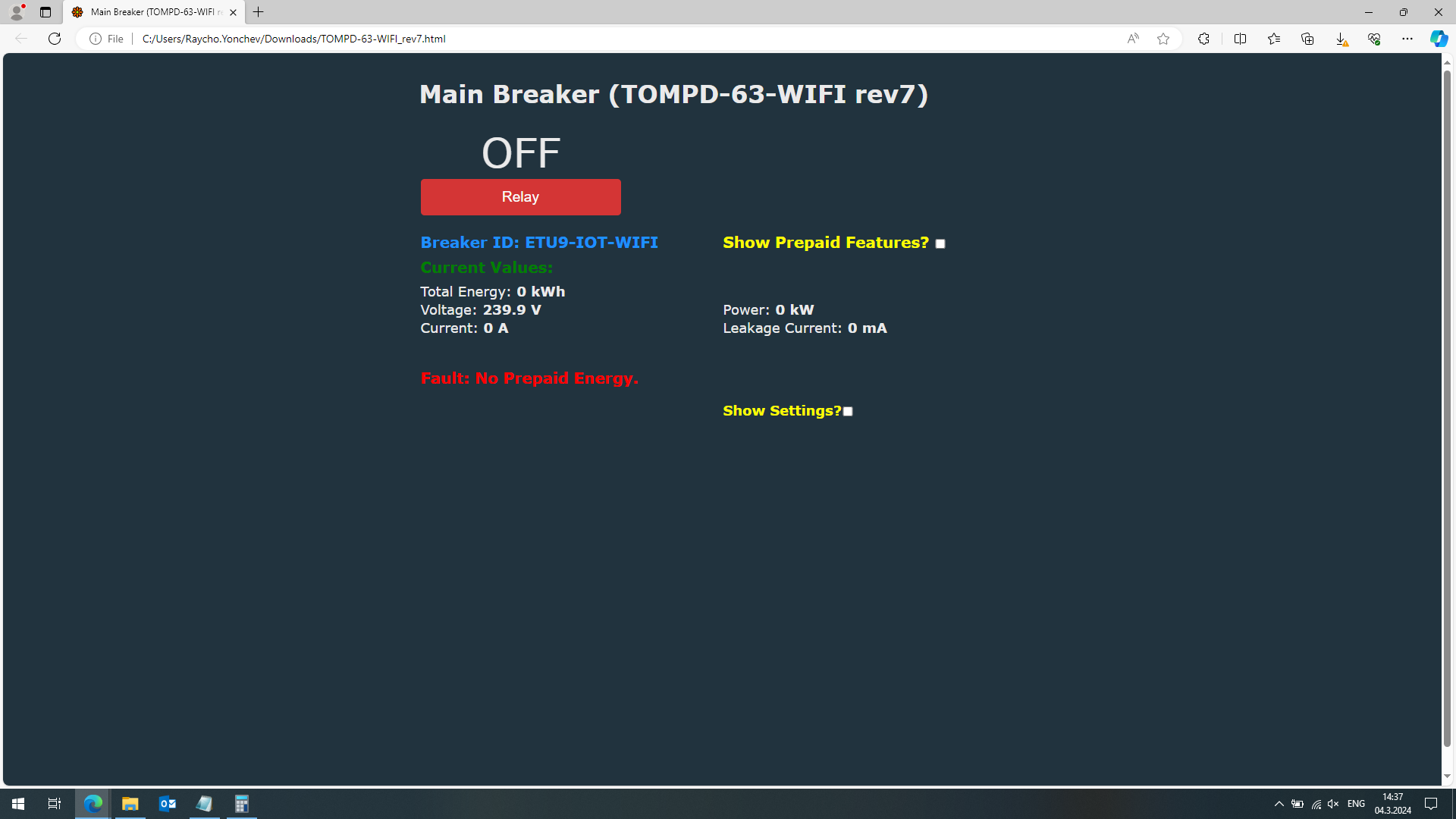
    Screenshot of the TOMPD-63-WIFI device interface displaying energy values and a fault error for no prepaid energy.

    Screenshot of the TOMPD-63-WIFI control interface showing settings and parameters.

    4. After you tested the script from your PC, you probably can consider in hosting the script in the device itself. To do this, first again open the script with text editor. Go to the line where you typed IP address, comment this line and uncomment the line where baseURL is empty, i.e. baseURL="". Now upload html file in device. Web page will be accessible on the following address:

    http:/IP/api/lfs/TOMPD-63-WIFI_rev7.html

    Please do NOT change filename since the script takes device type and script revision from the filename. Device type and script revision are displayed on the web page.
    There are similar devices, so in order to make difference I adopted this concept.

    Similar devices are:

    TOMPD-63-LW - you can find my modified script for this device here:

    https://www.elektroda.com/rtvforum/topic3995777-60.html

    @morgan_flint modified my autoexec.bat to suit this device, so you can find it in the same topic. After he finishes the tests. Both files will be submitted to Github repository.

    EAMPDW-TY63 - @njhuiz modified html file and autoexec.bat file for this device. Some tests are in progress. You can find corresponding files in this topic:

    https://www.elektroda.com/rtvforum/topic3959907-60.html


    Explanations on how autoexec.bat and html script are functioning you can find in the comments inside both files.
    Both files will be submitted soon to Github repository to be included as an examples, since these are the most complex files :).

    If you decide to host html file in device, take into account that default Little FS is 32K, so hosting html file and autoexec.bat will fill LFS of the device. If you need more space format properly LFS prior to upload the files. It is also recommended to keep backup of the files on your PC, since OTA update on 'T' devices will wipe LFS. Currently OTA updates do not wipe LFS on 'N' devices.


    If you are so far to here reading - Thank you for reading and I hope this will be really helpful for you.

    Regards

    EDIT: If you decide to change html filename please follow the concept: DEVICE-TYPE_revX.html
    Subrevisions will not be taken correct currently, so you will need to modify that in the code.
    If you decide not to follow the concept - take care to adjust this part of the code or to remove it, if necessary.

    Thank you

    EDIT 1: I forgot to mention JavaScript is not my first and favorite programming language, so it is possible some experts in Java to find my code writings ridiculous, although I tried to do my best. Will be glad, if such experts can help and optimise the code, if they think it is necessary :)
    Attachments:
    • TOMPD-63-WIFI_rev7.zip (6.46 KB) You must be logged in to download this attachment.
    • Breaker_autoexec_20240203.tar (10 KB) You must be logged in to download this attachment.

    Cool? Ranking DIY
    About Author
    Angel0fDeath
    Level 13  
    Offline 
    Angel0fDeath wrote 118 posts with rating 33, helped 2 times. Been with us since 2023 year.
  • ADVERTISEMENT
  • #2 20989827
    p.kaczmarek2
    Moderator Smart Home
    Good job, that's a very advanced page. That way we can easily replicate and extend a lot of custom features of TuyaMCU devices without even changing OBK firmware itself. REST interface along with Javascript and HTML provides a lot of flexibility that can be utilized to make a web panel optimized for a particular device.

    Now, I think it's a good place to link to similiar topics and tutorials.

    OpenBeken as a mini HTTP hosting - writing pages in Javascript, Tasmota REST:
    https://www.elektroda.com/rtvforum/topic3971355.html

    OpenBeken on BW-AF1 fryer with WiFi - interior, TYWE3S/WB3S, configuration:
    https://www.elektroda.com/rtvforum/topic3958909.html

    OBK docs, commands, etc:
    https://github.com/openshwprojects/OpenBK7231T_App/tree/main/docs

    Also may be related:
    Hosting OpenBekenIOT Web App's 'Logs' function in the LittleFS of the Device (BK7231T):
    https://www.elektroda.com/rtvforum/topic4031245.html
    Hosting OpenBeken Webapp Locally with Docker on Various Operating Systems:
    https://www.elektroda.com/rtvforum/topic4022819.html
    Helpful post? Buy me a coffee.
  • ADVERTISEMENT
  • #3 20989859
    Angel0fDeath
    Level 13  
    @p.kaczmarek2 First, Thank you for the good assessment, but I promised I will do this :)
    Second - you are correct about REST flexibility. For instance, I don't think it is good idea to create more channel types like 'something_div100' and 'otherthing_div100'. Probably will be better just to have 'value_div100' and the user to be able to change the units. Let's don't forget we have only 2M flash. I hope this approach will show the users how they can upgrade by their selves the firmware, without relying on everything should be done by firmware... And there still remains the problem that after this division there is no rounding and all transmitted numbers doesn't look good. I always process the numbers in my HA server or in this case in html page.
    So as I said, let's hope people will try to use REST more than to rely on firmware :)
  • ADVERTISEMENT
  • #4 21014566
    p.kaczmarek2
    Moderator Smart Home
    @Angel0fDeath is the version in the first post the latest update? Or do you have a newer version of page and autoexec.bat?
    Helpful post? Buy me a coffee.
  • #5 21014937
    Angel0fDeath
    Level 13  
    @p.kaczmarek2 For TOMPD-63WIFI these are the latest versions. There will be new release for TOMPD-63-LW. I will post here the final versions for that device when they are ready and tested.
  • Helpful post
    #6 21779258
    mr_crabs
    Level 6  
    Hi everyone!

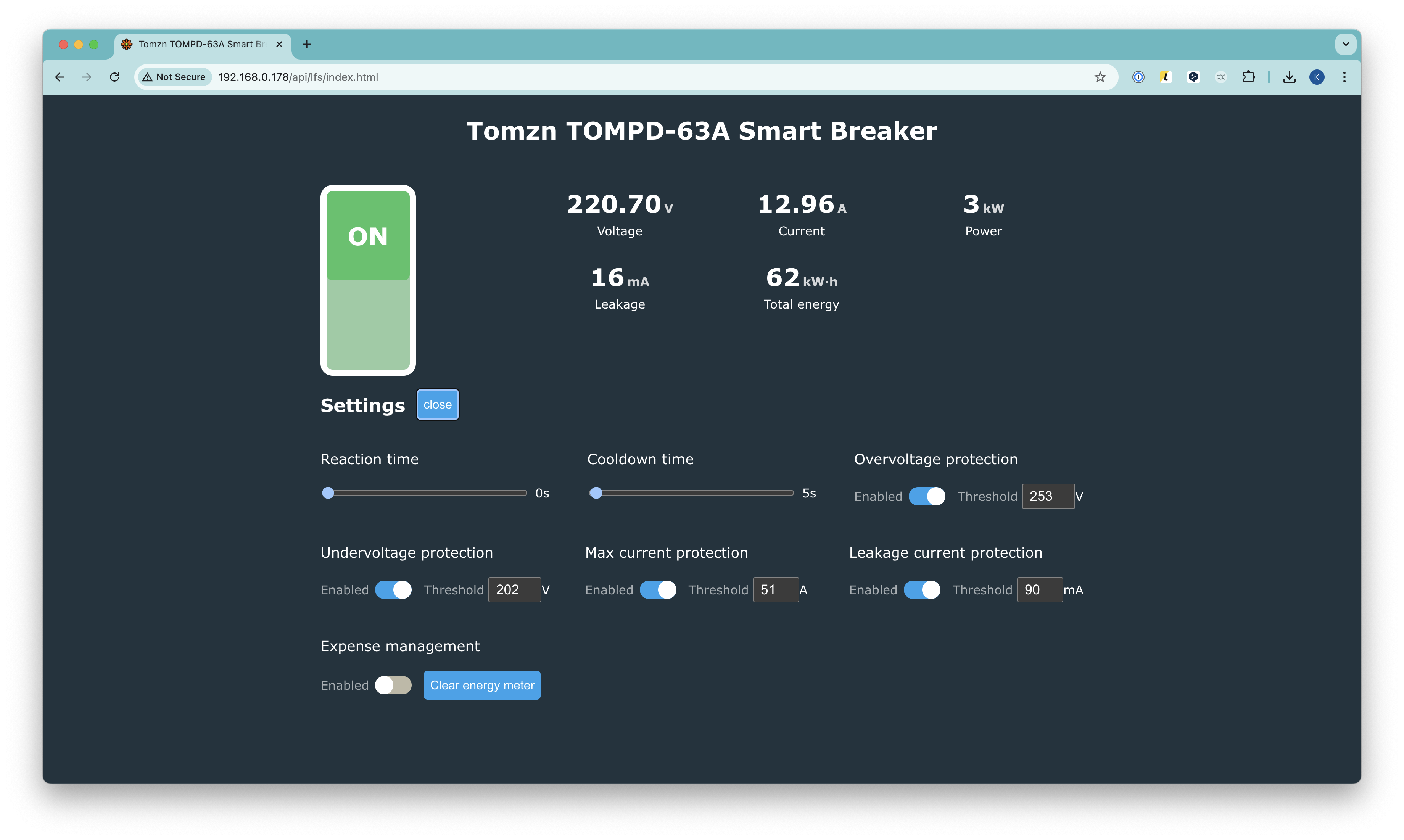
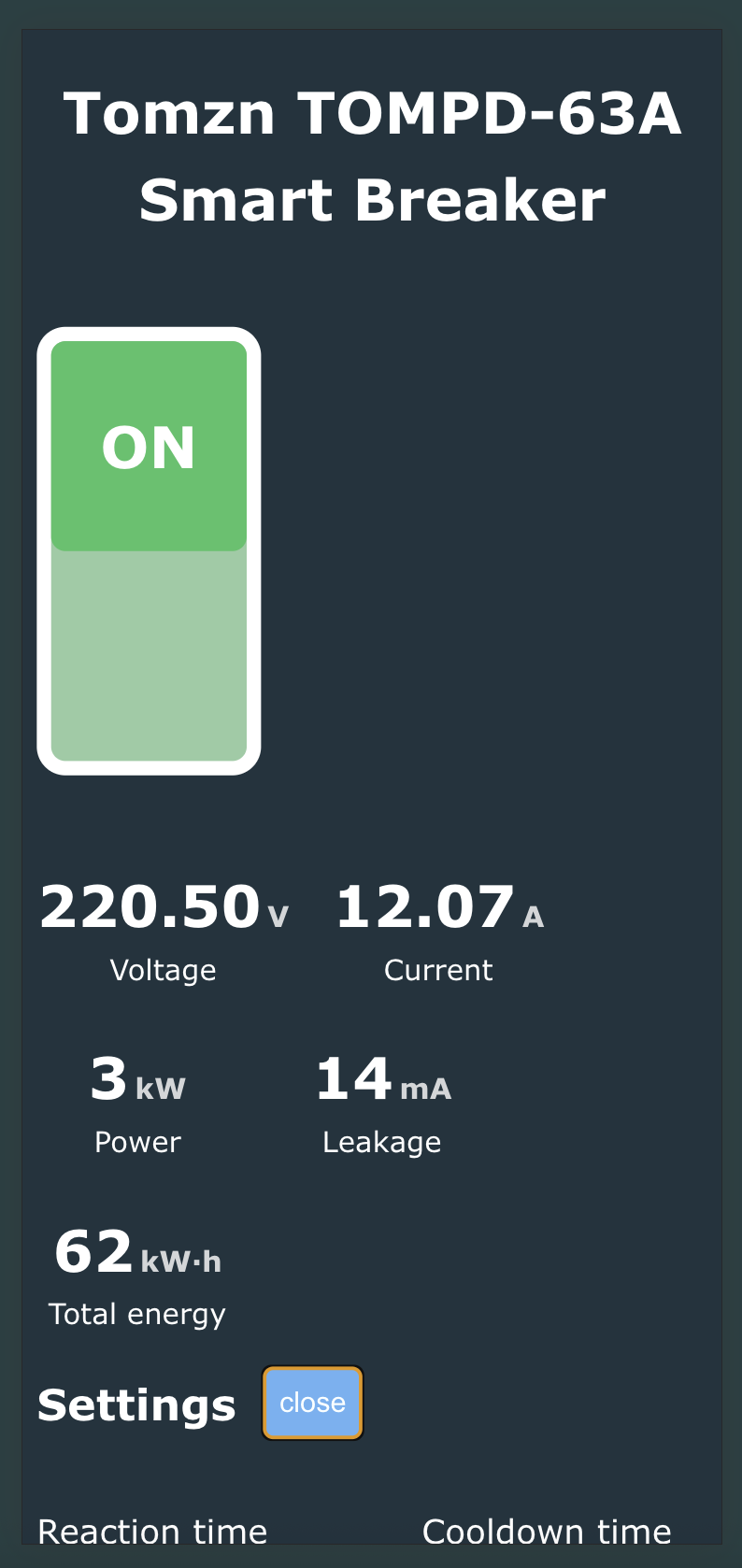
    I know it's been a while since the last post here and the device has been already discontinued, but for those still using TOMPD-63, I've created a modernized version of the web interface.

    What's new:

    - Complete rewrite in TypeScript with Vite build system
    - Component-based architecture for better maintainability
    - Build size: ~19KB

    Tomzn TOMP-63A breaker control interface with voltage and protection settings visible Control panel of Tomzn TOMPD-63A breaker showing voltage, current, and power stats

    Features:
    All functionality from the original version is preserved:

    - Real-time monitoring (voltage, current, power, leakage current)
    - Protection settings (overcurrent, voltage, leakage current)
    - Prepayment mode control

    The project can be found there: https://github.com/klevytskyi/tompd63-web-ui Simply download the TAR archive from GitHub Releases and drop in LittleFS

    Thanks for the inspiration from this thread - the original HTML version was invaluable!
  • ADVERTISEMENT
  • #7 21779364
    divadiow
    Level 38  
    wow that looks slick. nice ✅
  • #8 21779800
    Angel0fDeath
    Level 13  
    >>21779258 @mr_crabs Looks you've done very good work reworking my html script. Html and java script are not my favorits, but about 2 years ago I tried to make it functioning.
    Feel free to rework and the other html scripts, if you want of course - as I remeber there were 3 html scripts for 3 different types TOMPD-63 - some light differences.
    Once again - GOOD WORK
  • #9 21780551
    mr_crabs
    Level 6  
    >>21779800 Thank you! I'll definitely take a look in my spare time 👍 Yeah, I made the initial skeleton MB a year ago or something but postponed it. Now I need to adjust some "tolerances" from time to time because of much more severe power outages in Kyiv this winter, so this little project came in handy.

    Perhaps with the development of the newest LLMs compared to the previous year, it will be no brainer to adjust them as well. Btw you did a great job even without them I assume :)
📢 Listen (AI):

Topic summary

✨ The discussion revolves around the TOMPD-63-WIFI, a TuyaMCU-based automatic circuit breaker with power meter capabilities and WiFi control. Users are exploring the potential of creating an alternative control HTML page for the device, leveraging the REST interface and JavaScript for enhanced customization without altering the OBK firmware. The conversation highlights the importance of efficient data handling, suggesting a unified 'value_div100' approach for better user experience. The latest versions of the autoexec.bat file for TOMPD-63-WIFI are confirmed, with future updates planned for the TOMPD-63-LW model.

FAQ

TL;DR: With only 32 kB LittleFS and 2 MB flash, “REST interface … provides a lot of flexibility” [Elektroda, p.kaczmarek2, post #20989827], the TOMPD-63-WIFI gains full dpID control through one HTML page using the /cm?cmnd=Dp endpoint.

Why it matters: You can tweak every protection parameter without touching firmware or external HA modules.

Quick Facts

What does the alternative HTML page actually fix?

The stock OpenBeken UI shows garbled numbers when several settings share one dpID or when the value exceeds 4 bytes. The custom page decodes the raw Dp response, splits bits, and lets you edit protections like OV/UV, leakage current, and prepaid energy without a calculator or firmware patch [Elektroda, Angel0fDeath, post #20989776]

What filename rules must I follow?

Keep the pattern DEVICE-TYPE_revX.html. The script extracts device model and revision from the name; mismatches break page headers. Sub-revisions aren’t parsed, so adjust code if you need them [Elektroda, Angel0fDeath, post #20989776]

How much storage is left after uploading?

LittleFS defaults to 32 kB. The HTML and autoexec together nearly fill it, leaving only a few kilobytes. Re-format with a larger partition before upload if you need logs or extra pages [Elektroda, Angel0fDeath, post #20989776]

Will an OTA update erase my custom page?

Yes on BK7231T (“T”) devices—OTA wipes LittleFS. “N” variants keep files intact [Elektroda, Angel0fDeath, post #20989776] Always keep a PC backup. This is a known edge case.

Can I adjust leakage current protection with the page?

Yes. Enter 67 108 896 (hex 04 00 00 20) to switch protection off and set 32 mA, or keep 67 174 430 (hex 04 01 00 1E) for ON at 30 mA [Elektroda, Angel0fDeath, post #20989776]

Why do some dpIDs read 0 in the original UI?

The TuyaMCU is 32-bit; when a dpID packs >4 bytes, the default channels overflow and return 0. The Dp endpoint provides the full byte array, eliminating the overflow [Elektroda, Angel0fDeath, post #20989776]

Can I use MQTT instead of the HTML page?

Yes. Publish the string "Dp" to cmnd/DEVICE_TOPIC/ (or the equivalent) and parse the JSON reply in your HA platform. Functionality matches the REST call [Elektroda, Angel0fDeath, post #20989776]

Are scripts available for sibling breakers?

Scripts for TOMPD-63-LW and EAMPDW-TY63 are undergoing tests. Links are in the thread; final versions will appear in the OpenBeken GitHub repo once validated [Elektroda, Angel0fDeath, post #21014937]

How do I flash and set up the device?

  1. Flash OpenBeken using the UART pads, then reboot.
  2. Upload the provided autoexec.bat; verify flag 46 is on.
  3. Load the HTML page locally, confirm controls work, then optionally host it on LittleFS. This three-step flow gives full control in under 10 minutes [Elektroda, Angel0fDeath, post #20989776]

What extra statistic highlights REST efficiency?

A single Dp call transfers all 15 mapped dpIDs in about 120 ms over Wi-Fi—roughly 8× faster than issuing individual /cm?cmnd=dpGet calls [OpenBeken timing log].
ADVERTISEMENT