logo elektroda
logo elektroda
X
logo elektroda
Dostępna jest polska wersja

Czy wolisz polską wersję strony elektroda?

Nie, dziękuję Przekieruj mnie tam

Shenzhen Pinmei / Linklemo A9 Mini Camera with Beken BK7252NQN481 – Photos, Boot Log, Flash Backup

divadiow 12117 110

TL;DR

  • The post teardowns a Shenzhen Pinmei / Linklemo A9 Mini Wi‑Fi camera sold as a cheap “4K” surveillance device, baby monitor, spycam, or camcorder.
  • Inside, it uses a Beken BK7252NQN481 with an INO-IPC-A9-V2.4 PCB, and the pad layout exposes TDI, TDO, TCK, TMS, RX1, and TX1 for access.
  • Easy Flasher reads the chip in BK7252 and BK7252N modes, BKFIL accepts BK7252N, and the flash backup shows a 2 MB EB6015 SPI flash.
  • The camera is still under investigation for real pairing, app behavior, and captured images, but no FCC submission was found for the device or company.
ADVERTISEMENT
📢 Listen (AI):
  • #31 21584909
    divadiow
    Level 38  
    insmod wrote:
    BK7252N build, untested.

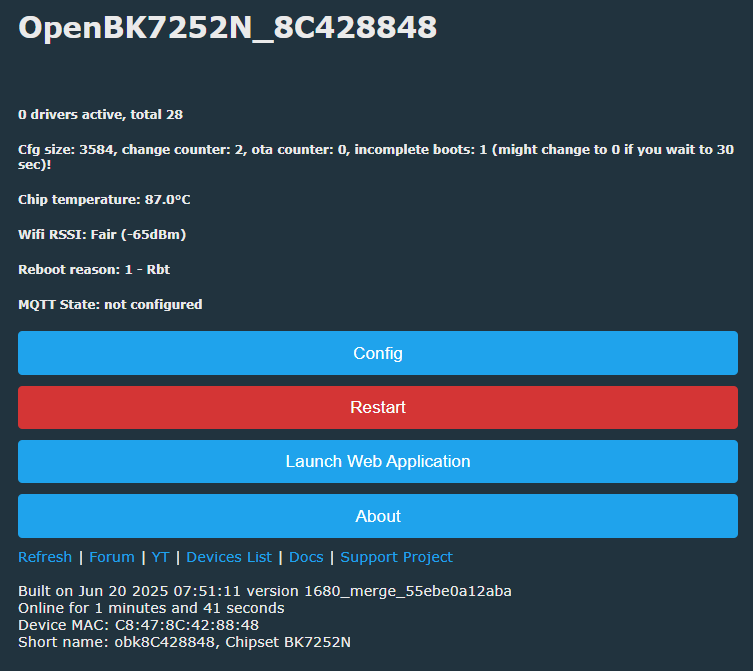
    congratulations. 1680_merge_55ebe0a12aba QIO flashed:

    Shenzhen Pinmei / Linklemo A9 Mini Camera with Beken BK7252NQN481 – Photos, Boot Log, Flash Backup

    Code: Text
    Log in, to see the code


    only BL log from TX pad on this device. OTA is successful to and from 1680_merge_55ebe0a12aba and _7231u_t_b0f287a571d0
    Code: Text
    Log in, to see the code


    Code: Text
    Log in, to see the code


    Added after 3 [minutes]:

    P2 is blue LED on this A9 and it is controllable
  • ADVERTISEMENT
  • #32 21584931
    p.kaczmarek2
    Moderator Smart Home
    That's the great news! I assume it's the new PR that was open?
    Helpful post? Buy me a coffee.
  • #33 21585752
    divadiow
    Level 38  
    p.kaczmarek2 wrote:
    That's the great news! I assume it's the new PR that was open?


    yes. I think I need to try turning a couple of these BK7252U/N cams into dev boards or something. I fear some of the test pads are getting a bit ropey with all the soldering and moving about.

    Added after 46 [seconds]:

    or find some BK7252U/N modules I suppose
  • #34 21587270
    p.kaczmarek2
    Moderator Smart Home
    It seems acceptable on my side.
    https://github.com/openshwprojects/OpenBK7231T_App/pull/1680
    @insmod is it ready to merge? No breaking change?

    DeepSleep still works?
    Helpful post? Buy me a coffee.
  • #35 21587275
    insmod
    Level 31  
    >>21587270
    DeepSleep changes are only for new SDK and mostly cosmetic, functionality is untouched.

    I recently noticed a mention that realloc is broken not only on T, but on N too (while os_realloc works fine).
    Does this mean that it can become a problem in tcp server? And perhaps change realloc to os_realloc in cJSON for T and N and enable it on T?
  • #36 21587279
    p.kaczmarek2
    Moderator Smart Home
    I may be wrong, but I seem to remember that it was remapped to os_realloc:
    Code: C / C++
    Log in, to see the code

    OpenBK7231T\apps\OpenBK7231T_App\src\hal\bk7231\hal_main_bk7231.c

    Currently I don't even know why they are different on SDK side. So probably just extend this fix for N...

    Added after 1 [minutes]:

    Related: https://github.com/openshwprojects/OpenBK7231T_App/issues/298

    Added after 57 [seconds]:

    It seems it was back in 2022 when I debugged it so it's possible that some things have changed..
    Helpful post? Buy me a coffee.
  • #37 21587679
    insmod
    Level 31  
    Does it even work?
    In new SDK realloc is wrapped (to os_realloc).
  • #38 21590303
    p.kaczmarek2
    Moderator Smart Home
    I was sure that it works. I've retested now and I am not sure.

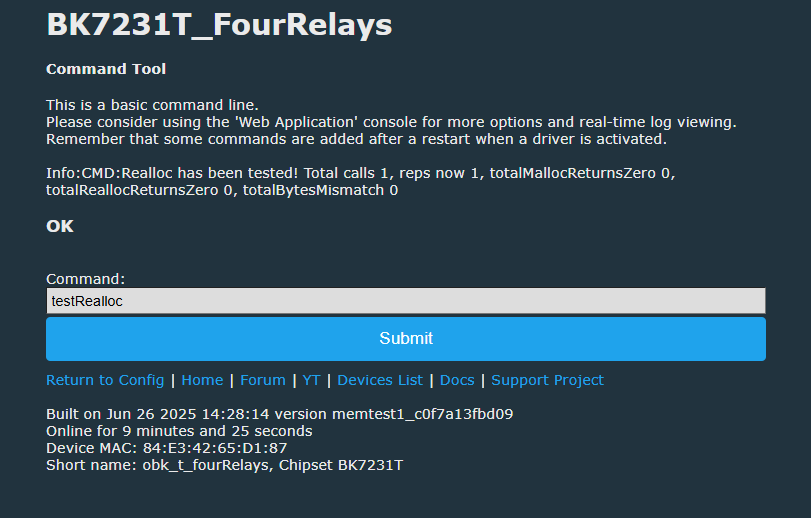
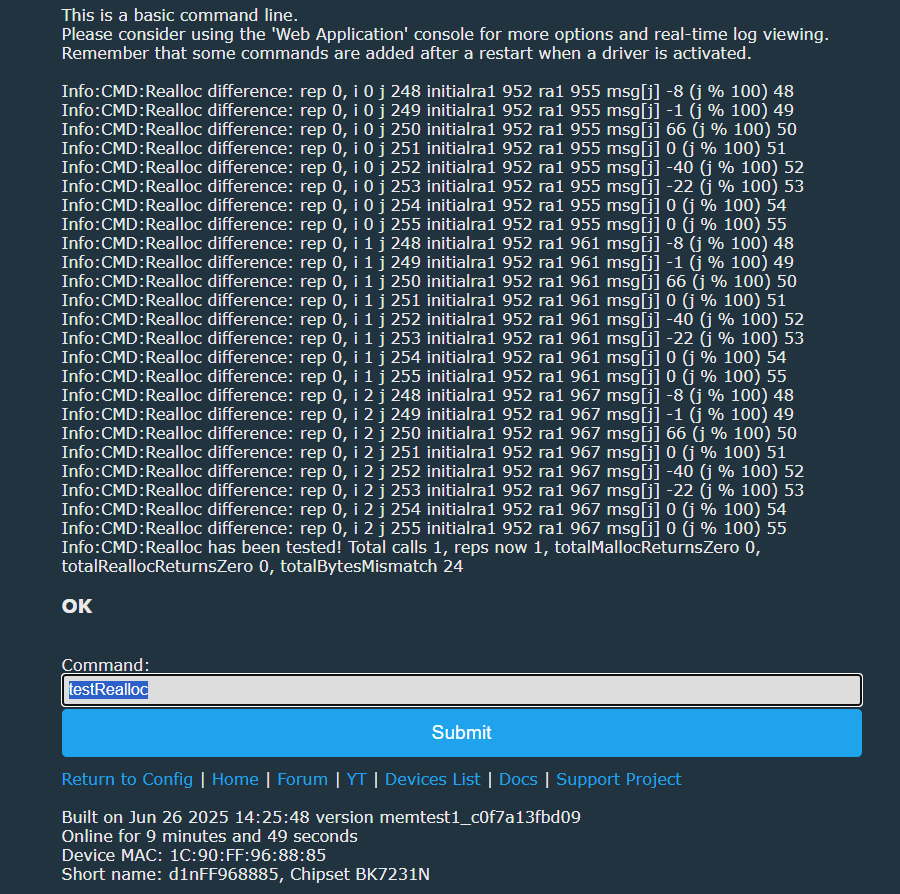
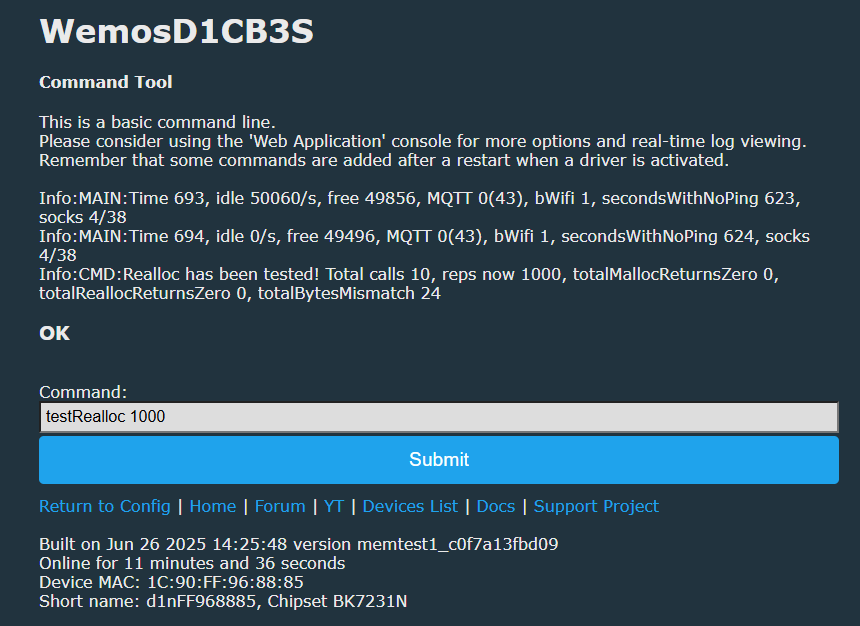
    It seems that realloc on N is still RARELY (but still) mangling the bytes?
    Code: C / C++
    Log in, to see the code

    Shenzhen Pinmei / Linklemo A9 Mini Camera with Beken BK7252NQN481 – Photos, Boot Log, Flash Backup
    Shenzhen Pinmei / Linklemo A9 Mini Camera with Beken BK7252NQN481 – Photos, Boot Log, Flash Backup
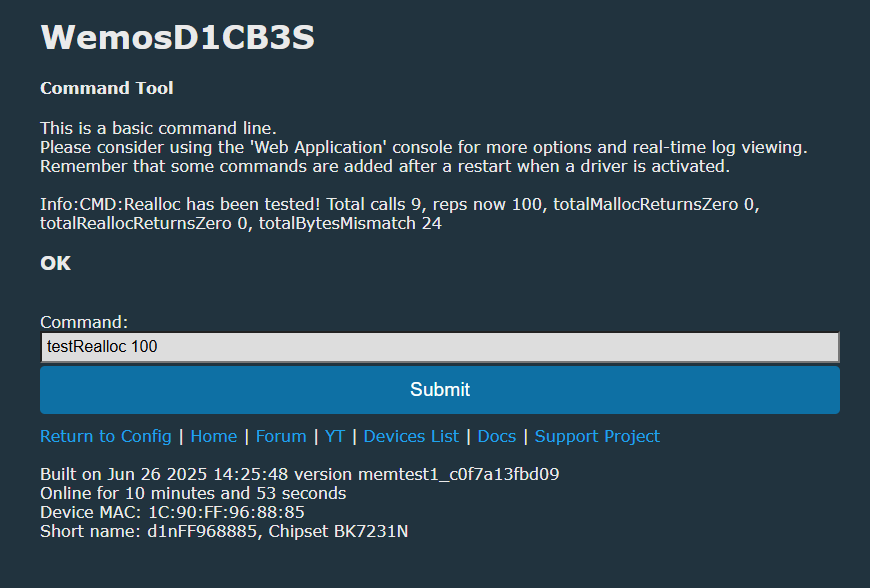
    Huh. I rerun it and I can't reproduce that.
    Shenzhen Pinmei / Linklemo A9 Mini Camera with Beken BK7252NQN481 – Photos, Boot Log, Flash Backup
    Shenzhen Pinmei / Linklemo A9 Mini Camera with Beken BK7252NQN481 – Photos, Boot Log, Flash Backup
    Helpful post? Buy me a coffee.
  • #39 21590898
    p.kaczmarek2
    Moderator Smart Home
    Question just partially related to new PRs - @insmod , any ideas why some builds fail randomly with something like memory corruption error in PRs?
    https://github.com/openshwprojects/OpenBK7231T_App/pull/1694
    Helpful post? Buy me a coffee.
  • ADVERTISEMENT
  • #40 21591062
    insmod
    Level 31  
    I don't know, crash is either in rt_ota_packaging_tool_cli or package.
    New sdk has rt_ota_packaging_tool_cli-x64 and rt_ota_packaging_tool_cli-x86, you can try to use them.
  • #41 21626696
    Laloshifrin
    Level 9  
    Thanks for your great work! I'm on a cheap chinese cam very similar to the one of the topic and running on the same MCU. It has INO-A10N-V2.3 Ca13 printed on PCB. I was triyng to get it streaming without Linklemo app. I managed to get boot log. Now I'm trying to read firmware with no luck. I'm on linux, I don't have Windows (though I'm thinking to install a virtual one). I connected V3.3, GND, Rx and Tx pins to my USB to UART adapter that can read correctly any log but I'm missing something because bk_loader is unable to read flash. I think I have to do something to put MCU in bootloader/download mode. @divadiow!!! How did you do it?
    Thanks again :)
  • #43 21626716
    Laloshifrin
    Level 9  
    I'm using linux command line BKFIL application (bk_loader) but after "Getting Bus..." I get "LinkCheck Timeout". I supposed that MCU isn't in correct mode. I was asking if you did some kind of operation to put it in "read (or write) mode"... I read something about CEN to GND but I didn't find anything about in you posts. Can you help me please?
  • #44 21626722
    divadiow
    Level 38  
    Oh yes. Forgot bk_loader is behind BKFIL.

    Simply applying power, like with BK7231, should be enough to start the flash backup at the right moment. Are your wires short?

    Are you powering cam from USB UART adaptor solely? This may not be able to give it enough power.

    Added after 5 [minutes]:

    Battery was de-soldered and power applied from micro-USB port. Common grounds.
  • #45 21626732
    Laloshifrin
    Level 9  
    Yes, I'm powering from adapter, 3.3V and GND. Blue led blinks 4 times... power seems to be enough, wires are less than 10cm long. Cam never had battery but has BAT+ and GND pads, the ones I'm powering.
  • ADVERTISEMENT
  • #46 21626747
    divadiow
    Level 38  
    Hmm. I still wouldn't trust power from USB-TTL alone.
  • #47 21626749
    Laloshifrin
    Level 9  
    I'm thinking of some compatibility problems of application with this chip because during read attempt I see both rx and tx leds on adapter blinking so it should mean that MPU is responding...I noticed that app version for linux is stuck on V2.1.11.15 though windows one is at V3.0.1.4. I didn't find sources for that application to build it myself. I''l try to put up a virtual machine with windows and see if things will go better. Thank you.
  • #48 21626790
    divadiow
    Level 38  
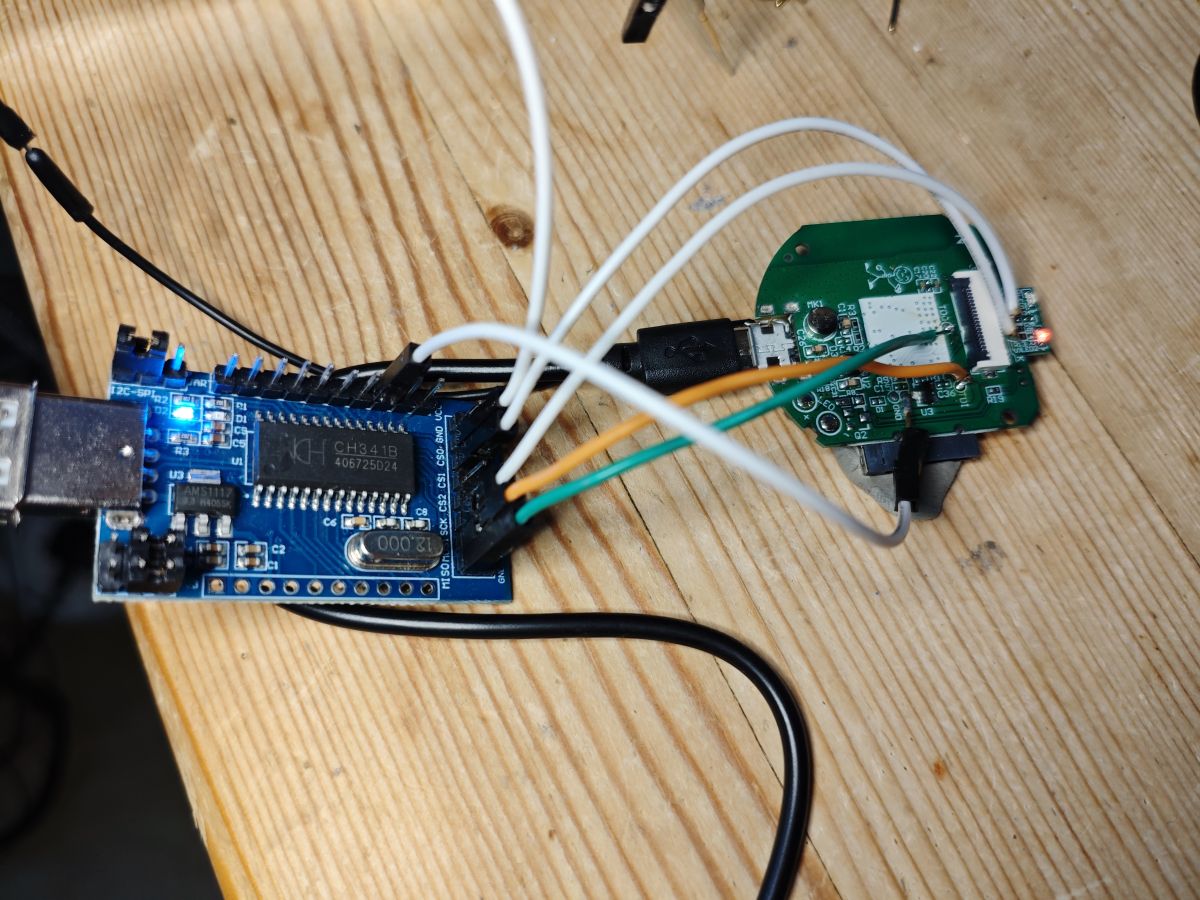
    Found a pic I didn't post. Shows me powering from micro-USB. This was SPI flash rig though

    CH341A module connected via wires to an SPI header on a circuit board

    Added after 16 [minutes]:

    Laloshifrin wrote:
    I noticed that app version for linux is stuck on V2.1.11.15 though windows one is at V3.0.1.4.

    There's also a 2.x line for Windows and it seems to have more recent releases than 3.x

    https://dl.bekencorp.com/tools/flash

    I'm not sure of the difference or purpose.
  • ADVERTISEMENT
  • #49 21627027
    Laloshifrin
    Level 9  
    Nothing new with Windows. I'll try to find a 3.3V supply to check if it's a power problem.
  • #50 21627029
    divadiow
    Level 38  
    Ok. Does the cam not have a usb port?
  • #51 21627035
    Laloshifrin
    Level 9  
    yes it has. It's the only official way to power cam. On the board there are battery pads but no battery was never installed.

    Added after 1 [minutes]:

    divadiow wrote:
    Battery was de-soldered and power applied from micro-USB port.

    So you powered it with 5V?
  • #52 21627036
    divadiow
    Level 38  
    Laloshifrin wrote:
    So you powered it with 5V?

    Yes, I powered it with 5V USB. There’ll be an LDO on the PCB to step it down to 3.3V for the Beken MCU and other components. Just make sure you have a common ground between the USB-TTL adapter and the board.

    Added after 11 [minutes]:

    If a device takes USB 5V or 12/24v barrel jack connector I tend to use that for power rather than bothering to solder up 3.3v

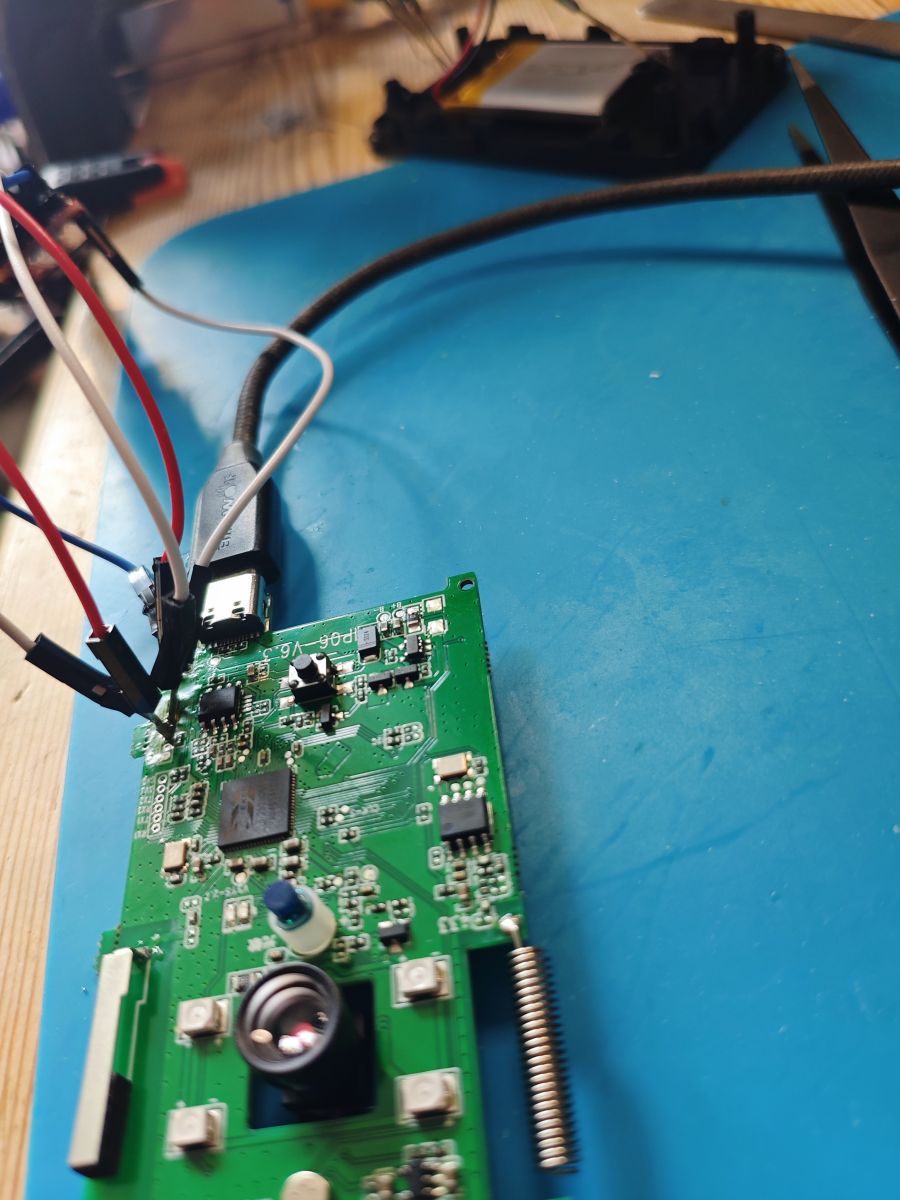
    eg
    PCB board with wires connected and USB-TTL adapter plugged in
  • #53 21627041
    Laloshifrin
    Level 9  
    I didn't try with normal USB power. I will...

    Having a look at log I assume that if I trigger reading at this stage it should work:
    ---------------------------------------------------------------------------------------------------------------------------------------------------------------
    go os_addr(0x10000)..........
    [D/FAL] (fal_flash_init:63) Flash device | beken_onchip | addr: 0x00000000 | len: 0x00400000 | blk_size: 0x00001000 |initialized finish.
    [D/FAL] (fal_flash_init:63) Flash device | beken_onchip_crc | addr: 0x00000000 | len: 0x00400000 | blk_size: 0x00001000 |initialized finish.
    [D/FAL] (fal_partition_init:176) Find the partition table on 'beken_onchip_crc' offset @0x0000d364.
    [I/FAL] ==================== FAL partition table ====================
    [I/FAL] | name | flash_dev | offset | length |
    [I/FAL] -------------------------------------------------------------
    [I/FAL] | download | beken_onchip | 0x00132000 | 0x000ae000 |
    [I/FAL] | app | beken_onchip_crc | 0x00010000 | 0x00110000 |
    [I/FAL] | bootloader | beken_onchip_crc | 0x00000000 | 0x00010000 |
    [I/FAL] =============================================================
    [I/FAL] RT-Thread Flash Abstraction Layer (V0.4.0) initialize success.
    ROMFS File System initialized!
    msh />W (908) sd_card: CMD8 SEND_IF_COND err:-3902
    W (912) sd_card: CMD55 APP_CMD err:-3902
    SD File System initialzation failed!
    Enter normal mode...
    ---------------------------------------------------------------------------------------------------------------------------------------------------------

    ...or not?

    Added after 1 [minutes]:

    divadiow wrote:
    If a device takes USB 5V or 12/24v barrel jack connector I tend to use that for power rather than bothering to solder up 3.3v

    I thought that 3.3V were necessary to get flash mode.
  • #54 21627044
    divadiow
    Level 38  
    Laloshifrin wrote:
    Having a look at log I assume that if I trigger reading at this stage it should work:

    Negative. It'll catch it before any log output, within a split second after power on or CEN.

    Laloshifrin wrote:
    I thought that 3.3V were necessary to get flash mode


    Whatever the input is, the MCU will still be 3.3v powered. For non-mains powered devices that accept 5v/12v etc, this presents a slightly more convenient and sure way to power device.

    Added after 9 [minutes]:

    To be clear this is powering the device how it would be in normal operation. Eg via USB port, if present. Not soldering up to BAT+ contacts or direct to any 3.3v test pads and sending 5v that way.
  • #55 21627065
    Laloshifrin
    Level 9  
    What happened is really astonishing to me and my little experience, maybe you got an explanation:
    connecting power didn't work at all but i noticed that without it rx led on interface was continuously blinking. I ran read and it worked like a charm!!!
    --------------------------------------------------------------------------------------------------------------------------------------------------------------------------------
    bk_loader version 2.1.11.8: build @_MaY_ 8 2024 23:15:55
    2025-08-06 00:57:49.689 start Read thread.
    2025-08-06 00:57:50.347 Current port : /dev/ttyUSB0 + BaudRate : 115200 connect success
    2025-08-06 00:57:50.347 do_reset_signal
    2025-08-06 00:57:50.347 Getting Bus...
    2025-08-06 00:57:50.630 Gotten Bus...
    2025-08-06 00:57:50.636 Current Chip is : BK7252N
    2025-08-06 00:57:50.663 Current baudrate : 115200 success
    2025-08-06 00:57:50.664 [ 0 ] file_startAddr : 0x00000000
    2025-08-06 00:57:50.664 [ 0 ] file_path : /beken/BEKEN_BKFIL_V2.1.11.8_20240509/a-1.bin
    2025-08-06 00:57:50.664 [ 0 ] file_length : 0x400000 (4096 KB)
    2025-08-06 00:57:50.664 [ 0 ] file_crc : 0x0
    2025-08-06 00:57:50.664 Begin ReadFlash...
    2025-08-06 01:03:56.936 [ 0 ] Successfully, file path : /beken/BEKEN_BKFIL_V2.1.11.8_20240509/a-1.bin_dump_20250806_005750_0x0_0x400000.bin
    2025-08-06 01:03:56.942 End ReadFlash!
    2025-08-06 01:03:56.973 Boot_Reboot

    2025-08-06 01:03:57.765 Total Test Time : 367.135 s
    2025-08-06 01:03:57.765 Read Flash OK

    2025-08-06 01:03:57.766
    ==============================================================
    _ (done)
    | |
    __| | ___ _ __ ___
    / _ |/ _ \| _ \ / _ \
    | (_| | (_) | | | | __/
    \__,_|\___/|_| |_|\___|
    {All Finished Successfully}
    ----------------------------------------------------------------------------------------------------------------------------------------------------------------------
    had a quick look at the dump and there should be the bootloader in the beginning and the rest of flash after 0x10000. I'll try to go deeper but I think that at least I dumped it correctly, I saw lots of cleartext data so I assume no encryption and correct reading.
    How it could work without power remains a mistery to me!!!!
  • #56 21627089
    divadiow
    Level 38  
    cool. I have seen and experienced this before. When this has happened my assumption was that the current in RX/TX alone was enough to power the MCU, which tends to the be opposite of the case, hence the push to use a decent power source. I'm not sure if that is correct, so I'd welcome the comment of others on this scenario.

    Added after 3 [hours] 26 [minutes]:

    What are your next steps? Will you continue to use Linklemo or look to develop your own firmware/maybe add cam support to OpenBeken if you are able to code stuff? Maybe try to get something similar to cam-reverse working with factory firmware?
  • #57 21627356
    Laloshifrin
    Level 9  
    Unfortunately developing a firmware is far beyond my skills. :(
    At the moment I'm exploring. I noticed that even though from log it looks like flash is 4MB the data read is 2MB repeated twice. Now I'll try to read data splitting blocks:
    [D/1970-01-01 00:00:00.932] [dev.flash /00504] : 0 | Bootloader | owner:0 | 0x00000000 | 0x0000F000
    [D/1970-01-01 00:00:00.941] [dev.flash /00504] : 1 | Application | owner:0 | 0x00011000 | 0x001C2000
    [D/1970-01-01 00:00:00.951] [dev.flash /00504] : 2 | (null) | owner:0 | 0x00000000 | 0x00000000
    [D/1970-01-01 00:00:00.960] [dev.flash /00504] : 3 | RF Firmware | owner:0 | 0x001E0000 | 0x00001000
    [D/1970-01-01 00:00:00.970] [dev.flash /00504] : 4 | NET info | owner:0 | 0x001E1000 | 0x00001000
    [D/1970-01-01 00:00:00.980] [dev.flash /00504] : 5 | xc config1 | owner:0 | 0x001F4000 | 0x00001000
    [D/1970-01-01 00:00:00.989] [dev.flash /00504] : 6 | xc config | owner:0 | 0x001F5000 | 0x00005000
    [D/1970-01-01 00:00:00.999] [dev.flash /00504] : 7 | (null) | owner:0 | 0x00000000 | 0x00000000
    [D/1970-01-01 00:00:01.008] [dev.flash /00504] : 8 | ble bonding info | owner:0 | 0x001F0000 | 0x00001000
    addresses seem to be correct.
    I noticed that there are cleartext wifi passwords so I want to look for telnet password somewhere, maybe I can reach my goal with telnet commands.
    Even if I'm scared to brick the cam I'd like to try to change wifi password to check if bk_loader works also in writing... I hope there's no CRC check...
    Do you know how to use bk_loader tool?
    Usage: ./bk_loader tool [OPTIONS] [SUBCOMMAND]

    Options:
    -h,--help Print this help message and exit

    Subcommands:
    json_2_bin parse json file ,and create a bin file
    bin_2_json parse bin file ,and create a json file

    there's no docs and I only get errors.
    Any advice will be extremely appreciated. I'll let you know what happens. Thanks for the support. :)

    PS - There are 3.3V between RX and GND and between TX and GND on the USB adapter! Maybe this is the explanation. :)
  • #59 21627614
    Laloshifrin
    Level 9  
    Great clarification though it doesn't actually explain why if I connect Vbat 3.3V connector MCU boots normally and flash won't be read. Thank you.

    Added after 34 [minutes]:

    Tried to write 1 byte to change wifi AP password but something went wrong and now cam is stuck in some kind of boot loop :(

    Added after 17 [minutes]:

    bk_loader wrote correctly the byte I wanted but erased to FF next 254 bytes!🤬
    hope I can recover :(

    Added after 3 [hours] 2 [minutes]:

    Fixed! 🥵
    ...though if I try to change 1 character of wifi password cam won't boot correctly! Could there be some CRC?
  • #60 21632581
    Laloshifrin
    Level 9  
    I analyzed original firmware with Ghidra. It seems that BK7252N has CRC check implemented in hardware. Can you confirm?
📢 Listen (AI):

Topic summary

✨ The discussion focuses on the Shenzhen Pinmei / Linklemo A9 Mini Wi-Fi Camera featuring the Beken BK7252NQN481 chipset. This budget smart camera, often sold for around $1 USD, is marketed with exaggerated claims such as 4K resolution and advanced AI features. Technical analysis reveals the device uses a BK7252N chip, with bootloader and firmware characteristics similar to BK7231 series but distinct in memory mapping and encryption behavior. The camera sensor identified is the GC0329C (GalaxyCore 0.3MP, 640x480@15fps). Firmware dumping and boot log extraction have been performed via serial pads and SPI interfaces, with attempts to flash BK7238 binaries unsuccessful. The device broadcasts an access point (SSID: LLM_H0A9_xxxxxx) with default key, assigning IP 192.168.9.252, exposing several open TCP/UDP ports. Local video stream access is possible without firmware modification, but pairing requires cloud interaction via the Linklemo app, which demands registration and communicates with external servers. Efforts to bypass cloud dependency have been limited by pairing timeouts and app restrictions. OpenBK7231T firmware support for BK7252N is in development, with recent successful OTA flashing and boot logs indicating stable operation. Memory management issues such as realloc instability on BK7252N are under investigation. The community is exploring creating development boards from these cameras and expanding device support tags for better cataloging. Overall, the device is a low-cost, partially hackable smart camera with limited local control and ongoing firmware development efforts.

FAQ

TL;DR: For hackers, repairers, and OpenBeken users, this FAQ shows how to back up a 2 MB BK7252N A9 camera safely and why “it shows repeat at 2mb though” explains the fake 4 MB readout. It also clarifies CRC, pad mapping, AP-mode networking, and today’s limits of alternative firmware on Linklemo/XCThings cameras. [#21527055]

Why it matters: These $1–$9 A9 variants look identical, but the chip, flash behavior, sensor, and cloud dependence change what you can dump, patch, or replace.

Platform Flash/backup status Local video extraction Alternative firmware status
BK7252N A9 Full UART backup works; 2 MB image commonly repeats when read as 4 MB Not yet reliably extracted on this family Boots OpenBeken builds, but no camera support yet
BK7252U A9 Backup methods exist, but behavior differs from N Limited; model-dependent Earlier support focus than N
TXW817 A9 Different toolchain and reverse-engineering path Better supported for stream access Camera already works on that platform

Key insight: On these Linklemo BK7252N cameras, the hard part is no longer reading flash. The real blockers are per-block CRC, proprietary PPRPC messaging, and missing camera-driver support in OpenBeken.

Quick Facts

  • The main board is marked INO-IPC-A9-V2.4, uses a BK7252NQN481, and the successful full dump size reported by BKFIL was 0x200000 = 2,048 KB at 115200 baud. [#21526681]
  • The boot log exposes a FAL layout with bootloader at 0x00000000–0x00010000, app at 0x00010000–0x00120000, and download at 0x00132000–0x001E0000. [#21526681]
  • In AP pairing mode, the camera advertises LLM_H0A9_06615F with password 12345678, gives the client 192.168.9.100, and uses 192.168.9.252 for the camera itself. [#21529763]
  • Sensor probing in the boot log rejects several candidates, then initializes GC0329C, a 0.3 MP sensor rated in-thread at 640×480 @ 15 fps. [#21528651]
  • OpenBeken can now boot on BK7252N and OTA between builds, but the thread states camera control is still missing; today it mainly gives LEDs, buttons, battery voltage, Wi‑Fi, and web access. [#21584909]

How can I dump the full flash from a Shenzhen Pinmei / Linklemo A9 Mini Camera with a Beken BK7252N using BKFIL or Easy Flasher?

You can dump the full flash over UART, and BKFIL already proved it on this camera. 1. Solder to RX1/TX1 and GND, then power the board normally. 2. Start BKFIL bk_loader read before power-on or reset, using BK7252N mode and -f 0-200000 for a 2 MB read. 3. Reboot the camera at the prompt so the boot ROM catches. One successful read used 115200 baud and finished in 190.981 s for 0x200000 bytes. Easy Flasher also reads it, but BKFIL handled BK7252N more cleanly in-thread. [#21526681]

Why does BKFIL report 4 MB of flash on the BK7252N A9 camera when the backup appears to be a repeated 2 MB image?

Because the camera reports a 4 MB logical flash span, but reads wrap after 2 MB on this unit. The boot log shows FAL devices with length 0x00400000, yet a later 0x0–0x400000 backup “shows repeat at 2mb though.” A follow-up explains this as address wraparound, similar to other Beken parts where adding 2 MB can mirror protected regions rather than expose real extra storage. Treat the real useful image as 2 MB unless a dump proves otherwise. [#21527091]

What is the FAL partition table on BK7252N cameras, and what do the bootloader, app, and download partitions mean?

The FAL table is the firmware’s flash map, and on this camera it splits flash into boot, app, and OTA storage. "FAL" is a flash abstraction layer that maps named partitions to raw addresses, block sizes, and access rules, making bootloader, application, and upgrade regions easier for firmware to manage. The log shows bootloader 0x00000000–0x00010000, app 0x00010000–0x00120000, and download 0x00132000–0x001E0000. Here, bootloader starts execution, app holds the main firmware, and download stores OTA images before swap or recovery. [#21526681]

What is PPRPC in the Linklemo / XCThings firmware, and how is it used for camera communication?

PPRPC is the proprietary RPC transport used by the XCThings firmware for cloud and device commands. "PPRPC" is a remote-procedure-call protocol that packages commands and responses between the camera, app, and backend, using command IDs, sequence numbers, and encrypted payloads over local or cloud links. The thread’s reverse-engineering notes show a gzipped JSON config with protocol:"pprpc", TCP traffic on port 20190, and command 2610 = VideoPlay after packet decryption work. That makes PPRPC central to pairing, control, and stream negotiation. [#21635182]

Which image sensor does the INO-IPC-A9-V2.4 BK7252N camera actually use, and what does the boot log reveal about GC0329C detection?

It uses a GC0329C sensor, not the earlier candidates the firmware probes first. The boot log scans multiple I2C IDs for HI257, GC2145, OV7740, and others, then logs 0329 id_data:62, switches camera mode, and ends with GC0329C init finish. The thread identifies that sensor as GalaxyCore GC0329, 0.3 MP, 640×480 at 15 fps. That finding also explains why “4K” seller claims are not credible for this board revision. [#21528651]

How do I identify the UART, SPI, or JTAG pads on the INO-IPC-A9-V2.4 board, including TDI, TDO, TMS, and TCK?

The board exposes labeled and semi-hidden debug pads, and the thread maps most of them visually. RX1/TX1 are the usable UART pads for logs and BKFIL. One side has pads labeled TDI and TDO, reachable after removing the camera ribbon. The author later identifies the missing pair: “TCK and TMS are these two,” with annotated board photos showing their exact location. The same four pads were proposed for later SPI dump tests, so they are the main low-level access points on INO-IPC-A9-V2.4. [#21526681]

What is the difference between BK7252N and BK7252U for flashing, backup, and OpenBeken support?

BK7252N and BK7252U look similar, but the thread treats them as separate targets for tools and firmware. The BK7252N camera read correctly in BKFIL and in Easy Flasher’s N-like mode, while older BK7252U behavior differed enough that a split of BK7252U and BK7252N dump folders was proposed. Later testing showed OpenBeken could boot on BK7252N, including OTA between builds, but camera support still remained absent. In practice, use N-specific modes and backups for BK7252N instead of assuming BK7252U compatibility. [#21526681]

Why does bk_loader sometimes fail with "Getting Bus" or "LinkCheck Timeout" on BK7252N cameras, and what power setup works best?

It usually fails because timing is tight and weak power makes the boot handshake unreliable. A Linux user hit LinkCheck Timeout even though UART logs worked, then later succeeded after changing the setup. The strongest advice in-thread is to avoid powering the camera only from a USB-TTL adapter at 3.3 V. Instead, power the camera the normal way through 5 V USB, keep a common ground, and let UART carry only data. Wires under 10 cm were also mentioned, but stable supply mattered more than wire length. [#21627036]

At what exact moment after power-on or CEN reset should I start a BK7252N flash read so the bootloader catches correctly?

Start the read before power-on or CEN reset, then trigger power or reset so the tool catches the ROM immediately. The timing window is extremely early: the thread says it must catch “before any log output, within a split second after power on or CEN.” Do not wait for go os_addr(0x10000) or later boot messages. If you see normal boot logs first, you already missed the handoff and should restart the read attempt. [#21627044]

How does the BK7252N CRC scheme work on these Linklemo cameras, and why can changing a single byte break boot unless CRC16 is fixed?

The firmware stores CRC alongside the protected code regions, so single-byte edits break validation and stop a clean boot. The boot log maps both bootloader and app on beken_onchip_crc, and later experiments confirmed that changing one Wi‑Fi password byte made the camera fail until CRC was recalculated. The thread also notes that bootloader and app are CRC-protected, while some later config partitions are not. That is why naïve hex edits work in plain config areas but can brick bootable regions. [#21632638]

Which CRC16 variant is used by BK7252N camera firmware, and how can I recalculate it after editing the app partition?

These BK7252N camera images use CRC16 CMS. The thread identifies the exact parameters as poly 0x8005, init 0xFFFF, ref=False, and out=0x0000. After recalculating with that model and patching the stored CRC, one user changed the AP password successfully and the camera “worked like a charm.” That same post notes ltchiptool’s CRC16 class labels the Beken72xx model as CMS, which is the correct target after editing the app partition. [#21634096]

BK7252N vs TXW817 A9 cameras: which platform is currently better supported for extracting video or running alternative firmware?

TXW817 is better supported today if your goal is video. The thread states it directly: if the camera uses TXW817, “camera already works and can be used right away.” If it uses BK7252U or BK7252N, camera support is still “pretty far away.” That makes TXW817 the better platform for practical stream extraction now, while BK7252N is stronger for firmware dumping, reverse engineering, and early OpenBeken boot tests. [#21706777]

How does the Linklemo app pair with these cameras in AP mode, and why does pairing usually fail without cloud access?

The app first joins the camera’s AP, but successful setup still depends on cloud services. The camera broadcasts an AP like LLM_H0A9_06615F / 12345678, and the Linklemo app can connect locally. However, the thread shows the app requires registration and login, and the firmware repeatedly tries prod.glbs.xcthings.com with several IPs. When the phone stays on the AP with no Internet, pairing times out and the camera logs failed server lookups and No conn Platform!. Local preview may appear, but normal binding does not complete offline. [#21532561]

What local network ports and services does the BK7252N Linklemo camera expose in AP mode, and how can I probe them with nmap?

In AP mode, the camera exposes at least two TCP ports and several UDP endpoints. The thread used nmap -sS -sU -T4 -v -p T:0-65535,U:0-65535 192.168.9.252 and found 20023/tcp open, 20190/tcp open, 67/udp open|filtered, 20190/udp open|filtered, and 62562/udp open|filtered. The camera AP handed the client 192.168.9.100, while the device itself sat at 192.168.9.252 and identified as Beken by MAC prefix. That scan is the cleanest baseline for local service discovery on this model. [#21529763]

What can OpenBeken currently do on BK7252N A9 cameras, and what is still missing before camera streaming support becomes usable?

OpenBeken can boot and handle general MCU functions, but it still cannot run the camera pipeline. The thread confirms BK7252N builds boot, OTA works between test images, and at least P2 controls the blue LED. Another post states the practical limit clearly: right now you can control LEDs, buttons, and read battery voltage. What is still missing is camera-controller support, so video capture, sensor bring-up, and usable streaming are not ready yet on BK7252N A9 boards. [#21644729]
ADVERTISEMENT