
logo elektroda
logo elektroda
X
logo elektroda

Cloud Cutting Dreo 517s Wall Mount Heater using an approach similar to TuyaMCU

markusdd 2373 104
Best answers

How can I cloud-cut the Dreo 517s wall heater, identify its Beken module, and back up/flash its firmware safely?

The heater appears to use a Hesung Innovation Limited MBL01 / BL2028N Beken module, and the suggested backup path is to treat it like a Beken/Tuya device: dump the stock flash first with BK7231GUIFlashTool/Easy Flasher, using TX1/RX1 for flash read/write and TX2 for logs, then restore the RF partition if OBK won’t connect because the dump showed RF at 0x1E0000 while OBK expects 0x1D0000 [#21856107] [#21856302] [#21857178] The UART protocol is TuyaMCU-like but not identical: frames start with 0x55 0xAA 0x00 , the sequence increments from 0 after boot, and the checksum is roughly (sequence + sum(payload bytes) - 1) % 256 [#21856296] The live capture showed a 10-second heartbeat/ping-pong, with full status frames carrying all datapoints, and the parsed DPs included power, operating mode, submode/context, target temperature, and several mode flags/constants [#21856296] [#21856379] A Dreo-specific driver/repo already appeared on GitHub, and an early OpenBeken port was put into PRs, so the path forward was to use that driver instead of reverse-engineering everything from scratch [#21856568] [#21868387] [#21857261]
Generated by the language model.
ADVERTISEMENT
  • #31 21856501
    markusdd
    Level 2  
    Can I get you guys any more captures that would be helpful? Certain transitions, etc.?
  • ADVERTISEMENT
  • #32 21856568
    divadiow
    Level 38  
    user Lygris on Discord has the same device and has posted their findings into a new Github repo. https://github.com/lygris/dreo_heater

    reported to be fully working with transplanted ESP in place of the BL2028N module. Head-start on a driver maybe?
  • ADVERTISEMENT
  • #33 21856931
    markusdd
    Level 2  
    >>21856568

    Wow. I almost felt stupid seeing this and asking myself why I did not find this. Until I realized it's really just been uploaded^^

    That being said: Can't ESPHome run on Bekens now anyway? I mean, a transplant is easy enough, but probably not even needed.

    But I guess the goal here is to port this driver to OpenBK? Anyway, it seems there's no need to reverse-engineer anymore, it's basically already done.
  • ADVERTISEMENT
  • #34 21856933
    DeDaMrAz
    Level 22  
    Porting such a driver will be a pain without a device in hand so that path is blocked currently I am afraid ( I may be wrong!! )

    I suggest you go ESPHome route for now and if the situation arises we can check again to port that driver to OBK in the future.
  • #35 21856994
    divadiow
    Level 38  
    markusdd wrote:
    I almost felt stupid seeing this and asking myself why I did not find this. Until I realized it's really just been uploaded^^


    :) ah yeh. I asked Lygris for their resources and they spun up a repo with it all in
  • #36 21857064
    markusdd
    Level 2  
    OK, so I guess as I have the original firmware and the uploaded ESPHome repo, I will just try to flash it and see how this works. We can always go back.
    Could I actually just flash OpenBK with the GUI Flasher and then OTA in ESPHome?

    I'll try.

    As for this endeavor: Can I provide you guys with anything more? Or would it be better to go back to the other thread with the Argo and figure out why MQTT is not working? Because I would really like to see that solved as well, because I would have a use for that one elsewhere, but without controls working it's no real use.

    EDIT: @divadiow do I have to do anythign special for flashing OBK? It worked, but I cannot connect to the wifi hotspot and when I give my wifi config via the flasher the device does not show up in my network.
  • #37 21857178
    divadiow
    Level 38  
    markusdd wrote:
    do I have to do anythign special for flashing OBK? It worked, but I cannot connect to the wifi hotspot and when I give my wifi config via the flasher the device does not show up in my network.

    may be worth restoring your RF partition from original dump to location OBK expects it to be at 0x1D0000 but your backup shows it to be at 0x1E0000.

    Easy Flasher - set BK7231M - show advanced options - custom - restore RF from backup
  • #38 21857185
    markusdd
    Level 2  
    >>21857178

    Beauty! That was it!

    So, in case I want to go the ESPHome route first — can I just OTA in an ESPHome image now? Or does this need to be physically flashed also?
  • #39 21857191
    divadiow
    Level 38  
    ah good.

    I must admit I don't know as much as I probably should about ESPHome. Roughly, it'll be a case of setting up your config in the ESPHome builder (where you'll set things like OTA and RF partition addresses (you could flash factory back and use default offsets for these bits)). Then you compile your firmware and flash.

    If I were you I think I'd probably go down the route of starting afresh from factory flash state then begin again UART flashing, rather than trying to OTA anything. Others may chime in with more info/better ideas though.
  • #40 21857194
    markusdd
    Level 2  
    >>21857191

    Yeah, generally I know how to operate ESPHome. I was just wondering if I can just OTA in the initial build via OBK OTA.

    OBK is running now, but obviously without the adapted driver it cannot be used now.

    I know that flashing ESPHome via Tasmota does work for ESPs; I was not aware if it's the same for OBK though.
  • #42 21857201
    markusdd
    Level 2  
    nothing to apologize for you guys are doing the god's work here, really.

    I will report back if flashing ESPHome over OBK is a suitable route.
    It would be certainly a good approach as the flasher has all the tooling for backup etc. until OBK can fully support climate entities and the associated slightly different TuyaMCU protocol.

    If this all truly cloud-cuts the Dreos this would be amazing. I'm actually quite impressed with the device itself. Silent, good construction and nice optics.

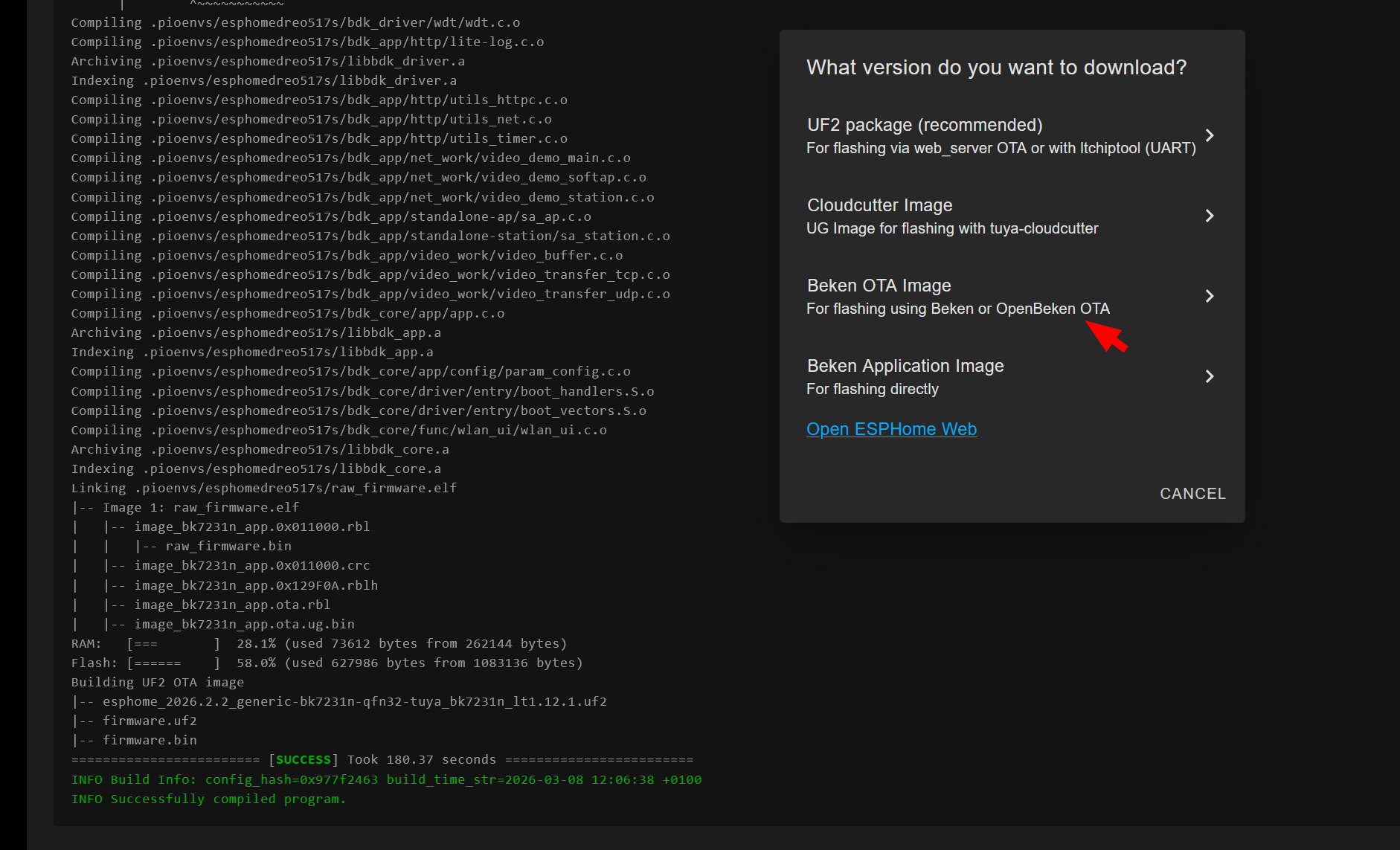
    EDIT: LOL. They even have it right there haha
    Screenshot of build log and a “What version do you want to download?” dialog with UF2 and Beken options

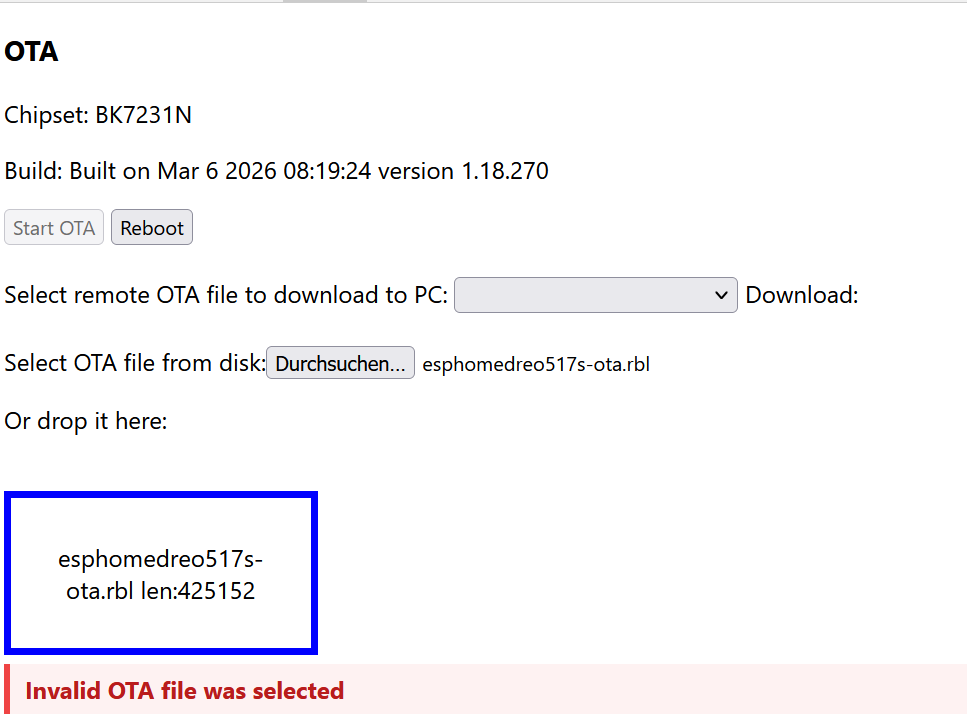
    EDIT: Welp xD
    Screenshot of an OTA page with file selection and the error “Invalid OTA file was selected”.

    Ok, so i did not get it to work. I finally had to use the .uf2 with ltchiptool, which did work.
  • #43 21857235
    p.kaczmarek2
    Moderator Smart Home
    If you have a working driver, then we should be able to port it. Why not give it a try first?
    Helpful post? Buy me a coffee.
  • #44 21857241
    markusdd
    Level 2  
    >>21857235

    I do not have a working driver xD.

    But diadiow surfaced this ESPHome driver via Discord, so I am now trying that first to see how that works.

    I guess first thing for OBK would be to implement this slightly different protocol of TuyaMCU flavor and then also support for publishing climate entities to HA, which, as we learned in the thread of the argo heater, also still has issues.
  • Helpful post
    #45 21857261
    p.kaczmarek2
    Moderator Smart Home
    I can port this driver easily to OBK, would you help with testing?
    Helpful post? Buy me a coffee.
  • #46 21857665
    markusdd
    Level 2  
    Sure. The only question is if we can OTA OBK back onto it from ESPHome, or if I need to take it apart again.

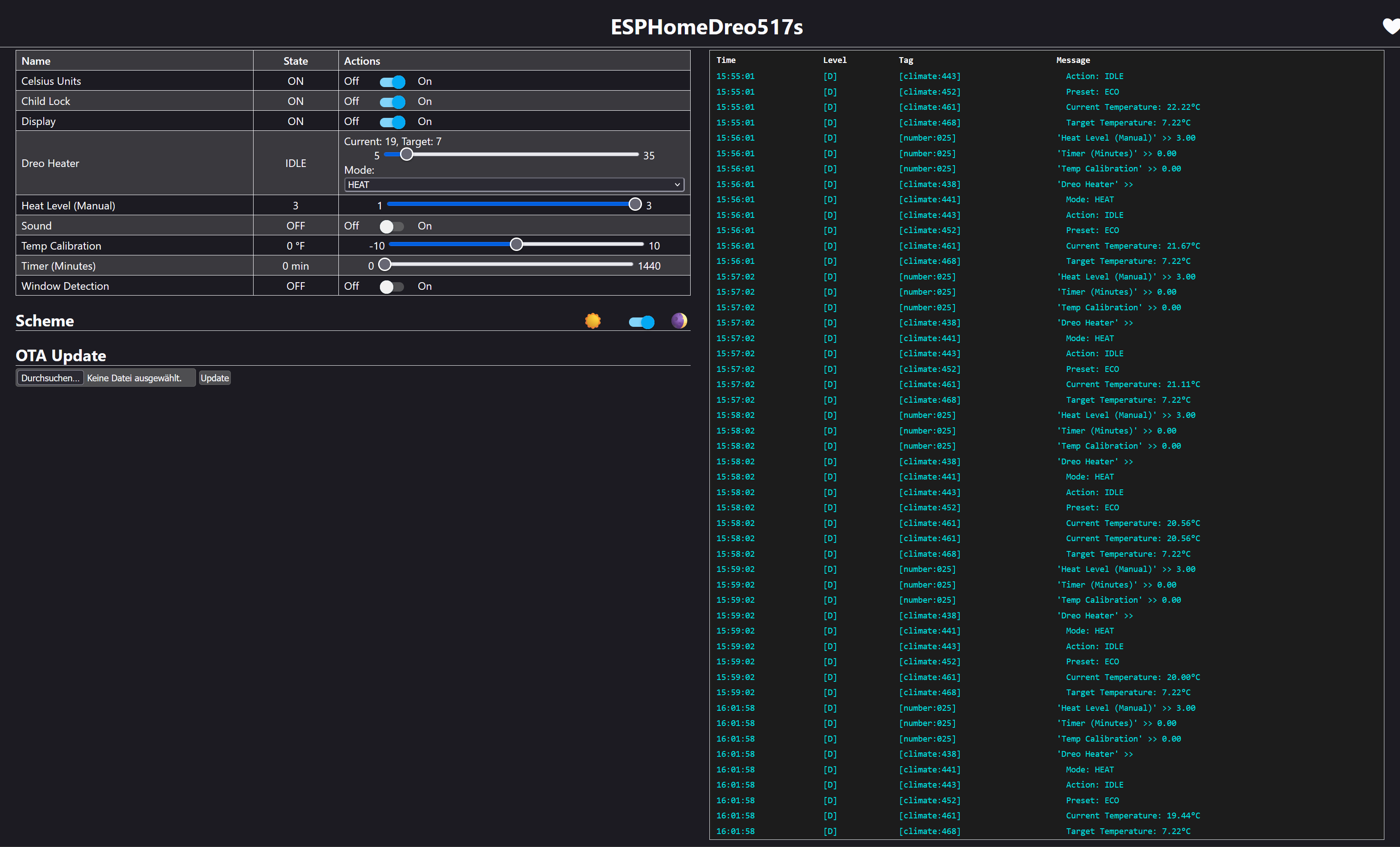
    Good news is, it indeed does work right now with ESPHome. So this driver is worth copying.
    Screenshot of ESPHomeDreo517s control panel with heater settings and temperature logs on the right

    And I just proved in the Argo thread https://www.elektroda.com/rtvforum/topic4166319-30.html#21857286 we do not even need published climate entities yet natively in OBK, because you can very nicely assemble them in HA directly (and customize).

    So yes, I would absolutely help, after you guys helped me so much.
  • #47 21858600
    markusdd
    Level 2  
    So, @p.kaczmarek2, what do you estimate effort-wise/time-wise for this?

    Is this a thing of a couple of hours/days or something longer?
    Only reason I'm asking is that this thing needs to be put up in my mom's house at some point, but as winter seems to have decided,
    to be over we got some time on our hands. But I probably would like to fit it over the Easter break.

    So is this something we conceivably make work during March?
  • #48 21859496
    p.kaczmarek2
    Moderator Smart Home
    I think basic port is just a hour or so of work, very easy, but it will require some back and forth testing. I'd love to get your help with that. I just need to find a moment for initial draft, maybe tomorrow evening, if lucky.
    Helpful post? Buy me a coffee.
  • #49 21860098
    markusdd
    Level 2  
    >>21859496

    OK, that is a no-brainer then. You can take your time until this Sunday with that, as I will be traveling from tomorrow, but from Sunday afternoon onwards I can keep testing; also, evenings next week and the weekend thereafter are mostly available.

    Then let's do this.
  • ADVERTISEMENT
  • #50 21862972
    markusdd
    Level 2  
    OK, so just FYI, @p.kaczmarek2, I'm back and available for testing.

    Do I need to set something up specifically (some build env or whatever)?

    And can we do the initial flash using ESPHome OTA or do I need to convert it back via UART flash to OBK?
  • #51 21865497
    markusdd
    Level 2  
    just to not overlook it: talked to original author and there was another patch to fix some of the temperature unit handling.
  • #52 21865563
    divadiow
    Level 38  
    hey that's cool. hope a driver can be conjured up so these Dreos can be OpenBekenised.
  • #53 21865564
    markusdd
    Level 2  
    >>21865563
    yup.
    I'm ready to test here and help mature it, once @p.kaczmarek2 has some capacity to port it over.
  • #54 21868387
    p.kaczmarek2
    Moderator Smart Home
    Early dreo port is on GitHub now in PRs. Not fully reviewed and tested. Should also be able to autocreate a list of received dpids on main http page.
    Helpful post? Buy me a coffee.
  • #55 21868792
    markusdd
    Level 2  
    Thanks for burning the midnight oil there.

    What's the easiest way to make a binary out of that that I can flash or OTA?
    Do I need a platformio setup for that or something? I have not built custom Openbeken builds yet.
  • #56 21868794
    p.kaczmarek2
    Moderator Smart Home
    You can just download binary directly from GitHub, however...
    https://www.elektroda.com/rtvforum/topic4033833.html
    I think I enabled it for Windows only so far. I think I need to enable it for Beken first.
    Helpful post? Buy me a coffee.
  • #57 21868801
    markusdd
    Level 2  
    Impressive pipelines you got there. Found the artifacts page but which one of the many is it? haha

    Also: Can I do the first flash by using OTA from ESPHome or do I need to remove the board and flash another clean OpenBeken first?
  • #58 21868877
    divadiow
    Level 38  
    markusdd wrote:
    Also: Can I do the first flash by using OTA from ESPHome or do I need to remove the board and flash another clean OpenBeken first?


    there was this, but I never tried it. Dunno if it still works https://github.com/BenJamesAndo/OpenBeken_uf2_firmware

    Added after 6 [minutes]:

    Code: Text
    Log in, to see the code


    Python script to get latest OBK files and convert. Assumes ltchiptool is available locally. I have NOT tested the converted files.
    Attachments:
    • OpenBeken_ESPHome_Conversion.zip (1.01 MB) You must be logged in to download this attachment.
    • build_obk_esphome_uf2.zip (3.17 KB) You must be logged in to download this attachment.
  • #59 21868891
    divadiow
    Level 38  
    Hmm. Makes me wonder how it could maybe be done for every release, without LT, so there's always a conversion artefact for download 🤔
  • #60 21868949
    markusdd
    Level 2  
    >>21868891

    cool find I will try, would save me from opening and flashing. Now I just need to know which of the above firmwares to take.

    Mmh. Fails with "Update failed!" - not very insightful haha

    Added after 55 [minutes]:

    hhm I have serious issues to get the module to run again unfortunately.

    I have it here on the bench and can erase and write to it with the gui flasher just fine but nothing works afterwards...

Topic summary

✨ The discussion focuses on reverse engineering the Dreo 517s wall-mount heater's communication protocol to enable cloud cutting similar to the TuyaMCU approach used for other generic heaters. The device uses an OpenBeken-compatible module, specifically identified as a Hesung Innovation Limited MBL01 - BL2028N (BK7231N), communicating via UART with an MCU. Initial challenges include grounding issues when connecting a logic analyzer due to the heater's mains-powered high-voltage board supplying 5 V. The heater contains an additional MCU on the mains board responsible for fan speed control and system monitoring, indicated by an error display ("E0") if disconnected. Captured UART traffic reveals periodic status and alive ping-pong messages every ten seconds, with command sequences changing upon temperature adjustments and power toggling via the app. Protocol analysis shows a fixed header starting with 0xAA and a rolling code, with a checksum algorithm similar but not identical to the one used in the dreo-cloudcutter project for a Dreo tower fan. Disassembly of command structures and state messages is underway, with temperature setpoints appearing to be scaled values. The protocol differs from TuyaMCU but shares some structural similarities, suggesting feasible protocol cracking through logic analysis and CRC verification. Further testing involves cycling through modes and temperature settings to fully map command and response patterns.
Generated by the language model.

FAQ

TL;DR: Cloud-cutting the Dreo 517s works by speaking its UART protocol: a 0x55 0xAA 0x00 header, rolling ID, and a ~10‑second heartbeat. “Header is always 0x55 0xAA 0x00 .” Use 5 V bench power for safe sniffing and back up flash at 230400 baud. [Elektroda, markusdd, post #21856296]

Why it matters: This lets you keep full local control (no cloud) while retaining buttons and safety features, and paves the way for OpenBeken/ESPHome drivers.

Quick Facts

What exactly is “cloud cutting” for the Dreo 517s?

Cloud cutting is a local-control retrofit that replaces the vendor cloud link with a direct UART protocol between the Wi‑Fi module and the main MCU, keeping buttons and safety logic intact. It relies on decoding 0x55 0xAA framed packets and the 10‑second heartbeat. [Elektroda, markusdd, post #21856296]

Which Wi‑Fi module is inside the Dreo 517s wall heater?

The PCB carries a Hesung Innovation MBL01 module labeled BL2028N, which the community maps to the Beken BK7231N family used by OpenBeken-compatible devices. A user posted FCC imagery matching MBL01. [Elektroda, divadiow, post #21856107]

How do I safely capture UART without tripping the heater or the logic analyzer?

Power the logic board with a stable 5 V bench supply and keep mains disconnected to avoid ground issues. With RX/TX/5V/GND reconnected, the app still links and reports temperature for clean captures. [Elektroda, markusdd, post #21856029]

What is the Dreo 517s UART packet format and checksum?

Packets start 55 AA 00, followed by a 1‑byte transaction ID that increments from boot, payload bytes, then a checksum computed as (ID + sum(payload bytes) − 1) mod 256. Heartbeat exchanges occur about every 10 seconds. [Elektroda, markusdd, post #21856296]

How do I back up the stock firmware before any flashing?

Use BK7231GUIFlashTool. Connect TX/RX/3.3 V/GND, click “firmware backup,” then power or briefly pull CEN low to enter boot. A successful dump used the BK7231M profile at 230400 baud. [Elektroda, markusdd, post #21856327]

Does the 517s behave like TuyaMCU devices?

Yes, the framing and DP-style fields resemble TuyaMCU, but IDs and checksum differ. Status messages are full-state frames, and the driver can likely reuse TuyaMCU parsing with a different frame runner. [Elektroda, p.kaczmarek2, post #21856491]

Can I use ESPHome today, or should I wait for an OpenBeken driver?

You can use ESPHome now by transplanting an ESP module; a community repo reports full operation. Porting to OpenBeken is feasible but slower without test hardware. “Go ESPHome route for now.” [Elektroda, DeDaMrAz, post #21856933]

How are modes and ECO temperatures encoded on the wire?

Multi‑DP set frames include DP01 power, DP02 mode, DP03 level, and DP04 parameter. ECO uses Fahrenheit byte targets: 15°C→0x3B, 20°C→0x44, 25°C→0x4D, 30°C→0x56, derived from C→F. [Elektroda, markusdd, post #21856387]

What failure modes should I expect while probing?

Ground loops with mains connected can crash captures, and removing the mains-board MCU shows “E0” and stops operation. Always bench-power at 5 V during logic analysis to avoid these faults. [Elektroda, markusdd, post #21856029]

Do physical buttons and IR still work after cloud cutting?

Yes. Buttons are on a separate capacitive line into the main MCU. Presses trigger MCU→Wi‑Fi status messages, so local controls and IR remain functional during UART-based control. [Elektroda, markusdd, post #21856436]

Which serial speed and lines should I monitor?

Use a logic analyzer on the module UART RX/TX at LVCMOS levels. A successful flash dump ran at 230400 baud, while normal UART captures used standard analyzer settings with LSB‑first decoding. [Elektroda, markusdd, post #21856327]

What extra features are exposed (beep, child-lock, display, °C/°F)?

Toggles for display on/off, beep, child lock, window‑open detection, ambient temperature compensation, and °C/°F switching appear as DP fields and cause MCU→Wi‑Fi messages when changed. [Elektroda, markusdd, post #21856404]

How do I put the unit into pairing or observe boot handshakes?

Capture the startup sequence from cold power‑on. You’ll see init queries (cmd 0x01/0x03), a ready trigger (0x08), then status and heartbeat frames. Use that to clone boot timing in your driver. [Elektroda, markusdd, post #21856338]

Is there a known constant or sentinel in the DP set?

Yes. Users observed DP07 as a constant 4‑byte value (0x0000004A) across samples, plus multiple zeroed 4‑byte DPs (e.g., DP09, DP0F, DP11). Treat them as required template fillers. [Elektroda, DeDaMrAz, post #21856379]

What heater power does this effort target?

The reverse‑engineering follows a prior 1000 W/2000 W wall‑mount heater project; the Dreo 517s is a quieter, popular variant tackled with a similar UART approach. [Elektroda, markusdd, post #21855755]

What 3‑step process should I follow to send a mode change?

  1. Send a DP‑prep frame (cmd 0x06) with new rolling ID. 2. Send a 0x07 multi‑DP set using the fixed 126‑byte template, update power/mode/level/param, and recompute checksum. 3. Expect 0x07 ack and a full status frame. [Elektroda, markusdd, post #21856387]
Generated by the language model.
ADVERTISEMENT



