FAQ
TL;DR: With a 3-line script and a USB-to-UART adapter, you can flash the LSC Action 3206306 lamp to OpenBK for cloud-free control. As the developer put it, "just connect it to P16" for WS2812 output. This FAQ is for users who want OpenBK, Home Assistant, RGBCW tuning, and fixes for restore-state or HTTP quirks. [#21448379]
Why it matters: This thread shows not just how to flash the lamp, but how OpenBK behavior differs from Tasmota in restore-state, RGBCW color parsing, logging, and HTTP control.
| Topic |
OpenBK in thread |
Tasmota in thread |
RGBCW color 255,255,255,255,0 |
Initially drove RGB unexpectedly for one user |
Reported as Cool White |
RGBCW color 0,0,0,255,0 |
Proposed as clearer CW-only value |
Reported as same Cool White output |
| Loxone HTTP request |
200 OK, but light could stay off |
User said same style worked on Tasmota lights |
| Browser request |
Firefox switching worked on test device |
Not discussed as a problem |
Key insight: Flashing works and the lamp is usable cloud-free today, but exact behavior still depends on OpenBK feature parity. The main open gaps in this thread are Tasmota-style RGBCW parsing, Loxone HTTP compatibility, and separate RGB/CW entities. [#21632458]
Quick Facts
- The core lamp script shown in the thread has 3 commands:
startDriver SM16703P, SM16703P_Init 16, and startDriver PixelAnim. That maps LED handling to P16 and enables animations. [#21448379]
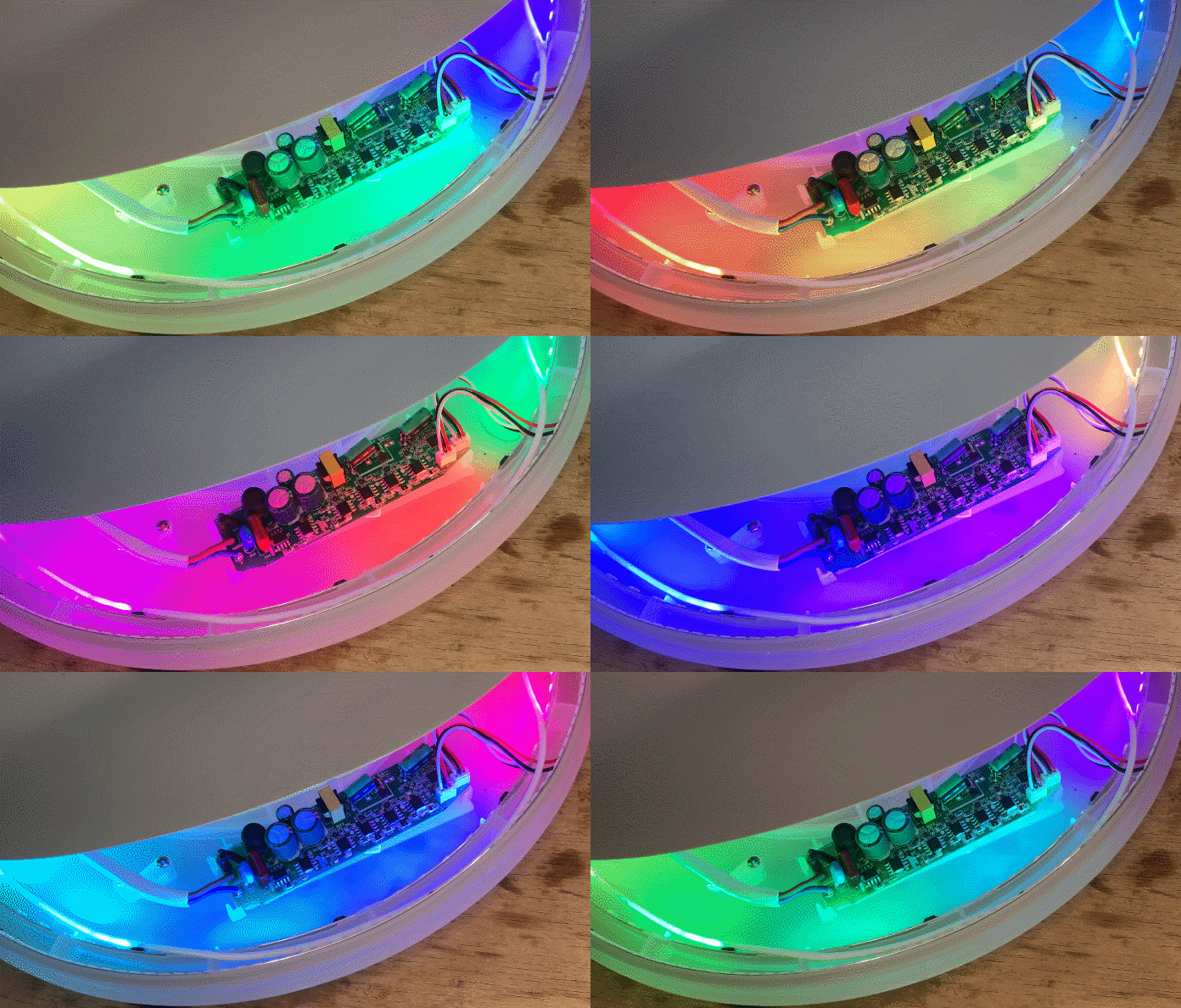
- The lamp combines an SM16703P/WS2812 RGB ring with a PWM cool-white strip, so OpenBK must coordinate addressable RGB effects and separate white output behavior. [#21448379]
- Restore-state behavior can be changed with flags. After adjusting them, one user confirmed power-loss recovery started working for on/off and remembered state. [#21450897]
- A Wi-Fi logging issue was reported on 2025-02-22, and a fix was linked in a Git commit on 2025-02-24 so new builds stop printing the network key in logs. [#21453651]
- One interoperability failure is repeatable: Loxone requests returned HTTP 200 OK yet did not switch the lamp, while the same command worked from Firefox and later worked after adding browser-like headers. [#21559410]
How do I flash the LSC Action Smart Ceiling Lamp 3206306 with OpenBK using a USB-to-UART adapter?
You flash it by opening the lamp, connecting a simple USB-to-UART converter, and loading OpenBK instead of the stock firmware. 1. Wire the adapter and flash OpenBK. 2. Apply the lamp script with
SM16703P_Init 16. 3. Test RGB animations and white output from the web UI or Home Assistant. The thread’s video guide shows this exact process for model
3206306 and states the same method works for RGB-only lamps if you skip the CW step.
[#21448379]
What is the correct OpenBK script to configure the LSC 3206306 lamp with an SM16703P/WS2812 RGB ring and PWM cool-white LEDs?
The script shown in the thread is:
startDriver SM16703PSM16703P_Init 16startDriver PixelAnim
That setup initializes the SM16703P path on
P16 and enables the PixelAnim driver for RGB effects. The author also notes that for RGB-only lamps you can configure the WS2812 LEDs and skip the CW-specific part.
[#21448379]
How can I run the LSC Smart Ceiling Lamp cloud-free and pair it with Home Assistant after flashing OpenBK?
Run it cloud-free by flashing OpenBK and then pairing it locally with Home Assistant instead of the vendor cloud. The thread links a dedicated Home Assistant guide and says the lamp can be used with Home Assistant after flashing, while animation integration was still marked
WIP at that time. A later user also confirmed they control OpenBK devices through
Home Assistant MQTT.
[#21632796]
Why doesn’t my OpenBK-flashed lamp restore its previous on/off state, RGB color, and white color after a power loss, and which flags control that behavior?
It usually fails because the restore-state flags are not enabled. In this thread, changing the relevant flags fixed power-loss recovery for a user who wanted Tasmota-like behavior for on/off and remembered light state. The developer directly asked whether that option was enabled in flags, and the user replied that manipulating flags made it work.
[#21450934]
How does Tasmota interpret the HTTP color command for RGBCW lights compared with OpenBK, especially for values like 255,255,255,255,0 and 0,0,0,255,0?
In this thread, Tasmota treated both
255,255,255,255,0 and
0,0,0,255,0 as the same
Cool White output. OpenBK did not initially mirror that behavior, which is why the developer questioned whether OpenBK should ignore RGB values when CW is present and said he could adjust it to match Tasmota better. That difference matters if you reuse older Loxone or Tasmota HTTP presets unchanged.
[#21485696]
What is SM16703P, and how does it differ from driving WS2812 LEDs directly in an OpenBK lamp setup?
"SM16703P is an LED driver that controls the lamp’s RGB section, while WS2812 refers to addressable RGB LEDs that carry color data in the LED chain itself." In this setup, OpenBK starts the
SM16703P driver and initializes it on
P16, while the author also says the same P16 hardware SPI output can drive a WS2812 strip directly with the shown script.
[#21448379]
What is the PixelAnim driver in OpenBK, and how is it used for WS2812B animations and HTTP control?
"PixelAnim is an OpenBK animation driver that generates WS2812B lighting effects and integrates with the firmware’s HTTP control panel for effect control." The thread’s script explicitly starts
PixelAnim, and the author links a text guide titled around
WS2812B animations, new
HTTP panel integration, and the PixelAnim driver.
[#21448379]
What is the DDP protocol, and how does it help control real-time LED animations over Wi-Fi with OpenBK and xLights?
"DDP is a network lighting protocol that sends real-time animation data over Wi-Fi, letting OpenBK devices receive external LED effects from tools such as xLights." The thread links a separate DDP topic and describes it as a way to create
real-time LED animations via WiFi for OBK and xLights setups. That makes it useful when local scripted effects are not enough.
[#21448379]
Why do HTTP on/off commands from Loxone return 200 OK in OpenBK but fail to switch the light, while the same URL works from Firefox?
The thread points to an HTTP-request compatibility mismatch, not a basic power command error. One user reported that OpenBK returned
200 OK to Loxone but left the lamp dark, while the same URL switched the light correctly from Firefox. The later breakthrough was that copying browser-generated headers made the request work, which strongly suggests OpenBK accepted the connection but handled the minimal Loxone request differently.
[#21559410]
How can I capture and compare the full HTTP request headers from Loxone and Firefox to troubleshoot OpenBK compatibility issues?
Capture the working browser request first, then compare it line by line with Loxone. 1. Open Firefox DevTools with
F12. 2. Send the working
cm?cmnd=Power%20On request and copy the full headers. 3. Post both the working and failing headers in a code block for comparison. The developer explicitly asked for the
full headers and request to reproduce the issue.
[#21559846]
Why would adding browser-like HTTP headers make OpenBK commands work from Loxone, and which headers are most likely required?
It worked because OpenBK appeared to accept Firefox-style requests more reliably than Loxone’s minimal request format. The user reported that once they inserted headers generated by Firefox, the lamp started responding correctly. The thread does not identify the exact required header, so the safest conclusion is that one or more standard browser headers or request-line details changed OpenBK’s request handling.
[#21559410]
What changed in OpenBK regarding Wi-Fi password logging, and how do I update to a build that no longer prints the key in logs?
OpenBK was changed so builds after the linked fix stop printing the Wi-Fi key in logs. A user showed a log line exposing
key:MYREALPASSWORD, called it a serious flaw, and the developer replied with a Git commit on
2025-02-24 that addressed it. Update to a build that includes commit
9b9f6359d43a62b0026af8d88726dd12a911f0cc or newer.
[#21453651]
How can I make the RGB ring and the CW/WW light on the LSC 3206306 behave like two separate lights in OpenBK, with separate on/off and dimming controls?
You cannot fully restore that behavior from the thread alone because the developer had not finished implementing it. A user who flashed the device on
2025-08-10 said RGB and CW/WW were controlled as one light, while the original firmware exposed them like
2 separate lights with separate dimming and on/off. The developer replied that code changes would likely be needed and then asked how the original firmware behaved.
[#21632458]
What’s the best way to integrate this OpenBK-flashed ceiling lamp with Home Assistant over MQTT when I want separate control of RGB effects and white lighting?
Use Home Assistant over MQTT for the lamp now, but expect a limitation if you need separate RGB and white entities. One user said they control all OpenBK devices through
HA MQTT, yet the same thread shows OpenBK still lacked stock-like separation of RGB and CW/WW on this lamp. Today’s practical path is MQTT control with one combined light entity until that feature is added.
[#21632796]
How smooth are the color transitions and wall reflections on the LSC ceiling lamp after flashing OpenBK, and how much does the diffuser affect the RGB effect?
The transitions should look smooth rather than harsh because the top dome diffuses the light. The developer answered that the dome
diffuses the lights nicely, and although the RGB is
not very bright, the overall effect is still pleasant. So expect softer wall reflections and gentler color blending, with brightness limited more by the lamp design than the firmware.
[#21450897]
AI summary based on the discussion. May contain errors.







Comments
A pleasant effect is generated by this lamp. How does it look on the wall the shadows/transitions between colours are sharp or smooth? [Read more]
Hello the light does not restore previous state in case lose of power like tasmota lights do (on/off state, set color, set white color). Is there any way to configure this? It is also a must have when... [Read more]
@techekspert the top dome diffuses the lights nicely, the RGB is not very bright but still effect is nice. I can try to make a video of effect soon. @cijoml well, do you have this option enabled in... [Read more]
Thank you manipulating flags made it to work however. I try manipulate via HTTP commands from Loxone and: http://192.168.5.128/cm?cmnd=color%20255,255,255,255,0 This in original Tasmota deactivate RGB... [Read more]
https://obrazki.elektroda.pl/2852232800_1740219853_thumb.jpg Are you really sure that it is: 255,255,255,255,0 This looks like setting all channels except last (Warm White) to 255. I'd rather... [Read more]
Yes it works like this at least from Tasmota v.11.x I started with. Now I run Tasmota 14.5 I use these bulbs: https://www.aliexpress.com/item/1005007226730234.html I created few colors so it works... [Read more]
What happens in Tasmota when you do: 0,0,0,255,0 instead of 255,255,255,255,0 I think I can change OBK behaviour to match Tasmota better, just like you requested, but I'm curious, does... [Read more]
Than it changes color to Cool white [Read more]
Are you saying that both those commands: color%200,0,0,255,0 color%20255,255,255,255,0 NOTE: %20 is an escape code for space. are changing color to Cool White? [Read more]
BTW this is a very dangerous and security flaw passing PASSWORD to the log and even worse into INFO log level: Info:MAIN:Time 5, idle 186369/s, free 78256, MQTT 0(0), bWifi 0, secondsWithNoPing -1,... [Read more]
yes both commands produce cool white in Tasmota 14.5. [Read more]
I'm not sure what can it change when the firmware is open source and anyone can read flash/OTA any build, but here it is: https://github.com/openshwprojects/OpenBK7231T_App/commit/9b9f6359d43a62b0026af8d88726dd12a911f0cc So... [Read more]
yes it provide both same output [Read more]
I still cannot get the light switch on/off from Loxone. If I call same url from Firefox it switch on/off, if I send same command (which works with tasmota lights) from loxone, OBK send 200 OK, but light... [Read more]
What kind of reply do you get? Let me test... on my device: https://obrazki.elektroda.pl/8579186200_1746485006_thumb.jpg I send: http://192.168.0.212/cm?cmnd=Power%20On https://obrazki.elektroda.pl/4926569000_1746484953_bigthumb.jpg... [Read more]
yes from browser it work. how can i provide header? i do not have zap proxy installed. check yellow picture I posted. That is log from loxone. [Read more]
@pkaczmarek2 well I made experiments and used headers generated by Firefox (F12 function) and inserted it as a header during request. Than light work. So I suppose there is problem with receiving request... [Read more]
Can you please give me here both headers (working and not) in text format, in code block, so I can do tests on my side? Full headers and request. [Read more]
How can I investigate HTTP headers in OBK? I tried setup HTTP logging but no headers are shown. Both Loxone server and the light are in the same network so I can catch only my browser's communication. [Read more]