logo elektroda
logo elektroda
X
logo elektroda

OpenBeken on Action LSC 8W 700lm RGB + 2700-6500K E27 LED bulb

b_st  26 1302 Cool? (+4)
📢 Listen (AI):

TL;DR

  • OpenBeken runs on the Action LSC 8W 700lm RGB + 2700-6500K E27 bulb, which uses a CBLC5 module with BK7231N and an SM2185N LED driver.
  • Programming needed UART TX/RX access, reliable 3.3V power, and OpenBeken setup with P24/PWM4 as SM2235DAT and P26/PWM5 as SM2235CLK.
  • The bulb uses a BP2571 buck converter for 3.3V, and the SM2235_Current settings were 8 mA for RGB plus 15 mA for cold and warm white.
  • After swapping channels and lowering the I2C clock, the first bulb worked correctly, but two others later misbehaved with color swaps and unreliable off states.
Generated by the language model.
I bought a couple of these and managed to get it working with OpenBeken:
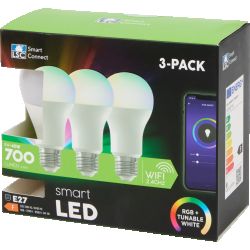
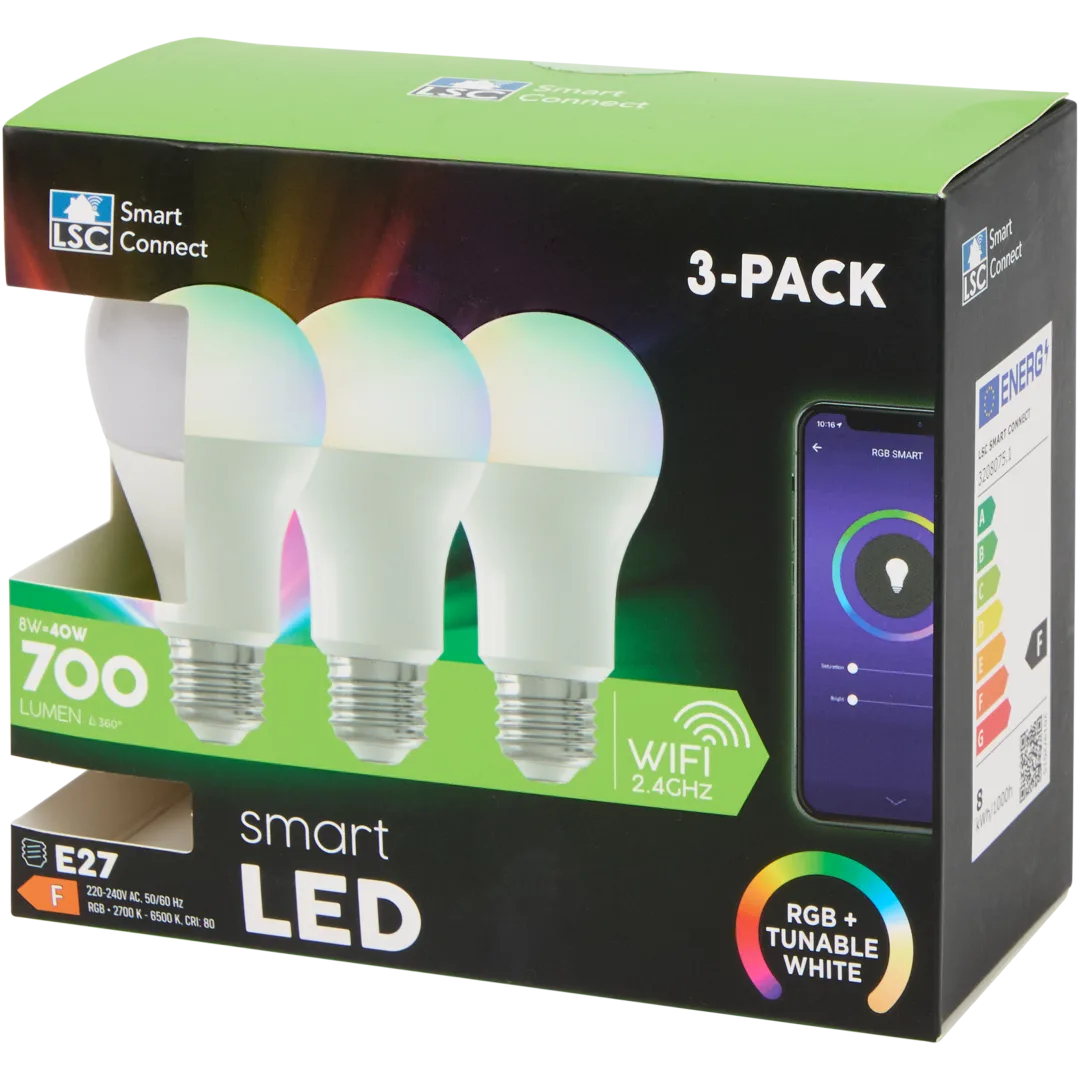
Three LSC Smart LED RGB+CCT light bulbs in a 3-pack retail box

Some info:
Webshop link
- Datasheet
- Product code: 3208075
- CBLC5 module with BK7231N
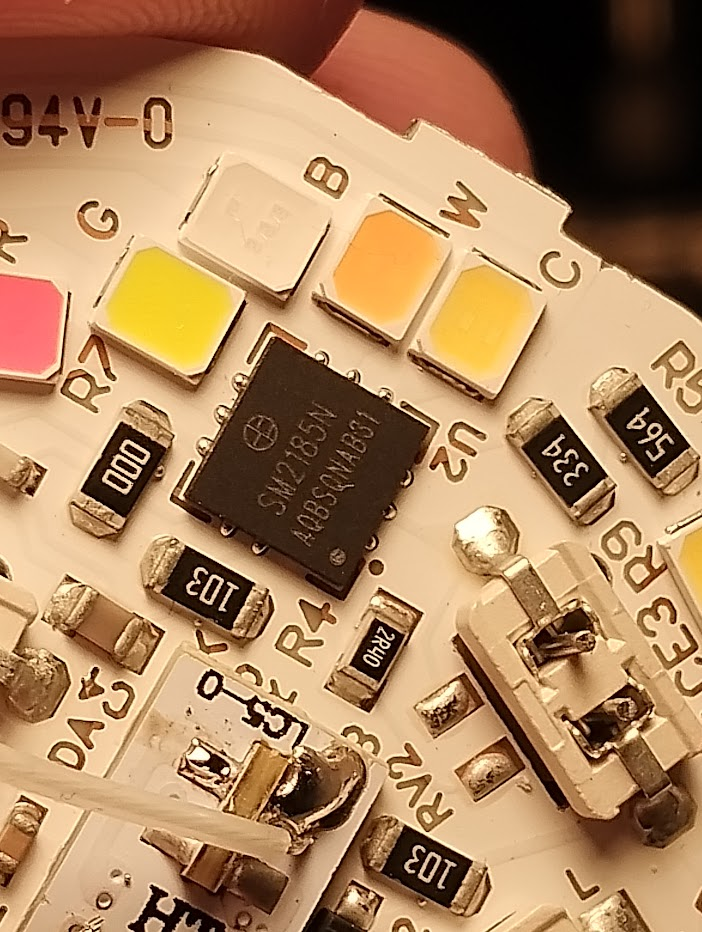
- LED driver (U2) is a SM2185N
- The 3v3 for the CBLC5 module is provided by a BP2571 buck converter.

This post has a really good description how to disassemble this device: https://www.elektroda.com/news/news3948374.html
To remove the metal threads, I simply screwed the bulb into a socket and gently pushed the bulb off the socket.

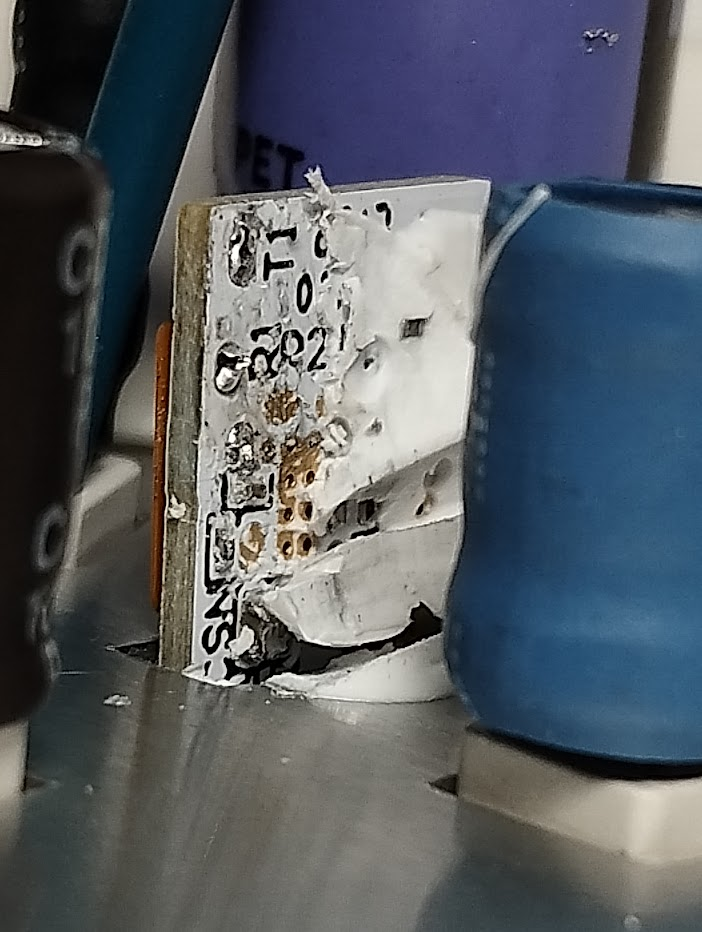
To program it, it is at least necessary to solder wires on the UART TX and RX pads of the CBLC5 module. To get to the pins it is sometimes necessary to remove the white glue a little bit. The picture below shows the pads T1 and R1 (sorry for the mess, this was already after I desoldered the wires again). There is also a reset pad, but it is not necessary connect if you use the right tool to program.
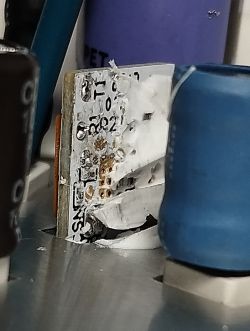
Close-up of PCB showing UART pads T1 and R1 with white service adhesive

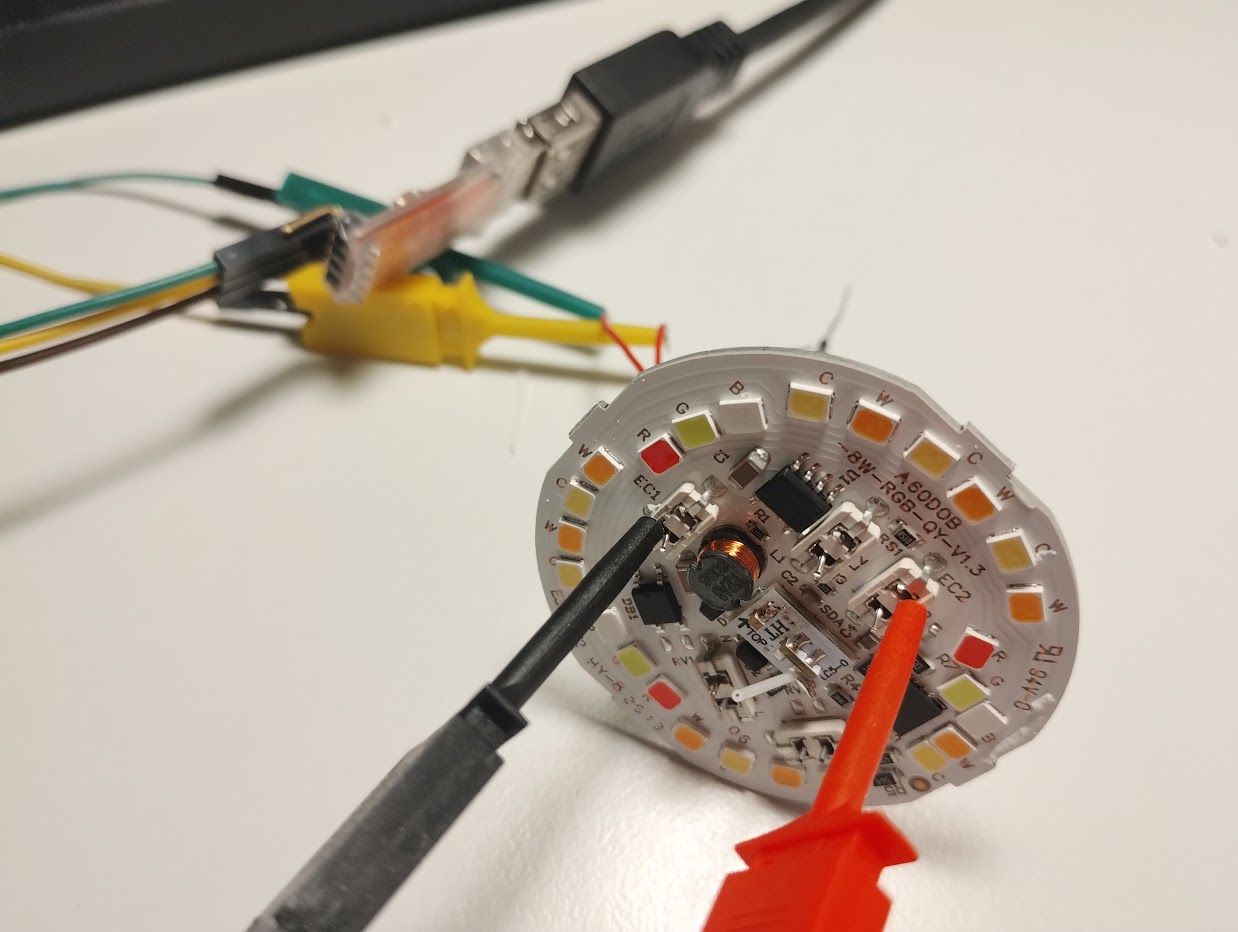
If you have clamps it is not necessary to solder wires to power the device. I found the following two locations are easy to clamp and are connected straight to the GND and VCC of the CBLC5 module.
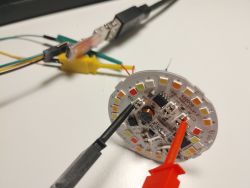
RGBW LED board with probes and wires connected to UART interface

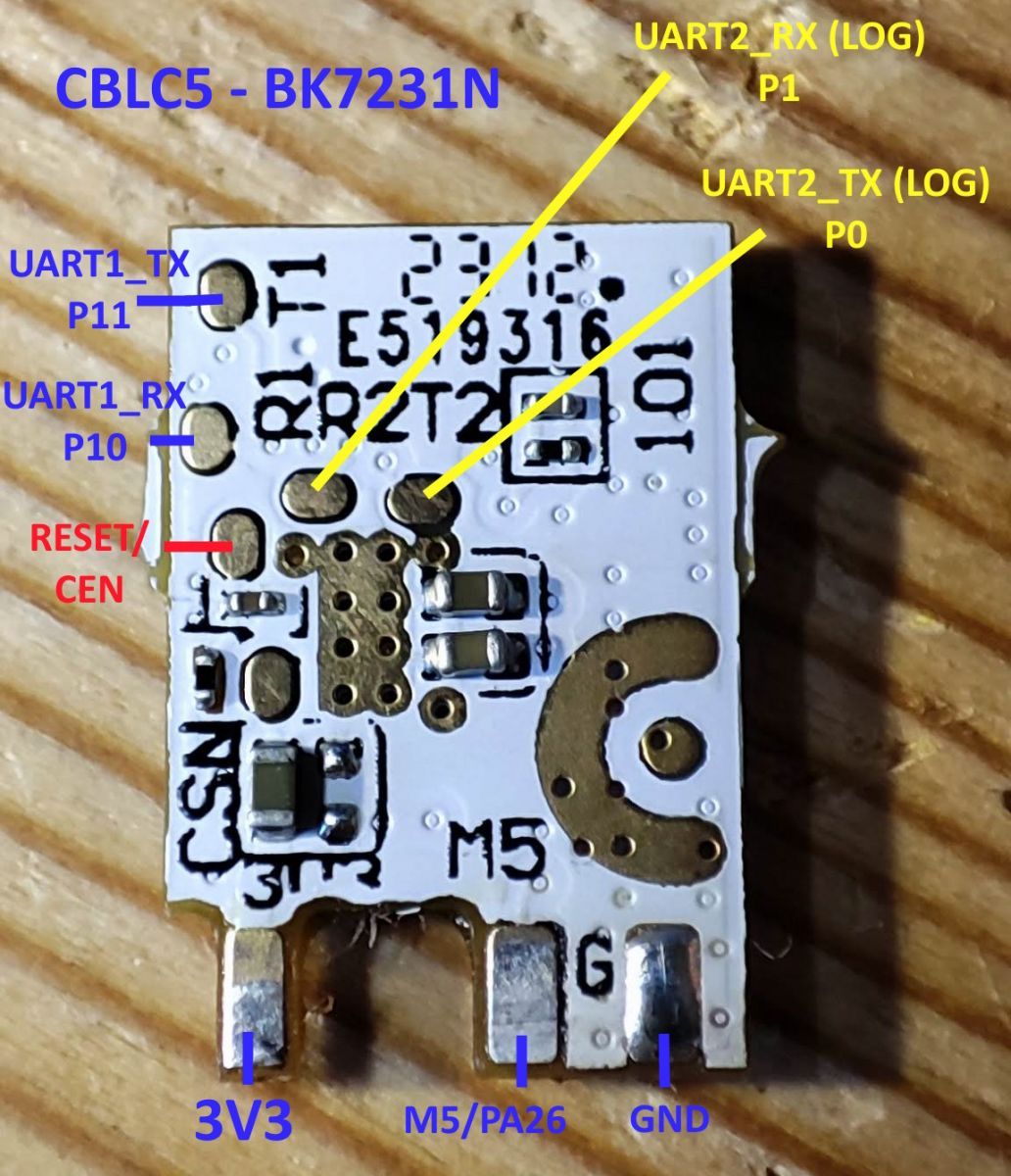
Here is a pinout of the CBLC5 module I found on the internet:
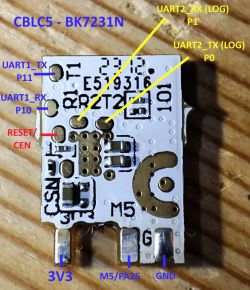
CBLC5 module with pin labels for UART, power, and reset on a wooden surface

Initially I failed to get the programming to work. It turns out that the device really, really needs the correct voltage. Often the 3.3V supply of USB - UART adapters do not deliver enough current. But even when I used a separate LDO to provide the power programming failed because I had too many wires and connections between the LDO and the CBLC5 module, causing a voltage drop which was too large.

To program the firmware, I used this tool: https://github.com/tuya-cloudcutter/bk7231tools It doesn't need the reset line to be connected (earlier I used hid_download_py, but it does need the reset line).
Code: Bash
Log in, to see the code


Edit: Note that version 1.18.245 or newer is required.

When OpenBeken is running, the following steps were necessary to get the light working:

1. Configure Module:
- Set P24 (PWM4) to SM2235DAT,
- Set P26 (PWM5) to SM2235CLK.
2. Configure General/Flags: Select Flag 4 - [LED] Force show RGBCW controller (for example, for SM2135 LEDs, or for DGR sender),
3. Restart the device.
4. Execute this command to swap the Cool and Warm, Red and Blue, channels.
Code: Text
Log in, to see the code

5. Execute a command to configure the correct clock I2C speed (the default is too fast)
Code: Text
Log in, to see the code

6. Execute this command to set the correct currents (8 mA for RGB leds, 15 mA for white cold and warm). The default settings are too high, I guess this will really shorten the life of your LED bulb if you don't set this.
Code: Text
Log in, to see the code


WARNING: The SM2235_Map command is persistent, the mapping is stored in the configuration in flash memory. The SM2235_Current command is NOT stored in the configuration, and therefore it is necessary to add it as a startup command.
ANOTHER WARNING: Do not use Flag 12 ([LED] Remember LED driver state (RGBCW, enable, brightness, temperature) after reboot). The state of the LED driver is restored _BEFORE_ startup commands are executed, so the LEDs will run with too much current after a reboot. This has been fixed in version 1.18.245, the current settings are applied immediately if the command is executed now.

This worked fine for the first bulb that I programmed. However, the other two showed weird behavior. Initially the LED worked correctly, but after some time setting a color resulted in white light or vice verse. Even turining off the light failed more often than not (it just changed to a random color or brightness).

Because I initially didn't know about the need to configure the correct current with SM2235_Current (and I didn't make a backup), I bought another one and attached a scope to figure out which current settings the original firmware applies (the first two bytes are 11011000 00010010). I also noticed that the I2C bus runs at about 50 kHz. I didn't measure the I2C clock of OpenBeken, but I noticed that the firmware probably uses a clock of 400 or 500 kHz. The SM2185N datasheet specifies that I should work with 1000 kHz, but lowering the clock rate solved the problem anyway.

I created a pull request to make the I2C clock frequency configurable with a command: https://github.com/openshwprojects/OpenBK7231T_App/pull/1928

Edit: change is merged, it is possible to configure a I2C clock that has no problems with this command:
Code: Text
Log in, to see the code


Code: JSON
Log in, to see the code

Here is picture of the LED controller IC
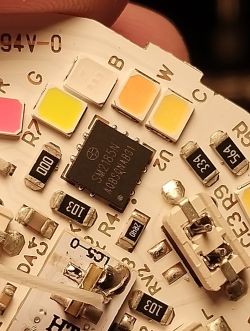
Close-up of SM2185N chip on LED driver board with labeled RGB and white LEDs

Another posts that helped me: https://www.elektroda.com/rtvforum/topic4014350.html

About Author
b_st wrote 11 posts with rating 5 , helped 1 times. Been with us since 2026 year.

Comments

p.kaczmarek2 05 Jan 2026 00:44

Thanks for sharing. Also, this looks like an important insight: Well, I think I can easily move it to execute later, but then, wouldn't it overwrite settings from startup command? Maybe it would... [Read more]

insmod 05 Jan 2026 09:44

I think it's better to keep them as it is, except SM2135 CW (lower it to 10ma). That way they'll be default datasheet currents. As a way to fix this, move https://github.com/openshwprojects/OpenBK7231T_App/blob/7a547c9c487cb42b1d7b4dadf144bad5ceab0287/src/user_main.c#L1411 to... [Read more]

p.kaczmarek2 05 Jan 2026 09:58

I've been thinking about moving NewLED_RestoreSavedStateIfNeeded but I am worried that we will lose some part of control because of it, With NewLED_RestoreSavedStateIfNeeded called first, users can have... [Read more]

insmod 05 Jan 2026 10:18

What do you think about moving early.bat execution after starting drivers? Plus change it from exec to startScript. [Read more]

p.kaczmarek2 05 Jan 2026 11:20

No strong feelings one way or the other, I think there are barely any use cases for early.bat. Maybe except... configuring some stuff that started drivers depend on? Still, the cost of adding third... [Read more]

b_st 05 Jan 2026 11:22

I'm afraid this is not the case (at least, as far as I can tell after enabling the debug log in SM2235_Write() . Commands are only sent to the LED controller if a new setting (brightness, color, etc)... [Read more]

divadiow 05 Jan 2026 21:08

yes [Read more]

p.kaczmarek2 05 Jan 2026 21:14

Ahh, that's it! I think it should be sent when current is changed! Do you agree? That can be our solution. [Read more]

b_st 05 Jan 2026 22:29

Yep, sounds like a decent solution. What is the approach you have in mind? Implement it in the driver itself (drv_sm2235.c)? That would require the driver to remember the last values passed to SM2235_Write()... [Read more]

p.kaczmarek2 05 Jan 2026 23:08

It's certainly nice to see someone helping with PRs, as we are maintaining this project in free time, but I am not sure about this approach. This is too local, and same bug is in the other drivers as well. Maybe... [Read more]

b_st 05 Jan 2026 23:26

Sure, no problem. I think I understand your argument, that was the reason why I was asking for how to approach this. I'll look into your idea if that's all right for you. [Read more]

p.kaczmarek2 05 Jan 2026 23:29

We could also skip the "save colors in new array" part and try to call again apply_smart_light, but I am not sure if it would be safe. [Read more]

b_st 06 Jan 2026 01:12

I couldn't say at the moment if it is safe, that's one hell of a function ;) What do you mean with 'safe'? Any unwanted side effects? Anyway, there is another driver that calls this function from a command... [Read more]

p.kaczmarek2 06 Jan 2026 11:13

I got another idea: https://github.com/openshwprojects/OpenBK7231T_App/pull/1932 Can you check? With smooth lerp and without it. Added after 9 [hours] 56 [minutes]: @divadiow @bst2 let me know... [Read more]

b_st 06 Jan 2026 13:48

Sure! I'll try to find time to test this in the evening. Looks like this should work. Sorry to bother you with this, but if it was my decision I would go for the solution to solve this in the drivers,... [Read more]

p.kaczmarek2 06 Jan 2026 15:40

No problem, I'm open to new suggestions. Can you update PR with your new proposed fix? Well, I am aware about this, and I am aware that's not perfect situation, but that's a sacrifice I'm ready to... [Read more]

b_st 07 Jan 2026 01:13

Your RAM argument sounds like a valid one, didn't realize that indeed all the drivers are always preset. That's a feature which is much appreciated IMO, makes it very easy to use. However, even 256 Kbyte... [Read more]

p.kaczmarek2 07 Jan 2026 15:40

Hmm ok, let's say, I will merge it for now, but if any suggestion arise, I'm open to changing it. Same goes for other parts of code - if you have any idea how to make it more elegant, while keeping it... [Read more]

b_st 08 Jan 2026 21:46

I spent quite some time to implement the suggestion that I made, but it's clearly a bit harder than I thought to get this done. I thought the purposes of both finalColors and led_rawLerpCurrent was enough... [Read more]

FAQ

TL;DR: Flash OpenBeken onto the LSC 8 W, 700 lm E27 bulb; map SM2235 lines, set 8 mA/15 mA currents, and slow I2C to ~50 kHz—“it really, really needs the correct voltage.” [Elektroda, b_st, post #21798914]

Why it matters: This fixes random colors, restores reliable on/off, and prevents overdriving LEDs for longer bulb life.

Quick Facts

What is OpenBeken and why use it on this LSC bulb?

OpenBeken is open firmware for BK72xx IoT chips. It gives local control, fast boot, and full RGBCW tuning. On this LSC 3208075 bulb, it restores stable color control and prevents excessive LED current when configured. You also avoid cloud lock-in and can script startup behavior. Users reported reliable results after mapping SM2235 lines, setting drive currents, and lowering the I2C clock. “Local firmware, local control” sums it up for many tinkerers. [Elektroda, b_st, post #21798914]

How do I safely power and program the CBLC5 (BK7231N) module?

Use a solid 3.3 V source with low drop and enough current. Keep leads short or clamp to the marked VCC and GND points. Solder only TX and RX to the module pads (T1/R1). A reset line is unnecessary with bk7231tools. The author warns the module “really, really needs the correct voltage,” and long thin wires can cause voltage sag and flashing failures. Program over UART with the provided write_flash command. [Elektroda, b_st, post #21798914]

Which pins and flags make the LEDs work under OpenBeken?

Set P24 to SM2235DAT and P26 to SM2235CLK in Module configuration. Enable Flag 4 to show the RGBCW controller UI. Restart the bulb so mappings apply cleanly. These steps expose proper control of the SM2235 driver for red, green, blue, cool white, and warm white channels. They also prepare the device for current and channel-map commands. [Elektroda, b_st, post #21798914]

My bulb shows white when I pick a color. How do I fix color mapping?

Run SM2235_Map 0 1 2 3 4 to align channel order. This mapping persists in flash, so you set it once. If colors still glitch, also lower the I2C clock as described below. Correct mapping prevents swapped red/blue or cool/warm behavior and makes app sliders match actual LEDs. [Elektroda, b_st, post #21798914]

What drive currents should I set for longevity and accuracy?

Set RGB to 8 mA and both white channels to 15 mA using SM2235_Current 1 2. This avoids overdriving and heat, preserving LED lifespan. Important: SM2235_Current is not persistent. Add it to startup commands so currents apply after every boot. Persistent mapping plus non-persistent current is the intended pairing. [Elektroda, b_st, post #21798914]

How do I make the bulb stable if it randomly changes colors or won’t turn off?

Lower the I2C speed to match the original firmware behavior. Use SoftI2C_SetClkPeriod 50, which yields about 50 kHz. The stock firmware used ~50 kHz; OpenBeken’s default was ~400–500 kHz and caused erratic color or on/off issues. After reducing speed, channel commands apply reliably without cross-talk. [Elektroda, b_st, post #21798914]

What’s the exact 3‑step setup after flashing OpenBeken?

  1. Configure P24=SM2235DAT and P26=SM2235CLK; enable Flag 4.
  2. Run: backlog SM2235_Map 0 1 2 3 4; SoftI2C_SetClkPeriod 50; SM2235_Current 1 2.
  3. Save and reboot so mapping persists; ensure current is in Startup. [Elektroda, b_st, post #21798914]

Should I enable the "Remember LED driver state" (Flag 12)?

Do not enable Flag 12 on this bulb. The LED state restores before startup commands run. That means LEDs may power up at excessive current if SM2235_Current hasn’t applied yet. This risks stress and shortened life. Keep Flag 12 off to ensure currents set first during each boot sequence. [Elektroda, b_st, post #21798914]

Can I flash without connecting the reset line?

Yes. Use bk7231tools write_flash over UART; it does not require the reset pad. Previous tools like hid_download_py needed reset, but bk7231tools avoids that step. This simplifies wiring and reduces handling risk around small pads. Keep your 3.3 V supply clean and leads short to prevent brownouts during transfer. [Elektroda, b_st, post #21798914]

What hardware is inside this Action LSC bulb?

It uses a CBLC5 Wi‑Fi module with a BK7231N MCU. The LED driver is an SM2185N, and a BP2571 buck provides 3.3 V to the module. The lamp outputs 700 lm at 8 W and supports RGB plus 2700–6500 K whites. Knowing this helps with pin mapping, current limits, and debugging power issues. [Elektroda, b_st, post #21798914]

What’s a safe all-in-one command to apply after flashing?

Use a backlog to apply mapping, I2C speed, and current in one go. Example: backlog SM2235_Map 0 1 2 3 4; SoftI2C_SetClkPeriod 50; SM2235_Current 1 2. Then save. Mapping persists; current does not, so add the current command to Startup to reapply on boot. [Elektroda, b_st, post #21798914]

Why did my first bulb work but later ones acted weird?

Units can differ slightly, and bus timing matters. At default fast I2C (≈400–500 kHz), later bulbs showed white when selecting color or ignored off commands. Slowing to ~50 kHz eliminated glitches. “Match the bus to the hardware behavior” is the practical rule here. [Elektroda, b_st, post #21798914]

How do I clamp power without soldering VCC/GND?

The board exposes convenient clamp points tied directly to module GND and VCC. Clip your 3.3 V supply there and solder only UART TX/RX. This reduces heat and rework on the tiny pads. Ensure polarity and secure contact to avoid intermittent voltage drop during flashing. [Elektroda, b_st, post #21798914]

What is BK7231N and how does it compare to common DIY boards?

BK7231N is a Wi‑Fi MCU used in many Tuya/Action devices. It’s not Arduino-compatible but runs OpenBeken for local control. Compared to ESP8266 boards, it uses different tooling and pin mapping. With correct setup, it delivers responsive RGBCW control at low power. [Elektroda, b_st, post #21798914]

What is Tuya, and why does it matter for this bulb?

Tuya is a cloud IoT platform behind many smart-home products. Devices ship with Tuya firmware that depends on cloud services. Flashing OpenBeken removes cloud dependence and grants local control over RGBCW, brightness, and color temperature. This improves privacy and latency. [Elektroda, b_st, post #21798914]

Edge case: after reboot, my LEDs surge bright for a moment. What happened?

You likely enabled Flag 12 or forgot to auto-run SM2235_Current. The bulb restores driver state before startup commands. Without immediate current limits, LEDs may briefly overcurrent. Disable Flag 12 and add SM2235_Current to Startup to prevent surges after power cycles. [Elektroda, b_st, post #21798914]
Generated by the language model.
%}