logo elektroda
logo elektroda
X
logo elektroda
Dostępna jest polska wersja

Czy wolisz polską wersję strony elektroda?

Nie, dziękuję Przekieruj mnie tam

Huawei SUN2000 Inverter: WIFI Dongle Connection, Firmware Update & FusionSolar

Bob271 430467 1369
Best answers

How do I get a Huawei SUN2000 Wi‑Fi dongle online when FusionSolar shows the SDongleA as offline?

To get the dongle/configuration working, connect to the inverter’s own Wi‑Fi AP, open FusionSolar, choose “Putting the device into operation,” scan the QR code on the inverter and enter the password from the label (or the default 00000a if it was not changed) [#18928339][#19344455] If Wi‑Fi setup keeps failing, one user gave up on wireless and connected the dongle/router by Ethernet cable directly, which worked immediately [#18870485] Another user reported that installing the latest FusionSolar fixed a case where the dongle was detected but all networks looked open and no connection would complete [#19386137] During commissioning and software updates, the inverter should have DC power available; without DC, Huawei units may behave oddly and not finish configuration/update properly [#18871886]
Generated by the language model.
ADVERTISEMENT
Treść została przetłumaczona polish » english Zobacz oryginalną wersję tematu
  • #661 19993831
    xszuflax
    Level 11  
    domelek wrote:
    And I added additional cooling, we will see what impact it has on the efficiency of the inverter, I will test, because I can make a temp vs efficiency graph ...


    And it will not be counterproductive, if you increase your production, you will still raise the tension even more.

    For the brave, there is still a bridgeable autotransformer opposite to the phase :-P
  • ADVERTISEMENT
  • #662 19994056
    miikew1
    Level 6  
    Hello
    I have a problem with connecting to Modbus
    soft in the inverter is probably ok, because if you connect to it via its hotspot, the modbus works and I can view some register
    unfortunately I can't cope with getting data through my router indirectly.
    or how to connect via hotspot 192.168.200.1:6607 - it works
    how to connect via router 192.168.12.68 cable (59WIFI): 6607 - does not work

    when I enter the inverter option via sun2000, the protocol is set to modbus, but it is not possible to save the settings:
    SETTING THE COMMUNICATION PARAMETER OF THE PARALLEL SYSTEM: NA / RS485 / MBUS
    after selecting RS485 and exiting the application, it is still set to ON

    What to do ?
    Attachments:
    • Huawei SUN2000 Inverter: WIFI Dongle Connection, Firmware Update & FusionSolar obraz_2022-04-25_130340539.png (9.54 KB) You must be logged in to download this attachment.
  • ADVERTISEMENT
  • #667 19994125
    gitpusher
    Level 12  
    miikew1 wrote:
    sun2000 3.2.00.013

    I don't know if sun2000 supports these options
    fire up the fusionsolar

    sun2000 sucks so much that even device commisioning failed to do it (at least in my case) ...
  • #668 19994133
    miikew1
    Level 6  
    do you have a link to some "napewno działająca version"?
  • #670 19994276
    miikew1
    Level 6  
    It works, maybe it will be useful to someone, I used the SUN2000 application hard to enter the inverter settings (via its hotspot), unfortunately it turns out that not all options are displayed in this case
    I did not know that the functionality of the SUN2000 application was transferred to the FUSIONSOLAR application in the JA tab and the Device commissioning item, there is an option for MODBUS which is not present in the SUN2000 application.
    So, summing up my adventures, I also found out that:
    Inverter has its WIFI (its AP)
    The dongle has its own WIFI (its AP) and its ethernet port
    via FUSIONSOLAR and forwarding .... you can connect to both APs mentioned above and all options appear
    of course via the installer / 00000a
  • #671 19997044
    qrko
    Level 14  
    domelek wrote:
    And I added additional cooling, we will see what impact it has on the efficiency of the inverter, I will test, because I can make a temp vs efficiency graph ...

    It's 60s? Because the 80s will probably not go behind the inverter, and it does not look like the 40s. Did anything help? I am worried about 65C on the inverter at peak production in the garage where it was 15C. If it is 25, it will probably reach 70, a bit much. I'd love to relieve him. For days I will replace the blower in the hood because it squeaks at full speed, I thought if I would somehow integrate it with the inverter at the slowest speed.
  • #672 19997079
    szczukot
    Level 14  
    Operating temperature -25 to 60?C (power reduction from 45?C)

    The question is where to measure
  • ADVERTISEMENT
  • #673 19997091
    qrko
    Level 14  
    The inverter provides temperature measurement in HA.
  • #674 19997104
    noogi
    Level 14  
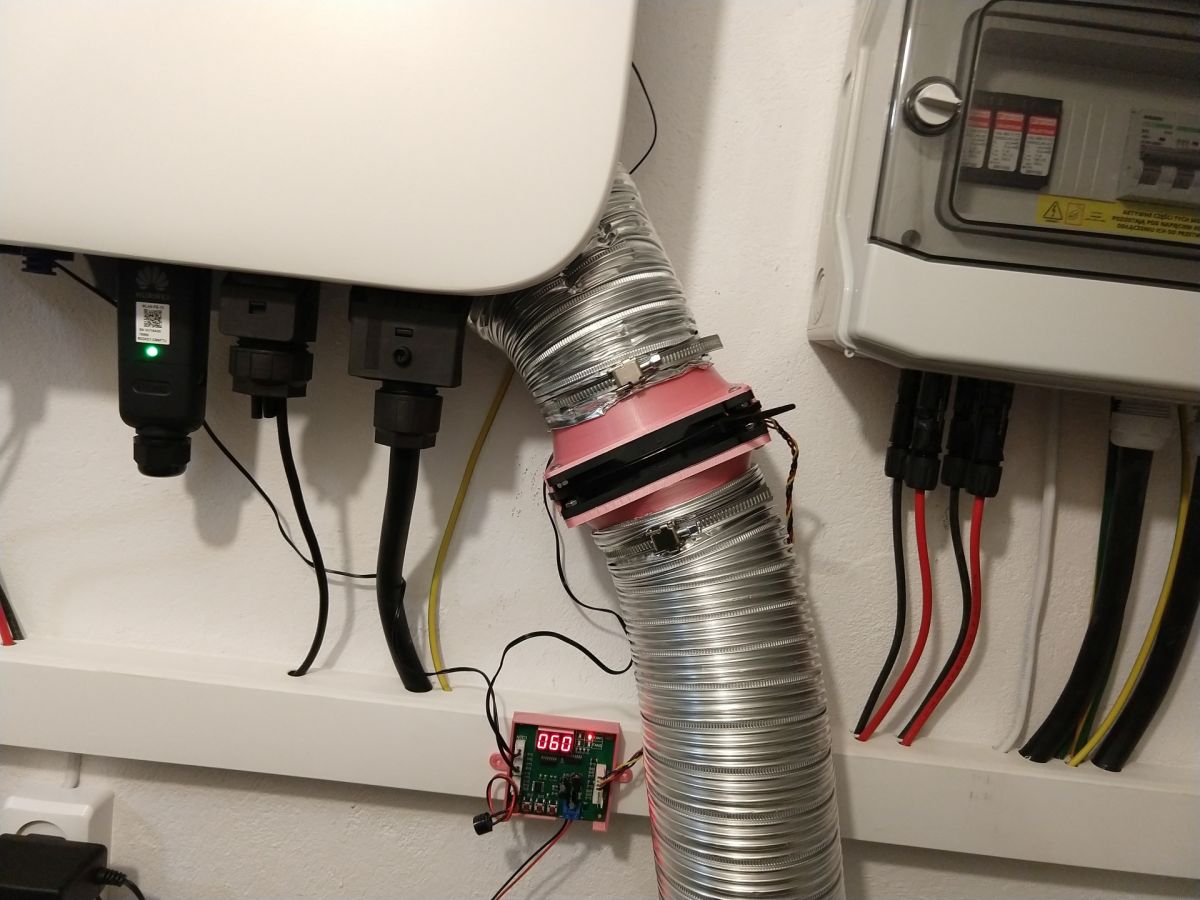
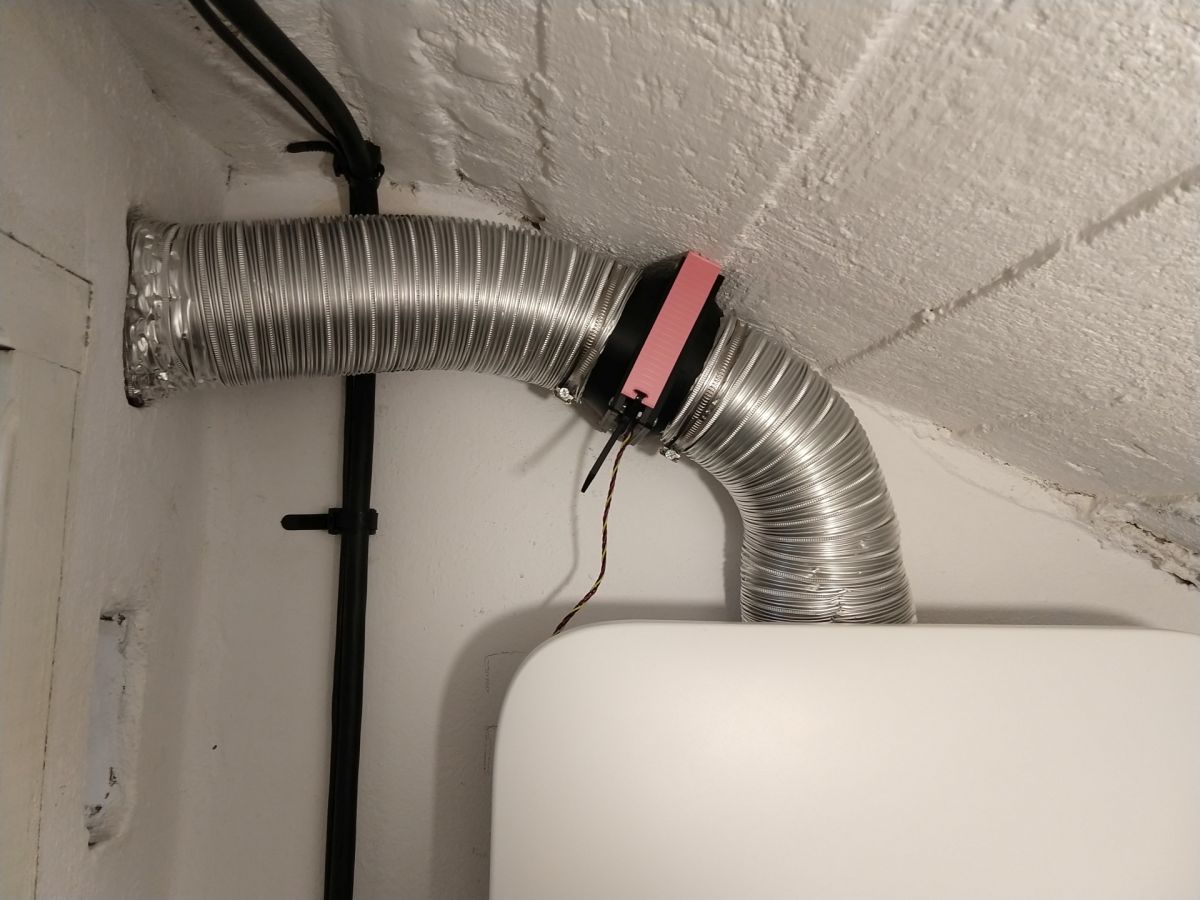
    I did something like this:
    Huawei SUN2000 Inverter: WIFI Dongle Connection, Firmware Update & FusionSolar Huawei SUN2000 Inverter: WIFI Dongle Connection, Firmware Update & FusionSolar
    And the temperature dropped down nicely
  • #675 19997106
    szeryfff
    Level 24  
    noogi wrote:
    I did something like this:
    Huawei SUN2000 Inverter: WIFI Dongle Connection, Firmware Update & FusionSolar Huawei SUN2000 Inverter: WIFI Dongle Connection, Firmware Update & FusionSolar
    And the temperature dropped down nicely

    what are these fans? what temp did you have before and after?

    Anyone know how the temperature above 45 degrees affects the production?
  • #676 19997108
    noogi
    Level 14  
    Two PWM fans (120x120x25 AVC DS12025B12H 4PIN) and a two-channel controller with temperature sensors attached to the fins - one fan draws air through the spriro pipe from above the tiled floor (cold) and pushes it under the ribs, and the upper one pulls it out and throws it into another room.
    I installed the cooling right away, because I have a small room and working with higher temperatures shortens the life of electronic devices
    The temperature measured on the fins does not exceed 34 degrees C (while the fans are running)
  • #677 19997124
    qrko
    Level 14  
    Epic. I have an unused ventilation chimney behind the inverter behind the inverter, which leads to the cables to the roof and panels. I think I'll enlarge the hole and do the same.
  • ADVERTISEMENT
  • #678 19997134
    szeryfff
    Level 24  
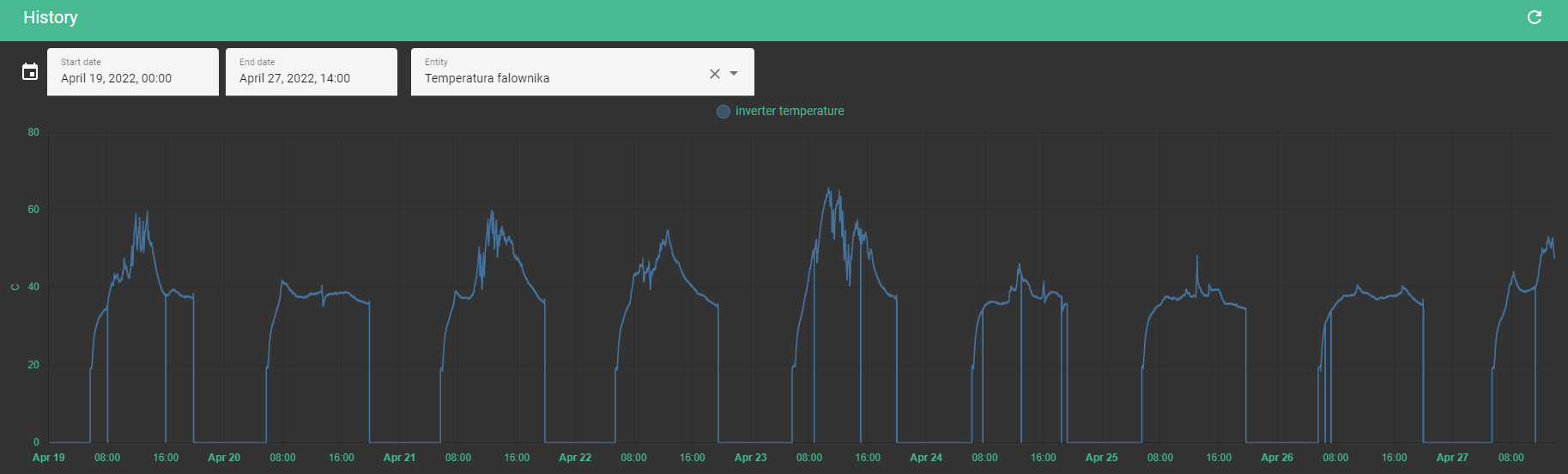
    I checked at home, for the last few days the maximum temperature is 46 degrees, but in the garage I have 16 degrees. It will be warmer in the summer, so I will probably exceed these 45 degrees more often.
  • #679 19997145
    szczukot
    Level 14  
    And where did you check the temperature?
  • #680 19997146
    noogi
    Level 14  
    I'm also looking - once I knew where to get it through the WWW, but a lot has changed ..
  • #681 19997154
    szeryfff
    Level 24  
    szczukot wrote:
    And where did you check the temperature?

    I check via Home Assistant.
  • #682 19997182
    qrko
    Level 14  
    Wow, that's actually not enough. I have 10KTL and only 8.1kWp of panels, and it hits 65 when the sun shines.
    Huawei SUN2000 Inverter: WIFI Dongle Connection, Firmware Update & FusionSolar
  • #683 19997200
    noogi
    Level 14  
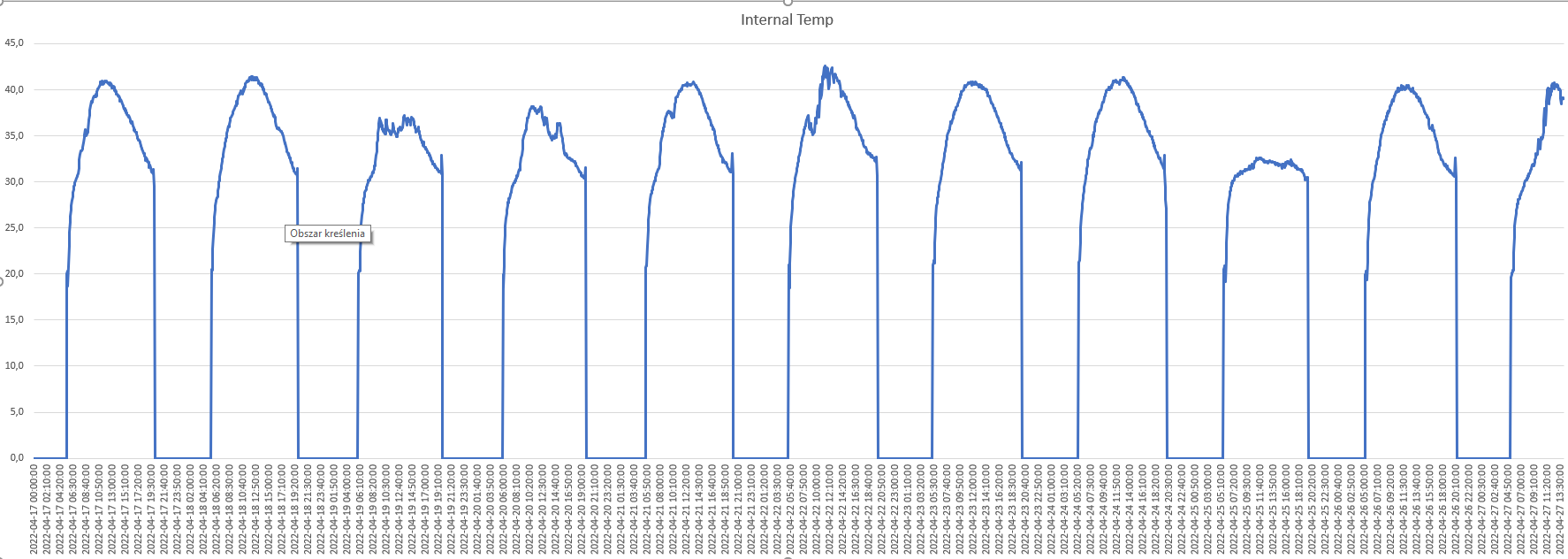
    Found in Device Management and Export Pefrormance Data.
    In my last week, the highest recorded temperature - 42.6 degrees C (6kW inverter)
  • #684 19997202
    szeryfff
    Level 24  
    @qrko you probably have heat in the room: /
  • #685 19997212
    rokbok
    Level 39  
    noogi wrote:
    I'm also looking - once I knew where to get it through the WWW, but a lot has changed ..


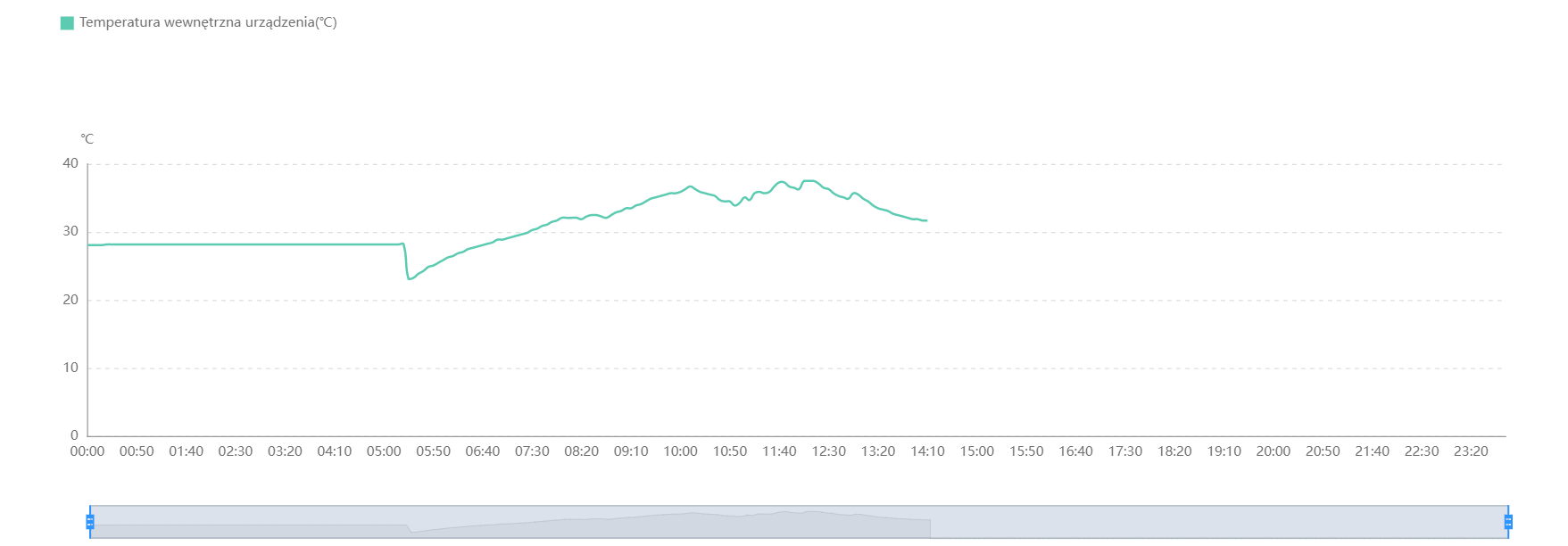
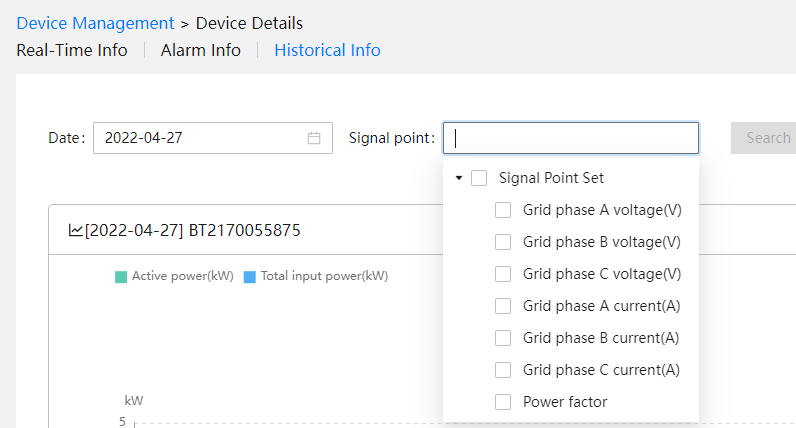
    It depends on your permissions, I can check the temperature in Fusion Solar on the web, Installations -> Device management -> click on the device -> Historical information -> click Signal point -> you select Internal temperature.

    Huawei SUN2000 Inverter: WIFI Dongle Connection, Firmware Update & FusionSolar

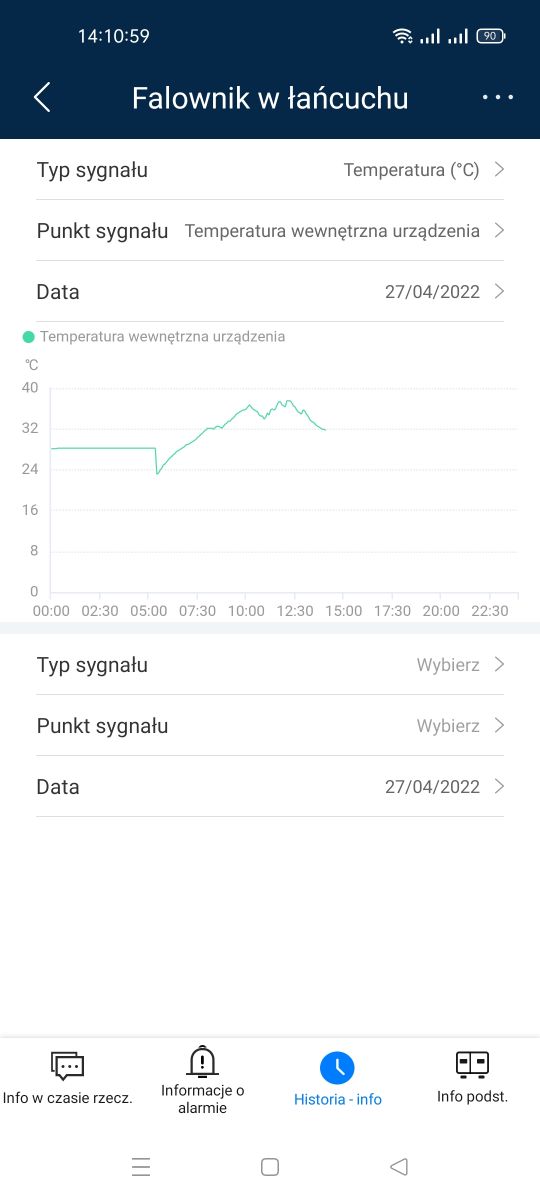
    In Fusion Solar mobile, Devices -> click on the device -> History-info -> Signal type -> click on Temperature -> Signal point -> select Internal temperature of the device -> Confirmed and display a graph with the temperature.

    Huawei SUN2000 Inverter: WIFI Dongle Connection, Firmware Update & FusionSolar
  • #686 19997230
    noogi
    Level 14  
    Cool, unfortunately in my case the temperature in M0 is not available in these options.
    But from the export data, I have this:
    Huawei SUN2000 Inverter: WIFI Dongle Connection, Firmware Update & FusionSolar
  • #687 19997234
    rokbok
    Level 39  
    I also have M0, but as I wrote earlier, it probably depends on what permissions you have given by the installer, "press down" it a little for more permissions.
  • #688 19997246
    domelek
    Level 17  
    qrko wrote:
    domelek wrote:
    And I added additional cooling, we will see what impact it has on the efficiency of the inverter, I will test, because I can make a temp vs efficiency graph ...

    It's 60s? Because the 80s will probably not go behind the inverter, and it does not look like the 40s. Did anything help? I am worried about 65C on the inverter at peak production in the garage where it was 15C. If it is 25, it will probably reach 70, a bit much. I'd love to relieve him. For days I will replace the blower in the hood because it squeaks at full speed, I thought if I would somehow integrate it with the inverter at the slowest speed.

    These are the 80s that came into contact between the wall and the inverter. I read through HA and attach it when the temperature exceeds 40C. So far it hits 50C, but the fans do not work at 100% (they are controlled by the built-in temperature sensor Model Arctic TC)
  • #689 19997248
    Math13
    Level 14  
    rokbok wrote:
    In Fusion Solar mobile, Devices -> click on the device -> History-info -> Signal type -> click on Temperature -> Signal point -> select Internal temperature of the device -> Confirmed and display a graph with the temperature.


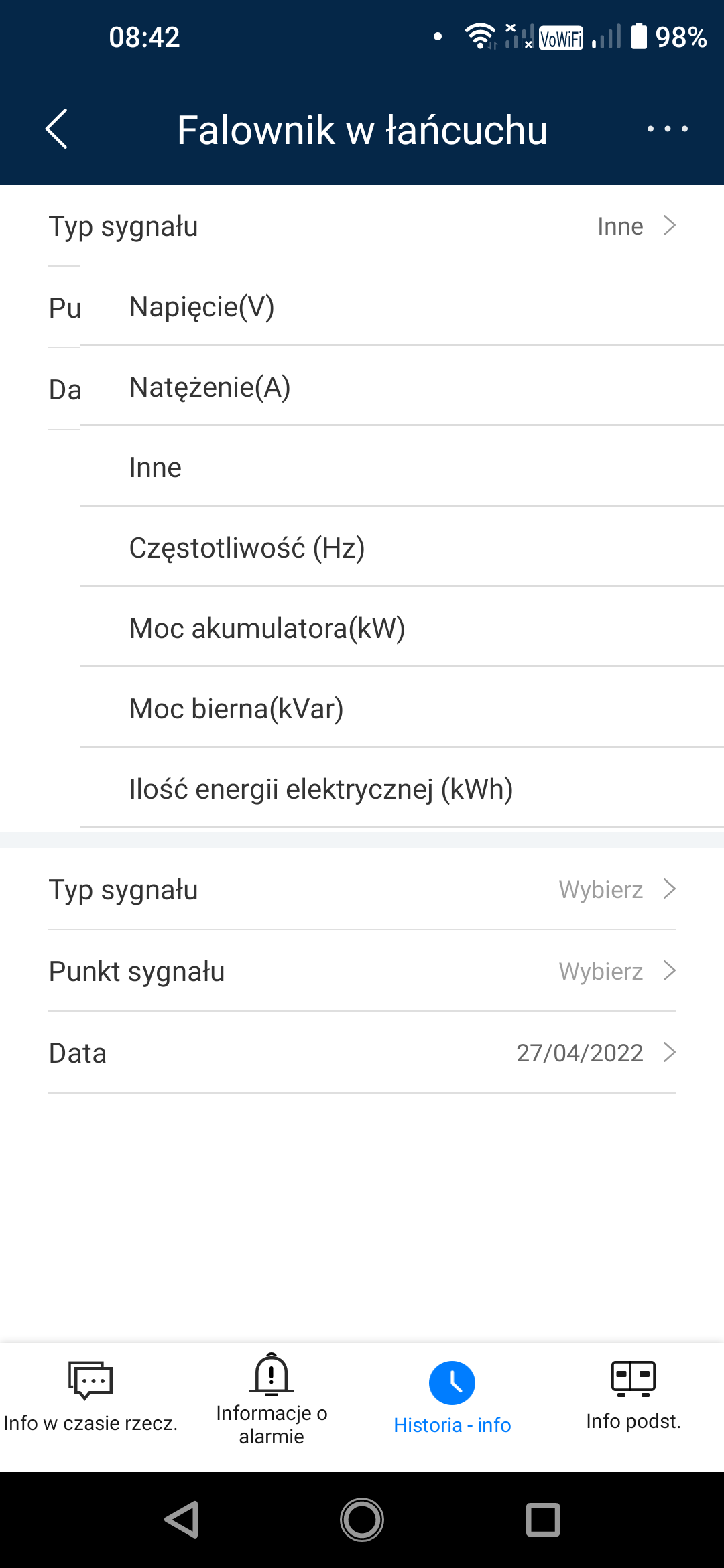
    I have full authority. Unfortunately, in my latest version, I do not see the possibility of viewing the Temperature. I only have the following:
    [img-0] Huawei SUN2000 Inverter: WIFI Dongle Connection, Firmware Update & FusionSolar
    and under "Other" additionally only "Power factor".
    Why can't I see Temperature in myself? Should I maybe install an additional sensor?
  • #690 19997251
    qrko
    Level 14  
    rokbok wrote:

    It depends on your permissions, I can check the temperature in Fusion Solar on the web, Installations -> Device management -> click on the device -> Historical information -> click Signal point -> you select Internal temperature.

    In Fusion Solar mobile, Devices -> click on the device -> History-info -> Signal type -> click on Temperature -> Signal point -> select Internal temperature of the device -> Confirmed and display a graph with the temperature.


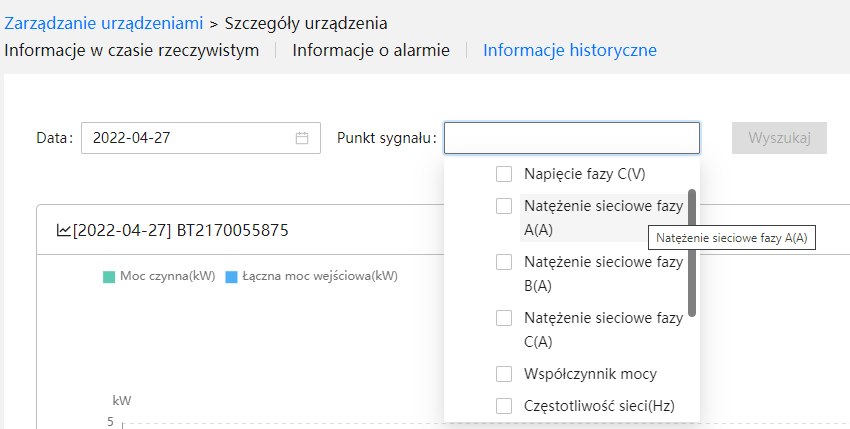
    Hmm, interesting. I have it like @ math13 - I have the highest permissions (installer), and I have no temp in the mobile or web app. Interestingly, the web site, after changing the language from Ang to Pol, has 3x more measurement options, but there is still no temperature among them.
    Huawei SUN2000 Inverter: WIFI Dongle Connection, Firmware Update & FusionSolar
    Huawei SUN2000 Inverter: WIFI Dongle Connection, Firmware Update & FusionSolar

    Model SUN2000-10KTL-M1
    Software version V100R001C00SPC142

    Added after 1 [minutes]:

    szeryfff wrote:
    @qrko you probably have heat in the room: /

    Garage, around 15C was there.

Topic summary

✨ The discussion centers on issues and configurations related to Huawei SUN2000 series inverters, particularly focusing on WiFi dongle connectivity, firmware updates, and the FusionSolar platform. Users report successful inverter commissioning and firmware updates but face persistent problems connecting the WiFi dongle, which often blinks red and appears offline in FusionSolar. A reliable workaround is connecting the dongle via Ethernet cable to the router. Changing WiFi network credentials requires logging directly into the inverter through FusionSolar or FusionHome apps, as remote password changes are not supported. Installer accounts have broader configuration permissions than owner accounts, which often restrict access to settings such as location, currency, and power configuration. The discussion also covers optimal network code selection (e.g., Germany-VDE-AR-N-4105 for Poland), MPPT multi-peak scanning settings for shadowed panels, and string capacity configuration aligning with physical panel connections. Users note that inverter startup voltage and MPPT voltage ranges affect minimum panel string length, with debates on using 140V or 240V for calculations. Firmware updates are available but may not always be visible to all users simultaneously; some recommend downgrading FusionSolar app versions to resolve login or configuration issues. The FusionSolar platform's interface and permissions can be non-intuitive, with some users unable to modify installation parameters without installer access. Additional topics include inverter automatic shutdown due to high grid voltage, anti-PID function requiring external devices, and integration with Huawei DTSU666-H smart meters, which are often auto-detected. Overall, the thread provides practical advice on inverter setup, network configuration, firmware management, and troubleshooting communication issues with Huawei SUN2000 inverters and associated software tools.
Generated by the language model.

FAQ

TL;DR: A 10-min average grid voltage ≥ 253 V forces the SUN2000 inverter to disconnect [Elektroda, lizak1983, post #19657944] “Huawei is a good inverter, I would not be afraid to install it” [Elektroda, Rhaavir, post #18871886] Latest firmware SPC136 fixes battery and startup issues.

Why it matters: Correct settings stop nuisance shutdowns, improve yield and keep the warranty intact.

Quick Facts

• Default grid code for PL installers: Germany VDE-AR-N-4105 or Custom 50 Hz with 253 V/10-min limit [Elektroda, domelek, post #19529531] • SUN2000-M0/M1: MPPT range 200–850 V; Startup 200 V; Max string current 11 A (oper.), 15 A (Isc) [Huawei Datasheet]. • Firmware: SPC136 (inverter) & SPC118 (SDongleA-05) – update in daylight, 20 min per device [Elektroda, lizak1983, post #19640000] • Wi-Fi dongle LED codes: steady green = online; red blink = no router link [Elektroda, JackRze, post #19489029] • Warranty checker: https://support.huawei.com – serial + e-mail required [Elektroda, maneks, post #19359819]

How do I change the inverter’s Wi-Fi after replacing a router?

  1. On the router set the new SSID and password identical to the old ones – the inverter reconnects automatically [Elektroda, lizak1983, post #19657944]
  2. If you prefer to edit the inverter, open the SUN2000 app, connect to the inverter’s AP, choose Maintenance > Communication > Router Wi-Fi and enter the new credentials; save and wait for the LED to turn steady green.

What causes the SUN2000 to trip on sunny days?

A 10-minute average grid voltage at the terminals above 253 V triggers disconnection per VDE-AR-N-4105 [Elektroda, lizak1983, post #19657944] High roof-top cable resistance adds 1-2 V, so measure at the inverter. Load shifting (e.g., 2 kW boiler) or DSO tap change fixes the issue.

Can I lift the 253 V reconnection limit?

Raising “Upper voltage limit when reconnecting to grid” breaches EU NC RfG and risks neighbour equipment damage. Installers and DSOs can audit logs [Elektroda, rokbok, post #19639893] Keep 253 V unless your DSO grants a written exception.

Firmware: what’s new in SPC136 and how do I install it?

SPC136 adds battery-version alarm, M1–M3 parallel support and faster offline self-check [Huawei ReleaseNotes 2021]. Download via SUN2000 or FusionSolar app (Me > Device Commissioning > Update). Stay within inverter Wi-Fi, tap Update, wait ~20 min; the inverter reboots once at ~80 % [Elektroda, MisiekDPx, post #19639882]

How do I update the SDongleA-05 Wi-Fi dongle?

Unplug the dongle, re-insert: it broadcasts “Dongle–AP”. Connect with SUN2000 app, default pwd 00000a, go to Maintenance > Update Device, choose SPC118 file and start. LED blinks fast green during upgrade, steady green when done (≈10 min) [Elektroda, lizak1983, post #19640000]

Grid code list shows only three Chinese entries – what now?

Import units lack EU presets. Select Custom 50 Hz and manually enter: U/Un 0.85 = 0 s, 1.10 = 10 min, 1.15 = 0.1 s; cos φ = 0.9 lead/lag; Q/U droop 4 % [Elektroda, domelek, post #19529531] A valid NC RfG declaration is still required for DSO acceptance.

My Wi-Fi dongle flashes red every few days – fix?

LED red blink means router unreachable. Common causes: weak signal or changed password. Move a repeater within 5 m (-55 dBm or better) [Elektroda, JackRze, post #19489219] If stable signal still fails, reboot the dongle or update its firmware (see above).

Installer owns the FusionSolar site – can I get control?

Yes. Ask the installer to delete the plant from their account, then register a new Installer account with your e-mail and inverter serial; Huawei cloud blocks duplicate serials [Elektroda, rokbok, post #19636492] Warranty remains tied to the serial, not the account.

Lost inverter password – how to reset?

Connect SUN2000 app to the inverter AP, choose “Reset Password”. You must input the 6-digit ESN from the side sticker and the current date. The default admin password resets to 00000a [Huawei Manual].

What’s the correct string current for SUN2000-M1?

Design strings so Isc ≤ 15 A and operating current ≤ 11 A. Example: 12×340 W modules give Isc 10.3 A, within limits [Elektroda, mariusz.lubicz, post #19656018] Exceeding Isc risks optimizer derating and warranty issues.

Will Huawei optimizers shut a whole string when one panel is shaded?

No. Each SUN2000-450W-P acts as a DC/DC converter. A shaded panel continues at lower power while the rest maintain maximum current [Elektroda, jsw, post #19656269] The inverter therefore keeps production and avoids hot-spot bypass.

How do I clear old alarms in FusionSolar?

Go to Device > Alarms, tap the three-dot menu, choose “Clear”. Alarms caused by firmware mismatch disappear automatically after updating both inverter and dongle [Elektroda, stratus84, post #19490242]

Edge case: inverter shows 2 V DC after switch-on – diagnosis?

Reverse-polarity MC4 crimps drop the PV voltage to ≈ 2 V and block startup [Elektroda, kravat3, post #19536568] Disconnect, verify red = + and black = – with a multimeter, then re-crimp.

Quick 3-step: add new owner without installer

  1. Installer deletes plant in FusionSolar. 2. Owner installs SUN2000 app, taps “Create Installer Account”, enters S/N and e-mail. 3. Log in, add plant, then invite personal “Owner” user. Done.
Generated by the language model.
ADVERTISEMENT